

ゲームでゲーム コントローラをサポートする場合、デバイスで実行されている Android バージョンが異なっていても、ゲームがコントローラの操作に対して同じように反応するようにしなければなりません。こうすることで、幅広いユーザー層にゲームを提供できるほか、プレーヤーは Android デバイスを交換したりアップグレードしたりしても、同じコントローラでゲームをシームレスに楽しむことができます。
このレッスンでは、Android 4.1 以降で使用可能な API を下位互換性のある方法で使用し、Android 3.1 以降が搭載されているデバイスでゲームが以下の機能に対応できるようにする方法について説明します。
- ゲーム コントローラが追加、変更、削除されたかどうかをゲームで検出する。
- ゲームでゲーム コントローラの機能を照会する。
- ゲーム コントローラから送信されるモーション イベントをゲームで認識する。
ゲーム コントローラをサポートするために API を抽象化する準備をする
たとえば、Android 3.1(API レベル 12)が搭載されているデバイスでゲーム コントローラの接続ステータスが変更されたかどうかを判断できるようにしたいとします。しかし、API は Android 4.1(API レベル 16)以降でしか使用できないため、Android 4.1 以降をサポートする実装を提供し、さらに Android 3.1 から Android 4.0 までをサポートする代替メカニズムも提供する必要があります。
どの機能で古いバージョン向けの代替メカニズムが必要かを判断できるようにするために、表 1 に、Android 3.1(API レベル 12)と 4.1(API レベル 16)のゲーム コントローラのサポートの違いを示します。
表 1.複数の Android バージョンでゲーム コントローラをサポートするための API
| コントローラの情報 | コントローラ向け API | API レベル 12 | API レベル 16 |
|---|---|---|---|
| デバイス ID | getInputDeviceIds() |
• | |
getInputDevice() |
• | ||
getVibrator() |
• | ||
SOURCE_JOYSTICK |
• | • | |
SOURCE_GAMEPAD |
• | • | |
| 接続ステータス | onInputDeviceAdded() |
• | |
onInputDeviceChanged() |
• | ||
onInputDeviceRemoved() |
• | ||
| 入力イベント ID | D-pad の押下(KEYCODE_DPAD_UP、KEYCODE_DPAD_DOWN、KEYCODE_DPAD_LEFT、KEYCODE_DPAD_RIGHT、KEYCODE_DPAD_CENTER) |
• | • |
ゲームパッド ボタンの押下(BUTTON_A、BUTTON_B、BUTTON_THUMBL、BUTTON_THUMBR、BUTTON_SELECT、BUTTON_START、BUTTON_R1、BUTTON_L1、BUTTON_R2、BUTTON_L2) |
• | • | |
ジョイスティックとハット スイッチの移動(AXIS_X、AXIS_Y、AXIS_Z、AXIS_RZ、AXIS_HAT_X、AXIS_HAT_Y) |
• | • | |
アナログ トリガーの押下(AXIS_LTRIGGER、AXIS_RTRIGGER) |
• | • |
抽象化を利用することで、バージョンに応じてゲーム コントローラをサポートし、さまざまなプラットフォームで使用することができます。このアプローチでは次の手順を実施します。
- ゲームに必要なゲーム コントローラ機能の実装を抽象化する Java 中間インターフェースを定義します。
- Android 4.1 以降で API を使用するインターフェースのプロキシ実装を作成します。
- Android 3.1 から Android 4.0 までで使用可能な API を使用するインターフェースのカスタム実装を作成します。
- これらの実装の切り替えを実行時に行うためのロジックを作成し、ゲームでインターフェースの使用を開始します。
抽象化の利用により、複数の Android バージョンにまたがって下位互換性のある方法でアプリを実行することが可能になります。その方法の概要については、 下位互換性のある UI を作成するをご覧ください。
下位互換性を提供するためのインターフェースを追加する
下位互換性を提供するには、カスタム インターフェースを作成し、バージョン固有の実装を追加します。このアプローチのメリットの 1 つは、ゲーム コントローラをサポートする一般公開インターフェースを Android 4.1(API レベル 16)でミラーリングできる点です。
Kotlin
// The InputManagerCompat interface is a reference example.
// The full code is provided in the ControllerSample.zip sample.
interface InputManagerCompat {
    val inputDeviceIds: IntArray
    fun getInputDevice(id: Int): InputDevice

    fun registerInputDeviceListener(
            listener: InputManager.InputDeviceListener,
            handler: Handler?
    )

    fun unregisterInputDeviceListener(listener:InputManager.InputDeviceListener)

    fun onGenericMotionEvent(event: MotionEvent)

    fun onPause()
    fun onResume()

    interface InputDeviceListener {
        fun onInputDeviceAdded(deviceId: Int)
        fun onInputDeviceChanged(deviceId: Int)
        fun onInputDeviceRemoved(deviceId: Int)
    }
}
Java
// The InputManagerCompat interface is a reference example.
// The full code is provided in the ControllerSample.zip sample.
public interface InputManagerCompat {
    ...
    public InputDevice getInputDevice(int id);
    public int[] getInputDeviceIds();

    public void registerInputDeviceListener(
            InputManagerCompat.InputDeviceListener listener,
            Handler handler);
    public void unregisterInputDeviceListener(
            InputManagerCompat.InputDeviceListener listener);

    public void onGenericMotionEvent(MotionEvent event);

    public void onPause();
    public void onResume();

    public interface InputDeviceListener {
        void onInputDeviceAdded(int deviceId);
        void onInputDeviceChanged(int deviceId);
        void onInputDeviceRemoved(int deviceId);
    }
    ...
}
InputManagerCompat インターフェースには以下のメソッドがあります。
getInputDevice()getInputDevice()をミラーリングします。ゲーム コントローラの機能を表すInputDeviceオブジェクトを取得します。getInputDeviceIds()getInputDeviceIds()をミラーリングします。配列の各要素がそれぞれ異なる入力デバイスの ID を表す、整数の配列を返します。このメソッドは、複数のプレーヤーをサポートするゲームを作成する場合や、接続されているコントローラの数を検出したい場合に便利です。registerInputDeviceListener()registerInputDeviceListener()をミラーリングします。新しいデバイスが追加、変更、削除されたときに通知を受け取るように登録できます。unregisterInputDeviceListener()unregisterInputDeviceListener()をミラーリングします。 入力デバイスのリスナーの登録を解除します。onGenericMotionEvent()onGenericMotionEvent()をミラーリングします。イベント(ジョイスティックの動きやアナログ トリガーの押下など)を表すMotionEventオブジェクトと軸の値をゲームでインターセプトして処理することができます。onPause()- メイン アクティビティが一時停止されたとき、またはゲームがフォーカスを失ったときに、ゲーム コントローラ イベントのポーリングを停止します。
onResume()- メイン アクティビティが再開されたとき、またはゲームが開始されてフォアグラウンドで実行されたときに、ゲーム コントローラ イベントのポーリングを開始します。
InputDeviceListenerInputManager.InputDeviceListenerインターフェースをミラーリングします。ゲーム コントローラが追加、変更、削除されたときにゲームに通知します。
次に、さまざまなプラットフォーム バージョンで機能する InputManagerCompat の実装を作成します。ゲームが Android 4.1 以降で実行されている場合に InputManagerCompat メソッドを呼び出すと、プロキシ実装によって InputManager の同等のメソッドが呼び出されます。ただし、ゲームが Android 3.1 から Android 4.0
までで実行されている場合、カスタム実装は Android 3.1 以前で導入された API のみを使用して InputManagerCompat
メソッドの呼び出しを処理します。実行時にどのバージョンに固有の実装が使用されているかに関係なく、実装によって呼び出しの結果がゲームに透過的に返されます。
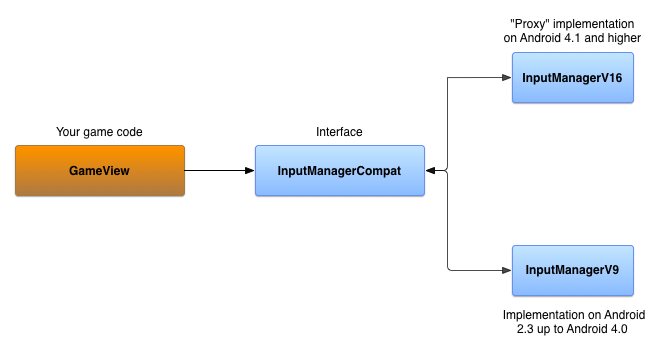
Android 4.1 以降にインターフェースを実装する
InputManagerCompatV16 は、実際の
InputManager および
InputManager.InputDeviceListener のメソッド呼び出しをプロキシする InputManagerCompat
インターフェースの実装です。
InputManager は
、システムの Context から取得されます。
Kotlin
// The InputManagerCompatV16 class is a reference implementation.
// The full code is provided in the ControllerSample.zip sample.
public class InputManagerV16(
        context: Context,
        private val inputManager: InputManager =
            context.getSystemService(Context.INPUT_SERVICE) as InputManager,
        private val listeners:
            MutableMap<InputManager.InputDeviceListener, V16InputDeviceListener> = mutableMapOf()
) : InputManagerCompat {
    override val inputDeviceIds: IntArray = inputManager.inputDeviceIds

    override fun getInputDevice(id: Int): InputDevice = inputManager.getInputDevice(id)

    override fun registerInputDeviceListener(
            listener: InputManager.InputDeviceListener,
            handler: Handler?
    ) {
        V16InputDeviceListener(listener).also { v16listener ->
            inputManager.registerInputDeviceListener(v16listener, handler)
            listeners += listener to v16listener
        }
    }

    // Do the same for unregistering an input device listener
    ...

    override fun onGenericMotionEvent(event: MotionEvent) {
        // unused in V16
    }

    override fun onPause() {
        // unused in V16
    }

    override fun onResume() {
        // unused in V16
    }

}

class V16InputDeviceListener(
        private val idl: InputManager.InputDeviceListener
) : InputManager.InputDeviceListener {

    override fun onInputDeviceAdded(deviceId: Int) {
        idl.onInputDeviceAdded(deviceId)
    }
    // Do the same for device change and removal
    ...
}
Java
// The InputManagerCompatV16 class is a reference implementation.
// The full code is provided in the ControllerSample.zip sample.
public class InputManagerV16 implements InputManagerCompat {

    private final InputManager inputManager;
    private final Map<InputManagerCompat.InputDeviceListener,
            V16InputDeviceListener> listeners;

    public InputManagerV16(Context context) {
        inputManager = (InputManager)
                context.getSystemService(Context.INPUT_SERVICE);
        listeners = new HashMap<InputManagerCompat.InputDeviceListener,
                V16InputDeviceListener>();
    }

    @Override
    public InputDevice getInputDevice(int id) {
        return inputManager.getInputDevice(id);
    }

    @Override
    public int[] getInputDeviceIds() {
        return inputManager.getInputDeviceIds();
    }

    static class V16InputDeviceListener implements
            InputManager.InputDeviceListener {
        final InputManagerCompat.InputDeviceListener mIDL;

        public V16InputDeviceListener(InputDeviceListener idl) {
            mIDL = idl;
        }

        @Override
        public void onInputDeviceAdded(int deviceId) {
            mIDL.onInputDeviceAdded(deviceId);
        }

        // Do the same for device change and removal
        ...
    }

    @Override
    public void registerInputDeviceListener(InputDeviceListener listener,
            Handler handler) {
        V16InputDeviceListener v16Listener = new
                V16InputDeviceListener(listener);
        inputManager.registerInputDeviceListener(v16Listener, handler);
        listeners.put(listener, v16Listener);
    }

    // Do the same for unregistering an input device listener
    ...

    @Override
    public void onGenericMotionEvent(MotionEvent event) {
        // unused in V16
    }

    @Override
    public void onPause() {
        // unused in V16
    }

    @Override
    public void onResume() {
        // unused in V16
    }

}
Android 3.1 から Android 4.0 までにインターフェースを実装する
Android 3.1 から Android 4.0 までをサポートする InputManagerCompat
の実装を作成するには、次のオブジェクトを使用します。
- デバイスに接続されているゲーム コントローラを追跡するためのデバイス ID の
SparseArray。 - デバイス イベントを処理する
Handler。 アプリが開始または再開されたときに、Handlerはゲーム コントローラの接続解除の ポーリングを開始するためのメッセージを受け取ります。Handlerは、 既知の接続済みゲーム コントローラをそれぞれチェックして、デバイス ID が返されるかどうかを確認するループを開始します。戻り値nullは、ゲーム コントローラが接続されていないことを示します。TheHandlerは、アプリ が一時停止されたときにポーリングを停止します。 MapオブジェクトのInputManagerCompat.InputDeviceListener。このリスナーを使用すると、追跡対象のゲーム コントローラの接続ステータスを更新できます。
Kotlin
// The InputManagerCompatV9 class is a reference implementation.
// The full code is provided in the ControllerSample.zip sample.
class InputManagerV9(
        val devices: SparseArray<Array<Long>> = SparseArray(),
        private val listeners:
        MutableMap<InputManager.InputDeviceListener, Handler> = mutableMapOf()
) : InputManagerCompat {
    private val defaultHandler: Handler = PollingMessageHandler(this)
    …
}
Java
// The InputManagerCompatV9 class is a reference implementation.
// The full code is provided in the ControllerSample.zip sample.
public class InputManagerV9 implements InputManagerCompat {
    private final SparseArray<long[]> devices;
    private final Map<InputDeviceListener, Handler> listeners;
    private final Handler defaultHandler;
    …

    public InputManagerV9() {
        devices = new SparseArray<long[]>();
        listeners = new HashMap<InputDeviceListener, Handler>();
        defaultHandler = new PollingMessageHandler(this);
    }
}
PollingMessageHandler オブジェクトを実装し、
Handler を拡張し、
handleMessage()
メソッドをオーバーライドします。このメソッドは、接続済みのゲーム コントローラが接続解除されたかどうかを確認し、登録済みのリスナーに通知します。
Kotlin
private class PollingMessageHandler(
        inputManager: InputManagerV9,
        private val mInputManager: WeakReference<InputManagerV9> = WeakReference(inputManager)
) : Handler() {

    override fun handleMessage(msg: Message) {
        super.handleMessage(msg)
        when (msg.what) {
            MESSAGE_TEST_FOR_DISCONNECT -> {
                mInputManager.get()?.also { imv ->
                    val time = SystemClock.elapsedRealtime()
                    val size = imv.devices.size()
                    for (i in 0 until size) {
                        imv.devices.valueAt(i)?.also { lastContact ->
                            if (time - lastContact[0] > CHECK_ELAPSED_TIME) {
                                // check to see if the device has been
                                // disconnected
                                val id = imv.devices.keyAt(i)
                                if (null == InputDevice.getDevice(id)) {
                                    // Notify the registered listeners
                                    // that the game controller is disconnected
                                    imv.devices.remove(id)
                                } else {
                                    lastContact[0] = time
                                }
                            }
                        }
                    }
                    sendEmptyMessageDelayed(MESSAGE_TEST_FOR_DISCONNECT, CHECK_ELAPSED_TIME)
                }
            }
        }
    }
}
Java
private static class PollingMessageHandler extends Handler {
    private final WeakReference<InputManagerV9> inputManager;

    PollingMessageHandler(InputManagerV9 im) {
        inputManager = new WeakReference<InputManagerV9>(im);
    }

    @Override
    public void handleMessage(Message msg) {
        super.handleMessage(msg);
        switch (msg.what) {
            case MESSAGE_TEST_FOR_DISCONNECT:
                InputManagerV9 imv = inputManager.get();
                if (null != imv) {
                    long time = SystemClock.elapsedRealtime();
                    int size = imv.devices.size();
                    for (int i = 0; i < size; i++) {
                        long[] lastContact = imv.devices.valueAt(i);
                        if (null != lastContact) {
                            if (time - lastContact[0] > CHECK_ELAPSED_TIME) {
                                // check to see if the device has been
                                // disconnected
                                int id = imv.devices.keyAt(i);
                                if (null == InputDevice.getDevice(id)) {
                                    // Notify the registered listeners
                                    // that the game controller is disconnected
                                    imv.devices.remove(id);
                                } else {
                                    lastContact[0] = time;
                                }
                            }
                        }
                    }
                    sendEmptyMessageDelayed(MESSAGE_TEST_FOR_DISCONNECT,
                            CHECK_ELAPSED_TIME);
                }
                break;
        }
    }
}
ゲーム コントローラの接続解除のポーリングを開始および停止するには、以下のメソッドをオーバーライドします。
Kotlin
private const val MESSAGE_TEST_FOR_DISCONNECT = 101
private const val CHECK_ELAPSED_TIME = 3000L

class InputManagerV9(
        val devices: SparseArray<Array<Long>> = SparseArray(),
        private val listeners:
        MutableMap<InputManager.InputDeviceListener, Handler> = mutableMapOf()
) : InputManagerCompat {
    ...
    override fun onPause() {
        defaultHandler.removeMessages(MESSAGE_TEST_FOR_DISCONNECT)
    }

    override fun onResume() {
        defaultHandler.sendEmptyMessageDelayed(MESSAGE_TEST_FOR_DISCONNECT, CHECK_ELAPSED_TIME)
    }
    ...
}
Java
private static final int MESSAGE_TEST_FOR_DISCONNECT = 101;
private static final long CHECK_ELAPSED_TIME = 3000L;

@Override
public void onPause() {
    defaultHandler.removeMessages(MESSAGE_TEST_FOR_DISCONNECT);
}

@Override
public void onResume() {
    defaultHandler.sendEmptyMessageDelayed(MESSAGE_TEST_FOR_DISCONNECT,
            CHECK_ELAPSED_TIME);
}
入力デバイスが追加されたことを検出するには、onGenericMotionEvent() メソッドをオーバーライドします。システムからモーション
イベントがレポートされたときに、そのイベントがすでに追跡されているデバイス ID からのものか、新しいデバイス ID
からのものかを確認します。新しいデバイス ID からである場合は、登録済みのリスナーに通知します。
Kotlin
override fun onGenericMotionEvent(event: MotionEvent) {
    // detect new devices
    val id = event.deviceId
    val timeArray: Array<Long> = mDevices.get(id) ?: run {
        // Notify the registered listeners that a game controller is added
        ...
        arrayOf<Long>().also {
            mDevices.put(id, it)
        }
    }
    timeArray[0] = SystemClock.elapsedRealtime()
}
Java
@Override
public void onGenericMotionEvent(MotionEvent event) {
    // detect new devices
    int id = event.getDeviceId();
    long[] timeArray = mDevices.get(id);
    if (null == timeArray) {
        // Notify the registered listeners that a game controller is added
        ...
        timeArray = new long[1];
        mDevices.put(id, timeArray);
    }
    long time = SystemClock.elapsedRealtime();
    timeArray[0] = time;
}
リスナーの通知を実装するには、
Handler オブジェクトを使用して DeviceEvent
Runnable オブジェクトをメッセージキューに送信します。
DeviceEvent には、InputManagerCompat.InputDeviceListener
への参照が含まれています。DeviceEvent が実行されると、リスナーの適切なコールバック メソッドが呼び出され、ゲーム コントローラが追加、変更、削除されたかどうかが通知されます。
Kotlin
class InputManagerV9(
        val devices: SparseArray<Array<Long>> = SparseArray(),
        private val listeners:
        MutableMap<InputManager.InputDeviceListener, Handler> = mutableMapOf()
) : InputManagerCompat {
    ...
    override fun registerInputDeviceListener(
            listener: InputManager.InputDeviceListener,
            handler: Handler?
    ) {
        listeners[listener] = handler ?: defaultHandler
    }

    override fun unregisterInputDeviceListener(listener: InputManager.InputDeviceListener) {
        listeners.remove(listener)
    }

    private fun notifyListeners(why: Int, deviceId: Int) {
        // the state of some device has changed
        listeners.forEach { listener, handler ->
            DeviceEvent.getDeviceEvent(why, deviceId, listener).also {
                handler?.post(it)
            }
        }
    }
    ...
}

private val sObjectQueue: Queue<DeviceEvent> = ArrayDeque<DeviceEvent>()

private class DeviceEvent(
        private var mMessageType: Int,
        private var mId: Int,
        private var mListener: InputManager.InputDeviceListener
) : Runnable {

    companion object {
        fun getDeviceEvent(messageType: Int, id: Int, listener: InputManager.InputDeviceListener) =
                sObjectQueue.poll()?.apply {
                    mMessageType = messageType
                    mId = id
                    mListener = listener
                } ?: DeviceEvent(messageType, id, listener)

    }

    override fun run() {
        when(mMessageType) {
            ON_DEVICE_ADDED -> mListener.onInputDeviceAdded(mId)
            ON_DEVICE_CHANGED -> mListener.onInputDeviceChanged(mId)
            ON_DEVICE_REMOVED -> mListener.onInputDeviceChanged(mId)
            else -> {
                // Handle unknown message type
            }
        }
    }

}
Java
@Override
public void registerInputDeviceListener(InputDeviceListener listener,
        Handler handler) {
    listeners.remove(listener);
    if (handler == null) {
        handler = defaultHandler;
    }
    listeners.put(listener, handler);
}

@Override
public void unregisterInputDeviceListener(InputDeviceListener listener) {
    listeners.remove(listener);
}

private void notifyListeners(int why, int deviceId) {
    // the state of some device has changed
    if (!listeners.isEmpty()) {
        for (InputDeviceListener listener : listeners.keySet()) {
            Handler handler = listeners.get(listener);
            DeviceEvent odc = DeviceEvent.getDeviceEvent(why, deviceId,
                    listener);
            handler.post(odc);
        }
    }
}

private static class DeviceEvent implements Runnable {
    private int mMessageType;
    private int mId;
    private InputDeviceListener mListener;
    private static Queue<DeviceEvent> sObjectQueue =
            new ArrayDeque<DeviceEvent>();
    ...

    static DeviceEvent getDeviceEvent(int messageType, int id,
            InputDeviceListener listener) {
        DeviceEvent curChanged = sObjectQueue.poll();
        if (null == curChanged) {
            curChanged = new DeviceEvent();
        }
        curChanged.mMessageType = messageType;
        curChanged.mId = id;
        curChanged.mListener = listener;
        return curChanged;
    }

    @Override
    public void run() {
        switch (mMessageType) {
            case ON_DEVICE_ADDED:
                mListener.onInputDeviceAdded(mId);
                break;
            case ON_DEVICE_CHANGED:
                mListener.onInputDeviceChanged(mId);
                break;
            case ON_DEVICE_REMOVED:
                mListener.onInputDeviceRemoved(mId);
                break;
            default:
                // Handle unknown message type
                ...
                break;
        }
        // Put this runnable back in the queue
        sObjectQueue.offer(this);
    }
}
これで、InputManagerCompat の実装が 2 つできました。1 つは Android 4.1 以降を搭載するデバイスで動作し、もう 1
つは Android 3.1 から Android 4.0 までを搭載するデバイスで動作します。
バージョン固有の実装を使用する
バージョン固有の切り替えロジックは、 ファクトリーとして機能するクラスに実装されます。
Kotlin
object Factory {
    fun getInputManager(context: Context): InputManagerCompat =
            if (Build.VERSION.SDK_INT >= Build.VERSION_CODES.JELLY_BEAN) {
                InputManagerV16(context)
            } else {
                InputManagerV9()
            }
}
Java
public static class Factory {
    public static InputManagerCompat getInputManager(Context context) {
        if (Build.VERSION.SDK_INT >= Build.VERSION_CODES.JELLY_BEAN) {
            return new InputManagerV16(context);
        } else {
            return new InputManagerV9();
        }
    }
}
これで、InputManagerCompat オブジェクトをインスタンス化して、
InputManagerCompat.InputDeviceListener をメインの
View に登録できるようになります。設定したバージョン切り替えロジックにより、デバイスで実行されている Android
バージョンに適した実装がゲームで自動的に使用されます。
Kotlin
class GameView(context: Context) : View(context), InputManager.InputDeviceListener {
    private val inputManager: InputManagerCompat = Factory.getInputManager(context).apply {
        registerInputDeviceListener(this@GameView, null)
        ...
    }
    ...
}
Java
public class GameView extends View implements InputDeviceListener {
    private InputManagerCompat inputManager;
    ...

    public GameView(Context context, AttributeSet attrs) {
        inputManager =
                InputManagerCompat.Factory.getInputManager(this.getContext());
        inputManager.registerInputDeviceListener(this, null);
        ...
    }
}
次に、メインビューの onGenericMotionEvent() メソッドを
オーバーライドします。これは、ゲーム
コントローラからの MotionEvent を処理するの説明に沿ったものです。これで、Android 3.1(API レベル)以降が実行されている各デバイスで、ゲーム コントローラ
イベントを同じように処理できるようになっているはずです。
Kotlin
override fun onGenericMotionEvent(event: MotionEvent): Boolean {
    inputManager.onGenericMotionEvent(event)

    // Handle analog input from the controller as normal
    ...
    return super.onGenericMotionEvent(event)
}
Java
@Override
public boolean onGenericMotionEvent(MotionEvent event) {
    inputManager.onGenericMotionEvent(event);

    // Handle analog input from the controller as normal
    ...
    return super.onGenericMotionEvent(event);
}
この互換性コードの完全な実装は、ダウンロード可能なサンプル ControllerSample.zip に含まれている GameView
クラスで確認できます。