

PgsGamesSignInClient 를 사용하여 플레이어를 인증하고 플레이어의 ID를 백엔드 서버에 안전하게 전달하는 것이 좋습니다. 이렇게 하면 기기를 거치는 동안 잠재적인 조작에 노출되지 않고 게임이 플레이어의 ID와 기타 데이터를 안전하게 가져올 수 있습니다.
플레이어가 성공적으로 인증되면 Play Games 서비스 v2 네이티브 SDK (베타)에서 특수한 일회용 코드 (서버 승인 코드라고 함)를 요청할 수 있습니다. 이 코드는 클라이언트가 서버로 전달합니다. 그런 다음 서버에서 서버 인증 코드를 서버가 Google Play Games 서비스 API를 호출하는 데 사용할 수 있는 OAuth 2.0 토큰으로 교환합니다.
게임에 인증을 추가하는 방법에 관한 추가 가이드는 플랫폼 인증을 참고하세요.
오프라인 액세스에는 다음 단계가 필요합니다.
- Google Play Console: 게임 서버의 사용자 인증 정보를 만듭니다. 사용자 인증 정보의 OAuth 클라이언트 유형은 '웹'입니다.
- Android 앱: 플랫폼 인증의 일환으로 서버의 사용자 인증 정보에 대한 서버 승인 코드를 요청하여 서버에 전달합니다.
PgsGamesSignInClient는 Play Games 서비스 웹 API에 대한 서버 측 액세스를 요청할 때 세 가지 OAuth 2.0 범위를 요청할 수 있습니다. 선택적 범위는PGS_AUTH_SCOPE_EMAIL,PGS_AUTH_SCOPE_PROFILE,PGS_AUTH_SCOPE_OPENID입니다. 두 기본 범위는DRIVE_APPFOLDER및GAMES_LITE입니다. - 게임 서버: Google 인증 서비스를 사용하여 서버 승인 코드를 OAuth 액세스 토큰으로 교환한 후 이를 사용하여 Play Games 서비스 REST API를 호출합니다.
시작하기 전에
먼저 게임으로 Google Play 게임즈 서비스 설정에 설명된 대로 Google Play Console에서 게임을 추가해야 합니다.
서버 측 웹 앱 만들기
Google Play 게임즈 서비스는 웹 게임에 백엔드 지원을 제공하지 않습니다. 그러나 Android 게임 서버에는 백엔드 서버 지원을 제공합니다.
서버 측 앱에서 Google Play 게임즈 서비스용 REST API 를 사용하려면 다음 단계를 따르세요.
- Google Play Console에서 게임을 선택합니다.
- Play Games 서비스 > 설정 및 관리 > 구성 으로 이동합니다.
- 사용자 인증 정보 추가 를 선택하여 사용자 인증 정보 추가 페이지 로 이동합니다.
게임 서버 를 사용자 인증 정보 유형으로 선택하고 승인 섹션으로 이동합니다.
- 게임 서버에 이미 OAuth 클라이언트 ID가 있으면 드롭다운 메뉴에서 이 ID를 선택합니다. 변경사항을 저장한 후 다음 섹션으로 이동합니다.
- 게임 서버에 기존 OAuth 클라이언트 ID가 없으면 새로 만들 수 있습니다.
- OAuth 클라이언트 만들기 를 클릭하고 OAuth 클라이언트 ID 만들기 링크를 이용합니다.
- 그러면 게임과 연결된 프로젝트를 위한 Google Cloud Platform의 OAuth 클라이언트 ID 만들기 페이지로 이동합니다.
- 페이지의 양식을 작성하고 만들기를 클릭합니다. 애플리케이션 유형을 웹 애플리케이션으로 설정해야 합니다.
- 사용자 인증 정보 추가 페이지의 승인 섹션으로 돌아가 새로 생성된 OAuth 클라이언트를 선택하고 변경사항을 저장합니다.
서버 인증 코드 가져오기
게임이 백엔드 서버의 액세스 토큰으로 사용할 수 있는 서버 인증 코드를 가져오려면 다음 단계를 따르세요.
- 클라이언트에서
PgsGamesSignInClient_requestServerSideAccess를 호출합니다.- Android 애플리케이션의 OAuth 클라이언트 ID가 아니라 게임 서버에 등록된 OAuth 클라이언트 ID 를 사용해야 합니다.
- (선택사항) 게임 서버에 Play 게임즈 서비스로의 오프라인 액세스 (갱신 토큰을 사용한 장기 지속 액세스)가 필요하면
force_refresh_token매개변수를 true로 설정하면 됩니다.
(선택사항) 인증 시 신규 사용자에게 추가 범위에 대한 단일 동의 화면이 표시되어야 합니다. 동의를 수락하면
PgsAuthScopescopes매개변수를PGS_AUTH_SCOPE_EMAIL,PGS_AUTH_SCOPE_PROFILE, 및PGS_AUTH_SCOPE_OPENIDOAuth 범위로 설정합니다. 사용자가 동의를 거부하면 기본 범위DRIVE_APPFOLDER및GAMES_LITE만 백엔드로 전송됩니다.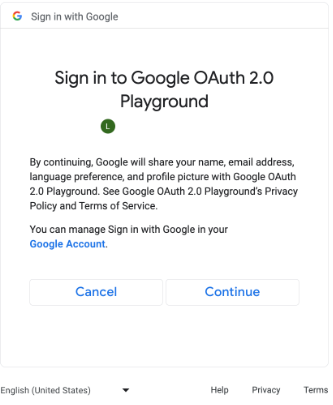
추가 OAuth 범위에 대한 동의 화면 (확대하려면 클릭) // #include "google/games/pgs_games_sign_in_client.h" // 1. Define the Callback // This function is called when the server-side access request completes. // It provides the authorization code (on success) or an error (on failure). void OnServerSideAccessCallback(void* context, PgsError error, const char* serverAuthCode) { if (error == PgsError_Success) { if (serverAuthCode != nullptr) { __android_log_print(ANDROID_LOG_INFO, "Games", "Received Server Auth Code: %s", serverAuthCode); // Send 'serverAuthCode' to your backend server immediately. // Your server will exchange this code for an OAuth access token. } } else { __android_log_print(ANDROID_LOG_ERROR, "Games", "Failed to get server auth code. Error: %d", error); } } // 2. Define the Wrapper Function void RequestServerAccess(PgsGamesSignInClient* signInClient) { if (signInClient == nullptr) { return; } // This must match the "Web client ID" from your Google Cloud Console // (linked to your Play Console Game Server Credential). const char* SERVER_CLIENT_ID = "xxxx"; // Set to 'true' if your server needs a Refresh Token (long-lived access). // Set to 'false' if you only need an Access Token (short-lived). bool forceRefreshToken = false; // Call the API PgsGamesSignInClient_requestServerSideAccess( signInClient, SERVER_CLIENT_ID, forceRefreshToken, OnServerSideAccessCallback, // The callback defined nullptr // User context (optional, passed to callback) ); } // 3. Example Usage void TriggerSignInProcess(PgsGamesClient* gamesClient) { // Obtain the Sign-In Client from the main Games Client PgsGamesSignInClient* signInClient = PgsGamesClient_getSignInClient(gamesClient); RequestServerAccess(signInClient); }
OAuth 승인 코드 토큰을 백엔드 서버로 보내 교환할 수 있도록 하고 플레이어 ID를 Play Games 서비스 REST API에 대해 확인한 다음 게임에 인증합니다.
서버 인증 코드 전송
서버 인증 코드를 백엔드 서버로 전송하여 액세스 및 갱신 토큰으로 교환합니다. 액세스 토큰을 사용하여 플레이어를 대신해 Play Games Services API를 호출합니다. 선택적으로 갱신 토큰을 저장하여 액세스 토큰이 만료되면 새 액세스 토큰을 획득할 수 있습니다.
플레이어 ID의 작동 방식에 관한 자세한 내용은 차세대 플레이어 ID를 참고하세요.
다음 코드 스니펫은 C++ 프로그래밍 언어로 서버 측 코드를 구현하여 서버 승인 코드를 액세스 토큰으로 교환하는 방법을 보여줍니다.
Java
/**
 * Exchanges the authcode for an access token credential. The credential
 * is associated with the given player.
 *
 * @param authCode - the non-null authcode passed from the client.
 * @param player   - the player object which the given authcode is
 *                 associated with.
 * @return the HTTP response code indicating the outcome of the exchange.
 */
private int exchangeAuthCode(String authCode, Player player) {
try {

    // The client_secret.json file is downloaded from the Google Cloud
    // console. This is used to identify your web application. The
    // contents of this file shouldn't be shared.

    File secretFile = new File("client_secret.json");

    // If we don't have the file, we can't access any APIs, so return
    // an error.
    if (!secretFile.exists()) {
        log("Secret file : " + secretFile
                .getAbsolutePath() + "  does not exist!");
        return HttpServletResponse.SC_FORBIDDEN;
    }

    GoogleClientSecrets clientSecrets = GoogleClientSecrets.load(
            JacksonFactory.getDefaultInstance(), new
            FileReader(secretFile));

    // Extract the application ID of the game from the client ID.
    String applicationId = extractApplicationId(clientSecrets
            .getDetails().getClientId());

    GoogleTokenResponse tokenResponse =
            new GoogleAuthorizationCodeTokenRequest(
            HTTPTransport,
            JacksonFactory.getDefaultInstance(),
            "https://oauth2.googleapis.com/token",
            clientSecrets.getDetails().getClientId(),
            clientSecrets.getDetails().getClientSecret(),
            authCode,
            "")
            .execute();

    TokenVerifier(tokenResponse);

    log("hasRefresh == " + (tokenResponse.getRefreshToken() != null));
    log("Exchanging authCode: " + authCode + " for token");
    Credential credential = new Credential
            .Builder(BearerToken.authorizationHeaderAccessMethod())
            .setJsonFactory(JacksonFactory.getDefaultInstance())
            .setTransport(HTTPTransport)
            .setTokenServerEncodedUrl("https://www.googleapis.com/oauth2/v4/token")
            .setClientAuthentication(new HttpExecuteInterceptor() {
                @Override
                public void intercept(HttpRequest request)
                        throws IOException {
                        }
            })
            .build()
            .setFromTokenResponse(tokenResponse);

    player.setCredential(credential);

    // Now that we have a credential, we can access the Games API.
    PlayGamesAPI api = new PlayGamesAPI(player, applicationId,
            HTTPTransport, JacksonFactory.getDefaultInstance());

    // Call the verify method, which checks that the access token has
    // access to the Games API, and that the Player ID used by the
    // client matches the playerId associated with the accessToken.
    boolean ok = api.verifyPlayer();

    // Call a Games API on the server.
    if (ok) {
        ok = api.updatePlayerInfo();
        if (ok) {
            // persist the player.
            savePlayer(api.getPlayer());
        }
    }

    return ok ? HttpServletResponse.SC_OK :
            HttpServletResponse.SC_INTERNAL_SERVER_ERROR;

  } catch (IOException e) {
    e.printStackTrace();
  }
  return HttpServletResponse.SC_INTERNAL_SERVER_ERROR;
}
Java 또는 Python의 Google API 클라이언트 라이브러리를 사용하여 OAuth 범위를 검색해 GoogleIdTokenVerifier 객체를 가져올 수 있습니다. 다음 코드 스니펫은 Java 프로그래밍 언어의 구현을 보여줍니다.
Java
import com.google.api.client.googleapis.auth.oauth2.GoogleIdToken;
import com.google.api.client.googleapis.auth.oauth2.GoogleIdToken.Payload;
import com.google.api.client.googleapis.auth.oauth2.GoogleIdTokenVerifier;

/**
 * Gets the GoogleIdTokenVerifier object and additional OAuth scopes.
 * If additional OAuth scopes are not requested, the idToken will be null.
 *
 * @param tokenResponse - the tokenResponse passed from the exchangeAuthCode
 *                        function.
 *
 **/

void TokenVerifier(GoogleTokenResponse tokenResponse) {

    string idTokenString = tokenResponse.getIdToken();

    GoogleIdTokenVerifier verifier = new GoogleIdTokenVerifier.Builder(transport, jsonFactory)
        // Specify the WEB_CLIENT_ID of the app that accesses the backend:
        .setAudience(Collections.singletonList(WEB_CLIENT_ID))
        // Or, if multiple clients access the backend:
        //.setAudience(Arrays.asList(WEB_CLIENT_ID_1, WEB_CLIENT_ID_2, WEB_CLIENT_ID_3))
        .build();

    GoogleIdToken idToken = verifier.verify(idTokenString);

    // The idToken can be null if additional OAuth scopes are not requested.
    if (idToken != null) {
        Payload payload = idToken.getPayload();

    // Print user identifier
    String userId = payload.getSubject();
    System.out.println("User ID: " + userId);

    // Get profile information from payload
    String email = payload.getEmail();
    boolean emailVerified = Boolean.valueOf(payload.getEmailVerified());
    String name = (String) payload.get("name");
    String pictureUrl = (String) payload.get("picture");
    String locale = (String) payload.get("locale");
    String familyName = (String) payload.get("family_name");
    String givenName = (String) payload.get("given_name");

    // This ID is unique to each Google Account, making it suitable for use as
    // a primary key during account lookup. Email is not a good choice because
    // it can be changed by the user.
    String sub = payload.getSubject();

    // Use or store profile information
    // ...

    } else {
      System.out.println("Invalid ID token.");
    }
}
서버에서 REST API 호출
사용 가능한 API 호출에 관한 자세한 내용은 Google Play 게임즈 서비스용 REST API를 참고하세요.
유용할 수 있는 REST API 호출의 예는 다음과 같습니다.
플레이어
인증된 플레이어의 ID와 프로필 데이터를 가져오고 싶은가요? 'me'를 ID로 사용하여
Players.get을 호출합니다.
업적
자세한 내용은 업적 가이드를 참고하세요.
현재 업적 목록을 가져오려면 AchievementDefinitions.list를 호출합니다.
이를 Achievements.list 호출과 결합하여 플레이어가 달성한 업적을 확인합니다.
Achievements.unlock을 호출하여 플레이어 업적을 잠금 해제합니다.
Achievements.increment를 호출하여 업적 진행 상황을 보고하고 플레이어가 업적을 달성했는지 확인합니다.
프로덕션에 도달하지 않은 게임을 디버깅하는 경우 Management API에서 Achievements.reset 또는 Achievements.resetAll 을 호출하여 업적을 원래 상태로 재설정할 수 있습니다.