
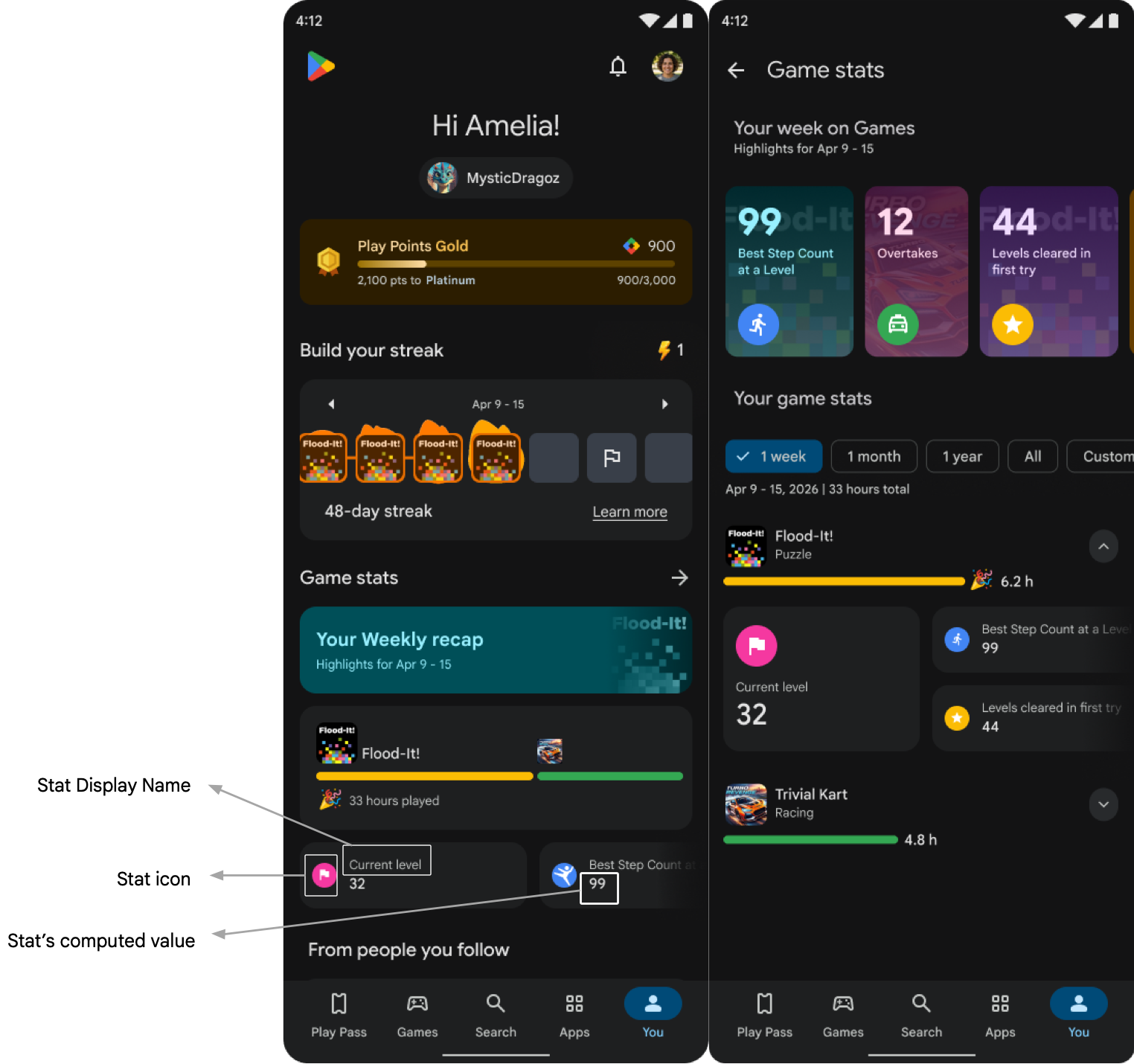
Game Stats are cumulative statistics about your game that players can view on their Gamer profile. These stats let players track lifetime progress, see highlight moments, and compare with other players, and power Google Play features such as Quests, Social Challenges and more in the future.
Game stats must:
- Not require a purchase (For example, buy gems) that is they should not update as a result of any IAP purchase.
- Not require watching advertisements that is they should not update as a result of watching an advertisement.
- Not be generic use of the game (For example, open the game; use settings).
- Not include Personal and Sensitive User Data, as defined per Play Policy, including user Ids, passwords, precise location or health data, or any offensive, profane, sexually explicit, violent, or hateful content.
- Be available to all users (For example, not a team-specific action or available only to users of a certain level or limited to time limited liveops etc)
The image shows Game Stats in the Gamer Profile on the You tab. This user interface (UI) in the You tab is available only for testing purposes. The Game Stats UI will be available in September 2026.
Integration steps
Send data using Game Stats API as player events for repetitive stats
and a predefined event progressUpdate for the progression stat. You will also
need to configure the logic for calculating the stats that would appear on Gamer
profile and their display information.
Player Events represent distinct in-game moments, game loop completions, or progression milestones.
A player event is defined and modeled as follows:
- An event is represented by a specific action taken by the player such as completing a match, finishing a run, unlocking a chest, or saving progress in an area.
- Each action results in certain outcomes or has certain characteristics defining the action. These are modeled as event properties that provide context about the event and its specific outcomes (for example, match type, coins collected during that run, match result, or headshot count).
The integration consists of the following steps:
- Declare the raw data schema: Define player events using a CSV upload in the Play Console. See Create events.
- Integrate with Game Stats API: Send raw player data in the declared
format for player events and
progressUpdateevent.- Send all defined events using client side or server side integration.
For more information, see examples for Player Events and
progressUpdateevent.
- Send all defined events using client side or server side integration.
For more information, see examples for Player Events and
- Upload a ZIP file: Provide 3 CSV files and all icon image files that
define 5 repetitive stats and 1 player progression level.
For more information, see ZIP file guidelines.
Include the following details:
- CSV file for repetitive stats:
- A unique ID for the stat.
- Specify the event label to be used for stat
calculation. You cannot use the
progressUpdateevent label here.- Specify the property label to be used for stat calculation. This must be a property of the specified event.
- Specify the aggregation type (SUM, MAX, MIN, or COUNT) to determine how to calculate the stat on the selected property label.
- Specify an optional filter condition to calculate the logic only when the condition is met. Define the property and event label, the operator (=, <, <=, >=, or >), and the threshold value.
- Include a boolean flag to indicate if the stat can be used for competitive features.
- If the feature can be used for competitive features then minimum and maximum hourly limits for a genuine player. This will be used for us to identify players who might be misusing when participating in features like leagues and social challenges.
- Provide a unique display name for the stat that players see.
- Provide unique text describing the stat. This description should provide details into how the player earns it and will be shown to players in the Gamer Profile UI.
- Provide a unique icon representing the stat by entering the exact icon filename in the CSV file.
- Provide an optional input whether an increasing value or decreasing value is good for the player. This input will be used for celebrating player movements.
- Provide an optional unit of measurement for the stat such as km, miles, and seconds.
- CSV file for player progression stat:
- Provide a unique display name for the player progression that players see.
- Provide a unique icon representing the stat.
- Provide a description for the progression stat.
- Provide an optional input whether an increasing value or decreasing
value is good for the player. This input will be used for
celebrating player movements only when the
currentProgressproperty is of type INT. - Provide an optional unit of measurement for the stat such as km, miles, seconds.
- CSV file for localization: Provide localized display names for all
stats.
- Add one row for each localization.
- Use stat display name string as added in previous CSV to uniquely identify the stat against which the localization is being added.
- Specify the language from a list of language codes.
- Add localization for the display name in the specified language.
- Add localization for the stat description in the specified language.
- CSV file for repetitive stats:
Plan the schema
You can send two types of data using the Game Stats API: player events and a predefined event for player progression stats.
The following examples illustrate how player events look across various game types:
Player Events
Player Events are defined by distinct in-game moments, game loop completions, or progression milestones.
- Define events as specific in-game moments, game loop completions, or
progression milestones:
- Game loop completions, such as a completed match or run.
- Progression milestones, such as saved area exploration progress or a completed level.
- Since repetitive stats should truly represent repeatable actions by a player, the defined events should be associated with core gameplay.
- Add properties to provide context about the event and its outcomes, such as the level number, match type, weapon type, number of weapons, headshots, coins collected, match result, lap time, or car type.
- Send events within the gameplay session as soon as they occur. For example, send a game loop completion event immediately after the loop completes.
Examples
| Game type | Event Label | In-game moment / Progression Event Completion / Game Loop Completion | Outcome | Characteristics |
|---|---|---|---|---|
| Linear Progression Indie puzzle game | chapter_completed | Progression event completion | N/A | Chapter Number, Chapter Name, Number of try, number of screens, number of moves, chapter content |
| screen_completed | Progression event completion | Chapter Number, Chapter Name, Number of try, number of moves, chapter content | ||
| 3D Endless runner | run_completed | Game Loop Completion | Coins collected, score | Run duration, coins collected from jetpack, booster used at run start, surfboards used, magnets used, jumper used, jetpack used |
| Open World Action RPG | areaExplorationProgress | Progression event completion | Enemies defeated, potions collected | Area number, Area name, Percentage progress |
| questCompleted | Game loop completion | N/A | Quest name | |
| weaponUnlocked | In-game moment | N/A | Weapon Name, Weapon Level | |
| chestUnlocked | In-game moment | Enhancement ore collected | ||
| Casual puzzle with decorative meta | puzzleCompleted | Game loop completion / Progression event completion | Coins collected, Boosters collected | Number of moves, Butler's gift used?, Type of level, Level Number, color boosters used, dynamites used |
| cardsCollected | In-game moment | 1 star cards, 2 star cards, 3 star cards, total cards | Album number, Album name | |
| Arcade Racing | raceCompleted | Game loop completion | Rank, NOS used, race_time | Type of race, rating, car_used |
| carUpgraded | In-game moment | Car characteristic that was upgraded, old level / value, new level / value | Type of car, current garage level | |
| Third person Battle Royale Shooter | matchCompleted | Game loop completion | Eliminations, Headshots, Honor Value | Match type, survival time |
| eSports Management Simulation | matchCompleted | Game loop completion | Result, goals scored, goals | Opponent team name, playing team name |
| trainingCompleted | In-game moment | Drills done, teamplay_form_attack, teamplay_form_defense, teamplay_form_possession, teamplay_form_condition |
progressUpdate Event
If your game has a primary progression mechanic, then use this event to send the
current progress of the player. The event has one predefined property called
"currentProgress" of type INT or STRING. You are expected to send the
current value of player progress in the primary progression mechanic using this
property. If you use this event, the predefined property "currentProgress" must
be present and a progression stat must be defined using this property.
You can send current value for other progression systems in your game like
lifetime highest score or current coin balance as other properties of this
event.
Since players could compare their profiles by the current progress within the
game, it is important that there is no delay in getting the current progress
value after the first integration. In order to represent the accurate current
progress to players, you should send the progressUpdate event at the start of
each game session as well as whenever there is an update to the current
progress.
Examples
| Game type | currentProgress property of `progressUpdate` event |
|---|---|
| Linear Progression Puzzle Game | Current Chapter Number Or Level Number |
| 3d Endless Runner | High Score, Current Boosters balance |
| Casual Puzzle | Current Level number, First Try Wins count, Areas Completed count, Number of Collections Completed |
| Arcade Racing | Current Level number, Currency Balance |
| Open World Action RPG | Current Character Rank, Current Level number |
| Third Person Shooter | Current Level number |
| Esports Simulation | Manager Level number, Club Level number |
Configure your stats
You will need to configure your repetitive and progression stats by defining the computation logic and display information about each stat. Examples of repetitive stats from different Game Genres are included below. Repetitive stats are usually stats that update repeatedly for any player across a very few (3-4) game sessions and are associated with the core game loop.
| Game Name | Game stat display name | Event Property | Calculation logic [aggregation] | Filter |
|---|---|---|---|---|
| 3D Endless Runner | Runs completed | Any property of the event run_completed | Count | All values [no filter] |
| Coins collected | Coins_collected property of the event run_completed | Sum | N/A | |
| Keys Collected | Keys_collected property of the event run_completed | Sum | N/A | |
| Highest Run Score | Score property of the event run_completed | Max | N/A | |
| High coins Runs completed | Coins_collected property of the event run_completed | Count | Value > 5000 | |
| Linear Progression Puzzle Game | Chapters completed | Any property of the event chapter_completed | Count | All values [no filter] |
| Screens completed | Any property of the event screen_completed | Count | All values [no filter] | |
| Chapters completed in first try | Num_try property of the event chapter_completed | Count | Num_try = 1 | |
| Screens completed in first try | Num_try property of the event screen_completed | Count | Num_try = 1 | |
| Open World Action RPG | Quests completed | Any property of the event quest_completed | Count | All values [no filter] |
| Areas Explored | Perc_progress property of area_exploration_progress event | Count | Value = 100 | |
| Swords unlocked | Weapon_type property of the event weapon_unlocked | Count | Value = "sword" | |
| Enemies defeated | Enemies_defeated property of the event area_exploration_progress | Sum | N/A | Health Potions Collected | Enhancement_ores property of the event chest_unlocked | Sum | N/A |
| Casual Puzzle | Levels completed | Any property of the event level_completed | Count | All values [no filter] |
| Levels completed in first try | Num_try property of the event level_completed | Count | Value = 1 | |
| Color Boosters Used | Color_booster_used property of the event level_completed | Sum | N/A | |
| Bomb Boosters Used | Bomb_booster_used property of the event level_completed | Sum | N/A | |
| Cards collected | Total_cards property of the event cards_collected | Sum | N/A | |
| Arcade Racing | Races won | Rank property of the event race_completed | Count | Value = 1 |
| Fastest race | race_time property of the event race_completed | Min | N/A | |
| NOS used | NOS_used property of the event race_completed | Sum | N/A | |
| Races finished with Mustang | Car_type property of the event race_completed | Count | Value = "Mustang" | |
| Car upgrades | Any property of the event car_upgraded | Count | All values [no filter] | |
| Third person Battle Royale Shooter | Matches Won | Any property of the event match_completed | Count | Match_result = TRUE |
| Total eliminations | Eliminations property of the event match_completed | Sum | N/A | |
| Highest survival time | Survival_time property of the event match_completed | Max | N/A | |
| Total headshots | Headshots property of the event match_completed | Sum | N/A | |
| Total Skill Value | Skill_value property of the event match_completed | Sum | N/A | |
| eSports Management Simulation | Matches Won | Result property of the event match_completed | Count | Result = "Won" |
| Total Goals scored | Goals_scored property of the event match_completed | Sum | N/A | |
| Hard matches won | Result property of the event hard_match_completed | Count | Result = "Won" | |
| Highest goal difference win | Goal_difference property of the event match_completed | Max | Result = "Won" | |
| Total training drills | Drills_done property of the event training_completed | Sum | N/A | |
| Total trainings completed | Any property of the event training_completed | Count | N/A |
Integration details
This section shows how to construct events and send them in both client side and server side integrations.
When should you send data
Player Events represent in-game actions related to game loop completions or specific in-game moments. Submit these events as soon as they occur. For example, submit the game loop completion event as soon as the loop completes.
progressUpdate Event represents the current progress level of a player.
The data for progression stat should be sent using this event in the following
situations:
- Whenever there is an update to current progress send the latest value immediately
- Whenever a player launches the game so as to ensure the presence of this stat for a player at all times.
Integration paths
There are two paths of integration - client and server to server.
Server to server integration
A public API endpoint lets you send events in the request payload using the following configurations:
HTTP request
POST https://games.googleapis.com/games/v1/players/{playerId}/gameStats:
batchRecordEvents
Path parameters
| Parameter | Data type | Description |
|---|---|---|
| playerId | String | The PGS ID of the player. |
Authorization and Authentication
Server-to-server API calls follow standard Server-side access to Play Games
Services guidelines using OAuth 2.0. Requests must include a Bearer token
authorized with the https://www.googleapis.com/auth/games scope.
Events: Request Body
The backend API has strict structural validation limits:
- Batch size: A maximum of 30 events per
BatchRecordEventsRequest. - Property count: A maximum of 25 custom properties per
PlayerGameEvent. - Length limits: Event name (max 100 characters), property keys (max 100 characters), and property string values (max 1024 characters).
- Event ID: Must be a valid 36-character UUID string.
- Retry and caching: Avoid caching or accumulating excessive events locally if the API fails, as batch retries exceeding 30 events will be rejected. Always chunk retries to respect the batch size limit.
BatchRecordEventsRequest
{
  "packageName": string,
  "requestTime": string,
  "events": [
    {
      object (PlayerGameEvent)
    }
  ]
}
PlayerGameEvent
{ "eventId": string, "eventName": string, "eventProperties": { // keys (e.g., "matchId", "score") "" : { object (PropertyValue) } }, "eventTime": string // RFC 3339 formatted timestamp string (e.g., "2026-01-01T18:00:00Z"). }
PropertyValue
// ONE of the following fields will be present:
{
// 64-bit integer formatted as a string to prevent data loss
"intValue": "string",
// Double-precision floating point number.
"doubleValue": number,
// Standard UTF-8 text string.
"stringValue": "string",
// Boolean value (true or false).
"boolValue": boolean,
// Duration in seconds suffixed with 's' (e.g., "240s" or "3.5s").
"durationValue": "string"
}
progressUpdate event: Request Body
BatchRecordEventsRequest
{
  "packageName": string,
  "requestTime": string,
  "events": [
    {
      object (PlayerGameEvent)
    }
  ]
}
PlayerGameEvent - progressUpdate
{ "eventId": string, "eventName": "progressUpdate", "eventProperties": { "" : { object (PropertyValue) // Must have at least one property "currentProgress" of type INT or STRING } }, "eventTime": string // RFC 3339 formatted timestamp string (e.g., "2026-01-01T18:00:00Z") }
Response Body
If successful, returns an HTTP 200 OK status with an empty JSON object.
Example Request Body
Event: PlayerGameEvent
{
  "packageName": "com.example.awesomegame",//Your package name
  "requestTime": "2026-05-09T00:44:44Z",
  "events": [
    {
      "eventId": "123e1234-e29b-41d4-a123-446655440000", // UUID for deduplication and idempotency
      "eventName": "matchCompleted",
      "eventTime": "2026-05-09T01:44:44Z", // RFC 3339 formatted timestamp string (e.g., "2026-05-09T01:44:44Z").
      "eventProperties": {
        "matchId": {
          "stringValue": "Match_A"
        },
        "gameMode": {
          "stringValue": "Battle_B"
        },
        "locationId": {
          "stringValue": "Location_XYZ"
        },
        "playerElimination": {
          "intValue": 2
        },
        "isWinner": {
          "boolValue": true
        }
      }
    }
  ]
}
progressUpdate event
{
  "packageName": "com.example.awesomegame",//Your package name
  "requestTime": "2026-05-09T00:44:44Z",
  "events": [
    {
      "eventId": "123e1234-e29b-41d4-a123-446655440000", // UUID
      "eventName": "progressUpdate",
      "eventTime": "2026-05-09T01:44:44Z", // RFC 3339 formatted timestamp string (e.g., "2026-01-01T18:00:00Z").
      "eventProperties": {
        "currentProgress": {
          "intValue": 52
        },
//Add more properties as per your requirement
      }
    }
  ]
}
Client implementations
To learn about the Game Stats client implementation for your platform, see the following resources:
Milestones
| Date | Game Stats API Integration | Game Stats configuration |
| September 2026 | N/A | Players start seeing game stats on their Gamer profile. |