

如果遊戲支援遊戲控制器,您有責任確保遊戲在不同 Android 版本執行的裝置上,都能穩定回應控制器。這能讓遊戲觸及更廣大的客群,玩家即使更換或升級 Android 裝置,也能使用控制器享受流暢的遊戲體驗。
本課程將示範如何以回溯相容的方式,使用 Android 4.1 以上版本提供的 API,讓遊戲在搭載 Android 3.1 以上版本的裝置上支援下列功能:
- 遊戲可以偵測是否新增、變更或移除遊戲控制器。
- 遊戲可以查詢遊戲控制器的功能。
- 遊戲可辨識遊戲控制器傳來的動作事件。
準備將遊戲控制器支援的 API 抽象化
假設您想在搭載 Android 3.1 (API 級別 12) 的裝置上,判斷遊戲控制器的連線狀態是否已變更,不過,這些 API 僅適用於 Android 4.1 (API 級別 16) 以上版本,因此您需要提供支援 Android 4.1 以上版本的實作項目,同時提供支援 Android 3.1 至 Android 4.0 的備援機制。
為協助您判斷哪些功能需要較低版本的備援機制,表 1 列出 Android 3.1 (API 級別 12) 和 4.1 (API 級別 16) 之間,遊戲控制器支援的差異。
表 1. 適用於各種 Android 版本的遊戲控制器支援 API。
| 控制器資訊 | Controller API | API 級別 12 | API 級別 16 |
|---|---|---|---|
| 裝置識別 | getInputDeviceIds() |
• | |
getInputDevice() |
• | ||
getVibrator() |
• | ||
SOURCE_JOYSTICK |
• | • | |
SOURCE_GAMEPAD |
• | • | |
| 連線狀態 | onInputDeviceAdded() |
• | |
onInputDeviceChanged() |
• | ||
onInputDeviceRemoved() |
• | ||
| 輸入事件識別 | 按下 D-Pad (
KEYCODE_DPAD_UP、
KEYCODE_DPAD_DOWN、
KEYCODE_DPAD_LEFT、
KEYCODE_DPAD_RIGHT、
KEYCODE_DPAD_CENTER) |
• | • |
按下控制器按鈕 (
BUTTON_A,
BUTTON_B,
BUTTON_THUMBL,
BUTTON_THUMBR,
BUTTON_SELECT,
BUTTON_START,
BUTTON_R1,
BUTTON_L1,
BUTTON_R2,
BUTTON_L2) |
• | • | |
搖桿和帽形開關移動 (
AXIS_X,
AXIS_Y,
AXIS_Z,
AXIS_RZ,
AXIS_HAT_X,
AXIS_HAT_Y) |
• | • | |
類比觸發鍵按壓 (
AXIS_LTRIGGER,
AXIS_RTRIGGER) |
• | • |
您可以使用抽象化功能,建構可跨平台運作的遊戲控制器支援功能,並因應版本調整。這種做法包含下列步驟:
- 定義中介 Java 介面,抽象化遊戲所需的遊戲控制器功能實作內容。
- 建立介面的 Proxy 實作項目,使用 Android 4.1 以上版本的 API。
- 使用 Android 3.1 到 Android 4.0 之間的 API,建立介面的自訂實作項目。
- 建立在執行階段切換這些實作方式的邏輯,並開始在遊戲中使用介面。
如要瞭解如何使用抽象化功能,確認應用程式可在不同 Android 版本中回溯相容,請參閱「建立與先前版本相容的 UI」。
新增介面以確保回溯相容性
如要提供回溯相容性,您可以建立自訂介面,然後新增特定版本的實作項目。這種做法的優點之一,是您可以在支援遊戲控制器的 Android 4.1 (API 級別 16) 上,鏡像處理公用介面。
Kotlin
// The InputManagerCompat interface is a reference example.
// The full code is provided in the ControllerSample.zip sample.
interface InputManagerCompat {
    val inputDeviceIds: IntArray
    fun getInputDevice(id: Int): InputDevice

    fun registerInputDeviceListener(
            listener: InputManager.InputDeviceListener,
            handler: Handler?
    )

    fun unregisterInputDeviceListener(listener:InputManager.InputDeviceListener)

    fun onGenericMotionEvent(event: MotionEvent)

    fun onPause()
    fun onResume()

    interface InputDeviceListener {
        fun onInputDeviceAdded(deviceId: Int)
        fun onInputDeviceChanged(deviceId: Int)
        fun onInputDeviceRemoved(deviceId: Int)
    }
}
Java
// The InputManagerCompat interface is a reference example.
// The full code is provided in the ControllerSample.zip sample.
public interface InputManagerCompat {
    ...
    public InputDevice getInputDevice(int id);
    public int[] getInputDeviceIds();

    public void registerInputDeviceListener(
            InputManagerCompat.InputDeviceListener listener,
            Handler handler);
    public void unregisterInputDeviceListener(
            InputManagerCompat.InputDeviceListener listener);

    public void onGenericMotionEvent(MotionEvent event);

    public void onPause();
    public void onResume();

    public interface InputDeviceListener {
        void onInputDeviceAdded(int deviceId);
        void onInputDeviceChanged(int deviceId);
        void onInputDeviceRemoved(int deviceId);
    }
    ...
}
InputManagerCompat 介面提供下列方法:
getInputDevice()- 鏡子
getInputDevice()。取得代表遊戲控制器功能的InputDevice物件。 getInputDeviceIds()- 鏡子
getInputDeviceIds()。傳回整數陣列,每個整數都是不同輸入裝置的 ID。如果您要建構支援多位玩家的遊戲,並想偵測已連線的控制器數量,這項功能就非常實用。 registerInputDeviceListener()- 鏡子
registerInputDeviceListener()。註冊後,即可在新增、變更或移除裝置時收到通知。 unregisterInputDeviceListener()- 鏡子
unregisterInputDeviceListener()。 Unregisters an input device listener. onGenericMotionEvent()- 鏡子
onGenericMotionEvent()。讓遊戲攔截並處理MotionEvent物件和軸值,這些物件和值代表搖桿移動和類比觸發按鈕按下等事件。 onPause()- 當主要活動暫停或遊戲不再是焦點時,停止輪詢遊戲控制器事件。
onResume()- 在主要活動恢復時,或遊戲啟動並在前台執行時,開始輪詢遊戲控制器事件。
InputDeviceListener- 會鏡像
InputManager.InputDeviceListener介面。在新增、變更或移除遊戲控制器時通知遊戲。
接著,請為 InputManagerCompat 建立實作項目,以便在不同平台版本中運作。如果遊戲在 Android 4.1 以上版本執行,並呼叫 InputManagerCompat 方法,則 Proxy 實作會呼叫 InputManager 中的對等方法。不過,如果遊戲是在 Android 3.1 至 Android 4.0 上執行,自訂實作程序會使用不晚於 Android 3.1 推出的 API,處理對 InputManagerCompat 方法的呼叫。無論在執行階段使用哪個版本專屬的實作項目,實作項目都會將呼叫結果透明地傳回遊戲。
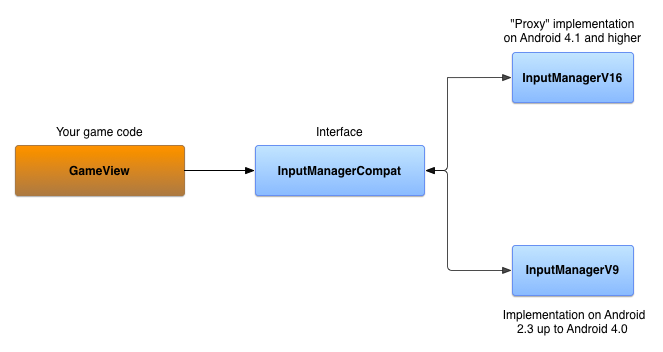
在 Android 4.1 以上版本實作介面
InputManagerCompatV16 是 InputManagerCompat 介面的實作項目,可將方法呼叫作業 Proxy 至實際的 InputManager 和 InputManager.InputDeviceListener。InputManager 是從系統 Context 取得。
Kotlin
// The InputManagerCompatV16 class is a reference implementation.
// The full code is provided in the ControllerSample.zip sample.
public class InputManagerV16(
        context: Context,
        private val inputManager: InputManager =
            context.getSystemService(Context.INPUT_SERVICE) as InputManager,
        private val listeners:
            MutableMap<InputManager.InputDeviceListener, V16InputDeviceListener> = mutableMapOf()
) : InputManagerCompat {
    override val inputDeviceIds: IntArray = inputManager.inputDeviceIds

    override fun getInputDevice(id: Int): InputDevice = inputManager.getInputDevice(id)

    override fun registerInputDeviceListener(
            listener: InputManager.InputDeviceListener,
            handler: Handler?
    ) {
        V16InputDeviceListener(listener).also { v16listener ->
            inputManager.registerInputDeviceListener(v16listener, handler)
            listeners += listener to v16listener
        }
    }

    // Do the same for unregistering an input device listener
    ...

    override fun onGenericMotionEvent(event: MotionEvent) {
        // unused in V16
    }

    override fun onPause() {
        // unused in V16
    }

    override fun onResume() {
        // unused in V16
    }

}

class V16InputDeviceListener(
        private val idl: InputManager.InputDeviceListener
) : InputManager.InputDeviceListener {

    override fun onInputDeviceAdded(deviceId: Int) {
        idl.onInputDeviceAdded(deviceId)
    }
    // Do the same for device change and removal
    ...
}
Java
// The InputManagerCompatV16 class is a reference implementation.
// The full code is provided in the ControllerSample.zip sample.
public class InputManagerV16 implements InputManagerCompat {

    private final InputManager inputManager;
    private final Map<InputManagerCompat.InputDeviceListener,
            V16InputDeviceListener> listeners;

    public InputManagerV16(Context context) {
        inputManager = (InputManager)
                context.getSystemService(Context.INPUT_SERVICE);
        listeners = new HashMap<InputManagerCompat.InputDeviceListener,
                V16InputDeviceListener>();
    }

    @Override
    public InputDevice getInputDevice(int id) {
        return inputManager.getInputDevice(id);
    }

    @Override
    public int[] getInputDeviceIds() {
        return inputManager.getInputDeviceIds();
    }

    static class V16InputDeviceListener implements
            InputManager.InputDeviceListener {
        final InputManagerCompat.InputDeviceListener mIDL;

        public V16InputDeviceListener(InputDeviceListener idl) {
            mIDL = idl;
        }

        @Override
        public void onInputDeviceAdded(int deviceId) {
            mIDL.onInputDeviceAdded(deviceId);
        }

        // Do the same for device change and removal
        ...
    }

    @Override
    public void registerInputDeviceListener(InputDeviceListener listener,
            Handler handler) {
        V16InputDeviceListener v16Listener = new
                V16InputDeviceListener(listener);
        inputManager.registerInputDeviceListener(v16Listener, handler);
        listeners.put(listener, v16Listener);
    }

    // Do the same for unregistering an input device listener
    ...

    @Override
    public void onGenericMotionEvent(MotionEvent event) {
        // unused in V16
    }

    @Override
    public void onPause() {
        // unused in V16
    }

    @Override
    public void onResume() {
        // unused in V16
    }

}
在 Android 3.1 至 Android 4.0 實作介面
如要建立支援 Android 3.1 到 Android 4.0 的 InputManagerCompat 實作項目,可以使用下列物件:
SparseArray裝置 ID,用於追蹤連線至裝置的遊戲控制器。Handler,用於處理裝置事件。 應用程式啟動或繼續執行時,Handler會收到訊息,開始輪詢遊戲控制器是否已中斷連線。Handler會開始迴圈,檢查每個已知的連線遊戲控制器,並查看是否傳回裝置 ID。如果傳回值為null,表示遊戲控制器已中斷連線。應用程式暫停時,Handler會停止輪詢。InputManagerCompat.InputDeviceListener物件的Map。您將使用監聽器更新追蹤遊戲控制器的連線狀態。
Kotlin
// The InputManagerCompatV9 class is a reference implementation.
// The full code is provided in the ControllerSample.zip sample.
class InputManagerV9(
        val devices: SparseArray<Array<Long>> = SparseArray(),
        private val listeners:
        MutableMap<InputManager.InputDeviceListener, Handler> = mutableMapOf()
) : InputManagerCompat {
    private val defaultHandler: Handler = PollingMessageHandler(this)
    …
}
Java
// The InputManagerCompatV9 class is a reference implementation.
// The full code is provided in the ControllerSample.zip sample.
public class InputManagerV9 implements InputManagerCompat {
    private final SparseArray<long[]> devices;
    private final Map<InputDeviceListener, Handler> listeners;
    private final Handler defaultHandler;
    …

    public InputManagerV9() {
        devices = new SparseArray<long[]>();
        listeners = new HashMap<InputDeviceListener, Handler>();
        defaultHandler = new PollingMessageHandler(this);
    }
}
實作擴充 Handler 的 PollingMessageHandler 物件,並覆寫 handleMessage() 方法。這個方法會檢查附加的遊戲控制器是否已中斷連線,並通知已註冊的接聽程式。
Kotlin
private class PollingMessageHandler(
        inputManager: InputManagerV9,
        private val mInputManager: WeakReference<InputManagerV9> = WeakReference(inputManager)
) : Handler() {

    override fun handleMessage(msg: Message) {
        super.handleMessage(msg)
        when (msg.what) {
            MESSAGE_TEST_FOR_DISCONNECT -> {
                mInputManager.get()?.also { imv ->
                    val time = SystemClock.elapsedRealtime()
                    val size = imv.devices.size()
                    for (i in 0 until size) {
                        imv.devices.valueAt(i)?.also { lastContact ->
                            if (time - lastContact[0] > CHECK_ELAPSED_TIME) {
                                // check to see if the device has been
                                // disconnected
                                val id = imv.devices.keyAt(i)
                                if (null == InputDevice.getDevice(id)) {
                                    // Notify the registered listeners
                                    // that the game controller is disconnected
                                    imv.devices.remove(id)
                                } else {
                                    lastContact[0] = time
                                }
                            }
                        }
                    }
                    sendEmptyMessageDelayed(MESSAGE_TEST_FOR_DISCONNECT, CHECK_ELAPSED_TIME)
                }
            }
        }
    }
}
Java
private static class PollingMessageHandler extends Handler {
    private final WeakReference<InputManagerV9> inputManager;

    PollingMessageHandler(InputManagerV9 im) {
        inputManager = new WeakReference<InputManagerV9>(im);
    }

    @Override
    public void handleMessage(Message msg) {
        super.handleMessage(msg);
        switch (msg.what) {
            case MESSAGE_TEST_FOR_DISCONNECT:
                InputManagerV9 imv = inputManager.get();
                if (null != imv) {
                    long time = SystemClock.elapsedRealtime();
                    int size = imv.devices.size();
                    for (int i = 0; i < size; i++) {
                        long[] lastContact = imv.devices.valueAt(i);
                        if (null != lastContact) {
                            if (time - lastContact[0] > CHECK_ELAPSED_TIME) {
                                // check to see if the device has been
                                // disconnected
                                int id = imv.devices.keyAt(i);
                                if (null == InputDevice.getDevice(id)) {
                                    // Notify the registered listeners
                                    // that the game controller is disconnected
                                    imv.devices.remove(id);
                                } else {
                                    lastContact[0] = time;
                                }
                            }
                        }
                    }
                    sendEmptyMessageDelayed(MESSAGE_TEST_FOR_DISCONNECT,
                            CHECK_ELAPSED_TIME);
                }
                break;
        }
    }
}
如要開始及停止輪詢遊戲控制器中斷連線,請覆寫下列方法:
Kotlin
private const val MESSAGE_TEST_FOR_DISCONNECT = 101
private const val CHECK_ELAPSED_TIME = 3000L

class InputManagerV9(
        val devices: SparseArray<Array<Long>> = SparseArray(),
        private val listeners:
        MutableMap<InputManager.InputDeviceListener, Handler> = mutableMapOf()
) : InputManagerCompat {
    ...
    override fun onPause() {
        defaultHandler.removeMessages(MESSAGE_TEST_FOR_DISCONNECT)
    }

    override fun onResume() {
        defaultHandler.sendEmptyMessageDelayed(MESSAGE_TEST_FOR_DISCONNECT, CHECK_ELAPSED_TIME)
    }
    ...
}
Java
private static final int MESSAGE_TEST_FOR_DISCONNECT = 101;
private static final long CHECK_ELAPSED_TIME = 3000L;

@Override
public void onPause() {
    defaultHandler.removeMessages(MESSAGE_TEST_FOR_DISCONNECT);
}

@Override
public void onResume() {
    defaultHandler.sendEmptyMessageDelayed(MESSAGE_TEST_FOR_DISCONNECT,
            CHECK_ELAPSED_TIME);
}
如要偵測輸入裝置是否已新增,請覆寫 onGenericMotionEvent() 方法。系統回報動作事件時,請檢查該事件是否來自已追蹤的裝置 ID,或是來自新的裝置 ID。如果裝置 ID 是新的,請通知已註冊的接聽程式。
Kotlin
override fun onGenericMotionEvent(event: MotionEvent) {
    // detect new devices
    val id = event.deviceId
    val timeArray: Array<Long> = mDevices.get(id) ?: run {
        // Notify the registered listeners that a game controller is added
        ...
        arrayOf<Long>().also {
            mDevices.put(id, it)
        }
    }
    timeArray[0] = SystemClock.elapsedRealtime()
}
Java
@Override
public void onGenericMotionEvent(MotionEvent event) {
    // detect new devices
    int id = event.getDeviceId();
    long[] timeArray = mDevices.get(id);
    if (null == timeArray) {
        // Notify the registered listeners that a game controller is added
        ...
        timeArray = new long[1];
        mDevices.put(id, timeArray);
    }
    long time = SystemClock.elapsedRealtime();
    timeArray[0] = time;
}
通知接聽程式是透過 Handler 物件實作,可將 DeviceEvent
Runnable 物件傳送至訊息佇列。DeviceEvent 包含 InputManagerCompat.InputDeviceListener 的參照。執行 DeviceEvent 時,系統會呼叫事件監聽器的適當回呼方法,指出遊戲控制器是否已新增、變更或移除。
Kotlin
class InputManagerV9(
        val devices: SparseArray<Array<Long>> = SparseArray(),
        private val listeners:
        MutableMap<InputManager.InputDeviceListener, Handler> = mutableMapOf()
) : InputManagerCompat {
    ...
    override fun registerInputDeviceListener(
            listener: InputManager.InputDeviceListener,
            handler: Handler?
    ) {
        listeners[listener] = handler ?: defaultHandler
    }

    override fun unregisterInputDeviceListener(listener: InputManager.InputDeviceListener) {
        listeners.remove(listener)
    }

    private fun notifyListeners(why: Int, deviceId: Int) {
        // the state of some device has changed
        listeners.forEach { listener, handler ->
            DeviceEvent.getDeviceEvent(why, deviceId, listener).also {
                handler?.post(it)
            }
        }
    }
    ...
}

private val sObjectQueue: Queue<DeviceEvent> = ArrayDeque<DeviceEvent>()

private class DeviceEvent(
        private var mMessageType: Int,
        private var mId: Int,
        private var mListener: InputManager.InputDeviceListener
) : Runnable {

    companion object {
        fun getDeviceEvent(messageType: Int, id: Int, listener: InputManager.InputDeviceListener) =
                sObjectQueue.poll()?.apply {
                    mMessageType = messageType
                    mId = id
                    mListener = listener
                } ?: DeviceEvent(messageType, id, listener)

    }

    override fun run() {
        when(mMessageType) {
            ON_DEVICE_ADDED -> mListener.onInputDeviceAdded(mId)
            ON_DEVICE_CHANGED -> mListener.onInputDeviceChanged(mId)
            ON_DEVICE_REMOVED -> mListener.onInputDeviceChanged(mId)
            else -> {
                // Handle unknown message type
            }
        }
    }

}
Java
@Override
public void registerInputDeviceListener(InputDeviceListener listener,
        Handler handler) {
    listeners.remove(listener);
    if (handler == null) {
        handler = defaultHandler;
    }
    listeners.put(listener, handler);
}

@Override
public void unregisterInputDeviceListener(InputDeviceListener listener) {
    listeners.remove(listener);
}

private void notifyListeners(int why, int deviceId) {
    // the state of some device has changed
    if (!listeners.isEmpty()) {
        for (InputDeviceListener listener : listeners.keySet()) {
            Handler handler = listeners.get(listener);
            DeviceEvent odc = DeviceEvent.getDeviceEvent(why, deviceId,
                    listener);
            handler.post(odc);
        }
    }
}

private static class DeviceEvent implements Runnable {
    private int mMessageType;
    private int mId;
    private InputDeviceListener mListener;
    private static Queue<DeviceEvent> sObjectQueue =
            new ArrayDeque<DeviceEvent>();
    ...

    static DeviceEvent getDeviceEvent(int messageType, int id,
            InputDeviceListener listener) {
        DeviceEvent curChanged = sObjectQueue.poll();
        if (null == curChanged) {
            curChanged = new DeviceEvent();
        }
        curChanged.mMessageType = messageType;
        curChanged.mId = id;
        curChanged.mListener = listener;
        return curChanged;
    }

    @Override
    public void run() {
        switch (mMessageType) {
            case ON_DEVICE_ADDED:
                mListener.onInputDeviceAdded(mId);
                break;
            case ON_DEVICE_CHANGED:
                mListener.onInputDeviceChanged(mId);
                break;
            case ON_DEVICE_REMOVED:
                mListener.onInputDeviceRemoved(mId);
                break;
            default:
                // Handle unknown message type
                ...
                break;
        }
        // Put this runnable back in the queue
        sObjectQueue.offer(this);
    }
}
您現在有兩種 InputManagerCompat 實作方式:一種適用於搭載 Android 4.1 以上版本的裝置,另一種則適用於搭載 Android 3.1 至 Android 4.0 版本的裝置。
使用特定版本的實作方式
版本專屬的切換邏輯是在充當 工廠的類別中實作。
Kotlin
object Factory {
    fun getInputManager(context: Context): InputManagerCompat =
            if (Build.VERSION.SDK_INT >= Build.VERSION_CODES.JELLY_BEAN) {
                InputManagerV16(context)
            } else {
                InputManagerV9()
            }
}
Java
public static class Factory {
    public static InputManagerCompat getInputManager(Context context) {
        if (Build.VERSION.SDK_INT >= Build.VERSION_CODES.JELLY_BEAN) {
            return new InputManagerV16(context);
        } else {
            return new InputManagerV9();
        }
    }
}
現在您可以例項化 InputManagerCompat 物件,並在主要 View 中註冊 InputManagerCompat.InputDeviceListener。由於您設定了版本切換邏輯,遊戲會自動使用適合裝置 Android 版本的實作方式。
Kotlin
class GameView(context: Context) : View(context), InputManager.InputDeviceListener {
    private val inputManager: InputManagerCompat = Factory.getInputManager(context).apply {
        registerInputDeviceListener(this@GameView, null)
        ...
    }
    ...
}
Java
public class GameView extends View implements InputDeviceListener {
    private InputManagerCompat inputManager;
    ...

    public GameView(Context context, AttributeSet attrs) {
        inputManager =
                InputManagerCompat.Factory.getInputManager(this.getContext());
        inputManager.registerInputDeviceListener(this, null);
        ...
    }
}
接著,在主要檢視區塊中覆寫 onGenericMotionEvent() 方法,如「處理遊戲控制器的 MotionEvent」一節所述。現在,您的遊戲應該能在搭載 Android 3.1 (API 級別) 的裝置上,穩定處理遊戲控制器事件。
Kotlin
override fun onGenericMotionEvent(event: MotionEvent): Boolean {
    inputManager.onGenericMotionEvent(event)

    // Handle analog input from the controller as normal
    ...
    return super.onGenericMotionEvent(event)
}
Java
@Override
public boolean onGenericMotionEvent(MotionEvent event) {
    inputManager.onGenericMotionEvent(event);

    // Handle analog input from the controller as normal
    ...
    return super.onGenericMotionEvent(event);
}
您可以在可供下載的範例 ControllerSample.zip 中提供的 GameView 類別,找到這段相容性程式碼的完整實作方式。