

在本指南中,您将学习如何调整游戏,使其能够在各种 Android 设备规格上运行。
在开始之前,请先阅读支持大屏设备尺寸调整。Android 上的现代游戏应适应所有屏幕尺寸,而无需依赖系统兼容性层。这样,您就可以始终控制游戏的显示方式,并且即使在 XR 等设备规格或无法旋转屏幕的设备上,您的游戏也能提供优质的玩家体验。
为此,请完成以下任务:
- 停用系统黑边模式,并实现您自己的引擎内黑边模式。
- 使黑边区域可用且主题合适。
- 解决让游戏从 21:9 缩放到 1:1 再到 9:21 所需的设计注意事项。
测试命令
在构建和测试游戏时,请验证游戏是否会自行渲染任何黑边。您还应强制游戏采用纵向和横向屏幕方向,因为电视和车载显示屏等设备无法从其默认的横向或纵向屏幕方向旋转。
如需检查游戏引擎是否正在使用系统黑边,请使用 adb shell cmd window set-letterbox-style 命令。例如,以下命令会将系统黑边设为亮绿色,并为游戏添加圆角半径,以便在游戏回退到操作系统的兼容模式时,让您一目了然:
adb shell "cmd window set-letterbox-style --backgroundType solid_color --backgroundColor '#00FF00' --cornerRadius 30 --isEducationEnabled false"
如需强制使用某个屏幕方向进行测试,请使用 adb shell cmd window user-rotation lock。这有助于您模拟游戏在不遵循应用方向替换设置的设备上的行为,或了解用户在 XR 或类似 PC 的设备上看到的内容,在这些设备上,窗口可以独立于设备方向以纵向或横向显示。
首先,将设备置于可替换应用屏幕方向的状态:
adb shell cmd window set-ignore-orientation-request true
adb shell cmd window fixed-to-user-rotation enabled
接下来,测试将游戏切换为横屏模式:
adb shell cmd window user-rotation lock 1
然后,测试将游戏更改为竖屏模式:
adb shell cmd window user-rotation lock 0
通过重新启动或运行以下命令,将设备重置为 OEM 配置:
adb shell cmd window reset-letterbox-style
adb shell cmd window fixed-to-user-rotation default
adb shell cmd window user-rotation free
adb shell cmd window set-ignore-orientation-request reset
为何要停用系统信箱模式?
系统始终控制系统黑边模式。通过自行检测屏幕尺寸和管理显示区域,您可以缓解一些问题,例如当输入离开游戏区域时发生的输入丢失。您还可以将非游戏内容元素扩展到屏幕边缘,即使游戏内容仍固定在中间。系统兼容模式可以使游戏正常运行,但作为游戏开发者,您需要为玩家提供出色的游戏体验。

信箱模式实现示例
大多数游戏引擎都允许您控制摄像头在屏幕上的渲染位置。如需实现您自己的黑边模式,请测量渲染区域的宽高比,并针对未使用的区域调整剪裁矩形,而不是让系统为游戏添加黑边。以下示例将一个摄像头限制为以限定的宽高比进行渲染,同时允许界面摄像头或通道扩展到完整的逻辑屏幕尺寸:
Unity
[SerializeField]
private float minAspectRatio = 4f / 3f;

[SerializeField]
private float maxAspectRatio = 21f / 9f;

private Camera _camera;

private void Awake()
{
    _camera = GetComponent<Camera>();
}

public void MaintainAspectRatio()
{
    int viewWidth = Screen.width;
    int viewHeight = Screen.height;

    // 1. Calculate screen aspect ratio
    float scaleScreen = viewWidth / (float)viewHeight;
    Rect rect = _camera.pixelRect;

    // 2. Scale to the fullest of the lower between width or height
    if (scaleScreen > maxAspectRatio)
    {
        // use height, lock width to max at aspect scale
        rect.width = viewHeight * maxAspectRatio;
        rect.height = viewHeight;
    }
    else if (scaleScreen < minAspectRatio)
    {
        // use width, lock height to min at aspect scale
        rect.width = viewWidth;
        rect.height = viewWidth / minAspectRatio;
    }
    else
    {
        // within allowed aspect ratio range, use full screen
        rect.width = viewWidth;
        rect.height = viewHeight;
    }

    rect.x = Mathf.Floor((viewWidth - rect.width) * 0.5f);
    rect.y = Mathf.Floor((viewHeight - rect.height) * 0.5f);

    Debug.Log("camera view width = " + rect.width +
        " height = " + rect.height +
        " x = " + rect.x +
        " y = " + rect.y);

    // 3. Commit the new size to the camera so that it takes effect
    _camera.pixelRect = rect;
}
C++ (Vulkan)
/**
 * @brief Calculates a bounded-aspect-ratio gameplay viewport and scissor
 * rectangle and records them directly into a Vulkan command buffer.
 *
 * @note Requires `VK_DYNAMIC_STATE_VIEWPORT` and `VK_DYNAMIC_STATE_SCISSOR` to
 * be enabled on the bound graphics `VkPipeline`.
 *
 * @param command_buffer   Active `VkCommandBuffer` in the recording state.
 * @param window_width     Full physical window or swapchain width in pixels.
 * @param window_height    Full physical window or swapchain height in pixels.
 * @param min_aspect_ratio Minimum allowed aspect ratio (`width / height`).
 * @param max_aspect_ratio Maximum allowed aspect ratio (`width / height`).
 */
void MaintainAspectRatio(VkCommandBuffer command_buffer, uint32_t window_width,
                         uint32_t window_height, float min_aspect_ratio,
                         float max_aspect_ratio) {
  if (command_buffer == VK_NULL_HANDLE || window_width == 0 ||
      window_height == 0 || min_aspect_ratio <= 0.0f ||
      max_aspect_ratio < min_aspect_ratio) {
    return;
  }

  // 1. Calculate screen aspect ratio.
  const float view_width = static_cast<float>(window_width);
  const float view_height = static_cast<float>(window_height);
  const float scale_screen = view_width / view_height;

  // 2. Scale to the fullest of the lower between width or height.
  float rect_width = view_width;
  float rect_height = view_height;
  if (scale_screen > max_aspect_ratio) {
    // Use height, lock width to max at aspect scale (pillarbox).
    rect_width = std::floor(view_height * max_aspect_ratio);
    rect_height = view_height;
  } else if (scale_screen < min_aspect_ratio) {
    // Use width, lock height to min at aspect scale (letterbox).
    rect_width = view_width;
    rect_height = std::floor(view_width / min_aspect_ratio);
  } else {
    // Within allowed aspect ratio range, use full screen.
    rect_width = view_width;
    rect_height = view_height;
  }

  const float rect_x = std::floor((view_width - rect_width) * 0.5f);
  const float rect_y = std::floor((view_height - rect_height) * 0.5f);

  // 3. Commit the new viewport and scissor to the command buffer so that
  // subsequent gameplay draw calls are transformed and clipped to this region.
  const VkViewport viewport = {
      .x = rect_x,
      .y = rect_y,
      .width = rect_width,
      .height = rect_height,
      .minDepth = 0.0f,
      .maxDepth = 1.0f,
  };
  const VkRect2D scissor = {
      .offset =
          {
              .x = static_cast<int32_t>(rect_x),
              .y = static_cast<int32_t>(rect_y),
          },
      .extent =
          {
              .width = static_cast<uint32_t>(rect_width),
              .height = static_cast<uint32_t>(rect_height),
          },
  };

  vkCmdSetViewport(command_buffer, 0, 1, &viewport);
  vkCmdSetScissor(command_buffer, 0, 1, &scissor);
}
如需了解 Unity 中的分步演示,请参阅针对大屏设备和可折叠设备优化 Unity 游戏 Codelab。
处理大屏幕和小屏幕尺寸
在较小的屏幕(例如手机和可折叠设备的外屏)上,锁定为纵向或横向的游戏可能会带来最佳用户体验。随着屏幕变大(例如平板电脑、Chromebook、车载显示屏或可折叠设备的内屏),旋转设备变得不那么理想,甚至不可能,而更大的物理显示屏使游戏在非轴宽高比下仍可玩。
为了给玩家提供最佳体验,请在运行时检测屏幕尺寸,并在必要时限制旋转,同时随着屏幕尺寸的增加为玩家提供更大的灵活性。Android 认为理想的临界值为 sw600dp,即最小宽度为 600 密度无关像素 (600dp)。这与 WindowSizeClass.WIDTH_DP_MEDIUM_LOWER_BOUND 相关。使用 computeMaximumWindowMetrics 验证多显示屏配置中的可用屏幕尺寸。
如需在游戏中支持此功能,请在清单中支持所有屏幕方向,然后在 onCreate() 和 onConfigurationChanged() 中评估最小宽度并相应地设置屏幕方向锁定:
移除清单中的静态屏幕方向锁定,并声明配置变更处理:
<activity
    android:name=".MainActivity"
    android:resizeableActivity="true"
    android:configChanges="orientation|screenSize|smallestScreenSize|screenLayout|density|keyboard|keyboardHidden" />
添加所需的导入:
import android.content.pm.ActivityInfo
import android.content.res.Configuration
import android.os.Bundle
import androidx.activity.enableEdgeToEdge
import androidx.window.core.layout.WindowSizeClass
import androidx.window.layout.WindowMetricsCalculator
import kotlin.math.min
同时处理
onCreate和onConfigurationChanged:override fun onCreate(savedInstanceState: Bundle?) { enableEdgeToEdge() super.onCreate(savedInstanceState) applyAdaptiveOrientationPolicy() // ... } override fun onConfigurationChanged(newConfig: Configuration) { super.onConfigurationChanged(newConfig) applyAdaptiveOrientationPolicy() // ... }根据最小屏幕宽度更新请求的方向,将紧凑屏幕锁定到游戏的首选设计方向:
private fun applyAdaptiveOrientationPolicy() {
    // compute the smallest screen bound in dp
    val maxMetrics = WindowMetricsCalculator.getOrCreate().computeMaximumWindowMetrics(this)
    val minDimensionPx = min(maxMetrics.bounds.width(), maxMetrics.bounds.height())
    val displaySmallestWidthDp = minDimensionPx / maxMetrics.density

    val targetOrientation = if (displaySmallestWidthDp >= WindowSizeClass.WIDTH_DP_MEDIUM_LOWER_BOUND) {
        // Large display (>= 600dp): allow free rotation in any orientation
        ActivityInfo.SCREEN_ORIENTATION_UNSPECIFIED
    } else {
        // Compact display (< 600dp): lock to your game's preferred orientation
        // (use SCREEN_ORIENTATION_SENSOR_LANDSCAPE for landscape-first games)
        ActivityInfo.SCREEN_ORIENTATION_PORTRAIT
    }

    // Guard against redundant setter calls to avoid configuration change loops
    if (requestedOrientation != targetOrientation) {
        requestedOrientation = targetOrientation
    }
}
围绕常见问题进行设计
支持各种宽高比和屏幕方向,可为玩家提供最佳用户体验。与手机不同,大屏设备通常固定为横屏或竖屏,在某些情况下,屏幕几乎是方形的。在这些大屏设备上,玩家在玩游戏时通常会同时处理多项任务。 通过最大限度地利用屏幕空间,您可以吸引更多玩家更频繁地玩游戏,并延长游戏时间。
以下部分提供的解决方案可让您的游戏在各种设备规格上都能提供优质体验,而不是像嵌入在非手机屏幕中的手机游戏。
可感知宽高比的摄像头
在 3D 游戏中,如果屏幕过高,玩家可能会感觉自己是在通过一条狭窄的缝隙观看游戏;如果屏幕过宽,玩家可能会错过设计的互动。与 2D 游戏一样,您可以让“安全区域”始终可见。以下代码会根据有效宽高比与参考宽高比 (1920x1080) 的比较结果,在水平视野范围和垂直视野范围之间切换摄像头。这样,设计师就可以针对 1080p 显示屏构建游戏,并确保该参考框架内设计的所有内容都保持可见:
Unity
[SerializeField]
private Camera _camera;

[SerializeField]
private float _referenceWidth = 1920f;

[SerializeField]
private float _referenceHeight = 1080f;

[SerializeField]
private float _referenceVerticalFov = 60f;

public float ReferenceAspectRatio => _referenceWidth / Mathf.Max(0.0001f, _referenceHeight);

private void Awake()
{
    if (_camera == null)
    {
        _camera = GetComponent<Camera>();
    }
}

// Built-in Render Pipeline callback. In URP, subscribe to
// RenderPipelineManager.beginCameraRendering or call UpdateFov() on resize.
private void OnPreCull()
{
    UpdateFov();
}

public void UpdateFov()
{
    if (_camera == null || _camera.orthographic)
    {
        return;
    }

    float referenceAspect = ReferenceAspectRatio;
    float currentAspect = _camera.aspect;
    if (currentAspect <= 0.0001f)
    {
        return;
    }

    float targetVerticalFov;

    if (currentAspect >= referenceAspect)
    {
        // Viewport is wider than (or equal to) the reference safe area
        targetVerticalFov = _referenceVerticalFov;
    }
    else
    {
        // Viewport is skinnier than the reference safe area
        float referenceHorizontalFov = Camera.VerticalToHorizontalFieldOfView(_referenceVerticalFov, referenceAspect);
        targetVerticalFov = Camera.HorizontalToVerticalFieldOfView(referenceHorizontalFov, currentAspect);
        targetVerticalFov = Mathf.Clamp(targetVerticalFov, 1f, 179f);
    }

    if (!Mathf.Approximately(_camera.fieldOfView, targetVerticalFov))
    {
        _camera.fieldOfView = targetVerticalFov;
    }
}
C++ (Vulkan)
/**
 * @brief Calculates an aspect-aware Vulkan perspective projection matrix using
 * GLM that keeps a reference safe area (e.g., 1920x1080) visible across
 * aspect ratios.
 *
 * @note Uses `glm::perspectiveZO` for Vulkan's `[0, 1]` depth range and
 * inverts `projection[1][1]` for Vulkan's top-left (`+Y` down) clip space.
 *
 * @param viewport_width         Active gameplay viewport width in pixels.
 * @param viewport_height        Active gameplay viewport height in pixels.
 * @param reference_width        Authored safe-area reference width in pixels.
 * @param reference_height       Authored safe-area reference height in pixels.
 * @param reference_vertical_fov Authored vertical FOV in degrees (e.g., 60.0f).
 * @param near_plane             Near clipping plane distance (`zNear > 0.0f`).
 * @param far_plane              Far clipping plane distance (`zFar > zNear`).
 * @return Aspect-aware `glm::mat4` perspective projection matrix for Vulkan.
 */
glm::mat4 CalculateAspectAwareProjectionMatrix(
    float viewport_width, float viewport_height, float reference_width = 1920.0f,
    float reference_height = 1080.0f, float reference_vertical_fov = 60.0f,
    float near_plane = 0.1f, float far_plane = 100.0f) {
  if (viewport_width <= 0.0001f || viewport_height <= 0.0001f) {
    return glm::mat4(1.0f);
  }

  // 1. Compare the active viewport aspect ratio against the reference safe
  // area.
  const float reference_aspect =
      reference_width / std::max(0.0001f, reference_height);
  const float current_aspect = viewport_width / viewport_height;

  float target_vertical_fov_rad = glm::radians(reference_vertical_fov);

  if (current_aspect >= reference_aspect) {
    // Viewport is wider than (or equal to) the reference safe area (Hor+).
    target_vertical_fov_rad = glm::radians(reference_vertical_fov);
  } else {
    // Viewport is skinnier than the reference safe area (Vert+):
    // Convert reference vertical FOV -> reference horizontal FOV -> new
    // vertical FOV at current_aspect so the safe area is never cropped.
    const float tan_half_horiz =
        std::tan(target_vertical_fov_rad * 0.5f) * reference_aspect;
    target_vertical_fov_rad = 2.0f * std::atan(tan_half_horiz / current_aspect);
    target_vertical_fov_rad = std::clamp(
        target_vertical_fov_rad, glm::radians(1.0f), glm::radians(179.0f));
  }

  // 2. Build the Vulkan [0, 1] depth perspective matrix and flip +Y clip space.
  glm::mat4 projection = glm::perspectiveZO(
      target_vertical_fov_rad, current_aspect, near_plane, far_plane);
  projection[1][1] *= -1.0f;
  return projection;
}
完全互动的信箱
有些游戏在设计上具有固定的游戏区域,通常符合基于类型的游戏设计考虑因素,例如垂直射击游戏的固定区域或用于复古美学的翻转屏幕滚动。
对于这些游戏,请缩放游戏内容区域以使其适应屏幕,使游戏的一个轴始终最大化以填充游戏内容区域。哪个轴最大化可能会根据游戏和显示边界的相对宽高比而变化。
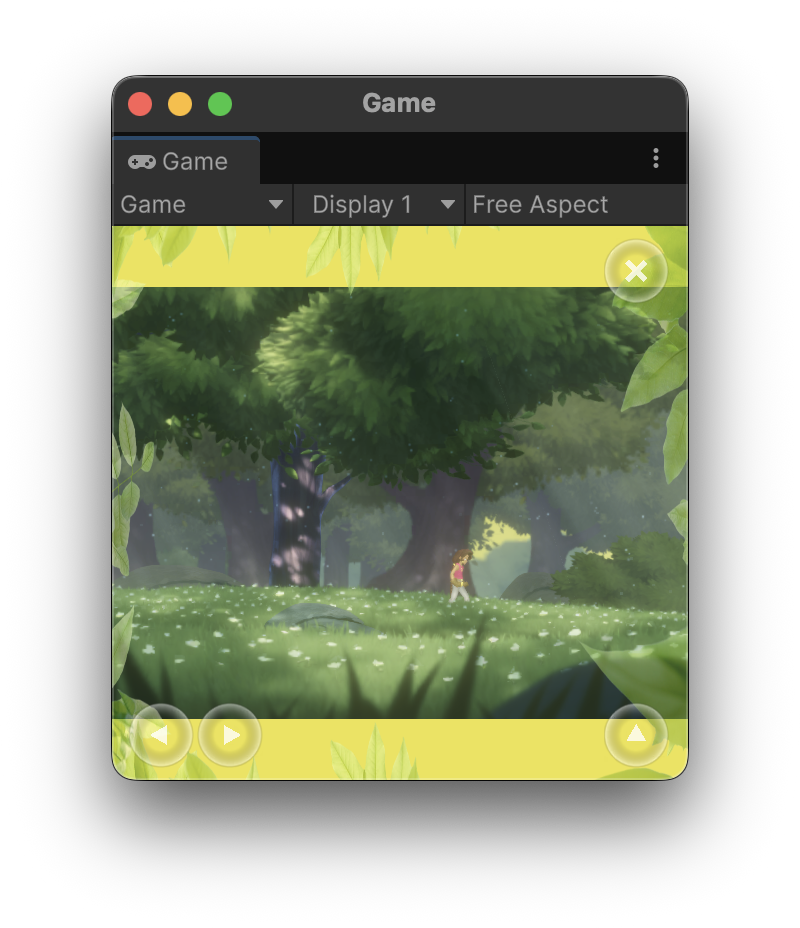
将 HUD 和界面元素一直锚定到屏幕的安全边缘:避开刘海屏,但尽可能将虚拟控件、生命值条和迷你地图等互动元素放置在游戏内容区域之外。这样,游戏的互动部分就会使用整个屏幕,而平板电脑和可折叠设备等设备类型的玩家可以舒适地玩游戏,而无需过度伸展手指。
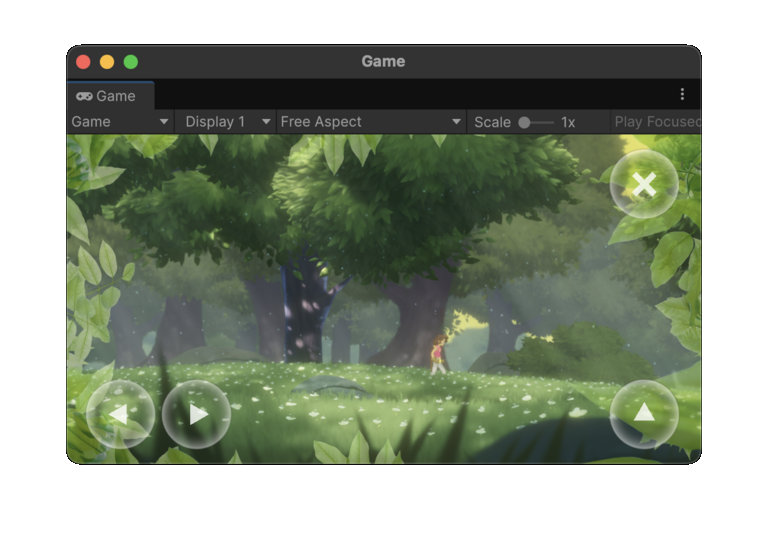
最后,让黑边区域具有适当的主题或叙事性。考虑使用与屏幕调色板或图块集相匹配的边框、用于棋盘游戏或复古游戏的虚拟桌面或屏幕,或扩展的迷你地图和装饰性视觉效果。
在以下示例中,游戏在大多数宽高比下都会以全尺寸渲染。 当宽高比小于 4:3 时,它会渲染一个主题色天空盒,同时继续将控件等界面元素放置在屏幕边缘:
|
|
战争迷雾
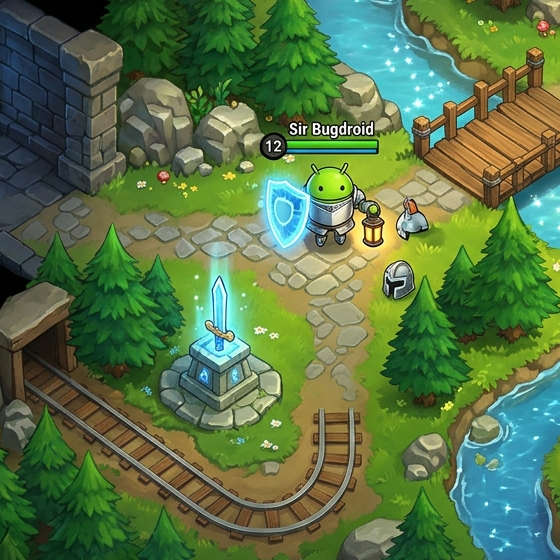
许多游戏开发者担心,玩家可能会通过极端的纵向或横向宽高比获得不公平的优势。例如,在多人在线战斗竞技场游戏 (MOBA) 等竞技游戏中,玩家可能会使用非常垂直的屏幕来深入查看对手的路线。
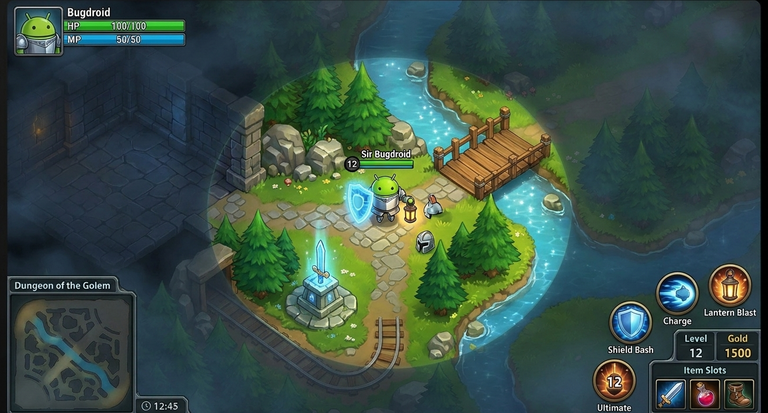
对于俯视角策略和模拟游戏,请考虑渲染战争迷雾:
- 在玩家可以看到几何图形之前,不要渲染几何图形。
- 将玩家角色无法主动看到的几何图形渲染为暗淡状态,不包含任何动态元素。
- 仅渲染玩家角色在故事世界中能主动看到的对手、收藏品和其他动态对象。
如果您将此技术与完全互动的黑边相结合,并将界面渲染到屏幕边缘,玩家就会获得一种既精致又用心的体验,而无需您重新设计关卡结构或团队平衡。
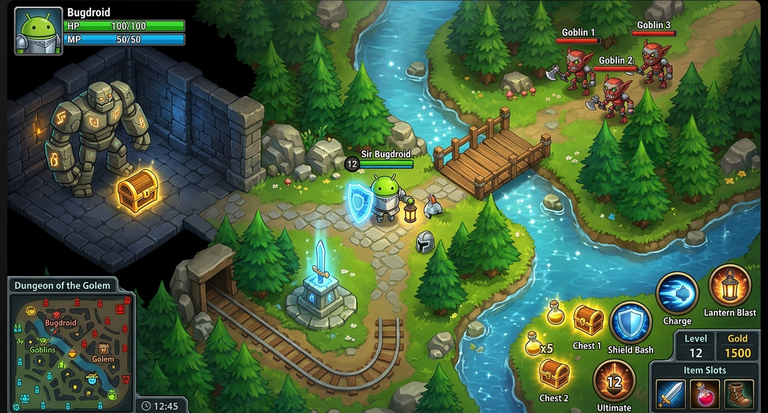
如果将此游戏扩展到更大的屏幕上,而没有战争迷雾,则会显示玩家不应看到的地图部分:
|
|
通过渲染战争迷雾并隐藏敌人和物品等动态元素,您可以在使用游戏可用的完整帧的同时保持游戏公平性:
|
|
|
淡出几何图形
许多游戏(尤其是回合制策略游戏)都使用类似于上一部分中所述的战争迷雾技术,不渲染玩家尚未发现或在特定场景中无法与之互动的几何图形。
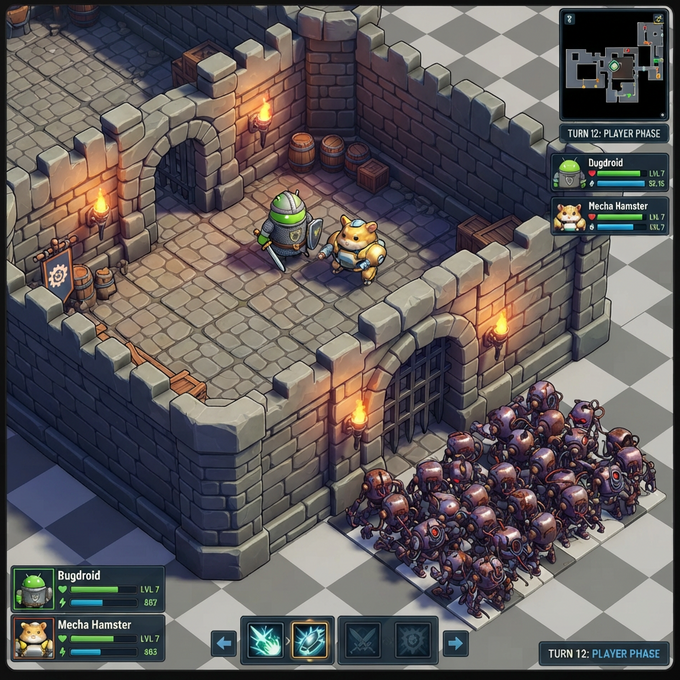
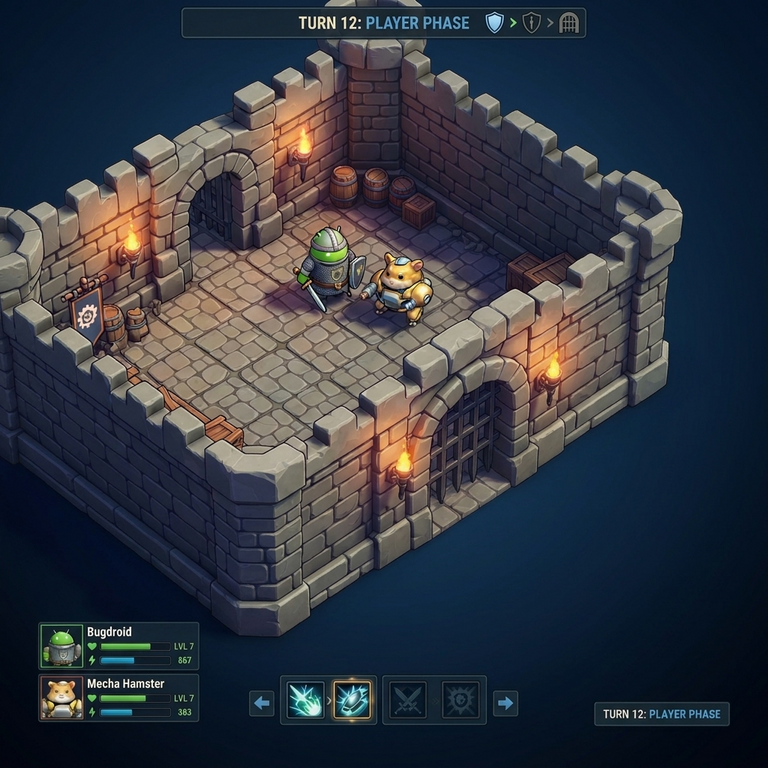
如果扩大视野范围会显示玩家不应看到的场景或影片部分,则以简洁的设计方式遮盖场景的某些部分,可以达到与黑边相同的实际效果,而不会让人感觉有固定的静态边框。
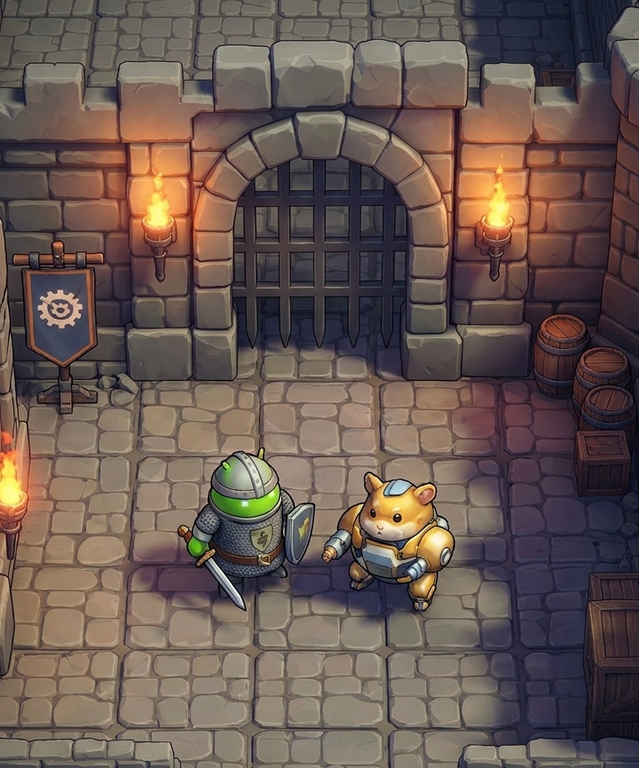
在以下示例中,将游戏画面扩展到更大的宽高比后,城堡墙外出现了一群僵尸:
|
|
相反,您可以省略渲染当前游戏区域边界之外的关卡几何图形:
|
|
|
叙事边界
在沉浸式 3D 游戏中,扩大视野范围可能会在第一人称或第三人称多人游戏中带来竞争优势,或在固定场景游戏中揭示未设计的区域。因此,请考虑在游戏中构建叙事性元素来限制视野范围,而不是依赖矩形黑边。例如:
- 汽车或飞机等交通工具的内部驾驶舱
- 头盔内部
- 表示玩家视野边缘的晕影
界面和 HUD 元素仍应延伸到屏幕边缘或融入到叙事边界中,最好能让它们动态变化。 这些叙事元素还可以帮助有晕动症的玩家(尤其是在 XR 设备上),除了帮助缓解新宽高比的复杂性之外,还提供无障碍辅助功能。
避免在非交互式静态场景内的表面上呈现游戏。 虽然这种方法比渲染黑边和柱状黑边要好,但玩家很快就会注意到静态边框,如果他们最喜欢的游戏在非手机设备上渲染到手机大小的屏幕区域,他们可能会感到沮丧。
|
在此示例中,专为标准手机屏幕设计的游戏在模拟电视中呈现,并配有拟物化游戏手柄,以适应可折叠设备内部屏幕上常见的更接近正方形的宽高比: 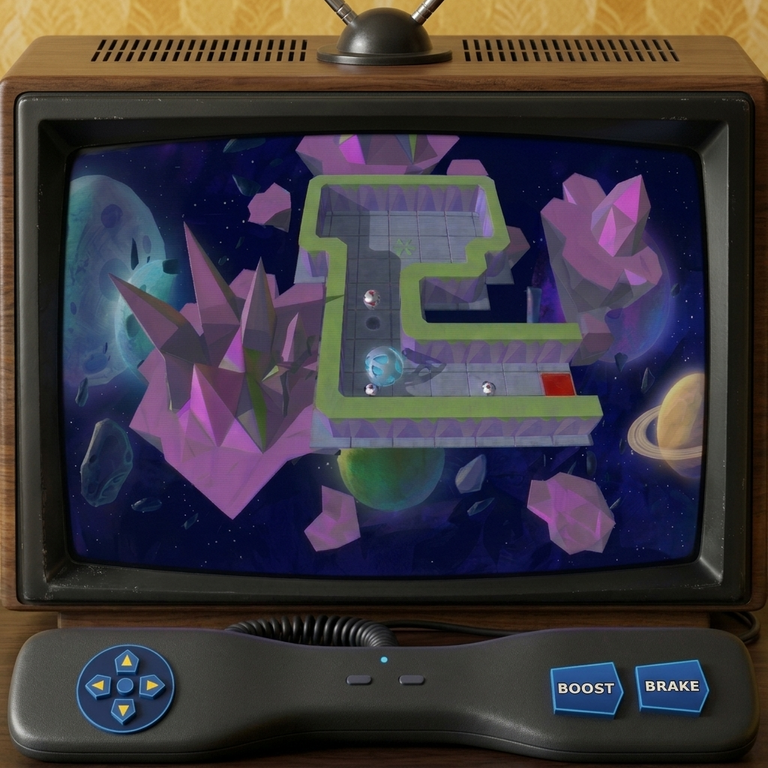
|
出于竞技公平性或设计方面的考虑,某些 3D 游戏可能需要限制视野范围。最好使用驾驶舱、头盔或其他叙事性隐喻来限制视野范围,而不是使用黑边: 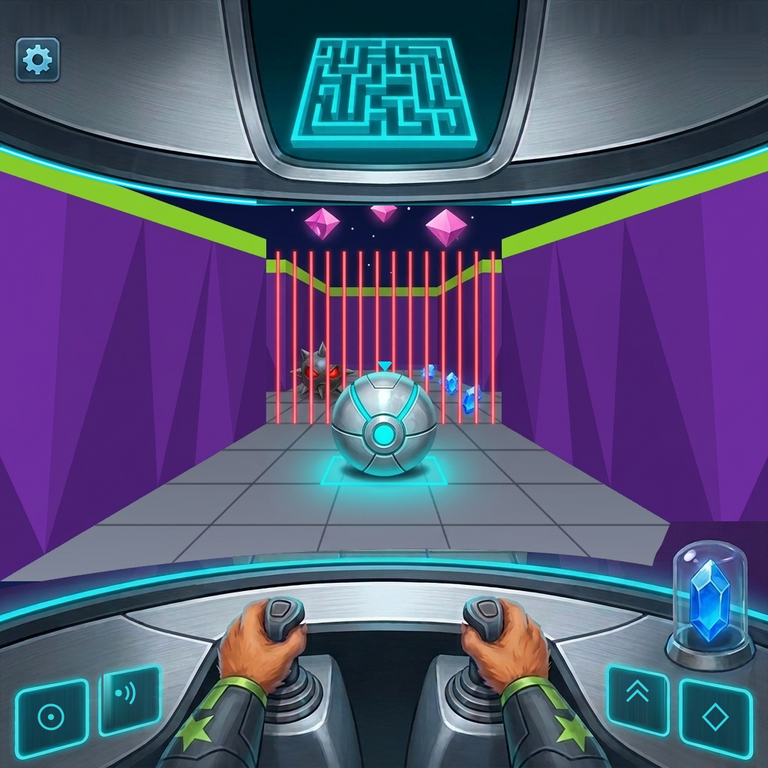
|