

מומלץ להשתמש ב-PgsGamesSignInClient כדי לאמת שחקנים ולהעביר את הזהות שלהם בצורה מאובטחת לשרת העורפי. כך המשחק יכול לאחזר בצורה מאובטחת את זהות השחקן ונתונים אחרים בלי להיחשף לשיבוש פוטנציאלי בזמן שהנתונים עוברים דרך המכשיר.
אחרי שהשחקן מאומת בהצלחה, אפשר לבקש קוד מיוחד לשימוש חד-פעמי (שנקרא קוד הרשאה לשרת) מ-Play Games Services v2 Native SDK (בטא), שהלקוח מעביר לשרת. לאחר מכן, בשרת, מחליפים את קוד האימות של השרת בטוקן OAuth 2.0 שהשרת יכול להשתמש בו כדי לבצע קריאות ל-Google Play Games Services API.
הנחיות נוספות להוספת אימות במשחקים זמינות במאמר בנושא אימות פלטפורמה.
כדי לגשת למסמכים במצב אופליין:
- ב-Google Play Console: יוצרים פרטי כניסה לשרת גיימינג. סוג לקוח ה-OAuth של פרטי הכניסה יהיה 'אינטרנט'.
- באפליקציית Android: כחלק מאימות הפלטפורמה, מבקשים קוד הרשאה שרת עבור פרטי הכניסה של השרת, ומעבירים אותו לשרת. אפליקציית
PgsGamesSignInClientיכולה לבקש שלושה היקפי הרשאות של OAuth 2.0 כשהיא מבקשת גישה בצד השרת לממשקי אינטרנט של Play Games Services. ההיקפים האופציונליים הםPGS_AUTH_SCOPE_EMAIL,PGS_AUTH_SCOPE_PROFILEו-PGS_AUTH_SCOPE_OPENID. שני היקפי ברירת המחדל הםDRIVE_APPFOLDERו-GAMES_LITE. - בשרת הגיימינג: מחליפים את קוד האימות של השרת בטוקן גישה ל-OAuth באמצעות שירותי האימות של Google, ואז משתמשים בו כדי לקרוא לממשקי ה-API של REST של Play Games Services.
לפני שמתחילים
קודם צריך להוסיף את המשחק ב-Google Play Console, כמו שמתואר במאמר הגדרה של Google Play Games Services למשחק.
יצירת אפליקציית אינטרנט בצד השרת
שירותי המשחקים של Google Play לא מספקים תמיכה בקצה העורפי למשחקי אינטרנט. עם זאת, הם מספקים תמיכה בשרת בקצה העורפי לשרת של משחק Android.
כדי להשתמש בממשקי ה-API בארכיטקטורת REST של Google Play Games Services באפליקציה מצד השרת, פועלים לפי השלבים הבאים:
- ב-Google Play Console, בוחרים משחק.
- עוברים אל Play Games Services > הגדרה וניהול > הגדרות.
- לוחצים על הוספת פרטי כניסה כדי לעבור אל הדף להוספת פרטי כניסה. בוחרים באפשרות שרת גיימינג כסוג פרטי הכניסה וממשיכים אל הקטע הרשאה.
- אם לשרת הגיימינג שלכם כבר יש מזהה לקוח OAuth, בוחרים אותו מהתפריט הנפתח. אחרי ששומרים את השינויים, עוברים אל הקטע הבא.
- אם אין לכם מזהה לקוח OAuth קיים לשרת גיימינג, אתם יכולים ליצור אחד.
- לוחצים על Create OAuth client (יצירת לקוח OAuth) ועוקבים אחרי ההוראות במאמר יצירת מזהה לקוח OAuth.
- תועברו לדף יצירת מזהה לקוח OAuth ב-Google Cloud Platform עבור הפרויקט שמשויך למשחק.
- ממלאים את הטופס שבדף ולוחצים על 'יצירה'. חשוב להגדיר את סוג האפליקציה כ'אפליקציית אינטרנט'.
- חוזרים לקטע Authorization בדף Add credential, בוחרים את לקוח ה-OAuth החדש שנוצר ושומרים את השינויים.
קבלת קוד האימות לשרת
כדי לאחזר קוד הרשאה לשרת שהמשחק יכול להשתמש בו בשביל טוקנים של גישה בשרת הבק-אנד:
- שיחה אל
PgsGamesSignInClient_requestServerSideAccessמהלקוח.- חשוב לוודא שאתם משתמשים במזהה הלקוח ב-OAuth שרשום עבור שרת המשחק ולא במזהה הלקוח ב-OAuth של אפליקציה ל-Android.
- (אופציונלי) אם שרת הגיימינג שלכם דורש גישה אופליין (גישה לטווח ארוך באמצעות טוקן רענון) ל-Play Games Services, אתם יכולים להגדיר את הפרמטר
force_refresh_tokenכ-true.
(אופציונלי) כחלק מהאימות, משתמשים חדשים צריכים לראות מסך הסכמה יחיד להיקפי הרשאות נוספים. לאחר אישור ההסכמה, צריך להגדיר את הפרמטר
PgsAuthScopescopesעם היקפי ההרשאותPGS_AUTH_SCOPE_EMAIL,PGS_AUTH_SCOPE_PROFILEו-PGS_AUTH_SCOPE_OPENIDשל OAuth. אם המשתמשים דוחים את בקשת ההסכמה, רק שני היקפי ברירת המחדלDRIVE_APPFOLDERו-GAMES_LITEנשלחים אל ה-Backend.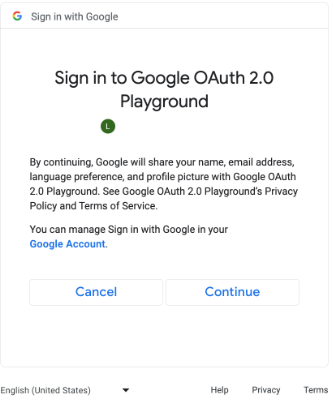
מסך הסכמה להיקפי הרשאות נוספים של OAuth. (לוחצים כדי להגדיל). // #include "google/games/pgs_games_sign_in_client.h" // 1. Define the Callback // This function is called when the server-side access request completes. // It provides the authorization code (on success) or an error (on failure). void OnServerSideAccessCallback(void* context, PgsError error, const char* serverAuthCode) { if (error == PgsError_Success) { if (serverAuthCode != nullptr) { __android_log_print(ANDROID_LOG_INFO, "Games", "Received Server Auth Code: %s", serverAuthCode); // Send 'serverAuthCode' to your backend server immediately. // Your server will exchange this code for an OAuth access token. } } else { __android_log_print(ANDROID_LOG_ERROR, "Games", "Failed to get server auth code. Error: %d", error); } } // 2. Define the Wrapper Function void RequestServerAccess(PgsGamesSignInClient* signInClient) { if (signInClient == nullptr) { return; } // This must match the "Web client ID" from your Google Cloud Console // (linked to your Play Console Game Server Credential). const char* SERVER_CLIENT_ID = "xxxx"; // Set to 'true' if your server needs a Refresh Token (long-lived access). // Set to 'false' if you only need an Access Token (short-lived). bool forceRefreshToken = false; // Call the API PgsGamesSignInClient_requestServerSideAccess( signInClient, SERVER_CLIENT_ID, forceRefreshToken, OnServerSideAccessCallback, // The callback defined nullptr // User context (optional, passed to callback) ); } // 3. Example Usage void TriggerSignInProcess(PgsGamesClient* gamesClient) { // Obtain the Sign-In Client from the main Games Client PgsGamesSignInClient* signInClient = PgsGamesClient_getSignInClient(gamesClient); RequestServerAccess(signInClient); }
שולחים את טוקן קוד ההרשאה של OAuth לשרת הבק-אנד כדי להמיר אותו, לאמת את מזהה השחקן מול ממשקי ה-API של Play Games Services בארכיטקטורת REST, ולאחר מכן לאמת אותו במשחק.
שליחת קוד האימות לשרת
שולחים את קוד האימות של השרת לשרת הבק-אנד כדי להמיר אותו לטוקן גישה ולטוקן רענון. משתמשים בטוקן הגישה כדי לקרוא ל-Play Games Services API בשם השחקן, ואם רוצים, מאחסנים את טוקן הרענון כדי לקבל טוקן גישה חדש כשפג התוקף של טוקן הגישה.
מידע נוסף על אופן הפעולה של מזהי שחקנים זמין במאמר מזהי שחקנים מהדור הבא.
בקטע הקוד הבא אפשר לראות איך מטמיעים את הקוד בצד השרת בשפת התכנות C++ כדי להחליף את קוד האימות של השרת באסימוני גישה.
Java
/**
 * Exchanges the authcode for an access token credential. The credential
 * is associated with the given player.
 *
 * @param authCode - the non-null authcode passed from the client.
 * @param player   - the player object which the given authcode is
 *                 associated with.
 * @return the HTTP response code indicating the outcome of the exchange.
 */
private int exchangeAuthCode(String authCode, Player player) {
try {

    // The client_secret.json file is downloaded from the Google Cloud
    // console. This is used to identify your web application. The
    // contents of this file shouldn't be shared.

    File secretFile = new File("client_secret.json");

    // If we don't have the file, we can't access any APIs, so return
    // an error.
    if (!secretFile.exists()) {
        log("Secret file : " + secretFile
                .getAbsolutePath() + "  does not exist!");
        return HttpServletResponse.SC_FORBIDDEN;
    }

    GoogleClientSecrets clientSecrets = GoogleClientSecrets.load(
            JacksonFactory.getDefaultInstance(), new
            FileReader(secretFile));

    // Extract the application ID of the game from the client ID.
    String applicationId = extractApplicationId(clientSecrets
            .getDetails().getClientId());

    GoogleTokenResponse tokenResponse =
            new GoogleAuthorizationCodeTokenRequest(
            HTTPTransport,
            JacksonFactory.getDefaultInstance(),
            "https://oauth2.googleapis.com/token",
            clientSecrets.getDetails().getClientId(),
            clientSecrets.getDetails().getClientSecret(),
            authCode,
            "")
            .execute();

    TokenVerifier(tokenResponse);

    log("hasRefresh == " + (tokenResponse.getRefreshToken() != null));
    log("Exchanging authCode: " + authCode + " for token");
    Credential credential = new Credential
            .Builder(BearerToken.authorizationHeaderAccessMethod())
            .setJsonFactory(JacksonFactory.getDefaultInstance())
            .setTransport(HTTPTransport)
            .setTokenServerEncodedUrl("https://www.googleapis.com/oauth2/v4/token")
            .setClientAuthentication(new HttpExecuteInterceptor() {
                @Override
                public void intercept(HttpRequest request)
                        throws IOException {
                        }
            })
            .build()
            .setFromTokenResponse(tokenResponse);

    player.setCredential(credential);

    // Now that we have a credential, we can access the Games API.
    PlayGamesAPI api = new PlayGamesAPI(player, applicationId,
            HTTPTransport, JacksonFactory.getDefaultInstance());

    // Call the verify method, which checks that the access token has
    // access to the Games API, and that the Player ID used by the
    // client matches the playerId associated with the accessToken.
    boolean ok = api.verifyPlayer();

    // Call a Games API on the server.
    if (ok) {
        ok = api.updatePlayerInfo();
        if (ok) {
            // persist the player.
            savePlayer(api.getPlayer());
        }
    }

    return ok ? HttpServletResponse.SC_OK :
            HttpServletResponse.SC_INTERNAL_SERVER_ERROR;

  } catch (IOException e) {
    e.printStackTrace();
  }
  return HttpServletResponse.SC_INTERNAL_SERVER_ERROR;
}
אפשר לאחזר את היקפי ההרשאות של OAuth באמצעות ספריות הלקוח של Google API ב-Java או ב-Python כדי לקבל את אובייקט GoogleIdTokenVerifier. בקטע הקוד הבא מוצגת ההטמעה בשפת התכנות Java.
Java
import com.google.api.client.googleapis.auth.oauth2.GoogleIdToken;
import com.google.api.client.googleapis.auth.oauth2.GoogleIdToken.Payload;
import com.google.api.client.googleapis.auth.oauth2.GoogleIdTokenVerifier;

/**
 * Gets the GoogleIdTokenVerifier object and additional OAuth scopes.
 * If additional OAuth scopes are not requested, the idToken will be null.
 *
 * @param tokenResponse - the tokenResponse passed from the exchangeAuthCode
 *                        function.
 *
 **/

void TokenVerifier(GoogleTokenResponse tokenResponse) {

    string idTokenString = tokenResponse.getIdToken();

    GoogleIdTokenVerifier verifier = new GoogleIdTokenVerifier.Builder(transport, jsonFactory)
        // Specify the WEB_CLIENT_ID of the app that accesses the backend:
        .setAudience(Collections.singletonList(WEB_CLIENT_ID))
        // Or, if multiple clients access the backend:
        //.setAudience(Arrays.asList(WEB_CLIENT_ID_1, WEB_CLIENT_ID_2, WEB_CLIENT_ID_3))
        .build();

    GoogleIdToken idToken = verifier.verify(idTokenString);

    // The idToken can be null if additional OAuth scopes are not requested.
    if (idToken != null) {
        Payload payload = idToken.getPayload();

    // Print user identifier
    String userId = payload.getSubject();
    System.out.println("User ID: " + userId);

    // Get profile information from payload
    String email = payload.getEmail();
    boolean emailVerified = Boolean.valueOf(payload.getEmailVerified());
    String name = (String) payload.get("name");
    String pictureUrl = (String) payload.get("picture");
    String locale = (String) payload.get("locale");
    String familyName = (String) payload.get("family_name");
    String givenName = (String) payload.get("given_name");

    // This ID is unique to each Google Account, making it suitable for use as
    // a primary key during account lookup. Email is not a good choice because
    // it can be changed by the user.
    String sub = payload.getSubject();

    // Use or store profile information
    // ...

    } else {
      System.out.println("Invalid ID token.");
    }
}
ביצוע קריאות ל-REST API מהשרת
במאמר ממשקי REST API לשירותי Google Play Games מפורט תיאור מלא של קריאות ה-API שזמינות.
דוגמאות לקריאות ל-API בארכיטקטורת REST שעשויות להיות שימושיות:
שחקן
רוצים לקבל את האימות עם מזהה השחקן ונתוני הפרופיל? צריך להתקשר אל Players.get עם 'me' כמזהה.
הישגים
פרטים נוספים זמינים במדריך בנושא הישגים.
כדי לקבל רשימה של ההישגים הנוכחיים, קוראים ל-AchievementDefinitions.list.
אפשר לשלב את זה עם קריאה ל-Achievements.list כדי לגלות אילו הישגים השחקן פתח.
כדי להעניק הישג לשחקן, צריך לבצע קריאה ל-method Achievements.unlock.
כדי לדווח על התקדמות בהשגת הישג ולבדוק אם השחקן השיג אותו, צריך לבצע קריאה ל-method Achievements.increment.
אם אתם מנפים באגים במשחק שלא הגיע לשלב הייצור, אתם יכולים להפעיל את Achievements.reset או את Achievements.resetAll מתוך Management API כדי לאפס את ההישגים למצב המקורי שלהם.