

หน้านี้อธิบายวิธีใช้ Recall API ภายในเกม โดยจะอธิบายการตั้งค่าเซิร์ฟเวอร์เกมและไคลเอ็นต์เพื่อรองรับ API ก่อน จากนั้นจึงอธิบายวิธีจัดเก็บและเรียกโทเค็น
การตั้งค่าเซิร์ฟเวอร์เกม
ตั้งค่าเซิร์ฟเวอร์เกมเพื่อทำการเรียก Recall API ไปยังเซิร์ฟเวอร์ของ Google
1. ตั้งค่าโปรเจ็กต์บริการเกมของ Play
หากยังไม่ได้ตั้งค่า ให้ทำตามวิธีการในหัวข้อตั้งค่าบริการเกมของ Google Play
2. ตั้งค่าบัญชีบริการสำหรับเกม
ทำตามวิธีการสร้างบัญชีบริการ เมื่อเสร็จแล้ว คุณควรมีไฟล์ JSON ที่มีข้อมูลเข้าสู่ระบบของบัญชีบริการ
3. ดาวน์โหลดไลบรารี Java ฝั่งเซิร์ฟเวอร์สำหรับ PlayGamesServices
ดาวน์โหลดไลบรารี google-api-services-games แล้วอัปโหลดไปยัง เซิร์ฟเวอร์
4. เตรียมข้อมูลเข้าสู่ระบบสำหรับการเรียก Recall API
ดูข้อมูลเพิ่มเติมได้ที่การเตรียมตัวสำหรับการเรียก API ที่ได้รับอนุญาต
import com.google.api.client.googleapis.auth.oauth2.GoogleCredential;
import com.google.api.services.games.Games;
import com.google.api.services.games.GamesScopes;

// ...

GoogleCredential credential =
  GoogleCredential.fromStream(new FileInputStream("<credentials>.json"))
    .createScoped(Collections.singleton(GamesScopes.ANDROIDPUBLISHER));

Games gamesApi =
    new Games.Builder(httpTransport, JSON_FACTORY, credential).build();
การตั้งค่าไคลเอ็นต์เกม
ตั้งค่าไคลเอ็นต์เกมเพื่อเรียกข้อมูลรหัสเซสชัน Recall ที่เซิร์ฟเวอร์ของเราใช้ในการสื่อสารกับเซิร์ฟเวอร์ของ Google
Java SDK
ตั้งค่า Java SDK ภายในไคลเอ็นต์ และตรวจสอบว่าได้รวม
com.google.android.gms:play-services-games-v2:19.0.0
และ com.google.android.gms:play-services-tasks:18.0.2 หรือเวอร์ชันที่ใหม่กว่าไว้ใน
ไฟล์ Gradle
หากต้องการสื่อสารกับเซิร์ฟเวอร์ของ Google ด้วยข้อมูลที่ถูกต้อง คุณต้องขอรหัสเซสชัน Recall จาก Client SDK แล้วส่งรหัสดังกล่าวไปยังเซิร์ฟเวอร์ของเกม
Kotlin
PlayGames.getRecallClient(getActivity())
                .requestRecallAccess()
                .addOnSuccessListener { recallAccess -> val recallSessionId: String = recallAccess.getSessionId() }
                // Send the recallSessionId to your game server
Java
PlayGames.getRecallClient(getActivity())
  .requestRecallAccess()
  .addOnSuccessListener(
    recallAccess -> {
      String recallSessionId = recallAccess.getSessionId();
      // Send the recallSessionId to your game server
    });
Unity SDK
หากยังไม่ได้ตั้งค่า ให้ตั้งค่า Unity SDK ภายในไคลเอ็นต์
หากต้องการสื่อสารกับเซิร์ฟเวอร์ของ Google ด้วยข้อมูลที่ถูกต้อง คุณต้องขอรหัสเซสชัน Recall จาก Client SDK แล้วส่งรหัสดังกล่าวไปยังเซิร์ฟเวอร์ของเกม
PlayGamesPlatform.Instance.RequestRecallAccess(
    recallAccess => {
        string recallSessionId = recallAccess.sessionId;
        // Send the recallSessionId to your game server
    });
v2 Native SDK (เบต้า)
หากยังไม่ได้ตั้งค่า ให้เริ่มต้นใช้งานบริการเกมของ Play สำหรับ C และ C++
// Include the following headers

#include "play_games.h"
#include "recall_client.h"
#include "pgs_status_code.h"
// Request Recall Access
// Initializes the Play Games Services v2 Native SDK (beta).
Pgs_initialize(javaVM, activity);

//Creating Recall Client
PgsRecallClient* pgs_recall_client =
      PgsRecallClient_create(activity);

// RequestRecallAccess Function
PgsRecallClient_requestRecallAccess(
    pgs_recall_client,

    // This is your callback function defined as an inline lambda
    [](PgsStatusCode status_code, char* session_id, user_data) {

        if (status_code == PGS_STATUS_SUCCESS) {
            // Recall Session Id Fetched Successfully
        } else {
            // Fetching Recall Session Id Failed
            // Handle error based on status_code.
            // Examples:
            // PGS_STATUS_NETWORK_ERROR: Check internet connection.
            // PGS_STATUS_INTERNAL_ERROR: An unexpected error occurred.
        }

        // Clean up the client instance passed as user_data
        PgsRecallClient* client = static_cast<PgsRecallClient*>(user_data);
        if (client != nullptr) {
            PgsRecallClient_destroy(client);
        }
    },

    user_data // Data to pass to the callback
);

// Shuts down the Play Games Services v2 Native SDK (beta).
Pgs_destroy()
ใช้ Recall API ภายในเซิร์ฟเวอร์เกม
หลังจากกำหนดค่าเซิร์ฟเวอร์และไคลเอ็นต์แล้ว คุณสามารถส่ง recallSessionID จากไคลเอ็นต์เกมไปยังเซิร์ฟเวอร์เกม และทำตามคำแนะนำต่อไปนี้เพื่อเริ่มใช้ Java API ในการจัดเก็บ เรียก หรือลบโทเค็น Recall ฝั่งเซิร์ฟเวอร์
จัดเก็บโทเค็น
บัญชีผู้เล่นใน Google Play Games Recall API ประกอบด้วยข้อมูล 2 ส่วน ได้แก่
- เพอร์โซนา ซึ่งทำหน้าที่เป็นตัวระบุที่เสถียรสำหรับบัญชีในเกม
- โทเค็น ซึ่งทำหน้าที่เป็นคีย์ในการลงชื่อเข้าใช้บัญชีของผู้เล่นอย่างปลอดภัย
คุณจัดเก็บเพอร์โซนาและโทเค็นของผู้ใช้ได้โดยใช้ออบเจ็กต์ LinkPersonaRequest ใช้ GoogleCredential เพื่อเรียก Google APIs (ดูบริบทได้ที่ การเรียก Google
APIs) เพอร์โซนามีข้อจำกัดด้านจำนวนรายการแบบ 1:1 กล่าวคือ โปรไฟล์ PGS
จะมีเพอร์โซนาได้เพียงรายการเดียว และเพอร์โซนาจะเป็นของโปรไฟล์ PGS
ได้เพียงโปรไฟล์เดียว ตั้งค่านโยบายการแก้ปัญหาลิงก์ที่ขัดแย้งกันเพื่อกำหนด
วิธีแก้ปัญหาการละเมิดข้อจำกัดด้านจำนวนรายการแบบ 1:1
ตั้งเวลาหมดอายุของโทเค็น (ไม่บังคับ) ใช้ SetTtl() กับออบเจ็กต์
Durations เพื่อตั้งค่า Time to Live หรือระบุเวลาหมดอายุที่แน่นอน
ด้วย setExpireTime()
คุณต้องเข้ารหัสเพอร์โซนาและโทเค็นเกม และข้อมูลดังกล่าวต้องไม่มีข้อมูลส่วนบุคคลที่ระบุตัวบุคคลนั้นได้ สตริงเพอร์โซนาและโทเค็นต้องมีความยาวไม่เกิน 256 อักขระ
import com.google.api.services.games.Games.Recall.LinkPersona;
import com.google.api.services.games.model.LinkPersonaRequest;
import com.google.api.services.games.model.LinkPersonaResponse;
import com.google.protobuf.util.Durations;

// ...

Games gamesApi =
    new Games.Builder(httpTransport, JSON_FACTORY, credential).build();

String recallSessionId = ... // recallSessionID from game client
String persona = ... // encrypted opaque string, stable for in-game account
String token = ... // encrypted opaque string encoding the progress line

LinkPersonaRequest linkPersonaRequest =
  LinkPersonaRequest.newBuilder()
    .setSessionId(recallSessionId)
    .setPersona(persona)
    .setToken(token)
    .setCardinalityConstraint(ONE_PERSONA_TO_ONE_PLAYER)
    .setConflictingLinksResolutionPolicy(CREATE_NEW_LINK)
    .setTtl(Durations.fromDays(7)) // Optionally set TTL for token
    .build();

LinkPersonaResponse linkPersonaResponse =
  gamesApi.recall().linkPersona(linkPersonaRequest).execute();

if (linkPersonaResponse.getState() == LINK_CREATED) {
  // success
}
เรียกโทเค็น
คุณเรียกโทเค็นได้ 3 วิธีตามความต้องการของเกม โดยสามารถขอข้อมูลต่อไปนี้ได้
- โทเค็นที่เชื่อมโยงกับเกมปัจจุบัน ซึ่งรวมถึงโทเค็น Recall ที่กำหนดขอบเขตเป็นเกม
- โทเค็นล่าสุดที่จัดเก็บไว้ในเกมทั้งหมดที่เป็นของบัญชีนักพัฒนาแอป
- โทเค็น Recall ทั้งหมดที่เชื่อมโยงกับเกมแต่ละเกมจากรายการเกมที่เป็นของบัญชีนักพัฒนาแอป
โทเค็น Recall ที่กำหนดขอบเขตเป็นเกม
หากต้องการเรียกโทเค็น Recall จากเกมปัจจุบัน ให้รับ recallSessionId จากไคลเอ็นต์แล้วส่งไปยัง retrieveTokens API
import com.google.api.services.games.Games;
import com.google.api.services.games.model.RetrievePlayerTokensResponse;
import com.google.api.services.games.model.RecallToken;

// ...

String recallSessionId = ... // recallSessionID from game client

RetrievePlayerTokensResponse retrievePlayerTokensResponse =
  gamesApi.recall().retrieveTokens(recallSessionId).execute();

for (RecallToken recallToken : retrievePlayerTokensResponse.getTokens()) {
  String token recallToken.getToken();
  // Same string as was written in LinkPersona call
  // decrypt and recover in-game account
}
โทเค็นเรียกคืนข้อมูลล่าสุดในเกมทั้งหมดที่เป็นของบัญชีนักพัฒนาแอป
หากต้องการเรียกโทเค็นล่าสุดที่จัดเก็บไว้ในเกมทั้งหมดที่เป็นของบัญชีนักพัฒนาแอปใน Google Play Console คุณต้องรับ recallSessionId จากไคลเอ็นต์แล้วส่งไปยัง lastTokenFromAllDeveloperGames API ดังที่แสดงในข้อมูลโค้ดต่อไปนี้ โดยคุณสามารถตรวจสอบ
รหัสแอปพลิเคชันที่เชื่อมโยงกับโทเค็นนี้ได้ในส่วนหนึ่งของคำตอบ
import com.google.api.services.games.Games;
import com.google.api.services.games.model.RetrieveDeveloperGamesLastPlayerTokenResponse;
import com.google.api.services.games.model.GamePlayerToken;
import com.google.api.services.games.model.RecallToken;

// ...

String recallSessionId = ... // recallSessionID from game client

RetrieveDeveloperGamesLastPlayerTokenResponse response =
        gamesApi.recall().lastTokenFromAllDeveloperGames(recallSessionId)
        .execute();

if (response.hasGamePlayerToken()) {
    GamePlayerToken gamePlayerToken = response.getGamePlayerToken();

    // The ID of the application that the token is associated with.
    String applicationId = gamePlayerToken.getApplicationId();

    // Same string as was written in LinkPersona call.
    RecallToken recallToken = gamePlayerToken.getRecallToken();

    // Decrypt and recover in-game account.
}
โทเค็น Recall ทั้งหมดในรายการเกมที่กำหนดซึ่งเป็นของบัญชีนักพัฒนาแอป
หากต้องการเรียกโทเค็นทั้งหมดที่เชื่อมโยงกับรายการเกมที่เป็นของบัญชีนักพัฒนาแอปใน Google Play Console ให้รับ recallSessionId จากไคลเอ็นต์แล้วส่งไปยัง gamesPlayerTokens API ระบุรายการรหัสแอปพลิเคชัน
import com.google.api.services.games.Games;
import com.google.api.services.games.model.RetrieveGamesPlayerTokensResponse;
import com.google.api.services.games.model.GamePlayerToken;
import com.google.api.services.games.model.RecallToken;

// ...

String recallSessionId = ... // recallSessionID from game client

// Application IDs for which you would like to retrieve the recall tokens.
List<String> applicationIds = ...

RetrieveGamesPlayerTokensResponse response =
gamesApiClient
        .recall()
        .gamesPlayerTokens(recallSessionId)
        .setApplicationIds(applicationIds)
        .execute();

for (GamePlayerToken gamePlayerToken : response.getGamePlayerTokens()) {
    // The ID of the application that the token is associated with.
    String applicationId  = gamePlayerToken.getApplicationId();

    // Same string as was written in LinkPersona call.
    RecallToken recallToken = gamePlayerToken.getRecallToken();

    // Decrypt and recover in-game account.
}
ลบโทเค็นเรียกคืนข้อมูล
หากจำเป็น คุณยังลบโทเค็นเรียกคืนข้อมูลได้ด้วยการเรียกต่อไปนี้
import com.google.api.services.games.Games;
import com.google.api.services.games.model.UnlinkPersonaRequest;
import com.google.api.services.games.model.UnlinkPersonaResponse;

// ...

String recallSessionId = ...
String persona = ...
String token = ...

Games gamesApi =
    new Games.Builder(httpTransport, JSON_FACTORY, credential).build();

UnlinkPersonaRequest unlinkPersonaRequest =
  UnlinkPersonaRequest.newBuilder()
    .setSessionId(recallSessionId)
    .setPersona(persona)
    // .setToken(token) - alternatively set token, but not both
    .build();

UnlinkPersonaResponse unlinkPersonaResponse =
  gamesApi.recall().unlinkPersona(unlinkPersonaRequest).execute();

boolean unlinked = unlinkPersonaResponse.isUnlinked();
เปิดใช้โหมดที่ไม่มีโปรไฟล์
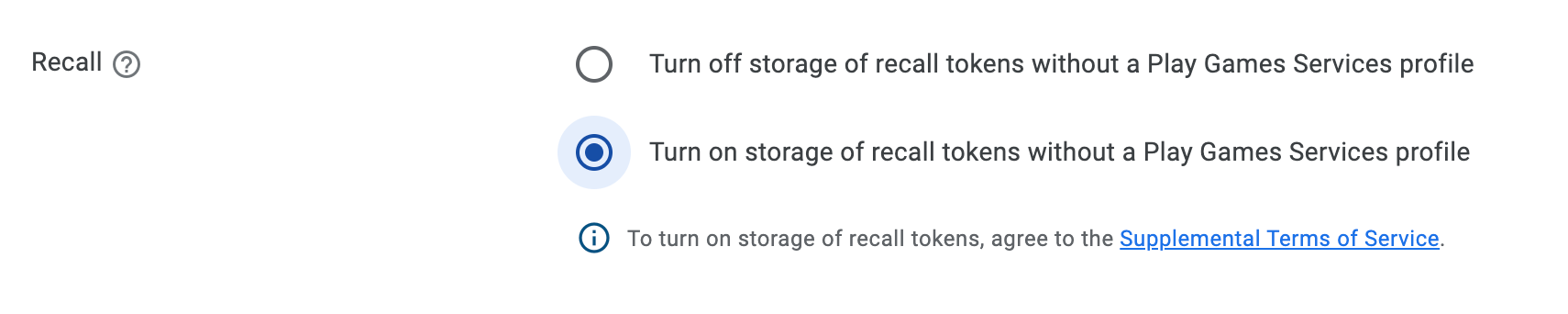
คุณเปิดใช้ฟังก์ชันการทำงานของ Recall API แบบจำกัดสำหรับผู้ใช้ที่ไม่มี โปรไฟล์ PGS ได้โดยทำตามขั้นตอนต่อไปนี้
- เปิดใช้ Recall ที่ไม่มีโปรไฟล์สำหรับโปรเจ็กต์เกม PGS ใน Play Developer
Console.
- อ่านข้อกำหนดเพิ่มเติมที่อธิบายไว้ในส่วนนี้
- เพิ่มแท็กข้อมูลเมตาต่อไปนี้ลงในไฟล์ Manifest ของแอป:
<meta-data
  android:name="com.google.android.gms.games.PROFILELESS_RECALL_ENABLED"
  android:value="true" />
ข้อกำหนดเพิ่มเติม
นอกจากนี้ คุณต้องปฏิบัติตามข้อกำหนดในการให้บริการของบริการเกมของ Play ด้วย หากคุณใช้ Recall API สำหรับผู้ใช้ที่ไม่มีโปรไฟล์ PGS ซึ่งเกี่ยวข้องกับการแชร์ข้อมูลผู้ใช้ปลายทางกับ Google คุณต้องแจ้งให้ผู้ใช้ปลายทางทราบอย่างเหมาะสมซึ่งอธิบายข้อมูลต่อไปนี้ก่อนที่จะแชร์ข้อมูลนี้กับ Google
- วิธีที่คุณแชร์ข้อมูลกับ Google เพื่อเปิดใช้ฟีเจอร์การลิงก์บัญชี Play Games
- การตั้งค่าที่พร้อมใช้งานเพื่อจัดการการแชร์นี้ เช่น ผ่านการตั้งค่า Play Games
- การประมวลผลข้อมูลนี้ภายใต้นโยบายความเป็นส่วนตัวของ Google และ ข้อกำหนดในการขอความยินยอมที่เหมาะสมจากผู้ใช้ปลายทางสำหรับการแชร์นี้ซึ่ง เป็นไปตามข้อกำหนดทางกฎหมายที่เกี่ยวข้องทั้งหมด