

Ti consigliamo di utilizzare PgsGamesSignInClient per autenticare i giocatori e trasmettere in modo sicuro l'identità del giocatore al server di backend. In questo modo, il gioco può recuperare in modo sicuro l'identità del giocatore e altri dati senza essere esposto a potenziali manomissioni durante il passaggio attraverso il dispositivo.
Una volta che il giocatore si è autenticato correttamente, puoi richiedere un codice speciale monouso (chiamato codice di autorizzazione del server) dall'SDK nativo v2 (beta) di Play Games Services, che il client passa al server. Poi, sul server, scambia il codice di autenticazione del server con un token OAuth 2.0 che il server può utilizzare per effettuare chiamate all'API dei servizi per i giochi di Google Play.
Per ulteriori indicazioni sull'aggiunta dell'autenticazione nei giochi, consulta Autenticazione della piattaforma.
I seguenti passaggi sono necessari per l'accesso offline:
- In Google Play Console: crea una credenziale per il server di giochi. Il tipo di client OAuth della credenziale sarà "web".
- Nell'app Android: nell'ambito dell'autenticazione della piattaforma, richiedi un codice di autenticazione del server per la credenziale del server e passalo al server.
PgsGamesSignInClientpuò richiedere tre ambiti OAuth 2.0 quando richiede l'accesso lato server alle API web dei servizi per i giochi di Play. Gli ambiti facoltativi sonoPGS_AUTH_SCOPE_EMAIL,PGS_AUTH_SCOPE_PROFILEePGS_AUTH_SCOPE_OPENID. I due ambiti predefiniti sonoDRIVE_APPFOLDEReGAMES_LITE. - Sul server di giochi: scambia il codice di autenticazione del server con un token di accesso OAuth utilizzando i servizi di autenticazione di Google, quindi utilizzalo per chiamare le API REST dei servizi per i giochi di Play.
Prima di iniziare
Per prima cosa, devi aggiungere il gioco in Google Play Console, come descritto in Configurare i servizi per i giochi di Google Play con il tuo gioco.
Creare un'app web lato server
I servizi per i giochi di Google Play non forniscono il supporto di backend per i giochi web. Tuttavia, forniscono il supporto del server di backend per il server del gioco per Android.
Se vuoi utilizzare le API REST per i servizi per i giochi di Google Play nella tua app lato server, segui questi passaggi:
- In the Google Play Console, seleziona un gioco.
- Vai a Play Games Services > Configurazione e gestione > Configurazione.
- Seleziona Aggiungi credenziale per accedere alla pagina Aggiungi credenziale.
Seleziona Server di giochi come tipo di credenziale e continua nella sezione Autorizzazione.
- Se il server di giochi ha già un ID client OAuth, selezionalo dal menu a discesa. Dopo aver salvato le modifiche, passa a lla sezione successiva.
- Se non hai un ID client OAuth esistente per il server di giochi, puoi crearne uno.
- Fai clic su Crea client OAuth e segui il link Crea ID client OAuth.
- Verrà visualizzata la pagina Crea ID client OAuth di Google Cloud Platform per il progetto associato al tuo gioco.
- Compila il modulo della pagina e fai clic su Crea. Assicurati di impostare il tipo di applicazione su Applicazione web.
- Torna alla sezione Autorizzazione della pagina Aggiungi credenziale, seleziona il client OAuth appena creato e salva le modifiche.
Recuperare il codice di autorizzazione del server
Per recuperare un codice di autorizzazione del server che il gioco può utilizzare per i token di accesso sul server di backend:
- Chiama
PgsGamesSignInClient_requestServerSideAccessdal client.- Assicurati di utilizzare l'ID client OAuth registrato per il server di gioco e non l'ID client OAuth dell'app per Android.
- (Facoltativo) Se il server di gioco richiede l'accesso offline (accesso a lungo termine utilizzando un token di aggiornamento) a Play Games Services, puoi impostare il parametro
force_refresh_tokensu true.
(Facoltativo) Nell'ambito dell'autenticazione, i nuovi utenti dovrebbero visualizzare una singola schermata per il consenso per gli ambiti aggiuntivi. Dopo aver accettato il consenso, imposta il
PgsAuthScopescopesparametro conPGS_AUTH_SCOPE_EMAIL,PGS_AUTH_SCOPE_PROFILEePGS_AUTH_SCOPE_OPENIDambiti OAuth. Se gli utenti rifiutano il consenso, al backend vengono inviati solo i due ambiti predefinitiDRIVE_APPFOLDEReGAMES_LITE.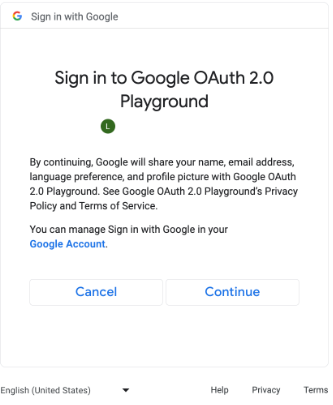
Schermata per il consenso per gli ambiti OAuth aggiuntivi. (fai clic per ingrandire). // #include "google/games/pgs_games_sign_in_client.h" // 1. Define the Callback // This function is called when the server-side access request completes. // It provides the authorization code (on success) or an error (on failure). void OnServerSideAccessCallback(void* context, PgsError error, const char* serverAuthCode) { if (error == PgsError_Success) { if (serverAuthCode != nullptr) { __android_log_print(ANDROID_LOG_INFO, "Games", "Received Server Auth Code: %s", serverAuthCode); // Send 'serverAuthCode' to your backend server immediately. // Your server will exchange this code for an OAuth access token. } } else { __android_log_print(ANDROID_LOG_ERROR, "Games", "Failed to get server auth code. Error: %d", error); } } // 2. Define the Wrapper Function void RequestServerAccess(PgsGamesSignInClient* signInClient) { if (signInClient == nullptr) { return; } // This must match the "Web client ID" from your Google Cloud Console // (linked to your Play Console Game Server Credential). const char* SERVER_CLIENT_ID = "xxxx"; // Set to 'true' if your server needs a Refresh Token (long-lived access). // Set to 'false' if you only need an Access Token (short-lived). bool forceRefreshToken = false; // Call the API PgsGamesSignInClient_requestServerSideAccess( signInClient, SERVER_CLIENT_ID, forceRefreshToken, OnServerSideAccessCallback, // The callback defined nullptr // User context (optional, passed to callback) ); } // 3. Example Usage void TriggerSignInProcess(PgsGamesClient* gamesClient) { // Obtain the Sign-In Client from the main Games Client PgsGamesSignInClient* signInClient = PgsGamesClient_getSignInClient(gamesClient); RequestServerAccess(signInClient); }
Invia il token del codice di autorizzazione OAuth al server di backend in modo che possa essere scambiato, l'ID giocatore verificato rispetto alle API REST di Play Games Services e poi autenticato con il gioco.
Inviare il codice di autorizzazione del server
Invia il codice di autorizzazione del server al server di backend per scambiarlo con i token di accesso e di aggiornamento. Utilizza il token di accesso per chiamare l'API dei servizi per i giochi di Play per conto del giocatore e, facoltativamente, memorizza il token di aggiornamento per acquisire un nuovo token di accesso alla scadenza del token di accesso.
Per saperne di più sul funzionamento degli ID giocatore, vedi ID giocatore di nuova generazione.
Il seguente snippet di codice mostra come potresti implementare il codice lato server nel linguaggio di programmazione C++ per scambiare il codice di autorizzazione del server con i token di accesso.
Java
/**
 * Exchanges the authcode for an access token credential. The credential
 * is associated with the given player.
 *
 * @param authCode - the non-null authcode passed from the client.
 * @param player   - the player object which the given authcode is
 *                 associated with.
 * @return the HTTP response code indicating the outcome of the exchange.
 */
private int exchangeAuthCode(String authCode, Player player) {
try {

    // The client_secret.json file is downloaded from the Google Cloud
    // console. This is used to identify your web application. The
    // contents of this file shouldn't be shared.

    File secretFile = new File("client_secret.json");

    // If we don't have the file, we can't access any APIs, so return
    // an error.
    if (!secretFile.exists()) {
        log("Secret file : " + secretFile
                .getAbsolutePath() + "  does not exist!");
        return HttpServletResponse.SC_FORBIDDEN;
    }

    GoogleClientSecrets clientSecrets = GoogleClientSecrets.load(
            JacksonFactory.getDefaultInstance(), new
            FileReader(secretFile));

    // Extract the application ID of the game from the client ID.
    String applicationId = extractApplicationId(clientSecrets
            .getDetails().getClientId());

    GoogleTokenResponse tokenResponse =
            new GoogleAuthorizationCodeTokenRequest(
            HTTPTransport,
            JacksonFactory.getDefaultInstance(),
            "https://oauth2.googleapis.com/token",
            clientSecrets.getDetails().getClientId(),
            clientSecrets.getDetails().getClientSecret(),
            authCode,
            "")
            .execute();

    TokenVerifier(tokenResponse);

    log("hasRefresh == " + (tokenResponse.getRefreshToken() != null));
    log("Exchanging authCode: " + authCode + " for token");
    Credential credential = new Credential
            .Builder(BearerToken.authorizationHeaderAccessMethod())
            .setJsonFactory(JacksonFactory.getDefaultInstance())
            .setTransport(HTTPTransport)
            .setTokenServerEncodedUrl("https://www.googleapis.com/oauth2/v4/token")
            .setClientAuthentication(new HttpExecuteInterceptor() {
                @Override
                public void intercept(HttpRequest request)
                        throws IOException {
                        }
            })
            .build()
            .setFromTokenResponse(tokenResponse);

    player.setCredential(credential);

    // Now that we have a credential, we can access the Games API.
    PlayGamesAPI api = new PlayGamesAPI(player, applicationId,
            HTTPTransport, JacksonFactory.getDefaultInstance());

    // Call the verify method, which checks that the access token has
    // access to the Games API, and that the Player ID used by the
    // client matches the playerId associated with the accessToken.
    boolean ok = api.verifyPlayer();

    // Call a Games API on the server.
    if (ok) {
        ok = api.updatePlayerInfo();
        if (ok) {
            // persist the player.
            savePlayer(api.getPlayer());
        }
    }

    return ok ? HttpServletResponse.SC_OK :
            HttpServletResponse.SC_INTERNAL_SERVER_ERROR;

  } catch (IOException e) {
    e.printStackTrace();
  }
  return HttpServletResponse.SC_INTERNAL_SERVER_ERROR;
}
Puoi recuperare gli ambiti OAuth utilizzando le
librerie client delle API Google
in Java o Python per ottenere l'oggetto GoogleIdTokenVerifier. Il seguente snippet di codice mostra l'implementazione nel linguaggio di programmazione Java.
Java
import com.google.api.client.googleapis.auth.oauth2.GoogleIdToken;
import com.google.api.client.googleapis.auth.oauth2.GoogleIdToken.Payload;
import com.google.api.client.googleapis.auth.oauth2.GoogleIdTokenVerifier;

/**
 * Gets the GoogleIdTokenVerifier object and additional OAuth scopes.
 * If additional OAuth scopes are not requested, the idToken will be null.
 *
 * @param tokenResponse - the tokenResponse passed from the exchangeAuthCode
 *                        function.
 *
 **/

void TokenVerifier(GoogleTokenResponse tokenResponse) {

    string idTokenString = tokenResponse.getIdToken();

    GoogleIdTokenVerifier verifier = new GoogleIdTokenVerifier.Builder(transport, jsonFactory)
        // Specify the WEB_CLIENT_ID of the app that accesses the backend:
        .setAudience(Collections.singletonList(WEB_CLIENT_ID))
        // Or, if multiple clients access the backend:
        //.setAudience(Arrays.asList(WEB_CLIENT_ID_1, WEB_CLIENT_ID_2, WEB_CLIENT_ID_3))
        .build();

    GoogleIdToken idToken = verifier.verify(idTokenString);

    // The idToken can be null if additional OAuth scopes are not requested.
    if (idToken != null) {
        Payload payload = idToken.getPayload();

    // Print user identifier
    String userId = payload.getSubject();
    System.out.println("User ID: " + userId);

    // Get profile information from payload
    String email = payload.getEmail();
    boolean emailVerified = Boolean.valueOf(payload.getEmailVerified());
    String name = (String) payload.get("name");
    String pictureUrl = (String) payload.get("picture");
    String locale = (String) payload.get("locale");
    String familyName = (String) payload.get("family_name");
    String givenName = (String) payload.get("given_name");

    // This ID is unique to each Google Account, making it suitable for use as
    // a primary key during account lookup. Email is not a good choice because
    // it can be changed by the user.
    String sub = payload.getSubject();

    // Use or store profile information
    // ...

    } else {
      System.out.println("Invalid ID token.");
    }
}
Chiamare le API REST dal server
Per una descrizione completa delle chiamate API disponibili, consulta API REST per i servizi per i giochi di Google Play.
Di seguito sono riportati alcuni esempi di chiamate API REST che potrebbero esserti utili:
Giocatore
Vuoi recuperare l'ID e i dati del profilo del giocatore autenticato? Chiama
Players.get con 'me' come ID.
Obiettivi
Per maggiori dettagli, consulta la guida Obiettivi.
Per recuperare un elenco degli obiettivi attuali, chiama AchievementDefinitions.list.
Combina questa chiamata con una chiamata a Achievements.list per scoprire quali obiettivi ha sbloccato il giocatore.
Chiama Achievements.unlock per sbloccare un obiettivo del giocatore.
Chiama Achievements.increment per segnalare i progressi compiuti per un obiettivo e scoprire se il giocatore lo ha sbloccato.
Se stai eseguendo il debug di un gioco che non ha raggiunto la produzione, puoi chiamare Achievements.reset o Achievements.resetAll dalle API di gestione per ripristinare lo stato originale degli obiettivi.