

本页介绍了如何在游戏中实现 Recall API。其中首先介绍如何设置游戏服务器和客户端以支持该 API,然后说明如何存储和检索令牌。
游戏服务器设置
设置您的游戏服务器,以便对 Google 服务器进行 Recall API 调用。
1. 设置您的 Play 游戏服务项目
如果您尚未完成,请按照设置 Google Play 游戏服务中的说明进行操作。
2. 为游戏设置服务账号
按照创建服务账号中的说明操作。最后,您应该得到一个包含服务账号凭据的 JSON 文件。
3. 下载适用于 PlayGamesServices 的服务器端 Java 库
下载 google-api-services-games 库并将其上传到您的服务器。
4. 准备用于 Recall API 调用的凭据
如需了解更多背景信息,请参阅准备进行已获授权的 API 调用。
import com.google.api.client.googleapis.auth.oauth2.GoogleCredential;
import com.google.api.services.games.Games;
import com.google.api.services.games.GamesScopes;

// ...

GoogleCredential credential =
  GoogleCredential.fromStream(new FileInputStream("<credentials>.json"))
    .createScoped(Collections.singleton(GamesScopes.ANDROIDPUBLISHER));

Games gamesApi =
    new Games.Builder(httpTransport, JSON_FACTORY, credential).build();
游戏客户端设置
设置游戏客户端,以检索我们的服务器用于与 Google 服务器进行通信的 Recall 会话 ID。
Java SDK
在客户端中设置 Java SDK,并确保在 Gradle 文件中包含 com.google.android.gms:play-services-games-v2:19.0.0 和 com.google.android.gms:play-services-tasks:18.0.2 或更高版本。
若要使用正确的信息与 Google 的服务器进行通信,您需向客户端 SDK 请求 Recall 会话 ID,并将该 ID 发送到游戏服务器。
Kotlin
PlayGames.getRecallClient(getActivity())
                .requestRecallAccess()
                .addOnSuccessListener { recallAccess -> val recallSessionId: String = recallAccess.getSessionId() }
                // Send the recallSessionId to your game server
Java
PlayGames.getRecallClient(getActivity())
  .requestRecallAccess()
  .addOnSuccessListener(
    recallAccess -> {
      String recallSessionId = recallAccess.getSessionId();
      // Send the recallSessionId to your game server
    });
Unity SDK
如果您尚未这样做,请在客户端中设置 Unity SDK。
若要使用正确的信息与 Google 的服务器进行通信,您需向客户端 SDK 请求 Recall 会话 ID,并将该 ID 发送到游戏服务器。
PlayGamesPlatform.Instance.RequestRecallAccess(
    recallAccess => {
        string recallSessionId = recallAccess.sessionId;
        // Send the recallSessionId to your game server
    });
v2 原生 SDK(Beta 版)
如果您尚未这样做,请面向 C 和 C++ 的 Play 游戏服务使用入门。
// Include the following headers

#include "play_games.h"
#include "recall_client.h"
#include "pgs_status_code.h"
// Request Recall Access
// Initializes the Play Games Services v2 Native SDK (beta).
Pgs_initialize(javaVM, activity);

//Creating Recall Client
PgsRecallClient* pgs_recall_client =
      PgsRecallClient_create(activity);

// RequestRecallAccess Function
PgsRecallClient_requestRecallAccess(
    pgs_recall_client,

    // This is your callback function defined as an inline lambda
    [](PgsStatusCode status_code, char* session_id, user_data) {

        if (status_code == PGS_STATUS_SUCCESS) {
            // Recall Session Id Fetched Successfully
        } else {
            // Fetching Recall Session Id Failed
            // Handle error based on status_code.
            // Examples:
            // PGS_STATUS_NETWORK_ERROR: Check internet connection.
            // PGS_STATUS_INTERNAL_ERROR: An unexpected error occurred.
        }

        // Clean up the client instance passed as user_data
        PgsRecallClient* client = static_cast<PgsRecallClient*>(user_data);
        if (client != nullptr) {
            PgsRecallClient_destroy(client);
        }
    },

    user_data // Data to pass to the callback
);

// Shuts down the Play Games Services v2 Native SDK (beta).
Pgs_destroy()
在游戏服务器中使用 Recall API
配置服务器和客户端后,您可以将 recallSessionID 从游戏客户端发送到游戏服务器,并按照以下指南开始使用 Java API 来存储、检索或删除 Recall 令牌服务器端。
存储令牌
Google Play 游戏 Recall API 中的玩家账号包含两部分信息:
- 作为游戏内账号的稳定标识符的角色
- 作为安全登录玩家账号的密钥的令牌
您可以使用 LinkPersonaRequest 对象存储用户的角色和令牌。您需要使用 GoogleCredential 来调用 Google API(如需了解上下文,请参阅调用 Google API)。角色具有 1:1 基数限制:一个 PGS 玩家资料只能包含一个角色,而一个角色只能属于一个 PGS 玩家资料。设置冲突链接解决政策,以定义应如何解决 1:1 基数限制的违规问题。
(可选)设置令牌的过期时间。使用 SetTtl() 和 Durations 对象来设置存留时间,或使用 setExpireTime() 提供确切的过期时间。
您必须对角色和游戏令牌进行加密,且它们不能包含个人身份信息。角色和令牌字符串不得超过 256 个字符。
import com.google.api.services.games.Games.Recall.LinkPersona;
import com.google.api.services.games.model.LinkPersonaRequest;
import com.google.api.services.games.model.LinkPersonaResponse;
import com.google.protobuf.util.Durations;

// ...

Games gamesApi =
    new Games.Builder(httpTransport, JSON_FACTORY, credential).build();

String recallSessionId = ... // recallSessionID from game client
String persona = ... // encrypted opaque string, stable for in-game account
String token = ... // encrypted opaque string encoding the progress line

LinkPersonaRequest linkPersonaRequest =
  LinkPersonaRequest.newBuilder()
    .setSessionId(recallSessionId)
    .setPersona(persona)
    .setToken(token)
    .setCardinalityConstraint(ONE_PERSONA_TO_ONE_PLAYER)
    .setConflictingLinksResolutionPolicy(CREATE_NEW_LINK)
    .setTtl(Durations.fromDays(7)) // Optionally set TTL for token
    .build();

LinkPersonaResponse linkPersonaResponse =
  gamesApi.recall().linkPersona(linkPersonaRequest).execute();

if (linkPersonaResponse.getState() == LINK_CREATED) {
  // success
}
检索令牌
您可以根据游戏的需求,通过以下三种方式检索令牌。您可以请求以下内容:
- 与当前游戏关联的令牌,包括游戏范围的召回令牌。
- 开发者账号所拥有的所有游戏中存储的最后一个令牌。
- 给定开发者账号所拥有的游戏列表,与每个游戏关联的所有召回令牌。
游戏范围的召回令牌
如需从当前游戏中检索 Recall 令牌,请从客户端获取 recallSessionId 并将其传递到 retrieveTokens API:
import com.google.api.services.games.Games;
import com.google.api.services.games.model.RetrievePlayerTokensResponse;
import com.google.api.services.games.model.RecallToken;

// ...

String recallSessionId = ... // recallSessionID from game client

RetrievePlayerTokensResponse retrievePlayerTokensResponse =
  gamesApi.recall().retrieveTokens(recallSessionId).execute();

for (RecallToken recallToken : retrievePlayerTokensResponse.getTokens()) {
  String token recallToken.getToken();
  // Same string as was written in LinkPersona call
  // decrypt and recover in-game account
}
开发者账号拥有的所有游戏的最新 Recall 令牌
如需检索 Google Play 管理中心内开发者账号拥有的所有游戏中存储的最新令牌,您需要从客户端获取 recallSessionId 并将其传递到 lastTokenFromAllDeveloperGames API 中,如以下代码段所示。在响应中,您可以检查与此令牌关联的应用 ID。
import com.google.api.services.games.Games;
import com.google.api.services.games.model.RetrieveDeveloperGamesLastPlayerTokenResponse;
import com.google.api.services.games.model.GamePlayerToken;
import com.google.api.services.games.model.RecallToken;

// ...

String recallSessionId = ... // recallSessionID from game client

RetrieveDeveloperGamesLastPlayerTokenResponse response =
        gamesApi.recall().lastTokenFromAllDeveloperGames(recallSessionId)
        .execute();

if (response.hasGamePlayerToken()) {
    GamePlayerToken gamePlayerToken = response.getGamePlayerToken();

    // The ID of the application that the token is associated with.
    String applicationId = gamePlayerToken.getApplicationId();

    // Same string as was written in LinkPersona call.
    RecallToken recallToken = gamePlayerToken.getRecallToken();

    // Decrypt and recover in-game account.
}
开发者账号所拥有的指定游戏列表中的所有召回令牌
如需检索与 Google Play 管理中心内开发者账号所拥有的游戏列表相关联的所有令牌,请从客户端获取 recallSessionId 并将其传递到 gamesPlayerTokens API。提供应用 ID 列表。
import com.google.api.services.games.Games;
import com.google.api.services.games.model.RetrieveGamesPlayerTokensResponse;
import com.google.api.services.games.model.GamePlayerToken;
import com.google.api.services.games.model.RecallToken;

// ...

String recallSessionId = ... // recallSessionID from game client

// Application IDs for which you would like to retrieve the recall tokens.
List<String> applicationIds = ...

RetrieveGamesPlayerTokensResponse response =
gamesApiClient
        .recall()
        .gamesPlayerTokens(recallSessionId)
        .setApplicationIds(applicationIds)
        .execute();

for (GamePlayerToken gamePlayerToken : response.getGamePlayerTokens()) {
    // The ID of the application that the token is associated with.
    String applicationId  = gamePlayerToken.getApplicationId();

    // Same string as was written in LinkPersona call.
    RecallToken recallToken = gamePlayerToken.getRecallToken();

    // Decrypt and recover in-game account.
}
删除 Recall 令牌
如果需要,您还可以通过以下调用删除 Recall 令牌:
import com.google.api.services.games.Games;
import com.google.api.services.games.model.UnlinkPersonaRequest;
import com.google.api.services.games.model.UnlinkPersonaResponse;

// ...

String recallSessionId = ...
String persona = ...
String token = ...

Games gamesApi =
    new Games.Builder(httpTransport, JSON_FACTORY, credential).build();

UnlinkPersonaRequest unlinkPersonaRequest =
  UnlinkPersonaRequest.newBuilder()
    .setSessionId(recallSessionId)
    .setPersona(persona)
    // .setToken(token) - alternatively set token, but not both
    .build();

UnlinkPersonaResponse unlinkPersonaResponse =
  gamesApi.recall().unlinkPersona(unlinkPersonaRequest).execute();

boolean unlinked = unlinkPersonaResponse.isUnlinked();
启用无配置文件模式
您可以按照以下步骤为没有 PGS 资料的用户启用有限的 Recall API 功能:
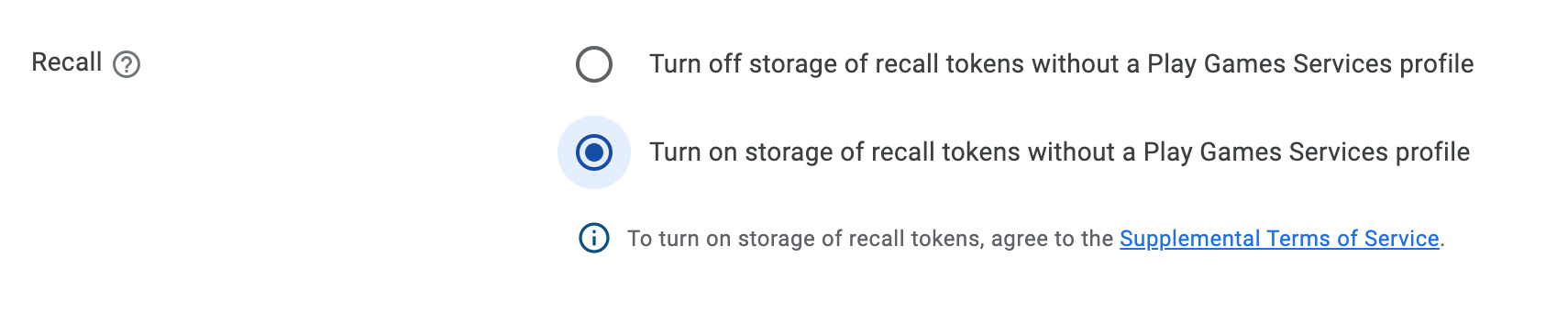
<meta-data
  android:name="com.google.android.gms.games.PROFILELESS_RECALL_ENABLED"
  android:value="true" />
附加条款
您还必须遵守 Play 游戏服务条款。如果您针对没有 PGS 玩家资料的用户使用 Recall API(这涉及与 Google 分享最终用户数据),则必须在与 Google 分享这些数据之前,向最终用户提供适当的通知,其中应说明以下内容:
- 您如何与 Google 共享数据以启用 Play 游戏账号关联功能。
- 用于管理此共享的设置是否可用,例如通过 Play 游戏 设置进行管理。
- 根据 Google 隐私权政策处理这些数据,以及必须征得最终用户的适当同意才能进行此类分享,且所征得的同意必须符合所有适用的法律要求。