This document describes how to use Google Play Games Services achievements in C++ games. This
document assumes you have set up your project as described in Set Up
Google Play Games Services. You can find the achievements API in the
PgsAchievementsClient.
Before you begin
If you haven't already done so, you might find it helpful to review the achievements game concepts.
Before you start to code using the achievements API:
Follow the instructions for installing and setting up your app to use Play Games Services in the Set Up Google Play Games Services guide.
Define the achievements that you want your game to unlock or display, by following the instructions in the Google Play Console guide.
Familiarize yourself with the recommendations described in Quality Checklist.
Get an achievements client
To start using the achievements API, your game must first obtain an
PgsAchievementsClient
object. You can do this by calling the
PgsAchievementsClient_create
method and passing in the activity.
Unlock achievements
To unlock an achievement, call the
PgsAchievementsClient_unlock
method and pass in the PgsAchievementsClient and achievement ID.
The following code snippet shows how your app can unlock achievements:
// Example Usage
void TriggerUnlock(PgsGamesClient* gamesClient) {
    // You must obtain the achievements client from the main games client
    PgsAchievementsClient* achievementsClient = PgsGamesClient_getAchievementsClient(gamesClient);

    // Replace with your actual Achievement ID from the Play Console
    const char* MY_ACHIEVEMENT_ID = "CgkI...sQw";

    UnlockAchievement(achievementsClient, MY_ACHIEVEMENT_ID);
}
If the achievement is of the incremental type (that is, several steps are
required to unlock it), call PgsAchievementsClient_increment
instead.
The following code snippet shows how your app can increment the player's achievement:
void IncrementMyAchievement(PgsAchievementsClient* client,
     const char* achievementId, uint32_t steps) {
    if (client == nullptr) {
        return;
    }

    // Call the API
    // Parameters typically include:
    // 1. Client handle
    // 2. Achievement ID (string)
    // 3. Number of steps to increment by (For example, 1)
    // 4. Callback function
    // 5. User context (passed to callback)
    PgsAchievementsClient_increment(
        client,
        achievementId,
        steps,
        OnIncrementCallback,
        (void*)achievementId // Pass ID as context so the callback knows which one finished
    );
}

//  Example Usage in Game Loop
void OnEnemyDefeated(PgsGamesClient* gamesClient) {
    // Get the achievements client handle
    PgsAchievementsClient* achievementsClient = PgsGamesClient_getAchievementsClient(gamesClient);

    // ID from Google Play Console
    const char* ACH_ENEMY_KILLER = "CgkI...xyz";

    // Increment by 1 step
    IncrementMyAchievement(achievementsClient, ACH_ENEMY_KILLER, 1);
}
You don't need to write additional code to unlock the achievement; Google Play Games Services automatically unlocks the achievement once it reaches its required number of steps.
A good practice is to define the achievement IDs in the strings.xml file, so
your game can reference the achievements by resource ID. When making calls to
update and load achievements, make sure to also follow these
best practices to avoid exceeding your API
quota.
Display achievements
To show a player's achievements, call
PgsAchievementsClient_showAchievementsUI.
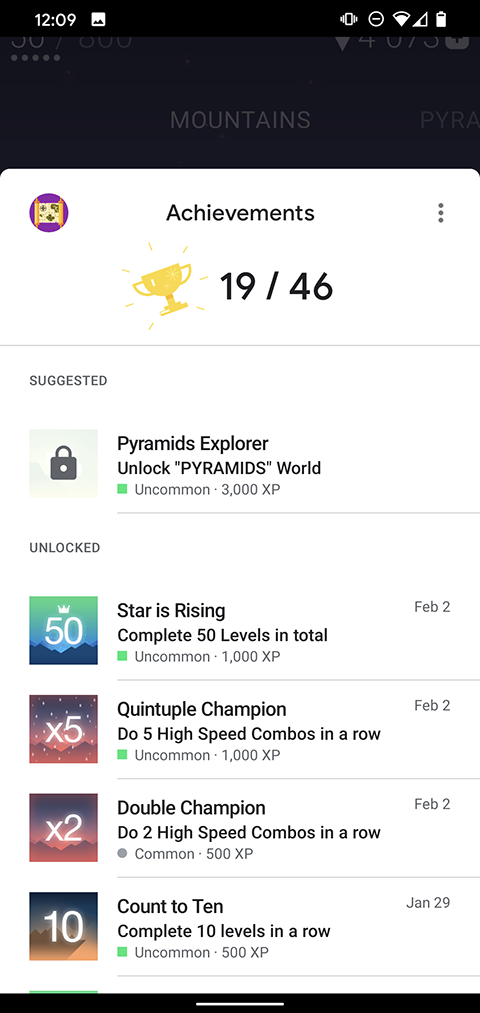
The following code snippet shows how your app can display the default achievement user interface.
void OnShowAchievementsUICallback(void* context, PgsError error) {
    if (error == PgsError_Success) {
        // The UI was displayed and closed successfully by the user.
        // You might resume your game loop here if it was paused.
    } else {
        // Handle error (For example,, user not signed in, UI failed to load).
    }
}

// Function to trigger the Achievements UI
void ShowMyAchievements(PgsAchievementsClient* achievementsClient) {
    if (achievementsClient == nullptr) {
        // Log error: Client not initialized
        return;
    }

    // Call the API
    // Note: The specific arguments often include the client, a callback, and user_data.
    // Some versions might require the Android Activity or a Request Code as well.
    PgsAchievementsClient_showAchievementsUI(
        achievementsClient,
        OnShowAchievementsUICallback, // Callback function
        nullptr                       // Optional user data (context) passed to callback
    );
}
The following image shows an example of the default achievements UI: