已发布:
Android 11(API 级别 30)- Thermal API
Android 12(API 级别 31)- NDK API
(预览版)Android 15 (DP1) - getThermalHeadroomThresholds()
应用的潜在性能受设备热状态的限制,热状态可能会因天气、近期使用情况以及设备热设计等特性而异。设备只能在限定的时间内保持高水平的性能,然后便会受到热限制。实现的关键目标是在不超出热限制的情况下实现性能目标。Thermal API 使得无需进行设备专用优化即可实现此目标。此外,在调试性能问题时,了解设备热状态是否限制了性能非常重要。
游戏引擎通常具有运行时性能参数,可以调整引擎对设备施加的工作负载。例如,这些参数可以设置工作器线程数量、大核心和小核心的工作器线程亲和性、GPU 保真度选项以及帧缓冲区分辨率。在 Unity 引擎中,游戏 开发者可以使用 Adaptive Performance 插件更改 质量 设置来调整工作负载。 对于 Unreal Engine,请使用可伸缩性设置来调整 质量级别。
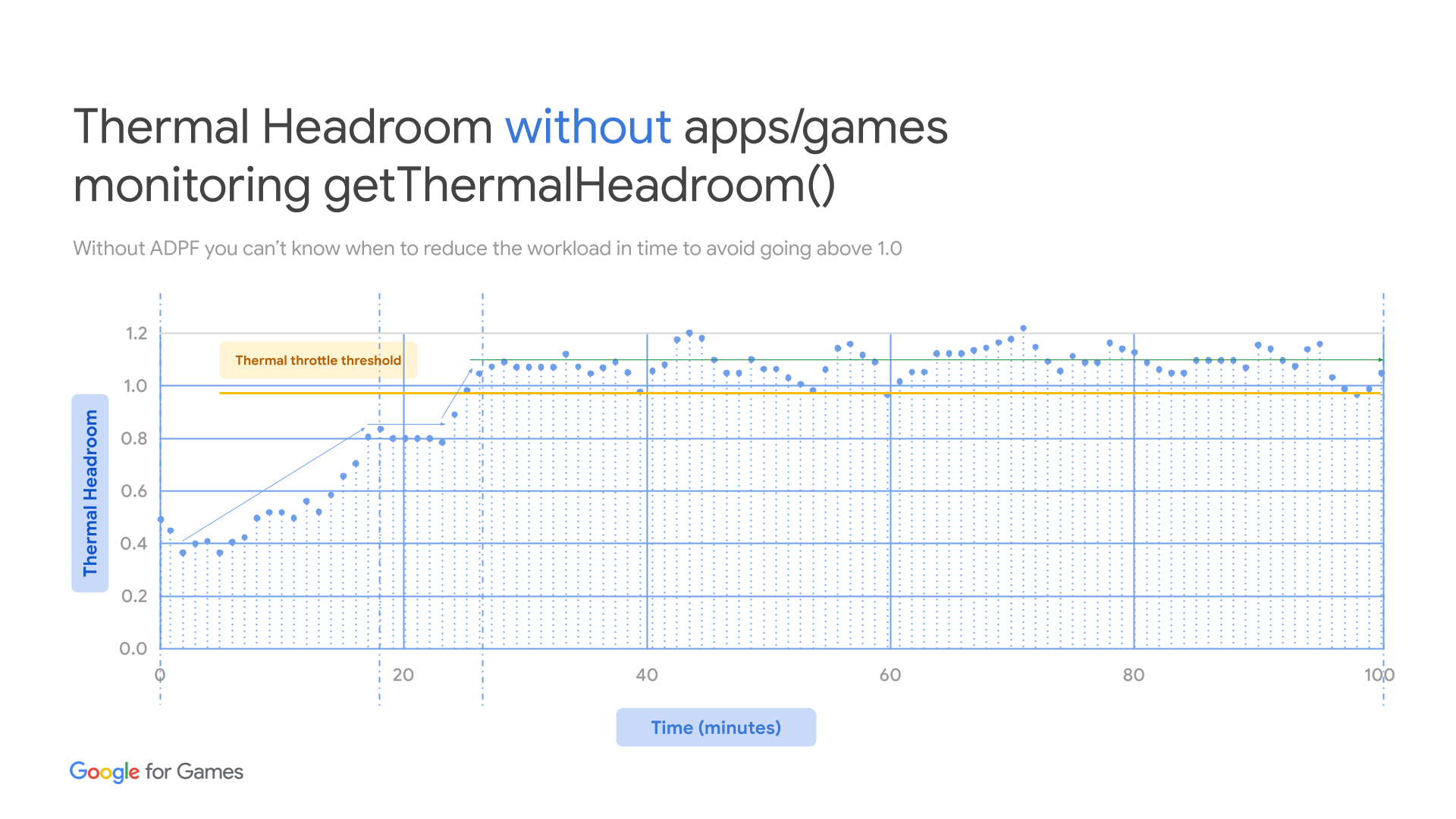
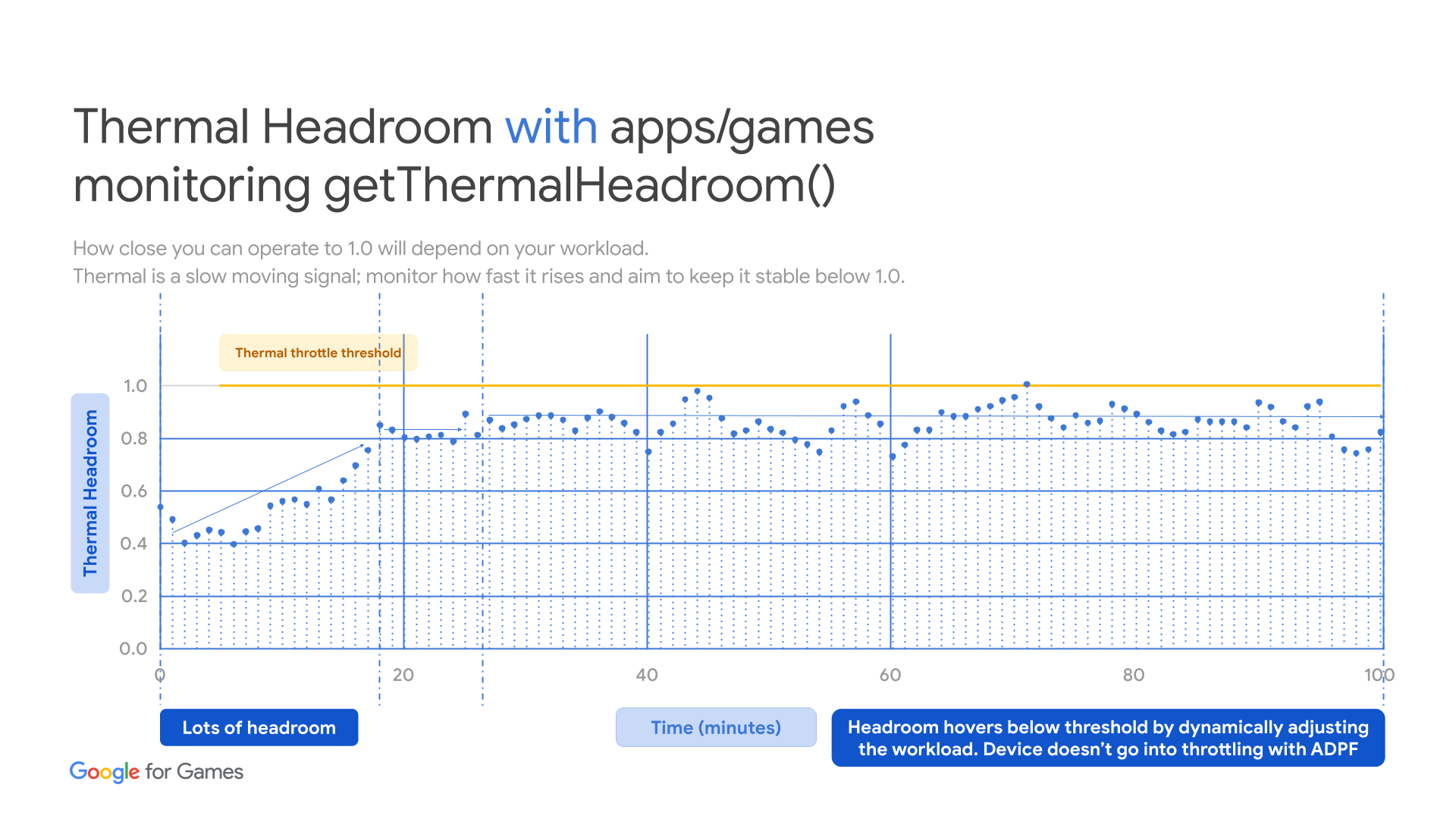
当设备接近不安全的热状态时,您的游戏可以通过借助这些参数降低工作负载来避免受到限制。为避免受到限制,您应监控设备的热状态并主动调整游戏引擎工作负载。
设备过热后,工作负载必须降至可持续的性能水平以下,以便进行散热。热余量降至更安全的水平后,游戏可以再次提高质量设置,但请务必找到可持续的质量级别,以获得最佳游戏时间。
您可以通过轮询
getThermalHeadroom 方法来监控设备的热状态。此方法可预测设备在不发生过热的情况下可以保持当前性能水平的时间。如果时间低于运行工作负载所需的时间量,您的游戏应将工作负载降低到可持续水平。例如,游戏可以切换到较小的核心、降低帧速率或降低保真度。
获取 Thermal Manager
如需使用 Thermal API,您首先需要获取 Thermal Manager
C++
AThermalManager* thermal_manager = AThermal_acquireManager();
Java
PowerManager powerManager = (PowerManager)this.getSystemService(Context.POWER_SERVICE);
查询热余量
您可以向系统询问当前热余量。这可以指示您的工作负载与热限制的接近程度。该 API 还允许您根据当前工作负载预测 x 秒后的温度。这可以为您的应用提供更多响应时间,但准确性不如使用当前热状态。
结果范围为 0.0f(无限制,
THERMAL_STATUS_NONE)
到 1.0f(严重限制,
THERMAL_STATUS_SEVERE)。
如果您的游戏具有不同的图形质量级别,您可以遵循我们的
热余量指南。
C++
float thermal_headroom = AThermal_getThermalHeadroom(0);
ALOGI("ThermalHeadroom: %f", thermal_headroom);
Java
float thermalHeadroom = powerManager.getThermalHeadroom(0);
Log.d("ADPF", "ThermalHeadroom: " + thermalHeadroom);
或者,依靠热状态进行澄清
每个设备型号的设计可能不同。有些设备可能能够更好地散热,因此在受到限制之前能够承受更高的热余量。如果您想读取热余量范围的简化分组,可以查看热状态,以了解当前设备上的热余量值。
C++
AThermalStatus thermal_status = AThermal_getCurrentThermalStatus(thermal_manager);
ALOGI("ThermalStatus is: %d", thermal_status);
Java
int thermalStatus = powerManager.getCurrentThermalStatus();
Log.d("ADPF", "ThermalStatus is: " + thermalStatus);
在热状态发生变化时收到通知
您还可以避免轮询 thermalHeadroom,直到 thermalStatus 达到
特定级别(例如:
THERMAL_STATUS_LIGHT)。
为此,您可以注册一个回调,以便在
状态发生变化时让系统通知您。
C++
int result = AThermal_registerThermalStatusListener(thermal_manager, callback);
if ( result != 0 ) {
  // failed, check whether you have previously registered callback that
  // hasn’t been unregistered
}
Java
// PowerManager.OnThermalStatusChangedListener is an interface, thus you can
// also define a class that implements the methods
PowerManager.OnThermalStatusChangedListener listener = new
  PowerManager.OnThermalStatusChangedListener() {
    @Override
    public void onThermalStatusChanged(int status) {
        Log.d("ADPF", "ThermalStatus changed: " + status);
        // check the status and flip the flag to start/stop pooling when
        // applicable
    }
};
powerManager.addThermalStatusListener(listener);
请记得在完成后移除监听器
C++
int result = AThermal_unregisterThermalStatusListener(thermal_manager, callback);
if ( result != 0 ) {
  // failed, check whether the callback has been registered previously
}
Java
powerManager.removeThermalStatusListener(listener);
清理
完成后,您需要清理获取的 thermal_manager。 如果您使用的是 Java,系统可以自动为您进行 PowerManager 引用垃圾回收。但是,如果您通过 JNI 使用 Java API 并保留了引用,请记得清理该引用!
C++
AThermal_releaseManager(thermal_manager);
如需详细了解如何使用 C++ API (NDK API) 和 Java API(通过 JNI)在原生 C++ 游戏中实现 Thermal API,请查看集成 Thermal API部分中的适应性 Codelab部分。
热余量指南
您可以通过轮询
getThermalHeadroom
方法来监控设备的热状态。此方法可预测设备在达到
THERMAL_STATUS_SEVERE之前可以保持当前
性能水平的时间。例如,如果 getThermalHeadroom(30)
返回 0.8,则表示在 30 秒内,热余量预计将达到 0.8,距离严重限制(即 1.0)还有 0.2 的距离。如果时间低于运行工作负载所需的时间量,您的游戏应将工作负载降低到可持续水平。例如,游戏可以降低帧速率、降低保真度或减少网络连接工作。
热状态及其含义
- 如果设备未受到热限制:
- 受到一些限制,但对性能没有显著影响:
- 显著限制,影响性能:
Thermal API 的设备限制
由于在旧设备上实现 Thermal API,Thermal API 存在一些已知限制或其他要求。限制及其解决方法如下:
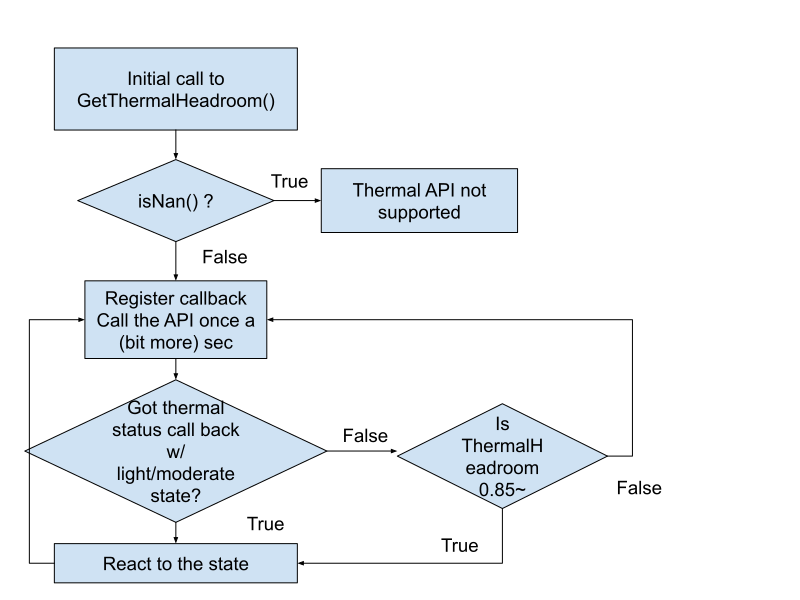
- 不要过于频繁地调用
GetThermalHeadroom()API。如果这样做,API 会返回NaN。您每 10 秒调用它的次数不应超过一次。 - 避免从多个线程调用,这样更难确保调用频率,并且可能会导致 API 返回
NaN。 - 如果
GetThermalHeadroom()的初始值为 NaN,则该设备上没有此 API - 如果
GetThermalHeadroom()返回较高的值(例如:0.85 或更高),而GetCurrentThermalStatus()仍然返回THERMAL_STATUS_NONE,则状态可能未更新。使用启发法来估算正确的热限制状态,或者仅使用getThermalHeadroom(),而不使用getCurrentThermalStatus()。
启发法示例:
- 检查是否支持 Thermal API。
isAPISupported()检查对getThermalHeadroom的首次调用的值,以确保该值不是 0 或 NaN,如果第一个值为 0 或 NaN,则跳过使用该 API。 - 如果
getCurrentThermalStatus()返回的值不是THERMAL_STATUS_NONE,则设备受到热限制。 - 如果
getCurrentThermalStatus()一直返回THERMAL_STATUS_NONE,并不一定意味着设备未受到热限制。这可能意味着设备不支持getCurrentThermalStatus()。 检查getThermalHeadroom()的返回值,以确保设备状况。 - 如果
getThermalHeadroom()返回的值大于 1.0,则状态实际上可能是THERMAL_STATUS_SEVERE或更高,请立即降低工作负载,并保持较低的工作负载,直到getThermalHeadroom()返回较低的值 - 如果
getThermalHeadroom()返回的值为 0.95,则状态实际上可能是THERMAL_STATUS_MODERATE或更高,请立即降低工作负载,并保持警惕以防止读数更高 - 如果
getThermalHeadroom()返回的值为 0.85,则状态实际上可能是THERMAL_STATUS_LIGHT,请保持警惕并在可能的情况下降低工作负载
伪代码:
  bool isAPISupported() {
    float first_value_of_thermal_headroom = getThermalHeadroom();
    if ( first_value_of_thermal_headroom == 0 ||
      first_value_of_thermal_headroom == NaN ) {
        // Checked the thermal Headroom API's initial return value
        // it is NaN or 0,so, return false (not supported)
        return false;
    }
    return true;
  }

  if (!isAPISupported()) {
    // Checked the thermal Headroom API's initial return value, it is NaN or 0
    // Don’t use the API
  } else {
      // Use thermalStatus API to check if it returns valid values.
      if (getCurrentThermalStatus() > THERMAL_STATUS_NONE) {
          // The device IS being thermally throttled
      } else {
      // The device is not being thermally throttled currently. However, it
      // could also be an indicator that the ThermalStatus API may not be
      // supported in the device.
      // Currently this API uses predefined threshold values for thermal status
      // mapping. In the future  you may be able to query this directly.
      float thermal_headroom = getThermalHeadroom();
      if ( thermal_headroom > 1.0) {
            // The device COULD be severely throttled.
      } else  if ( thermal_headroom > 0.95) {
            // The device COULD be moderately throttled.
      } else if ( thermal_headroom > 0.85) {
            // The device COULD be experiencing light throttling.
      }
    }
  }
示意图: