เอกสารนี้อธิบายวิธีใช้รางวัลพิเศษของบริการเกมของ Google Play ในเกม C++ เอกสารนี้ถือว่าคุณได้ตั้งค่าโปรเจ็กต์ตามที่อธิบายไว้ใน ตั้งค่า
บริการเกมของ Google Play คุณจะพบ API รางวัลพิเศษได้ใน
PgsAchievementsClient
ก่อนเริ่มต้น
หากยังไม่ได้ดำเนินการ คุณอาจพบว่าการดู แนวคิดเกี่ยวกับเกมรางวัลพิเศษจะเป็นประโยชน์
ก่อนเริ่มเขียนโค้ดโดยใช้ API รางวัลพิเศษ ให้ทำดังนี้
ทำตามวิธีการติดตั้งและตั้งค่าแอปให้ใช้ บริการเกมของ Play ใน คู่มือตั้งค่าบริการเกมของ Google Play
กำหนดรางวัลพิเศษที่ต้องการให้เกมปลดล็อกหรือแสดง โดย ทำตามวิธีการในคู่มือ Google Play Console
ทำความคุ้นเคยกับคำแนะนำที่อธิบายไว้ใน รายการตรวจสอบคุณภาพ
รับไคลเอ็นต์รางวัลพิเศษ
หากต้องการเริ่มใช้ API รางวัลพิเศษ เกมของคุณต้องได้รับ
PgsAchievementsClient
ออบเจ็กต์ก่อน คุณทำได้โดยการเรียกใช้
PgsAchievementsClient_create
เมธอด และส่งกิจกรรม
ปลดล็อกรางวัลพิเศษ
หากต้องการปลดล็อกรางวัลพิเศษ ให้เรียกใช้
PgsAchievementsClient_unlock
เมธอด และส่ง PgsAchievementsClient และรหัสรางวัลพิเศษ
ข้อมูลโค้ดต่อไปนี้แสดงวิธีที่แอปปลดล็อกรางวัลพิเศษได้
// Example Usage
void TriggerUnlock(PgsGamesClient* gamesClient) {
    // You must obtain the achievements client from the main games client
    PgsAchievementsClient* achievementsClient = PgsGamesClient_getAchievementsClient(gamesClient);

    // Replace with your actual Achievement ID from the Play Console
    const char* MY_ACHIEVEMENT_ID = "CgkI...sQw";

    UnlockAchievement(achievementsClient, MY_ACHIEVEMENT_ID);
}
หากรางวัลพิเศษเป็นประเภท เพิ่มขึ้นเรื่อยๆ (นั่นคือต้องทำหลายขั้นตอนจึงจะปลดล็อกได้) ให้เรียกใช้ PgsAchievementsClient_incrementแทน
ข้อมูลโค้ดต่อไปนี้แสดงวิธีที่แอปเพิ่มรางวัลพิเศษของผู้เล่นได้
void IncrementMyAchievement(PgsAchievementsClient* client,
     const char* achievementId, uint32_t steps) {
    if (client == nullptr) {
        return;
    }

    // Call the API
    // Parameters typically include:
    // 1. Client handle
    // 2. Achievement ID (string)
    // 3. Number of steps to increment by (For example, 1)
    // 4. Callback function
    // 5. User context (passed to callback)
    PgsAchievementsClient_increment(
        client,
        achievementId,
        steps,
        OnIncrementCallback,
        (void*)achievementId // Pass ID as context so the callback knows which one finished
    );
}

//  Example Usage in Game Loop
void OnEnemyDefeated(PgsGamesClient* gamesClient) {
    // Get the achievements client handle
    PgsAchievementsClient* achievementsClient = PgsGamesClient_getAchievementsClient(gamesClient);

    // ID from Google Play Console
    const char* ACH_ENEMY_KILLER = "CgkI...xyz";

    // Increment by 1 step
    IncrementMyAchievement(achievementsClient, ACH_ENEMY_KILLER, 1);
}
คุณไม่จำเป็นต้องเขียนโค้ดเพิ่มเติมเพื่อปลดล็อกรางวัลพิเศษ เนื่องจากบริการเกมของ Google Play จะปลดล็อกรางวัลพิเศษโดยอัตโนมัติเมื่อทำตามจำนวนขั้นตอนที่กำหนด
แนวทางปฏิบัติแนะนำคือการกำหนดรหัสรางวัลพิเศษในไฟล์ strings.xml เพื่อให้เกมอ้างอิงรางวัลพิเศษตามรหัสทรัพยากรได้ เมื่อทำการเรียกเพื่อ
อัปเดตและโหลดรางวัลพิเศษ โปรดทำตาม
แนวทางปฏิบัติแนะนำเหล่านี้ด้วยเพื่อหลีกเลี่ยงไม่ให้เกินโควต้า API
แสดงรางวัลพิเศษ
หากต้องการแสดงรางวัลพิเศษของผู้เล่น ให้เรียกใช้
PgsAchievementsClient_showAchievementsUI
ข้อมูลโค้ดต่อไปนี้แสดงวิธีที่แอปแสดง UI รางวัลพิเศษเริ่มต้นได้
void OnShowAchievementsUICallback(void* context, PgsError error) {
    if (error == PgsError_Success) {
        // The UI was displayed and closed successfully by the user.
        // You might resume your game loop here if it was paused.
    } else {
        // Handle error (For example,, user not signed in, UI failed to load).
    }
}

// Function to trigger the Achievements UI
void ShowMyAchievements(PgsAchievementsClient* achievementsClient) {
    if (achievementsClient == nullptr) {
        // Log error: Client not initialized
        return;
    }

    // Call the API
    // Note: The specific arguments often include the client, a callback, and user_data.
    // Some versions might require the Android Activity or a Request Code as well.
    PgsAchievementsClient_showAchievementsUI(
        achievementsClient,
        OnShowAchievementsUICallback, // Callback function
        nullptr                       // Optional user data (context) passed to callback
    );
}
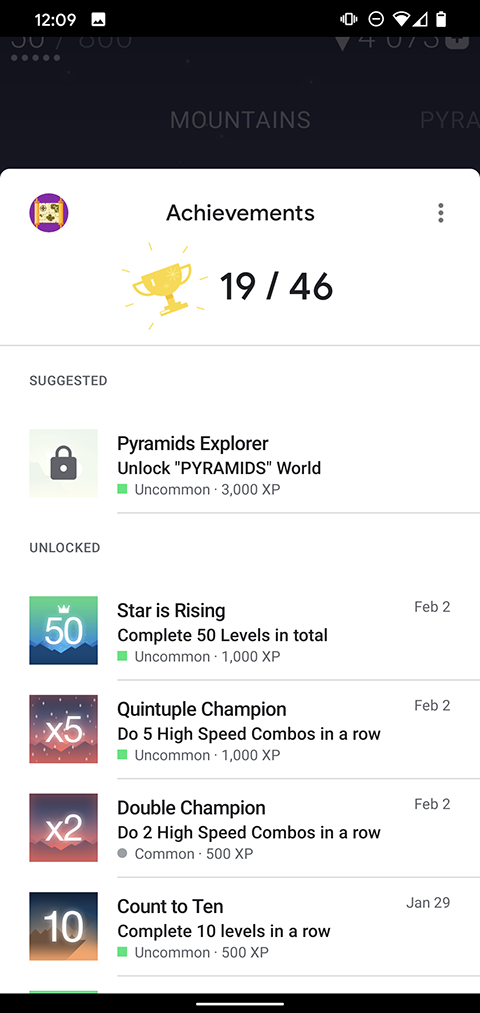
รูปภาพต่อไปนี้แสดงตัวอย่าง UI รางวัลพิเศษเริ่มต้น