

Halaman ini menjelaskan cara menerapkan Recall API ke dalam game Anda. Halaman ini membahas cara menyiapkan server game dan klien untuk mendukung API, lalu membahas cara menyimpan dan mengambil token.
Penyiapan server game
Siapkan server game untuk melakukan panggilan Recall API ke server Google.
1. Menyiapkan project Layanan Play Games Anda
Jika belum melakukannya, ikuti petunjuk di Menyiapkan Layanan game Google Play.
2. Menyiapkan akun layanan untuk game
Ikuti petunjuk tentang cara membuat akun layanan. Pada akhirnya, Anda akan memiliki file JSON dengan kredensial akun layanan.
3. Mendownload library Java sisi server untuk Layanan game Play
Download library google-api-services-games, lalu upload ke server Anda.
4. Menyiapkan kredensial untuk panggilan Recall API
Lihat Menyiapkan panggilan API yang diotorisasi untuk konteks selengkapnya.
import com.google.api.client.googleapis.auth.oauth2.GoogleCredential;
import com.google.api.services.games.Games;
import com.google.api.services.games.GamesScopes;

// ...

GoogleCredential credential =
  GoogleCredential.fromStream(new FileInputStream("<credentials>.json"))
    .createScoped(Collections.singleton(GamesScopes.ANDROIDPUBLISHER));

Games gamesApi =
    new Games.Builder(httpTransport, JSON_FACTORY, credential).build();
Penyiapan klien game
Siapkan klien game Anda untuk mengambil ID sesi recall yang digunakan oleh server kami untuk berkomunikasi dengan server Google.
Java SDK
Siapkan Java SDK di dalam klien Anda, dan pastikan untuk menyertakan
com.google.android.gms:play-services-games-v2:19.0.0
dan com.google.android.gms:play-services-tasks:18.0.2 atau yang lebih baru dalam
file Gradle Anda.
Untuk berkomunikasi dengan server Google menggunakan informasi yang benar, Anda perlu meminta ID sesi Recall dari SDK klien yang dikirim ke server game.
Kotlin
PlayGames.getRecallClient(getActivity())
                .requestRecallAccess()
                .addOnSuccessListener { recallAccess -> val recallSessionId: String = recallAccess.getSessionId() }
                // Send the recallSessionId to your game server
Java
PlayGames.getRecallClient(getActivity())
  .requestRecallAccess()
  .addOnSuccessListener(
    recallAccess -> {
      String recallSessionId = recallAccess.getSessionId();
      // Send the recallSessionId to your game server
    });
Unity SDK
Jika belum melakukannya, siapkan Unity SDK di dalam klien Anda.
Untuk berkomunikasi dengan server Google menggunakan informasi yang benar, Anda perlu meminta ID sesi Recall dari SDK klien, lalu kirimkan ke server game.
PlayGamesPlatform.Instance.RequestRecallAccess(
    recallAccess => {
        string recallSessionId = recallAccess.sessionId;
        // Send the recallSessionId to your game server
    });
SDK Native v2 (beta)
Jika belum melakukannya, mulai Layanan Play Game untuk C dan C++.
// Include the following headers

#include "play_games.h"
#include "recall_client.h"
#include "pgs_status_code.h"
// Request Recall Access
// Initializes the Play Games Services v2 Native SDK (beta).
Pgs_initialize(javaVM, activity);

//Creating Recall Client
PgsRecallClient* pgs_recall_client =
      PgsRecallClient_create(activity);

// RequestRecallAccess Function
PgsRecallClient_requestRecallAccess(
    pgs_recall_client,

    // This is your callback function defined as an inline lambda
    [](PgsStatusCode status_code, char* session_id, user_data) {

        if (status_code == PGS_STATUS_SUCCESS) {
            // Recall Session Id Fetched Successfully
        } else {
            // Fetching Recall Session Id Failed
            // Handle error based on status_code.
            // Examples:
            // PGS_STATUS_NETWORK_ERROR: Check internet connection.
            // PGS_STATUS_INTERNAL_ERROR: An unexpected error occurred.
        }

        // Clean up the client instance passed as user_data
        PgsRecallClient* client = static_cast<PgsRecallClient*>(user_data);
        if (client != nullptr) {
            PgsRecallClient_destroy(client);
        }
    },

    user_data // Data to pass to the callback
);

// Shuts down the Play Games Services v2 Native SDK (beta).
Pgs_destroy()
Menggunakan Recall API di dalam server game
Setelah mengonfigurasi server dan klien, Anda dapat mengirim recallSessionID dari klien game ke server game, lalu ikuti panduan berikut untuk mulai menggunakan Java API guna menyimpan, mengambil, atau menghapus sisi server token Recall.
Menyimpan token
Akun pemain di Google Play Games Recall API terdiri dari dua informasi:
- Persona yang berfungsi sebagai ID yang stabil untuk akun dalam game
- Token yang berfungsi sebagai kunci untuk mengamankan login pemain ke akun
Anda dapat menyimpan persona dan token pengguna menggunakan objek LinkPersonaRequest. Gunakan GoogleCredential untuk memanggil Google API (Lihat Memanggil Google
API untuk konteks). Persona memiliki batasan kardinalitas 1:1: profil PGS
hanya dapat berisi satu persona, dan persona hanya dapat dimiliki oleh satu profil PGS. Tetapkan kebijakan resolusi link yang bertentangan untuk menentukan
cara pelanggaran batasan kardinalitas 1:1 harus diselesaikan.
Secara opsional, tetapkan waktu habis masa berlaku token. Gunakan SetTtl() dengan objek
Durations untuk menetapkan Waktu Aktif atau memberikan waktu habis masa berlaku yang tepat
dengan setExpireTime().
Anda harus mengenkripsi persona dan token game, dan keduanya tidak boleh berisi informasi identitas pribadi. Panjang string persona dan token maksimal adalah 256 karakter.
import com.google.api.services.games.Games.Recall.LinkPersona;
import com.google.api.services.games.model.LinkPersonaRequest;
import com.google.api.services.games.model.LinkPersonaResponse;
import com.google.protobuf.util.Durations;

// ...

Games gamesApi =
    new Games.Builder(httpTransport, JSON_FACTORY, credential).build();

String recallSessionId = ... // recallSessionID from game client
String persona = ... // encrypted opaque string, stable for in-game account
String token = ... // encrypted opaque string encoding the progress line

LinkPersonaRequest linkPersonaRequest =
  LinkPersonaRequest.newBuilder()
    .setSessionId(recallSessionId)
    .setPersona(persona)
    .setToken(token)
    .setCardinalityConstraint(ONE_PERSONA_TO_ONE_PLAYER)
    .setConflictingLinksResolutionPolicy(CREATE_NEW_LINK)
    .setTtl(Durations.fromDays(7)) // Optionally set TTL for token
    .build();

LinkPersonaResponse linkPersonaResponse =
  gamesApi.recall().linkPersona(linkPersonaRequest).execute();

if (linkPersonaResponse.getState() == LINK_CREATED) {
  // success
}
Mengambil token
Ada tiga opsi untuk mengambil token, berdasarkan kebutuhan game Anda. Anda dapat meminta hal berikut:
- Token yang terkait dengan game saat ini, termasuk token recall cakupan game.
- Token terakhir yang disimpan di semua game yang dimiliki oleh akun developer.
- Mengingat daftar game yang dimiliki oleh akun developer, semua token recall yang terkait dengan setiap game.
Token recall cakupan game
Untuk mengambil token recall dari game saat ini, dapatkan recallSessionId dari klien dan teruskan ke retrieveTokens API:
import com.google.api.services.games.Games;
import com.google.api.services.games.model.RetrievePlayerTokensResponse;
import com.google.api.services.games.model.RecallToken;

// ...

String recallSessionId = ... // recallSessionID from game client

RetrievePlayerTokensResponse retrievePlayerTokensResponse =
  gamesApi.recall().retrieveTokens(recallSessionId).execute();

for (RecallToken recallToken : retrievePlayerTokensResponse.getTokens()) {
  String token recallToken.getToken();
  // Same string as was written in LinkPersona call
  // decrypt and recover in-game account
}
Token recall terbaru di semua game yang dimiliki oleh akun developer
Untuk mengambil token terbaru yang disimpan di semua game yang dimiliki oleh akun developer di Konsol Google Play, Anda harus mendapatkan recallSessionId dari klien dan meneruskannya ke lastTokenFromAllDeveloperGames API, seperti yang ditunjukkan dalam cuplikan kode berikut. Sebagai bagian dari respons, Anda dapat memeriksa
ID Aplikasi yang terkait dengan token ini.
import com.google.api.services.games.Games;
import com.google.api.services.games.model.RetrieveDeveloperGamesLastPlayerTokenResponse;
import com.google.api.services.games.model.GamePlayerToken;
import com.google.api.services.games.model.RecallToken;

// ...

String recallSessionId = ... // recallSessionID from game client

RetrieveDeveloperGamesLastPlayerTokenResponse response =
        gamesApi.recall().lastTokenFromAllDeveloperGames(recallSessionId)
        .execute();

if (response.hasGamePlayerToken()) {
    GamePlayerToken gamePlayerToken = response.getGamePlayerToken();

    // The ID of the application that the token is associated with.
    String applicationId = gamePlayerToken.getApplicationId();

    // Same string as was written in LinkPersona call.
    RecallToken recallToken = gamePlayerToken.getRecallToken();

    // Decrypt and recover in-game account.
}
Semua token recall di seluruh daftar game yang dimiliki oleh akun developer
Untuk mengambil semua token yang terkait dengan daftar game yang dimiliki oleh akun developer Anda di Konsol Google Play, dapatkan recallSessionId dari klien dan teruskan ke gamesPlayerTokens API. Berikan daftar
ID Aplikasi.
import com.google.api.services.games.Games;
import com.google.api.services.games.model.RetrieveGamesPlayerTokensResponse;
import com.google.api.services.games.model.GamePlayerToken;
import com.google.api.services.games.model.RecallToken;

// ...

String recallSessionId = ... // recallSessionID from game client

// Application IDs for which you would like to retrieve the recall tokens.
List<String> applicationIds = ...

RetrieveGamesPlayerTokensResponse response =
gamesApiClient
        .recall()
        .gamesPlayerTokens(recallSessionId)
        .setApplicationIds(applicationIds)
        .execute();

for (GamePlayerToken gamePlayerToken : response.getGamePlayerTokens()) {
    // The ID of the application that the token is associated with.
    String applicationId  = gamePlayerToken.getApplicationId();

    // Same string as was written in LinkPersona call.
    RecallToken recallToken = gamePlayerToken.getRecallToken();

    // Decrypt and recover in-game account.
}
Menghapus token recall
Jika diperlukan, Anda juga dapat menghapus token recall dengan panggilan berikut:
import com.google.api.services.games.Games;
import com.google.api.services.games.model.UnlinkPersonaRequest;
import com.google.api.services.games.model.UnlinkPersonaResponse;

// ...

String recallSessionId = ...
String persona = ...
String token = ...

Games gamesApi =
    new Games.Builder(httpTransport, JSON_FACTORY, credential).build();

UnlinkPersonaRequest unlinkPersonaRequest =
  UnlinkPersonaRequest.newBuilder()
    .setSessionId(recallSessionId)
    .setPersona(persona)
    // .setToken(token) - alternatively set token, but not both
    .build();

UnlinkPersonaResponse unlinkPersonaResponse =
  gamesApi.recall().unlinkPersona(unlinkPersonaRequest).execute();

boolean unlinked = unlinkPersonaResponse.isUnlinked();
Mengaktifkan mode tanpa profil
Anda dapat mengaktifkan fungsi Recall API terbatas untuk pengguna yang tidak memiliki profil PGS dengan mengikuti langkah-langkah berikut:
- Aktifkan recall tanpa profil untuk project game PGS Anda di Konsol Play.
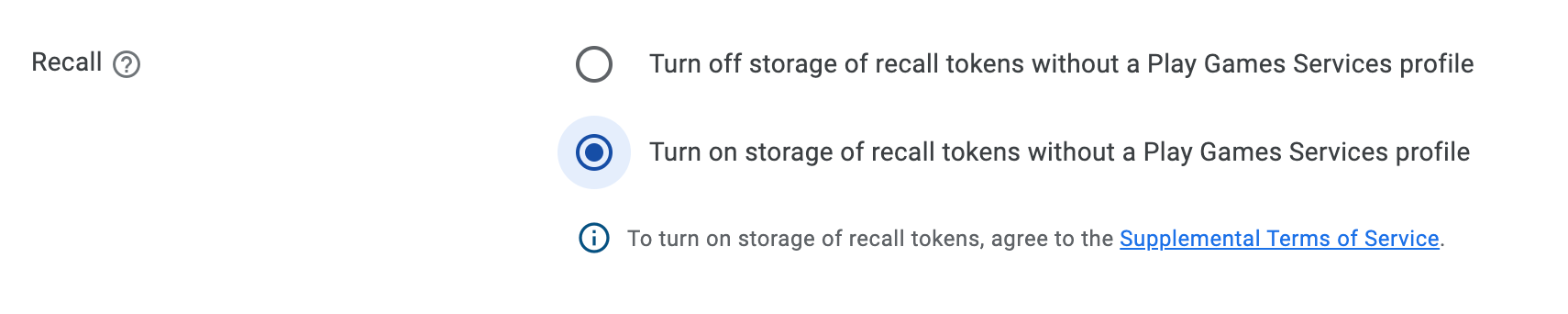
- Tinjau persyaratan tambahan yang dijelaskan nanti di bagian ini.
- Tambahkan tag metadata berikut ke manifes aplikasi Anda:
<meta-data
  android:name="com.google.android.gms.games.PROFILELESS_RECALL_ENABLED"
  android:value="true" />
Persyaratan tambahan
Anda juga harus mematuhi Persyaratan Layanan Layanan game Play. Jika Anda menggunakan Recall API untuk pengguna tanpa profil PGS, yang melibatkan berbagi data pengguna akhir dengan Google, Anda harus, sebelum membagikan data ini kepada Google, memberikan pemberitahuan yang sesuai kepada pengguna akhir yang menjelaskan hal berikut:
- Cara Anda membagikan data kepada Google untuk mengaktifkan fitur penautan akun Play Game.
- Ketersediaan setelan untuk mengelola berbagi ini, misalnya, melalui setelan Play Game.
- Pemrosesan data ini berdasarkan Kebijakan Privasi Google, dan persyaratan untuk mendapatkan izin pengguna akhir yang sesuai untuk berbagi ini yang memenuhi semua persyaratan hukum yang berlaku.