

進行状況インジケーターは、オペレーションのステータスを視覚的に表示します。アニメーションを使用して、データの読み込みや処理など、プロセスの完了までの進捗状況をユーザーに伝えます。また、完了までの進捗状況に関係なく、処理が進行中であることを示すこともできます。
進行状況インジケーターを使用する可能性がある 3 つのユースケースを考えてみましょう。
- コンテンツの読み込み: 画像やユーザー プロフィールのデータなど、ネットワークからコンテンツを取得している間。
- ファイルのアップロード: アップロードにかかる時間をユーザーにフィードバックする。
- 長時間処理: アプリが大量のデータを処理している間、 完了した合計量をユーザーに伝える。
マテリアル デザインには、次の 2 種類の進行状況インジケーターがあります。
- 確定: 完了した進捗状況を正確に表示します。
- 不確定: 進捗状況に関係なく、継続的にアニメーション表示します。
同様に、進行状況インジケーターは次のいずれかの形式で表示できます。
- 線形: 左から右に埋まる横棒。
- 円形: 円の 全周を囲むまでストロークが長くなる円。
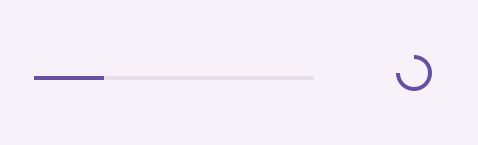
API サーフェス
マテリアル デザインに準拠した進行状況インジケーターを作成するために使用できるコンポーザブルはいくつかありますが、パラメータに大きな違いはありません。注意すべき主なパラメータは次のとおりです。
progress: インジケーターに表示される現在の進捗状況。0.0~1.0のFloatを渡します。color: 実際のインジケーターの色。つまり、進捗状況を反映するコンポーネントの部分であり、進捗状況が完了するとコンポーネント全体を囲みます。trackColor: インジケーターが描画されるトラックの色。
確定インジケーター
確定インジケーターは、アクションの完了度合いを正確に反映します。
LinearProgressIndicator または CircularProgressIndicator
コンポーザブルを使用し、progress パラメータに値を渡します。
次のスニペットに比較的詳細な例を示します。ユーザーがボタンを押すと、アプリは進行状況インジケーターを表示し、progress の値を徐々に増やすコルーチンを起動します。これにより、進行状況インジケーターが順番に増えていきます。
@Composable fun LinearDeterminateIndicator() { var currentProgress by remember { mutableFloatStateOf(0f) } var loading by remember { mutableStateOf(false) } val scope = rememberCoroutineScope() // Create a coroutine scope Column( verticalArrangement = Arrangement.spacedBy(12.dp), horizontalAlignment = Alignment.CenterHorizontally, modifier = Modifier.fillMaxWidth() ) { Button(onClick = { loading = true scope.launch { loadProgress { progress -> currentProgress = progress } loading = false // Reset loading when the coroutine finishes } }, enabled = !loading) { Text("Start loading") } if (loading) { LinearProgressIndicator( progress = { currentProgress }, modifier = Modifier.fillMaxWidth(), ) } } } /** Iterate the progress value */ suspend fun loadProgress(updateProgress: (Float) -> Unit) { for (i in 1..100) { updateProgress(i.toFloat() / 100) delay(100) } }
読み込みが部分的に完了すると、上記の例の線形インジケーターは次のようになります。
同様に、円形インジケーターは次のようになります。
不確定インジケーター
不確定インジケーターは、オペレーションの完了までの進捗状況を反映しません。代わりに、アニメーションを使用して、完了度合いを指定せずに処理が進行中であることをユーザーに示します。
不確定の進行状況インジケーターを作成するには、LinearProgressIndicator コンポーザブルまたは CircularProgressIndicator コンポーザブルを使用しますが、progress に値を渡さないでください。次の例では、ボタンを押して不確定インジケーターを切り替える方法を示します。
@Composable fun IndeterminateCircularIndicator() { var loading by remember { mutableStateOf(false) } Button(onClick = { loading = true }, enabled = !loading) { Text("Start loading") } if (!loading) return CircularProgressIndicator( modifier = Modifier.width(64.dp), color = MaterialTheme.colorScheme.secondary, trackColor = MaterialTheme.colorScheme.surfaceVariant, ) }
インジケーターがアクティブな場合のこの実装の例を次に示します。
同じ実装の例を次に示しますが、CircularProgressIndicator の代わりに LinearProgressIndicator を使用しています。