

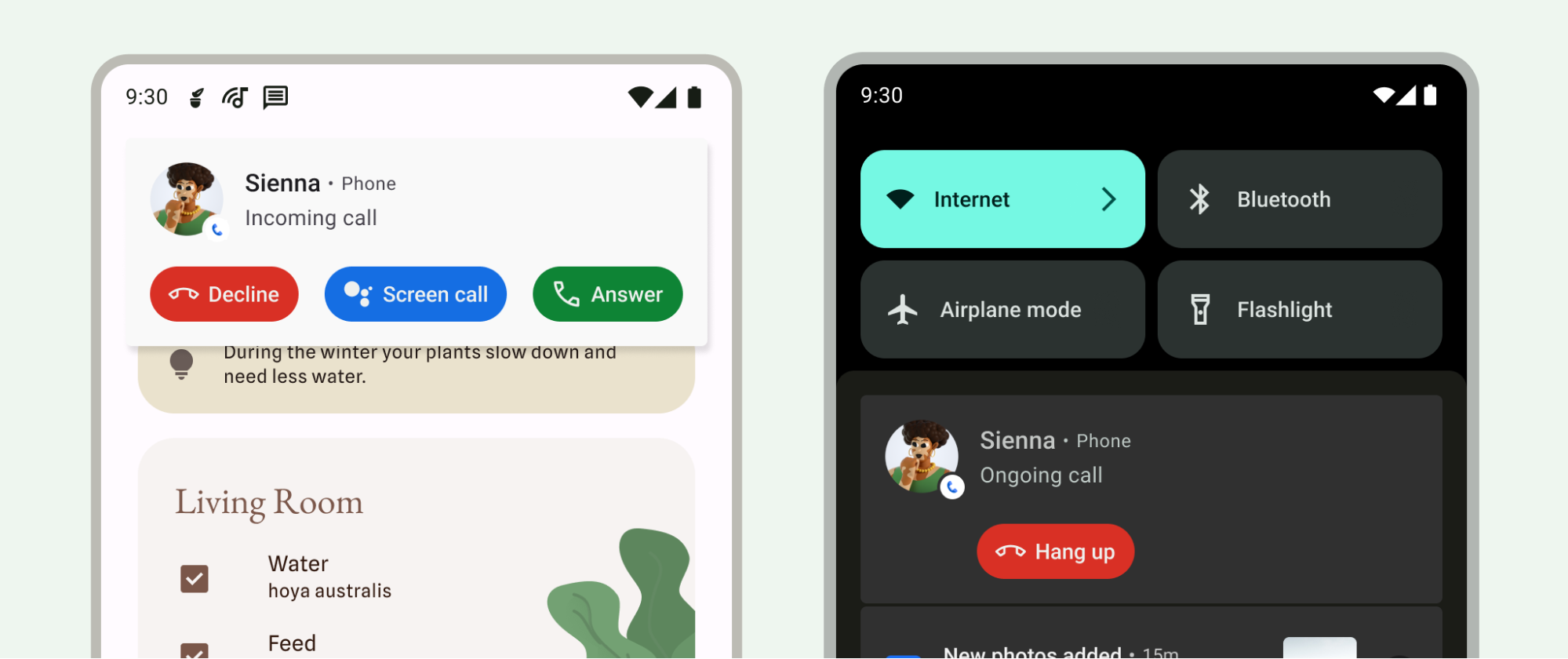
在 Android 12.0 (API 級別 31) 以上版本中,系統會提供 CallStyle 通知範本,區分來電通知和其他類型的通知。使用這個範本建立來電通知或通話中通知。這個範本支援大型通知,其中包含來電者資訊和必要動作,例如接聽或拒接來電。
由於來電和通話中屬於高優先順序事件,因此這些通知在通知欄中會優先顯示。這項排名也能讓系統將這些優先來電轉接至其他裝置。
CallStyle 通知範本包含下列必要動作:
- 接聽或拒接來電。
- 掛斷進行中的通話。
- 接聽或掛斷來電過濾。
這種樣式的動作會顯示為按鈕,系統會自動新增適當的圖示和文字。不支援手動為按鈕加上標籤。如要進一步瞭解通知設計原則,請參閱「通知」。
必要動作會以意圖的形式傳遞,例如下節中的 hangupIntent 和 answerIntent。這些都是系統維護權杖的參照。權杖是輕量物件,可在不同應用程式和程序之間傳遞。系統會負責管理權杖的生命週期,並確保即使建立 PendingIntent 的應用程式已停止執行,仍可使用。當您將 PendingIntent 提供給其他應用程式時,即代表您授予該應用程式執行指定作業的權限,例如拒絕或接聽。即使建立意圖的應用程式未執行,系統也會授予這項權限。詳情請參閱 PendingIntent 的參考文件。
從 Android 14 (API 級別 34) 開始,您可以將來電通知設為不可關閉。方法是使用 CallStyle 通知,並搭配 Notification.FLAG_ONGOING_EVENT 到 Notification.Builder#setOngoing(true)。
以下範例說明如何搭配 CallStyle 通知使用各種方法。
// Create a new call, setting incoming caller. val incomingCaller = Person.Builder() .setName("Jane Doe") .setImportant(true) .build()
來電
使用 forIncomingCall() 方法,為來電建立通話樣式通知。
// For demonstrative purposes only, should use a well-defined Intents. val contentIntent = PendingIntent.getActivity(context, 0, Intent(), PendingIntent.FLAG_IMMUTABLE) val declineIntent = PendingIntent.getActivity(context, 0, Intent(), PendingIntent.FLAG_IMMUTABLE) val hangupIntent = PendingIntent.getActivity(context, 0, Intent(), PendingIntent.FLAG_IMMUTABLE) val answerIntent = PendingIntent.getActivity(context, 0, Intent(), PendingIntent.FLAG_IMMUTABLE) // Create a call style notification for an incoming call. val builderForIncomingCall = NotificationCompat.Builder(context, CHANNEL_ID) .setContentIntent(contentIntent) .setSmallIcon(R.drawable.ic_logo) .setStyle( NotificationCompat.CallStyle.forIncomingCall(incomingCaller, declineIntent, answerIntent)) .addPerson(incomingCaller)
通話中
使用 forOngoingCall() 方法,為進行中的通話建立通話樣式通知。
// Create a call style notification for an ongoing call. val builderForOngoingCall = NotificationCompat.Builder(context, CHANNEL_ID) .setContentIntent(contentIntent) .setSmallIcon(R.drawable.ic_logo) .setStyle( NotificationCompat.CallStyle.forOngoingCall(callerAtOtherEnd, hangupIntent)) .addPerson(caller)
過濾來電
使用 forScreeningCall() 方法建立通話樣式通知,用於過濾來電。
// Create a call style notification for screening a call. val builder = NotificationCompat.Builder(context, CHANNEL_ID) .setContentIntent(contentIntent) .setSmallIcon(R.drawable.ic_logo) .setStyle( NotificationCompat.CallStyle.forScreeningCall(caller, hangupIntent, answerIntent)) .addPerson(caller)
提供更多 Android 版本的相容性
在 API 級別 30 以下版本中,將 CallStyle 通知與前景服務建立關聯,以便為通知指派 API 級別 31 以上版本中的高排名。此外,在 API 30 以下版本中,CallStyle 通知可使用 setColorized() 方法將通知標示為彩色,以達到類似的排名。
搭配使用 Telecom API 和 CallStyle 通知。詳情請參閱「電信架構總覽」。