Rich text input lets users format what they type, including bolding a word,
adding a heading, aligning a paragraph, or inserting a highlighted @mention.
In Compose, you build this on top of state-based text fields
(BasicTextField and TextField). Styles live in
TextFieldState alongside the text, so they survive edits, selection
changes, and recompositions, and stay in sync as the user types, deletes, and
pastes.
This page shows how to apply, update, query, extract, and remove styles in a
TextFieldState using TextFieldBuffer, and how to drive a formatting
toolbar from TextFieldState.textStyles.
Apply inline and paragraph styles
You can apply character-level and paragraph-level formatting inside any
TextFieldBuffer receiver scope, including TextFieldState.edit,
InputTransformation.transformInput, and
OutputTransformation.transformOutput.
Control boundary expansion with ExpandPolicy
When you call addStyle, you can pass an ExpandPolicy to define how the
styled range behaves when the user inserts new characters directly at its
start or end boundary:
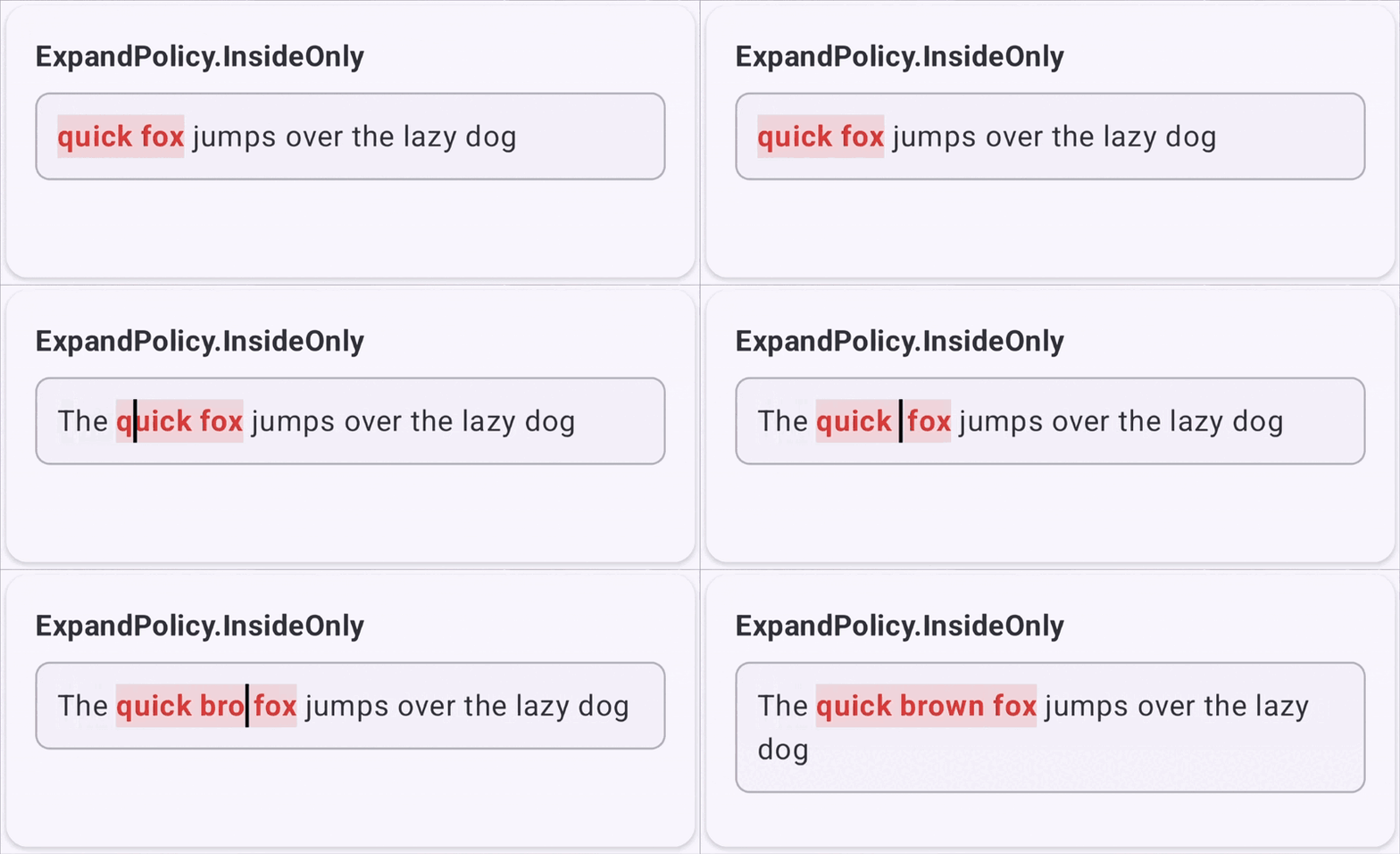
- Insertion inside
(start, end): Always expands the styled range. - Insertion before
start: Always shifts bothstartandendoffsets to the right. - Insertion directly at
startorend: Controlled by theExpandPolicyyou specify.
The following table describes the available ExpandPolicy options and their
typical use cases:
| Policy | Boundary behavior | Recommended use cases | Example |
|---|---|---|---|
ExpandPolicy.InsideOnly |
Text typed at start or end stays outside the styled range. |
Discrete tokens such as @mentions, #hashtags, or background pills where typing next to the tag shouldn't inherit the tag's background color. |
 |
ExpandPolicy.AtStart |
Text typed at start inherits the style, and text typed at end stays unstyled. |
Text typed directly in front of the styled text should also adopt the same formatting. | 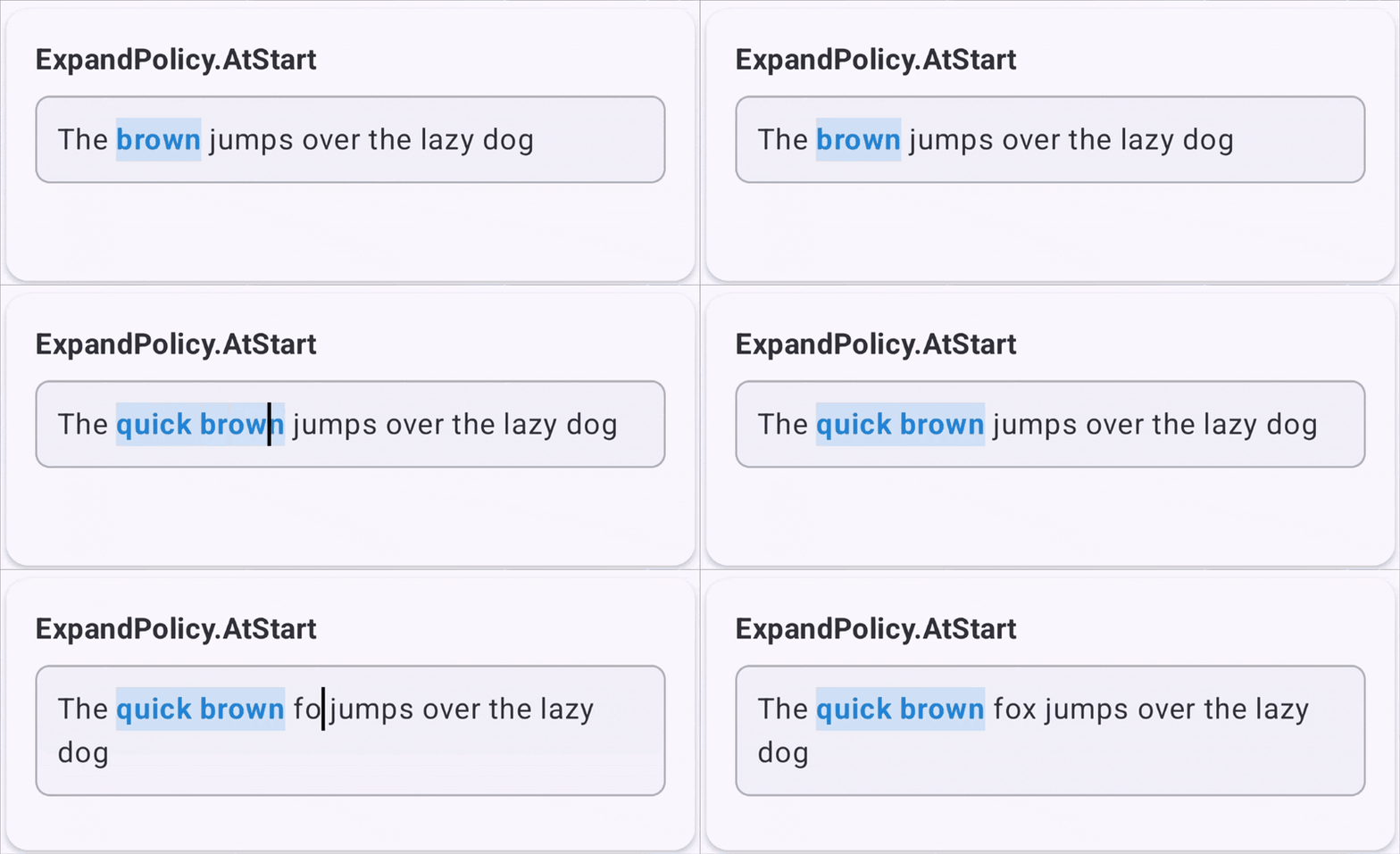 |
ExpandPolicy.AtEnd |
Text typed at end inherits the style, and text typed at start stays unstyled. |
Standard rich text editor typing, where continuing to type after a bold or italic word continues that formatting. | 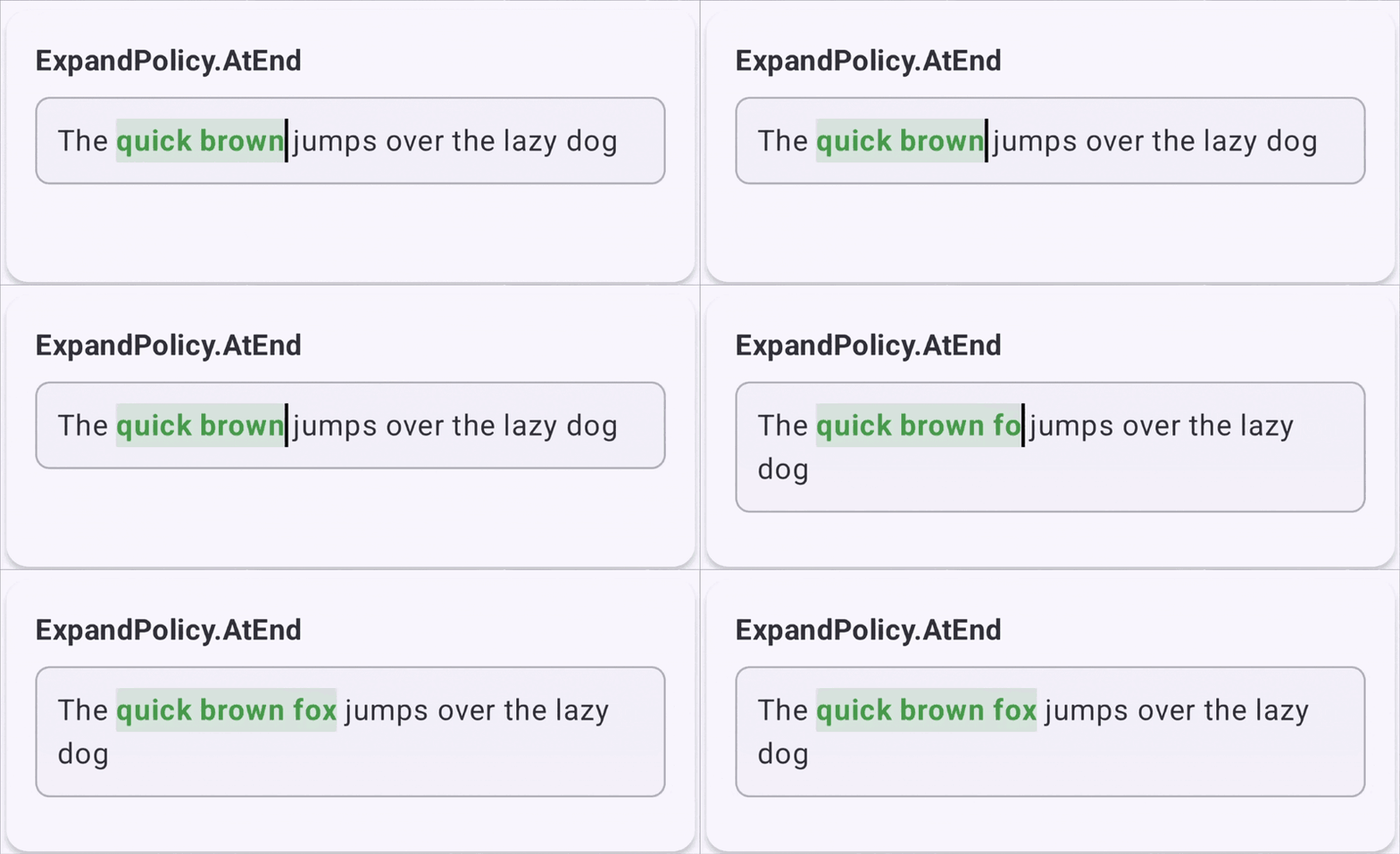 |
ExpandPolicy.AtBoth |
Text typed at either start or end expands the range and inherits the style. |
Active highlights or continuous formatted blocks that should grow from either edge. | 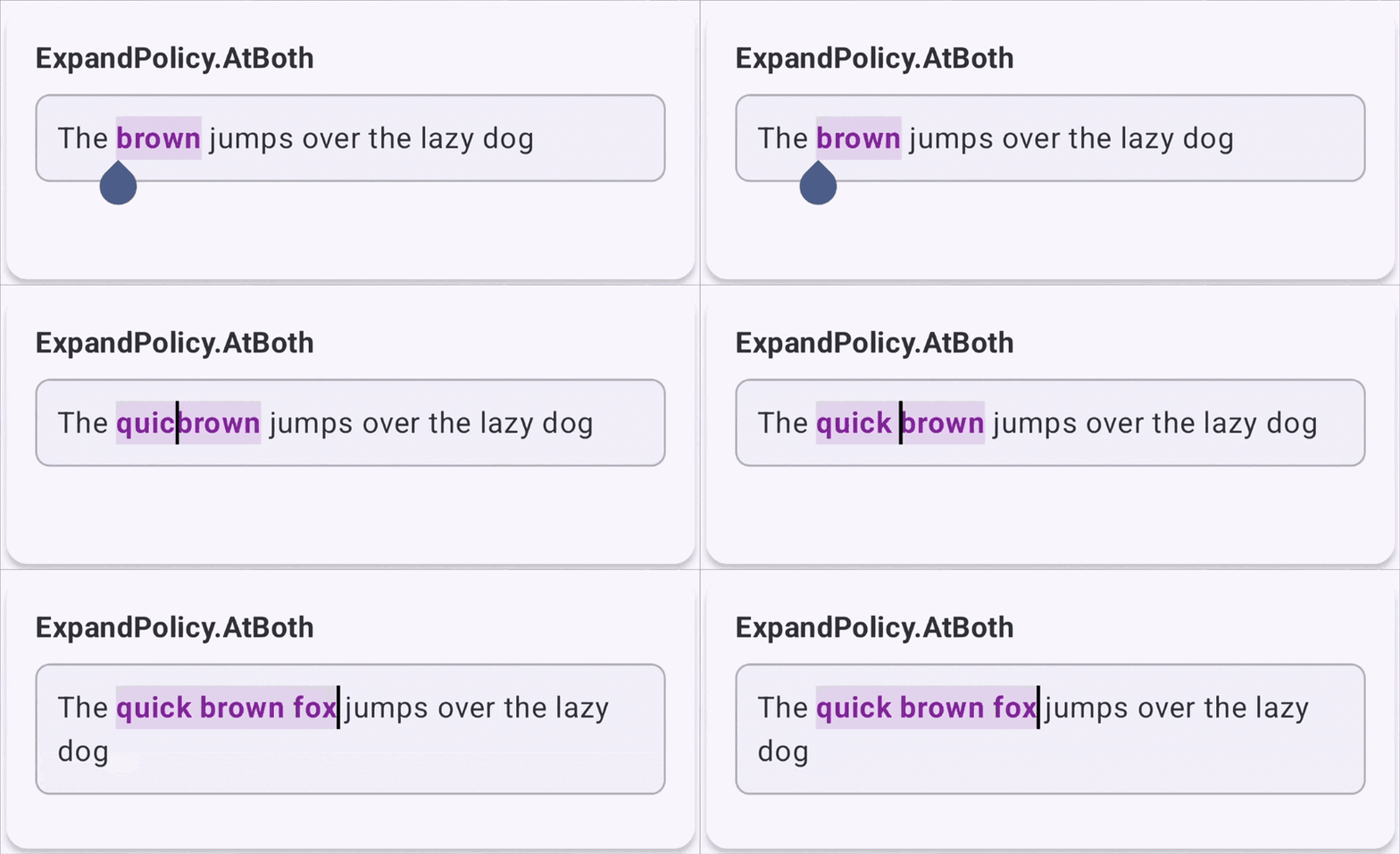 |
Apply character formatting with SpanStyle
Use addStyle with a SpanStyle to apply character-level formatting,
such as text color, background highlight, FontWeight, FontStyle,
or underline to a specific TextRange in the buffer.
Key behaviors for SpanStyle ranges
- Layering order: Styles apply in the order you add them to the buffer. If
multiple overlapping
SpanStyleranges set the same property with different values, the style added later renders on top. - Non-empty range requirement: You must pass a non-collapsed range where
start<end. CallingaddStyleon a collapsed selection of length0has no effect, and passing reversed or out-of-bounds indexes throws anIllegalArgumentException.
TextField( state = rememberTextFieldState(), inputTransformation = InputTransformation { for (i in 0 until changes.changeCount) { val range = changes.getRange(i) if (!range.collapsed) { addStyle( spanStyle = SpanStyle( fontWeight = FontWeight.ExtraBold, fontStyle = FontStyle.Italic, color = Color.Red, ), range = range, expandPolicy = ExpandPolicy.AtEnd ) } } } )
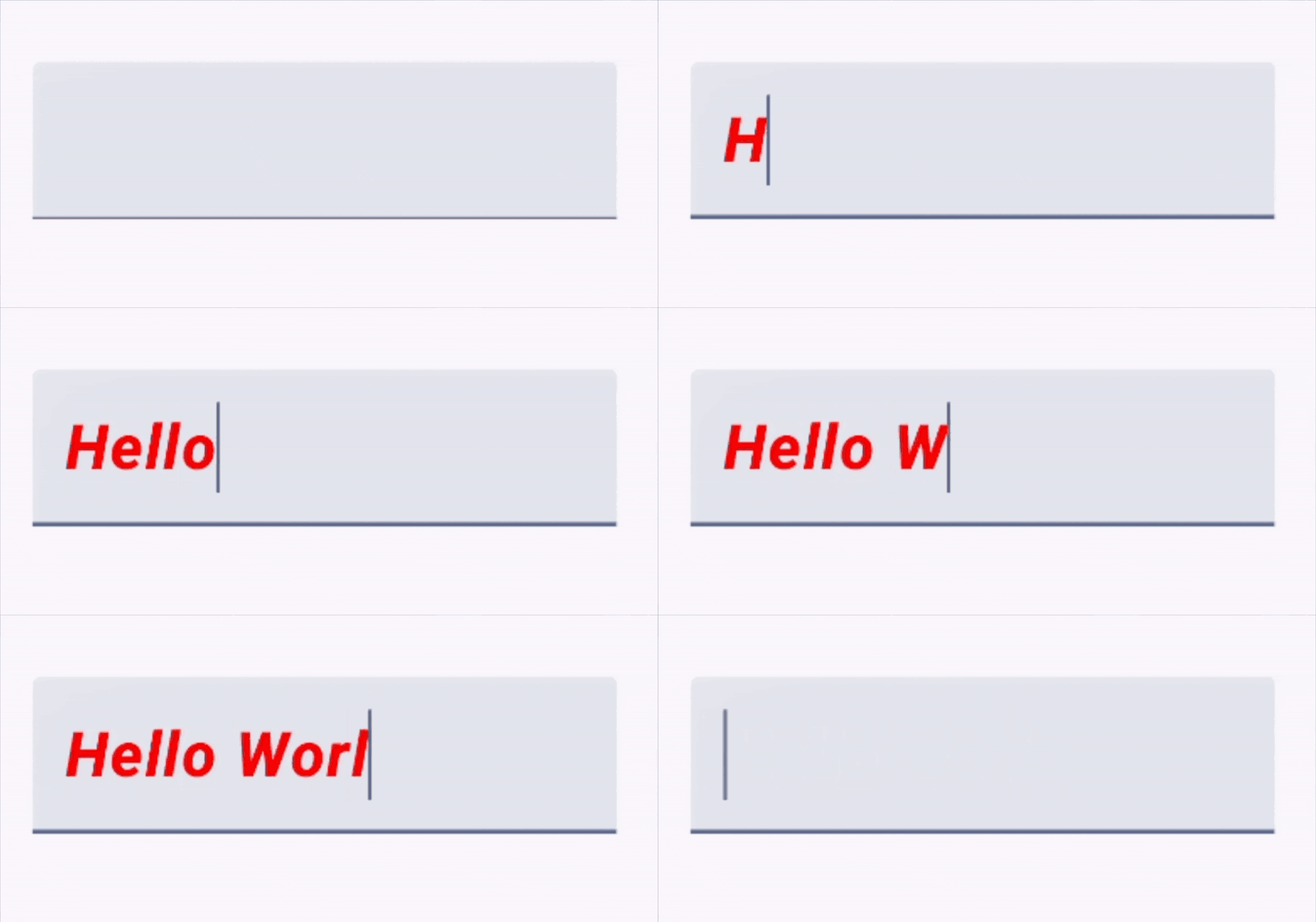
Apply block formatting with ParagraphStyle
Use addStyle with a ParagraphStyle to apply block-level
structural formatting such as textAlign, lineHeight,
textDirection, or textIndent to a paragraph range.
fun setParagraphAlignment(state: TextFieldState, alignment: TextAlign) { val targetRange = if (state.selection.collapsed) { TextRange(0, state.text.length) } else { state.selection } if (targetRange.collapsed) return state.edit { // 1. Remove existing paragraph styles in this range getParagraphStyles(targetRange).forEach { removeStyle(it) } // 2. Apply the new paragraph alignment addStyle( paragraphStyle = ParagraphStyle(textAlign = alignment), range = targetRange, expandPolicy = ExpandPolicy.InsideOnly ) } }
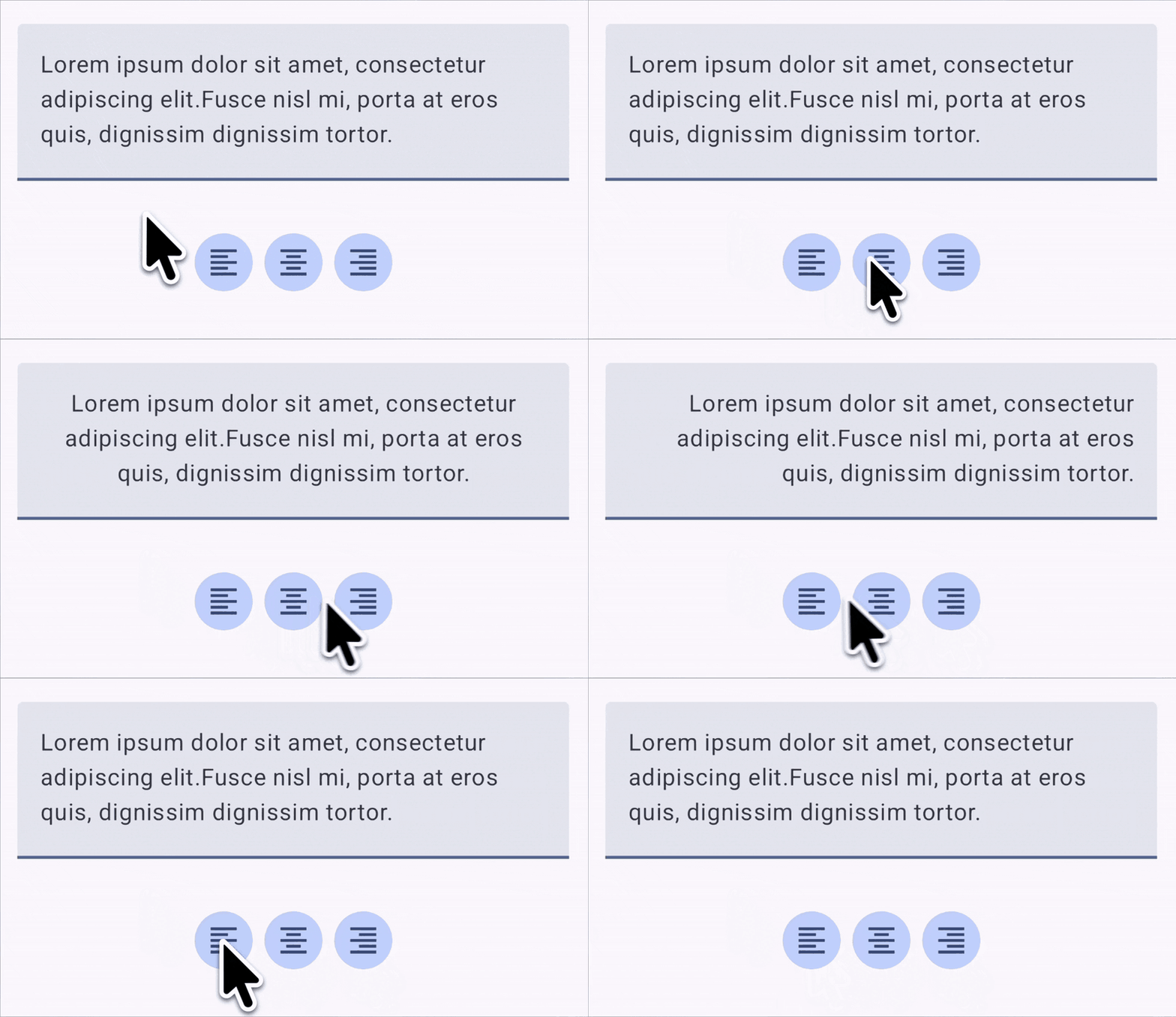
ParagraphStyle.Pitfalls to avoid with ParagraphStyle
Because ParagraphStyle applies to entire blocks of text, avoid using it in the
following scenarios:
- Expanding into adjacent paragraphs: Set
ExpandPolicycarefully so adjacentParagraphStyleranges don't overlap after user edits. For example, if[0, 5)usesExpandPolicy.AtEndand[5, 10)usesExpandPolicy.AtStart, inserting text at index5expands both styles into an overlap and throws anIllegalArgumentException. - Nesting
ParagraphStyleranges: Although completely nested ranges (such as[0, 10)and[2, 8)) are valid inAnnotatedString, avoid nestingParagraphStyleranges in a text field. Layout splits nested ranges into separate paragraphs and subsequent edits can inadvertently turn nested ranges into a partial overlap.
Update a style in place with TrackedRange
Calling addStyle with a TextRange and ExpandPolicy returns a
TrackedRange handle, which can be TrackedRange<SpanStyle> or
TrackedRange<ParagraphStyle>. A TrackedRange is a dynamic reference to a
style interval in the TextFieldBuffer that automatically updates its start
and end character offsets as text is inserted, deleted, or replaced around it.
In-place mutability
You don't need to call removeStyle and addStyle to update an existing style
or adjust its boundaries. Inside a TextFieldBuffer scope, TrackedRange
provides extension properties that update the interval in place while preserving
its original layering order relative to other styles:
TrackedRange<SpanStyle>.spanStyle: Reads or replaces theSpanStylepayload in place on aTrackedRange<SpanStyle>.TrackedRange<ParagraphStyle>.paragraphStyle: Reads or replaces theParagraphStylepayload in place on aTrackedRange<ParagraphStyle>.TrackedRange<*>.textRange: Reads or updates the currentTextRangebounds in place. Setting a collapsed, reversed, or out-of-bounds range throws anIllegalArgumentException.TrackedRange<*>.expandPolicy: Reads or updates theExpandPolicyin place.TrackedRange<*>.isValid: Returnstrueif the style interval is still active in the buffer, orfalseif edits caused its length to collapse to0or if it was removed.
// Trim an existing bold span in place when the selection overlaps one edge val range = style.textRange if (range.start < selection.min && range.end <= selection.max) { // Selection covers the end of the span - shrink end boundary in place style.textRange = TextRange(range.start, selection.min) } else if (range.start >= selection.min && range.end > selection.max) { // Selection covers the start of the span - shrink start boundary in place style.textRange = TextRange(selection.max, range.end) }
Scope confinement and lifecycle rules
Keep the following scope and lifecycle rules in mind when working with
TrackedRange instances:
- Confined to
TextFieldBuffer:TrackedRangeextension properties only exist within theTextFieldBufferscope where the handle was created or queried. - Automatic pruning on collapse: If user edits delete all characters covered
by a
TrackedRange, its length shrinks to0,isValidreturnsfalse, and the style is removed from the buffer.
Query and remove styles
Compose provides two ways to inspect active styles, depending on whether you are mutating the buffer or reading state for your UI:
- Inside a
TextFieldBufferblock: CallgetSpanStylesandgetParagraphStylesdirectly on theTextFieldBufferreceiver to obtain mutableTrackedRangehandles. - Outside an edit block: Read
TextFieldState.textStyles, which returns immutableAnnotatedString.Rangelists that reflect the committed state.
Query intersecting styles in TextFieldBuffer
TextFieldBuffer.getSpanStyles and
TextFieldBuffer.getParagraphStyles return all TrackedRange instances
that intersect with the given TextRange, ordered by when they were added to
the buffer.
For example, you can query getSpanStyles(selection) inside state.edit to
inspect or update styles covering the user's current selection:
state.edit { if (selection.collapsed) return@edit // Query all bold spans that overlap with the current selection val boldStyles: List<TrackedRange<SpanStyle>> = getSpanStyles(selection).filter { it.spanStyle.fontWeight == FontWeight.Bold } // ... }
Style intervals use a semi-open mathematical range [start, end). Whether a
touching style is returned depends on whether you query a selection or a single
cursor point:
- For a non-empty selection
[start, end):- Returned: Any style that overlaps, contains, or sits inside the
selection range. For example, query
[5, 15)matches[0, 20),[8, 12), or[0, 10). - Not returned: Styles that only touch the outer boundary edges without
overlapping characters. For example, query
[5, 15)excludes[0, 5)and[15, 25).
- Returned: Any style that overlaps, contains, or sits inside the
selection range. For example, query
- For a collapsed cursor
[index, index]:- Returned: Any style containing the cursor or starting at the cursor
position. For example, a cursor at
10matches[0, 20)and[10, 20). - Not returned (touching end rule): Any style ending at the cursor
position. For example, a cursor at
10excludes[0, 10).
- Returned: Any style containing the cursor or starting at the cursor
position. For example, a cursor at
Remove or toggle styles with removeStyle
Pass a TrackedRange handle to removeStyle to delete that specific
style interval from the TextFieldBuffer.
removeStyle returns true if the TrackedRange was found and removed, or
false if it was already removed or belonged to a different buffer. It removes
only the targeted TrackedRange handle, leaving other overlapping styles
intact.
fun toggleBold(state: TextFieldState) { state.edit { if (selection.collapsed) return@edit // Query all bold spans that overlap with the current selection val boldStyles: List<TrackedRange<SpanStyle>> = getSpanStyles(selection).filter { it.spanStyle.fontWeight == FontWeight.Bold } if (boldStyles.isNotEmpty()) { // Remove or trim existing bold spans covering the selection for (style in boldStyles) { val range = style.textRange if (range.start >= selection.min && range.end <= selection.max) { removeStyle(style) } else if (range.start < selection.min && range.end > selection.max) { val oldEnd = range.end style.textRange = TextRange(range.start, selection.min) addStyle( spanStyle = SpanStyle(fontWeight = FontWeight.Bold), range = TextRange(selection.max, oldEnd), expandPolicy = ExpandPolicy.AtEnd ) } else if (range.start < selection.min) { style.textRange = TextRange(range.start, selection.min) } else { style.textRange = TextRange(selection.max, range.end) } } } else { // No bold spans intersect the selection - apply bold addStyle( spanStyle = SpanStyle(fontWeight = FontWeight.Bold), range = selection, expandPolicy = ExpandPolicy.AtEnd ) } } }
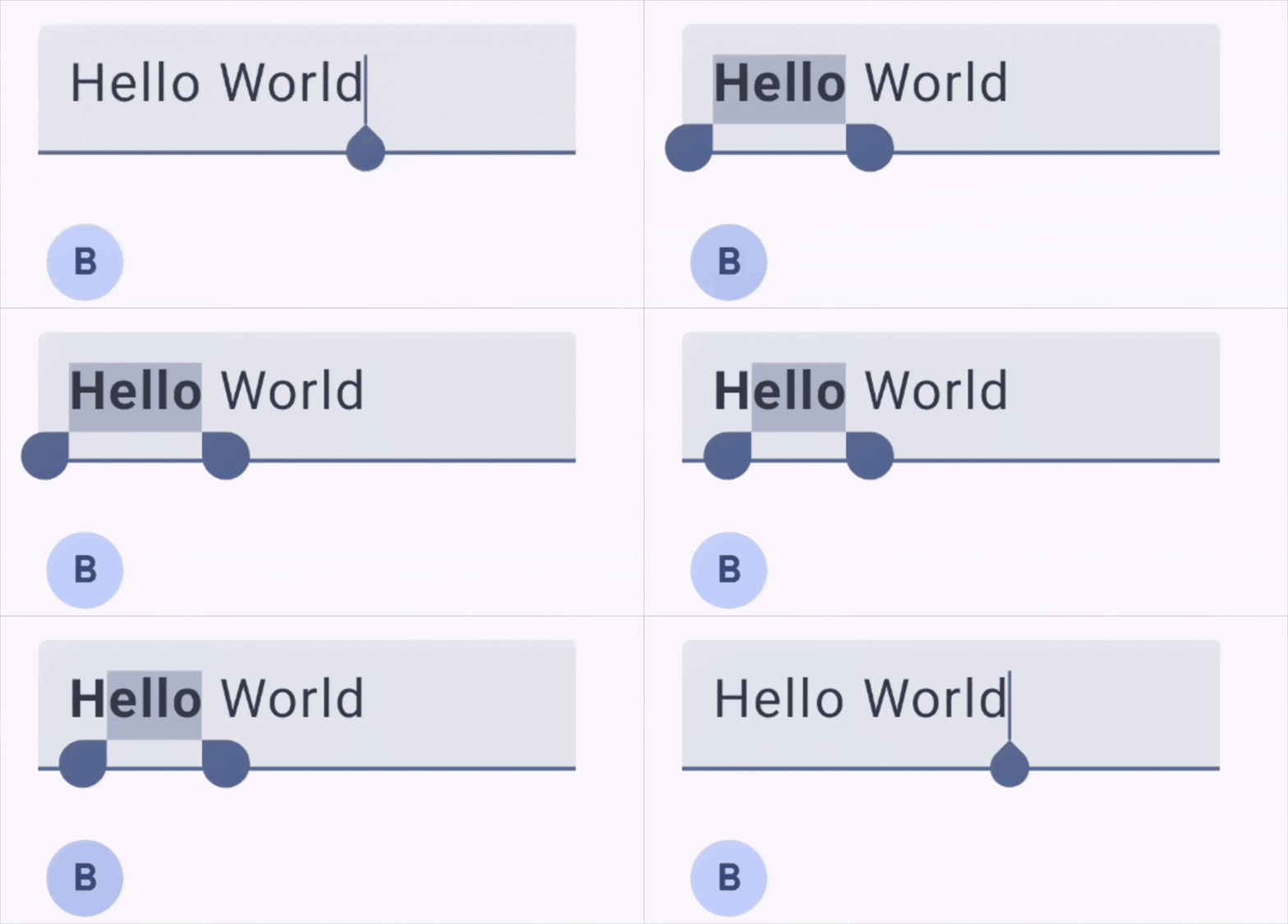
Extract or serialize rich text
To display formatted input in a read-only Text composable, or serialize it to
a backend service, read TextFieldState.textStyles outside an edit block.
state.textStyles.getSpanStyles and
state.textStyles.getParagraphStyles return
List<AnnotatedString.Range<SpanStyle>> and
List<AnnotatedString.Range<ParagraphStyle>>, which you can pass directly to
the AnnotatedString constructor:
fun TextFieldState.toAnnotatedString(): AnnotatedString { val fullRange = TextRange(0, text.length) return AnnotatedString( text = text.toString(), spanStyles = textStyles.getSpanStyles(fullRange), paragraphStyles = textStyles.getParagraphStyles(fullRange) ) }
Complete example in Jetchat
To see a complete implementation that combines inline character styling (bold, italic, underline, strikethrough, and color), see the Jetchat sample on GitHub:
RichTextState.kt: EncapsulatesTextFieldStatestyle queries, span toggling, trimming or splitting across selection bounds, and more.UserInput.kt: ConnectsRichTextStateto the rich text formatting toolbar and message input field.