
Scrolling is divided into multiple phases. Input delta is dispatched through a sequence of phases to ensure each phase has an opportunity to consume or react to the movement.
Throughout this cycle, both the available input delta and the consumed input delta are passed along at every step. This provides each phase with the complete context needed to react to, consume, or listen to the scroll event.
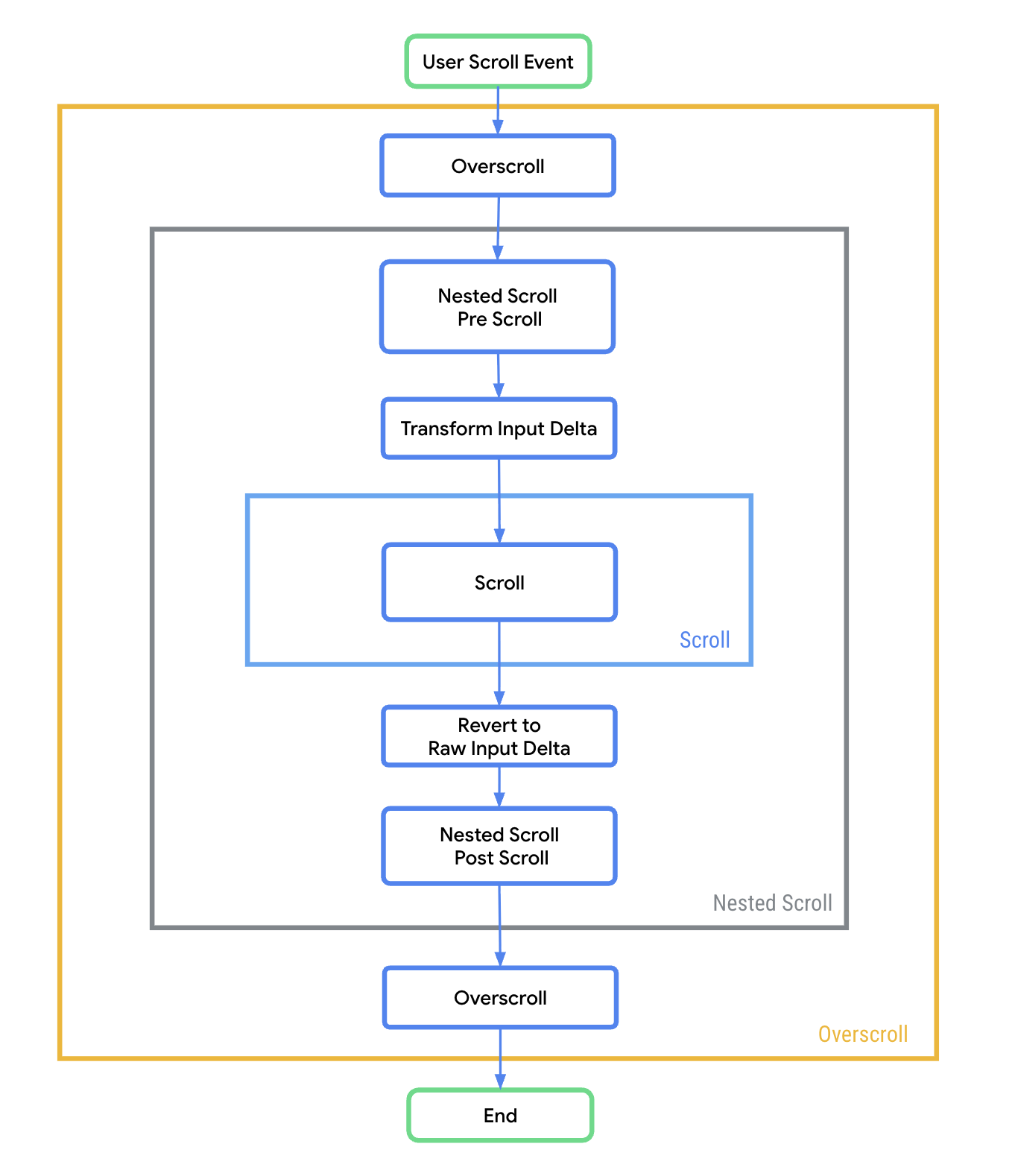
As illustrated in Figure 1, the scrolling process follows this exact order:
- Overscroll: Receives the initial input delta first, which gives overscroll a chance to react first (for example, by relaxing an active stretch effect).
- Nested scroll pre-scroll: Gives an opportunity to react to the input delta before the Scroll phase. In this phase, some input delta might be consumed, or it may just be monitored to trigger UI changes, such as collapsing or expanding an app bar.
- Transform input delta: Adjusts the sign of the raw input delta based on layout orientation and direction to ensure natural scrolling behavior. For more information, see the Transform input delta section.
- Scroll: This phase receives the available, unconsumed input delta adjusted to match scrolling container configuration. It typically uses this delta to update its own scroll offset.
- Revert to raw input delta: Reverts available and consumed delta from the Scroll phase to the original raw input delta sign.
- Nested scroll post-scroll: This phase reacts after the main scroll phase has completed, receiving the newly updated available and consumed deltas. It can consume any leftover available input, or use the context of what was just consumed.
- Overscroll: This last phase looks at the final available and consumed deltas. Any remaining available input that makes it to this stage is typically used to drive edge effects, like a stretch or glow, indicating that the user has reached the boundary of the scrollable area.
Transform input delta
Pointer input delta requires sign adjustments across scroll phases to match expected contracts. Before the delta reaches the Scroll phase, scroll modifiers adjust input delta based on orientation, layout direction, and RTL contexts. This happens because raw input tracks the physical pixel movement of the pointer on the screen (for example, moving down increases the screen's Y-coordinate, yielding a positive delta). However, to achieve "natural scrolling" where content moves with your finger, dragging down means the viewport must shift up over the content, which corresponds to a negative scroll offset.
Input deltas from other input sources, such as a mouse wheel or touchpad, aren't transformed throughout the scroll phases.
Example: Pointer moves right using Modifier.horizontalScroll()
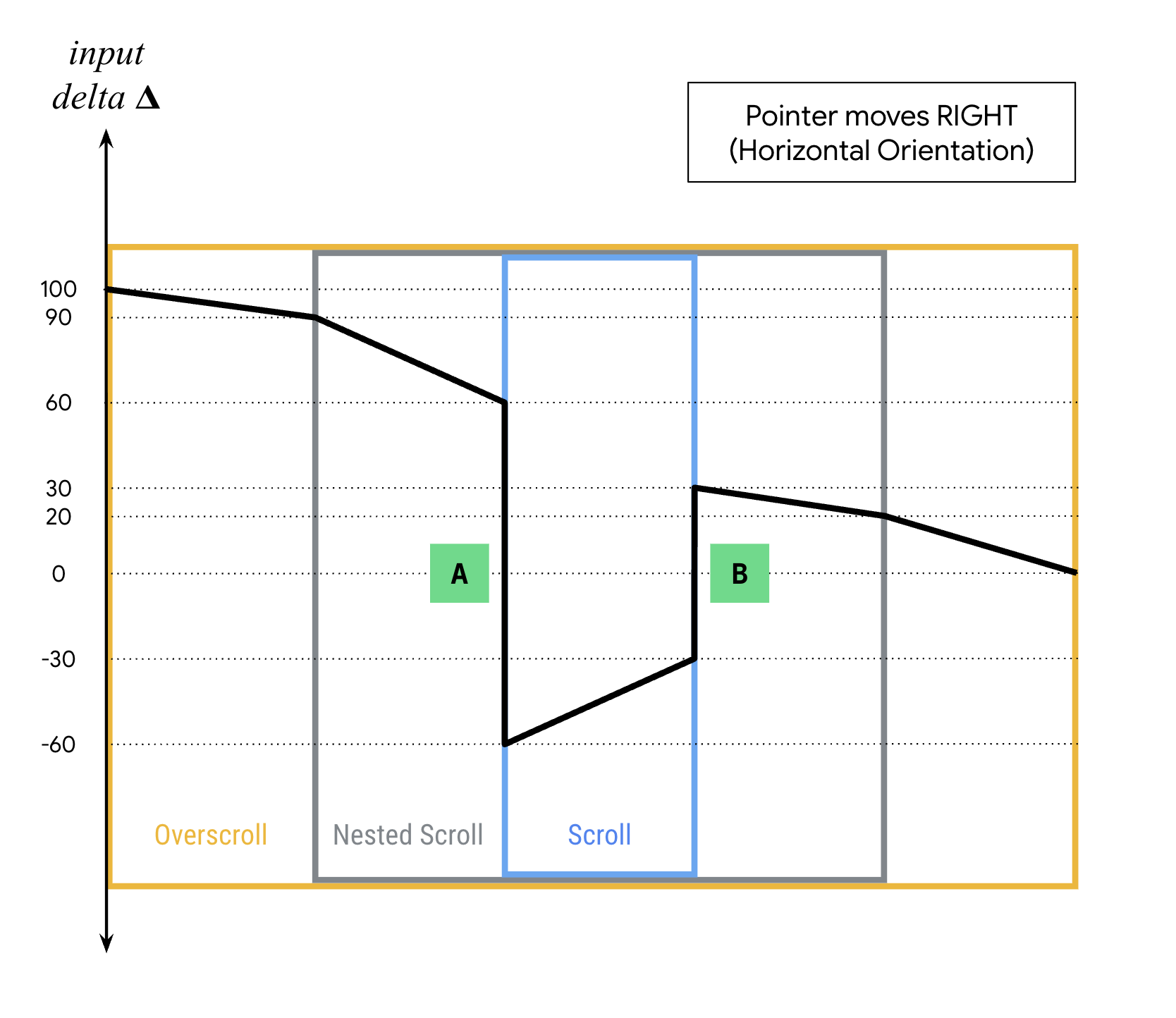
To understand how deltas are consumed and transformed, see Figure 2, which maps a gesture where the pointer moves right.
- Pre-scroll: The gesture begins with a positive raw input delta of 100.
- Overscroll observes this and consumes 10, leaving 90.
- Nested scroll pre-scroll gives the parent component an opportunity to react, consuming 30. The remaining raw delta is 60.
- Transformation A: Before entering the Scroll phase,
horizontalScrollinverts the remaining positive raw delta (60) into a negative delta (-60). This ensures the viewport shifts left so the content appears to move right with the user's finger. - Scroll: The target scrollable component consumes a portion of this transformed delta to update its scroll offset. In this example, it consumes -30, leaving -30 unconsumed.
- Transformation B: The unconsumed scroll delta (-30) is converted back into a positive raw delta (30) to match the contract of nested scroll and overscroll.
- Post-scroll: The remaining raw delta is passed back up the pipeline.
- Nested scroll post-scroll consumes 10, leaving 20.
- Overscroll effect uses the final 20 to drive visual edge effects, such as a stretch or glow, fully resolving the input delta to 0.
Pointer input delta transformation reference
The following table outlines how input deltas are signed across different phases and directions for pointer input.
| Raw input delta | Overscroll effect | Nested scroll | scrollableArea with horizontal orientation |
scrollableArea with horizontal orientation (reversed) |
scrollableArea with vertical orientation |
scrollableArea with vertical orientation (reversed) |
|
|---|---|---|---|---|---|---|---|
| Pointer moves UP | Negative | Negative | Negative | N/A | N/A | Positive | Negative |
| Pointer moves DOWN | Positive | Positive | Positive | N/A | N/A | Negative | Positive |
| Pointer moves LEFT | Negative | Negative | Negative | Positive (Negative for RTL) | Negative (Positive for RTL) | N/A | N/A |
| Pointer moves RIGHT | Positive | Positive | Positive | Negative (Positive for RTL) | Positive (Negative for RTL) | N/A | N/A |