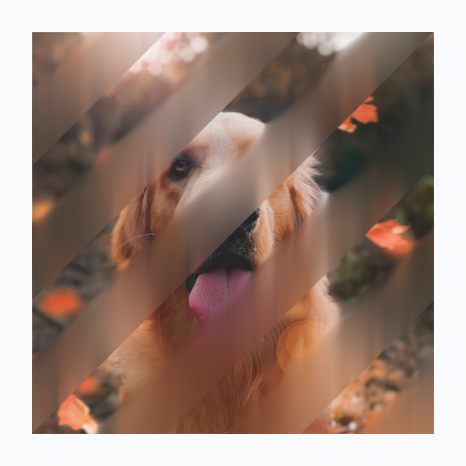
다음 섹션에서는 일반적인 UI 패턴에 Modifier.blur, BlurRadiusSpec, BlurStop, BlurScope를 결합하는 방법을 보여줍니다. 이러한 API에 관한 소개는 Compose에서 흐리게 처리를 참고하세요.
스크롤 또는 드래그 가능한 콘텐츠의 가장자리 흐리게 처리
스크롤 목록, 캐러셀 또는 선택 도구를 표시할 때 다중 정지 점진적 블러를 사용하여 컨테이너 가장자리 근처의 항목을 부드럽게 처리하면서 활성 중앙 영역을 선명하게 유지할 수 있습니다.
스크롤 목록의 상단 및 하단 가장자리 페이드
항목이 세로 목록의 표시 영역 안팎으로 스크롤될 때 항목을 부드럽게 하려면 BlurStop 항목이 있는 BlurRadiusSpec.verticalGradient를 LazyColumn에 적용합니다. 다음 예에서는 노래 가사를 한 줄씩 스크롤하며, 0.42f과 0.58f 사이의 0.dp 중지점은 활성 줄을 중앙에 선명하게 유지하고 상단 및 하단 가장자리의 줄은 점차 흐리게 처리합니다.
@Composable fun SongListTopBottomBlurExample(lyrics: List<String>) { // ... LazyColumn( state = listState, flingBehavior = flingBehavior, modifier = Modifier .width(330.dp) .height(480.dp) .padding(horizontal = 24.dp) .blur( blurRadiusSpec = BlurRadiusSpec.verticalGradient( stops = listOf( BlurStop(fraction = 0.00f, radius = 18.dp), // Heavily blurred top edge BlurStop(fraction = 0.24f, radius = 8.dp), // Soft upper transition BlurStop(fraction = 0.42f, radius = 0.dp), // Sharp center focus starts BlurStop(fraction = 0.58f, radius = 0.dp), // Sharp center focus ends BlurStop(fraction = 0.76f, radius = 8.dp), // Soft lower transition BlurStop(fraction = 1.00f, radius = 18.dp), // Heavily blurred bottom edge ), ), edgeTreatment = BlurredEdgeTreatment.Unbounded, ), contentPadding = PaddingValues(vertical = 36.dp), verticalArrangement = Arrangement.spacedBy(26.dp), horizontalAlignment = Alignment.CenterHorizontally, ) { // ... } }
가로 컨트롤의 왼쪽 및 오른쪽 가장자리 페이드
마찬가지로 휠 선택 도구, 캐러셀, 측정 눈금과 같이 가로로 스크롤하거나 드래그할 수 있는 구성요소의 중앙에 포커스를 맞추려면 BlurStop 항목이 있는 BlurRadiusSpec.horizontalGradient를 적용합니다. 다음 드래그 가능한 체중계에서 왼쪽과 오른쪽 가장자리는 부드럽게 처리되고 중앙 표시기 바늘 근처의 눈금과 숫자는 완전히 선명하게 유지됩니다.
@Composable fun HorizontalScaleBlurExample() { var selectedValue by remember { mutableFloatStateOf(65.0f) } val animatedValue by animateFloatAsState( targetValue = selectedValue, animationSpec = tween(durationMillis = 900, easing = FastOutSlowInEasing), label = "horizontalScaleSmoothScroll", ) Column( modifier = Modifier .width(340.dp) .background(Color(0xFF0F172A), RoundedCornerShape(24.dp)) .padding(vertical = 24.dp), horizontalAlignment = Alignment.CenterHorizontally, ) { Text( text = "${(animatedValue * 10).roundToInt() / 10.0} kg", color = Color.White, fontSize = 44.sp, fontWeight = FontWeight.Black, ) Spacer(Modifier.height(16.dp)) Box( // ... ) { // Ruler ticks blurred at the left and right edges, sharp at center Canvas( modifier = Modifier .fillMaxSize() .blur( blurRadiusSpec = BlurRadiusSpec.horizontalGradient( stops = listOf( BlurStop(fraction = 0.00f, radius = 14.dp), BlurStop(fraction = 0.28f, radius = 0.dp), BlurStop(fraction = 0.72f, radius = 0.dp), BlurStop(fraction = 1.00f, radius = 14.dp), ), ), edgeTreatment = BlurredEdgeTreatment.Unbounded, ), ) { // Draw horizontal ruler ticks offset by `animatedValue` // ... } // ... } } }
linearGradient로 대각선 블러 만들기
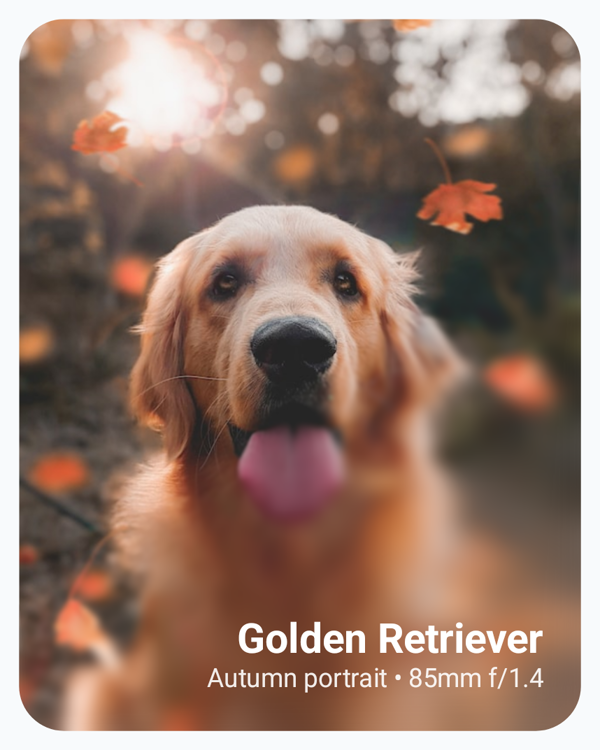
BlurRadiusSpec.linearGradient는 레이어 좌표 공간의 start 값과 end DpOffset 값 사이의 선분을 따라 블러 반경을 변경합니다.
Modifier.blur 람다 블록 내에서 BlurScope.size를 읽어 히어로 이미지에서 왼쪽 상단에서 오른쪽 하단으로 대각선 점진적 블러를 실행할 수 있습니다. 이렇게 하면 왼쪽 상단의 피사체는 완전히 선명하게 유지하면서 오버레이된 텍스트 뒤의 오른쪽 하단 영역은 점진적으로 흐리게 처리할 수 있습니다.
@Composable fun DiagonalLinearBlurCardExample() { Box( modifier = Modifier .wrapContentSize() .background(Color(0xFFF8FAFC)) .padding(10.dp), ) { Image( painter = painterResource(id = R.drawable.dog), contentDescription = stringResource(id = R.string.dog_content_description), contentScale = ContentScale.Crop, modifier = Modifier .size(width = 300.dp, height = 380.dp) .blur { blurRadiusSpec = BlurRadiusSpec.linearGradient( start = DpOffset(0.dp, 0.dp), end = DpOffset(size.width, size.height), stops = listOf( BlurStop(fraction = 0.00f, radius = 0.dp), BlurStop(fraction = 0.50f, radius = 0.dp), BlurStop(fraction = 0.75f, radius = 14.dp), BlurStop(fraction = 1.00f, radius = 28.dp), ), ) edgeTreatment = BlurredEdgeTreatment(RoundedCornerShape(24.dp)) }, ) // ... } }
radialGradient로 포커스 스포트라이트 만들기
BlurRadiusSpec.radialGradient는 초점에서 바깥쪽으로 흐리게 처리 반경을 변경하여 원형 스포트라이트 효과를 만듭니다. center를 DpOffset로 정의하고 fallOffRadius를 endRadius에 도달하는 center로부터의 Dp 거리로 정의합니다. center를 DpOffset.Unspecified로 두면 그라데이션이 컴포저블의 중앙에 배치되고 fallOffRadius를 Dp.Unspecified로 두면 기본적으로 레이어의 작은 크기의 절반으로 설정됩니다.
예를 들어 텍스트 구절에 BlurRadiusSpec.radialGradient를 적용하고 포인터 드래그 이벤트에서 center를 업데이트하면 사용자가 원형 읽기 스포트라이트를 단락 전체로 드래그하면서 주변 텍스트를 흐리게 처리할 수 있습니다. 다음 예를 참고하세요.
@Composable fun RadialSpotlightTextExample() { var touchOffset by remember { mutableStateOf(Offset.Unspecified) } Box( modifier = Modifier .size(width = 330.dp, height = 340.dp) .background(Color(0xFF0F172A), RoundedCornerShape(20.dp)) .pointerInput(Unit) { detectDragGestures( onDragStart = { offset -> touchOffset = offset }, onDrag = { change, _ -> touchOffset = change.position }, ) } .blur { val spotlightCenter = if (touchOffset.isSpecified) { DpOffset(touchOffset.x.toDp(), touchOffset.y.toDp()) } else { DpOffset(x = size.width / 2, y = size.height / 2) } blurRadiusSpec = BlurRadiusSpec.radialGradient( startRadius = 0.dp, endRadius = 10.dp, center = spotlightCenter, fallOffRadius = 215.dp, ) edgeTreatment = BlurredEdgeTreatment(RoundedCornerShape(20.dp)) } .padding(22.dp), ) { // ... } }
셰이더를 사용하여 맞춤 블러 마스크 만들기
반복 패턴, 임의의 도형, 절차적 노이즈와 같이 선형 또는 방사형 그래디언트를 넘어서는 복잡한 공간 블러 분포의 경우 AGSL RuntimeShader와 같은 맞춤 Shader를 BlurRadiusSpec.shader에 전달합니다. 셰이더는 왼쪽 상단 원점의 레이어 픽셀 좌표에서 평가되며 샘플링된 알파 채널 (0..1)은 maxRadius를 확장합니다.
remember 컴포저블 함수를 사용하여 셰이더와 BlurRadiusSpec.shader 구성을 한 번 만들면 재구성 전반에서 단일 인스턴스가 재사용됩니다. Compose는 각 확인에서 레이어 크기로 구성 블록을 호출합니다. 여기서 크기 종속 유니폼을 설정합니다.
@RequiresApi(Build.VERSION_CODES.TIRAMISU) @Composable fun ShaderBlurExample() { // Creates 6 diagonal frosted-glass bands across the image. val maskShader = remember { RuntimeShader( """ uniform float2 size; half4 main(float2 coord) { float2 uv = coord / size; float band = smoothstep(0.4, 0.6, fract((uv.x + uv.y) * 3.0)); return half4(0.0, 0.0, 0.0, half(band)); } """.trimIndent(), ) } val maskBlurSpec = remember(maskShader) { BlurRadiusSpec.shader(maxRadius = 24.dp) { sizePx -> maskShader.setFloatUniform("size", sizePx.width, sizePx.height) maskShader } } Image( painter = painterResource(id = R.drawable.dog), contentDescription = stringResource(id = R.string.dog_content_description), contentScale = ContentScale.Crop, modifier = Modifier .size(150.dp) .blur(blurRadiusSpec = maskBlurSpec), ) }