

ExoPlayer のメインのデモアプリには、主に次の 2 つの目的があります。
- ExoPlayer の使用例を完全な形で提供するため。デモアプリは、独自のアプリを開発する際の便利な出発点として使用できます。
- ExoPlayer を試すことができる。デモアプリを使用すると、付属のサンプルに加えて、独自のコンテンツの再生をテストできます。
このページでは、デモアプリを取得、コンパイル、実行する方法について説明します。また、このアプリを使用して独自のメディアを再生する方法についても説明します。
コードの取得
メインのデモアプリのソースコードは、GitHub プロジェクトの demos/main フォルダにあります。まだ行っていない場合は、プロジェクトをローカル ディレクトリにクローンします。
git clone https://github.com/androidx/media.git
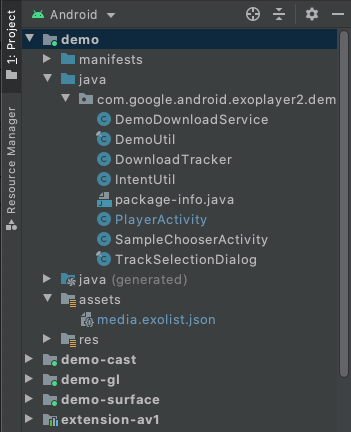
次に、Android Studio でプロジェクトを開きます。[Android] プロジェクト ビューに次のように表示されます(デモアプリの関連フォルダが開いています)。
コンパイルと実行
デモアプリをコンパイルして実行するには、Android Studio で demo 構成を選択して実行します。デモアプリがインストールされ、接続されている Android デバイスで実行されます。可能であれば、実機を使用することをおすすめします。代わりにエミュレータを使用する場合は、サポートされているデバイスのエミュレータのセクションを読み、仮想デバイスが API レベル 23 以上のシステム イメージを使用していることを確認してください。
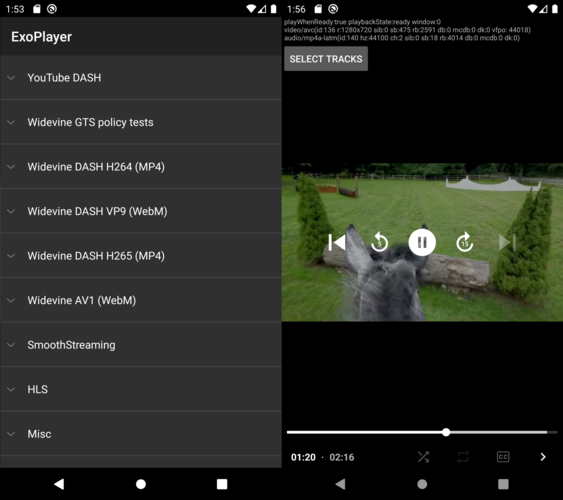
デモアプリにはサンプル(SampleChooserActivity)のリストが表示されます。サンプルを選択すると、再生用の 2 つ目のアクティビティ(PlayerActivity)が開きます。このデモでは、再生コントロールとトラック選択機能を紹介します。また、ExoPlayer の EventLogger ユーティリティ クラスを使用して、有用なデバッグ情報をシステムログに出力します。このロギングは、次のコマンドで(他のタグのエラーレベルのロギングとともに)確認できます。
adb logcat EventLogger:V *:E
バンドルされたデコーダを有効にする
ExoPlayer には、AV1、VP9、Opus、FLAC、FFmpeg(音声のみ)などのバンドル ソフトウェア デコーダを使用できる拡張機能がいくつかあります。デモアプリは、次のようにこれらの拡張機能を含めて使用するようにビルドできます。
- 含める拡張機能をそれぞれビルドします。これは手動プロセスです。手順については、各拡張機能の
README.mdファイルを参照してください。 Android Studio の [Build Variants] ビューで、次の図に示すように、デモ モジュールのビルド バリアントを
withDecoderExtensionsDebugまたはwithDecoderExtensionsReleaseに設定します。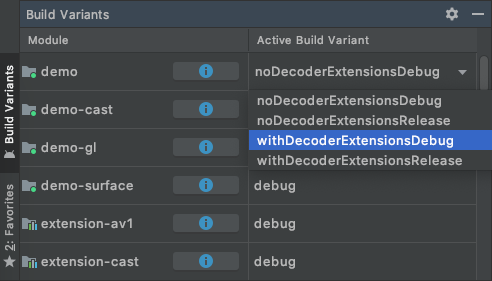
通常どおり、
demo構成をコンパイル、インストール、実行します。
デフォルトでは、適切なプラットフォーム デコーダが存在しない場合にのみ、拡張機能デコーダが使用されます。次のセクションで説明するように、拡張デコーダを優先するように指定できます。
自分のコンテンツを再生する
デモアプリで独自のコンテンツを再生する方法は複数あります。
1. アセット/media.exolist.json の編集
デモアプリに表示されるサンプルは assets/media.exolist.json から読み込まれます。この JSON ファイルを編集することで、デモアプリのサンプルを追加したり削除したりできます。スキーマは次のとおりです。ここで、[O] は省略可能な属性を示します。
[
  {
    "name": "Name of heading",
    "samples": [
      {
        "name": "Name of sample",
        "uri": "The URI of the sample",
        "extension": "[O] Sample type hint. Cannot be combined with mime_type. Values: mpd, ism, m3u8",
        "clip_start_position_ms": "[O] A start point to which the sample should be clipped, in milliseconds"
        "clip_end_position_ms": "[O] An end point from which the sample should be clipped, in milliseconds"
        "drm_scheme": "[O] Drm scheme if protected. Values: widevine, playready, clearkey",
        "drm_license_uri": "[O] URI of the license server if protected",
        "drm_force_default_license_uri": "[O] Whether to force use of "drm_license_uri" for key requests that include their own license URI",
        "drm_key_request_properties": "[O] Key request headers if protected",
        "drm_session_for_clear_content": "[O] Whether to attach a DRM session to clear video and audio tracks"
        "drm_multi_session": "[O] Enables key rotation if protected",
        "mime_type": "[O] The MIME type of the sample. Cannot be combined with extension.",
        "subtitle_uri": "[O] The URI of a subtitle sidecar file",
        "subtitle_mime_type": "[O] The MIME type of subtitle_uri (required if subtitle_uri is set)",
        "subtitle_language": "[O] The BCP47 language code of the subtitle file (ignored if subtitle_uri is not set)",
        "ad_tag_uri": "[O] The URI of an ad tag to load via the IMA extension"
      },
      ...etc
    ]
  },
  ...etc
]
サンプルのプレイリストは、次のスキーマを使用して指定できます。
[
  {
    "name": "Name of heading",
    "samples": [
      {
        "name": "Name of playlist sample",
        "playlist": [
          {
            "uri": "The URI of the first sample in the playlist",
            "extension": "[O] Sample type hint. Cannot be combined with mime_type. Values: mpd, ism, m3u8"
            "clip_start_position_ms": "[O] A start point to which the sample should be clipped, in milliseconds"
            "clip_end_position_ms": "[O] An end point from which the sample should be clipped, in milliseconds"
            "drm_scheme": "[O] Drm scheme if protected. Values: widevine, playready, clearkey",
            "drm_license_uri": "[O] URI of the license server if protected",
            "drm_force_default_license_uri": "[O] Whether to force use of "drm_license_uri" for key requests that include their own license URI",
            "drm_key_request_properties": "[O] Key request headers if protected",
            "drm_session_for_clear_content": "[O] Whether to attach a DRM session to clear video and audio tracks",
            "drm_multi_session": "[O] Enables key rotation if protected",
            "mime_type": "[O] The MIME type of the sample. Cannot be combined with extension.",
            "subtitle_uri": "[O] The URI of a subtitle sidecar file",
            "subtitle_mime_type": "[O] The MIME type of subtitle_uri (required if subtitle_uri is set)",
            "subtitle_language": "[O] The BCP47 language code of the subtitle file (ignored if subtitle_uri is not set)"
          },
          {
            "uri": "The URI of the second sample in the playlist",
            ...etc
          },
          ...etc
        ]
      },
      ...etc
    ]
  },
  ...etc
]
必要に応じて、キー リクエスト ヘッダーは、各ヘッダーの文字列属性を含むオブジェクトとして指定されます。
"drm_key_request_properties": {
  "name1": "value1",
  "name2": "value2",
  ...etc
}
サンプル選択アクティビティのオーバーフロー メニューには、拡張機能デコーダを優先するかどうかを指定するオプションが含まれています。
ローカル ファイル URI と対象範囲別ストレージの制限
ローカル ファイル URI を指定すると、デモアプリはこれらのファイルを読み取るために必要なストレージ アクセス権限をリクエストします。ただし、Android 13 以降では、一般的なメディア ファイル拡張子(.mp4 など)で終わらない任意のファイルを読み込むことはできません。そのようなファイルを読み込む必要がある場合は、アクセス制限のないデモアプリの特定のストレージ ディレクトリに配置できます。通常、このファイルは /sdcard/Android/data/androidx.media3.demo.main/files にあります。
2. 外部の exolist.json ファイルを読み込む
デモアプリは、上記のスキーマを使用して、*.exolist.json の命名規則に従って命名された外部 JSON ファイルを読み込むことができます。たとえば、https://yourdomain.com/samples.exolist.json でこのようなファイルをホストしている場合は、次のコードを使用してデモアプリで開くことができます。
adb shell am start -a android.intent.action.VIEW \
    -d https://yourdomain.com/samples.exolist.json
デモアプリがインストールされているデバイスで *.exolist.json リンク(ブラウザやメール クライアントなど)をクリックすると、デモアプリで開きます。*.exolist.json JSON ファイルをホストすると、他のユーザーがデモアプリで試せるコンテンツを配布できます。
3. インテントを起動する
インテントを使用すると、サンプルの一覧をバイパスして、再生を直接開始できます。単一のサンプルを再生するには、インテントのアクションを androidx.media3.demo.main.action.VIEW に設定し、データ URI を再生するサンプルの URI に設定します。このようなインテントは、ターミナルから次のコマンドで起動できます。
adb shell am start -a androidx.media3.demo.main.action.VIEW \
    -d https://yourdomain.com/sample.mp4
単一のサンプル インテントでサポートされているオプションの追加機能は次のとおりです。
- 構成の追加の例:
mime_type[String] サンプル MIME タイプのヒント。たとえば、DASH コンテンツの場合はapplication/dash+xmlです。clip_start_position_ms[Long] サンプルをクリップする開始点(ミリ秒単位)。clip_end_position_ms[Long] サンプルをクリップするエンドポイント(ミリ秒単位)。drm_scheme[String] 保護されている場合の DRM スキーム。有効な値はwidevine、playready、clearkeyです。DRM スキーム UUID も使用できます。drm_license_uri[String] 保護されている場合のライセンス サーバーの URI。drm_force_default_license_uri[Boolean] 独自のライセンス URI を含むキー リクエストでdrm_license_uriの使用を強制するかどうか。drm_key_request_properties[文字列配列] 保護されている場合、name1、value1、name2、value2 などとしてパックされたキー リクエスト ヘッダー。drm_session_for_clear_content[Boolean] DRM セッションをクリアな動画トラックと音声トラックにアタッチするかどうか。drm_multi_session[ブール値] 保護されている場合に鍵のローテーションを有効にします。subtitle_uri[String] 字幕サイドカー ファイルの URI。subtitle_mime_type[String] subtitle_uri の MIME タイプ(subtitle_uri が設定されている場合は必須)。subtitle_language[String] 字幕ファイルの BCP47 言語コード(subtitle_uri が設定されていない場合は無視されます)。ad_tag_uri[String] IMA 拡張機能を使用して読み込む広告タグの URI。prefer_extension_decoders[ブール値] 拡張機能デコーダがプラットフォーム デコーダよりも優先されるかどうか。
adb shell am start を使用してインテントを起動する場合、オプションの文字列エクストラは --es で設定できます(例: --es extension mpd)。オプションのブール値エクストラは --ez で設定できます(例: --ez prefer_extension_decoders TRUE)。オプションの long エクストラは --el で設定できます(例: --el clip_start_position_ms 5000)。オプションの文字列配列エクストラは --esa で設定できます(例: --esa drm_key_request_properties name1,value1)。
サンプルの再生リストを再生するには、インテントのアクションを androidx.media3.demo.main.action.VIEW_LIST に設定します。サンプル構成の追加は、androidx.media3.demo.main.action.VIEW の場合と同じですが、次の 2 つの点が異なります。
- エキストラのキーには、アンダースコアと 0 ベースのサンプル インデックスを接尾辞として含める必要があります。たとえば、
extension_0は最初のサンプルのサンプルタイプを示します。drm_scheme_1は 2 番目のサンプルの DRM スキームを設定します。 - サンプルの URI は、キー
uri_<sample-index>を持つエクストラとして渡されます。
サンプルに依存しないその他のエクストラは変更されません。たとえば、ターミナルで次のコマンドを実行すると、2 つのアイテムを含むプレイリストが再生され、2 つ目のアイテムの拡張子がオーバーライドされます。
adb shell am start -a androidx.media3.demo.main.action.VIEW_LIST \
    --es uri_0 https://a.com/sample1.mp4 \
    --es uri_1 https://b.com/sample2.fake_mpd \
    --es extension_1 mpd