

โมเดลเลย์เอาต์ของ Compose ช่วยให้คุณใช้ AlignmentLine เพื่อสร้างเส้นแนวที่กำหนดเอง
ซึ่งเลย์เอาต์ระดับบนสุดสามารถใช้เพื่อจัดแนวและวางตำแหน่งองค์ประกอบย่อย
ได้ ตัวอย่างเช่น Row สามารถใช้เส้นแนวที่กำหนดเองขององค์ประกอบย่อย
เพื่อจัดแนวองค์ประกอบย่อยได้
เมื่อเลย์เอาต์ระบุค่าสำหรับ AlignmentLine ที่เจาะจง เลย์เอาต์ระดับบนสุด
จะอ่านค่านี้ได้หลังจากวัดขนาดแล้ว โดยใช้โอเปอเรเตอร์ Placeable.get
ในอินสแตนซ์ Placeable ที่เกี่ยวข้อง จากนั้นเลย์เอาต์ระดับบนสุดจะตัดสินใจวางตำแหน่งองค์ประกอบย่อยตามตำแหน่งของ AlignmentLine
คอมโพสได้บางรายการใน Compose มีเส้นแนวมาให้แล้ว ตัวอย่างเช่น คอมโพสได้
BasicText จะแสดงเส้นแนว FirstBaseline และ LastBaseline
ในตัวอย่างต่อไปนี้ LayoutModifier ที่กำหนดเองชื่อ
firstBaselineToTop จะอ่าน FirstBaseline เพื่อเพิ่มระยะห่างจากขอบบนให้กับ Text
โดยเริ่มจากเส้นฐานแรก
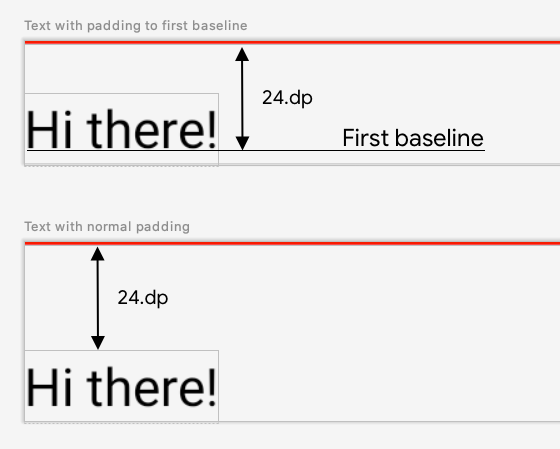
fun Modifier.firstBaselineToTop( firstBaselineToTop: Dp, ) = layout { measurable, constraints -> // Measure the composable val placeable = measurable.measure(constraints) // Check the composable has a first baseline check(placeable[FirstBaseline] != AlignmentLine.Unspecified) val firstBaseline = placeable[FirstBaseline] // Height of the composable with padding - first baseline val placeableY = firstBaselineToTop.roundToPx() - firstBaseline val height = placeable.height + placeableY layout(placeable.width, height) { // Where the composable gets placed placeable.placeRelative(0, placeableY) } } @Preview @Composable private fun TextWithPaddingToBaseline() { MaterialTheme { Text("Hi there!", Modifier.firstBaselineToTop(32.dp)) } }
หากต้องการอ่าน FirstBaseline ในตัวอย่าง ให้ใช้ placeable [FirstBaseline]
ในระยะการวัดขนาด
สร้างเส้นแนวที่กำหนดเอง
เมื่อสร้างคอมโพสได้ Layout ที่กำหนดเองหรือ
LayoutModifier ที่กำหนดเอง คุณสามารถระบุเส้นแนวที่กำหนดเองเพื่อให้
คอมโพสได้ระดับบนสุดอื่นๆ ใช้เส้นแนวเหล่านั้นเพื่อจัดแนวและวางตำแหน่งองค์ประกอบย่อย
ตามความเหมาะสมได้
ตัวอย่างต่อไปนี้แสดงคอมโพสได้ BarChart ที่กำหนดเองซึ่งแสดงเส้นแนว 2 เส้น ได้แก่ MaxChartValue และ MinChartValue เพื่อให้คอมโพสได้อื่นๆ จัดแนวกับค่าข้อมูลสูงสุดและต่ำสุดของแผนภูมิได้ องค์ประกอบข้อความ 2 รายการ ได้แก่
Max และ Min ได้รับการจัดแนวให้อยู่ตรงกลางเส้นแนวที่กำหนดเอง
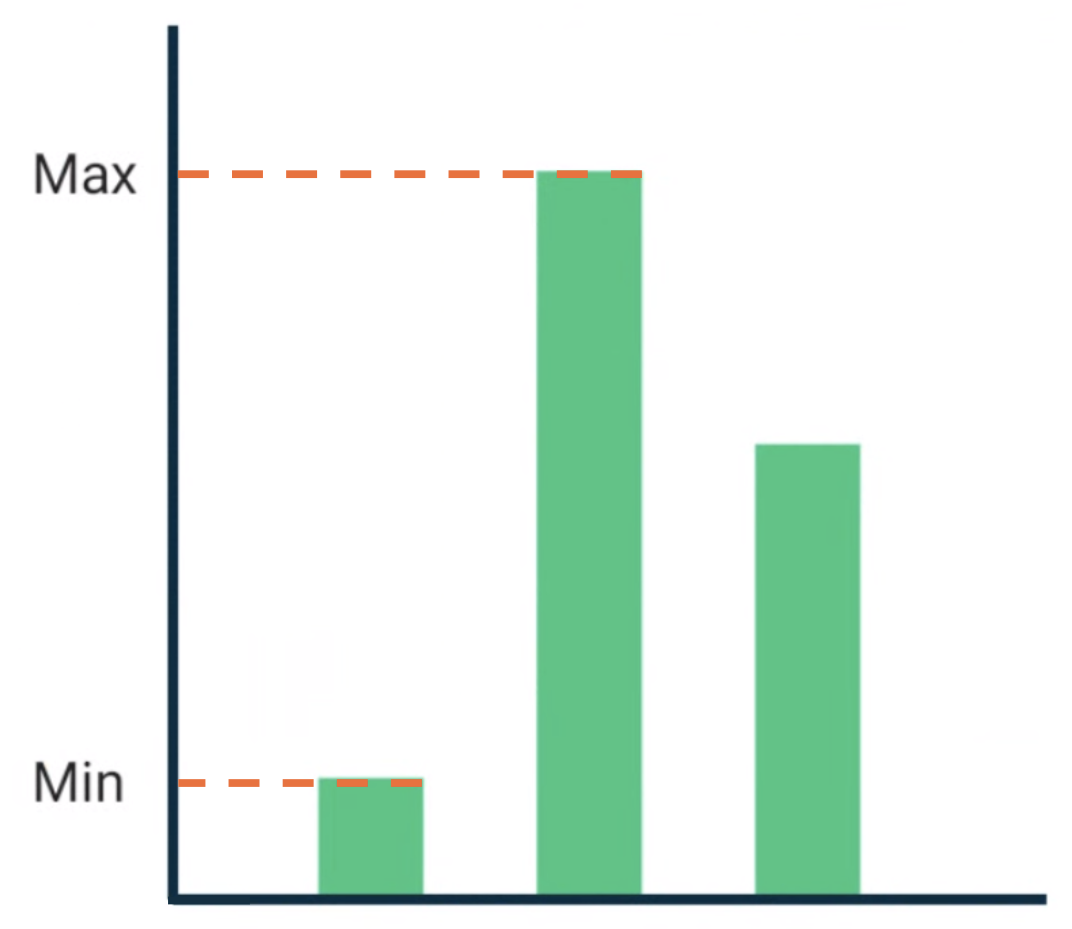
BarChart ที่มีข้อความจัดแนวกับค่าข้อมูลสูงสุดและ
ต่ำสุดเส้นแนวที่กำหนดเองจะกำหนดเป็นตัวแปรระดับบนสุดในโปรเจ็กต์
/** * AlignmentLine defined by the maximum data value in a [BarChart] */ private val MaxChartValue = HorizontalAlignmentLine(merger = { old, new -> min(old, new) }) /** * AlignmentLine defined by the minimum data value in a [BarChart] */ private val MinChartValue = HorizontalAlignmentLine(merger = { old, new -> max(old, new) })
เส้นแนวที่กำหนดเองที่จะสร้างตัวอย่างของเรามีประเภทเป็น
HorizontalAlignmentLine เนื่องจาก
ใช้เพื่อจัดแนวองค์ประกอบย่อยในแนวตั้ง ระบบจะส่งนโยบายการผสานเป็นพารามิเตอร์ในกรณีที่เลย์เอาต์หลายรายการระบุค่าสำหรับเส้นแนวเหล่านี้ เนื่องจาก
ระบบเลย์เอาต์ของ Compose จะประสานงานและCanvas
พิกัดแสดง[0, 0] มุมซ้ายบน และแกนx และy เป็น
ค่าบวกในทิศทางลง ดังนั้นค่าMaxChartValue จะมีค่าน้อยกว่า
MinChartValue เสมอ ด้วยเหตุนี้ นโยบายการผสานจึงเป็น min สำหรับเส้นฐานค่าข้อมูลแผนภูมิสูงสุด และ max สำหรับเส้นฐานค่าข้อมูลแผนภูมิต่ำสุด
เมื่อสร้าง Layout หรือ LayoutModifier ที่กำหนดเอง ให้ระบุเส้นแนวที่กำหนดเองในเมธอด MeasureScope.layout ซึ่งใช้พารามิเตอร์
alignmentLines: Map<AlignmentLine, Int>
@Composable private fun BarChart( dataPoints: List<Int>, modifier: Modifier = Modifier, ) { val maxValue: Float = remember(dataPoints) { dataPoints.maxOrNull()!! * 1.2f } BoxWithConstraints(modifier = modifier) { val density = LocalDensity.current with(density) { // ... // Calculate baselines val maxYBaseline = // ... val minYBaseline = // ... Layout( content = {}, modifier = Modifier.drawBehind { // ... } ) { _, constraints -> with(constraints) { layout( width = if (hasBoundedWidth) maxWidth else minWidth, height = if (hasBoundedHeight) maxHeight else minHeight, // Custom AlignmentLines are set here. These are propagated // to direct and indirect parent composables. alignmentLines = mapOf( MinChartValue to minYBaseline.roundToInt(), MaxChartValue to maxYBaseline.roundToInt() ) ) {} } } } } }
คอมโพสได้นี้มีคอมโพสได้ระดับบนสุดทั้งโดยตรงและโดยอ้อมที่ใช้เส้นแนวได้ คอมโพสได้ต่อไปนี้สร้างเลย์เอาต์ที่กำหนดเองซึ่งใช้ช่อง Text 2 ช่องและจุดข้อมูลเป็นพารามิเตอร์ และจัดแนวข้อความ 2 รายการกับค่าข้อมูลแผนภูมิสูงสุดและต่ำสุด ตัวอย่างของคอมโพสได้นี้แสดงอยู่ในรูปที่ 2
@Composable private fun BarChartMinMax( dataPoints: List<Int>, maxText: @Composable () -> Unit, minText: @Composable () -> Unit, modifier: Modifier = Modifier, ) { Layout( content = { maxText() minText() // Set a fixed size to make the example easier to follow BarChart(dataPoints, Modifier.size(200.dp)) }, modifier = modifier ) { measurables, constraints -> check(measurables.size == 3) val placeables = measurables.map { it.measure(constraints.copy(minWidth = 0, minHeight = 0)) } val maxTextPlaceable = placeables[0] val minTextPlaceable = placeables[1] val barChartPlaceable = placeables[2] // Obtain the alignment lines from BarChart to position the Text val minValueBaseline = barChartPlaceable[MinChartValue] val maxValueBaseline = barChartPlaceable[MaxChartValue] layout(constraints.maxWidth, constraints.maxHeight) { maxTextPlaceable.placeRelative( x = 0, y = maxValueBaseline - (maxTextPlaceable.height / 2) ) minTextPlaceable.placeRelative( x = 0, y = minValueBaseline - (minTextPlaceable.height / 2) ) barChartPlaceable.placeRelative( x = max(maxTextPlaceable.width, minTextPlaceable.width) + 20, y = 0 ) } } } @Preview @Composable private fun ChartDataPreview() { MaterialTheme { BarChartMinMax( dataPoints = listOf(4, 24, 15), maxText = { Text("Max") }, minText = { Text("Min") }, modifier = Modifier.padding(24.dp) ) } }
แนะนำสำหรับคุณ
- หมายเหตุ: ข้อความลิงก์จะแสดงเมื่อ JavaScript ปิดอยู่
- กราฟิกใน Compose
- เลย์เอาต์ที่กำหนดเอง {:#custom-layouts }
- การวัดขนาดโดยธรรมชาติในเลย์เอาต์ของ Compose