
ViewModel overview Part of Android Jetpack.

The ViewModel class is a business logic or screen level state
holder. It exposes state to the UI and encapsulates related business logic.
Its principal advantage is that it caches state and persists it through
configuration changes. This means that your UI doesn't have to fetch data again
when navigating between activities, or following configuration changes, such as
when rotating the screen.
For more information on state holders, see the state holders guidance. Similarly, for more information on the UI layer generally, see the UI layer guidance.
ViewModel benefits
The alternative to a ViewModel is a plain class that holds the data you display in your UI. This can become a problem when navigating between activities or Navigation destinations. Doing so destroys that data if you don't store it using the saved instance state mechanism. ViewModel provides a convenient API for data persistence that resolves this issue.
Alternatively, for pure state holders, Compose offers retain capabilities that
allow plain classes to survive configuration changes without the full
infrastructure of a ViewModel. While both mechanisms help with state retention,
it is generally safer to provide a ViewModel to a retained instance rather than
the other way around, as their lifecycles and cleanup behaviors differ.
The key benefits of the ViewModel class are essentially two:
- It lets you persist UI state.
- It provides access to business logic.
Persistence
ViewModel allows persistence through both the state that a ViewModel holds, and the operations that a ViewModel triggers. This caching means that you don't have to fetch data again through common configuration changes, such as a screen rotation.
Scope
When you instantiate a ViewModel, you pass it an object that implements the
ViewModelStoreOwner interface. This may be a Navigation destination,
Navigation graph, activity, or any other type that implements the
interface. You also can scope a ViewModel directly to a composable using
the rememberViewModelStoreOwner API.
Your ViewModel is then scoped to the Lifecycle of the
ViewModelStoreOwner. It remains in memory until its ViewModelStoreOwner
goes away permanently (like when the composable owner exits the Composition).
A range of classes are either direct or indirect subclasses of the
ViewModelStoreOwner interface. The direct subclasses are
ComponentActivity and NavBackStackEntry.
For a full list of indirect subclasses, see the
ViewModelStoreOwner reference. To scope ViewModels to individual items
in a LazyList or Pager, use rememberViewModelStoreProvider() to hoist
the owner management to the parent.
When the host activity undergoes a configuration change, asynchronous work continues in the ViewModel, whether it is scoped to the activity or to specific composable. This is the key to persistence.
For more information, see the ViewModel lifecycle section that follows, ViewModel Scoping APIs, and the guide on state hoisting for Jetpack Compose.
SavedStateHandle
SavedStateHandle lets you persist data not just through configuration changes, but across process death. That is, it lets you keep the UI state intact even when the user closes the app and opens it at a later time.
For more information about saving UI state, see Save UI state in Compose.
Access to business logic
Even though the vast majority of business logic is present in the data layer, the UI layer can also contain business logic. This can be the case when combining data from multiple repositories to create the screen UI state, or when a particular type of data doesn't require a data layer.
ViewModel is the right place to handle business logic in the UI layer. The ViewModel is also in charge of handling events and delegating them to other layers of the hierarchy when business logic needs to be applied to modify application data.
Implement a ViewModel
The following is an example implementation of a ViewModel for a screen that allows the user to roll dice.
data class DiceUiState(
    val firstDieValue: Int? = null,
    val secondDieValue: Int? = null,
    val numberOfRolls: Int = 0,
)

class DiceRollViewModel : ViewModel() {

    // Expose screen UI state
    private val _uiState = MutableStateFlow(DiceUiState())
    val uiState: StateFlow<DiceUiState> = _uiState.asStateFlow()

    // Handle business logic
    fun rollDice() {
        _uiState.update { currentState ->
            currentState.copy(
                firstDieValue = Random.nextInt(from = 1, until = 7),
                secondDieValue = Random.nextInt(from = 1, until = 7),
                numberOfRolls = currentState.numberOfRolls + 1,
            )
        }
    }
}
You can then access the ViewModel from a screen-level composable as follows:
import androidx.lifecycle.viewmodel.compose.viewModel

// Use the 'viewModel()' function from the lifecycle-viewmodel-compose artifact
@Composable
fun DiceRollScreen(
    viewModel: DiceRollViewModel = viewModel()
) {
    val uiState by viewModel.uiState.collectAsStateWithLifecycle()
    // Update UI elements
}
Use coroutines with ViewModel
ViewModel includes support for Kotlin coroutines. It is able to persist
asynchronous work in the same manner as it persists UI state.
For more information, see Use Kotlin coroutines with Android Architecture Components.
The lifecycle of a ViewModel
The lifecycle of a ViewModel is tied directly to its scope. A ViewModel
remains in memory until the ViewModelStoreOwner to which it is scoped
disappears. This may occur in the following contexts:
- In the case of an activity, when it finishes.
- In the case of a Navigation entry, when it's removed from the back stack.
- In the case of a composable, when it exits the Composition.
You can use
rememberViewModelStoreOwnerto scope a ViewModel directly to an arbitrary part of your UI (like aPagerorLazyList).
This makes ViewModels a great solution for storing data that survives configuration changes.
Figure 1 illustrates the various lifecycle states of an activity as it undergoes
a rotation and then is finished. The illustration also shows the lifetime of the
ViewModel next to the associated activity lifecycle. This particular
diagram illustrates the states of an activity.
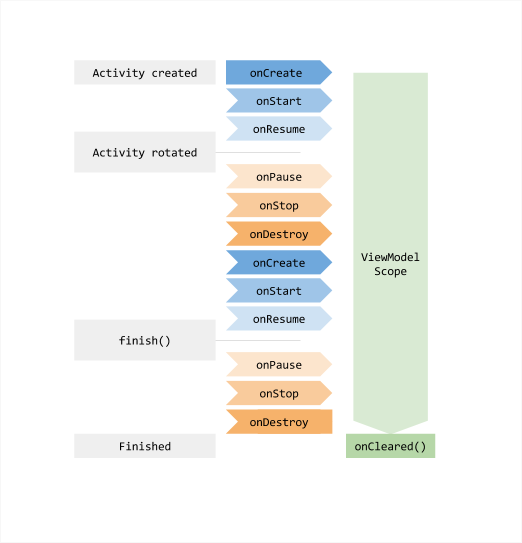
You usually request a ViewModel the first time the system calls an
activity object's onCreate() method. The system may call
onCreate() several times throughout the existence of an activity, such
as when a device screen is rotated. The ViewModel exists from when you
first request a ViewModel until the activity is finished and destroyed.
Clearing ViewModel dependencies
The ViewModel calls the onCleared method when the ViewModelStoreOwner
destroys it in the course of its lifecycle. This allows you to clean up any work
or dependencies that follow the ViewModel's lifecycle.
The following example shows an alternative to viewModelScope.
viewModelScope is a built-in CoroutineScope that
automatically follows the ViewModel's lifecycle. The ViewModel uses it to
trigger business-related operations. If you want to use a custom scope instead
of viewModelScope for easier testing, the ViewModel can receive a
CoroutineScope as a dependency in its constructor. When the
ViewModelStoreOwner clears the ViewModel at the end of its lifecycle, the
ViewModel also cancels the CoroutineScope.
class MyViewModel(
    private val coroutineScope: CoroutineScope =
        CoroutineScope(SupervisorJob() + Dispatchers.Main.immediate)
) : ViewModel() {

    // Other ViewModel logic ...

    override fun onCleared() {
        coroutineScope.cancel()
    }
}
From lifecycle version 2.5 and above,
you can pass one or more Closeable
objects to the ViewModel's constructor that automatically closes when the
ViewModel instance is cleared.
class CloseableCoroutineScope(
    context: CoroutineContext = SupervisorJob() + Dispatchers.Main.immediate
) : Closeable, CoroutineScope {
    override val coroutineContext: CoroutineContext = context
    override fun close() {
        coroutineContext.cancel()
   }
}

class MyViewModel(
    private val coroutineScope: CoroutineScope = CloseableCoroutineScope()
) : ViewModel(coroutineScope) {
    // Other ViewModel logic ...
}
Best practices
The following are several key best practices you should follow when implementing ViewModel:
- Because of their scoping, use ViewModels as implementation details of a screen level state holder. Don't use them as state holders of reusable UI components such as chip groups or forms. Otherwise, you'd get the same ViewModel instance in different usages of the same UI component under the same ViewModelStoreOwner unless you use an explicit view model key per chip.
- ViewModels shouldn't know about the UI implementation details. Keep the names of the methods the ViewModel API exposes and those of the UI state fields as generic as possible. In this way, your ViewModel can accommodate any type of UI: a mobile phone, foldable, tablet, or even a Chromebook!
- As they can potentially live longer than the
ViewModelStoreOwner, ViewModels shouldn't hold any references of lifecycle-related APIs such as theContextorResourcesto prevent memory leaks. - Don't pass ViewModels to other classes, functions or other UI components. Because the platform manages them, you should keep them as close to it as you can—close to your Activity, screen level composable function, or Navigation destination. This prevents lower level components from accessing more data and logic than they need.
Further information
As your data grows more complex, you might choose to have a separate class just
to load the data. The purpose of ViewModel is to encapsulate the data for
a UI controller to let the data survive configuration changes. For information
about how to load, persist, and manage data across configuration changes, see
Saved UI States.
The Guide to Android App Architecture suggests building a repository class to handle these functions.
Additional resources
For further information about the ViewModel class, consult the following
resources.
Documentation
Views content
Samples
Recommended for you
- Note: link text is displayed when JavaScript is off
- Use Kotlin coroutines with lifecycle-aware components
- Save UI states
- Load and display paged data