
The Navigation component provides ways to programmatically create and interact with certain navigation elements.
Create a NavHostFragment
You can use NavHostFragment.create() to programmatically create a
NavHostFragment with a specific graph resource, as shown in the following
example:
Kotlin
val finalHost = NavHostFragment.create(R.navigation.example_graph)
supportFragmentManager.beginTransaction()
    .replace(R.id.nav_host, finalHost)
    .setPrimaryNavigationFragment(finalHost) // equivalent to app:defaultNavHost="true"
    .commit()
Java
NavHostFragment finalHost = NavHostFragment.create(R.navigation.example_graph);
getSupportFragmentManager().beginTransaction()
    .replace(R.id.nav_host, finalHost)
    .setPrimaryNavigationFragment(finalHost) // equivalent to app:defaultNavHost="true"
    .commit();
Note that setPrimaryNavigationFragment(finalHost) lets your NavHost
intercept system Back button presses. You can also implement this behavior in
your NavHost XML by adding app:defaultNavHost="true". If you're implementing
custom Back button behavior and don't want your NavHost intercepting
Back button presses, you can pass null to setPrimaryNavigationFragment().
Reference a destination using NavBackStackEntry
Starting with Navigation 2.2.0, you can get a reference to the
NavBackStackEntry for any destination on the navigation stack by calling
NavController.getBackStackEntry(), passing it a destination ID. If the
back stack contains more than one instance of the specified destination,
getBackStackEntry() returns the topmost instance from the stack.
The returned NavBackStackEntry provides the following objects at the
destination level:
These objects are valid for the lifetime of the destination on the back stack.
When the associated destination is popped off the back stack, the Lifecycle is
destroyed, the state is no longer saved, and any ViewModel objects are
cleared.
These properties give you a Lifecycle and a store for ViewModel objects and
classes that work with saved state no matter what type of destination you
use.
This is especially useful when working with destination types that don't
automatically have an associated Lifecycle, such as custom destinations.
For example, you can observe the Lifecycle of a NavBackStackEntry just as
you would observe the Lifecycle of a fragment or activity. In addition,
NavBackStackEntry is a LifecycleOwner, which means that you can use it when
observing LiveData or with other lifecycle-aware components, as shown in the
following example:
Kotlin
myViewModel.liveData.observe(backStackEntry, Observer { myData ->
    // react to live data update
})
Java
myViewModel.getLiveData().observe(backStackEntry, myData -> {
    // react to live data update
});
Lifecycle state automatically updates whenever you call navigate().
Lifecycle states for destinations that are not at the top of the back stack
move from RESUMED to STARTED if the destinations are still visible under a
FloatingWindow destination, such as a dialog destination, or to STOPPED
otherwise.
Returning a result to the previous Destination
In Navigation 2.3 and higher, NavBackStackEntry gives access to a
SavedStateHandle. A SavedStateHandle is a key-value map that can be
used to store and retrieve data. These values persist through process death,
including configuration changes, and remain available through the same object.
By using the given SavedStateHandle, you can access and pass data between
destinations. This is especially useful as a mechanism to get data back from a
destination after it is popped off the stack.
To pass data back to Destination A from Destination B, first
set up Destination A to listen for a result on its SavedStateHandle.
To do so, retrieve the NavBackStackEntry by using the
getCurrentBackStackEntry() API and then observe the LiveData
provided by SavedStateHandle.
Kotlin
override fun onViewCreated(view: View, savedInstanceState: Bundle?) {
    val navController = findNavController();
    // We use a String here, but any type that can be put in a Bundle is supported
    navController.currentBackStackEntry?.savedStateHandle?.getLiveData<String>("key")?.observe(
        viewLifecycleOwner) { result ->
        // Do something with the result.
    }
}
Java
@Override
public void onViewCreated(@NonNull View view, @Nullable Bundle savedInstanceState) {
    NavController navController = NavHostFragment.findNavController(this);
    // We use a String here, but any type that can be put in a Bundle is supported
    MutableLiveData<String> liveData = navController.getCurrentBackStackEntry()
            .getSavedStateHandle()
            .getLiveData("key");
    liveData.observe(getViewLifecycleOwner(), new Observer<String>() {
        @Override
        public void onChanged(String s) {
            // Do something with the result.
        }
    });
}
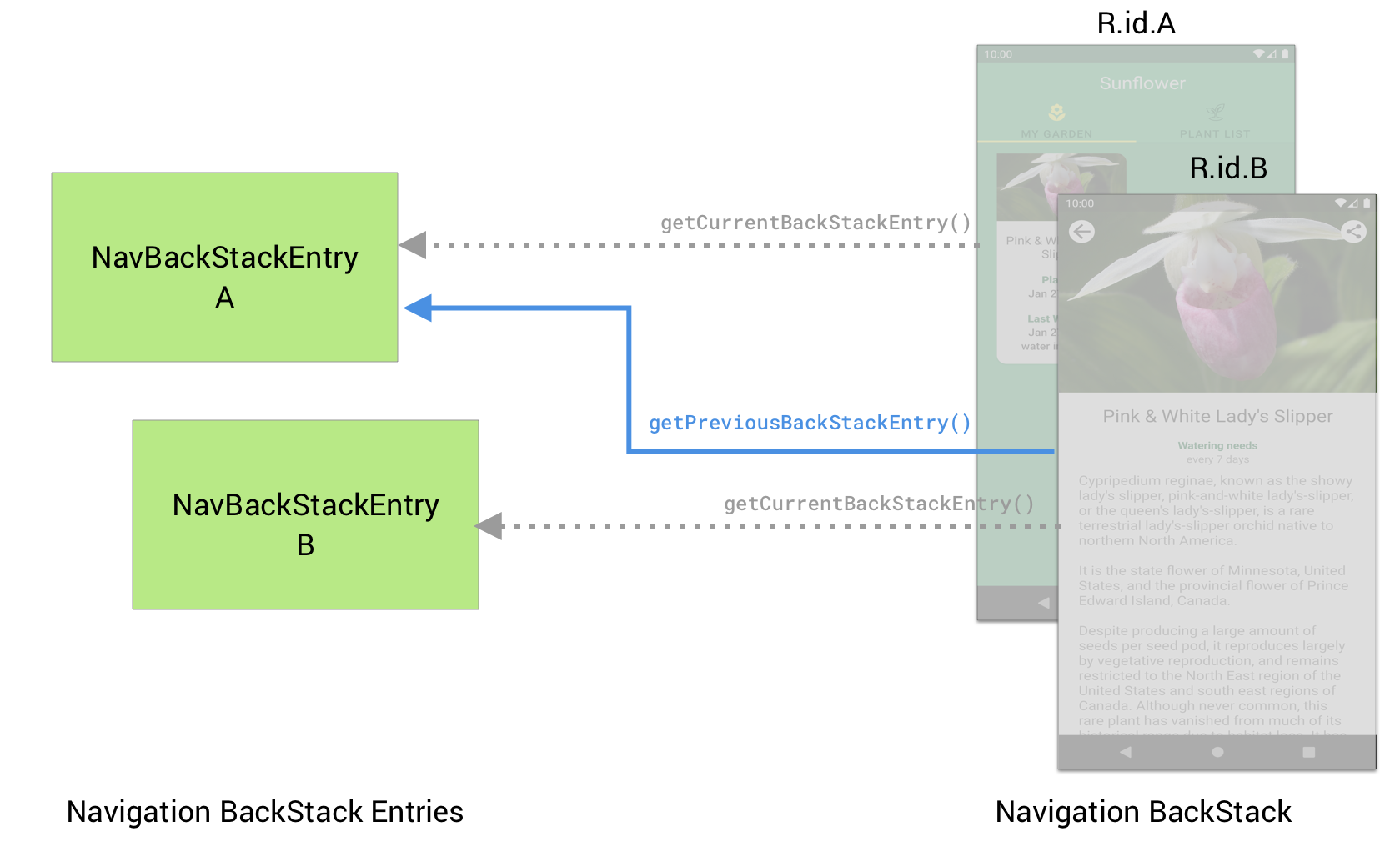
In Destination B, you must set the result on the SavedStateHandle of
Destination A by using the getPreviousBackStackEntry() API.
Kotlin
navController.previousBackStackEntry?.savedStateHandle?.set("key", result)
Java
navController.getPreviousBackStackEntry().getSavedStateHandle().set("key", result);
If you want to handle a result only once, you must call remove() on the
SavedStateHandle to clear the result. If you don't remove the result, the
LiveData will continue to return the last result to any new Observer
instances.
Considerations when using dialog destinations
When you navigate to a destination that takes the full view of the
NavHost (such as a <fragment> destination), the previous destination
has its lifecycle stopped, preventing any callbacks to the LiveData
provided by SavedStateHandle.
However, when navigating to a dialog destination, the previous destination
is also visible on the screen and is therefore also STARTED despite not being
the current destination. This means that calls to getCurrentBackStackEntry()
from within lifecycle methods such as onViewCreated() will return the
NavBackStackEntry of the dialog destination after a configuration change or
process death and recreation (since the dialog is restored above the other
destination). Therefore you should use getBackStackEntry() with the ID of
your destination to ensure that you always use the correct NavBackStackEntry.
This also means that any Observer you set on the result LiveData will be
triggered even while the dialog destinations is still on the screen. If you
only want to check the result when the dialog destination is closed and the
underlying destination becomes the current destination, you can observe the
Lifecycle associated with the NavBackStackEntry and retrieve the result
only when it becomes RESUMED.
Kotlin
override fun onViewCreated(view: View, savedInstanceState: Bundle?) {
    super.onViewCreated(view, savedInstanceState)
    val navController = findNavController();
    // After a configuration change or process death, the currentBackStackEntry
    // points to the dialog destination, so you must use getBackStackEntry()
    // with the specific ID of your destination to ensure we always
    // get the right NavBackStackEntry
    val navBackStackEntry = navController.getBackStackEntry(R.id.your_fragment)

    // Create our observer and add it to the NavBackStackEntry's lifecycle
    val observer = LifecycleEventObserver { _, event ->
        if (event == Lifecycle.Event.ON_RESUME
            && navBackStackEntry.savedStateHandle.contains("key")) {
            val result = navBackStackEntry.savedStateHandle.get<String>("key");
            // Do something with the result
        }
    }
    navBackStackEntry.lifecycle.addObserver(observer)

    // As addObserver() does not automatically remove the observer, we
    // call removeObserver() manually when the view lifecycle is destroyed
    viewLifecycleOwner.lifecycle.addObserver(LifecycleEventObserver { _, event ->
        if (event == Lifecycle.Event.ON_DESTROY) {
            navBackStackEntry.lifecycle.removeObserver(observer)
        }
    })
}
Java
@Override
public void onViewCreated(@NonNull View view, @Nullable Bundle savedInstanceState) {
    super.onViewCreated(view, savedInstanceState);
    NavController navController = NavHostFragment.findNavController(this);
    // After a configuration change or process death, the currentBackStackEntry
    // points to the dialog destination, so you must use getBackStackEntry()
    // with the specific ID of your destination to ensure we always
    // get the right NavBackStackEntry
    final NavBackStackEntry navBackStackEntry = navController.getBackStackEntry(R.id.your_fragment);

    // Create our observer and add it to the NavBackStackEntry's lifecycle
    final LifecycleEventObserver observer = new LifecycleEventObserver() {
        @Override
        public void onStateChanged(@NonNull LifecycleOwner source, @NonNull Lifecycle.Event event) {
            if (event.equals(Lifecycle.Event.ON_RESUME)
                && navBackStackEntry.getSavedStateHandle().contains("key")) {
                String result = navBackStackEntry.getSavedStateHandle().get("key");
                // Do something with the result
            }
        }
    };
    navBackStackEntry.getLifecycle().addObserver(observer);

    // As addObserver() does not automatically remove the observer, we
    // call removeObserver() manually when the view lifecycle is destroyed
    getViewLifecycleOwner().getLifecycle().addObserver(new LifecycleEventObserver() {
        @Override
        public void onStateChanged(@NonNull LifecycleOwner source, @NonNull Lifecycle.Event event) {
            if (event.equals(Lifecycle.Event.ON_DESTROY)) {
                navBackStackEntry.getLifecycle().removeObserver(observer)
            }
        }
    });
}
Share UI-related data between destinations with ViewModel
The Navigation back stack stores a NavBackStackEntry not only for each
individual destination, but also for each parent navigation graph that contains
the individual destination. This lets you retrieve a NavBackStackEntry that is
scoped to a navigation graph. A navigation graph-scoped NavBackStackEntry
provides a way to create a ViewModel that's scoped to a navigation graph,
enabling you to share UI-related data between the graph's destinations. Any
ViewModel objects created in this way live until the associated NavHost and
its ViewModelStore are cleared or until the navigation graph is popped from
the back stack.
The following example shows how to retrieve a ViewModel that's scoped to a
navigation graph:
Kotlin
val viewModel: MyViewModel
        by navGraphViewModels(R.id.my_graph)
Java
NavBackStackEntry backStackEntry = navController.getBackStackEntry(R.id.my_graph);
MyViewModel viewModel = new ViewModelProvider(backStackEntry).get(MyViewModel.class);
If you're using Navigation 2.2.0 or earlier, you need to provide your own factory to use Saved State with ViewModels, as shown in the following example:
Kotlin
val viewModel: MyViewModel by navGraphViewModels(R.id.my_graph) {
    SavedStateViewModelFactory(requireActivity().application, requireParentFragment())
}
Java
NavBackStackEntry backStackEntry = navController.getBackStackEntry(R.id.my_graph);

ViewModelProvider viewModelProvider = new ViewModelProvider(
        backStackEntry.getViewModelStore(),
        new SavedStateViewModelFactory(
                requireActivity().getApplication(), requireParentFragment()));

MyViewModel myViewModel = provider.get(myViewModel.getClass());
For more information about ViewModel, see
ViewModel Overview.
Modifying inflated navigation graphs
You can modify an inflated navigation graph dynamically at runtime.
As an example, if you have a BottomNavigationView that is bound to a
NavGraph, the default destination of the NavGraph dictates the selected tab
on app startup. However, you might need to override this behavior, such as when
a user preference specifies a preferred tab to be loaded on app startup.
Alternatively, your app might need to change the starting tab based upon past
user behavior. You can support these cases by dynamically specifying the default
destination of the NavGraph.
Consider this NavGraph:
<?xml version="1.0" encoding="utf-8"?>
<navigation xmlns:android="http://schemas.android.com/apk/res/android"
    xmlns:app="http://schemas.android.com/apk/res-auto"
    xmlns:tools="http://schemas.android.com/tools"
    android:id="@+id/nav_graph"
    app:startDestination="@id/home">
    <fragment
        android:id="@+id/home"
        android:name="com.example.android.navigation.HomeFragment"
        android:label="fragment_home"
        tools:layout="@layout/fragment_home" />
    <fragment
        android:id="@+id/location"
        android:name="com.example.android.navigation.LocationFragment"
        android:label="fragment_location"
        tools:layout="@layout/fragment_location" />
    <fragment
        android:id="@+id/shop"
        android:name="com.example.android.navigation.ShopFragment"
        android:label="fragment_shop"
        tools:layout="@layout/fragment_shop" />
    <fragment
        android:id="@+id/settings"
        android:name="com.example.android.navigation.SettingsFragment"
        android:label="fragment_settings"
        tools:layout="@layout/fragment_settings" />
</navigation>
When this graph is loaded, the app:startDestination attribute specifies
that HomeFragment is to be displayed. To override the start destination
dynamically, do the following:
- First, inflate the
NavGraphmanually. - Override the start destination.
- Finally, manually attach the graph to the
NavController.
Kotlin
val navHostFragment =
        supportFragmentManager.findFragmentById(R.id.nav_host_fragment) as NavHostFragment

val navController = navHostFragment.navController
val navGraph = navController.navInflater.inflate(R.navigation.bottom_nav_graph)
navGraph.startDestination = R.id.shop
navController.graph = navGraph
binding.bottomNavView.setupWithNavController(navController)
Java
NavHostFragment navHostFragment = (NavHostFragment) getSupportFragmentManager()
        .findFragmentById(R.id.nav_host_fragment);

NavController navController = navHostFragment.getNavController();
NavGraph navGraph = navController.getNavInflater().inflate(R.navigation.bottom_nav_graph);
navGraph.setStartDestination(R.id.shop);
navController.setGraph(navGraph);
NavigationUI.setupWithNavController(binding.bottomNavView, navController);
Now when your app starts, ShopFragment is shown instead of HomeFragment.
When using deep links, the NavController constructs a back stack
automatically for the deep link destination. If the user
navigates to the deep link and then navigates backward, they will reach the
start destination at some point. Overriding the start destination using the
technique in the previous example ensures that the correct start
destination is added to the constructed back stack.
Note that this technique also allows for the overriding of other aspects of
the NavGraph as required. All modifications to the graph must be done
prior to the call to setGraph() to ensure that the correct structure
is used when handling deep links, restoring state, and moving to the start
destination of your graph.