

Paging 程式庫總覽 Android Jetpack 的一部分。
分頁程式庫可協助您載入及顯示本機儲存空間或網路上大型資料集的資訊頁面。此方法可讓應用程式更有效率地使用網路頻寬和系統資源。Paging 程式庫的元件設計成配合建議的 Android 應用程式架構,可與其他 Jetpack 元件完美整合,並提供最優質的 Kotlin 支援。
使用 Paging 程式庫的好處
Paging 程式庫包含下列功能:
- 針對分頁資料的記憶體內快取。如此可確保應用程式在使用分頁資料時,更有效率地使用系統資源。
- 內建要求簡化功能,確保應用程式有效率地使用網路頻寬和系統資源。
- 優質的 Kotlin 協同程式和流程支援。
- 內建錯誤處理機制支援,包括重新整理和重試功能。
設定
如要將 Paging 元件匯入 Android 應用程式,請在應用程式的 build.gradle 檔案中新增下列依附元件:
Kotlin
dependencies {
  val paging_version = "3.4.2"

  implementation("androidx.paging:paging-common:$paging_version")

  // Jetpack Compose integration
  implementation("androidx.paging:paging-compose:$paging_version")
}
Groovy
dependencies {
  def paging_version = "3.4.2"

  implementation "androidx.paging:paging-common:$paging_version"

  // Jetpack Compose integration
  implementation "androidx.paging:paging-compose:$paging_version"
}
程式庫架構
分頁程式庫的元件會在應用程式的三個層執行:
- 存放區層
ViewModel層- 使用者介面層
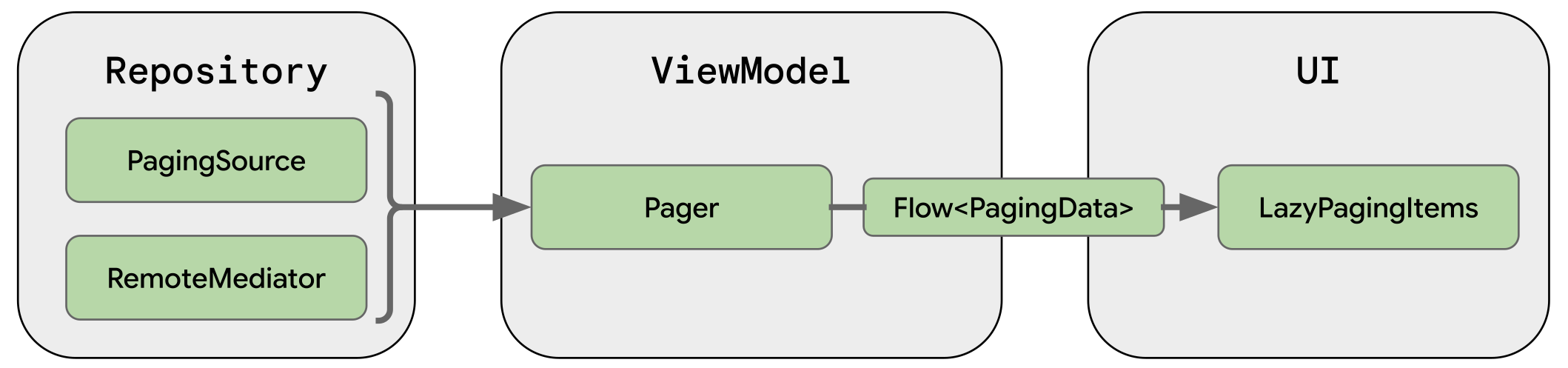
本節會說明在各層執行的 Paging 程式庫元件,以及這些元件如何搭配運作,藉此載入並顯示分頁資料。
存放區層
存放區層的主要 Paging 程式庫元件為 PagingSource。每個 PagingSource 物件都會定義資料來源,以及如何從該來源擷取資料。PagingSource 物件可以從任何單一來源載入資料,包括網路來源和本機資料庫。
另一個您可以使用的Paging 程式庫元件為 RemoteMediator。RemoteMediator 物件可處理分層資料來源的分頁,例如具有本機資料庫快取的網路資料來源。
ViewModel 層
以 PagingSource 物件及PagingConfig設定物件為基礎,Pager元件提供用於建構在回應串流中傳送 PagingData 執行個體的公開 API。
將 ViewModel 層連結至使用者介面的元件為 PagingData。PagingData 物件是分頁資料快照的容器。查詢 PagingSource 物件並儲存結果。
UI 層
主要的 Paging UI API 是 collectAsLazyPagingItems()。它會將分頁項目公開為資料清單,方便 Compose 的延遲版面配置元件 (例如 LazyColumn 和 LazyRow) 使用。
新增 androidx.paging:paging-compose 程式庫,即可使用與 Compose 相容的 API,讓 UI 自動回應資料載入、更新和錯誤,不必使用配接器或差異邏輯。在 Flow<PagingData> 上使用 collectAsLazyPagingItems() 擴充功能函式,將傳回的 LazyPagingItems 傳遞至 LazyColumn 中的 items()。
@Composable fun MessageList(pager: Pager<Int, Message>) { val lazyPagingItems = pager.flow.collectAsLazyPagingItems() LazyColumn { items( lazyPagingItems.itemCount, key = lazyPagingItems.itemKey { it.id } ) { index -> val message = lazyPagingItems[index] if (message != null) { MessageRow(message) } else { MessagePlaceholder() } } } }
詳情請參閱「大型資料集 (分頁)」。
為您推薦
- 注意:系統會在 JavaScript 關閉時顯示連結文字
- 載入並顯示分頁資料
- 遷移至 Paging 3
- 從網路和資料庫進行分頁