

사용자가 옵션 세트에서 나란히 선택할 수 있도록 분할된 버튼을 사용하세요. 분할된 버튼에는 두 가지 유형이 있습니다.
- 단일 선택 버튼: 사용자가 하나의 옵션을 선택할 수 있습니다.
- 다중 선택 버튼: 사용자가 2~5개의 항목 중에서 선택할 수 있습니다. 더 복잡한 선택이나 5개 이상의 항목에는 칩을 사용합니다.
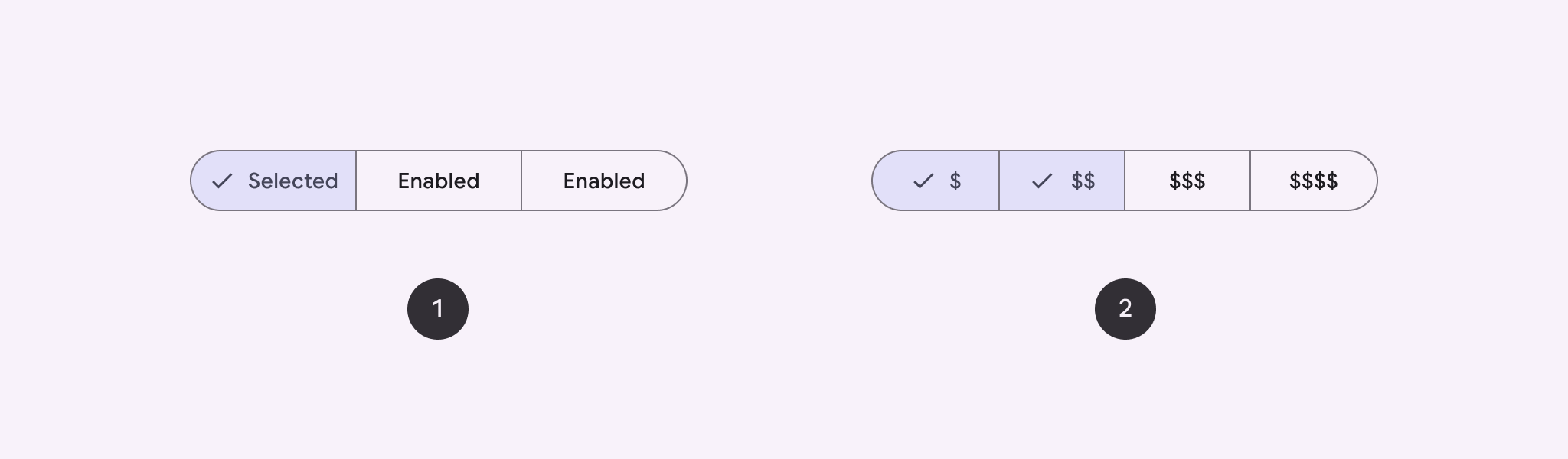
API 표시 경로
SingleChoiceSegmentedButtonRow 및 MultiChoiceSegmentedButtonRow 레이아웃을 사용하여 분할된 버튼을 만듭니다. 이러한 레이아웃은 SegmentedButton을 올바르게 배치하고 크기를 조정하며 다음 주요 매개변수를 공유합니다.
space: 버튼 간의 겹침을 조정합니다.content: 분할 버튼 행의 콘텐츠를 포함하며, 일반적으로SegmentedButton의 시퀀스입니다.
단일 선택 분할된 버튼 만들기
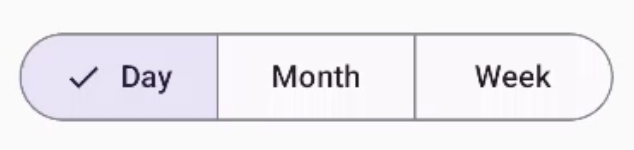
이 예시에서는 단일 선택 분할된 버튼을 만드는 방법을 보여줍니다.
@Composable fun SingleChoiceSegmentedButton(modifier: Modifier = Modifier) { var selectedIndex by remember { mutableIntStateOf(0) } val options = listOf("Day", "Month", "Week") SingleChoiceSegmentedButtonRow { options.forEachIndexed { index, label -> SegmentedButton( shape = SegmentedButtonDefaults.itemShape( index = index, count = options.size ), onClick = { selectedIndex = index }, selected = index == selectedIndex, label = { Text(label) } ) } } }
코드에 관한 핵심 사항
remember및mutableIntStateOf를 사용하여selectedIndex변수를 초기화하여 선택한 버튼 색인을 추적합니다.- 버튼 라벨을 나타내는
options목록을 정의합니다. SingleChoiceSegmentedButtonRow를 사용하면 버튼을 하나만 선택할 수 있습니다.forEachIndexed루프 내에서 각 옵션에 대해SegmentedButton을 만듭니다.shape은SegmentedButtonDefaults.itemShape을 사용하여 인덱스와 총 옵션 수를 기반으로 버튼의 모양을 정의합니다.onClick은 클릭된 버튼의 색인으로selectedIndex를 업데이트합니다.selected은selectedIndex에 따라 버튼의 선택 상태를 설정합니다.label은Text컴포저블을 사용하여 버튼 라벨을 표시합니다.
결과
다중 선택 분할된 버튼 만들기
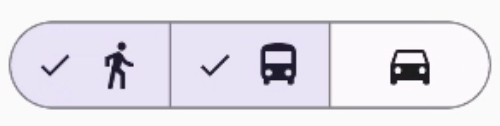
이 예시에서는 사용자가 여러 옵션을 선택할 수 있는 아이콘이 있는 다중 선택 분할된 버튼을 만드는 방법을 보여줍니다.
@Composable fun MultiChoiceSegmentedButton(modifier: Modifier = Modifier) { val selectedOptions = remember { mutableStateListOf(false, false, false) } val options = listOf("Walk", "Ride", "Drive") MultiChoiceSegmentedButtonRow { options.forEachIndexed { index, label -> SegmentedButton( shape = SegmentedButtonDefaults.itemShape( index = index, count = options.size ), checked = selectedOptions[index], onCheckedChange = { selectedOptions[index] = !selectedOptions[index] }, icon = { SegmentedButtonDefaults.Icon(selectedOptions[index]) }, label = { when (label) { "Walk" -> Icon( imageVector = Icons.AutoMirrored.Filled.DirectionsWalk, contentDescription = "Directions Walk" ) "Ride" -> Icon( imageVector = Icons.Default.DirectionsBus, contentDescription = "Directions Bus" ) "Drive" -> Icon( imageVector = Icons.Default.DirectionsCar, contentDescription = "Directions Car" ) } } ) } } }
코드에 관한 핵심 사항
- 이 코드는
remember및mutableStateListOf를 사용하여selectedOptions변수를 초기화합니다. 각 버튼의 선택된 상태를 추적합니다. - 이 코드는
MultiChoiceSegmentedButtonRow를 사용하여 버튼을 포함합니다. forEachIndexed루프 내에서 코드는 각 옵션에 대해SegmentedButton을 만듭니다.shape은 색인과 총 옵션 수를 기반으로 버튼의 모양을 정의합니다.checked는selectedOptions의 해당 값에 따라 버튼의 선택 상태를 설정합니다.onCheckedChange는 버튼을 클릭할 때selectedOptions에서 해당 항목의 선택 상태를 전환합니다.icon은SegmentedButtonDefaults.Icon및 버튼의 선택 상태에 따라 아이콘을 표시합니다.label은 적절한 이미지 벡터 및 콘텐츠 설명과 함께Icon컴포저블을 사용하여 라벨에 해당하는 아이콘을 표시합니다.
결과
추가 리소스
- Material 3: 분할된 버튼