
The Paging library provides powerful capabilities for loading and displaying paged data from a larger dataset. This guide demonstrates how to use the Paging library to set up a stream of paged data from a network data source and display it in a lazy list.
Define a data source
The first step is to define a PagingSource implementation to identify the
data source. The PagingSource API class includes the load method,
which you override to indicate how to retrieve paged data from the corresponding
data source.
Use the PagingSource class directly to use Kotlin coroutines for async
loading.
Select key and value types
PagingSource<Key, Value> has two type parameters: Key and Value. The key
defines the identifier used to load the data, and the value is the type of the
data itself. For example, if you load pages of User objects from the network
by passing Int page numbers to Retrofit, select Int as the Key type
and User as the Value type.
Define the PagingSource
The following example implements a PagingSource that loads pages of items
by page number. The Key type is Int and the Value type is User.
class ExamplePagingSource(
    val backend: ExampleBackendService,
    val query: String
) : PagingSource<Int, User>() {
  override suspend fun load(
    params: LoadParams<Int>
  ): LoadResult<Int, User> {

    init {
        // the data source is expected to be immutable
        // invalidate PagingSource if data source
        // has updated
        backEnd.addDatabaseOnChangedListener {
            invalidate()
        }
    }

    try {
      // Start refresh at page 1 if undefined.
      val nextPageNumber = params.key ?: 1
      val response = backend.searchUsers(query, nextPageNumber)
      return LoadResult.Page(
        data = response.users,
        prevKey = null, // Only paging forward.
        nextKey = nextPageNumber + 1
      )
    } catch (e: Exception) {
      // Handle errors in this block and return LoadResult.Error for
      // expected errors (such as a network failure).
    }
  }

  override fun getRefreshKey(state: PagingState<Int, User>): Int? {
    // Try to find the page key of the closest page to anchorPosition from
    // either the prevKey or the nextKey; you need to handle nullability
    // here.
    //  * prevKey == null -> anchorPage is the first page.
    //  * nextKey == null -> anchorPage is the last page.
    //  * both prevKey and nextKey are null -> anchorPage is the
    //    initial page, so return null.
    return state.anchorPosition?.let { anchorPosition ->
      val anchorPage = state.closestPageToPosition(anchorPosition)
      anchorPage?.prevKey?.plus(1) ?: anchorPage?.nextKey?.minus(1)
    }
  }
}
A typical PagingSource implementation passes parameters provided in its
constructor to the load method to load appropriate data for a query. In the
example above, those parameters are:
backend: an instance of the backend service that provides the dataquery: the search query to send to the service indicated bybackend
The LoadParams
object contains information about the load operation to be performed. This
includes the key to be loaded and the number of items to be loaded.
The LoadResult
object contains the result of the load operation. LoadResult is a sealed class
that takes one of three forms, depending on whether the load call succeeded:
- If the load is successful, return a
LoadResult.Pageobject. - If the load is not successful, return a
LoadResult.Errorobject. - If the
PagingSourceis no longer valid and should be replaced by a new instance (for example, due to an underlying data change), return aLoadResult.Invalidobject.
The following figure illustrates how the load function in this example
receives the key for each load and provides the key for the subsequent load.
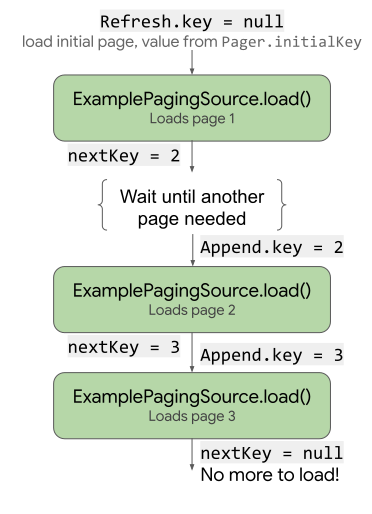
load uses and updates the key.
The PagingSource implementation must also implement a
getRefreshKey
method that takes a
PagingState object as a
parameter. It returns the key to pass into the load method when the data is
refreshed or invalidated after the initial load. The Paging library calls this
method automatically on subsequent refreshes of the data.
Handle errors
Requests to load data can fail for a number of reasons, especially when loading
over a network. Report errors encountered during loading by returning a
LoadResult.Error object from the load method.
For example, you can catch and report loading errors in ExamplePagingSource
from the previous example by adding the following to the load method:
catch (e: IOException) {
  // IOException for network failures.
  return LoadResult.Error(e)
} catch (e: HttpException) {
  // HttpException for any non-2xx HTTP status codes.
  return LoadResult.Error(e)
}
For more information on handling Retrofit errors, see the samples in the
PagingSource API reference.
PagingSource collects and delivers LoadResult.Error objects to the UI so
that you can act on them. For more information about exposing the loading state
in the UI, see Manage and present loading states.
Set up a stream of PagingData
Next, you need a stream of paged data from the PagingSource implementation.
Set up the data stream in your ViewModel. The Pager class provides
methods that expose a reactive stream of PagingData objects from a
PagingSource. The Paging library exposes the stream of data as a Flow.
When you create a Pager instance to set up your reactive stream, you must
provide the instance with a PagingConfig configuration object and a
function that tells Pager how to get an instance of your PagingSource
implementation, as shown in the following example.
class UserViewModel(
    private val backend: ExampleBackendService,
    private val query: String
) : ViewModel() {

    val userPagingFlow: Flow<PagingData<User>> = Pager(
        // Configure how data is loaded by passing additional properties to
        // PagingConfig, such as pageSize and enabling or disabling placeholders.
        config = PagingConfig(
            pageSize = 20,
            enablePlaceholders = true
        ),
        pagingSourceFactory = {
            ExamplePagingSource(backend, query)
        }
    )
    .flow
    .cachedIn(viewModelScope)
}
The cachedIn operator makes the data stream shareable and caches the loaded
data with the provided CoroutineScope. Without cachedIn, the PagingData
cannot be recollected on. This example uses the viewModelScope provided by the
lifecycle lifecycle-viewmodel-ktx artifact.
The Pager object calls the load method from the PagingSource object,
providing it with the LoadParams object and receiving the
LoadResult object in return.
Collect and display the data in your UI
To connect the paged stream to the UI, obtain the flow from your ViewModel and
pass it to your list composable.
@Composable
fun UserScreen(viewModel: UserViewModel = viewModel()) {
    val userFlow = viewModel.userPagingFlow
    UserList(flow = userFlow)
}
Use collectAsLazyPagingItems to convert the PagingData flow into
LazyPagingItems. Then, use the items API within a LazyColumn to lay out
each item.
Make sure to provide a unique, stable identifier for each item using itemKey.
The following example uses it.id (referencing the User.id property) because
it stays stable for the User instance across data updates.
@Composable
fun UserList(flow: Flow<PagingData<User>>) {
    val lazyPagingItems = flow.collectAsLazyPagingItems()
    LazyColumn {
        items(
            lazyPagingItems.itemCount,
            key = lazyPagingItems.itemKey { it.id }
        ) { index ->
            val user = lazyPagingItems[index]
            if (user != null) {
                UserRow(user)
            } else {
                UserPlaceholder()
            }
        }
    }
}
The Paging library uses null for placeholders while a page is loading, so if
you have enabled placeholders, you must handle null values in the content
block.
Now the list displays the paged data, and the Paging library loads additional pages as the user scrolls.
Additional resources
To learn more about the Paging library, see the following additional resources:
Documentation
Views content
Recommended for you
- Note: link text is displayed when JavaScript is off
- Page from network and database
- Migrate to Paging 3
- Paging library overview