
This page is a guide for modularizing your navigation code. It is intended to complement the general guidance for app modularization.
Overview
Modularizing your navigation code is the process of separating related navigation keys, and the content they represent, into individual modules. This provides a clear separation of responsibilities and lets you navigate between different features in your app.
To modularize your navigation code, do the following:
- Create two submodules:
apiandimplfor each feature in your app - Place navigation keys for each feature into its
apimodule - Place
entryProvidersand navigable content for each feature into the associatedimplmodule - Provide
entryProvidersto your main app modules, either directly or using dependency injection
Separate features into api and implementation submodules
For each feature in your app, create two submodules named api and impl
(short for "implementation"). Use the following table to decide where to place
navigation code.
Module name |
Contains |
|
|
|
Content for that feature, including definitions for
|
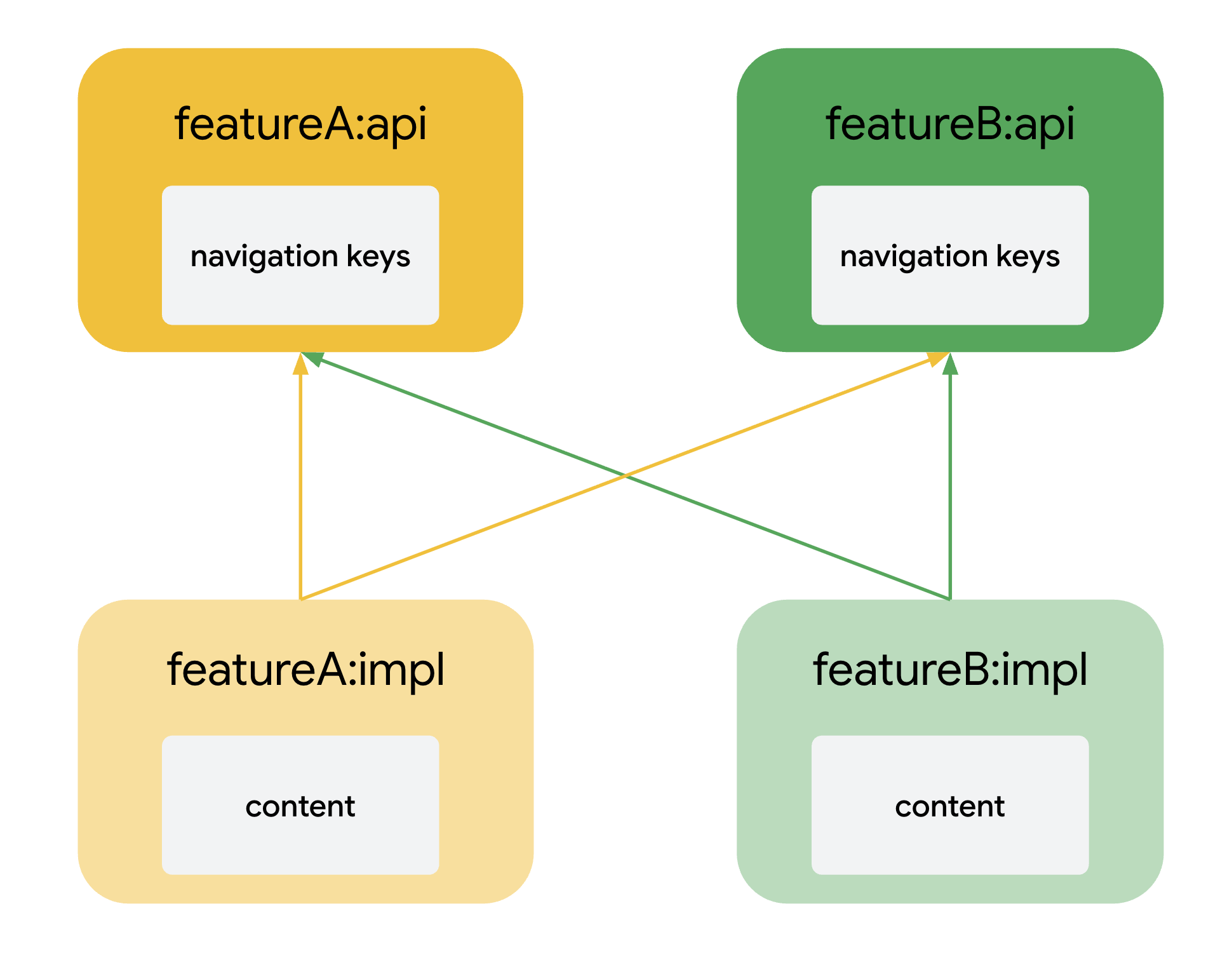
This approach allows one feature to navigate to another by allowing its content,
contained in its impl module, to depend on the navigation keys of another
module, contained in that module's api module.
Separate navigation entries using extension functions
In Navigation 3, navigable content is defined using navigation entries. To
separate these entries into separate modules, create extension functions on
EntryProviderScope and move them into the impl module for that feature.
These are known as entry builders.
The following code example shows an entry builder that builds two navigation entries.
// import androidx.navigation3.runtime.EntryProviderScope // import androidx.navigation3.runtime.NavKey fun EntryProviderScope<NavKey>.featureAEntryBuilder() { entry<KeyA> { ContentRed("Screen A") { // Content for screen A } } entry<KeyA2> { ContentGreen("Screen A2") { // Content for screen A2 } } }
Call that function using the entryProvider DSL when defining your
entryProvider in your main app module.
// import androidx.navigation3.runtime.entryProvider // import androidx.navigation3.ui.NavDisplay NavDisplay( entryProvider = entryProvider { featureAEntryBuilder() }, // ... )
Use dependency injection to add entries to the main app
In the preceding code example, each entry builder is called directly by the
main app using the entryProvider DSL. If your app has a lot of screens or
feature modules, this pattern might not scale well.
To solve this, have each feature module contribute its entry builders into the app's activity using dependency injection.
For example, the following code uses Dagger multibindings,
specifically @IntoSet, to inject the entry builders into a Set owned by
MainActivity. These are then called iteratively inside entryProvider,
negating the need to explicitly call numerous entry builder functions.
Feature module
// import dagger.Module // import dagger.Provides // import dagger.hilt.InstallIn // import dagger.hilt.android.components.ActivityRetainedComponent // import dagger.multibindings.IntoSet @Module @InstallIn(ActivityRetainedComponent::class) object FeatureAModule { @IntoSet @Provides fun provideFeatureAEntryBuilder() : EntryProviderScope<NavKey>.() -> Unit = { featureAEntryBuilder() } }
App module
// import android.os.Bundle // import androidx.activity.ComponentActivity // import androidx.activity.compose.setContent // import androidx.navigation3.runtime.EntryProviderScope // import androidx.navigation3.runtime.NavKey // import androidx.navigation3.runtime.entryProvider // import androidx.navigation3.ui.NavDisplay // import javax.inject.Inject class MainActivity : ComponentActivity() { @Inject lateinit var entryBuilders: Set<@JvmSuppressWildcards EntryProviderScope<NavKey>.() -> Unit> override fun onCreate(savedInstanceState: Bundle?) { super.onCreate(savedInstanceState) setContent { NavDisplay( entryProvider = entryProvider { entryBuilders.forEach { builder -> this.builder() } }, // ... ) } } }
If your navigation entries need to navigate—for example, they contain UI elements that navigate to new screens—inject an object capable of modifying the app's navigation state into each builder function.
Modularize deep link matchers
If your app supports deep links and is modularized, each feature module
should define the DeepLinkMatcher instances for the destinations it owns.
To collate all matchers from across your app, you can use
dependency injection multibindings. For example, each feature module can
contribute its matchers to a Dagger @IntoSet multibinding:
Feature module
@Module @InstallIn(ActivityRetainedComponent::class) object FeatureADeepLinkModule { @IntoSet @Provides fun provideUserMatcher(): DeepLinkMatcher<*, *> { return UriDeepLinkMatcher( DeepLinkUri("www.example.com/users/{id}"), serializer<UserProfileKey>() ) } }
Then, in your main app module, such as in your MainActivity, you can inject
the set of matchers and use them to match incoming requests:
App module
@AndroidEntryPoint class MainActivityWithDI : ComponentActivity() { @Inject lateinit var deepLinkMatchers: Set<@JvmSuppressWildcards DeepLinkMatcher<*, *>> override fun onCreate(savedInstanceState: Bundle?) { super.onCreate(savedInstanceState) val request = DeepLinkRequest(intent = intent) val matchResult = deepLinkMatchers .mapNotNull { it.match(request) } .maxOrNull() val backStack = when (matchResult) { null -> listOf(HomeKey) is BackStackMatchResult<*, *> -> { @Suppress("UNCHECKED_CAST") matchResult.backStack as List<NavKey> } else -> listOf(matchResult.key) } } }
For more information about defining and handling deep links, see Support deep links.
Resources
For code samples showing how to modularize Navigation 3 code, see:
- The Navigation 3 architecture code recipes
- The modularization learning journey from the Now in Android app
- Androidify