

Một số nội dung sẽ mang lại trải nghiệm tốt nhất ở chế độ toàn màn hình mà không có chỉ báo nào trên thanh trạng thái hoặc thanh điều hướng. Một số ví dụ là video, trò chơi, thư viện hình ảnh, sách và trang trình bày. Đây được gọi là chế độ sống động. Trang này cho biết cách bạn có thể thu hút người dùng tương tác sâu hơn với nội dung ở chế độ toàn màn hình.
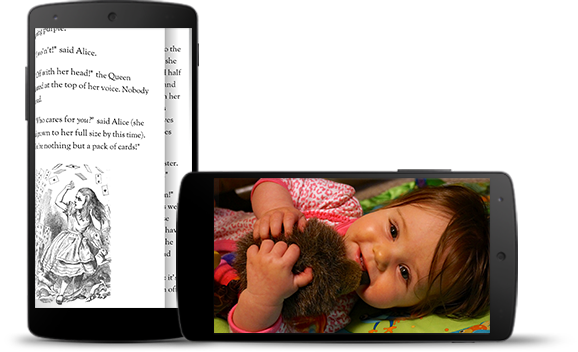
Chế độ sống động giúp người dùng tránh thoát khỏi trò chơi một cách vô tình và mang đến trải nghiệm sống động khi thưởng thức hình ảnh, video và sách. Tuy nhiên, hãy lưu ý đến tần suất người dùng chuyển đổi giữa các ứng dụng để kiểm tra thông báo, thực hiện các tìm kiếm ngẫu hứng hoặc thực hiện các hành động khác. Vì chế độ sống động khiến người dùng mất quyền truy cập dễ dàng vào chế độ điều hướng hệ thống, nên bạn chỉ sử dụng chế độ sống động khi lợi ích mang lại cho trải nghiệm người dùng không chỉ đơn thuần là sử dụng thêm không gian màn hình.
Sử dụng WindowInsetsControllerCompat.hide() để ẩn các thanh hệ thống và WindowInsetsControllerCompat.show() để hiện lại các thanh này.
Đoạn mã sau đây cho thấy ví dụ về cách định cấu hình một nút để ẩn và hiện các thanh hệ thống.
Kotlin
override fun onCreate(savedInstanceState: Bundle?) {
    ...

    val windowInsetsController =
        WindowCompat.getInsetsController(window, window.decorView)
    // Configure the behavior of the hidden system bars.
    windowInsetsController.systemBarsBehavior =
        WindowInsetsControllerCompat.BEHAVIOR_SHOW_TRANSIENT_BARS_BY_SWIPE

    // Add a listener to update the behavior of the toggle fullscreen button when
    // the system bars are hidden or revealed.
    ViewCompat.setOnApplyWindowInsetsListener(window.decorView) { view, windowInsets ->
        // You can hide the caption bar even when the other system bars are visible.
        // To account for this, explicitly check the visibility of navigationBars()
        // and statusBars() rather than checking the visibility of systemBars().
        if (windowInsets.isVisible(WindowInsetsCompat.Type.navigationBars())
            || windowInsets.isVisible(WindowInsetsCompat.Type.statusBars())) {
            binding.toggleFullscreenButton.setOnClickListener {
                // Hide both the status bar and the navigation bar.
                windowInsetsController.hide(WindowInsetsCompat.Type.systemBars())
            }
        } else {
            binding.toggleFullscreenButton.setOnClickListener {
                // Show both the status bar and the navigation bar.
                windowInsetsController.show(WindowInsetsCompat.Type.systemBars())
            }
        }
        ViewCompat.onApplyWindowInsets(view, windowInsets)
    }
}
Java
@Override
protected void onCreate(Bundle savedInstanceState) {
    ...

    WindowInsetsControllerCompat windowInsetsController =
            WindowCompat.getInsetsController(getWindow(), getWindow().getDecorView());
    // Configure the behavior of the hidden system bars.
    windowInsetsController.setSystemBarsBehavior(
            WindowInsetsControllerCompat.BEHAVIOR_SHOW_TRANSIENT_BARS_BY_SWIPE
    );

    // Add a listener to update the behavior of the toggle fullscreen button when
    // the system bars are hidden or revealed.
    ViewCompat.setOnApplyWindowInsetsListener(
        getWindow().getDecorView(),
        (view, windowInsets) -> {
        // You can hide the caption bar even when the other system bars are visible.
        // To account for this, explicitly check the visibility of navigationBars()
        // and statusBars() rather than checking the visibility of systemBars().
        if (windowInsets.isVisible(WindowInsetsCompat.Type.navigationBars())
                || windowInsets.isVisible(WindowInsetsCompat.Type.statusBars())) {
            binding.toggleFullscreenButton.setOnClickListener(v -> {
                // Hide both the status bar and the navigation bar.
                windowInsetsController.hide(WindowInsetsCompat.Type.systemBars());
            });
        } else {
            binding.toggleFullscreenButton.setOnClickListener(v -> {
                // Show both the status bar and the navigation bar.
                windowInsetsController.show(WindowInsetsCompat.Type.systemBars());
            });
        }
        return ViewCompat.onApplyWindowInsets(view, windowInsets);
    });
}
Bạn có thể tuỳ ý chỉ định loại thanh hệ thống cần ẩn và xác định hành vi của các thanh này khi người dùng tương tác với chúng.
Chỉ định thanh hệ thống cần ẩn
Để chỉ định loại thanh hệ thống cần ẩn, hãy truyền một trong các tham số sau vào WindowInsetsControllerCompat.hide().
Sử dụng
WindowInsetsCompat.Type.systemBars()để ẩn cả hai thanh hệ thống.Sử dụng
WindowInsetsCompat.Type.statusBars()để chỉ ẩn thanh trạng thái.Sử dụng tổ hợp phím
WindowInsetsCompat.Type.navigationBars()để chỉ ẩn thanh điều hướng.
Chỉ định hành vi của các thanh hệ thống bị ẩn
Sử dụng WindowInsetsControllerCompat.setSystemBarsBehavior() để chỉ định cách các thanh hệ thống ẩn hoạt động khi người dùng tương tác với chúng.
Sử dụng
WindowInsetsControllerCompat.BEHAVIOR_SHOW_BARS_BY_TOUCHđể hiển thị các thanh hệ thống bị ẩn trong mọi hoạt động tương tác của người dùng trên màn hình tương ứng.Sử dụng
WindowInsetsControllerCompat.BEHAVIOR_SHOW_BARS_BY_SWIPEđể hiện các thanh hệ thống bị ẩn trên mọi cử chỉ hệ thống, chẳng hạn như vuốt từ cạnh màn hình nơi thanh hệ thống bị ẩn.Sử dụng
WindowInsetsControllerCompat.BEHAVIOR_SHOW_TRANSIENT_BARS_BY_SWIPEđể tạm thời hiển thị các thanh hệ thống bị ẩn bằng cử chỉ hệ thống, chẳng hạn như vuốt từ cạnh màn hình nơi thanh bị ẩn. Các thanh hệ thống tạm thời này sẽ phủ lên nội dung của ứng dụng, có thể có độ trong suốt nhất định và tự động ẩn sau một khoảng thời gian chờ ngắn.