
When you want to execute tasks that will continue to run even if the app leaves the visible state, we recommend using the Jetpack library WorkManager. WorkManager features a robust scheduling mechanism that lets tasks persist across app restarts and device reboots.
Types of work
WorkManager handles three types of work:
- Immediate: Tasks that must begin immediately and complete soon. May be expedited.
- Long Running: Tasks which might run for longer, potentially longer than 10 minutes.
- Deferrable: Scheduled tasks that start at a later time and can run periodically.
Figure 1 outlines how the different types of tasks relate to one another.
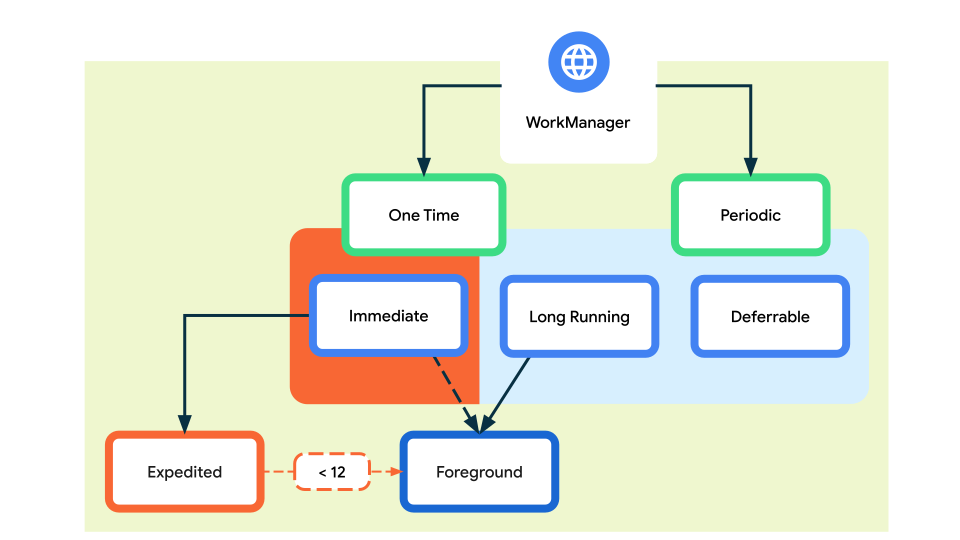
Similarly, the following table outlines the various types of work.
| Type | Periodicity | How to access |
|---|---|---|
| Immediate | One time | OneTimeWorkRequest and Worker. For expedited work, call setExpedited() on your OneTimeWorkRequest. |
| Long Running | One time or periodic | Any WorkRequest or Worker. Call setForeground() in the Worker to handle the notification. |
| Deferrable | One time or periodic | PeriodicWorkRequest and Worker. |
For more information regarding how to set up WorkManager, see the Defining your WorkRequests guide.
WorkManager Features
In addition to providing a simpler and more consistent API, WorkManager has a number of other key benefits:
Work constraints
Declaratively define the optimal conditions for your work to run using work constraints. For example, run only when the device is on an unmetered network, when the device is idle, or when it has sufficient battery.
Robust scheduling
WorkManager allows you to schedule work to run one-time or repeatedly using flexible scheduling windows. Work can be tagged and named as well, allowing you to schedule unique, replaceable work and monitor or cancel groups of work together.
Scheduled work is stored in an internally managed SQLite database and WorkManager takes care of ensuring that this work persists and is rescheduled across device reboots.
In addition, WorkManager adheres to power-saving features and best practices like Doze mode, so you don't have to worry about it.
Expedited work
You can use WorkManager to schedule immediate work for execution in the background. You should use Expedited work for tasks that are important to the user and which complete within a few minutes.
Flexible retry policy
Sometimes work fails. WorkManager offers flexible retry policies, including a configurable exponential backoff policy.
Work chaining
For complex related work, chain individual work tasks together using an intuitive interface that allows you to control which pieces run sequentially and which run in parallel.
Kotlin
val continuation = WorkManager.getInstance(context)
    .beginUniqueWork(
        Constants.IMAGE_MANIPULATION_WORK_NAME,
        ExistingWorkPolicy.REPLACE,
        OneTimeWorkRequest.from(CleanupWorker::class.java)
    ).then(OneTimeWorkRequest.from(WaterColorFilterWorker::class.java))
    .then(OneTimeWorkRequest.from(GrayScaleFilterWorker::class.java))
    .then(OneTimeWorkRequest.from(BlurEffectFilterWorker::class.java))
    .then(
        if (save) {
            workRequest<SaveImageToGalleryWorker>(tag = Constants.TAG_OUTPUT)
        } else /* upload */ {
            workRequest<UploadWorker>(tag = Constants.TAG_OUTPUT)
        }
    )
Java
WorkManager.getInstance(...)
.beginWith(Arrays.asList(workA, workB))
.then(workC)
.enqueue();
For each work task, you can define input and output data for that work. When chaining work together, WorkManager automatically passes output data from one work task to the next.
Built-In threading interoperability
WorkManager integrates seamlessly with Coroutines and RxJava and provides the flexibility to plug in your own asynchronous APIs.
Use WorkManager for reliable work
WorkManager is intended for work that is required to run reliably even if the user navigates off a screen, the app exits, or the device restarts. For example:
- Sending logs or analytics to backend services.
- Periodically syncing application data with a server.
WorkManager is not intended for in-process background work that can safely be terminated if the app process goes away. It is also not a general solution for all work that requires immediate execution. Please review the background processing guide to see which solution meets your needs.
Relationship to other APIs
This table shows how WorkManager relates to similar APIs. This information can help you choose the right API for your app's requirements.
| API | Recommended for | Relationship to WorkManager |
|---|---|---|
| Coroutines | All asynchronous work that doesn't need to persist if the app leaves the visible state. | Coroutines are the standard means of leaving the main thread in Kotlin. However, they stop as soon as the app closes. For work that should persist even after the app closes, use WorkManager. |
| AlarmManager | Alarms only. | Unlike WorkManager's regular workers, AlarmManager's exact alarms wake a device from Doze mode. It is therefore not efficient in terms of power and resource management. Only use it for precise alarms or notifications such as calendar events, not for recurring background work. |
Replace deprecated APIs
The WorkManager API is the recommended replacement for previous Android
background scheduling APIs, including FirebaseJobDispatcher and
GcmNetworkManager.
Get started
Check out the Getting started guide to start using WorkManager in your app.
Additional resources
The following sections provide some additional resources.
Videos
- Workmanager - MAD Skills, video series
- Working with WorkManager, from the 2018 Android Dev Summit
- WorkManager: Beyond the basics, from the 2019 Android Dev Summit