


本頁說明 Android 12 (API 級別 31) 以上版本提供的選用小工具強化功能。這些功能為選用功能,但實作方式簡單明瞭,可提升使用者的小工具體驗。
如要進一步瞭解如何強化小工具,請參閱 Compose 指南「強化小工具」。
使用動態色彩
從 Android 12 開始,小工具可以將裝置主題顏色用於按鈕、背景和其他元件。這樣一來,不同小工具之間的轉場效果會更流暢,且整體風格一致。
動態色彩的實作方式有兩種:
在根版面配置中使用系統的預設主題 (
@android:style/Theme.DeviceDefault.DayNight)。使用 Android 適用的 Material 元件程式庫中的 Material 3 主題 (
Theme.Material3.DynamicColors.DayNight),這個程式庫從 Android 適用的 Material 元件 v1.6.0 開始提供。
在根版面配置中設定主題後,您可以在根版面配置或任何子項中使用常見的顏色屬性,選取動態顏色。
以下列舉幾個可用的顏色屬性:
?attr/primary?attr/primaryContainer?attr/onPrimary?attr/onPrimaryContainer
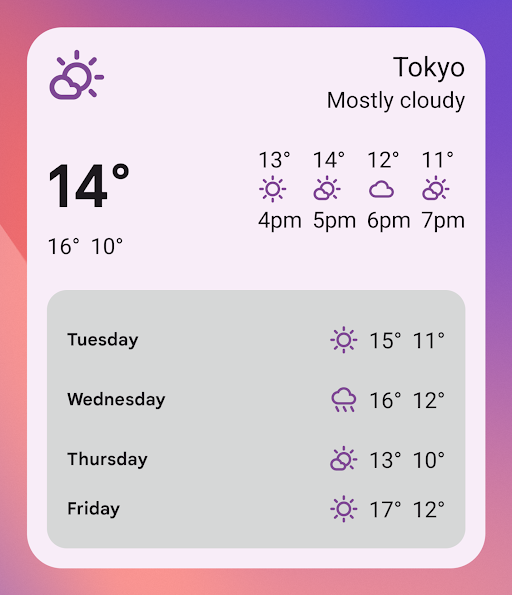
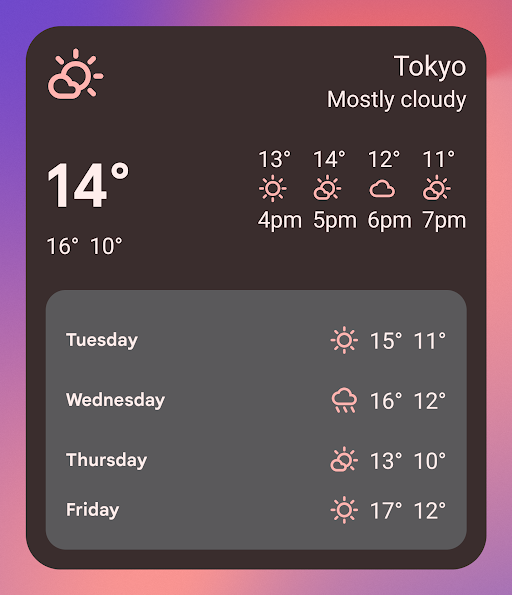
在下列使用 Material 3 主題的範例中,裝置的主題顏色為「紫紅色」。強調色和小工具背景會根據淺色和深色模式調整,如圖 1 和 2 所示。
<LinearLayout xmlns:android="http://schemas.android.com/apk/res/android" xmlns:app="http://schemas.android.com/apk/res-auto" android:layout_width="match_parent" android:layout_height="match_parent" android:background="?attr/colorPrimaryContainer" android:theme="@style/Theme.Material3.DynamicColors.DayNight"> <ImageView android:layout_width="wrap_content" android:layout_height="wrap_content" app:tint="?attr/colorPrimaryContainer" android:src="@drawable/ic_cloud" /> <!-- Other widget content. --> </LinearLayout>
動態色彩的回溯相容性
動態色彩僅適用於搭載 Android 12 以上版本的裝置。如要為較舊版本提供自訂主題,請使用預設主題屬性,以自訂顏色和新的限定符 (values-v31) 建立預設主題。
以下是使用 Material 3 主題的範例:
/values/styles.xml
<resources> <style name="MyWidgetTheme" parent="Theme.Material3.DynamicColors.DayNight"> <!-- Override default colorBackground attribute with custom color. --> <item name="android:colorBackground">@color/my_background_color</item> <!-- Add other colors/attributes. --> </style> </resources>
/values-v31/styles.xml
<resources> <!-- Do not override any color attribute. --> <style name="MyWidgetTheme" parent="Theme.Material3.DynamicColors.DayNight" /> </resources>
/layout/my_widget_layout.xml
<LinearLayout xmlns:android="http://schemas.android.com/apk/res/android" android:layout_width="match_parent" android:layout_height="match_parent" android:orientation="vertical" android:background="?android:attr/colorBackground" android:theme="@style/MyWidgetTheme" />
啟用語音支援
應用程式動作可讓 Google 助理在回應相關使用者語音指令時顯示小工具。將小工具設為回應內建意圖 (BII),應用程式就能在 Android 和 Android Auto 等 Google 助理介面上主動顯示小工具。使用者可以選擇釘選小工具,將 Google 助理顯示的小工具釘選到啟動器,鼓勵日後互動。
舉例來說,您可以為運動應用程式設定運動摘要小工具,以滿足觸發 GET_EXERCISE_OBSERVATION BII 的使用者語音指令。當使用者提出「Ok Google,根據範例應用程式的數據,我這個禮拜跑了幾英里?」等要求,觸發這個 BII 時,Google 助理就會主動顯示小工具。
有數十個 BII 涵蓋多種使用者互動類別,幾乎任何 Android 應用程式都能透過語音功能強化小工具。如要開始使用,請參閱「整合應用程式動作與 Android 小工具」。
啟用更流暢的轉場效果
從 Android 12 開始,啟動器會在使用者透過小工具啟動應用程式時,提供更流暢的轉場效果。
如要啟用這項改良的轉場效果,請使用 @android:id/background 或 android.R.id.background 識別背景元素:
<!-- Top-level layout of the widget. --> <LinearLayout xmlns:android="http://schemas.android.com/apk/res/android" android:id="@android:id/background" android:layout_width="match_parent" android:layout_height="match_parent" android:orientation="vertical"> </LinearLayout>
您的應用程式可以在舊版 Android 上使用 @android:id/background,不會發生錯誤,但系統會忽略這項功能。
在執行階段修改 RemoteViews
從 Android 12 開始,您可以利用多種 RemoteViews 方法,在執行階段修改 RemoteViews 屬性。如需新增方法的完整清單,請參閱 RemoteViews API 參考資料。
以下程式碼範例說明如何使用其中幾種方法。
// Set the colors of a progress bar at runtime. remoteView.setColorStateList( R.id.progress, "setProgressTintList", createProgressColorStateList() ) // Specify exact sizes for margins. remoteView.setViewLayoutMargin( R.id.text, RemoteViews.MARGIN_END, 8f, TypedValue.COMPLEX_UNIT_DIP )