

রিসোর্স হলো সেইসব অতিরিক্ত ফাইল এবং স্ট্যাটিক কন্টেন্ট যা আপনার কোড ব্যবহার করে, যেমন বিটম্যাপ, ইউজার ইন্টারফেস স্ট্রিং, অ্যানিমেশন নির্দেশনা এবং আরও অনেক কিছু।
আপনার কোড থেকে ছবি এবং স্ট্রিং-এর মতো অ্যাপ রিসোর্সগুলিকে সর্বদা আলাদা রাখুন, যাতে আপনি সেগুলিকে স্বাধীনভাবে রক্ষণাবেক্ষণ করতে পারেন। এছাড়াও, নির্দিষ্ট ডিভাইস কনফিগারেশনের জন্য বিকল্প রিসোর্স সরবরাহ করুন এবং সেগুলিকে বিশেষ নামের রিসোর্স ডিরেক্টরিতে একত্রিত করুন। রানটাইমে, অ্যান্ড্রয়েড বর্তমান কনফিগারেশনের উপর ভিত্তি করে উপযুক্ত রিসোর্সটি ব্যবহার করে। উদাহরণস্বরূপ, আপনি ভাষার সেটিংসের উপর নির্ভর করে বিভিন্ন স্ট্রিং সরবরাহ করতে চাইতে পারেন।
একবার আপনার অ্যাপের রিসোর্সগুলোকে এক্সটার্নালাইজ করলে, আপনি আপনার প্রোজেক্টের R ক্লাসে তৈরি হওয়া রিসোর্স আইডি ব্যবহার করে সেগুলোতে অ্যাক্সেস করতে পারবেন। এই ডকুমেন্টটিতে দেখানো হয়েছে কীভাবে আপনার অ্যান্ড্রয়েড প্রোজেক্টে রিসোর্সগুলোকে গ্রুপ করতে হয়। এছাড়াও, এতে দেখানো হয়েছে কীভাবে নির্দিষ্ট ডিভাইস কনফিগারেশনের জন্য বিকল্প রিসোর্স সরবরাহ করতে হয় এবং তারপর আপনার অ্যাপ কোড বা অন্যান্য XML ফাইল থেকে সেগুলোতে অ্যাক্সেস করতে হয়।
গ্রুপ রিসোর্স প্রকার
আপনার প্রোজেক্টের res/ ডিরেক্টরির একটি নির্দিষ্ট সাবডিরেক্টরিতে প্রতিটি ধরণের রিসোর্স রাখুন। উদাহরণস্বরূপ, একটি সাধারণ প্রোজেক্টের ফাইল কাঠামো নিচে দেওয়া হলো:
MyProject/
    src/
        MyActivity.kt
    res/
        drawable/
            graphic.png
        mipmap/
            icon.png
        values/
            strings.xml
res/ ডিরেক্টরির সাবডিরেক্টরিগুলোতে সমস্ত রিসোর্স থাকে: একটি ইমেজ রিসোর্স, লঞ্চার আইকনগুলোর জন্য একটি mipmap/ ডিরেক্টরি এবং একটি স্ট্রিং রিসোর্স ফাইল। রিসোর্স ডিরেক্টরির নামগুলো গুরুত্বপূর্ণ এবং সেগুলো সারণি ১-এ বর্ণনা করা হয়েছে।
দ্রষ্টব্য: mipmap ফোল্ডার ব্যবহার সম্পর্কে আরও তথ্যের জন্য, “mipmap ডিরেক্টরিতে অ্যাপ আইকন রাখুন” দেখুন।
সারণি ১. প্রজেক্টের res/ ডিরেক্টরির অভ্যন্তরে সমর্থিত রিসোর্স ডিরেক্টরিসমূহ।
| ডিরেক্টরি | সম্পদের ধরণ |
|---|---|
drawable/ | বিটম্যাপ ফাইল (PNG,
আরও তথ্যের জন্য, ড্রয়েবল রিসোর্স দেখুন। |
mipmap/ | বিভিন্ন লঞ্চার আইকন ঘনত্বের জন্য ড্রয়েবল ফাইল। mipmap/ ফোল্ডার ব্যবহার করে লঞ্চার আইকন পরিচালনা সম্পর্কে আরও তথ্যের জন্য, “mipmap ডিরেক্টরিতে অ্যাপ আইকন রাখুন” দেখুন। |
raw/ | যেকোনো ফাইলকে তার মূল রূপে সংরক্ষণ করা যাবে। একটি র' তবে, যদি আপনার মূল ফাইলের নাম এবং ফাইলের স্তরবিন্যাস অ্যাক্সেস করার প্রয়োজন হয়, |
values/ | এক্সএমএল ফাইল, যেগুলোতে স্ট্রিং, পূর্ণসংখ্যা এবং রঙের মতো সাধারণ মান থাকে। যেখানে যেহেতু প্রতিটি রিসোর্স তার নিজস্ব XML এলিমেন্ট দিয়ে সংজ্ঞায়িত করা হয়, তাই আপনি ফাইলটির যেকোনো নাম দিতে পারেন এবং বিভিন্ন ধরনের রিসোর্স একটি ফাইলে রাখতে পারেন। তবে, স্বচ্ছতার জন্য, আপনি স্বতন্ত্র ধরনের রিসোর্সগুলো আলাদা ফাইলে রাখতে চাইতে পারেন। উদাহরণস্বরূপ, এই ডিরেক্টরিতে আপনি যে রিসোর্সগুলো তৈরি করতে পারেন, সেগুলোর জন্য কিছু ফাইলনামের প্রচলিত নিয়ম নিচে দেওয়া হলো:
আরও তথ্যের জন্য, স্ট্রিং রিসোর্স , স্টাইল রিসোর্স এবং আরও রিসোর্স প্রকার দেখুন। |
xml/ | যেকোনো XML ফাইল যা রানটাইমে Resources.getXML কল করে পড়া যায়। বিভিন্ন XML কনফিগারেশন ফাইল এখানে সংরক্ষণ করতে হবে। |
font/ | TTF, OTF, বা TTC-এর মতো এক্সটেনশনযুক্ত ফন্ট ফাইল, অথবা <font-family> এলিমেন্ট অন্তর্ভুক্ত XML ফাইল। রিসোর্স হিসেবে ফন্ট সম্পর্কে আরও তথ্যের জন্য, "Add a font as an XML resource" দেখুন। |
সতর্কতা: রিসোর্স ফাইলগুলো কখনোই সরাসরি res/ ডিরেক্টরির ভেতরে সেভ করবেন না। এতে কম্পাইলার ত্রুটি দেখা দেয়।
সারণি ১-এ সংজ্ঞায়িত সাবডিরেক্টরিগুলিতে আপনি যে রিসোর্সগুলি সংরক্ষণ করেন, সেগুলিই আপনার ডিফল্ট রিসোর্স। অর্থাৎ, এই রিসোর্সগুলি আপনার অ্যাপের জন্য ডিফল্ট ডিজাইন এবং বিষয়বস্তু নির্ধারণ করে। তবে, বিভিন্ন ধরনের অ্যান্ড্রয়েড-চালিত ডিভাইসের জন্য বিভিন্ন ধরনের রিসোর্সের প্রয়োজন হতে পারে।
উদাহরণস্বরূপ, আপনি বিভিন্ন স্ট্রিং রিসোর্স প্রদান করতে পারেন যা ডিভাইসের ভাষা সেটিংসের উপর ভিত্তি করে আপনার ইউজার ইন্টারফেসের টেক্সট অনুবাদ করবে।
দ্রষ্টব্য: Compose-এ UI, অ্যানিমেশন এবং স্টেট-চালিত রঙ Kotlin-এ ঘোষণা করা হয়, তাই layout/ , menu/ , anim/ , animator/ এবং color/ ডিরেক্টরিগুলি আধুনিক অ্যাপের জন্য অপ্রচলিত। আরও তথ্যের জন্য, Compose-এ অ্যানিমেশন এবং Compose-এ একটি থিমের গঠন দেখুন।
বিকল্প সংস্থান সরবরাহ করুন
বেশিরভাগ অ্যাপই নির্দিষ্ট ডিভাইস কনফিগারেশন সমর্থন করার জন্য বিকল্প রিসোর্স সরবরাহ করে। উদাহরণস্বরূপ, বিভিন্ন স্ক্রিন ডেনসিটির জন্য বিকল্প ড্রয়েবল রিসোর্স এবং বিভিন্ন ভাষার জন্য বিকল্প স্ট্রিং রিসোর্স অন্তর্ভুক্ত করুন। রানটাইমে, অ্যান্ড্রয়েড বর্তমান ডিভাইস কনফিগারেশন শনাক্ত করে এবং আপনার অ্যাপের জন্য উপযুক্ত রিসোর্স লোড করে।
এক সেট রিসোর্সের জন্য কনফিগারেশন-নির্দিষ্ট বিকল্পগুলি উল্লেখ করতে, নিম্নলিখিতগুলি করুন:
-
res/ফোল্ডারে<resources_name> - <qualifier>ফর্ম্যাটে একটি নতুন ডিরেক্টরি তৈরি করুন।-
<resources_name>হলো সংশ্লিষ্ট ডিফল্ট রিসোর্সসমূহের ডিরেক্টরি নাম (যা সারণি ১-এ সংজ্ঞায়িত করা হয়েছে)। -
<qualifier>হলো একটি নাম যা একটি স্বতন্ত্র কনফিগারেশনকে নির্দিষ্ট করে, যার জন্য এই রিসোর্সগুলি ব্যবহার করা হবে (টেবিল ২-এ সংজ্ঞায়িত)।
আপনি একাধিক
<qualifier>যোগ করতে পারেন। প্রত্যেকটিকে একটি ড্যাশ দিয়ে আলাদা করুন।সতর্কতা: একাধিক কোয়ালিফায়ার যুক্ত করার সময়, সেগুলোকে অবশ্যই টেবিল ২-এ তালিকাভুক্ত ক্রমানুসারে রাখতে হবে। কোয়ালিফায়ারগুলোর ক্রম ভুল হলে, রিসোর্সগুলো উপেক্ষা করা হবে।
-
- এই নতুন ডিরেক্টরিতে উপযুক্ত বিকল্প রিসোর্সগুলো সংরক্ষণ করুন। রিসোর্স ফাইলগুলোর নাম অবশ্যই ডিফল্ট রিসোর্স ফাইলগুলোর নামের সাথে হুবহু একই হতে হবে।
উদাহরণস্বরূপ, এখানে কিছু ডিফল্ট এবং বিকল্প রিসোর্স দেওয়া হলো:
res/
    drawable/
        icon.png
        background.png
    drawable-hdpi/
        icon.png
        background.png
hdpi কোয়ালিফায়ারটি নির্দেশ করে যে, ঐ ডিরেক্টরির রিসোর্সগুলো উচ্চ-ঘনত্বের স্ক্রিনযুক্ত ডিভাইসের জন্য। এই ড্রয়েবল ডিরেক্টরিগুলোর ছবিগুলো নির্দিষ্ট স্ক্রিন ডেনসিটির জন্য আকার দেওয়া থাকে, কিন্তু ফাইলের নামগুলো হুবহু একই থাকে। এইভাবে, icon.png বা background.png ছবিকে রেফারেন্স করার জন্য আপনি যে রিসোর্স আইডি ব্যবহার করেন, তা সবসময় একই থাকে। অ্যান্ড্রয়েড ডিভাইসের কনফিগারেশন তথ্যের সাথে রিসোর্স ডিরেক্টরির নামের কোয়ালিফায়ারগুলো তুলনা করে প্রতিটি রিসোর্সের সেই সংস্করণটি নির্বাচন করে যা বর্তমান ডিভাইসের সাথে সবচেয়ে ভালোভাবে মেলে।
সতর্কতা: কোনো বিকল্প রিসোর্স নির্ধারণ করার সময়, নিশ্চিত করুন যে আপনি ডিফল্ট কনফিগারেশনেও রিসোর্সটি নির্ধারণ করেছেন। অন্যথায়, ডিভাইসের কনফিগারেশন পরিবর্তন হলে আপনার অ্যাপে রানটাইম এক্সেপশন দেখা দিতে পারে। উদাহরণস্বরূপ, যদি আপনি শুধুমাত্র values-en এ একটি স্ট্রিং যোগ করেন এবং values না করেন, তাহলে ব্যবহারকারী ডিফল্ট সিস্টেমের ভাষা পরিবর্তন করলে আপনার অ্যাপে ' Resource Not Found ' এক্সেপশন দেখা দিতে পারে।
সারণি ২-এ কনফিগারেশন কোয়ালিফায়ারগুলো অগ্রাধিকারের ক্রমানুসারে তালিকাভুক্ত করা হয়েছে। আপনি প্রতিটি কোয়ালিফায়ারকে একটি ড্যাশ দিয়ে আলাদা করে একটি ডিরেক্টরি নামে একাধিক কোয়ালিফায়ার যোগ করতে পারেন। যদি আপনি একটি রিসোর্স ডিরেক্টরির জন্য একাধিক কোয়ালিফায়ার ব্যবহার করেন, তবে আপনাকে অবশ্যই সেগুলোকে সারণিতে তালিকাভুক্ত ক্রমানুসারে ডিরেক্টরি নামে যোগ করতে হবে।
সারণি ২. কনফিগারেশন কোয়ালিফায়ার নামসমূহ।
| কনফিগারেশন | যোগ্যতা নির্ধারক মান | বর্ণনা |
|---|---|---|
| এমসিসি এবং এমএনসি | উদাহরণ:mcc310mcc208-mnc00 | ডিভাইসের সিম কার্ড থেকে মোবাইল কান্ট্রি কোড (MCC) এবং এর পরে ঐচ্ছিকভাবে মোবাইল নেটওয়ার্ক কোড (MNC) দেওয়া হয়। উদাহরণস্বরূপ, যদি ডিভাইসটি রেডিও সংযোগ ব্যবহার করে (অর্থাৎ, এটি একটি জিএসএম ফোন), তাহলে এমসিসি এবং এমএনসি মানগুলো সিম কার্ড থেকে আসে। উদাহরণস্বরূপ, আপনার অ্যাপে দেশ-নির্দিষ্ট আইনি রিসোর্স অন্তর্ভুক্ত করার জন্য আপনি শুধু MCC-ও ব্যবহার করতে পারেন। যদি আপনাকে শুধুমাত্র ভাষার উপর ভিত্তি করে নির্দিষ্ট করতে হয়, তাহলে তার পরিবর্তে ভাষা, স্ক্রিপ্ট (ঐচ্ছিক), এবং অঞ্চল (ঐচ্ছিক) কোয়ালিফায়ার ব্যবহার করুন। আপনি যদি MCC এবং MNC কোয়ালিফায়ার ব্যবহার করেন, তবে সতর্কতার সাথে তা করুন এবং পরীক্ষা করে দেখুন যে এটি প্রত্যাশিতভাবে কাজ করছে কিনা। এছাড়াও |
| ভাষা, লিপি (ঐচ্ছিক), এবং অঞ্চল (ঐচ্ছিক) | উদাহরণ:enfren-rUSfr-rFRfr-rCAb+enb+en+USb+es+419b+zh+Hantb+sr+Latn+RS | ভাষাটি একটি দুই-অক্ষরের ISO 639-1 ভাষা কোড দ্বারা সংজ্ঞায়িত করা হয়, যার পরে ঐচ্ছিকভাবে একটি দুই-অক্ষরের ISO 3166-1-alpha-2 অঞ্চল কোড (ছোট হাতের ' কোডগুলো কেস-সেনসিটিভ নয় । অঞ্চলের অংশটিকে আলাদা করার জন্য অ্যান্ড্রয়েড ৭.০ (এপিআই লেভেল ২৪)-এ বিসিপি ৪৭ ল্যাঙ্গুয়েজ ট্যাগের জন্য সমর্থন চালু করা হয়েছে, যা আপনি ভাষা- এবং অঞ্চল-নির্দিষ্ট রিসোর্স চিহ্নিত করতে ব্যবহার করতে পারেন। একটি ল্যাঙ্গুয়েজ ট্যাগ এক বা একাধিক সাবট্যাগের একটি অনুক্রম দ্বারা গঠিত, যার প্রতিটি সামগ্রিক ট্যাগ দ্বারা চিহ্নিত ভাষার পরিসরকে পরিমার্জিত বা সংকুচিত করে। ল্যাঙ্গুয়েজ ট্যাগ সম্পর্কে আরও তথ্যের জন্য, “ভাষা শনাক্তকরণের জন্য ট্যাগ” দেখুন। একটি BCP 47 ল্যাঙ্গুয়েজ ট্যাগ ব্যবহার করতে, আপনার অ্যাপ চলাকালীন ব্যবহারকারীরা সিস্টেম সেটিংসে তাদের ভাষা পরিবর্তন করলে ল্যাঙ্গুয়েজ ট্যাগও পরিবর্তিত হতে পারে। রানটাইমে এটি আপনার অ্যাপকে কীভাবে প্রভাবিত করতে পারে সে সম্পর্কে জানতে, ‘কনফিগারেশন পরিবর্তন পরিচালনা’ দেখুন। অন্যান্য ভাষার জন্য আপনার অ্যাপ স্থানীয়করণ করার সম্পূর্ণ নির্দেশিকার জন্য, “আপনার অ্যাপ স্থানীয়করণ করুন” দেখুন। এছাড়াও |
| ব্যাকরণগত লিঙ্গ | masculinefeminineneuter | ব্যবহারকারীর ব্যাকরণগত লিঙ্গ। যেসব ভাষায় ব্যাকরণগত লিঙ্গ আছে, সেগুলোর জন্য ব্যবহৃত হয়। উদাহরণস্বরূপ, ফরাসিভাষী ব্যবহারকারীদের জন্য যদি আপনাকে বিভিন্ন রিসোর্স সরবরাহ করতে হয়, তাহলে আপনি নিম্নলিখিতগুলির মতো ডিরেক্টরি ব্যবহার করতে পারেন: ব্যাকরণগত লিঙ্গ ব্যবহার করে আপনার অ্যাপের UI ব্যক্তিগতকরণ দেখুন। এছাড়াও এপিআই লেভেল ৩৪-এ যোগ করা হয়েছে। |
| প্রশস্ত রঙের গামুট | widecgnowidecg |
এপিআই লেভেল ২৬-এ যোগ করা হয়েছে। এছাড়াও |
| হাই ডাইনামিক রেঞ্জ (এইচডিআর) | highdrlowdr |
এপিআই লেভেল ২৬-এ যোগ করা হয়েছে। এছাড়াও |
| UI মোড | cardesktelevisionappliancewatchvrheadset |
এপিআই লেভেল ৮-এ যোগ করা হয়েছে; এপিআই ১৩-এ টেলিভিশন যোগ করা হয়েছে; এপিআই ১৬-এ অ্যাপ্লায়েন্স যোগ করা হয়েছে; এপিআই ২০-এ ঘড়ি যোগ করা হয়েছে; এপিআই ২৬-এ ভিআরহেডসেট যোগ করা হয়েছে। ডিভাইসটি ডকে ঢোকানো বা ডক থেকে সরানো হলে আপনার অ্যাপ কীভাবে সাড়া দিতে পারে, সে সম্পর্কে জানতে “ডকিংয়ের অবস্থা ও ধরন নির্ধারণ এবং পর্যবেক্ষণ করুন” পড়ুন। আপনার অ্যাপের কার্যকালে ব্যবহারকারী ডিভাইসটি ডকে রাখলে এটি পরিবর্তিত হতে পারে। আপনি |
| নাইট মোড | nightnotnight |
এপিআই লেভেল ৮-এ যোগ করা হয়েছে। আপনার অ্যাপের কার্যকালে এটি পরিবর্তিত হতে পারে, যদি নাইট মোড অটো মোডে (ডিফল্ট) রাখা হয়, সেক্ষেত্রে মোডটি দিনের সময়ের উপর ভিত্তি করে পরিবর্তিত হয়। আপনি |
| স্ক্রিন পিক্সেল ঘনত্ব (ডিপিআই) | ldpimdpihdpixhdpixxhdpixxxhdpinodpitvdpianydpinnn dpi |
ছয়টি প্রধান ডেনসিটির মধ্যে ৩:৪:৬:৮:১২:১৬ স্কেলিং অনুপাত রয়েছে (tvdpi ডেনসিটি উপেক্ষা করে)। সুতরাং, ldpi-তে একটি ৯x৯ বিটম্যাপ mdpi-তে ১২x১২, hdpi-তে ১৮x১৮, xhdpi-তে ২৪x২৪, ইত্যাদি হয়ে থাকে। দ্রষ্টব্য: ডেনসিটি কোয়ালিফায়ার ব্যবহার করার অর্থ এই নয় যে রিসোর্সগুলো শুধুমাত্র সেই ডেনসিটির স্ক্রিনগুলোর জন্যই প্রযোজ্য। আপনি যদি বর্তমান ডিভাইস কনফিগারেশনের সাথে আরও ভালোভাবে মেলে এমন কোয়ালিফায়ারসহ বিকল্প রিসোর্স প্রদান না করেন, তাহলে সিস্টেমটি সবচেয়ে উপযুক্ত রিসোর্সটিই ব্যবহার করবে। বিভিন্ন স্ক্রিন ডেনসিটি কীভাবে সামলাতে হয় এবং অ্যান্ড্রয়েড কীভাবে আপনার বিটম্যাপগুলিকে বর্তমান ডেনসিটির সাথে মানানসই করার জন্য স্কেল করতে পারে, সে সম্পর্কে আরও তথ্যের জন্য, স্ক্রিন সামঞ্জস্যতার সংক্ষিপ্ত বিবরণ দেখুন। |
| টাচস্ক্রিন টাইপ | notouchfinger |
এছাড়াও |
| কিবোর্ডের প্রাপ্যতা | keysexposedkeyshiddenkeyssoft |
আপনি যদি আপনার অ্যাপের কার্যকালে ব্যবহারকারী যদি একটি হার্ডওয়্যার কিবোর্ড খোলেন, তবে এটি পরিবর্তিত হতে পারে। রানটাইমে এটি আপনার অ্যাপকে কীভাবে প্রভাবিত করে, সে সম্পর্কে তথ্যের জন্য ‘কনফিগারেশন পরিবর্তন পরিচালনা ’ দেখুন। এছাড়াও |
| প্রাথমিক পাঠ্য ইনপুট পদ্ধতি | nokeysqwerty12key |
এছাড়াও |
| নেভিগেশন কী উপলব্ধতা | navexposednavhidden |
আপনার অ্যাপের কার্যকালে ব্যবহারকারী নেভিগেশন কীগুলো প্রকাশ করলে এটি পরিবর্তিত হতে পারে। রানটাইমে এটি আপনার অ্যাপকে কীভাবে প্রভাবিত করে সে সম্পর্কে তথ্যের জন্য, ‘কনফিগারেশন পরিবর্তন পরিচালনা’ দেখুন। এছাড়াও |
| প্রাথমিক নন-টাচ নেভিগেশন পদ্ধতি | nonavdpadtrackballwheel |
এছাড়াও |
| প্ল্যাটফর্ম সংস্করণ (এপিআই স্তর) | উদাহরণ:v3v4v7ইত্যাদি। | ডিভাইস দ্বারা সমর্থিত এপিআই লেভেল। উদাহরণস্বরূপ, এপিআই লেভেল ১-এর জন্য |
দ্রষ্টব্য: অ্যান্ড্রয়েডের সব সংস্করণ সমস্ত কোয়ালিফায়ার সমর্থন করে না। একটি নতুন কোয়ালিফায়ার ব্যবহার করলে তা স্বয়ংক্রিয়ভাবে প্ল্যাটফর্ম সংস্করণ কোয়ালিফায়ারটি যুক্ত করে দেয়, ফলে পুরোনো ডিভাইসগুলো এটিকে উপেক্ষা করতে পারে। যেকোনো সমস্যা এড়াতে, সর্বদা ডিফল্ট রিসোর্সের একটি সেট ( কোয়ালিফায়ারবিহীন রিসোর্সের একটি সেট) অন্তর্ভুক্ত করুন। আরও তথ্যের জন্য, রিসোর্সের মাধ্যমে ডিভাইসের সর্বোত্তম সামঞ্জস্যতা প্রদান সম্পর্কিত বিভাগটি দেখুন।
কম্পোজ অ্যাপে, লেআউট এবং ডাইমেনশন-সম্পর্কিত কনফিগারেশন কোয়ালিফায়ারের প্রয়োজন হয় না। যদিও এগুলোর অস্তিত্ব রয়েছে, তবুও এগুলোকে সারণি ২ থেকে বাদ দেওয়া হয়েছে। এই কোয়ালিফায়ারগুলোর মধ্যে রয়েছে: লেআউট ডিরেকশন, স্মলেস্ট উইডথ, অ্যাভেইলেবল উইডথ, অ্যাভেইলেবল হাইট, স্ক্রিন সাইজ, স্ক্রিন অ্যাসপেক্ট, রাউন্ড স্ক্রিন এবং স্ক্রিন ওরিয়েন্টেশন। অগ্রাধিকারের ক্রমানুসারে কনফিগারেশন কোয়ালিফায়ারগুলোর সম্পূর্ণ তালিকার জন্য, অ্যাপ রিসোর্সেস ওভারভিউ (ভিউস) দেখুন।
কোয়ালিফায়ার নামের নিয়মাবলী
কনফিগারেশন কোয়ালিফায়ার নাম ব্যবহারের কিছু নিয়ম নিচে দেওয়া হলো:
- আপনি ড্যাশ দিয়ে আলাদা করে একটিমাত্র রিসোর্স সেটের জন্য একাধিক কোয়ালিফায়ার নির্দিষ্ট করতে পারেন। উদাহরণস্বরূপ,
drawable-en-rUS-nightইউএস-ইংলিশ ডিভাইসগুলোর নাইট মোডের ক্ষেত্রে প্রযোজ্য। - যোগ্যতা নির্ধারকগুলো অবশ্যই সারণি ২- এ তালিকাভুক্ত ক্রমানুসারে থাকতে হবে।
- ভুল:
drawable-hdpi-night/ - সঠিক:
drawable-night-hdpi/
- ভুল:
- বিকল্প রিসোর্স ডিরেক্টরিগুলো একটির ভেতরে আরেকটি রাখা যায় না। উদাহরণস্বরূপ,
res/drawable/drawable-en/থাকতে পারে না। - মানগুলো কেস-ইনসেনসিটিভ। কেস-ইনসেনসিটিভ ফাইল সিস্টেমে সমস্যা এড়ানোর জন্য রিসোর্স কম্পাইলার প্রসেসিংয়ের আগে ডিরেক্টরির নামগুলোকে ছোট হাতের অক্ষরে রূপান্তর করে। নামগুলোতে বড় হাতের অক্ষর ব্যবহার করা হয় শুধুমাত্র পাঠযোগ্যতা বাড়ানোর জন্য।
- প্রতিটি কোয়ালিফায়ার টাইপের জন্য শুধুমাত্র একটি ভ্যালু সমর্থিত। উদাহরণস্বরূপ, আপনি যদি স্পেন এবং ফ্রান্সের জন্য একই ড্রয়েবল ফাইল ব্যবহার করতে চান, তাহলে আপনি
drawable-es-fr/` নামের কোনো ডিরেক্টরি রাখতে পারবেন না । এর পরিবর্তে, আপনারdrawable-es/এবংdrawable-fr/-এর মতো দুটি রিসোর্স ডিরেক্টরি প্রয়োজন, যেগুলোতে উপযুক্ত ফাইলগুলো থাকবে।
এই কোয়ালিফায়ারগুলো দিয়ে নাম দেওয়া ডিরেক্টরিতে বিকল্প রিসোর্সগুলো সেভ করার পর, অ্যান্ড্রয়েড বর্তমান ডিভাইস কনফিগারেশনের উপর ভিত্তি করে আপনার অ্যাপে রিসোর্সগুলো স্বয়ংক্রিয়ভাবে প্রয়োগ করে। প্রতিবার কোনো রিসোর্সের জন্য অনুরোধ করা হলে, অ্যান্ড্রয়েড সেই অনুরোধ করা রিসোর্স ফাইলটি আছে এমন বিকল্প রিসোর্স ডিরেক্টরিগুলো খুঁজে দেখে এবং তারপর সবচেয়ে উপযুক্ত রিসোর্সটি খুঁজে বের করে ।
যদি কোনো নির্দিষ্ট ডিভাইস কনফিগারেশনের সাথে মেলে এমন কোনো বিকল্প রিসোর্স না থাকে, তাহলে অ্যান্ড্রয়েড সংশ্লিষ্ট ডিফল্ট রিসোর্সগুলো ব্যবহার করে—যা হলো একটি নির্দিষ্ট রিসোর্স টাইপের জন্য রিসোর্সের সেই সেট, যেগুলোতে কোনো কনফিগারেশন কোয়ালিফায়ার অন্তর্ভুক্ত থাকে না।
উপনাম সম্পদ তৈরি করুন
যখন আপনার কাছে এমন কোনো রিসোর্স থাকে যা আপনি একাধিক ডিভাইস কনফিগারেশনের জন্য ব্যবহার করতে চান কিন্তু সেটিকে ডিফল্ট রিসোর্স হিসেবে প্রদান করতে চান না, তখন একই রিসোর্স একাধিক বিকল্প রিসোর্স ডিরেক্টরিতে রাখার প্রয়োজন নেই। এর পরিবর্তে, আপনি একটি বিকল্প রিসোর্স তৈরি করতে পারেন যা আপনার ডিফল্ট রিসোর্স ডিরেক্টরিতে সংরক্ষিত কোনো রিসোর্সের অ্যালিয়াস (alias) হিসেবে কাজ করবে।
অঙ্কনযোগ্য
উদাহরণস্বরূপ, ধরুন আপনার কাছে icon.png একটি অ্যাপ আইকন আছে এবং বিভিন্ন লোকেলের জন্য এটির একটি স্বতন্ত্র সংস্করণ প্রয়োজন। কিন্তু, ইংলিশ-কানাডিয়ান এবং ফ্রেঞ্চ-কানাডিয়ান—এই দুটি লোকেলের জন্য একই সংস্করণ ব্যবহার করতে হবে। ইংলিশ-কানাডিয়ান এবং ফ্রেঞ্চ-কানাডিয়ান উভয়ের জন্য একই ইমেজ রিসোর্স ডিরেক্টরিতে কপি করার কোনো প্রয়োজন নেই। এর পরিবর্তে, আপনি উভয়ের জন্য ব্যবহৃত ইমেজটি icon.png ছাড়া অন্য যেকোনো নামে, যেমন icon_ca.png , সেভ করে ডিফল্ট res/drawable/ ডিরেক্টরিতে রাখতে পারেন। এরপর res/drawable-en-rCA/ এবং res/drawable-fr-rCA/ ফোল্ডারে একটি icon.xml ফাইল তৈরি করুন, যেখানে <bitmap> এলিমেন্ট ব্যবহার করে icon_ca.png রিসোর্সটিকে রেফার করা থাকবে।
<?xml version="1.0" encoding="utf-8"?>
<bitmap xmlns:android="http://schemas.android.com/apk/res/android" android:src="@drawable/icon_ca" />
এর মাধ্যমে আপনি PNG ফাইলের কেবল একটি সংস্করণ এবং সেটিকে নির্দেশকারী দুটি ছোট XML ফাইল সংরক্ষণ করতে পারবেন। এরপর আপনি painterResource(R.drawable.icon) ব্যবহার করতে পারবেন এবং সিস্টেমটি লোকেল শনাক্ত করার পর উপযুক্ত ফাইলটি বেছে নেবে।
স্ট্রিং এবং অন্যান্য সাধারণ মান
বিদ্যমান কোনো স্ট্রিং-এর অ্যালিয়াস তৈরি করতে, নতুন স্ট্রিংটির ভ্যালু হিসেবে কাঙ্ক্ষিত স্ট্রিংটির রিসোর্স আইডি ব্যবহার করুন:
<?xml version="1.0" encoding="utf-8"?>
<resources>
    <string name="hello">Hello</string>
    <string name="hi">@string/hello</string>
</resources>
R.string.hi রিসোর্সটি এখন R.string.hello এর একটি উপনাম (alias)।
অন্যান্য সাধারণ মানগুলোও একইভাবে কাজ করে, যেমন রং:
<?xml version="1.0" encoding="utf-8"?>
<resources>
    <color name="red">#f00</color>
    <color name="highlight">@color/red</color>
</resources>
আপনার অ্যাপের রিসোর্স অ্যাক্সেস করুন
আপনার অ্যাপ্লিকেশনে একবার কোনো রিসোর্স প্রদান করলে, আপনি তার রিসোর্স আইডি উল্লেখ করে সেটি প্রয়োগ করতে পারেন। সমস্ত রিসোর্স আইডি আপনার প্রোজেক্টের R ক্লাসে সংজ্ঞায়িত করা থাকে, যা aapt টুলটি স্বয়ংক্রিয়ভাবে তৈরি করে।
যখন আপনার অ্যাপ্লিকেশনটি কম্পাইল করা হয়, aapt একটি R ক্লাস তৈরি করে, যেটিতে আপনার res/ ডিরেক্টরিতে থাকা সমস্ত রিসোর্সের রিসোর্স আইডি থাকে। প্রতিটি ধরণের রিসোর্সের জন্য একটি R সাবক্লাস থাকে, যেমন সমস্ত ড্রয়েবল রিসোর্সের জন্য R.drawable । এবং সেই ধরণের প্রতিটি রিসোর্সের জন্য একটি স্ট্যাটিক ইন্টিজার থাকে, উদাহরণস্বরূপ, R.drawable.icon । এই ইন্টিজারটিই হলো রিসোর্স আইডি, যা ব্যবহার করে আপনি আপনার রিসোর্সটি খুঁজে পেতে পারেন।
যদিও R ক্লাসেই রিসোর্স আইডি নির্দিষ্ট করা থাকে, একটি রিসোর্স আইডি খুঁজে বের করার জন্য সেখানে দেখার প্রয়োজন নেই। একটি রিসোর্স আইডি সর্বদা নিম্নলিখিত উপাদানগুলো দিয়ে গঠিত হয়:
- রিসোর্সের ধরণ : প্রতিটি রিসোর্সকে একটি 'ধরণ'-এ ভাগ করা হয়, যেমন
stringবাdrawable। - রিসোর্স নেম হলো ফাইলের নাম, যা থেকে এক্সটেনশনটি বাদ দেওয়া হয়।
কম্পোজে রিসোর্স অ্যাক্সেস করুন
Jetpack Compose নিরাপদে রিসোর্স অ্যাক্সেস করার জন্য বিল্ট-ইন, কম্পোজেবল-অ্যাওয়্যার ফাংশন প্রদান করে।
- স্ট্রিং:
stringResource(id = R.string.hello)
- অঙ্কনযোগ্য:
painterResource(id = R.drawable.my_icon)
নন-ইউআই কোডে রিসোর্স অ্যাক্সেস করুন
আপনার UI হায়ারার্কির বাইরের কোনো রিসোর্স—যেমন ViewModel , Repository বা সিস্টেম Service —অ্যাক্সেস করার প্রয়োজন হলে, আপনি Context ব্যবহার করে সেগুলোকে রিজলভ করতে পারেন।
// Retrieve a localized string resource
val greeting = context.getString(R.string.hello_world)
আপনি Resources এর মেথড ব্যবহার করে স্বতন্ত্র রিসোর্সও পুনরুদ্ধার করতে পারেন, যার একটি ইনস্ট্যান্স আপনি getResources এর মাধ্যমে পেতে পারেন।
সিনট্যাক্স
কোডে কোনো রিসোর্স রেফারেন্স করার সিনট্যাক্সটি হলো:
[<package_name>.]R.<resource_type>.<resource_name>
-
<package_name>হলো সেই প্যাকেজের নাম যেখানে রিসোর্সটি অবস্থিত (নিজের প্যাকেজ থেকে রিসোর্স রেফারেন্স করার ক্ষেত্রে এটির প্রয়োজন নেই)। -
<resource_type>হলো রিসোর্স টাইপের জন্যRসাবক্লাস। -
<resource_name>হলো এক্সটেনশন ছাড়া রিসোর্স ফাইলের নাম অথবা সহজ মানের জন্য XML এলিমেন্টেরandroid:nameঅ্যাট্রিবিউটের মান।
প্রতিটি রিসোর্স টাইপ এবং সেগুলোকে কীভাবে রেফারেন্স করতে হয় সে সম্পর্কে আরও তথ্যের জন্য, Compose-এর রিসোর্সসমূহ (Resources in Compose ) দেখুন।
মূল ফাইলগুলি অ্যাক্সেস করুন
যদিও এটি অস্বাভাবিক, আপনার মূল ফাইল এবং ডিরেক্টরিগুলো অ্যাক্সেস করার প্রয়োজন হতে পারে। যদি এমনটা হয়, তাহলে res/ ফোল্ডারে আপনার ফাইলগুলো সেভ করলে কাজ হবে না, কারণ res/ থেকে কোনো রিসোর্স পড়ার একমাত্র উপায় হলো রিসোর্স আইডি ব্যবহার করা। এর পরিবর্তে, আপনি আপনার রিসোর্সগুলো assets/ ডিরেক্টরিতে সেভ করতে পারেন।
assets/ ডিরেক্টরিতে সংরক্ষিত ফাইলগুলোকে কোনো রিসোর্স আইডি দেওয়া হয় না , তাই আপনি R ক্লাস বা XML রিসোর্স থেকে সেগুলোকে রেফারেন্স করতে পারবেন না। এর পরিবর্তে, আপনি একটি সাধারণ ফাইল সিস্টেমের মতো assets/ ডিরেক্টরির ফাইলগুলো কোয়েরি করতে পারেন এবং AssetManager ব্যবহার করে র ডেটা পড়তে পারেন।
তবে, আপনার যদি শুধু র ডেটা (যেমন একটি ভিডিও বা অডিও ফাইল) পড়ার ক্ষমতা প্রয়োজন হয়, তাহলে ফাইলটি res/raw/ ডিরেক্টরিতে সংরক্ষণ করুন এবং openRawResource ব্যবহার করে বাইটের একটি স্ট্রিম পড়ুন।
প্ল্যাটফর্মের রিসোর্স অ্যাক্সেস করুন
অ্যান্ড্রয়েডে সিস্টেম স্টাইল এবং থিমের মতো বেশ কিছু স্ট্যান্ডার্ড রিসোর্স রয়েছে। এগুলো অ্যাক্সেস করতে, আপনার রিসোর্স রেফারেন্সটিকে android প্যাকেজ ক্লাস দিয়ে কোয়ালিফাই করুন। উদাহরণস্বরূপ: painterResource(android.R.drawable.ic_menu_info_details) ।
রিসোর্সগুলোর সাথে ডিভাইসের সর্বোত্তম সামঞ্জস্য প্রদান করুন।
আপনার অ্যাপ যাতে একাধিক ডিভাইস কনফিগারেশন সমর্থন করতে পারে, সেজন্য আপনার অ্যাপে ব্যবহৃত প্রতিটি ধরনের রিসোর্সের জন্য সর্বদা ডিফল্ট রিসোর্স সরবরাহ করা অত্যন্ত গুরুত্বপূর্ণ।
উদাহরণস্বরূপ, যদি আপনার অ্যাপ একাধিক ভাষা সমর্থন করে, তাহলে সর্বদা একটি values/ ' ডিরেক্টরি (যেখানে আপনার স্ট্রিংগুলো সংরক্ষিত থাকে) ভাষা এবং অঞ্চল কোয়ালিফায়ার ছাড়া অন্তর্ভুক্ত করুন। এর পরিবর্তে, আপনি যদি আপনার সমস্ত স্ট্রিং ফাইল এমন ডিরেক্টরিতে রাখেন যেখানে ভাষা এবং অঞ্চল কোয়ালিফায়ার আছে, তাহলে আপনার স্ট্রিংগুলো যে ভাষা সমর্থন করে না, সেই ভাষায় সেট করা কোনো ডিভাইসে অ্যাপটি চালালে তা ক্র্যাশ করবে।
যতক্ষণ আপনি ডিফল্ট values/ রিসোর্স সরবরাহ করবেন, ততক্ষণ আপনার অ্যাপটি সঠিকভাবে চলবে, এমনকি ব্যবহারকারী এর ভাষা না বুঝলেও। ক্র্যাশ করার চেয়ে এটা ভালো।
ডিফল্ট রিসোর্স প্রদান করা গুরুত্বপূর্ণ, শুধু এই কারণে নয় যে আপনার অ্যাপ এমন কোনো কনফিগারেশনে চলতে পারে যা আপনি আগে থেকে ভাবেননি, বরং এই কারণেও যে অ্যান্ড্রয়েডের নতুন সংস্করণগুলো মাঝে মাঝে এমন কনফিগারেশন কোয়ালিফায়ার যোগ করে যা পূর্ববর্তী সংস্করণগুলো সমর্থন করে না। আপনি যদি একটি নতুন রিসোর্স কোয়ালিফায়ার ব্যবহার করেন, কিন্তু অ্যান্ড্রয়েডের পূর্ববর্তী সংস্করণগুলোর সাথে কোডের সামঞ্জস্যতা বজায় রাখতে চান, তাহলে অ্যান্ড্রয়েডের কোনো পূর্ববর্তী সংস্করণ যখন আপনার অ্যাপটি চালাবে, তখন ডিফল্ট রিসোর্স প্রদান না করলে অ্যাপটি ক্র্যাশ করবে, কারণ এটি নতুন কোয়ালিফায়ার দ্বারা চিহ্নিত রিসোর্সগুলো ব্যবহার করতে পারে না।
উদাহরণস্বরূপ, যদি আপনার minSdkVersion 4-এ সেট করা থাকে, এবং আপনি আপনার সমস্ত ড্রয়েবল রিসোর্সকে নাইট মোড ( night বা notnight , যা API লেভেল 8-এ যোগ করা হয়েছিল) ব্যবহার করে কোয়ালিফাই করেন, তাহলে একটি API লেভেল 4 ডিভাইস আপনার ড্রয়েবল রিসোর্সগুলো অ্যাক্সেস করতে পারবে না এবং ক্র্যাশ করবে। এই ক্ষেত্রে, আপনি সম্ভবত notnight আপনার ডিফল্ট রিসোর্স হিসেবে রাখতে চাইবেন, তাই ওই কোয়ালিফায়ারটি বাদ দিন এবং আপনার ড্রয়েবল রিসোর্সগুলোকে drawable/ অথবা drawable-night/ ফোল্ডারে রাখুন।
সংক্ষেপে, ডিভাইসের সাথে সর্বোত্তম সামঞ্জস্যতা নিশ্চিত করতে, আপনার অ্যাপের সঠিকভাবে কাজ করার জন্য প্রয়োজনীয় রিসোর্সগুলোর জন্য সর্বদা ডিফল্ট রিসোর্স সরবরাহ করুন। এরপর, কনফিগারেশন কোয়ালিফায়ার ব্যবহার করে নির্দিষ্ট ডিভাইস কনফিগারেশনের জন্য বিকল্প রিসোর্স তৈরি করুন।
এই নিয়মের একটি ব্যতিক্রম আছে: যদি আপনার অ্যাপের minSdkVersion ৪ বা তার বেশি হয়, তাহলে স্ক্রিন ডেনসিটি কোয়ালিফায়ারের সাথে বিকল্প ড্রয়েবল রিসোর্স প্রদান করলে আপনার ডিফল্ট ড্রয়েবল রিসোর্সের প্রয়োজন নেই । ডিফল্ট ড্রয়েবল রিসোর্স ছাড়াও, অ্যান্ড্রয়েড বিকল্প স্ক্রিন ডেনসিটিগুলোর মধ্যে থেকে সেরা মিল খুঁজে নিতে পারে এবং প্রয়োজন অনুযায়ী বিটম্যাপগুলোকে স্কেল করতে পারে। তবে, সব ধরনের ডিভাইসে সেরা অভিজ্ঞতার জন্য, তিন ধরনের ডেনসিটির জন্যই বিকল্প ড্রয়েবল প্রদান করুন।
অ্যান্ড্রয়েড কীভাবে সবচেয়ে উপযুক্ত রিসোর্স খুঁজে বের করে
যখন আপনি এমন কোনো রিসোর্সের জন্য অনুরোধ করেন যার বিকল্প আপনি প্রদান করেন, তখন অ্যান্ড্রয়েড বর্তমান ডিভাইস কনফিগারেশনের উপর নির্ভর করে রানটাইমে কোন বিকল্প রিসোর্সটি ব্যবহার করা হবে তা নির্বাচন করে। অ্যান্ড্রয়েড কীভাবে একটি বিকল্প রিসোর্স নির্বাচন করে তা দেখানোর জন্য, ধরে নিন নিম্নলিখিত ড্রয়েবল ডিরেক্টরিগুলোর প্রতিটিতে একই ইমেজের বিভিন্ন সংস্করণ রয়েছে:
drawable/
drawable-en/
drawable-fr-rCA/
drawable-en-night/
drawable-en-notouch-12key/
drawable-night-ldpi/
drawable-night-notouch-12key/
এবং ধরে নিন ডিভাইসটির কনফিগারেশন নিম্নরূপ:
লোকেল = en-GB
নাইট মোড = night
স্ক্রিন পিক্সেল ঘনত্ব = hdpi
টাচস্ক্রিন টাইপ = notouch
প্রাথমিক টেক্সট ইনপুট পদ্ধতি = 12key
ডিভাইস কনফিগারেশনকে উপলব্ধ বিকল্প রিসোর্সগুলোর সাথে তুলনা করে অ্যান্ড্রয়েড drawable-en-night থেকে ড্রয়েবল নির্বাচন করে।
সিস্টেমটি কোন সম্পদ ব্যবহার করবে সেই সিদ্ধান্তে নিম্নলিখিত যুক্তির মাধ্যমে উপনীত হয়:
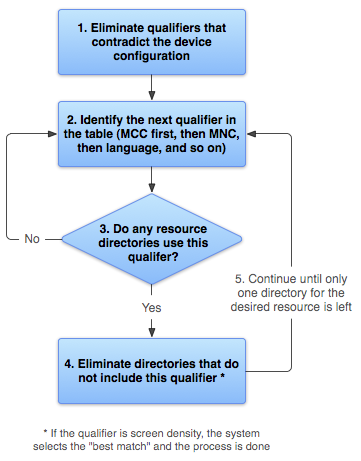
চিত্র ২. অ্যান্ড্রয়েড কীভাবে সবচেয়ে উপযুক্ত রিসোর্স খুঁজে বের করে তার ফ্লোচার্ট।
- ডিভাইস কনফিগারেশনের সাথে সাংঘর্ষিক রিসোর্স ফাইলগুলো মুছে ফেলুন।
drawable-fr-rCA/ডিরেক্টরিটি বাদ দেওয়া হয়েছে, কারণ এটিen-GBলোকেল-এর সাথে সাংঘর্ষিক।drawable/ drawable-en/
drawable-fr-rCA/drawable-en-night/ drawable-en-notouch-12key/ drawable-night-ldpi/ drawable-night-notouch-12key/ব্যতিক্রম: স্ক্রিন পিক্সেল ডেনসিটি হলো একমাত্র কোয়ালিফায়ার যা কোনো অসঙ্গতির কারণে বাদ দেওয়া হয় না। যদিও ডিভাইসটির স্ক্রিন ডেনসিটি hdpi,
drawable-night-ldpi/বাদ দেওয়া হয় না, কারণ এই পর্যায়ে প্রতিটি স্ক্রিন ডেনসিটিকেই সামঞ্জস্যপূর্ণ বলে বিবেচনা করা হয়। তথ্যের জন্য, স্ক্রিন সামঞ্জস্যতার ওভারভিউ দেখুন। - তালিকা থেকে পরবর্তী সর্বোচ্চ অগ্রাধিকারের কোয়ালিফায়ারটি খুঁজুন ( সারণী ২ )। (MCC দিয়ে শুরু করুন।)
- রিসোর্স ডিরেক্টরিগুলোর কোনোটিতে কি এই কোয়ালিফায়ারটি অন্তর্ভুক্ত আছে?
- যদি উত্তর 'না' হয়, তবে দ্বিতীয় ধাপে ফিরে যান এবং পরবর্তী কোয়ালিফায়ারটি দেখুন। এই উদাহরণে, ল্যাঙ্গুয়েজ কোয়ালিফায়ারে না পৌঁছানো পর্যন্ত উত্তরটি 'না' হবে।
- যদি উত্তর হ্যাঁ হয়, তবে চতুর্থ ধাপে যান।
- যেসব রিসোর্স ডিরেক্টরিতে এই কোয়ালিফায়ারটি নেই, সেগুলোকে বাদ দিন। এই উদাহরণে, সিস্টেমটি এরপর সেই সমস্ত ডিরেক্টরি বাদ দেয় যেগুলিতে কোনো ল্যাঙ্গুয়েজ কোয়ালিফায়ার নেই:
drawable/drawable-en/ drawable-en-night/ drawable-en-notouch-12key/drawable-night-ldpi/drawable-night-notouch-12key/ব্যতিক্রম: যদি বিবেচ্য কোয়ালিফায়ারটি স্ক্রিন পিক্সেল ডেনসিটি হয়, তাহলে অ্যান্ড্রয়েড সেই অপশনটি বেছে নেয় যা ডিভাইসের স্ক্রিন ডেনসিটির সাথে সবচেয়ে বেশি মেলে। সাধারণত, অ্যান্ড্রয়েড একটি ছোট মূল ইমেজকে বড় করার চেয়ে একটি বড় মূল ইমেজকে ছোট করতে বেশি পছন্দ করে। আরও তথ্যের জন্য, স্ক্রিন কম্প্যাটিবিলিটি ওভারভিউ দেখুন।
- কেবলমাত্র একটি ডিরেক্টরি অবশিষ্ট না থাকা পর্যন্ত দুই, তিন এবং চার নম্বর ধাপগুলো পুনরাবৃত্তি করুন। এই উদাহরণে, নাইট মোড হলো পরবর্তী কোয়ালিফায়ার যার জন্য কোনো মিল পাওয়া গেছে। সুতরাং, যে রিসোর্সগুলোতে নাইট মোড নির্দিষ্ট করা নেই, সেগুলো বাদ দেওয়া হয়:
drawable-en/drawable-en-night/drawable-en-notouch-12key/অবশিষ্ট ডিরেক্টরিটি হলো
drawable-en-night।
যদিও অনুরোধ করা প্রতিটি রিসোর্সের জন্য এই পদ্ধতিটি কার্যকর করা হয়, সিস্টেমটি এর কিছু দিক অপ্টিমাইজ করে। এই ধরনের একটি অপ্টিমাইজেশন হলো, ডিভাইসের কনফিগারেশন জানা গেলে, এটি এমন বিকল্প রিসোর্সগুলোকে বাদ দিয়ে দিতে পারে যেগুলো কখনোই মিলবে না। উদাহরণস্বরূপ, যদি কনফিগারেশনের ভাষা ইংরেজি হয়, তাহলে যে রিসোর্স ডিরেক্টরির ল্যাঙ্গুয়েজ কোয়ালিফায়ার ইংরেজি ছাড়া অন্য কিছুতে সেট করা আছে, সেটিকে যাচাই করা রিসোর্সের তালিকায় কখনোই অন্তর্ভুক্ত করা হয় না (যদিও ল্যাঙ্গুয়েজ কোয়ালিফায়ার ছাড়া রিসোর্স ডিরেক্টরি ঠিকই অন্তর্ভুক্ত থাকে)।
স্ক্রিনের আকারের নির্ধারক অনুসারে রিসোর্স নির্বাচন করার সময়, যদি আরও ভালোভাবে মেলে এমন কোনো রিসোর্স না থাকে, তাহলে সিস্টেম বর্তমান স্ক্রিনের চেয়ে ছোট স্ক্রিনের জন্য ডিজাইন করা রিসোর্স ব্যবহার করে। উদাহরণস্বরূপ, একটি বড় আকারের স্ক্রিন প্রয়োজনে সাধারণ আকারের স্ক্রিনের রিসোর্স ব্যবহার করে।
তবে, যদি একমাত্র উপলব্ধ রিসোর্সগুলো বর্তমান স্ক্রিনের চেয়ে বড় হয়, তাহলে সিস্টেম সেগুলো ব্যবহার করে না এবং ডিভাইস কনফিগারেশনের সাথে মেলে এমন অন্য কোনো রিসোর্স না থাকলে আপনার অ্যাপ ক্র্যাশ করে। উদাহরণস্বরূপ, এমনটা ঘটে যদি সমস্ত লেআউট রিসোর্সকে xlarge কোয়ালিফায়ার দিয়ে ট্যাগ করা থাকে, কিন্তু ডিভাইসটি একটি স্বাভাবিক আকারের স্ক্রিন হয়।
দ্রষ্টব্য: ডিভাইসের সাথে হুবহু মিলে যাওয়া কোয়ালিফায়ারের সংখ্যার চেয়ে কোয়ালিফায়ারের অগ্রাধিকার ( টেবিল ২-এ ) বেশি গুরুত্বপূর্ণ। পূর্ববর্তী উদাহরণে, চতুর্থ ধাপে তালিকার শেষ বিকল্পটিতে তিনটি কোয়ালিফায়ার রয়েছে যা ডিভাইসের সাথে হুবহু মিলে যায় (নাইট মোড, টাচস্ক্রিন টাইপ, এবং ইনপুট মেথড), যেখানে drawable-en কেবল একটি প্যারামিটার মেলে (ভাষা)। তবে, এই অন্যান্য কোয়ালিফায়ারগুলোর চেয়ে 'ভাষা'-র অগ্রাধিকার বেশি, তাই drawable-night-notouch-12key বাদ দেওয়া হয়।
অতিরিক্ত সম্পদ
অ্যাপের রিসোর্স সম্পর্কে আরও জানতে, নিম্নলিখিত অতিরিক্ত রিসোর্সগুলো দেখুন: