

ExoPlayer 的主要試用版應用程式有兩個主要用途:
- 提供 ExoPlayer 使用方式的完整功能範例。您可以將試用版應用程式做為起點,方便開發自己的應用程式。
- 讓您試用 ExoPlayer。除了內建範例,試用版應用程式還能用來測試您自己的內容播放。
本頁面說明如何取得、編譯及執行試用版應用程式,以及如何使用該應用程式播放自己的媒體。
取得程式碼
主要試用版應用程式的原始碼位於 GitHub 專案的 demos/main 資料夾中。如果尚未複製專案,請將專案複製到本機目錄:
git clone https://github.com/androidx/media.git
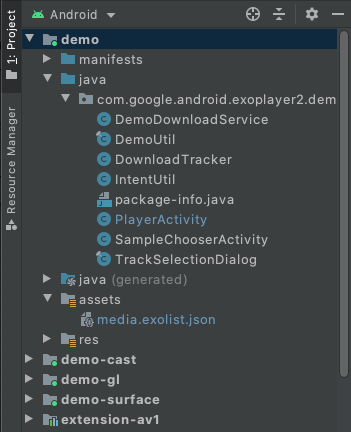
接著,在 Android Studio 中開啟專案。您應該會在 Android 專案檢視畫面中看到以下內容 (示範應用程式的相關資料夾已展開):
編譯及執行
如要編譯及執行試用版應用程式,請在 Android Studio 中選取並執行 demo 設定。試用版應用程式會安裝並在已連結的 Android 裝置上執行。建議您盡可能使用實體裝置。如要改用模擬器,請參閱「支援的裝置」的「模擬器」一節,並確認虛擬裝置使用的系統映像檔 API 級別至少為 23。
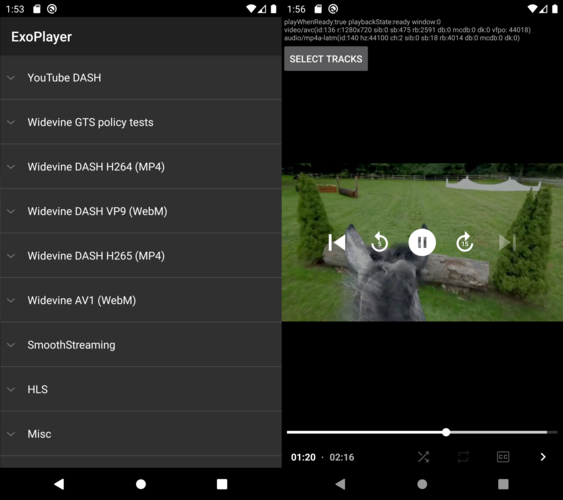
試用版應用程式會顯示範例清單 (SampleChooserActivity)。選取範例後,系統會開啟第二個活動 (PlayerActivity) 進行播放。示範功能包括播放控制項和曲目選取功能。此外,這個類別也會使用 ExoPlayer 的 EventLogger 公用程式類別,將實用的偵錯資訊輸出至系統記錄。您可以使用以下指令查看這項記錄 (以及其他標記的錯誤層級記錄):
adb logcat EventLogger:V *:E
啟用隨附解碼器
ExoPlayer 有多個擴充功能,可使用隨附的軟體解碼器,包括 AV1、VP9、Opus、FLAC 和 FFmpeg (僅限音訊)。您可以建構試用版應用程式,納入並使用這些擴充功能,如下所示:
- 建構要加入的每個擴充功能。請注意,這項程序需要手動執行。如需操作說明,請參閱各擴充功能的
README.md檔案。 在 Android Studio 的「Build Variants」檢視畫面中,將試用模組的建構變化版本設為
withDecoderExtensionsDebug或withDecoderExtensionsRelease,如下圖所示。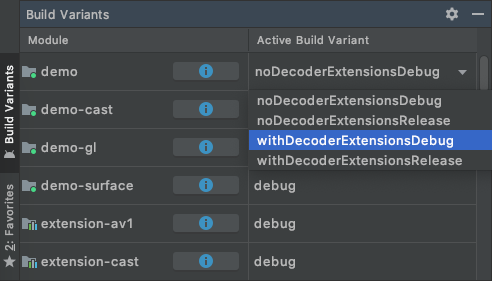
照常編譯、安裝及執行
demo設定。
根據預設,只有在沒有合適的平台解碼器時,才會使用擴充功能解碼器。您可以指定優先使用擴充功能解碼器,詳情請參閱以下各節。
播放自己的內容
您可以透過多種方式在試用版應用程式中播放自己的內容。
1. 編輯 assets/media.exolist.json
試用版應用程式中列出的範例是從 assets/media.exolist.json 載入。編輯這個 JSON 檔案,即可在試用版應用程式中新增及移除範例。結構定義如下,其中 [O] 表示選用屬性。
[
  {
    "name": "Name of heading",
    "samples": [
      {
        "name": "Name of sample",
        "uri": "The URI of the sample",
        "extension": "[O] Sample type hint. Cannot be combined with mime_type. Values: mpd, ism, m3u8",
        "clip_start_position_ms": "[O] A start point to which the sample should be clipped, in milliseconds",
        "clip_end_position_ms": "[O] An end point from which the sample should be clipped, in milliseconds",
        "drm_scheme": "[O] Drm scheme if protected. Values: widevine, playready, clearkey",
        "drm_license_uri": "[O] URI of the license server if protected",
        "drm_force_default_license_uri": "[O] Whether to force use of "drm_license_uri" for key requests that include their own license URI",
        "drm_key_request_properties": "[O] Key request headers if protected",
        "drm_session_for_clear_content": "[O] Whether to attach a DRM session to clear video and audio tracks",
        "drm_multi_session": "[O] Enables key rotation if protected",
        "drm_force_software_crypto": "[O] Whether to force DRM to use the software crypto library regardless of the device's hardware crypto capability if supported by the DRM scheme",
        "mime_type": "[O] The MIME type of the sample. Cannot be combined with extension.",
        "subtitle_uri": "[O] The URI of a subtitle sidecar file",
        "subtitle_mime_type": "[O] The MIME type of subtitle_uri (required if subtitle_uri is set)",
        "subtitle_language": "[O] The BCP47 language code of the subtitle file (ignored if subtitle_uri is not set)",
        "ad_tag_uri": "[O] The URI of an ad tag to load via the IMA extension"
      },
      ...etc
    ]
  },
  ...etc
]
您可以使用以下結構定義指定範例播放清單:
[
  {
    "name": "Name of heading",
    "samples": [
      {
        "name": "Name of playlist sample",
        "playlist": [
          {
            "uri": "The URI of the first sample in the playlist",
            "extension": "[O] Sample type hint. Cannot be combined with mime_type. Values: mpd, ism, m3u8",
            "clip_start_position_ms": "[O] A start point to which the sample should be clipped, in milliseconds",
            "clip_end_position_ms": "[O] An end point from which the sample should be clipped, in milliseconds",
            "drm_scheme": "[O] Drm scheme if protected. Values: widevine, playready, clearkey",
            "drm_license_uri": "[O] URI of the license server if protected",
            "drm_force_default_license_uri": "[O] Whether to force use of "drm_license_uri" for key requests that include their own license URI",
            "drm_key_request_properties": "[O] Key request headers if protected",
            "drm_session_for_clear_content": "[O] Whether to attach a DRM session to clear video and audio tracks",
            "drm_multi_session": "[O] Enables key rotation if protected",
            "drm_force_software_crypto": "[O] Whether to force DRM to use the software crypto library regardless of the device's hardware crypto capability if supported by the DRM scheme",
            "mime_type": "[O] The MIME type of the sample. Cannot be combined with extension.",
            "subtitle_uri": "[O] The URI of a subtitle sidecar file",
            "subtitle_mime_type": "[O] The MIME type of subtitle_uri (required if subtitle_uri is set)",
            "subtitle_language": "[O] The BCP47 language code of the subtitle file (ignored if subtitle_uri is not set)"
          },
          {
            "uri": "The URI of the second sample in the playlist",
            ...etc
          },
          ...etc
        ]
      },
      ...etc
    ]
  },
  ...etc
]
如有需要,請將重要要求標頭指定為物件,其中包含每個標頭的字串屬性:
"drm_key_request_properties": {
  "name1": "value1",
  "name2": "value2",
  ...etc
}
在範例選擇器活動中,溢位選單包含用於指定是否偏好擴充功能解碼器的選項。
本機檔案 URI 和限定範圍儲存空間限制
指定本機檔案 URI 時,試用版應用程式會要求必要的儲存空間存取權限,以便讀取這些檔案。不過,從 Android 13 開始,您無法載入結尾不是一般媒體檔案副檔名 (例如 .mp4) 的任意檔案。如需載入這類檔案,可以將檔案放在試用版應用程式的特定儲存空間目錄中,該目錄沒有存取限制。通常位於 /sdcard/Android/data/androidx.media3.demo.main/files。
2. 載入外部 exolist.json 檔案
試用版應用程式可使用上述結構定義載入外部 JSON 檔案,並根據 *.exolist.json 慣例命名。舉例來說,如果您在 https://yourdomain.com/samples.exolist.json 託管這類檔案,可以使用以下指令在試用版應用程式中開啟:
adb shell am start -a android.intent.action.VIEW \
    -d https://yourdomain.com/samples.exolist.json
在已安裝試用版應用程式的裝置上,點選 *.exolist.json 連結 (例如在瀏覽器或電子郵件用戶端中),也會在試用版應用程式中開啟該連結。託管 *.exolist.json JSON 檔案可讓其他人試用試用版應用程式中的內容。
3. 觸發意圖
意圖可用於略過範例清單,直接啟動播放。如要播放單一範例,請將意圖的動作設為 androidx.media3.demo.main.action.VIEW,並將資料 URI 設為要播放的範例。您可以使用以下指令,從終端機觸發這類意圖:
adb shell am start -a androidx.media3.demo.main.action.VIEW \
    -d https://yourdomain.com/sample.mp4
單一範例意圖支援的選用額外資料如下:
- 設定範例:
mime_type[字串] 範例 MIME 類型提示。例如 DASH 內容的application/dash+xml。clip_start_position_ms[Long] 樣本應剪輯的起始點,以毫秒為單位。clip_end_position_ms[Long] 應剪輯樣本的端點,以毫秒為單位。drm_scheme[String] DRM 配置 (如果受保護)。有效值為widevine、playready和clearkey。系統也接受 DRM 配置 UUID。drm_license_uri[字串] 授權伺服器的 URI (如果受保護)。drm_force_default_license_uri[布林值]:是否強制對包含自身授權 URI 的金鑰要求使用drm_license_uri。drm_key_request_properties[字串陣列] 封裝為 name1、value1、name2、value2 等的重要要求標頭 (如果受保護)。drm_session_for_clear_content[布林值] 是否要將 DRM 工作階段附加至清除影片和音軌。drm_multi_session[布林值] 啟用金鑰輪替 (如果受保護)。drm_force_software_crypto[布林值] 如果 DRM 配置支援,是否強制 DRM 使用軟體加密程式庫,無論裝置的硬體加密功能為何。subtitle_uri[字串] 字幕補充資訊檔案的 URI。subtitle_mime_type[字串] subtitle_uri 的 MIME 類型 (如果設定 subtitle_uri,則為必要)。subtitle_language[字串] 字幕檔案的 BCP47 語言代碼 (如果未設定 subtitle_uri,則會忽略)。ad_tag_uri[字串]:使用 IMA 擴充功能載入的廣告代碼 URI。prefer_extension_decoders[布林值] 是否優先使用擴充功能解碼器,而非平台解碼器。
使用 adb shell am start 觸發意圖時,可以使用 --es 設定選用的額外字串 (例如 --es extension mpd)。可以使用 --ez 設定選用的額外布林值 (例如 --ez prefer_extension_decoders TRUE)。可以使用 --el 設定選用的額外長整數 (例如 --el clip_start_position_ms 5000)。可以使用 --esa 設定選用的額外字串陣列 (例如 --esa drm_key_request_properties name1,value1)。
如要播放範例播放清單,請將意圖的動作設為 androidx.media3.demo.main.action.VIEW_LIST。範例設定額外項目與 androidx.media3.demo.main.action.VIEW 相同,但有兩項差異:
- 額外項目的鍵應包含底線,並以樣本的 0 索引做為後置字串。舉例來說,
extension_0會提示第一個樣本的樣本類型。drm_scheme_1會為第二個範例設定 DRM 配置。 - 範例的 URI 會以額外資訊的形式傳遞,並使用
uri_<sample-index>鍵。
其他不依賴樣本的額外項目則不會變更。舉例來說,您可以在終端機中執行下列指令,播放含有兩個項目的播放清單,並覆寫第二個項目的副檔名:
adb shell am start -a androidx.media3.demo.main.action.VIEW_LIST \
    --es uri_0 https://a.com/sample1.mp4 \
    --es uri_1 https://b.com/sample2.fake_mpd \
    --es extension_1 mpd