

Bazı içerikler, durum çubuğu veya gezinme çubuğunda herhangi bir gösterge olmadan tam ekranda en iyi şekilde deneyimlenir. Örnek olarak videolar, oyunlar, resim galerileri, kitaplar ve sunum slaytları verilebilir. Bu moda tam ekran modu denir. Bu sayfada, kullanıcıların tam ekran içeriklerle daha derinlemesine etkileşime geçmesini nasıl sağlayabileceğiniz açıklanmaktadır.
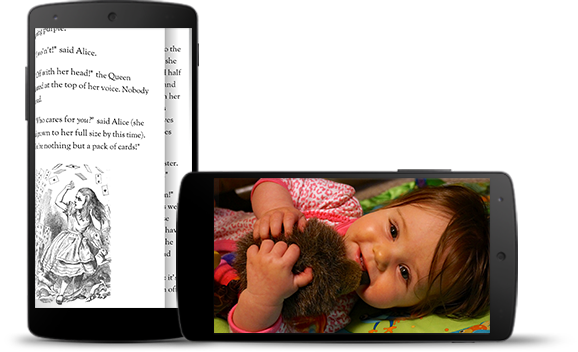
Etkileyici mod, kullanıcıların oyun sırasında yanlışlıkla çıkmasını önlemeye yardımcı olur ve resim, video ve kitapların keyfini çıkarmak için etkileyici bir deneyim sunar. Ancak kullanıcıların bildirimleri kontrol etmek, anlık aramalar yapmak veya başka işlemler gerçekleştirmek için uygulamalara ne sıklıkta girip çıktığına dikkat edin. Tam ekran modu, kullanıcıların sistemde gezinmeye kolayca erişmesini engellediğinden bu modu yalnızca kullanıcı deneyimine sağladığı fayda, ekran alanını genişletmenin ötesine geçtiğinde kullanın.
Sistem çubuklarını gizlemek için WindowInsetsControllerCompat.hide(), geri getirmek için WindowInsetsControllerCompat.show() simgesini kullanın.
Aşağıdaki snippet'te, sistem çubuklarını gizlemek ve göstermek için bir düğmenin nasıl yapılandırılacağına dair bir örnek gösterilmektedir.
Kotlin
override fun onCreate(savedInstanceState: Bundle?) {
    ...

    val windowInsetsController =
        WindowCompat.getInsetsController(window, window.decorView)
    // Configure the behavior of the hidden system bars.
    windowInsetsController.systemBarsBehavior =
        WindowInsetsControllerCompat.BEHAVIOR_SHOW_TRANSIENT_BARS_BY_SWIPE

    // Add a listener to update the behavior of the toggle fullscreen button when
    // the system bars are hidden or revealed.
    ViewCompat.setOnApplyWindowInsetsListener(window.decorView) { view, windowInsets ->
        // You can hide the caption bar even when the other system bars are visible.
        // To account for this, explicitly check the visibility of navigationBars()
        // and statusBars() rather than checking the visibility of systemBars().
        if (windowInsets.isVisible(WindowInsetsCompat.Type.navigationBars())
            || windowInsets.isVisible(WindowInsetsCompat.Type.statusBars())) {
            binding.toggleFullscreenButton.setOnClickListener {
                // Hide both the status bar and the navigation bar.
                windowInsetsController.hide(WindowInsetsCompat.Type.systemBars())
            }
        } else {
            binding.toggleFullscreenButton.setOnClickListener {
                // Show both the status bar and the navigation bar.
                windowInsetsController.show(WindowInsetsCompat.Type.systemBars())
            }
        }
        ViewCompat.onApplyWindowInsets(view, windowInsets)
    }
}
Java
@Override
protected void onCreate(Bundle savedInstanceState) {
    ...

    WindowInsetsControllerCompat windowInsetsController =
            WindowCompat.getInsetsController(getWindow(), getWindow().getDecorView());
    // Configure the behavior of the hidden system bars.
    windowInsetsController.setSystemBarsBehavior(
            WindowInsetsControllerCompat.BEHAVIOR_SHOW_TRANSIENT_BARS_BY_SWIPE
    );

    // Add a listener to update the behavior of the toggle fullscreen button when
    // the system bars are hidden or revealed.
    ViewCompat.setOnApplyWindowInsetsListener(
        getWindow().getDecorView(),
        (view, windowInsets) -> {
        // You can hide the caption bar even when the other system bars are visible.
        // To account for this, explicitly check the visibility of navigationBars()
        // and statusBars() rather than checking the visibility of systemBars().
        if (windowInsets.isVisible(WindowInsetsCompat.Type.navigationBars())
                || windowInsets.isVisible(WindowInsetsCompat.Type.statusBars())) {
            binding.toggleFullscreenButton.setOnClickListener(v -> {
                // Hide both the status bar and the navigation bar.
                windowInsetsController.hide(WindowInsetsCompat.Type.systemBars());
            });
        } else {
            binding.toggleFullscreenButton.setOnClickListener(v -> {
                // Show both the status bar and the navigation bar.
                windowInsetsController.show(WindowInsetsCompat.Type.systemBars());
            });
        }
        return ViewCompat.onApplyWindowInsets(view, windowInsets);
    });
}
İsteğe bağlı olarak, gizlenecek sistem çubuklarının türünü belirleyebilir ve kullanıcı bu çubuklarla etkileşimde bulunduğunda nasıl davranacaklarını belirleyebilirsiniz.
Hangi sistem çubuklarının gizleneceğini belirtme
Gizlenecek sistem çubuklarının türünü belirtmek için aşağıdaki parametrelerden birini WindowInsetsControllerCompat.hide() işlevine iletin.
Her iki sistem çubuğunu da gizlemek için
WindowInsetsCompat.Type.systemBars()simgesini kullanın.Yalnızca durum çubuğunu gizlemek için
WindowInsetsCompat.Type.statusBars()simgesini kullanın.Yalnızca gezinme çubuğunu gizlemek için
WindowInsetsCompat.Type.navigationBars()simgesini kullanın.
Gizli sistem çubuklarının davranışını belirtme
Kullanıcı etkileşimde bulunduğunda gizli sistem çubuklarının nasıl davranacağını belirtmek için WindowInsetsControllerCompat.setSystemBarsBehavior() kullanın.
İlgili ekranda herhangi bir kullanıcı etkileşiminde gizli sistem çubuklarını göstermek için
WindowInsetsControllerCompat.BEHAVIOR_SHOW_BARS_BY_TOUCHsimgesini kullanın.WindowInsetsControllerCompat.BEHAVIOR_SHOW_BARS_BY_SWIPEsimgesini kullanarak, sistem çubuğunun gizlendiği ekran kenarından kaydırma gibi herhangi bir sistem hareketinde gizli sistem çubuklarını gösterebilirsiniz.WindowInsetsControllerCompat.BEHAVIOR_SHOW_TRANSIENT_BARS_BY_SWIPEsimgesini kullanarak, çubuğun gizlendiği ekran kenarından kaydırma gibi sistem hareketleriyle gizli sistem çubuklarını geçici olarak gösterebilirsiniz. Bu geçici sistem çubukları, uygulamanızın içeriğinin üzerine yerleştirilir, belirli bir şeffaflık derecesine sahip olabilir ve kısa bir zaman aşımından sonra otomatik olarak gizlenir.