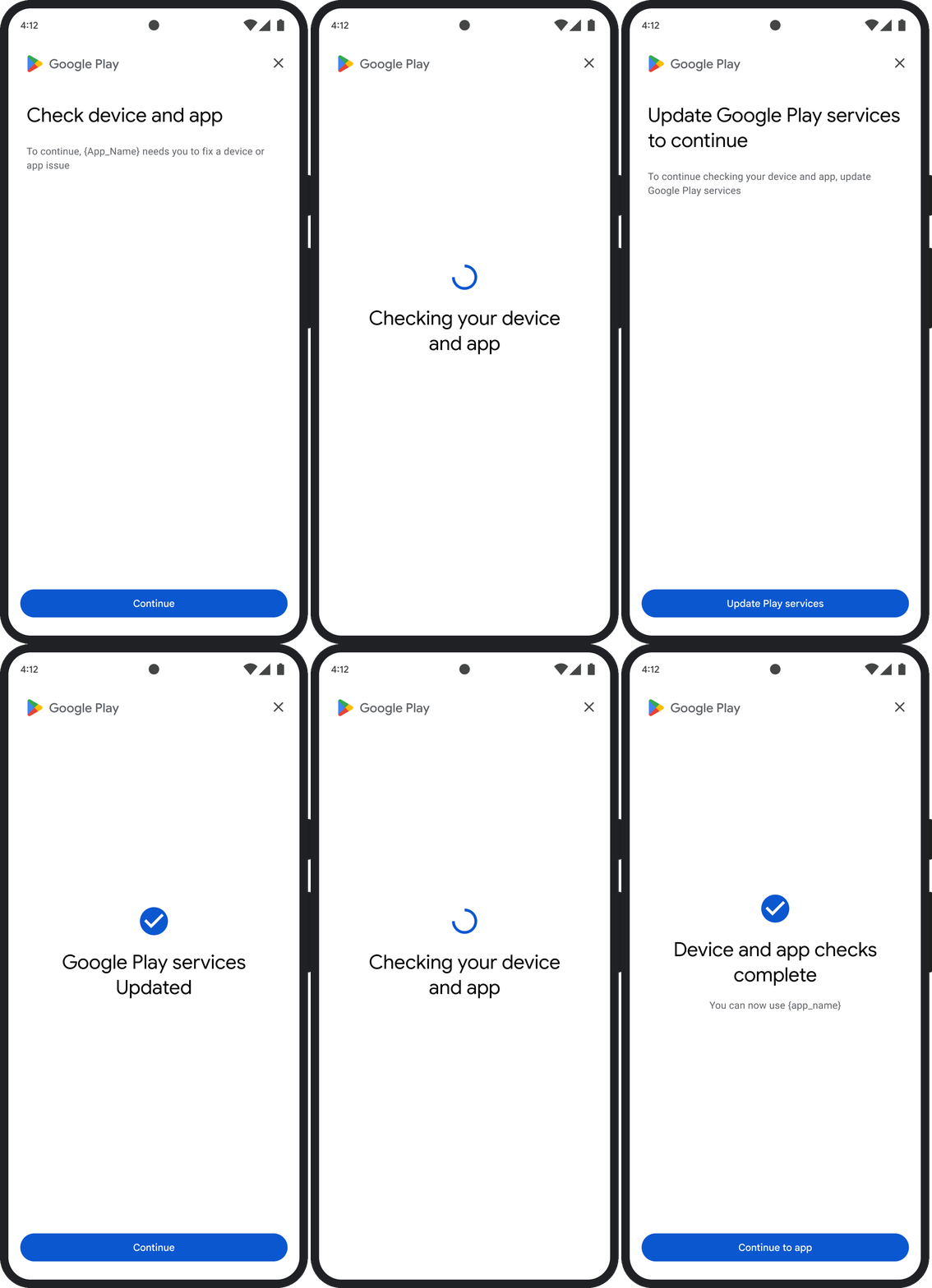
本頁面說明如何處理完整性判定結果的問題。
要求提供完整性權杖後,您可以選擇向使用者顯示 Google Play 對話方塊。如果完整性判定結果出現一或多個問題,或是在 Integrity API 要求期間發生例外狀況,您就可以顯示這個對話方塊。對話方塊關閉後,您可以提出另一項完整性權杖要求,驗證問題是否已修正。如果您提出標準要求,需再次替權杖供應工具暖機,才能取得最新判定結果。
要求完整性對話方塊,修正判定結果問題
當用戶端要求完整性權杖時,您可以使用 StandardIntegrityToken (標準 API) 和 IntegrityTokenResponse (傳統 API) 中提供的方法:showDialog(Activity activity, int integrityDialogTypeCode)。
下列步驟概述如何使用 Play Integrity API,透過 GET_LICENSED 對話方塊代碼顯示修復對話方塊。本節後方列出了應用程式可要求的其他對話方塊代碼。
透過應用程式要求完整性權杖,然後將權杖傳送至伺服器。使用「標準」或「傳統」要求都可以。
Kotlin
// Request an integrity token
val tokenResponse: StandardIntegrityToken = requestIntegrityToken()
// Send token to app server and get response on what to do next
val yourServerResponse: YourServerResponse = sendToServer(tokenResponse.token())
Java
// Request an integrity token
StandardIntegrityToken tokenResponse = requestIntegrityToken();
// Send token to app server and get response on what to do next
YourServerResponse yourServerResponse = sendToServer(tokenResponse.token());
Unity
// Request an integrity token
StandardIntegrityToken tokenResponse = RequestIntegrityToken();
// Send token to app server and get response on what to do next
YourServerResponse yourServerResponse = sendToServer(tokenResponse.Token);
Unreal Engine
// Request an integrity token
StandardIntegrityToken* Response = RequestIntegrityToken();
// Send token to app server and get response on what to do next
YourServerResponse YourServerResponse = SendToServer(Response->Token);
原生
/// Request an integrity token
StandardIntegrityToken* response = requestIntegrityToken();
/// Send token to app server and get response on what to do next
YourServerResponse yourServerResponse = sendToServer(StandardIntegrityToken_getToken(response));
在伺服器上解密完整性權杖,然後檢查
appLicensingVerdict欄位。如下所示:// Licensing issue { ... "accountDetails": { "appLicensingVerdict": "UNLICENSED" } }如果權杖包含
appLicensingVerdict: "UNLICENSED",請回覆應用程式用戶端,要求顯示授權對話方塊:Kotlin
private fun getDialogTypeCode(integrityToken: String): Int{
    // Get licensing verdict from decrypted and verified integritytoken
    val licensingVerdict: String = getLicensingVerdictFromDecryptedToken(integrityToken)

    return if (licensingVerdict == "UNLICENSED") {
            1 // GET_LICENSED
        } else 0
}
Java
private int getDialogTypeCode(String integrityToken) {
    // Get licensing verdict from decrypted and verified integrityToken
    String licensingVerdict = getLicensingVerdictFromDecryptedToken(integrityToken);

    if (licensingVerdict.equals("UNLICENSED")) {
      return 1; // GET_LICENSED
    }
    return 0;
}
Unity
private int GetDialogTypeCode(string IntegrityToken) {
    // Get licensing verdict from decrypted and verified integrityToken
    string licensingVerdict = GetLicensingVerdictFromDecryptedToken(IntegrityToken);

    if (licensingVerdict == "UNLICENSED") {
      return 1; // GET_LICENSED
    }
    return 0;
}
Unreal Engine
private int GetDialogTypeCode(FString IntegrityToken) {
    // Get licensing verdict from decrypted and verified integrityToken
    FString LicensingVerdict = GetLicensingVerdictFromDecryptedToken(IntegrityToken);

    if (LicensingVerdict == "UNLICENSED") {
      return 1; // GET_LICENSED
    }
    return 0;
}
原生
private int getDialogTypeCode(string integrity_token) {
    /// Get licensing verdict from decrypted and verified integrityToken
    string licensing_verdict = getLicensingVerdictFromDecryptedToken(integrity_token);

    if (licensing_verdict == "UNLICENSED") {
      return 1; // GET_LICENSED
    }
    return 0;
}
從伺服器擷取要求的程式碼後,在應用程式中使用該程式碼呼叫
showDialog:Kotlin
// Show dialog as indicated by the server
val showDialogType: Int? = yourServerResponse.integrityDialogTypeCode()
if (showDialogType == null) {
     return
}

// Create dialog request
val dialogRequest = StandardIntegrityDialogRequest.builder()
          .setActivity(activity)
          .setTypeCode(showDialogType)
          .setStandardIntegrityResponse(StandardIntegrityResponse.TokenResponse(token))
          .build()

// Call showDialog, the dialog will be shown on top of the provided activity
// and the task will complete when the dialog is closed.
val result: Task<Int> = standardIntegrityManager.showDialog(dialogRequest)

// Handle response code, call the Integrity API again to confirm that the
// verdict issue has been resolved.
Java
// Show dialog as indicated by the server
@Nullable Integer showDialogType = yourServerResponse.integrityDialogTypeCode();
if (showDialogType == null) {
     return;
}

// Create dialog request
StandardIntegrityDialogRequest dialogRequest =
      StandardIntegrityDialogRequest.builder()
          .setActivity(getActivity())
          .setTypeCode(showDialogTypeCode)
          .setStandardIntegrityResponse(new StandardIntegrityResponse.TokenResponse(token))
          .build();

// Call showDialog, the dialog will be shown on top of the provided activity
// and the task will complete when the dialog is closed.
Task<Integer> result = standardIntegrityManager.showDialog(dialogRequest);

// Handle response code, call the Integrity API again to confirm that the
// verdict issue has been resolved.
Unity
// Initialize the V2 manager. Requires Play Integrity Unity Plugin v2.0.0 or
// higher.
var standardIntegrityManager = new StandardIntegrityManagerV2();
IEnumerator ShowDialogCoroutine() {
    int showDialogType = yourServerResponse.IntegrityDialogTypeCode();

    PlayAsyncOperation<IntegrityDialogResponseCode, StandardIntegrityError> showDialogTask;

    using (var activity = UnityPlayerHelper.GetCurrentActivity())
    {
        // Create a dialog request
        var dialogRequest = new StandardIntegrityDialogRequest(tokenResponse, activity, showDialogType);

        // Call showDialog with the request, the dialog will be shown on top of the
        // provided activity and complete when the dialog is closed.
        showDialogTask = standardIntegrityManager.ShowDialog(dialogRequest);
    }

    // Wait for PlayAsyncOperation to complete.
    yield return showDialogTask;

    // Handle response code, call the Integrity API again to confirm that the
    // verdict issue been resolved.
}
Unreal Engine
// .h
void MyClass::OnShowDialogCompleted(
    EStandardIntegrityErrorCode Error,
    EIntegrityDialogResponseCode Response)
{
    // Handle response code, call the Integrity API again to confirm that the
    // verdict issue has been resolved.
}

// .cpp
void MyClass::RequestIntegrityToken()
{
    UStandardIntegrityToken* Response = ...
    int TypeCode = YourServerResponse.integrityDialogTypeCode();

    // Create a delegate to bind the callback function.
    FShowDialogStandardOperationCompletedDelegate Delegate;

    // Bind the completion handler (OnShowDialogCompleted) to the delegate.
    Delegate.BindDynamic(this, &MyClass::OnShowDialogCompleted);

    // Call ShowDialog with TypeCode which completes when the dialog is closed.
    Response->ShowDialog(TypeCode, Delegate);
}
原生
// Show dialog as indicated by the server int show_dialog_type = yourServerResponse.integrityDialogTypeCode(); if(show_dialog_type == 0){ return; } /// Create dialog request StandardIntegrityDialogRequest* dialog_request; StandardIntegrityDialogRequest_create(&dialog_request); StandardIntegrityDialogRequest_setTypeCode(dialog_request, show_dialog_type); StandardIntegrityDialogRequest_setActivity(dialog_request, activity); StandardIntegrityDialogRequest_setStandardIntegrityToken(dialog_request, token_response); /// Call showDialog with the dialog request. The dialog will be shown on top /// of the provided activity and complete when the dialog is closed by the /// user. StandardIntegrityDialogResponse* dialog_response; StandardIntegrityErrorCode error_code = StandardIntegrityManager_showDialog(dialog_request, &dialog_response); /// Use polling to wait for the async operation to complete. Note, the polling /// shouldn't block the thread where the StandardIntegrityManager is running. IntegrityDialogResponseCode response_code = INTEGRITY_DIALOG_RESPONSE_UNKNOWN; while (error_code == STANDARD_INTEGRITY_NO_ERROR) { error_code = StandardIntegrityDialogResponse_getResponseCode(dialog_response, &response_code); if(response_code != INTEGRITY_DIALOG_RESPONSE_UNKNOWN){ break; } } /// Free memory StandardIntegrityDialogRequest_destroy(dialog_request); StandardIntegrityDialogResponse_destroy(dialog_response); /// Handle response code, call the Integrity API again to confirm that the /// verdict issues have been resolved.對話方塊會顯示在系統提供的活動頂端。使用者關閉對話方塊後,工作就會完成,並顯示回應代碼。
(選用) 要求其他權杖,以便顯示任何後續對話方塊。如果您提出標準要求,需再次替權杖供應工具暖機,才能取得最新判定結果。
要求完整性對話方塊,修正用戶端例外狀況
如果 Integrity API 要求失敗,並顯示 StandardIntegrityException (標準 API) 或 IntegrityServiceException (傳統 API),且例外狀況可修正,您可以使用 GET_INTEGRITY 或 GET_STRONG_INTEGRITY 對話方塊修正錯誤。
下列步驟概述如何使用 GET_INTEGRITY 對話方塊,修正 Integrity API 回報的可修復用戶端錯誤。
檢查 Integrity API 要求傳回的例外狀況是否可修正。
Kotlin
private fun isExceptionRemediable(exception: ExecutionException): Boolean {
    val cause = exception.cause
    if (cause is StandardIntegrityException && cause.isRemediable) {
        return true
    }
    return false
}
Java
private boolean isExceptionRemediable(ExecutionException exception) {
    Throwable cause = exception.getCause();
    if (cause instanceof StandardIntegrityException integrityException
&& integrityException.isRemediable()) {
        return true;
    }
    return false;
}
Unity
private bool IsExceptionRemediable(StandardIntegrityError error) {
    // Check if the operation resulted in a remediable error
    if (error != null && error.ErrorCode != StandardIntegrityErrorCode.NoError && error.IsRemediable) {
        return true;
    }
    return false;
}
原生
bool IsErrorRemediable(StandardIntegrityToken* token) {
    /// Check if the error associated with the token is remediable
    bool isRemediable = false;
    if(StandardIntegrityToken_getIsRemediable(response, &isRemediable) == STANDARD_INTEGRITY_NO_ERROR){
      return isRemediable;
    }
    return false;
}
如果例外狀況可以修正,請使用傳回的例外狀況要求
GET_INTEGRITY對話方塊。對話方塊會顯示在提供的活動上方,使用者關閉對話方塊後,傳回的工作就會完成,並顯示回應代碼。Kotlin
  private fun showDialog(exception: StandardIntegrityException) {
      // Create a dialog request
      val standardIntegrityDialogRequest =
          StandardIntegrityDialogRequest.builder()
              .setActivity(activity)
              .setType(IntegrityDialogTypeCode.GET_INTEGRITY)
              .setStandardIntegrityResponse(ExceptionDetails(exception))
              .build()

      // Request dialog
      val responseCode: Task<Int> =
            standardIntegrityManager.showDialog(standardIntegrityDialogRequest)
}
Java
  private void showDialog(StandardIntegrityException exception) {
      // Create a dialog request
      StandardIntegrityDialogRequest standardIntegrityDialogRequest =
          StandardIntegrityDialogRequest.builder()
              .setActivity(this.activity)
              .setType(IntegrityDialogTypeCode.GET_INTEGRITY)
              .setStandardIntegrityResponse(new ExceptionDetails(exception))
              .build();

      // Request dialog
      Task<Integer> responseCode =
            standardIntegrityManager.showDialog(standardIntegrityDialogRequest);
}
Unity
// Initialize the V2 manager. Requires Play Integrity Unity Plugin v2.0.0 or
// higher.
var standardIntegrityManager = new StandardIntegrityManagerV2();
IEnumerator ShowDialogToFixError(StandardIntegrityError error) {
    PlayAsyncOperation<IntegrityDialogResponseCode, StandardIntegrityError> showDialogTask;

    using (var activity = UnityPlayerHelper.GetCurrentActivity())
    {
        // Create a dialog request using the error
        var dialogRequest = new StandardIntegrityDialogRequest(error, activity, GET_INTEGRITY_DIALOG);

        // Request dialog
        showDialogTask = standardIntegrityManager.ShowDialog(dialogRequest);
    }

    // Wait for PlayAsyncOperation to complete.
    yield return showDialogTask;
}
原生
private void showDialogToFixError(StandardIntegrityToken* token) {
    /// If the token request failed, and the underlying error is not fixable
    /// then return early
    if(isErrorRemediable(token)) {
      return;
    }

    /// Create dialog request
    StandardIntegrityDialogRequest* dialog_request;
    StandardIntegrityDialogRequest_create(&dialog_request);
    StandardIntegrityDialogRequest_setTypeCode(dialog_request,
                                       kGetIntegrityDialogTypeCode);
    StandardIntegrityDialogRequest_setActivity(dialog_request, activity);
    StandardIntegrityDialogRequest_setStandardIntegrityToken(dialog_request,
                                                    token_response);

    /// Call showDialog with the dialog request. The dialog will be shown on
    /// top of the provided activity and complete when the dialog is closed by
    /// the user.
    StandardIntegrityDialogResponse* dialog_response;
    StandardIntegrityErrorCode error_code =
        StandardIntegrityManager_showDialog(dialog_request, &dialog_response);

    /// Use polling to wait for the async operation to complete.
    /// Note, the polling shouldn't block the thread where the
    /// StandardIntegrityManager is running.
    IntegrityDialogResponseCode response_code = INTEGRITY_DIALOG_RESPONSE_UNKNOWN;
    while (error_code == STANDARD_INTEGRITY_NO_ERROR) {
        error_code = StandardIntegrityDialogResponse_getResponseCode(response, &response_code);
        if(response_code != INTEGRITY_DIALOG_RESPONSE_UNKNOWN){
          break;
        }
    }

    /// Free memory
    StandardIntegrityDialogRequest_destroy(dialog_request);
    StandardIntegrityDialogResponse_destroy(dialog_response);

}
如果傳回的回應代碼表示成功,下一個完整性權杖要求應會成功,不會發生任何例外狀況。如果您提出標準要求,需再次替權杖供應工具暖機,才能取得最新判定結果。
完整性對話方塊代碼
GET_LICENSED (類型代碼 1)
判定結果問題
這個對話方塊適用於以下兩種問題:
- 未經授權存取:
appLicensingVerdict: "UNLICENSED"。這表示使用者帳戶沒有應用程式授權,可能是因為使用者側載應用程式,或從 Google Play 以外的應用程式商店取得。 - 遭竄改的應用程式:
appRecognitionVerdict: "UNRECOGNIZED_VERSION"。這表示應用程式的二進位檔已遭修改,或不是 Google Play 認可的版本。
修復
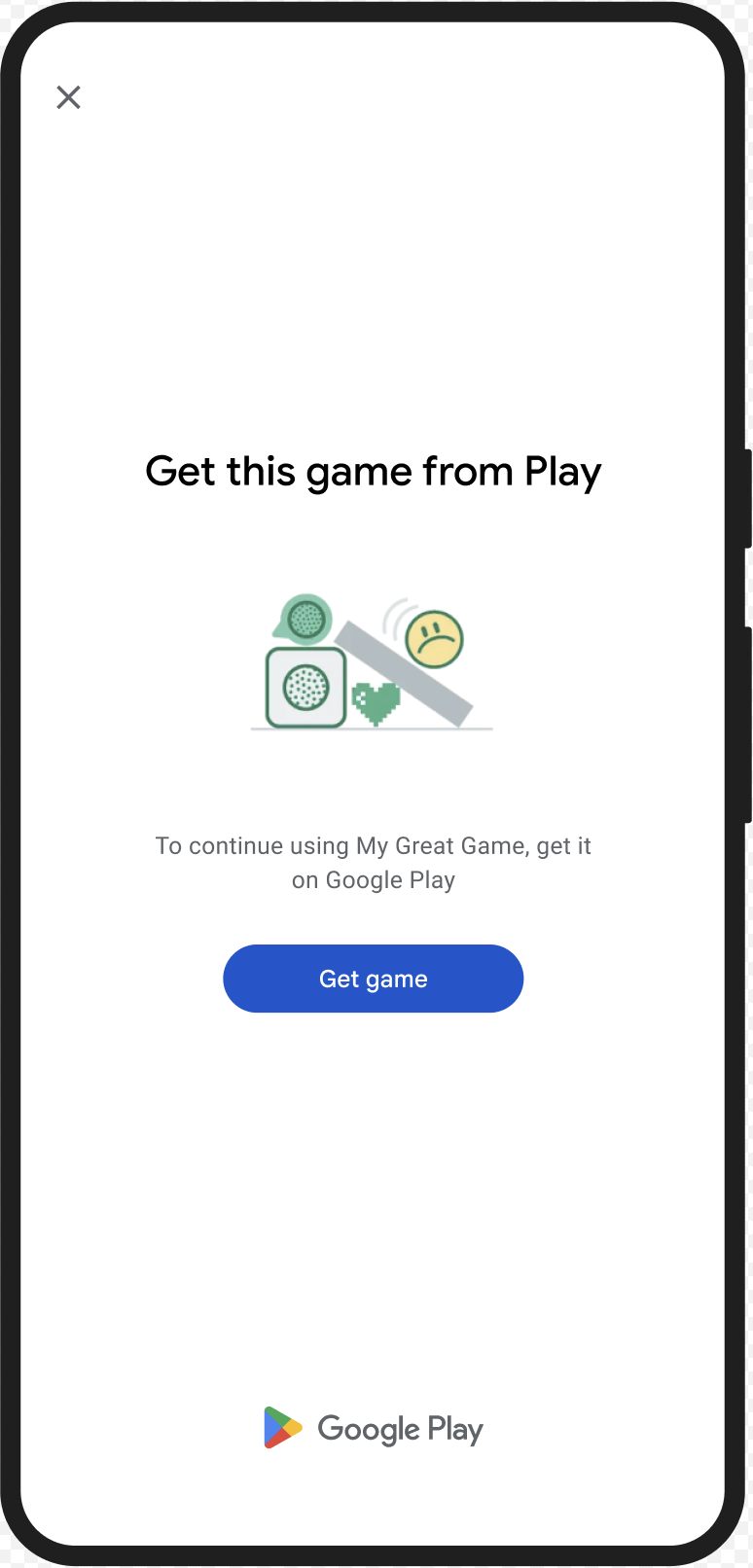
您可以顯示 GET_LICENSED 對話方塊,提示使用者從 Google Play 取得正版應用程式。這個對話方塊可同時處理這兩種情況:
- 如果使用者未取得授權,則會授予 Play 授權。這樣一來,使用者就能透過 Google Play 接收應用程式更新。
- 如果使用者安裝的是遭竄改的應用程式版本,系統會引導他們從 Google Play 安裝未經修改的應用程式。
使用者完成對話方塊後,後續的完整性檢查會傳回 appLicensingVerdict: "LICENSED" 和 appRecognitionVerdict: "PLAY_RECOGNIZED"。
使用者體驗範例
CLOSE_UNKNOWN_ACCESS_RISK (類型代碼 2)
判定結果問題
如果 environmentDetails.appAccessRiskVerdict.appsDetected 包含 "UNKNOWN_CAPTURING" 或 "UNKNOWN_CONTROLLING",表示裝置上執行的其他應用程式 (並非由 Google Play 安裝,也不是由裝置製造商在系統分區中預先載入) 可能會擷取螢幕畫面或控制裝置。
修復
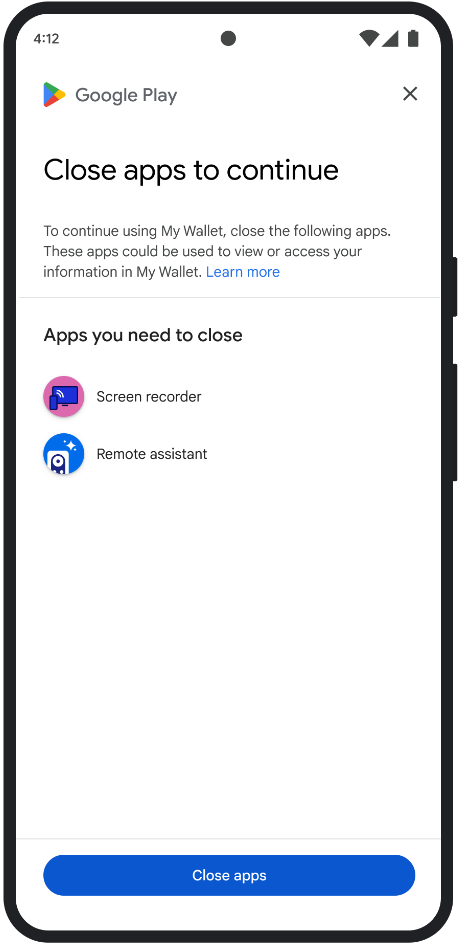
您可以顯示 CLOSE_UNKNOWN_ACCESS_RISK 對話方塊,提示使用者關閉所有可能擷取螢幕畫面或控制裝置的不明應用程式。如果使用者輕觸 Close all 按鈕,系統會關閉所有這類應用程式。
使用者體驗範例
CLOSE_ALL_ACCESS_RISK (類型代碼 3)
判定結果問題
如果 environmentDetails.appAccessRiskVerdict.appsDetected 包含 "KNOWN_CAPTURING"、"KNOWN_CONTROLLING"、"UNKNOWN_CAPTURING" 或 "UNKNOWN_CONTROLLING",表示裝置上執行的應用程式可能正在擷取螢幕畫面或控制裝置。
修復
您可以顯示 CLOSE_ALL_ACCESS_RISK 對話方塊,提示使用者關閉所有可能擷取螢幕畫面或控制裝置的應用程式。如果使用者輕觸 Close all 按鈕,裝置上所有這類應用程式都會關閉。
使用者體驗範例
GET_INTEGRITY (類型代碼 4)
判定結果問題
這個對話方塊適用於下列任一問題:
裝置完整性不佳:如果
deviceRecognitionVerdict不含MEETS_DEVICE_INTEGRITY,裝置可能不是正版且經過認證的 Android 裝置。舉例來說,如果裝置的系統啟動載入程式已解鎖,或載入的 Android 作業系統不是經過認證的製造商映像檔,就可能發生這種情況。未經授權存取:
appLicensingVerdict: "UNLICENSED"。這表示使用者帳戶沒有應用程式授權,可能是因為使用者側載應用程式,或從 Google Play 以外的應用程式商店取得。遭竄改的應用程式:
appRecognitionVerdict: "UNRECOGNIZED_VERSION"。這表示應用程式的二進位檔已遭修改,或不是 Google Play 認可的版本。用戶端例外狀況:在 Integrity API 要求期間發生可修正的例外狀況。可修正的例外狀況是指 Integrity API 例外狀況,錯誤代碼包括
PLAY_SERVICES_VERSION_OUTDATED、NETWORK_ERROR、PLAY_SERVICES_NOT_FOUND等。您可以使用exception.isRemediable()方法,檢查對話方塊是否可修正例外狀況。
修復
GET_INTEGRITY 對話方塊旨在簡化使用者體驗,在單一連續流程中處理多個修復步驟。這樣一來,使用者就不必與多個獨立對話方塊互動,即可修正不同問題。
當您要求對話方塊時,系統會自動偵測有哪些目標判定問題,並提供適當的修復步驟。也就是說,單一對話要求可以同時解決多個問題,包括:
- 裝置完整性:如果偵測到裝置完整性問題,對話方塊會引導使用者提升裝置安全性狀態,以符合
MEETS_DEVICE_INTEGRITY判定結果的要求。 - 應用程式完整性:如果偵測到未經授權存取或應用程式遭竄改等問題,對話方塊會引導使用者前往 Play 商店取得應用程式,以修正問題。
- 用戶端例外狀況:對話方塊會檢查並嘗試解決導致 Integrity API 例外狀況的任何潛在問題。例如,系統可能會提示使用者更新過時的 Google Play 服務版本。
使用者體驗範例

GET_STRONG_INTEGRITY (類型代碼 5)
判定結果問題
這個對話方塊旨在修正 GET_INTEGRITY 解決的所有相同問題,並新增修正功能,可解決導致裝置無法接收 MEETS_STRONG_INTEGRITY 判定結果的問題,以及修正 Play 安全防護判定結果問題。
修復
GET_STRONG_INTEGRITY 的設計旨在簡化使用者體驗,在單一連續流程中處理多個修復步驟。對話方塊會自動檢查可解決的完整性問題,包括:
- 裝置完整性:如果偵測到裝置完整性問題,對話方塊會引導使用者提升裝置安全性狀態,以符合
MEETS_STRONG_INTEGRITY判定結果的要求。 Play 安全防護狀態:如果
playProtectVerdict指出問題,對話方塊會引導使用者修正問題:- 如果 Play 安全防護功能已停用 (
playProtectVerdict == POSSIBLE_RISK),對話方塊會提示使用者啟用,並掃描裝置上的所有應用程式。 - 如果偵測到有害應用程式 (
playProtectVerdict == MEDIUM_RISK或HIGH_RISK),對話方塊會引導使用者透過 Google Play 安全防護解除安裝。
- 如果 Play 安全防護功能已停用 (
應用程式完整性:如果偵測到未經授權的存取或應用程式遭竄改等問題,對話方塊會提示使用者從 Play 商店取得應用程式,以修正問題。
用戶端例外狀況:對話方塊也會嘗試解決導致 Integrity API 例外狀況的任何潛在問題。舉例來說,如果系統發現 Google Play 服務已停用,可能會提示使用者啟用。可修正的例外狀況是指 Integrity API 例外狀況,錯誤代碼包括
PLAY_SERVICES_VERSION_OUTDATED、NETWORK_ERROR或PLAY_SERVICES_NOT_FOUND。您可以使用exception.isRemediable()方法,檢查是否可透過對話方塊修正錯誤。
使用者體驗範例