

On audio glasses, the system routes physical input (such as touchpad gestures or button presses) based on user awareness rather than visual display focus. Because users can't see a user interface, the system routes physical input to the projected activity of whichever app experience the user is sensing or actively interacting with.
How the system determines user awareness
The system determines user awareness by monitoring which of the following data streams are active:
- Audio output streams: Voice readouts, audio cues, or media playback.
- Microphone recording streams: Ongoing voice commands or audio capture from a user's surroundings.
- Camera capture streams: Video or photo streams.
Some data streams are transient and only hold user awareness for a short time. For example, an audio readout of the next turn a user should take while navigating a route. Other data streams are indefinite and hold user awareness for as long as they continue. For example, media playback with an endless, randomized playlist. When a transient data stream interrupts an indefinite data stream, it temporarily gains user awareness.
Concurrency and input focus
Users often run multiple app experiences simultaneously on audio glasses. For example, a user might listen to music while following turn-by-turn navigation. In these cases, the system assigns a concurrency state and shifts input focus to match audio focus by doing the following things:
- Resuming or stopping your app's projected activity.
- Routing physical input to the foregrounded projected activity.
This approach helps maintain a consistent user experience.
Let the system relaunch your projected activity
When your app gains user awareness, especially if its projected activity was in the background, the system must be able to resume the activity and route physical input to it.
To ensure the system can relaunch your activity:
Create a pending intent: Build an explicit
Intentpointing to your target projected activity. Wrap the intent in aPendingIntentand setFLAG_UPDATE_CURRENTorFLAG_IMMUTABLEto maintain secure and predictable launch behavior:// Build an explicit Intent pointing to this projected activity and wrap it in a // PendingIntent so the system can relaunch it and route physical input to it. private val pendingIntent: PendingIntent by lazy { val intent = Intent(this, ProjectedInputFocusActivity::class.java) PendingIntent.getActivity( this, 0, intent, PendingIntent.FLAG_UPDATE_CURRENT or PendingIntent.FLAG_IMMUTABLE ) }
Register the input receiver: Obtain an instance of
ProjectedActivityCompatand register yourPendingIntentas the designated input receiver by passing it intosetActivityAsInputReceiver.override fun onCreate(savedInstanceState: Bundle?) { super.onCreate(savedInstanceState) lifecycleScope.launch { // Create or obtain the ProjectedActivityCompat instance val projectedActivity = ProjectedActivityCompat.create(this@ProjectedInputFocusActivity) // Register the PendingIntent as the designated input receiver projectedActivity.setActivityAsInputReceiver(pendingIntent) }
Clear the input receiver on cleanup: When your activity is destroyed or no longer needs to receive physical input, clear the input receiver to prevent stale
PendingIntentdispatches and avoid memory leaks.override fun onDestroy() { super.onDestroy() lifecycleScope.launch { val projectedActivity = ProjectedActivityCompat.create(this@ProjectedInputFocusActivity) projectedActivity.clearActivityAsInputReceiver() } }
Understand how input focus shifts across concurrency states
To determine which app receives input focus, the system evaluates active data streams and routes input based on these concurrency states:
| Concurrency state | Environmental context | System behavior and input focus | Example |
|---|---|---|---|
Non-concurrent |
A standalone projected activity is active; no background media session running. |
Input focus is routed entirely to your projected activity, even during silent periods between readouts. |
A user runs a workout tracking app. Even during moments of silence, touchpad inputs route directly to the fitness app. |
Semi-concurrent |
A projected activity is active, but a background media session exists in a paused state. |
Input focus defaults to paused media controls during silent periods between app's active readouts. |
A user runs a workout tracking app while music is paused. Between fitness coach updates, a touchpad tap resumes the music rather than triggering a workout function. |
Concurrent |
Dual playback is active (for example, your app's audio announcement interrupts or ducks background music). |
Audio focus equals input focus. Input focus routes to your projected activity during active readouts and reverts to media controls when the audio stream ends. |
A user listens to music when a navigation app fires an instruction readout. During the readout, the navigation app gets input focus. After the readout finishes, input focus shifts back to media controls. |
System timing safeguards
The system provides the following safeguards to help prevent accidental input or unexpected behaviors for users:
- Grace periods for newly-launched projected activities: To accommodate cold-start asset loading or network delays, newly-launched projected activities receive a brief grace period to establish a data stream and gain user awareness before the system stops the projected activity and moves it to the background.
- Focus is routed based on user awareness: If user awareness changes from a new, active data stream such as an audio readout, the system instantly resumes your projected activity and routes input focus to it.
- Transition buffers during media playback: When a transient readout completes during background media playback, input focus remains with the projected activity momentarily. The buffer period helps to prevent accidental inputs, such as a user attempting to mute the readout but skipping a music track instead. After the transition buffer, the system stops the app's projected activity and routes input focus to the media controls.
- Idle projected activities are stopped or paused: The system stops any idle projected activities with no active data streams after a couple minutes (or momentarily for ongoing media output when paused).
Input focus transitions in practice
To understand how input focus transitions across concurrency states, consider the following example scenarios for a navigation app providing turn-by-turn guidance:
Scenario A: Non-concurrent (inactive media)
For this scenario, the system routes input to the navigation app, which has user awareness during the entire journey.
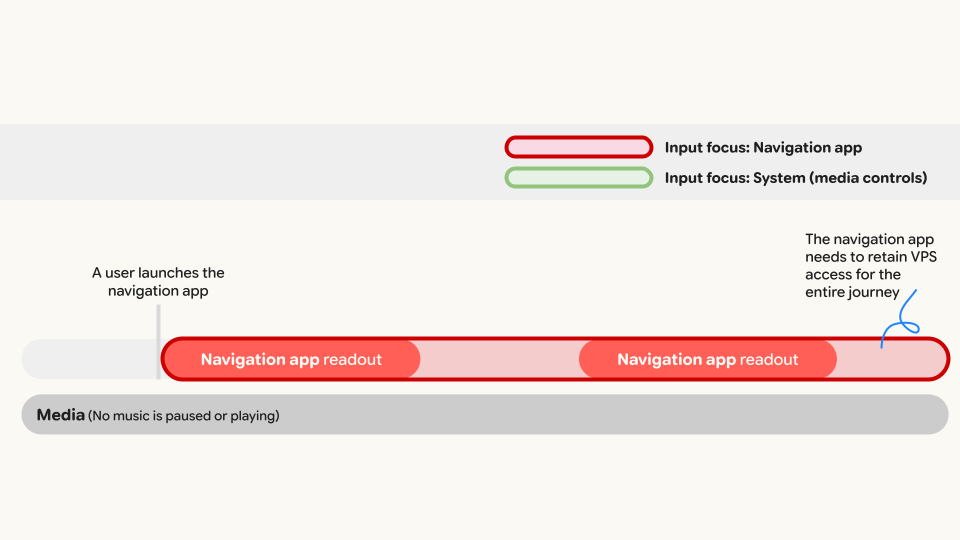
- The user launches navigation with no background music playing.
- The navigation app launches its projected activity on audio glasses.
- Because no media session is active, the navigation app maintains touchpad input focus throughout the journey.
- User actions: Tapping during an active readout could mute the guidance. Tapping during silence could repeat the last instruction.
Scenario B: Semi-concurrent (paused media)
For this scenario, the system routes input to the system media controls whenever the navigation app doesn't have user awareness.
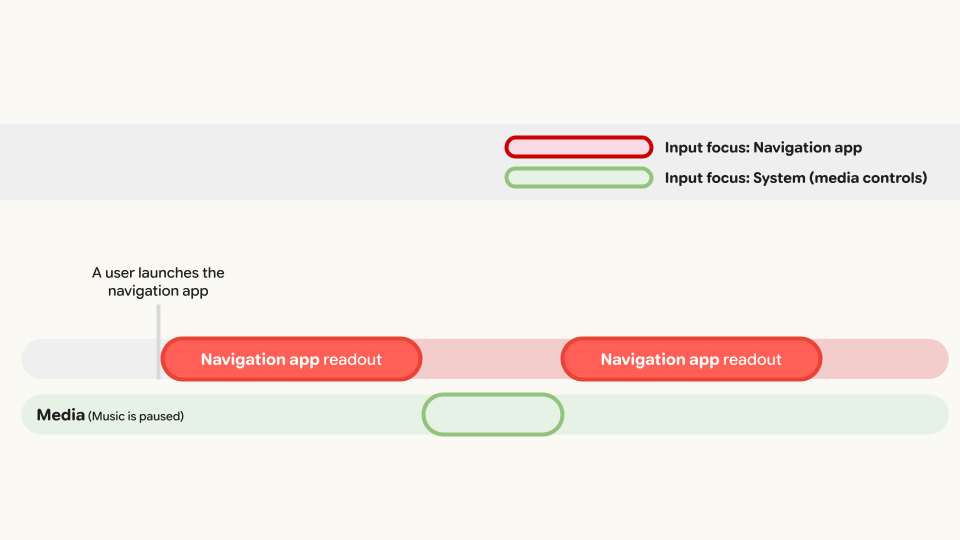
- The user launches navigation while background music is paused.
- During silent periods between readouts, input focus defaults to media controls.
- When the navigation app speaks "In 500 feet, turn left", it gains input focus.
- User actions: Tapping during the readout could mute the guidance. Tapping during silence resumes music playback.
Scenario C: Concurrent (active media)
For this scenario, the system routes input to the system media controls whenever the navigation app doesn't have user awareness, and the audio from the active media playback is ducked during each readout from the navigation app.
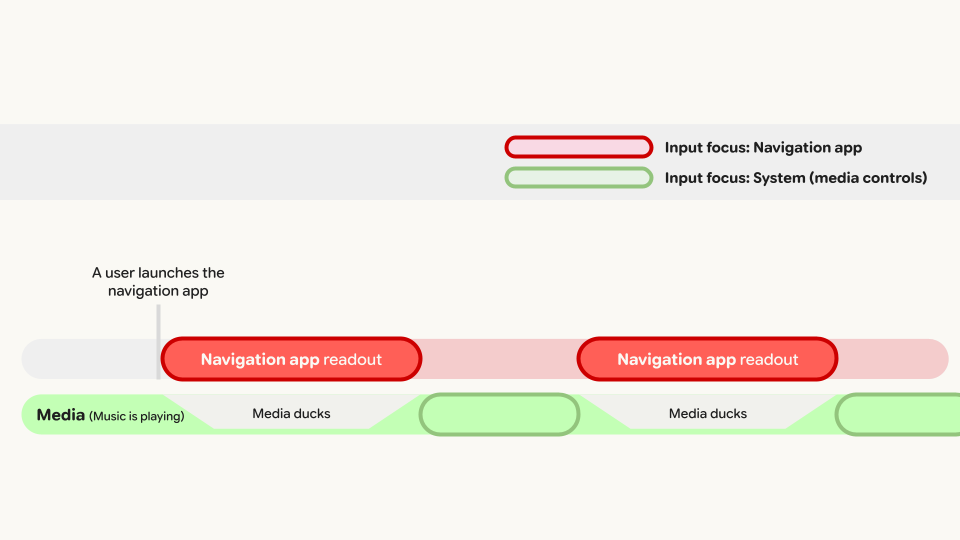
- The user launches navigation while music is actively playing.
- During an instruction readout, the system ducks background audio and shifts input focus to the navigation app.
- User actions: Tapping during the readout could mute the guidance. Tapping during silent periods controls media playback (to pause or resume).