
You may choose to provide alternative billing systems or external web links alongside Google Play Billing. While Google can render the choice screen, you also have the option to render your own choice screens provided you adhere to the following UX guidelines and declare your rendering preference in Play Console when enrolling (this can also be updated any time). Both implementation paths require integration with billing choice APIs to facilitate necessary information screens and parental controls. This section outlines the requirements for rendering your own choice screens to ensure a consistent and transparent experience for users to make informed billing choices.

Billing Transparency
To ensure users are fully informed about their billing options before making a purchase, you must adhere to the following guidelines:
- Labeling: You must clearly label alternative billing systems with the authorized entity, app name, or developer's name. This ensures users understand who is responsible for fulfilling the purchase and providing customer support.
- App icon or brand logo: Each billing option must feature its specific app icon or brand logo. For the Google Play billing option, follow Google Play's brand guidelines by displaying the Google Play icon in full color against a neutral light or dark background. For your own billing option, you must only display your own app icon or developer brand logo.
Payment Methods: Use the asset provided by the
getBillingChoiceInfoAsyncAPI to show available payment methods for Google Play's billing option while maintaining similar treatment when representing payment methods for your own billing option.- Payment method logos: Ensure that all payment method logos are
displayed uniformly for each billing option.
- For Google Play Billing, see the
getBillingChoiceInfoAsyncAPI for additional payment method arrangement options. - If you are unable to determine which payment methods to display to your users in the choice screen, you can choose to not display payment methods for your own billing option. In this case, you are still required to display payment methods for the Google Play Billing option.
- For Google Play Billing, see the
- Real-time Retrieval: You are required to fetch and display the payment methods returned by the API each time; don't alter or cache these assets.
- Supplemental Text: If the number of available payment methods exceeds the logos shown, you may include additional text to inform the user.
For example:
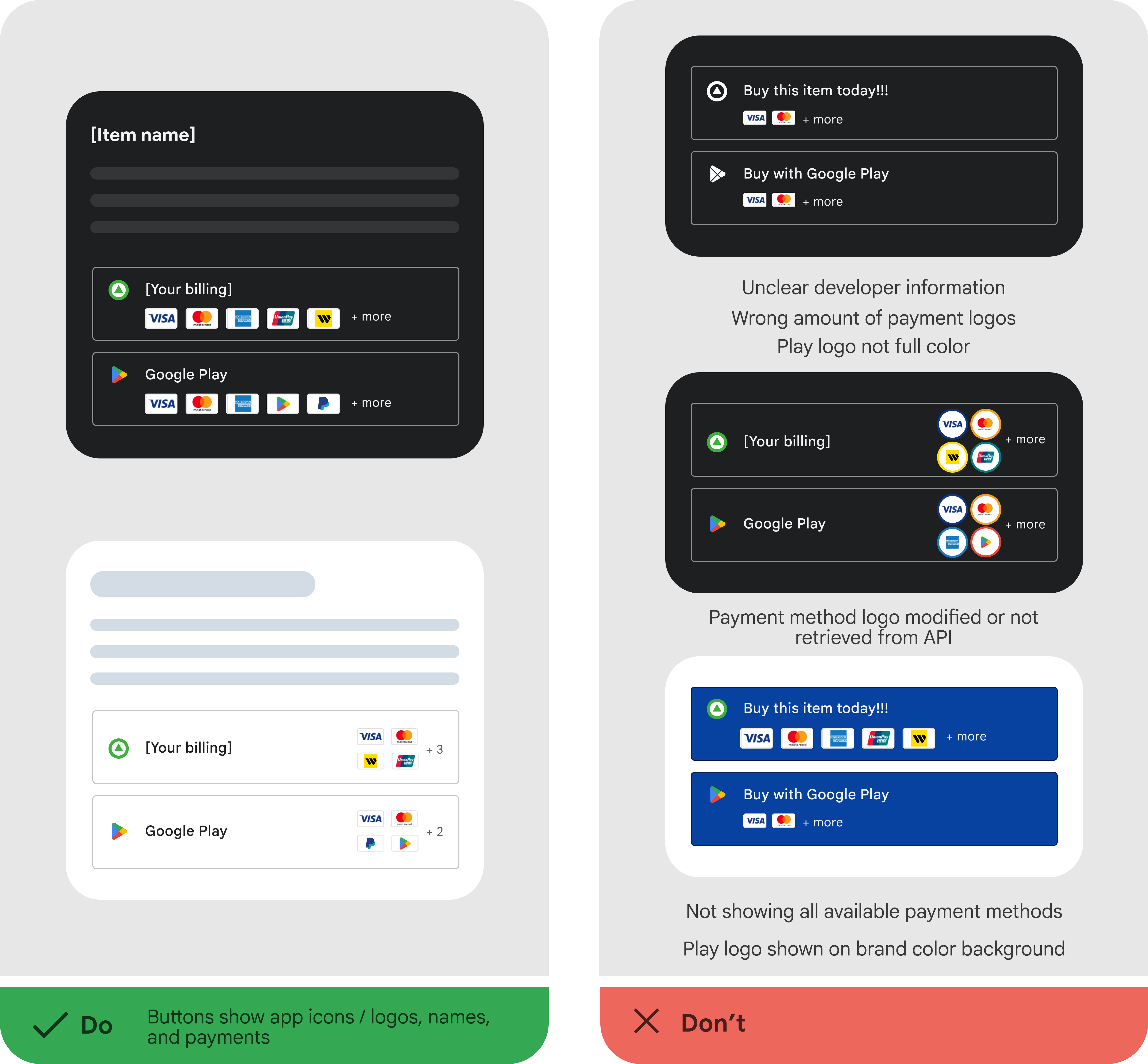
Figure 2. Payment logos - Payment method logos: Ensure that all payment method logos are
displayed uniformly for each billing option.
Button Style & Proximity
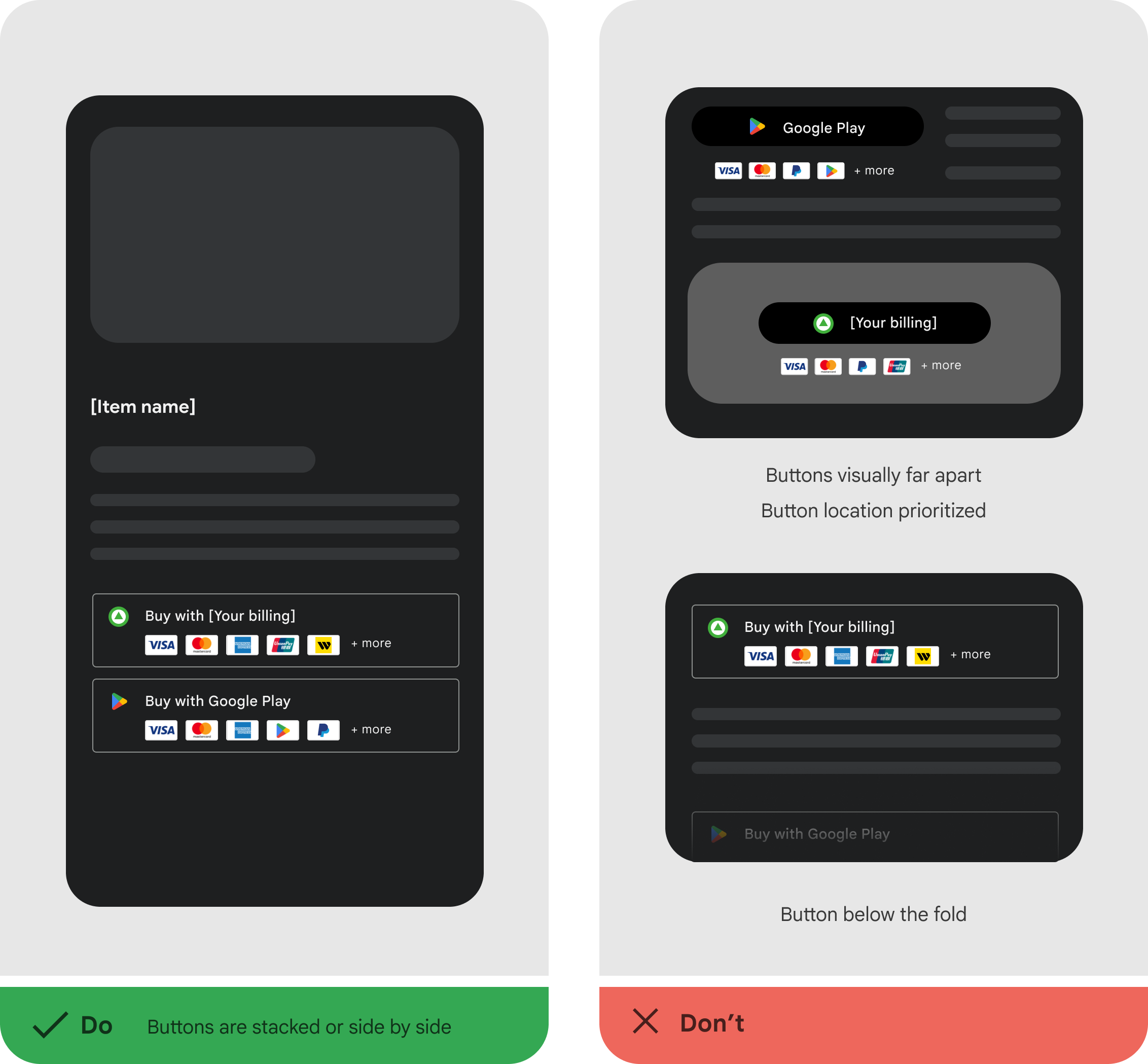
Buttons for your alternative billing system and Google Play billing must be presented in a fair and equal manner to help facilitate the user's choice.
- Equal Representation: All visual elements, including button sizes, text size, font style, contrast, and tap target dimensions should be represented equally. Logo usage and sizing within the buttons must also be equivalent.
- Proximity: The buttons for each billing option must be placed in close proximity to each other so that users can compare and select between them.

Call to Action (CTA)
The primary labels of the buttons leading users to each billing option must be equivalent and consistent. Developers are still able to present differentiated offers and benefits for each billing option. However, if this is provided, then Play's loyalty benefits must also be shown in an equivalent manner.
For example:

Optional Features
The following features may be included at your discretion, provided they are also shown for the Google Play Billing option.
Loyalty benefits: If loyalty information is displayed, it must be displayed with equal treatment, and must be shown for both billing options. Retrieve the loyalty message for the Google Play billing option from the
getBillingChoiceInfoAsyncAPI each time; don't cache or store this information. For example:
Figure 6. Loyalty benefits External web links: If you lead a user out of the app to complete a purchase, you must clearly indicate this. The text must be visually clear and explicitly inform the user they are being taken out of the app to a website with the following text: "You'll be redirected to a web page". For example:

Figure 7. External web links