

توفّر CameraX واجهة برمجة تطبيقات للإضافات تتيح الوصول إلى الإضافات التي نفّذتها الشركات المصنّعة للأجهزة على أجهزة Android المختلفة. للاطّلاع على قائمة بأوضاع الإضافة المتوافقة، راجِع إضافات الكاميرا.
للاطّلاع على قائمة بالأجهزة المتوافقة مع الإضافات، يُرجى الانتقال إلى الأجهزة المتوافقة.
بنية الإضافات
تعرض الصورة التالية بنية إضافات الكاميرا.
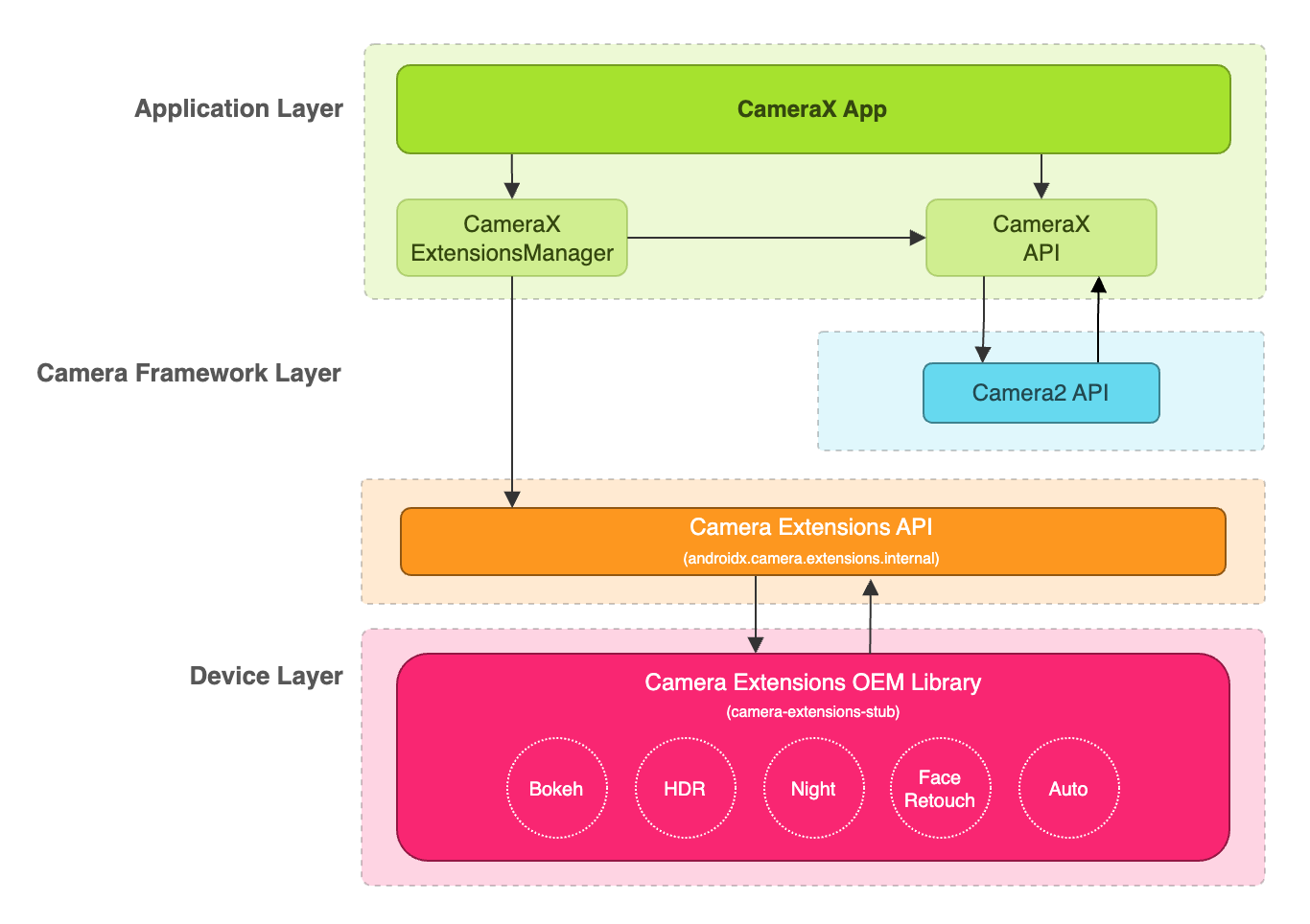
يمكن لتطبيق CameraX استخدام الإضافات من خلال واجهة برمجة التطبيقات CameraX Extensions API. تتولّى واجهة برمجة التطبيقات CameraX Extensions API إدارة طلبات البحث عن الإضافات المتاحة، وإعداد جلسة كاميرا إضافة، والتواصل مع مكتبة Camera Extensions OEM. يتيح ذلك لتطبيقك استخدام إمكانات مثل "الوضع الليلي" أو "النطاق العالي الديناميكية" أو "تلقائي" أو "تأثير البوكيه" أو "تجميل الوجه".
تفعيل إضافة لالتقاط الصور ومعاينتها
قبل استخدام واجهة برمجة التطبيقات الخاصة بالإضافات، عليك استرداد مثيل ExtensionsManager باستخدام طريقة ExtensionsManager#getInstanceAsync(Context, CameraProvider). سيتيح لك ذلك طلب معلومات حول مدى توفّر الإضافة. بعد ذلك، استرداد CameraSelector تم تفعيل الإضافة عليه سيتم تطبيق وضع الإضافة على حالات استخدام التقاط الصور ومعاينتها عند استدعاء الطريقة bindToLifecycle() مع تفعيل الإضافة CameraSelector.
لتنفيذ الإضافة لحالات استخدام التقاط الصور ومعاينتها، يُرجى الرجوع إلى عينة تعليمات برمجية التالية:
Kotlin
import androidx.camera.extensions.ExtensionMode
import androidx.camera.extensions.ExtensionsManager

override fun onCreate(savedInstanceState: Bundle?) {
    super.onCreate(savedInstanceState)

    val lifecycleOwner = this

    val cameraProviderFuture = ProcessCameraProvider.getInstance(applicationContext)
    cameraProviderFuture.addListener({
        // Obtain an instance of a process camera provider
        // The camera provider provides access to the set of cameras associated with the device.
        // The camera obtained from the provider will be bound to the activity lifecycle.
        val cameraProvider = cameraProviderFuture.get()

        val extensionsManagerFuture =
            ExtensionsManager.getInstanceAsync(applicationContext, cameraProvider)
        extensionsManagerFuture.addListener({
            // Obtain an instance of the extensions manager
            // The extensions manager enables a camera to use extension capabilities available on
            // the device.
            val extensionsManager = extensionsManagerFuture.get()

            // Select the camera
            val cameraSelector = CameraSelector.DEFAULT_BACK_CAMERA

            // Query if extension is available.
            // Not all devices will support extensions or might only support a subset of
            // extensions.
            if (extensionsManager.isExtensionAvailable(cameraSelector, ExtensionMode.NIGHT)) {
                // Unbind all use cases before enabling different extension modes.
                try {
                    cameraProvider.unbindAll()

                    // Retrieve a night extension enabled camera selector
                    val nightCameraSelector =
                        extensionsManager.getExtensionEnabledCameraSelector(
                            cameraSelector,
                            ExtensionMode.NIGHT
                        )

                    // Bind image capture and preview use cases with the extension enabled camera
                    // selector.
                    val imageCapture = ImageCapture.Builder().build()
                    val preview = Preview.Builder().build()
                    // Connect the preview to receive the surface the camera outputs the frames
                    // to. This will allow displaying the camera frames in either a TextureView
                    // or SurfaceView. The SurfaceProvider can be obtained from the PreviewView.
                    preview.setSurfaceProvider(surfaceProvider)

                    // Returns an instance of the camera bound to the lifecycle
                    // Use this camera object to control various operations with the camera
                    // Example: flash, zoom, focus metering etc.
                    val camera = cameraProvider.bindToLifecycle(
                        lifecycleOwner,
                        nightCameraSelector,
                        imageCapture,
                        preview
                    )
                } catch (e: Exception) {
                    Log.e(TAG, "Use case binding failed", e)
                }
            }
        }, ContextCompat.getMainExecutor(this))
    }, ContextCompat.getMainExecutor(this))
}
Java
import androidx.camera.extensions.ExtensionMode; import androidx.camera.extensions.ExtensionsManager; @Override protected void onCreate(Bundle savedInstanceState) { super.onCreate(savedInstanceState); final LifecycleOwner lifecycleOwner = this; final ListenableFuturecameraProviderFuture = ProcessCameraProvider.getInstance(getApplicationContext()); cameraProviderFuture.addListener(() -> { try { // Obtain an instance of a process camera provider // The camera provider provides access to the set of cameras associated with the // device. The camera obtained from the provider will be bound to the activity // lifecycle. final ProcessCameraProvider cameraProvider = cameraProviderFuture.get(); final ListenableFuture extensionsManagerFuture = ExtensionsManager.getInstanceAsync(getApplicationContext(), cameraProvider); extensionsManagerFuture.addListener(() -> { // Obtain an instance of the extensions manager // The extensions manager enables a camera to use extension capabilities available // on the device. try { final ExtensionsManager extensionsManager = extensionsManagerFuture.get(); // Select the camera final CameraSelector cameraSelector = CameraSelector.DEFAULT_BACK_CAMERA; // Query if extension is available. // Not all devices will support extensions or might only support a subset of // extensions. if (extensionsManager.isExtensionAvailable( cameraSelector, ExtensionMode.NIGHT )) { // Unbind all use cases before enabling different extension modes. cameraProvider.unbindAll(); // Retrieve extension enabled camera selector final CameraSelector nightCameraSelector = extensionsManager .getExtensionEnabledCameraSelector(cameraSelector, ExtensionMode.NIGHT); // Bind image capture and preview use cases with the extension enabled camera // selector. final ImageCapture imageCapture = new ImageCapture.Builder().build(); final Preview preview = new Preview.Builder().build(); // Connect the preview to receive the surface the camera outputs the frames // to. This will allow displaying the camera frames in either a TextureView // or SurfaceView. The SurfaceProvider can be obtained from the PreviewView. preview.setSurfaceProvider(surfaceProvider); cameraProvider.bindToLifecycle( lifecycleOwner, nightCameraSelector, imageCapture, preview ); } } catch (ExecutionException | InterruptedException e) { throw new RuntimeException(e); } }, ContextCompat.getMainExecutor(this)); } catch (ExecutionException | InterruptedException e) { throw new RuntimeException(e); } }, ContextCompat.getMainExecutor(this)); }
إيقاف الإضافة
لإيقاف إضافات المورّد، عليك إلغاء ربط جميع حالات الاستخدام وإعادة ربط حالات استخدام التقاط الصور والمعاينة باستخدام أداة اختيار عادية للكاميرا. على سبيل المثال، يمكنك إعادة الربط بالكاميرا الخلفية باستخدام CameraSelector.DEFAULT_BACK_CAMERA.
الطلبات التابعة
يتم تنفيذ واجهة برمجة التطبيقات CameraX Extensions API في المكتبة camera-extensions.
تعتمد الإضافات على وحدات CameraX الأساسية (core وcamera2 وlifecycle).
أنيق
dependencies {
  def camerax_version = "1.2.0-rc01"
  implementation "androidx.camera:camera-core:${camerax_version}"
  implementation "androidx.camera:camera-camera2:${camerax_version}"
  implementation "androidx.camera:camera-lifecycle:${camerax_version}"
  //the CameraX Extensions library
  implementation "androidx.camera:camera-extensions:${camerax_version}"
    ...
}
Kotlin
dependencies {
  val camerax_version = "1.2.0-rc01"
  implementation("androidx.camera:camera-core:${camerax_version}")
  implementation("androidx.camera:camera-camera2:${camerax_version}")
  implementation("androidx.camera:camera-lifecycle:${camerax_version}")
  // the CameraX Extensions library
  implementation("androidx.camera:camera-extensions:${camerax_version}")
    ...
}
إزالة واجهة برمجة التطبيقات القديمة
بعد طرح واجهة Extensions API الجديدة في 1.0.0-alpha26، تم إيقاف واجهة Extensions API القديمة التي تم طرحها في آب (أغسطس) 2019 نهائيًا. اعتبارًا من الإصدار 1.0.0-alpha28، تمت إزالة واجهة برمجة التطبيقات القديمة للإضافات من المكتبة. يجب أن تحصل التطبيقات التي تستخدم واجهة برمجة التطبيقات الجديدة للإضافات على CameraSelector
مفعَّل للإضافة،
ويجب أن تستخدمه لربط حالات الاستخدام.
يجب نقل التطبيقات التي تستخدم واجهة برمجة التطبيقات القديمة للإضافات إلى واجهة برمجة التطبيقات الجديدة للإضافات لضمان التوافق المستقبلي مع إصدارات CameraX القادمة.
مراجع إضافية
لمزيد من المعلومات حول CameraX، يُرجى الرجوع إلى المراجع الإضافية التالية.
درس تطبيقي حول الترميز
عيّنة تعليمات برمجية
مراجع أخرى
إضافات CameraX الخاصة بمورّدي الأجهزة
أداة التحقّق من صحة إضافات مورّدي CameraX