

Android アプリ内でのデジタル認証情報の検証は、ユーザーの身元(政府機関発行の身分証明書など)、ユーザーに関するプロパティ(運転免許証、学位、年齢や住所などの属性など)、またはエンティティの真正性を主張するために認証情報を発行して検証する必要があるその他のシナリオの認証と認可に使用できます。
Verifier API は、Android 9(API レベル 28)以降でサポートされています。
実装
Android プロジェクトでデジタル認証情報を検証する手順は次のとおりです。
- アプリのビルド スクリプトに依存関係を追加し、
CredentialManagerクラスを初期化します。 - デジタル認証情報リクエストを作成し、それを使用して
DigitalCredentialOptionを初期化してから、GetCredentialRequestをビルドします。 - 作成したリクエストを使用して
getCredentialフローを起動し、成功したGetCredentialResponseを受け取るか、発生する可能性のある例外を処理します。正常に取得されたら、レスポンスを検証します。
依存関係を追加して初期化する
Gradle ビルド スクリプトに次の依存関係を追加します。
dependencies {
    implementation("androidx.credentials:credentials:1.6.0-beta01")
    implementation("androidx.credentials:credentials-play-services-auth:1.6.0-beta01")
}
次に、CredentialManager クラスのインスタンスを初期化します。
val credentialManager = CredentialManager.create(context)
デジタル認証情報リクエストを作成する
デジタル認証情報リクエストを作成し、それを使用して DigitalCredentialOption を初期化します。
// The request in the JSON format to conform with
// the JSON-ified Credential Manager - Verifier API request definition.
val requestJson = generateRequestFromServer()
val digitalCredentialOption =
    GetDigitalCredentialOption(requestJson = requestJson)

// Use the option from the previous step to build the `GetCredentialRequest`.
val getCredRequest = GetCredentialRequest(
    listOf(digitalCredentialOption)
)
次の例は、OpenId4Vp1 リクエストを示しています。このリクエストのフィールドの詳細については、OpenID のドキュメントをご覧ください。
{
  "requests": [
    {
      "protocol": "openid4vp-v1-unsigned",
      "data": {
        "response_type": "vp_token",
        "response_mode": "dc_api",
        "nonce": "OD8eP8BYfr0zyhgq4QCVEGN3m7C1Ht_No9H5fG5KJFk",
        "dcql_query": {
          "credentials": [
            {
              "id": "cred1",
              "format": "mso_mdoc",
              "meta": {
                "doctype_value": "org.iso.18013.5.1.mDL"
              },
              "claims": [
                {
                  "path": [
                    "org.iso.18013.5.1",
                    "family_name"
                  ]
                },
                {
                  "path": [
                    "org.iso.18013.5.1",
                    "given_name"
                  ]
                },
                {
                  "path": [
                    "org.iso.18013.5.1",
                    "age_over_21"
                  ]
                }
              ]
            }
          ]
        }
      }
    }
  ]
}
認証情報を取得する
作成したリクエストを使用して getCredential フローを起動します。リクエストが成功した場合は GetCredentialResponse、失敗した場合は GetCredentialException が返されます。
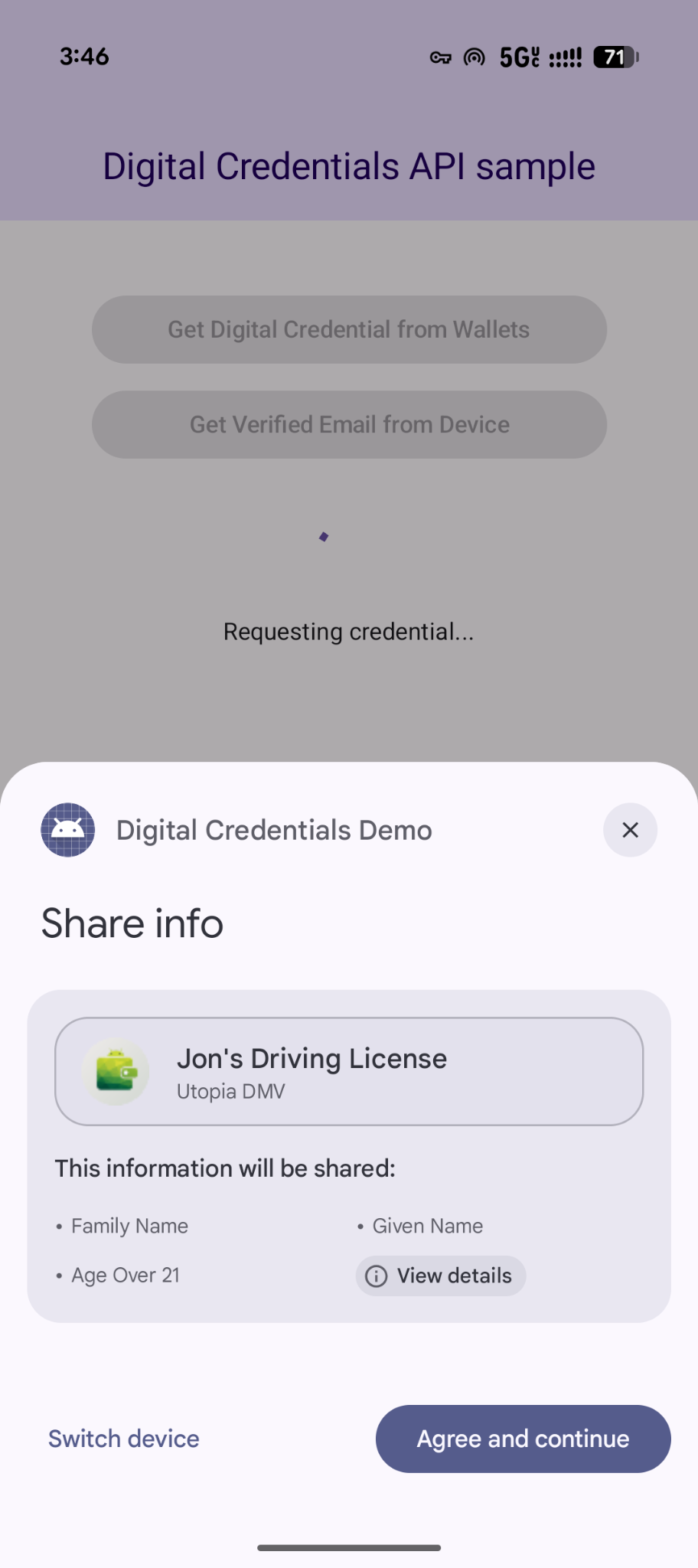
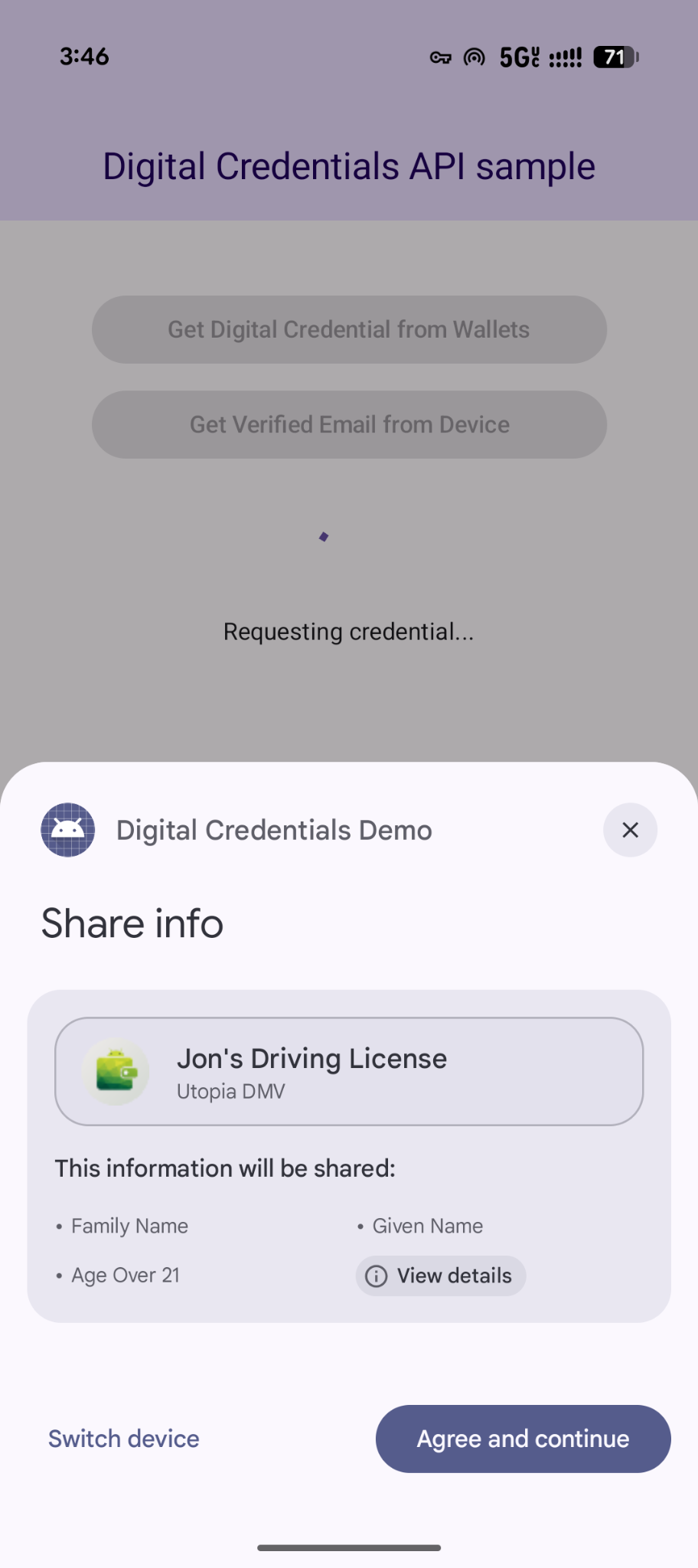
getCredential フローは、Android システム ダイアログをトリガーして、ユーザーが利用可能な認証情報のオプションを表示し、ユーザーの選択を収集します。次に、選択した認証情報オプションを含むウォレット アプリが、同意を収集し、デジタル認証情報のレスポンスを生成するために必要なアクションを実行するための UI を表示します。
coroutineScope.launch {
    try {
        val result = credentialManager.getCredential(
            context = activityContext,
            request = getCredRequest
        )
        verifyResult(result)
    } catch (e : GetCredentialException) {
        handleFailure(e)
    }
}

// Handle the successfully returned credential.
fun verifyResult(result: GetCredentialResponse) {
    val credential = result.credential
    when (credential) {
        is DigitalCredential -> {
            val responseJson = credential.credentialJson
            validateResponseOnServer(responseJson)
        }
        else -> {
            // Catch any unrecognized credential type here.
            Log.e(TAG, "Unexpected type of credential ${credential.type}")
        }
    }
}

// Handle failure.
fun handleFailure(e: GetCredentialException) {
  when (e) {
        is GetCredentialCancellationException -> {
            // The user intentionally canceled the operation and chose not
            // to share the credential.
        }
        is GetCredentialInterruptedException -> {
            // Retry-able error. Consider retrying the call.
        }
        is NoCredentialException -> {
            // No credential was available.
        }
        else -> Log.w(TAG, "Unexpected exception type ${e::class.java}")
    }
}
柔軟なマルチ認証情報リクエスト
Digital Credentials API は、OpenID4VP を使用して複数のタイプの認証情報を一度にリクエストすることもサポートしています。
- 同時リクエスト: 1 回のユーザー トランザクションで複数の認証情報をリクエストします。たとえば、旅行アプリは搭乗券と政府機関発行の身分証明書を同時にリクエストできるため、ユーザーは 1 回のタップで両方を確認して同意できます。
- 柔軟なフルフィルメント: 複数の認証情報タイプまたは発行者のいずれかを受け入れます。たとえば、年齢確認フローでは、運転免許証またはパスポートのいずれかを受け入れることができるため、ユーザーはホルダーに保存されているいずれかの認証情報を使用してリクエストを処理できます。
1 つのリクエストで複数の認証情報をリクエストする例を次に示します。
{
  "credentials": [
    {
      "id": "gov_id1",
      "format": "mso_mdoc",
      "meta": {
        "doctype_value": "org.iso.18013.5.1.mDL"
      },
      "claims": [
        {
          "path": [
            "org.iso.18013.5.1",
            "age_over_21"
          ]
        }
      ]
    },
    {
      "id": "boarding_pass1",
      "format": "dc+sd-jwt",
      "meta": {
        "vct_values": [
          "https://credentials.example.airline/boarding-pass"
        ]
      },
      "claims": [
        {
          "path": [
            "flight_number"
          ]
        },
        {
          "path": [
            "seat"
          ]
        }
      ]
    }
  ]
}
レスポンスを処理する
認証情報リクエストを行った後、CredentialManager から返された GetCredentialResponse を処理します。
// Handle the successfully returned credential.
fun verifyResult(result: GetCredentialResponse) {
    val credential = result.credential
    when (credential) {
        is DigitalCredential -> {
            val responseJson = credential.credentialJson
            validateResponseOnServer(responseJson)
        }
        else -> {
            // Catch any unrecognized credential type here.
            Log.e(TAG, "Unexpected type of credential ${credential.type}")
        }
    }
}
例外を処理する
アプリは、デバイスに認証情報がない場合や、ユーザーがオペレーションをキャンセルした場合など、スローされる可能性のあるエラーを処理する必要があります。
// Handle failure.
fun handleFailure(e: GetCredentialException) {
    when (e) {
        is GetCredentialCancellationException -> {
            // The user intentionally canceled the operation and chose not
            // to share the credential.
        }
        is GetCredentialInterruptedException -> {
            // Retry-able error. Consider retrying the call.
        }
        is NoCredentialException -> {
            // No credential was available.
        }
        is CreateCredentialUnknownException -> {
            // An unknown, usually unexpected, error has occurred. Check the
            // message error for any additional debugging information.
        }
        is CreateCredentialCustomException -> {
            // You have encountered a custom error thrown by the wallet.
            // If you made the API call with a request object that's a
            // subclass of CreateCustomCredentialRequest using a 3rd-party SDK,
            // then you should check for any custom exception type constants
            // within that SDK to match with e.type. Otherwise, drop or log the
            // exception.
        }
        else -> Log.w(TAG, "Unexpected exception type ${e::class.java}")
    }
}