

在 Wear OS 设备上,功能块由两个具有独立版本控制的关键组件呈现。为了帮助应用的功能块在所有设备上正常运行,您必须了解此底层架构。
- 与 Jetpack 功能块相关的库:这些库(包括 Wear Tiles 和 Wear ProtoLayout)嵌入在您的应用中,您作为开发者可以控制它们的版本。您的应用使用这些库来构建
TileBuilder.Tile对象(表示您的功能块的数据结构),以响应系统的onTileRequest()调用。 - ProtoLayout 渲染器:此系统组件负责在显示屏上渲染
Tile对象并处理用户互动。渲染器的版本不受应用开发者控制,并且可能会因设备而异,即使是硬件相同的设备也是如此。
Tile 的外观或行为可能会因应用的 Jetpack Tiles 库版本和用户设备上的 ProtoLayout 渲染器版本而异。例如,某设备可能支持旋转或显示心率数据,而另一设备可能不支持。
本文档介绍了如何使您的应用与不同版本的 Tile 库和 ProtoLayout 渲染器兼容。本文档还介绍了如何迁移到更高版本的 Jetpack 库。
考虑兼容性
为了创建可在各种设备上正常运行的功能块,请考虑支持不同的功能。您可以通过两种主要策略来实现此目的:在运行时检测渲染器功能和提供内置回退。
检测渲染器功能
您可以根据给定设备上可用的功能动态更改功能块的布局。
检测渲染器版本
- 使用传递给
onTileRequest()方法的DeviceParameters对象的getRendererSchemaVersion()方法。此方法会返回设备上 ProtoLayout 渲染器的主要版本号和次要版本号。 - 然后,您可以在
onTileRequest()实现中使用条件逻辑,以根据检测到的渲染器版本调整 Tile 的设计或行为。
@RequiresSchemaVersion 注解
- ProtoLayout 方法上的
@RequiresSchemaVersion注释表示该方法按文档所述运行所需的最低渲染器架构版本(示例)。- 虽然调用需要比设备上可用的渲染器版本更高的渲染器版本的方法不会导致应用崩溃,但可能会导致内容无法显示或功能被忽略。
版本检测示例
val rendererVersion = requestParams.deviceConfiguration.rendererSchemaVersion val arcElement = // DashedArcLine has the annotation @RequiresSchemaVersion(major = 1, minor = 500) // and so is supported by renderer versions 1.500 and greater if ( rendererVersion.major > 1 || (rendererVersion.major == 1 && rendererVersion.minor >= 500) ) { // Use DashedArcLine if the renderer supports it … DashedArcLine.Builder() .setLength(degrees(270f)) .setThickness(8f) .setLinePattern( LayoutElementBuilders.DashedLinePattern.Builder() .setGapSize(8f) .setGapInterval(10f) .build() ) .build() } else { // … otherwise use ArcLine. ArcLine.Builder().setLength(degrees(270f)).setThickness(dp(8f)).build() }
提供回退
某些资源允许您直接在构建工具中定义回退。这通常比检查渲染器版本更简单,并且是首选方法(如果可用)。
一个常见的用例是提供静态图片作为 Lottie 动画的后备。如果设备不支持 Lottie 动画,则会改为渲染静态图片。
val lottieImage = ResourceBuilders.ImageResource.Builder() .setAndroidLottieResourceByResId( ResourceBuilders.AndroidLottieResourceByResId.Builder(R.raw.lottie) .setStartTrigger(createOnVisibleTrigger()) .build() ) // Fallback if lottie is not supported .setAndroidResourceByResId( ResourceBuilders.AndroidImageResourceByResId.Builder() .setResourceId(R.drawable.lottie_fallback) .build() ) .build()
使用不同的渲染器版本进行测试
如需针对不同的渲染器版本测试您的功能块,请将其部署到不同版本的 Wear OS 模拟器。(在实体设备上,ProtoLayout 渲染器更新通过 Play 商店或系统更新提供。无法强制安装特定渲染器版本。)
Android Studio 的功能块预览功能利用了代码所依赖的 Jetpack ProtoLayout 库中嵌入的渲染器,因此另一种方法是在测试功能块时依赖不同的 Jetpack 库版本。
迁移到 Tiles 1.5 / ProtoLayout 1.3(Material 3 Expressive)
更新 Jetpack Tile 库,以利用最新的增强功能,包括可让您的功能块与系统无缝集成的界面更改。
Jetpack Tiles 1.5 和 Jetpack ProtoLayout 1.3 引入了多项重大改进和变更。其中包括:
- 用于描述界面的类似 Compose 的 API。
- Material 3 Expressive 组件,包括贴近底部的边缘按钮,以及对增强视觉效果的支持:Lottie 动画、更多渐变类型和新的弧线样式。- 注意:即使不迁移到新 API,您也可以使用其中一些功能。
建议
在迁移功能块时,请遵循以下建议:
- 同时迁移所有板块。避免在应用中混用功能块版本。虽然 Material 3 组件位于单独的制品 (
androidx.wear.protolayout:protolayout-material3) 中,从技术上讲可以在同一应用中使用 M2.5 和 M3 功能块,但我们强烈建议您不要这样做,除非绝对必要(例如,如果您的应用有大量功能块无法一次性全部迁移)。 - 采用卡片用户体验指南。鉴于功能块的高度结构化和模板化特性,请使用现有示例中的设计作为您自己设计的起点。
- 测试各种屏幕尺寸和字体大小。功能块通常包含大量信息,因此文字(尤其是放置在按钮上的文字)很容易出现溢出和剪裁问题。为尽量减少这种情况,请使用预构建的组件,并避免进行大规模自定义。使用 Android Studio 的功能块预览功能以及多部真实设备进行测试。
迁移过程
如需迁移功能块,请按以下步骤操作:
更新依赖项
首先,更新 build.gradle.kts 文件。更新版本并将 protolayout-material 依赖项更改为 protolayout-material3,如下所示:
// In build.gradle.kts

//val tilesVersion = "1.4.1"
//val protoLayoutVersion = "1.2.1"

// Use these versions for M3.
val tilesVersion = "1.5.0"
val protoLayoutVersion = "1.3.0"

 dependencies {
     // Use to implement support for wear tiles
     implementation("androidx.wear.tiles:tiles:$tilesVersion")

     // Use to utilize standard components and layouts in your tiles
     implementation("androidx.wear.protolayout:protolayout:$protoLayoutVersion")

     // Use to utilize components and layouts with Material Design in your tiles
     // implementation("androidx.wear.protolayout:protolayout-material:$protoLayoutVersion")
     implementation("androidx.wear.protolayout:protolayout-material3:$protoLayoutVersion")

     // Use to include dynamic expressions in your tiles
     implementation("androidx.wear.protolayout:protolayout-expression:$protoLayoutVersion")

     // Use to preview wear tiles in your own app
     debugImplementation("androidx.wear.tiles:tiles-renderer:$tilesVersion")

     // Use to fetch tiles from a tile provider in your tests
     testImplementation("androidx.wear.tiles:tiles-testing:$tilesVersion")
 }
TileService 基本保持不变
此次迁移中的主要变更会影响界面组件。因此,您的 TileService 实现(包括任何资源加载机制)应只需进行极少的修改或无需修改。
主要例外情况涉及功能块 activity 跟踪:如果您的应用使用 onTileEnterEvent() 或 onTileLeaveEvent(),我们建议您迁移到 onRecentInteractionEventsAsync()。从 API 36 开始,这些事件将进行批处理。
调整布局生成代码
在 ProtoLayout 1.2 (M2.5) 中,onTileRequest() 方法返回 TileBuilders.Tile。此对象包含各种元素,包括 TimelineBuilders.Timeline,而 TimelineBuilders.Timeline 又包含描述功能块界面的 LayoutElement。
在 ProtoLayout 1.3 (M3) 中,虽然总体数据结构和流程没有变化,但 LayoutElement 现在采用基于已定义槽的 Compose 风格方法构建,这些槽(从上到下)包括 titleSlot(可选;通常用于主标题或标题)、mainSlot(必需;用于核心内容)和 bottomSlot(可选;通常用于边缘按钮等操作或短文本等补充信息)。此布局由 primaryLayout() 函数构建。
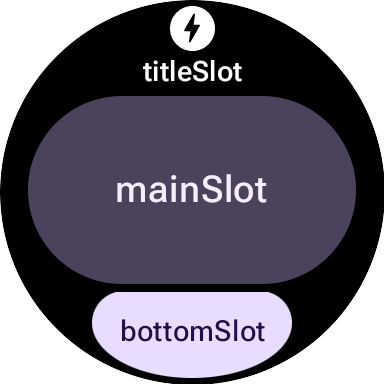
M2.5 与 M3 布局函数对比
M2.5
fun myLayout( context: Context, deviceConfiguration: DeviceParametersBuilders.DeviceParameters ) = PrimaryLayout.Builder(deviceConfiguration) .setResponsiveContentInsetEnabled(true) .setContent( Text.Builder(context, "Hello World!") .setTypography(Typography.TYPOGRAPHY_BODY1) .build() ) .build()
M3
fun myLayout( context: Context, deviceConfiguration: DeviceParametersBuilders.DeviceParameters, ) = materialScope(context, deviceConfiguration) { primaryLayout(mainSlot = { text("Hello, World!".layoutString) }) }
为突出显示主要区别,请执行以下操作:
- 淘汰构建器。之前用于 Material UI 组件的构建器模式已被更具声明性的、受 Compose 启发的语法取代。(字符串/颜色/修饰符等非界面组件也获得了新的 Kotlin 封装容器。)
- 标准化的初始化和布局函数。M3 布局依赖于标准化的初始化和结构函数:
materialScope()和primaryLayout()。这些必需函数用于初始化 M3 环境(主题、使用materialScope的组件范围)并定义基于主要 slot 的布局(使用primaryLayout)。每个布局都必须调用这两个函数一次。
主题
Material 3 对主题设置进行了多项更改,包括动态颜色以及一组扩展的排版和形状选项。
颜色
Material 3 Expressive 的一项突出功能是“动态主题化”:启用此功能的板块(默认处于启用状态)将以系统提供的主题显示(可用性取决于用户的设备和配置)。
M3 中的另一项变化是颜色令牌数量的增加,从 4 个增加到了 29 个。新的颜色令牌可在 ColorScheme 类中找到。
排版
与 M2.5 类似,M3 非常依赖预定义的字体大小常量,不建议直接指定字体大小。这些常量位于 Typography 类中,可提供略微扩展的更具表现力的选项范围。
如需了解完整详情,请参阅排版文档。
形状
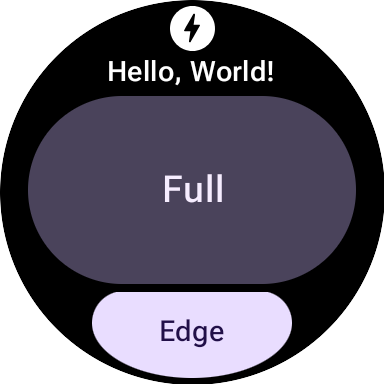
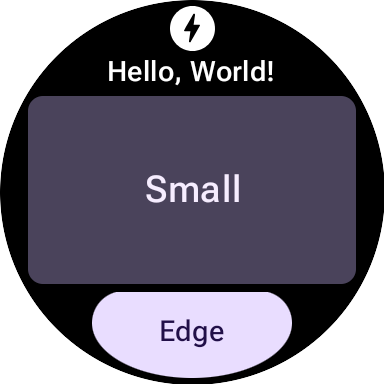
大多数 M3 组件的形状和颜色都可以变化。
形状为 full 的 textButton(在 mainSlot 中):
形状为 small 的相同 textButton:
组件
M3 组件比 M2.5 组件更灵活且可配置性更高。M2.5 通常需要不同的组件来实现各种视觉效果,而 M3 通常使用具有良好默认设置的通用型高度可配置的基础组件。
此原则也适用于根布局。在 M2.5 中,此值是 PrimaryLayout 或 EdgeContentLayout。在 M3 中,建立单个顶级 MaterialScope 后,您需要调用 primaryLayout() 函数。此函数直接返回根布局(无需构建器),并接受多个 slot 的 LayoutElements,例如 titleSlot、mainSlot 和 bottomSlot。您可以使用具体的界面组件(例如 text()、button() 或 card() 返回的组件)或布局结构(例如 LayoutElementBuilders 中的 Row 或 Column)填充这些槽位。
主题是另一项重要的 M3 增强功能。默认情况下,界面元素会自动遵循 M3 样式规范并支持动态主题。
| M2.5 | M3 |
|---|---|
| 互动元素 | |
Button 或 Chip |
|
| 文本 | |
Text |
text() |
| 进度指示器 | |
CircularProgressIndicator |
circularProgressIndicator() 或 segmentedCircularProgressIndicator() |
| 布局 | |
PrimaryLayout 或 EdgeContentLayout |
primaryLayout() |
| — | buttonGroup() |
| 图片 | |
| — | icon()、avatarImage() 或 backgroundImage() |
修饰符
在 M3 中,用于修饰或扩充组件的 Modifiers 更像 Compose。此更改可通过自动构建适当的内部类型来减少样板代码。(此变更与 M3 界面组件的使用无关;如有必要,您可以将 ProtoLayout 1.2 中的构建器样式修饰符与 M3 界面组件搭配使用,反之亦然。)
M2.5
// Uses Builder-style modifier to set opacity fun myModifier(): ModifiersBuilders.Modifiers = ModifiersBuilders.Modifiers.Builder() .setOpacity(TypeBuilders.FloatProp.Builder(0.5F).build()) .build()
M3
// Uses Compose-like modifiers to set opacity fun myModifier(): LayoutModifier = LayoutModifier.opacity(0.5F)
您可以使用任一 API 样式来构建修饰符,还可以使用 toProtoLayoutModifiers() 扩展函数将 LayoutModifier 转换为 ModifiersBuilders.Modifier。
辅助函数
虽然 ProtoLayout 1.3 允许使用受 Compose 启发的 API 来表达许多界面组件,但 LayoutElementBuilders 中的基础布局元素(例如行和列)仍使用构建器模式。为了弥合这种样式差距并提高与新的 M3 组件 API 的一致性,请考虑使用辅助函数。
不含辅助函数
primaryLayout( mainSlot = { Column.Builder() .setWidth(expand()) .setHeight(expand()) .addContent(text("A".layoutString)) .addContent(text("B".layoutString)) .addContent(text("C".layoutString)) .build() } )
使用辅助程序
// Function literal with receiver helper function fun column(builder: Column.Builder.() -> Unit) = Column.Builder().apply(builder).build() primaryLayout( mainSlot = { column { setWidth(expand()) setHeight(expand()) addContent(text("A".layoutString)) addContent(text("B".layoutString)) addContent(text("C".layoutString)) } } )
迁移到 Tiles 1.2 / ProtoLayout 1.0
从版本 1.2 开始,大多数功能块布局 API 都位于 androidx.wear.protolayout 命名空间中。如需使用最新的 API,请在代码中完成以下迁移步骤。
更新依赖项
在应用模块的 build 文件中,进行以下更改:
Groovy
// Removeimplementation 'androidx.wear.tiles:tiles-material:version'// Include additional dependencies implementation "androidx.wear.protolayout:protolayout:1.4.2" implementation "androidx.wear.protolayout:protolayout-material:1.4.2" implementation "androidx.wear.protolayout:protolayout-expression:1.4.2" // Update implementation "androidx.wear.tiles:tiles:1.6.2"
Kotlin
// Removeimplementation("androidx.wear.tiles:tiles-material:version")// Include additional dependencies implementation("androidx.wear.protolayout:protolayout:1.4.2") implementation("androidx.wear.protolayout:protolayout-material:1.4.2") implementation("androidx.wear.protolayout:protolayout-expression:1.4.2") // Update implementation("androidx.wear.tiles:tiles:1.6.2")
更新命名空间
在应用的 Kotlin 和 Java 代码文件中,进行以下更新: 或者,您也可以执行此命名空间重命名脚本。
- 将所有
androidx.wear.tiles.material.*导入内容都替换为androidx.wear.protolayout.material.*。另外也针对androidx.wear.tiles.material.layouts库完成此步骤。 将大多数其他
androidx.wear.tiles.*导入内容替换为androidx.wear.protolayout.*。androidx.wear.tiles.EventBuilders、androidx.wear.tiles.RequestBuilders、androidx.wear.tiles.TileBuilders和androidx.wear.tiles.TileService的导入内容应保持不变。重命名 TileService 和 TileBuilder 类中的一些已废弃的方法:
TileBuilders:将getTimeline()重命名为getTileTimeline(),将setTimeline()重命名为setTileTimeline()TileService:将onResourcesRequest()重命名为onTileResourcesRequest()RequestBuilders.TileRequest:将getDeviceParameters()重命名为getDeviceConfiguration(),将setDeviceParameters()重命名为setDeviceConfiguration(),将getState()重命名为getCurrentState(),将setState()重命名为setCurrentState()