

Giống như các bản phát hành trước, Android 16 có các thay đổi về hành vi có thể ảnh hưởng đến ứng dụng của bạn. Những thay đổi về hành vi sau đây chỉ áp dụng cho ứng dụng nhắm đến Android 16 trở lên. Nếu ứng dụng của bạn nhắm đến Android 16 trở lên, bạn nên điều chỉnh ứng dụng để hỗ trợ những hành vi này (nếu cần).
Ngoài ra, hãy nhớ tham khảo danh sách các thay đổi về hành vi ảnh hưởng đến tất cả ứng dụng chạy trên Android 16 bất kể targetSdkVersion của ứng dụng.
Trải nghiệm người dùng và giao diện người dùng hệ thống
Android 16 (cấp độ API 36) có những thay đổi sau đây nhằm mang đến trải nghiệm người dùng nhất quán và trực quan hơn.
Lựa chọn không sử dụng chế độ hiển thị tràn viền sẽ không còn nữa
Android 15 thực thi chế độ hiển thị tràn viền cho các ứng dụng nhắm đến Android 15 (API cấp 35), nhưng ứng dụng của bạn có thể chọn không sử dụng bằng cách đặt R.attr#windowOptOutEdgeToEdgeEnforcement thành true. Đối với các ứng dụng nhắm đến Android 16 (cấp độ API 36), R.attr#windowOptOutEdgeToEdgeEnforcement sẽ không được dùng nữa và bị vô hiệu hoá, đồng thời ứng dụng của bạn không thể chọn không hiển thị tràn viền.
- Nếu ứng dụng của bạn nhắm đến Android 16 (cấp độ API 36) và đang chạy trên một thiết bị Android 15, thì
R.attr#windowOptOutEdgeToEdgeEnforcementvẫn tiếp tục hoạt động. - Nếu ứng dụng của bạn nhắm đến Android 16 (cấp độ API 36) và đang chạy trên thiết bị Android 16, thì
R.attr#windowOptOutEdgeToEdgeEnforcementsẽ bị tắt.
Để kiểm thử trong Android 16, hãy đảm bảo ứng dụng của bạn hỗ trợ chế độ hiển thị tràn viền và xoá mọi cách sử dụng R.attr#windowOptOutEdgeToEdgeEnforcement để ứng dụng của bạn cũng hỗ trợ chế độ hiển thị tràn viền trên thiết bị Android 15. Để hỗ trợ chế độ hiển thị tràn viền, hãy xem hướng dẫn về Compose và Khung hiển thị.
Bạn phải di chuyển hoặc chọn không sử dụng tính năng xem trước thao tác quay lại
For apps targeting Android 16 (API level 36) or higher and running on an
Android 16 or higher device, the predictive back system animations
(back-to-home, cross-task, and cross-activity) are enabled by default.
Additionally, onBackPressed is not called and
KeyEvent.KEYCODE_BACK is not dispatched anymore.
If your app intercepts the back event and you haven't migrated to predictive
back yet, update your app to use supported back navigation APIs, or
temporarily opt out by setting the
android:enableOnBackInvokedCallback attribute to false in the
<application> or <activity> tag of your app's AndroidManifest.xml file.
Các API phông chữ Elegant không được dùng nữa và bị vô hiệu hoá
Apps targeting Android 15 (API level 35) have the
elegantTextHeight
TextView attribute set to true by
default, replacing the compact font with one that is much more readable. You
could override this by setting the elegantTextHeight attribute to false.
Android 16 deprecates the
elegantTextHeight attribute,
and the attribute will be ignored once your app targets Android 16. The "UI
fonts" controlled by these APIs are being discontinued, so you should adapt any
layouts to ensure consistent and future proof text rendering in Arabic, Lao,
Myanmar, Tamil, Gujarati, Kannada, Malayalam, Odia, Telugu or Thai.

elegantTextHeight behavior for apps targeting Android
14 (API level 34) and lower, or for apps targeting Android 15 (API level 35)
that overrode the default by setting the elegantTextHeight
attribute to false.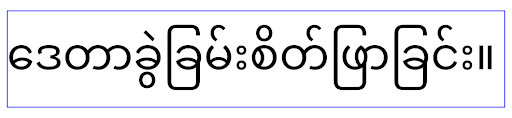
elegantTextHeight behavior for apps targeting Android
16 (API level 36), or for apps targeting Android 15 (API level 35) that didn't
override the default by setting the elegantTextHeight attribute
to false.Chức năng cốt lõi
Android 16 (cấp độ API 36) có những thay đổi sau đây nhằm sửa đổi hoặc mở rộng nhiều khả năng cốt lõi của hệ thống Android.
Tối ưu hoá lịch làm việc theo mức cố định
Prior to targeting Android 16, when scheduleAtFixedRate
missed a task execution due to being outside a valid
process lifecycle, all missed executions immediately
execute when the app returns to a valid lifecycle.
When targeting Android 16, at most one missed execution of
scheduleAtFixedRate is immediately executed when the app
returns to a valid lifecycle. This behavior change is expected to improve app
performance. Test this behavior in your app to check if your app is impacted.
You can also test by using the app compatibility framework
and enabling the STPE_SKIP_MULTIPLE_MISSED_PERIODIC_TASKS compat flag.
Kiểu dáng thiết bị
Android 16 (API cấp 36) có những thay đổi sau đây đối với các ứng dụng khi hiển thị trên thiết bị có màn hình lớn.
Bố cục thích ứng (Adaptive Layouts)
Giờ đây, các ứng dụng Android chạy trên nhiều thiết bị (chẳng hạn như điện thoại, máy tính bảng, thiết bị có thể gập lại, máy tính, ô tô và TV) và các chế độ tạo cửa sổ trên màn hình lớn (chẳng hạn như chế độ chia đôi màn hình và chế độ tạo cửa sổ trên máy tính), nhà phát triển nên tạo các ứng dụng Android thích ứng với mọi kích thước màn hình và cửa sổ, bất kể hướng thiết bị. Các mô hình như hạn chế hướng và khả năng đổi kích thước quá hạn chế trong thế giới đa thiết bị ngày nay.
Bỏ qua các quy định hạn chế về hướng, khả năng đổi kích thước và tỷ lệ khung hình
Đối với các ứng dụng nhắm đến Android 16 (cấp độ API 36), các quy định hạn chế về hướng, khả năng đổi kích thước và tỷ lệ khung hình sẽ không còn áp dụng trên những màn hình có chiều rộng nhỏ nhất >= 600 dp. Ứng dụng lấp đầy toàn bộ cửa sổ hiển thị, bất kể tỷ lệ khung hình hay hướng mà người dùng ưu tiên, và không sử dụng hiệu ứng hòm thư.
Thay đổi này giới thiệu một hành vi tiêu chuẩn mới của nền tảng. Android đang hướng đến một mô hình mà các ứng dụng dự kiến sẽ thích ứng với nhiều hướng, kích thước màn hình và tỷ lệ khung hình. Các quy tắc hạn chế như hướng cố định hoặc khả năng đổi kích thước hạn chế sẽ cản trở khả năng thích ứng của ứng dụng. Điều chỉnh ứng dụng để mang đến trải nghiệm tốt nhất có thể cho người dùng.
Bạn cũng có thể kiểm thử hành vi này bằng cách sử dụng khung tương thích của ứng dụng và bật cờ tương thích UNIVERSAL_RESIZABLE_BY_DEFAULT.
Các thay đổi có thể gây lỗi thường gặp
Việc bỏ qua các quy tắc hạn chế về hướng, khả năng đổi kích thước và tỷ lệ khung hình có thể ảnh hưởng đến giao diện người dùng của ứng dụng trên một số thiết bị, đặc biệt là những phần tử được thiết kế cho bố cục nhỏ ở chế độ dọc: ví dụ: các vấn đề như bố cục bị kéo giãn và các thành phần cũng như ảnh động nằm ngoài màn hình. Mọi giả định về tỷ lệ khung hình hoặc hướng đều có thể gây ra vấn đề về hình ảnh cho ứng dụng của bạn. Tìm hiểu thêm về cách tránh những vấn đề này và cải thiện hành vi thích ứng của ứng dụng.
Việc cho phép xoay thiết bị sẽ dẫn đến việc tạo lại nhiều hoạt động hơn, điều này có thể dẫn đến mất trạng thái người dùng nếu không được duy trì đúng cách. Tìm hiểu cách lưu trạng thái giao diện người dùng một cách chính xác trong bài viết Lưu trạng thái giao diện người dùng.
Thông tin chi tiết về việc triển khai
Các thuộc tính tệp kê khai và API thời gian chạy sau đây sẽ bị bỏ qua trên các thiết bị có màn hình lớn ở chế độ toàn màn hình và chế độ nhiều cửa sổ:
screenOrientationresizableActivityminAspectRatiomaxAspectRatiosetRequestedOrientation()getRequestedOrientation()
Các giá trị sau đây cho screenOrientation, setRequestedOrientation() và getRequestedOrientation() sẽ bị bỏ qua:
portraitreversePortraitsensorPortraituserPortraitlandscapereverseLandscapesensorLandscapeuserLandscape
Về khả năng thay đổi kích thước màn hình, android:resizeableActivity="false", android:minAspectRatio và android:maxAspectRatio không có tác dụng.
Đối với các ứng dụng nhắm đến Android 16 (cấp độ API 36), theo mặc định, các quy tắc hạn chế về hướng, khả năng đổi kích thước và tỷ lệ khung hình của ứng dụng sẽ bị bỏ qua trên màn hình lớn. Mọi ứng dụng chưa sẵn sàng hoàn toàn đều có thể tạm thời ghi đè hành vi này bằng cách chọn không sử dụng. Điều này dẫn đến hành vi trước đó là được đặt ở chế độ tương thích.
Ngoại lệ
Các quy tắc hạn chế về hướng, khả năng đổi kích thước và tỷ lệ khung hình của Android 16 không áp dụng trong những trường hợp sau:
- Trò chơi (dựa trên cờ
android:appCategory) - Người dùng chọn sử dụng rõ ràng hành vi mặc định của ứng dụng trong phần cài đặt tỷ lệ khung hình của thiết bị
- Màn hình có kích thước nhỏ hơn
sw600dp
Tạm thời không chọn
Để chọn không tham gia một hoạt động cụ thể, hãy khai báo thuộc tính tệp kê khai PROPERTY_COMPAT_ALLOW_RESTRICTED_RESIZABILITY:
<activity ...>
  <property android:name="android.window.PROPERTY_COMPAT_ALLOW_RESTRICTED_RESIZABILITY" android:value="true" />
  ...
</activity>
Nếu có quá nhiều phần trong ứng dụng của bạn chưa sẵn sàng cho Android 16, bạn có thể chọn không tham gia hoàn toàn bằng cách áp dụng cùng một thuộc tính ở cấp ứng dụng:
<application ...>
  <property android:name="android.window.PROPERTY_COMPAT_ALLOW_RESTRICTED_RESIZABILITY" android:value="true" />
</application>
Sức khoẻ và thể chất
Android 16 (API cấp 36) có những thay đổi sau đây liên quan đến dữ liệu về sức khoẻ và thể dục.
Quyền đối với dữ liệu về sức khoẻ và thể dục
For apps targeting Android 16 (API level 36) or higher,
BODY_SENSORS permissions use more granular permissions
under android.permissions.health, which Health Connect
also uses. As of Android 16, any API previously requiring BODY_SENSORS
or BODY_SENSORS_BACKGROUND requires the corresponding
android.permissions.health permission instead. This affects the following data
types, APIs, and foreground service types:
HEART_RATE_BPMfrom Health Services on Wear OSSensor.TYPE_HEART_RATEfrom Android Sensor ManagerheartRateAccuracyandheartRateBpmfromProtoLayouton Wear OSFOREGROUND_SERVICE_TYPE_HEALTHwhere the respectiveandroid.permission.healthpermission is needed in place ofBODY_SENSORS
If your app uses these APIs, it should request the respective granular permissions:
- For while-in-use monitoring of Heart Rate, SpO2, or Skin Temperature:
request the granular permission under
android.permissions.health, such asREAD_HEART_RATEinstead ofBODY_SENSORS. - For background sensor access: request
READ_HEALTH_DATA_IN_BACKGROUNDinstead ofBODY_SENSORS_BACKGROUND.
These permissions are the same as those that guard access to reading data from Health Connect, the Android datastore for health, fitness, and wellness data.
Mobile apps
Mobile apps migrating to use the READ_HEART_RATE and other granular
permissions must also declare an activity to display
the app's privacy policy. This is the same requirement as Health Connect.
Khả năng kết nối
Android 16 (cấp độ API 36) có những thay đổi sau đây trong ngăn xếp Bluetooth để cải thiện khả năng kết nối với các thiết bị ngoại vi.
Ý định mới để xử lý tình trạng mất kết nối và thay đổi chế độ mã hoá
As part of the Improved bond loss handling, Android 16 also introduces 2 new intents to provide apps with greater awareness of bond loss and encryption changes.
Apps targeting Android 16 can now:
- Receive an
ACTION_KEY_MISSINGintent when remote bond loss is detected, allowing them to provide more informative user feedback and take appropriate actions. - Receive an
ACTION_ENCRYPTION_CHANGEintent whenever encryption status of the link changes. This includes encryption status change, encryption algorithm change, and encryption key size change. Apps must consider the bond restored if the link is successfully encrypted upon receivingACTION_ENCRYPTION_CHANGEintent later.
Adapting to varying OEM implementations
While Android 16 introduces these new intents, their implementation and broadcasting can vary across different device manufacturers (OEMs). To ensure your app provides a consistent and reliable experience across all devices, developers should design their bond loss handling to gracefully adapt to these potential variations.
We recommend the following app behaviors:
If the
ACTION_KEY_MISSINGintent is broadcast:The ACL (Asynchronous Connection-Less) link will be disconnected by the system, but the bond information for the device will be retained (as described here).
Your app should use this intent as the primary signal for bond loss detection and guiding the user to confirm the remote device is in range before initiating device forgetting or re-pairing.
If a device disconnects after
ACTION_KEY_MISSINGis received, your app should be cautious about reconnecting, as the device may no longer be bonded with the system.If the
ACTION_KEY_MISSINGintent is NOT broadcast:The ACL link will remain connected, and the bond information for the device will be removed by the system, same to behavior in Android 15.
In this scenario, your app should continue its existing bond loss handling mechanisms as in previous Android releases, to detect and manage bond loss events.
Cách mới để xoá mối liên kết Bluetooth
All apps targeting Android 16 are now able to unpair bluetooth devices using a
public API in CompanionDeviceManager. If a companion device is
being managed as a CDM association, then the app can trigger
bluetooth bond removal by using the new removeBond(int) API
on the associated device. The app can monitor the bond state changes by
listening to the bluetooth device broadcast event
ACTION_BOND_STATE_CHANGED.
Bảo mật
Android 16 (cấp độ API 36) có những thay đổi sau đây về bảo mật.
Khoá phiên bản MediaStore
For apps targeting Android 16 or higher, MediaStore#getVersion() will now
be unique to each app. This eliminates identifying properties from the version
string to prevent abuse and usage for fingerprinting techniques. Apps shouldn't
make any assumptions around the format of this version. Apps should already
handle version changes when using this API and in most cases shouldn't need to
change their current behavior, unless the developer has attempted to infer
additional information that is beyond the intended scope of this API.
Ý định an toàn hơn
The Safer Intents feature is a multi-phase security initiative designed to improve the security of Android's intent resolution mechanism. The goal is to protect apps from malicious actions by adding checks during intent processing and filtering intents that don't meet specific criteria.
In Android 15 the feature focused on the sending app. Now with Android 16, control shifts to the receiving app, allowing developers to opt-in to strict intent resolution using their app manifest.
Two key changes are being implemented:
Explicit Intents Must Match the Target Component's Intent Filter: If an intent explicitly targets a component, it should match that component's intent filter.
Intents Without an Action Cannot Match any Intent Filter: Intents that don't have an action specified shouldn't be resolved to any intent filter.
These changes only apply when multiple apps are involved and don't affect intent handling within a single app.
Impact
The opt-in nature means that developers must explicitly enable it in their app manifest for it to take effect. As a result, the feature's impact will be limited to apps whose developers:
- Are aware of the Safer Intents feature and its benefits.
- Actively choose to incorporate stricter intent handling practices into their apps.
This opt-in approach minimizes the risk of breaking existing apps that may rely on the current less-secure intent resolution behavior.
While the initial impact in Android 16 may be limited, the Safer Intents initiative has a roadmap for broader impact in future Android releases. The plan is to eventually make strict intent resolution the default behavior.
The Safer Intents feature has the potential to significantly enhance the security of the Android ecosystem by making it more difficult for malicious apps to exploit vulnerabilities in the intent resolution mechanism.
However, the transition to opt-out and mandatory enforcement must be carefully managed to address potential compatibility issues with existing apps.
Implementation
Developers need to explicitly enable stricter intent matching using the
intentMatchingFlags attribute in their app manifest.
Here is an example where the feature is opt-in for the entire app,
but disabled/opt-out on a receiver:
<application android:intentMatchingFlags="enforceIntentFilter">
    <receiver android:name=".MyBroadcastReceiver" android:exported="true" android:intentMatchingFlags="none">
        <intent-filter>
            <action android:name="com.example.MY_CUSTOM_ACTION" />
        </intent-filter>
        <intent-filter>
            <action android:name="com.example.MY_ANOTHER_CUSTOM_ACTION" />
        </intent-filter>
    </receiver>
</application>
More on the supported flags:
| Flag Name | Description |
|---|---|
| enforceIntentFilter | Enforces stricter matching for incoming intents |
| none | Disables all special matching rules for incoming intents. When specifying multiple flags, conflicting values are resolved by giving precedence to the "none" flag |
| allowNullAction | Relaxes the matching rules to allow intents without an action to match. This flag to be used in conjunction with "enforceIntentFilter" to achieve a specific behavior |
Testing and Debugging
When the enforcement is active, apps should function correctly if the intent
caller has properly populated the intent.
However, blocked intents will trigger warning log messages like
"Intent does not match component's intent filter:" and "Access blocked:"
with the tag "PackageManager."
This indicates a potential issue that could impact the app and requires
attention.
Logcat filter:
tag=:PackageManager & (message:"Intent does not match component's intent filter:" | message: "Access blocked:")
Lọc lệnh gọi hệ thống GPU
To harden the Mali GPU surface, Mali GPU IOCTLs that have been deprecated or are intended solely for GPU development have been blocked in production builds. Additionally, IOCTLs used for GPU profiling have been restricted to the shell process or debuggable applications. Refer to the SAC update for more details on the platform-level policy.
This change takes place on Pixel devices using the Mali GPU (Pixel 6-9). Arm
has provided official categorization of their IOCTLs in
Documentation/ioctl-categories.rst of their r54p2 release. This
list will continue to be maintained in future driver releases.
This change does not impact supported graphics APIs (including Vulkan and OpenGL), and is not expected to impact developers or existing applications. GPU profiling tools such as the Streamline Performance Analyzer and the Android GPU Inspector won't be affected.
Testing
If you see a SELinux denial similar to the following, it is likely your application has been impacted by this change:
06-30 10:47:18.617 20360 20360 W roidJUnitRunner: type=1400 audit(0.0:85): avc:  denied  { ioctl }
for  path="/dev/mali0" dev="tmpfs" ino=1188 ioctlcmd=0x8023
scontext=u:r:untrusted_app_25:s0:c512,c768 tcontext=u:object_r:gpu_device:s0 tclass=chr_file
permissive=0 app=com.google.android.selinux.pts
If your application needs to use blocked IOCTLs, please file a bug and assign it to android-partner-security@google.com.
FAQ
Does this policy change apply to all OEMs? This change will be opt-in, but available to any OEMs who would like to use this hardening method. Instructions for implementing the change can be found in the implementation documentation.
Is it mandatory to make changes in the OEM codebase to implement this, or does it come with a new AOSP release by default? The platform-level change will come with a new AOSP release by default. Vendors may opt-in to this change in their codebase if they would like to apply it.
Are SoCs responsible for keeping the IOCTL list up to date? For example, if my device uses an ARM Mali GPU, would I need to reach out to ARM for any of the changes? Individual SoCs must update their IOCTL lists per device upon driver release. For example, ARM will update their published IOCTL list upon driver updates. However, OEMs should make sure that they incorporate the updates in their SEPolicy, and add any selected custom IOCTLs to the lists as needed.
Does this change apply to all Pixel in-market devices automatically, or is a user action required to toggle something to apply this change? This change applies to all Pixel in-market devices using the Mali GPU (Pixel 6-9). No user action is required to apply this change.
Will use of this policy impact the performance of the kernel driver? This policy was tested on the Mali GPU using GFXBench, and no measurable change to GPU performance was observed.
Is it necessary for the IOCTL list to align with the current userspace and kernel driver versions? Yes, the list of allowed IOCTLs must be synchronized with the IOCTLs supported by both the userspace and kernel drivers. If the IOCTLs in the user space or kernel driver are updated, the SEPolicy IOCTL list must be updated to match.
ARM has categorized IOCTLs as 'restricted' / 'instrumentation', but we want to use some of them in production use-cases, and/or deny others. Individual OEMs/SoCs are responsible for deciding on how to categorize the IOCTLs they use, based on the configuration of their userspace Mali libraries. ARM's list can be used to help decide on these, but each OEM/SoC's use-case may be different.
Quyền riêng tư
Android 16 (cấp độ API 36) có những thay đổi sau đây về quyền riêng tư.
Quyền truy cập mạng cục bộ
Devices on the LAN can be accessed by any app that has the INTERNET permission.
This makes it easy for apps to connect to local devices but it also has privacy
implications such as forming a fingerprint of the user, and being a proxy for
location.
The Local Network Protections project aims to protect the user's privacy by gating access to the local network behind a new runtime permission.
Release plan
This change will be deployed between two releases, 25Q2 and 26Q2 respectively. It is imperative that developers follow this guidance for 25Q2 and share feedback because these protections will be enforced at a later Android release. Moreover, they will need to update scenarios which depend on implicit local network access by using the following guidance and prepare for user rejection and revocation of the new permission.
Impact
At the current stage, LNP is an opt-in feature which means only the apps that opt in will be affected. The goal of the opt-in phase is for app developers to understand which parts of their app depend on implicit local network access such that they can prepare to permission guard them for the next release.
Apps will be affected if they access the user's local network using:
- Direct or library use of raw sockets on local network addresses (e.g. mDNS or SSDP service discovery protocol)
- Use of framework level classes that access the local network (e.g. NsdManager)
Traffic to and from a local network address requires local network access permission. The following table lists some common cases:
| App Low Level Network Operation | Local Network Permission Required |
|---|---|
| Making an outgoing TCP connection | yes |
| Accepting incoming TCP connections | yes |
| Sending a UDP unicast, multicast, broadcast | yes |
| Receiving an incoming UDP unicast, multicast, broadcast | yes |
These restrictions are implemented deep in the networking stack, and thus they apply to all networking APIs. This includes sockets created in native or managed code, networking libraries like Cronet and OkHttp, and any APIs implemented on top of those. Trying to resolve services on the local network (i.e. those with a .local suffix) will require local network permission.
Exceptions to the rules above:
- If a device's DNS server is on a local network, traffic to or from it (at port 53) doesn't require local network access permission.
- Applications using Output Switcher as their in-app picker won't need local network permissions (more guidance to come in 2025Q4).
Developer Guidance (Opt-in)
To opt into local network restrictions, do the following:
- Flash the device to a build with 25Q2 Beta 3 or later.
- Install the app to be tested.
Toggle the Appcompat flag in adb:
adb shell am compat enable RESTRICT_LOCAL_NETWORK <package_name>Reboot The device
Now your app's access to the local network is restricted and any attempt to access the local network will lead to socket errors. If you are using APIs that perform local network operations outside of your app process (ex: NsdManager), they won't be impacted during the opt-in phase.
To restore access, you must grant your app permission to NEARBY_WIFI_DEVICES.
- Ensure the app declares the
NEARBY_WIFI_DEVICESpermission in its manifest. - Go to Settings > Apps > [Application Name] > Permissions > Nearby devices > Allow.
Now your app's access to the local network should be restored and all your scenarios should work as they did prior to opting the app in.
Once enforcement for local network protection begins, here is how the app network traffic will be impacted.
| Permission | Outbound LAN Request | Outbound/Inbound Internet Request | Inbound LAN Request |
|---|---|---|---|
| Granted | Works | Works | Works |
| Not Granted | Fails | Works | Fails |
Use the following command to toggle-off the App-Compat flag
adb shell am compat disable RESTRICT_LOCAL_NETWORK <package_name>
Errors
Errors arising from these restrictions will be returned to the calling socket whenever it invokes send or a send variant to a local network address.
Example errors:
sendto failed: EPERM (Operation not permitted)

sendto failed: ECONNABORTED (Operation not permitted)
Local Network Definition
A local network in this project refers to an IP network that utilizes a broadcast-capable network interface, such as Wi-Fi or Ethernet, but excludes cellular (WWAN) or VPN connections.
The following are considered local networks:
IPv4:
- 169.254.0.0/16 // Link Local
- 100.64.0.0/10 // CGNAT
- 10.0.0.0/8 // RFC1918
- 172.16.0.0/12 // RFC1918
- 192.168.0.0/16 // RFC1918
IPv6:
- Link-local
- Directly-connected routes
- Stub networks like Thread
- Multiple-subnets (TBD)
Additionally, both multicast addresses (224.0.0.0/4, ff00::/8) and the IPv4 broadcast address (255.255.255.255) are classified as local network addresses.
Ảnh thuộc về ứng dụng
When prompted for photo and video permissions by an app targeting SDK 36 or higher on devices running Android 16 or higher, users who choose to limit access to selected media will see any photos owned by the app pre-selected in the photo picker. Users can deselect any of these pre-selected items, which will revoke the app's access to those photos and videos.