

ユーザーは、複数のメディア アセットをまとめて編集して、最終的な動画で複数のメディア アイテムを同時に表示したい場合があります。これには、ピクチャー イン ピクチャー、並列、グリッドなどのレイアウトでアイテムを配置することが含まれます。このようなプロジェクトの例を次に示します。
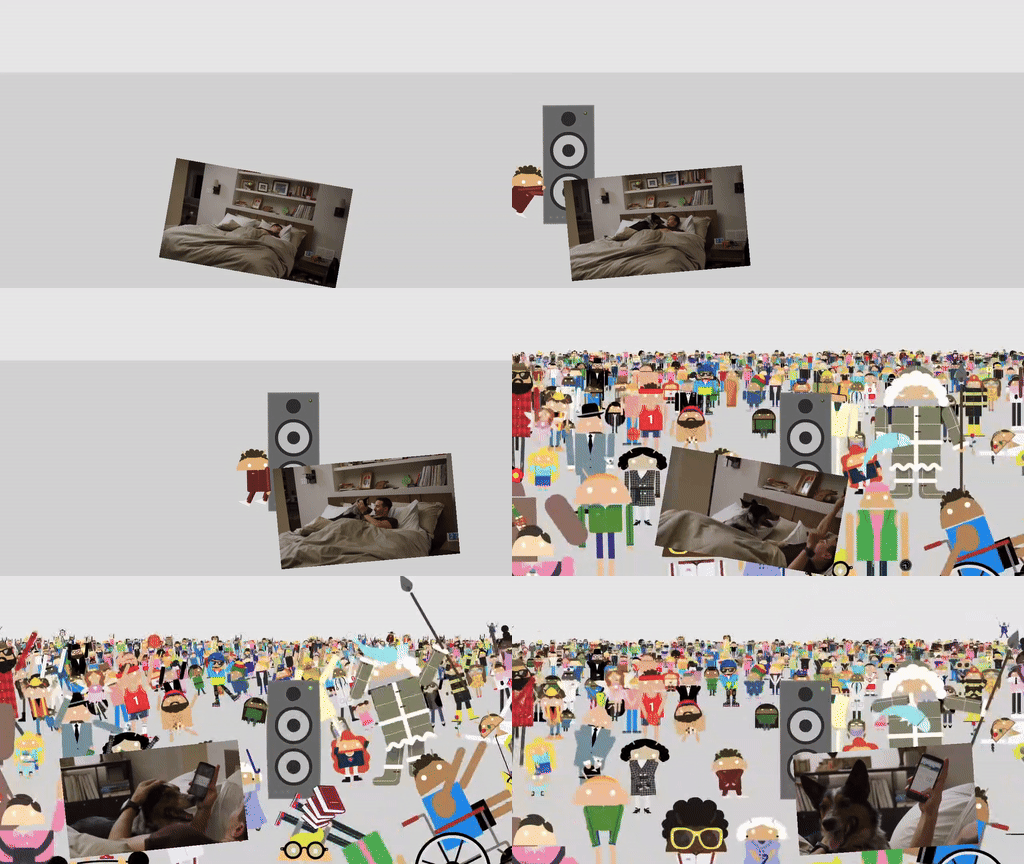
これらのレイアウトの実装については、 Composition デモアプリをご覧ください。
VideoCompositorSettings を実装する
VideoCompositorSettings インターフェースには 2 つのメソッドがあります。
getOutputSize(List<Size> inputSizes): 各入力のサイズを指定するために使用します。EditedMediaItemSequencegetOverlaySettings(int inputId, long presentationTimeUs): 各シーケンスをフレームに表示する方法を指定します。
OverlaySettings を使用してシーケンスの表示を構成する
getOverlaySettings() の実装では、プロジェクト内のシーケンスごとに
OverlaySettings インターフェースのインスタンスを返す必要があります。inputId パラメータは、設定が適用されるシーケンスを指定します。インスタンスを作成するには、Media3 に含まれている StaticOverlaySettings クラス
を使用します。構成オプションの完全なリストについては、StaticOverlaySettings.Builder のリファレンス ページをご覧ください。これには、アルファ透明度や HDR 輝度などの視覚的な変更、アンカー ポイントやフレーム内の位置などの位置の変更、回転やスケールなどの変換が含まれます。
override fun getOverlaySettings(inputId: Int, presentationTimeUs: Long): OverlaySettings { return when (inputId) { // Position the first sequence in the top-left 0 -> { StaticOverlaySettings.Builder() // Scale the video down to 1/4th the size of the frame .setScale(0.5f, 0.5f) // Anchor the sequence in the middle of frame .setOverlayFrameAnchor(0f, 0f) // Position the video in the top-left section of the frame .setBackgroundFrameAnchor(-0.5f, 0.5f) .build() } // Add more cases for remaining input sequences else -> StaticOverlaySettings.Builder().build() } }
getOverlaySettings() メソッドの presentationTimeUs パラメータを使用すると、このページで説明したピクチャー イン ピクチャーの移動の例のように、動画の位置に基づいてこれらの設定を変更できます。
override fun getOverlaySettings(inputId: Int, presentationTimeUs: Long): OverlaySettings { return if (inputId == 0) { // Use the first sequence as the overlay val cycleRadians = 2 * PI * (presentationTimeUs.toDouble() / cycleTimeUs) StaticOverlaySettings.Builder() // Scale the overlay down .setScale(0.35f, 0.35f) // Anchor the overlay in the top-middle of the frame .setOverlayFrameAnchor(0f, 1f) // Move the overlay over time .setBackgroundFrameAnchor(sin(cycleRadians).toFloat() * 0.5f, -0.2f) // Rotate the overlay over time .setRotationDegrees(cos(cycleRadians).toFloat() * -10f) .build() } else { // Present the second sequence in the background as normal StaticOverlaySettings.Builder().build() } }
フィードバック
動画合成のユースケースに関するフィードバックや機能リクエストがある場合は、 Media3 GitHub リポジトリで問題を送信してください。