

CameraX предоставляет API расширений для доступа к расширениям , реализованным производителями устройств на различных устройствах Android. Список поддерживаемых режимов расширений см. в разделе «Расширения камеры» .
Список устройств, поддерживающих расширения, см. в разделе «Поддерживаемые устройства» .
Архитектура расширений
На следующем изображении показана архитектура расширений камеры.
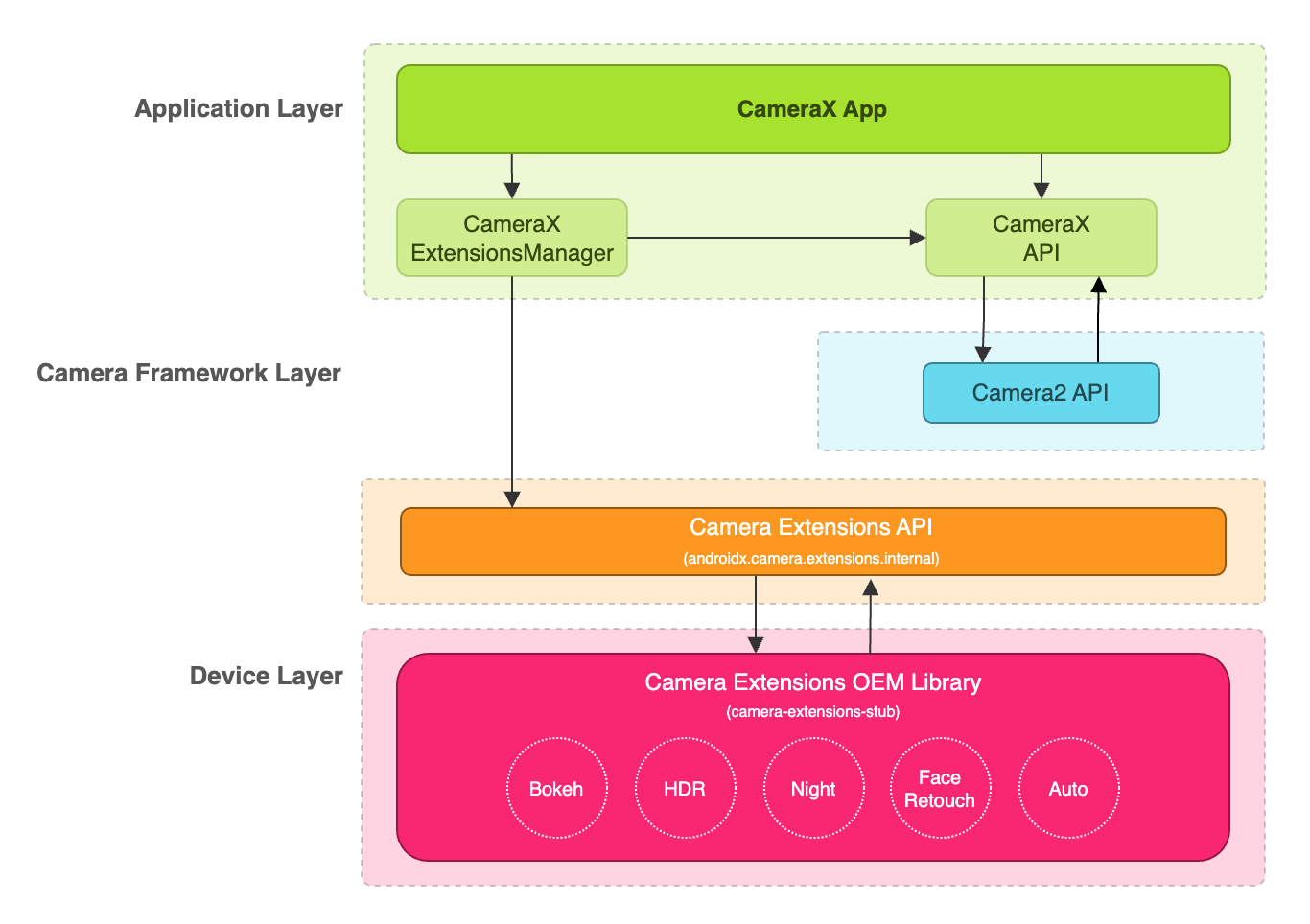
Приложение CameraX может использовать расширения через API расширений CameraX. API расширений CameraX управляет запросами на наличие доступных расширений, настройкой сеанса камеры с использованием расширений и взаимодействием с библиотекой OEM-производителя расширений Camera Extensions. Это позволяет вашему приложению использовать такие возможности, как ночной режим, HDR, автоматический режим, эффект боке или ретушь лица.
Включите расширение для захвата и предварительного просмотра изображений.
Перед использованием API расширений получите экземпляр ExtensionsManager с помощью метода ExtensionsManager#getInstanceAsync(Context, CameraProvider) . Это позволит вам запросить информацию о доступности расширений. Затем получите CameraSelector с включенным расширением. Режим расширения будет применяться к сценариям захвата изображений и предварительного просмотра при вызове метода bindToLifecycle() с включенным расширением CameraSelector .
Для реализации расширения, предназначенного для захвата и предварительного просмотра изображений, обратитесь к следующему примеру кода:
Котлин
import androidx.camera.extensions.ExtensionMode
import androidx.camera.extensions.ExtensionsManager

override fun onCreate(savedInstanceState: Bundle?) {
    super.onCreate(savedInstanceState)

    val lifecycleOwner = this

    val cameraProviderFuture = ProcessCameraProvider.getInstance(applicationContext)
    cameraProviderFuture.addListener({
        // Obtain an instance of a process camera provider
        // The camera provider provides access to the set of cameras associated with the device.
        // The camera obtained from the provider will be bound to the activity lifecycle.
        val cameraProvider = cameraProviderFuture.get()

        val extensionsManagerFuture =
            ExtensionsManager.getInstanceAsync(applicationContext, cameraProvider)
        extensionsManagerFuture.addListener({
            // Obtain an instance of the extensions manager
            // The extensions manager enables a camera to use extension capabilities available on
            // the device.
            val extensionsManager = extensionsManagerFuture.get()

            // Select the camera
            val cameraSelector = CameraSelector.DEFAULT_BACK_CAMERA

            // Query if extension is available.
            // Not all devices will support extensions or might only support a subset of
            // extensions.
            if (extensionsManager.isExtensionAvailable(cameraSelector, ExtensionMode.NIGHT)) {
                // Unbind all use cases before enabling different extension modes.
                try {
                    cameraProvider.unbindAll()

                    // Retrieve a night extension enabled camera selector
                    val nightCameraSelector =
                        extensionsManager.getExtensionEnabledCameraSelector(
                            cameraSelector,
                            ExtensionMode.NIGHT
                        )

                    // Bind image capture and preview use cases with the extension enabled camera
                    // selector.
                    val imageCapture = ImageCapture.Builder().build()
                    val preview = Preview.Builder().build()
                    // Connect the preview to receive the surface the camera outputs the frames
                    // to. This will allow displaying the camera frames in either a TextureView
                    // or SurfaceView. The SurfaceProvider can be obtained from the PreviewView.
                    preview.setSurfaceProvider(surfaceProvider)

                    // Returns an instance of the camera bound to the lifecycle
                    // Use this camera object to control various operations with the camera
                    // Example: flash, zoom, focus metering etc.
                    val camera = cameraProvider.bindToLifecycle(
                        lifecycleOwner,
                        nightCameraSelector,
                        imageCapture,
                        preview
                    )
                } catch (e: Exception) {
                    Log.e(TAG, "Use case binding failed", e)
                }
            }
        }, ContextCompat.getMainExecutor(this))
    }, ContextCompat.getMainExecutor(this))
}
Java
import androidx.camera.extensions.ExtensionMode; import androidx.camera.extensions.ExtensionsManager; @Override protected void onCreate(Bundle savedInstanceState) { super.onCreate(savedInstanceState); final LifecycleOwner lifecycleOwner = this; final ListenableFuturecameraProviderFuture = ProcessCameraProvider.getInstance(getApplicationContext()); cameraProviderFuture.addListener(() -> { try { // Obtain an instance of a process camera provider // The camera provider provides access to the set of cameras associated with the // device. The camera obtained from the provider will be bound to the activity // lifecycle. final ProcessCameraProvider cameraProvider = cameraProviderFuture.get(); final ListenableFuture extensionsManagerFuture = ExtensionsManager.getInstanceAsync(getApplicationContext(), cameraProvider); extensionsManagerFuture.addListener(() -> { // Obtain an instance of the extensions manager // The extensions manager enables a camera to use extension capabilities available // on the device. try { final ExtensionsManager extensionsManager = extensionsManagerFuture.get(); // Select the camera final CameraSelector cameraSelector = CameraSelector.DEFAULT_BACK_CAMERA; // Query if extension is available. // Not all devices will support extensions or might only support a subset of // extensions. if (extensionsManager.isExtensionAvailable( cameraSelector, ExtensionMode.NIGHT )) { // Unbind all use cases before enabling different extension modes. cameraProvider.unbindAll(); // Retrieve extension enabled camera selector final CameraSelector nightCameraSelector = extensionsManager .getExtensionEnabledCameraSelector(cameraSelector, ExtensionMode.NIGHT); // Bind image capture and preview use cases with the extension enabled camera // selector. final ImageCapture imageCapture = new ImageCapture.Builder().build(); final Preview preview = new Preview.Builder().build(); // Connect the preview to receive the surface the camera outputs the frames // to. This will allow displaying the camera frames in either a TextureView // or SurfaceView. The SurfaceProvider can be obtained from the PreviewView. preview.setSurfaceProvider(surfaceProvider); cameraProvider.bindToLifecycle( lifecycleOwner, nightCameraSelector, imageCapture, preview ); } } catch (ExecutionException | InterruptedException e) { throw new RuntimeException(e); } }, ContextCompat.getMainExecutor(this)); } catch (ExecutionException | InterruptedException e) { throw new RuntimeException(e); } }, ContextCompat.getMainExecutor(this)); }
Отключите расширение
Чтобы отключить расширения поставщика, отмените привязку всех сценариев использования и повторно привяжите сценарии захвата изображения и предварительного просмотра с помощью обычного селектора камеры. Например, повторно привяжите камеру к задней камере, используя CameraSelector.DEFAULT_BACK_CAMERA .
Зависимости
API расширений CameraX реализован в библиотеке camera-extensions . Расширения зависят от основных модулей CameraX ( core , camera2 , lifecycle ).
Классный
dependencies {
  def camerax_version = "1.2.0-rc01"
  implementation "androidx.camera:camera-core:${camerax_version}"
  implementation "androidx.camera:camera-camera2:${camerax_version}"
  implementation "androidx.camera:camera-lifecycle:${camerax_version}"
  //the CameraX Extensions library
  implementation "androidx.camera:camera-extensions:${camerax_version}"
    ...
}
Котлин
dependencies {
  val camerax_version = "1.2.0-rc01"
  implementation("androidx.camera:camera-core:${camerax_version}")
  implementation("androidx.camera:camera-camera2:${camerax_version}")
  implementation("androidx.camera:camera-lifecycle:${camerax_version}")
  // the CameraX Extensions library
  implementation("androidx.camera:camera-extensions:${camerax_version}")
    ...
}
Удаление устаревшего API
С выходом нового API расширений в версии 1.0.0-alpha26 устаревший API расширений, выпущенный в августе 2019 года, теперь считается устаревшим. Начиная с версии 1.0.0-alpha28 , устаревший API расширений был удален из библиотеки. Приложения, использующие новый API расширений, теперь должны получить CameraSelector с поддержкой расширений и использовать его для привязки сценариев использования.
Приложениям, использующим устаревший API расширений, следует перейти на новый API расширений, чтобы обеспечить совместимость с будущими версиями CameraX.
Дополнительные ресурсы
Чтобы узнать больше о CameraX, ознакомьтесь со следующими дополнительными ресурсами.
Кодлаб
Пример кода
Пример приложения CameraX Extensions
Другие ссылки
Инструмент проверки расширений поставщика CameraX