

CameraX udostępnia interfejs Extensions API, który umożliwia dostęp do rozszerzeń zaimplementowanych przez producentów urządzeń na różnych urządzeniach z Androidem. Listę obsługiwanych trybów rozszerzeń znajdziesz w sekcji Rozszerzenia aparatu.
Listę urządzeń obsługujących rozszerzenia znajdziesz w sekcji Obsługiwane urządzenia.
Architektura rozszerzeń
Obraz poniżej przedstawia architekturę rozszerzeń kamery.
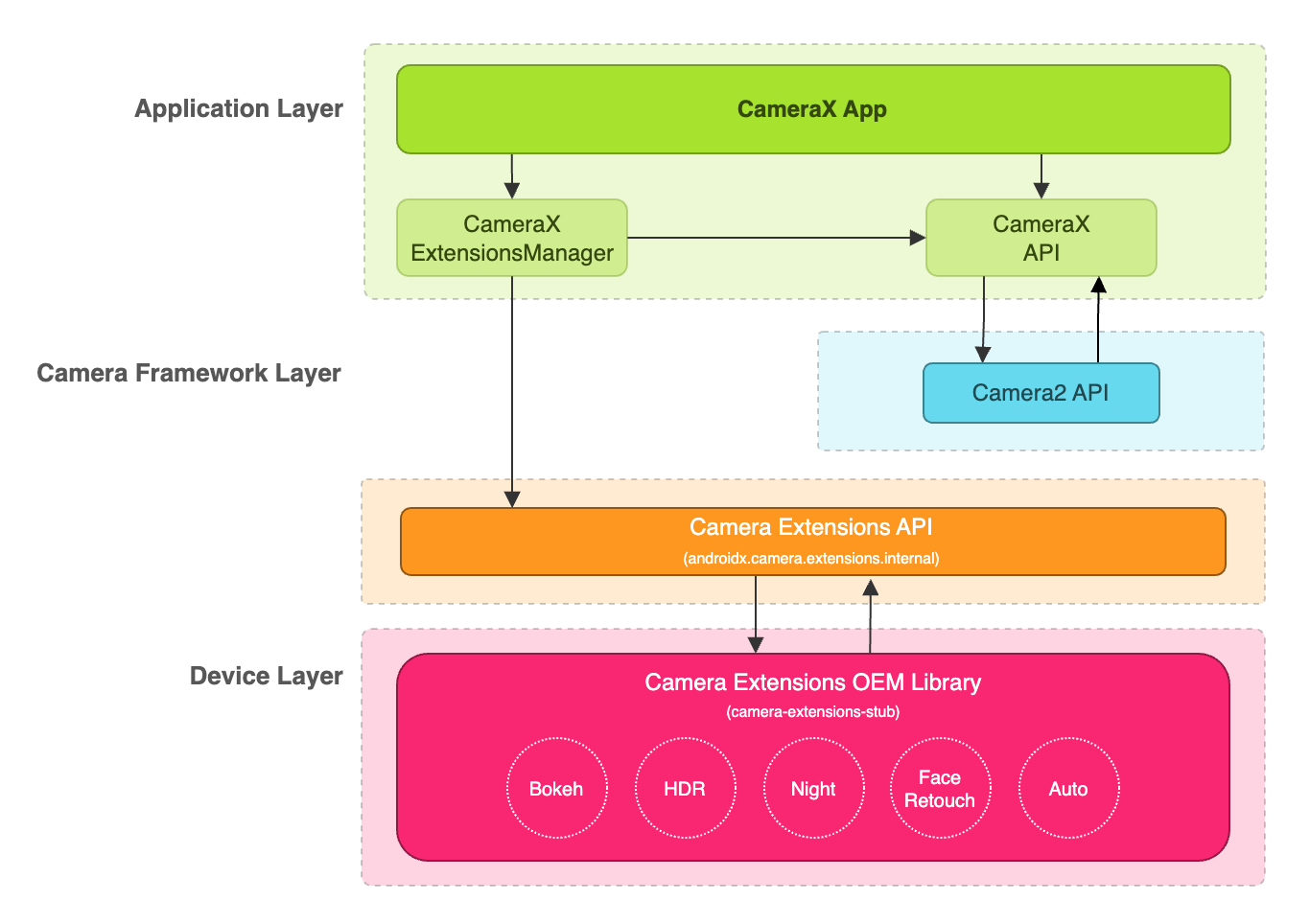
Aplikacja CameraX może korzystać z rozszerzeń za pomocą interfejsu CameraX Extensions API. Interfejs CameraX Extensions API zarządza wysyłaniem zapytań o dostępne rozszerzenia, konfigurowaniem sesji aparatu z rozszerzeniem i komunikacją z biblioteką OEM rozszerzeń aparatu. Dzięki temu aplikacja może korzystać z funkcji takich jak tryb nocny, HDR, automatyczny, bokeh czy retusz twarzy.
Włączanie rozszerzenia do przechwytywania obrazów i wyświetlania ich podglądu
Zanim zaczniesz korzystać z interfejsu Extensions API, pobierz instancję ExtensionsManager za pomocą metody ExtensionsManager#getInstanceAsync(Context, CameraProvider). Umożliwi Ci to wysyłanie zapytań o informacje o dostępności rozszerzenia. Następnie pobierz rozszerzenie z włączoną funkcją CameraSelector. Tryb rozszerzenia będzie stosowany w przypadku przechwytywania obrazu i podglądu, gdy wywoływana jest metoda bindToLifecycle() z włączonym rozszerzeniem CameraSelector.
Aby wdrożyć rozszerzenie w przypadku przechwytywania i podglądu obrazu, zapoznaj się z tym przykładowym kodem:
Kotlin
import androidx.camera.extensions.ExtensionMode
import androidx.camera.extensions.ExtensionsManager

override fun onCreate(savedInstanceState: Bundle?) {
    super.onCreate(savedInstanceState)

    val lifecycleOwner = this

    val cameraProviderFuture = ProcessCameraProvider.getInstance(applicationContext)
    cameraProviderFuture.addListener({
        // Obtain an instance of a process camera provider
        // The camera provider provides access to the set of cameras associated with the device.
        // The camera obtained from the provider will be bound to the activity lifecycle.
        val cameraProvider = cameraProviderFuture.get()

        val extensionsManagerFuture =
            ExtensionsManager.getInstanceAsync(applicationContext, cameraProvider)
        extensionsManagerFuture.addListener({
            // Obtain an instance of the extensions manager
            // The extensions manager enables a camera to use extension capabilities available on
            // the device.
            val extensionsManager = extensionsManagerFuture.get()

            // Select the camera
            val cameraSelector = CameraSelector.DEFAULT_BACK_CAMERA

            // Query if extension is available.
            // Not all devices will support extensions or might only support a subset of
            // extensions.
            if (extensionsManager.isExtensionAvailable(cameraSelector, ExtensionMode.NIGHT)) {
                // Unbind all use cases before enabling different extension modes.
                try {
                    cameraProvider.unbindAll()

                    // Retrieve a night extension enabled camera selector
                    val nightCameraSelector =
                        extensionsManager.getExtensionEnabledCameraSelector(
                            cameraSelector,
                            ExtensionMode.NIGHT
                        )

                    // Bind image capture and preview use cases with the extension enabled camera
                    // selector.
                    val imageCapture = ImageCapture.Builder().build()
                    val preview = Preview.Builder().build()
                    // Connect the preview to receive the surface the camera outputs the frames
                    // to. This will allow displaying the camera frames in either a TextureView
                    // or SurfaceView. The SurfaceProvider can be obtained from the PreviewView.
                    preview.setSurfaceProvider(surfaceProvider)

                    // Returns an instance of the camera bound to the lifecycle
                    // Use this camera object to control various operations with the camera
                    // Example: flash, zoom, focus metering etc.
                    val camera = cameraProvider.bindToLifecycle(
                        lifecycleOwner,
                        nightCameraSelector,
                        imageCapture,
                        preview
                    )
                } catch (e: Exception) {
                    Log.e(TAG, "Use case binding failed", e)
                }
            }
        }, ContextCompat.getMainExecutor(this))
    }, ContextCompat.getMainExecutor(this))
}
Java
import androidx.camera.extensions.ExtensionMode; import androidx.camera.extensions.ExtensionsManager; @Override protected void onCreate(Bundle savedInstanceState) { super.onCreate(savedInstanceState); final LifecycleOwner lifecycleOwner = this; final ListenableFuturecameraProviderFuture = ProcessCameraProvider.getInstance(getApplicationContext()); cameraProviderFuture.addListener(() -> { try { // Obtain an instance of a process camera provider // The camera provider provides access to the set of cameras associated with the // device. The camera obtained from the provider will be bound to the activity // lifecycle. final ProcessCameraProvider cameraProvider = cameraProviderFuture.get(); final ListenableFuture extensionsManagerFuture = ExtensionsManager.getInstanceAsync(getApplicationContext(), cameraProvider); extensionsManagerFuture.addListener(() -> { // Obtain an instance of the extensions manager // The extensions manager enables a camera to use extension capabilities available // on the device. try { final ExtensionsManager extensionsManager = extensionsManagerFuture.get(); // Select the camera final CameraSelector cameraSelector = CameraSelector.DEFAULT_BACK_CAMERA; // Query if extension is available. // Not all devices will support extensions or might only support a subset of // extensions. if (extensionsManager.isExtensionAvailable( cameraSelector, ExtensionMode.NIGHT )) { // Unbind all use cases before enabling different extension modes. cameraProvider.unbindAll(); // Retrieve extension enabled camera selector final CameraSelector nightCameraSelector = extensionsManager .getExtensionEnabledCameraSelector(cameraSelector, ExtensionMode.NIGHT); // Bind image capture and preview use cases with the extension enabled camera // selector. final ImageCapture imageCapture = new ImageCapture.Builder().build(); final Preview preview = new Preview.Builder().build(); // Connect the preview to receive the surface the camera outputs the frames // to. This will allow displaying the camera frames in either a TextureView // or SurfaceView. The SurfaceProvider can be obtained from the PreviewView. preview.setSurfaceProvider(surfaceProvider); cameraProvider.bindToLifecycle( lifecycleOwner, nightCameraSelector, imageCapture, preview ); } } catch (ExecutionException | InterruptedException e) { throw new RuntimeException(e); } }, ContextCompat.getMainExecutor(this)); } catch (ExecutionException | InterruptedException e) { throw new RuntimeException(e); } }, ContextCompat.getMainExecutor(this)); }
Wyłączanie rozszerzenia
Aby wyłączyć rozszerzenia dostawcy, odłącz wszystkie przypadki użycia i ponownie połącz przypadki użycia przechwytywania obrazu i podglądu za pomocą normalnego selektora aparatu. Możesz na przykład ponownie przypisać tylny aparat za pomocą identyfikatora CameraSelector.DEFAULT_BACK_CAMERA.
Zależności
Interfejs CameraX Extensions API jest zaimplementowany w bibliotece camera-extensions.
Rozszerzenia zależą od podstawowych modułów CameraX (core, camera2, lifecycle).
Dynamiczny
dependencies {
  def camerax_version = "1.2.0-rc01"
  implementation "androidx.camera:camera-core:${camerax_version}"
  implementation "androidx.camera:camera-camera2:${camerax_version}"
  implementation "androidx.camera:camera-lifecycle:${camerax_version}"
  //the CameraX Extensions library
  implementation "androidx.camera:camera-extensions:${camerax_version}"
    ...
}
Kotlin
dependencies {
  val camerax_version = "1.2.0-rc01"
  implementation("androidx.camera:camera-core:${camerax_version}")
  implementation("androidx.camera:camera-camera2:${camerax_version}")
  implementation("androidx.camera:camera-lifecycle:${camerax_version}")
  // the CameraX Extensions library
  implementation("androidx.camera:camera-extensions:${camerax_version}")
    ...
}
Usunięcie starszej wersji interfejsu API
Wraz z udostępnieniem nowego interfejsu Extensions API w 1.0.0-alpha26 starszy interfejs Extensions API z sierpnia 2019 r. został wycofany. Od wersji 1.0.0-alpha28 starsza wersja interfejsu Extensions API została usunięta z biblioteki. Aplikacje korzystające z nowego interfejsu API rozszerzeń muszą teraz uzyskać CameraSelector z włączoną obsługą rozszerzeń i używać go do wiązania przypadków użycia.
Aplikacje korzystające ze starszego interfejsu Extensions API powinny przejść na nowy interfejs Extensions API, aby zapewnić przyszłą zgodność z nadchodzącymi wersjami CameraX.
Dodatkowe materiały
Więcej informacji o bibliotece CameraX znajdziesz w tych materiałach.
Ćwiczenia z programowania
Przykładowy kod
Przykładowa aplikacja rozszerzeń CameraX
Inne źródła
Narzędzie do weryfikacji rozszerzeń dostawców CameraX