

CameraX یک API افزونهها برای دسترسی به افزونههایی که سازندگان دستگاه روی دستگاههای مختلف اندروید پیادهسازی کردهاند، ارائه میدهد. برای مشاهدهی فهرستی از حالتهای افزونهی پشتیبانیشده، به افزونههای دوربین مراجعه کنید.
برای مشاهده فهرست دستگاههایی که از افزونهها پشتیبانی میکنند، به دستگاههای پشتیبانیشده مراجعه کنید.
معماری افزونهها
تصویر زیر معماری افزونههای دوربین را نشان میدهد.
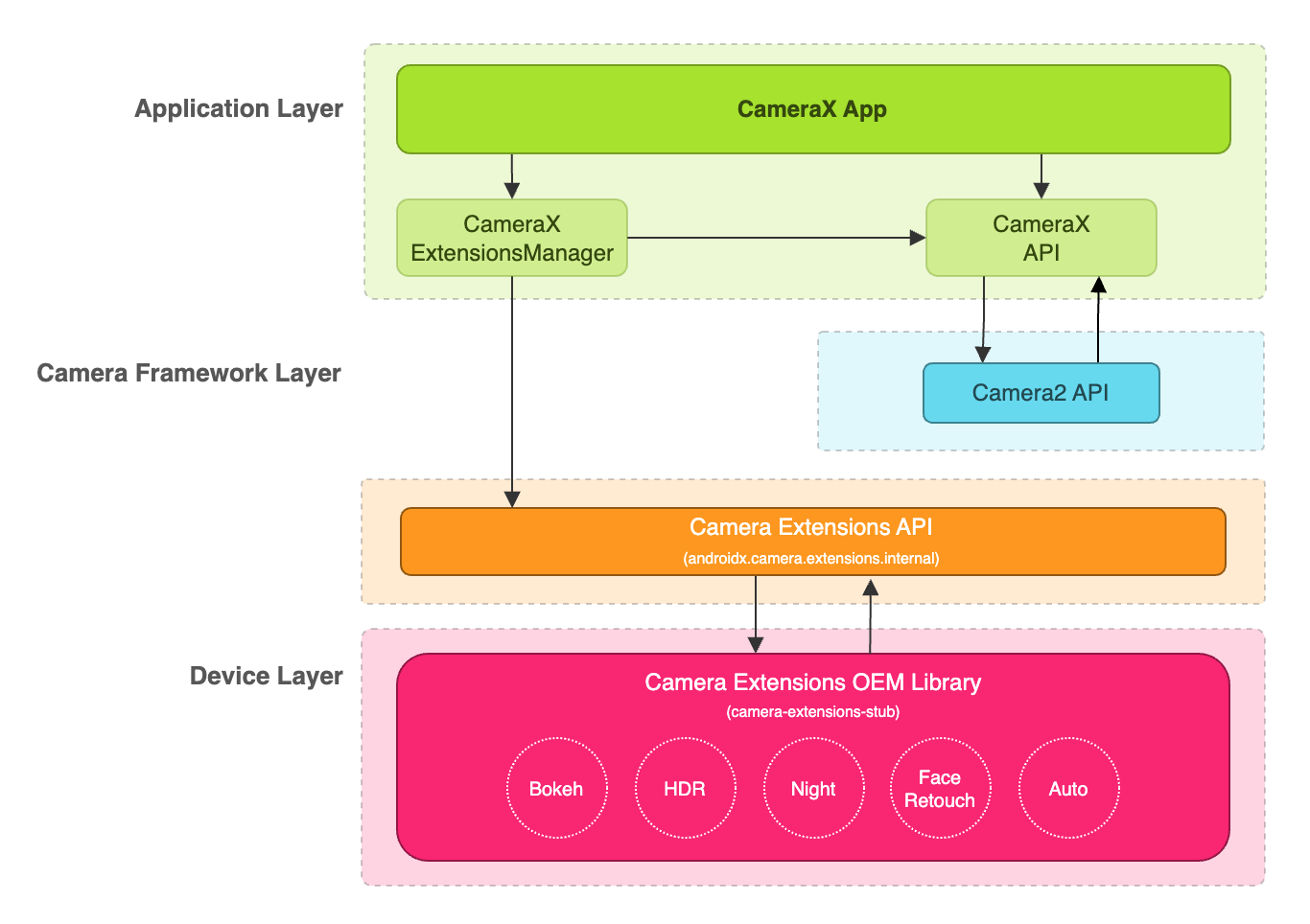
یک برنامه CameraX میتواند از طریق CameraX Extensions API از افزونهها استفاده کند. CameraX Extensions API مدیریت پرسوجو برای افزونههای موجود، پیکربندی یک جلسه دوربین افزونه و ارتباط با کتابخانه Camera Extensions OEM را بر عهده دارد. این به برنامه شما اجازه میدهد تا از قابلیتهایی مانند شب، HDR، خودکار، بوکه یا روتوش چهره استفاده کند.
فعال کردن افزونه برای ضبط و پیشنمایش تصویر
قبل از استفاده از API افزونهها، یک نمونه از ExtensionsManager را با استفاده از متد ExtensionsManager#getInstanceAsync(Context, CameraProvider) بازیابی کنید. این به شما امکان میدهد اطلاعات مربوط به در دسترس بودن افزونه را جستجو کنید. سپس یک CameraSelector فعال شده با افزونه را بازیابی کنید. حالت افزونه در موارد استفاده ضبط و پیشنمایش تصویر هنگام فراخوانی متد bindToLifecycle() با افزونه CameraSelector فعال شده اعمال خواهد شد.
برای پیادهسازی افزونه برای موارد استفاده ضبط تصویر و پیشنمایش، به نمونه کد زیر مراجعه کنید:
کاتلین
import androidx.camera.extensions.ExtensionMode
import androidx.camera.extensions.ExtensionsManager

override fun onCreate(savedInstanceState: Bundle?) {
    super.onCreate(savedInstanceState)

    val lifecycleOwner = this

    val cameraProviderFuture = ProcessCameraProvider.getInstance(applicationContext)
    cameraProviderFuture.addListener({
        // Obtain an instance of a process camera provider
        // The camera provider provides access to the set of cameras associated with the device.
        // The camera obtained from the provider will be bound to the activity lifecycle.
        val cameraProvider = cameraProviderFuture.get()

        val extensionsManagerFuture =
            ExtensionsManager.getInstanceAsync(applicationContext, cameraProvider)
        extensionsManagerFuture.addListener({
            // Obtain an instance of the extensions manager
            // The extensions manager enables a camera to use extension capabilities available on
            // the device.
            val extensionsManager = extensionsManagerFuture.get()

            // Select the camera
            val cameraSelector = CameraSelector.DEFAULT_BACK_CAMERA

            // Query if extension is available.
            // Not all devices will support extensions or might only support a subset of
            // extensions.
            if (extensionsManager.isExtensionAvailable(cameraSelector, ExtensionMode.NIGHT)) {
                // Unbind all use cases before enabling different extension modes.
                try {
                    cameraProvider.unbindAll()

                    // Retrieve a night extension enabled camera selector
                    val nightCameraSelector =
                        extensionsManager.getExtensionEnabledCameraSelector(
                            cameraSelector,
                            ExtensionMode.NIGHT
                        )

                    // Bind image capture and preview use cases with the extension enabled camera
                    // selector.
                    val imageCapture = ImageCapture.Builder().build()
                    val preview = Preview.Builder().build()
                    // Connect the preview to receive the surface the camera outputs the frames
                    // to. This will allow displaying the camera frames in either a TextureView
                    // or SurfaceView. The SurfaceProvider can be obtained from the PreviewView.
                    preview.setSurfaceProvider(surfaceProvider)

                    // Returns an instance of the camera bound to the lifecycle
                    // Use this camera object to control various operations with the camera
                    // Example: flash, zoom, focus metering etc.
                    val camera = cameraProvider.bindToLifecycle(
                        lifecycleOwner,
                        nightCameraSelector,
                        imageCapture,
                        preview
                    )
                } catch (e: Exception) {
                    Log.e(TAG, "Use case binding failed", e)
                }
            }
        }, ContextCompat.getMainExecutor(this))
    }, ContextCompat.getMainExecutor(this))
}
جاوا
import androidx.camera.extensions.ExtensionMode; import androidx.camera.extensions.ExtensionsManager; @Override protected void onCreate(Bundle savedInstanceState) { super.onCreate(savedInstanceState); final LifecycleOwner lifecycleOwner = this; final ListenableFuturecameraProviderFuture = ProcessCameraProvider.getInstance(getApplicationContext()); cameraProviderFuture.addListener(() -> { try { // Obtain an instance of a process camera provider // The camera provider provides access to the set of cameras associated with the // device. The camera obtained from the provider will be bound to the activity // lifecycle. final ProcessCameraProvider cameraProvider = cameraProviderFuture.get(); final ListenableFuture extensionsManagerFuture = ExtensionsManager.getInstanceAsync(getApplicationContext(), cameraProvider); extensionsManagerFuture.addListener(() -> { // Obtain an instance of the extensions manager // The extensions manager enables a camera to use extension capabilities available // on the device. try { final ExtensionsManager extensionsManager = extensionsManagerFuture.get(); // Select the camera final CameraSelector cameraSelector = CameraSelector.DEFAULT_BACK_CAMERA; // Query if extension is available. // Not all devices will support extensions or might only support a subset of // extensions. if (extensionsManager.isExtensionAvailable( cameraSelector, ExtensionMode.NIGHT )) { // Unbind all use cases before enabling different extension modes. cameraProvider.unbindAll(); // Retrieve extension enabled camera selector final CameraSelector nightCameraSelector = extensionsManager .getExtensionEnabledCameraSelector(cameraSelector, ExtensionMode.NIGHT); // Bind image capture and preview use cases with the extension enabled camera // selector. final ImageCapture imageCapture = new ImageCapture.Builder().build(); final Preview preview = new Preview.Builder().build(); // Connect the preview to receive the surface the camera outputs the frames // to. This will allow displaying the camera frames in either a TextureView // or SurfaceView. The SurfaceProvider can be obtained from the PreviewView. preview.setSurfaceProvider(surfaceProvider); cameraProvider.bindToLifecycle( lifecycleOwner, nightCameraSelector, imageCapture, preview ); } } catch (ExecutionException | InterruptedException e) { throw new RuntimeException(e); } }, ContextCompat.getMainExecutor(this)); } catch (ExecutionException | InterruptedException e) { throw new RuntimeException(e); } }, ContextCompat.getMainExecutor(this)); }
غیرفعال کردن افزونه
برای غیرفعال کردن افزونههای فروشنده، همه موارد استفاده را از حالت اتصال خارج کنید و موارد استفاده ضبط تصویر و پیشنمایش را با یک انتخابگر دوربین معمولی دوباره متصل کنید. به عنوان مثال، با استفاده از CameraSelector.DEFAULT_BACK_CAMERA به دوربین عقب دوباره متصل شوید.
وابستگیها
رابط برنامهنویسی کاربردی (API) افزونههای CameraX در کتابخانه camera-extensions پیادهسازی شده است. این افزونهها به ماژولهای اصلی CameraX ( core ، camera2 ، lifecycle ) بستگی دارند.
گرووی
dependencies {
  def camerax_version = "1.2.0-rc01"
  implementation "androidx.camera:camera-core:${camerax_version}"
  implementation "androidx.camera:camera-camera2:${camerax_version}"
  implementation "androidx.camera:camera-lifecycle:${camerax_version}"
  //the CameraX Extensions library
  implementation "androidx.camera:camera-extensions:${camerax_version}"
    ...
}
کاتلین
dependencies {
  val camerax_version = "1.2.0-rc01"
  implementation("androidx.camera:camera-core:${camerax_version}")
  implementation("androidx.camera:camera-camera2:${camerax_version}")
  implementation("androidx.camera:camera-lifecycle:${camerax_version}")
  // the CameraX Extensions library
  implementation("androidx.camera:camera-extensions:${camerax_version}")
    ...
}
حذف API قدیمی
با انتشار API افزونههای جدید در 1.0.0-alpha26 ، API افزونههای قدیمی که در آگوست 2019 منتشر شده بود، اکنون منسوخ شده است. از نسخه 1.0.0-alpha28 ، API افزونههای قدیمی از کتابخانه حذف شده است. برنامههایی که از API افزونههای جدید استفاده میکنند، اکنون باید یک CameraSelector با قابلیت افزونه را دریافت کرده و از آن برای اتصال موارد استفاده استفاده کنند.
برنامههایی که از API افزونههای قدیمی استفاده میکنند باید به API افزونههای جدید مهاجرت کنند تا سازگاری آینده با نسخههای آینده CameraX تضمین شود.
منابع اضافی
برای کسب اطلاعات بیشتر در مورد CameraX، به منابع اضافی زیر مراجعه کنید.
کدلب
نمونه کد
سایر مراجع
ابزار اعتبارسنجی افزونههای فروشنده CameraX