

本指南將詳細說明如何使用 DigitalCredential API 取得使用者的已驗證電話號碼。這項程序包含兩個步驟:
- 預先檢查:查詢 Android Telephony API,確認使用者的電信業者是否支援這個 API。如果系統不支援電信業者,請改用一般簡訊流程。
- 要求
TS.43 token:用戶端應用程式 (「驗證器」) 會向使用者裝置要求臨時 TS.43 權杖。TS.43 token是電信業者核發的憑證,代表使用者身分。 - 將權杖換成電話號碼:應用程式後端會與匯總工具或電信業者交換
TS.43 token,取得使用者經驗證的電話號碼。
Android 版本相容性
電話號碼驗證 API 支援 Android 10 (API 級別 29) 以上版本。
必要條件
如要使用 DigitalCredential API 實作電話號碼驗證,您需要有匯總商或行動電信業者的帳戶。匯總工具會與電信業者互動,並為應用程式提供必要的 API 介面,通常是可計費的 Cloud API 端點。在本指南中,集結網站和電信業者統稱為「集結網站」。
您也需要在 Gradle 建構指令碼中新增下列依附元件:
Kotlin
dependencies {
    implementation("androidx.credentials:credentials:1.7.0-alpha02")
    implementation("androidx.credentials:credentials-play-services-auth:1.7.0-alpha02")
}
Groovy
dependencies {
    implementation "androidx.credentials:credentials:1.7.0-alpha02"
    implementation "androidx.credentials:credentials-play-services-auth:1.7.0-alpha02"
}
導入作業
呼叫 Digital Credentials API 之前,請先使用 Android Telephony API 檢查使用者的電信業者是否支援這項功能。
將 READ_PHONE_STATE 權限新增至 AndroidManifest.xml 檔案。
val telephonyManager = context.getSystemService(Context.TELEPHONY_SERVICE) as TelephonyManager
val carrierId = telephonyManager.getSimCarrierId()
請使用這個 ID,向集結網站後端驗證 TS.43 支援。 如果系統不支援使用者的電信業者,您可以改用其他方法 (例如簡訊),因為呼叫 Digital Credentials API 會傳回空白結果。否則,請繼續執行數位憑證流程。
端對端程序通常包含下列步驟:
- 向集結器要求 DCQL (數位憑證查詢語言) 參數:呼叫一或多個集結器,並要求一組 DCQL 參數。DCQL 可讓您指定要從各個匯總工具取得哪些數位憑證。
建立 OpenID4VP 要求:從應用程式後端建立 OpenID4VP 要求,並加入來自匯總工具的 DCQL 參數。接著,將 OpenID4VP 要求傳送至用戶端應用程式。
呼叫 Credential Manager API:在用戶端應用程式中,使用 Credential Manager API 將 OpenID4VP 要求傳送至作業系統。您會收到包含
TS.43 Digital Credential的 OpenID4VP 回應物件。這組憑證會經過加密,只有相關聯的匯總工具才能解密。收到電信業者權杖後,請將用戶端應用程式的回應傳送至應用程式後端。驗證回應:在應用程式後端驗證 OpenID4VP 回應。
交換電話號碼:從應用程式後端將
TS.43 Digital Credential傳送給匯總工具。匯總工具會驗證憑證,並傳回已驗證的電話號碼。
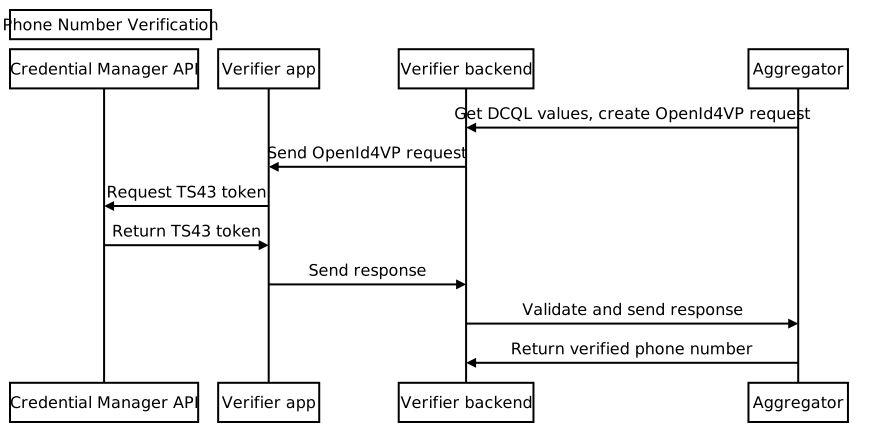
向集結網站要求 DCQL 參數
從應用程式後端,向匯總工具傳送數位憑證查詢語言 (DCQL) 憑證物件要求。請務必在要求中提供 Nonce 和要求 ID。匯總工具會傳回 DCQL 憑證物件,其結構大致如下:
{
  // The credential ID is mapped to the request ID that is sent in your request to the aggregator.
  "id": "aggregator1",
  "format": "dc-authorization+sd-jwt",
  "meta": {
    "vct_values": [
      "number-verification/device-phone-number/ts43"
    ],
    "credential_authorization_jwt": "..."
  },
  "claims": [
    {
      "path": ["subscription_hint"],
      "values": [1]
    },
    {
      "path": ["phone_number_hint"],
      "values": ["+14155552671"]
    }
  ]
}
建立 OpenID4VP 要求
首先,請從應用程式後端建立 dcql_query 物件,方法是將 DCQL 憑證物件放入巢狀結構於 dcql_query 物件中的 credentials 陣列,如以下範例所示:
"dcql_query": {
  "credentials": [
      "id": "aggregator1",
      "format": "dc-authorization+sd-jwt",
      "meta": {
        "vct_values": [
          "number-verification/device-phone-number/ts43"
        ],
        "credential_authorization_jwt": "..."
      },
      "claims": [
        {
          "path": ["subscription_hint"],
          "values": [1]
        },
        {
          "path": ["phone_number_hint"],
          "values": ["+14155552671"]
        }
      ]
  ]
}
接著,建立 OpenID4VP 要求,結構如下:
{
  "protocol": "openid4vp-v1-unsigned",
  "data": {
    "response_type": "vp_token",
    "response_mode": "dc_api",
    "nonce": "...",
    "dcql_query": { ... }
  }
}
protocol:如果是電話號碼驗證要求,必須設為openid4vp-v1-unsigned。response_type和response_mode:常數,表示要求格式,固定值分別為vp_token和dc_api。nonce:後端為每個要求產生的不重複值。匯總工具 DCQL 憑證物件中的 Nonce 必須與這個 Nonce 相符。dcql_query:在這種情況下,請使用dcql_query指定正在要求TS.43 Digital Credential。您也可以在這裡申請其他數位憑證。
接著,將 OpenID4VP 要求包裝在 DigitalCredential API 要求物件中,然後傳送至用戶端應用程式。
{
  "requests":
    [
      {
        "protocol": "openid4vp-v1-unsigned",
        "data": {
          "response_type": "vp_token",
          "response_mode": "dc_api",
          "nonce": "...",
          "dcql_query": { ... }
        }
      }
    ]
}
下列程式碼片段說明如何產生 DigitalCredential API 要求:
def GenerateDCRequest():
    credentials = []
    aggregator1_dcql = call_aggregator_endpoint(nonce, "aggregator1", additional_params)
    credentials.append(aggregator1_dcql) # You can optionally work with multiple
    # aggregators, or request other types of credentials

    val dc_request =
    {
      "requests":
        [
          {
            "protocol": "openid4vp-v1-unsigned",
            "data": {
              "response_type": "vp_token",
              "response_mode": "dc_api",
              "nonce": "...",
              "dcql_query": {"credentials": credentials}
            }
          }
        ]
    }
    return dc_request
呼叫 Credential Manager API
在用戶端應用程式中,使用應用程式後端提供的 DigitalCredential API 要求,呼叫 Credential Manager API。
val requestJson = generateTs43DigitalCredentialRequestFromServer()
val digiCredOption = GetDigitalCredentialOption(requestJson = requestJson)
val getCredRequest = GetCredentialRequest(
    listOf(digiCredOption)
)

coroutineScope.launch {
  try {
    val response = credentialManager.getCredential(
      context = activityContext,
      request = getCredRequest
    )
    val credential = response.credential
    when (credential) {
      is DigitalCredential -> {
        val responseJson = credential.credentialJson
        validateResponseOnServer(responseJson)
      }
      else -> {
        // Catch any unrecognized credential type here.
        Log.e(TAG, "Unexpected type of credential ${credential.type}")
      }
    }
  } catch (e : GetCredentialException) {
      // If user cancels the operation, the feature isn't available, or the
      // SIM doesn't support the feature, a GetCredentialCancellationException
      // will be returned. Otherwise, a GetCredentialUnsupportedException will
      // be returned with details in the exception message.
      handleFailure(e)
  }
}
DigitalCredential API 回應包含 OpenID4VP 回應。DigitalCredential 結果中的一般憑證 JSON 如下所示:
{
  "protocol": "openid4vp-v1-unsigned",

  "data": {
    "vp_token": {
      "aggregator1": ["eyJhbGciOiAiRVMy..."] # The encrypted TS.43 Digital
                                             # Credential in an array structure.
    }
  }
}
從用戶端應用程式將 DigitalCredential API 回應傳回後端伺服器,以便驗證並用於與匯總工具交換經驗證的電話號碼。
在某些情況下,回應可能包含 TS.43 錯誤。錯誤回應是 JSON 物件,格式符合 OpenID4VP 錯誤回應:
{
  "protocol": "openid4vp-v1-unsigned",

  "data": {
    "error": "<error_code>",
    "error_description": "<Human-readable description of the error>",
  }
}
error_code 有 2 個可能的值:
invalid_request:這表示要求格式不正確。server_error:表示處理要求時發生錯誤。這可能是本機錯誤或 TS.43 問題。
error_description 欄位會提供問題的詳細資料。
驗證數位憑證回應
以下範例說明如何剖析回應,並在應用程式後端執行驗證步驟:
def processDigitalCredentialsResponse(response):
  # Step 1: Parse out the TS.43 Digital Credential from the response
  openId4VpResponse = response['data']

  ts43_digital_credential = response['vp_token']["aggregator1"][0]

  # Step 2: Perform response validation
  verifyResponse(ts43_digital_credential)

def verifyResponse(ts43_digital_credential):
  # The returned ts43_digital_credential is an SD-JWT-based Verifiable Credentials
  # (SD-JWT VC) as defined in this IETF spec. The section 3.4 of the specification
  # outlines how to validate the credential. At a high level, the steps involves
  # validating (1) the nonce in the response credential matches the one in the
  # request, (2) the integrity of the credential by checking the credential is
  # signed by the trusted issuer Android Telephony, and (3) other validity
  # properties associated with this credential, such as issue time and expiration
  # time

  # In most cases, you can use an SD-JWT VC library to perform these validations.

  # Some aggregators may also perform the validation logic for you. Check with your
  # aggregator to decide the exact scope of the validation required.
交換電話號碼
從應用程式後端將已驗證的 TS.43 Digital Credential 傳送至匯總工具的端點,驗證憑證並接收已驗證的電話號碼。
def processDigitalCredentialsResponse(response):
  # ... prior steps

  # Step 3: Call aggregator endpoint to exchange the verified phone number
  callAggregatorPnvEndpoint(ts43_digital_credential)