

如果您是原始設備製造商 (OEM),或是維護具備權限的無線 (OTA) 更新用戶端,可以讓裝置上對安全性較為敏感的應用程式瞭解待處理的安全性更新,以便準確評估裝置的安全性狀態。如要強制執行嚴格的零信任原則,應用程式必須能夠驗證裝置上安裝的修補程式等級 (裝置安全性修補程式等級,簡稱 DSPL),以及可供安裝的安全性更新 (可用的安全性修補程式等級,簡稱 ASPL)。
由於沒有權限的用戶端應用程式無法直接讀取韌體屬性、檢查私人更新程式資料庫或查詢內部 OEM 後端端點,AndroidX Security State Provider 程式庫提供標準化且安全的跨程序通訊 (IPC) 架構,更新用戶端可透過這個架構分享可用更新的相關資訊。在 OTA 更新用戶端中導入 UpdateInfoService,即可發布系統的 ASPL 中繼資料,不必公開專屬的後端整合。Google 會為 GMS 裝置的模組化系統元件 (Mainline) 更新程式提供實作項目,非 GMS 裝置也可以發布這些模組化系統元件的 ASPL 中繼資料。
架構總覽
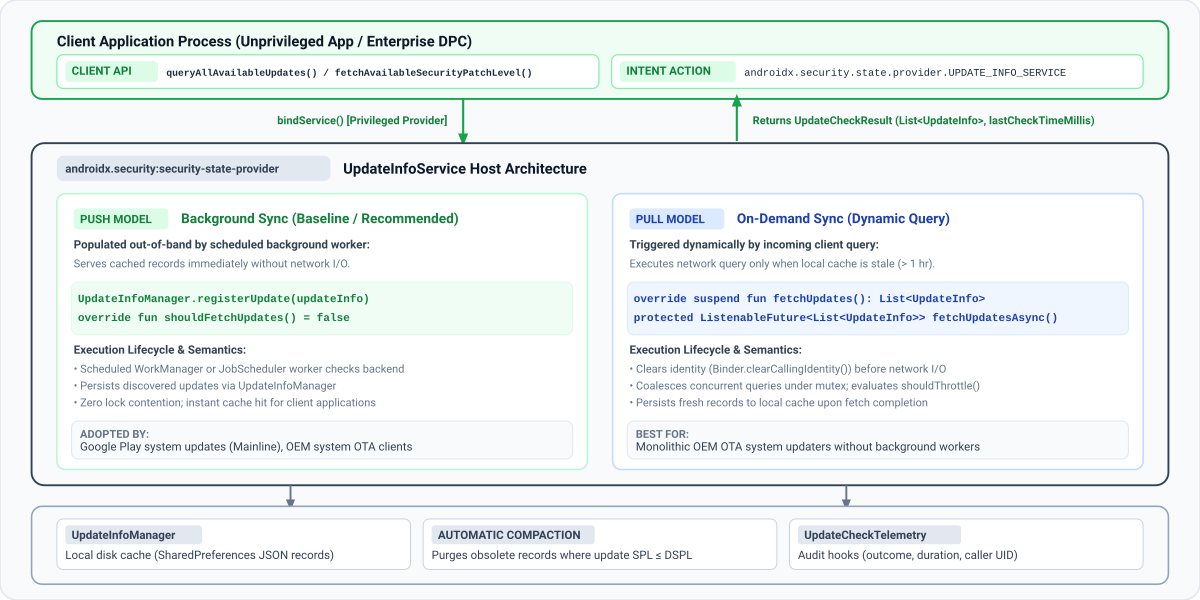
下圖說明 AndroidX Security State Provider 程式庫如何在無權限的用戶端應用程式和裝置端更新服務之間,建立標準化的安全 IPC 架構:
資料傳送模式
用戶端應用程式可以呼叫 queryAllAvailableUpdates 或 fetchAvailableSecurityPatchLevel,查詢更新是否可用。在幕後,用戶端程式庫會自動探索並繫結至裝置上所有註冊的服務,這些服務會從持有 READ_PRIVILEGED_PHONE_STATE 權限的系統應用程式擴充 UpdateInfoService 類別。
如上圖所示,security-state-provider 程式庫支援兩種資料傳送模型:
| 放送模式 | 同步觸發條件 | 客戶回覆 | 建議用途 |
|---|---|---|---|
| 推送模型 (背景同步) | 排定的背景工作者 (WorkManager 或 JobScheduler) 會與後端同步,並將記錄寫入 UpdateInfoManager。服務一律會從本機磁碟快取提供內容 (shouldFetchUpdates() = false)。 |
立即從本機快取提供。 | OEM 系統 OTA 更新程式和背景同步的模組化元件更新程式。 |
| 提取模型 (隨選同步) | 當快取記錄過時 (shouldFetchUpdates() = true) 時,傳入的用戶端 IPC 查詢會觸發網路擷取作業。互斥鎖定合併和速率限制 (shouldThrottle()) 可保護後端免於尖峰流量影響。 |
快取過時時,等待後端擷取。 | 沒有排程背景同步處理工作者的單體 OEM OTA 更新程式。 |
多個更新供應商
在 Android 生產裝置上,多個獨立的更新供應商會同時存在。舉例來說,Mainline 會發布模組化元件 (COMPONENT_SYSTEM_MODULES) 的可用性,而 OEM OTA 用戶端則會發布主要 OS 映像檔 (COMPONENT_SYSTEM) 的更新。
服務只需要為管理的特定元件註冊更新。如果裝置上的多個供應商發布相同元件的更新,用戶端應用程式會評估最高可用修補程式層級 (使用 fetchAvailableSecurityPatchLevel()),或檢查個別 UpdateInfo 記錄 (使用 queryAllAvailableUpdates()) 以進行企業稽核。請確保服務一律發布元件的標準格式 (DateBasedSecurityPatchLevel for COMPONENT_SYSTEM)。
逐步指南:導入更新用戶端
請按照下列步驟,將 AndroidX Security State Provider 程式庫整合至更新用戶端,並開始發布裝置的安全性更新可用性。
步驟 1:新增依附元件
如要實作更新供應器,請確認專案包含 Google Maven 存放區,然後將 security-state-provider 程式庫新增至模組的 build.gradle.kts (Kotlin DSL) 或 build.gradle (Groovy DSL) 檔案:
Kotlin
// Kotlin DSL (build.gradle.kts)
dependencies {
    // Core provider library for OTA and system update clients
    implementation("androidx.security:security-state-provider:1.0.0")
    // Required to construct UpdateInfo and DateBasedSecurityPatchLevel records
    implementation("androidx.security:security-state:1.1.0")
    // Optional: Guava ListenableFuture support for Java implementations
    implementation("androidx.concurrent:concurrent-futures:1.2.0")
    implementation("com.google.guava:guava:33.0.0-android")
}
Groovy
// Groovy DSL (build.gradle)
dependencies {
    // Core provider library for OTA and system update clients
    implementation 'androidx.security:security-state-provider:1.0.0'
    // Required to construct UpdateInfo and DateBasedSecurityPatchLevel records
    implementation 'androidx.security:security-state:1.1.0'
    // Optional: Guava ListenableFuture support for Java implementations
    implementation 'androidx.concurrent:concurrent-futures:1.2.0'
    implementation 'com.google.guava:guava:33.0.0-android'
}
步驟 2:在資訊清單中宣告更新服務
在應用程式的 AndroidManifest.xml 中,使用符合 androidx.security.state.provider.UPDATE_INFO_SERVICE 的 <intent-filter> 宣告服務。服務必須匯出 (android:exported="true") 並設定為單一使用者服務 (android:singleUser="true"),用戶端程式庫才能跨程序和使用者界線 (尤其是工作資料夾) 繫結至該服務:
<!-- AndroidManifest.xml -->
<manifest xmlns:android="http://schemas.android.com/apk/res/android"
    xmlns:tools="http://schemas.android.com/tools"
    package="com.example.android.updater">
    <application>
        <service
            android:name=".MyUpdateInfoService"
            android:exported="true"
            android:singleUser="true"
            tools:ignore="ExportedService">
            <intent-filter>
                <action android:name="androidx.security.state.provider.UPDATE_INFO_SERVICE" />
            </intent-filter>
        </service>
    </application>
</manifest>
如果更新工具不是以 android.uid.system 執行,請在資訊清單中宣告下列權限,並確保將這些權限新增至特殊權限允許清單:
READ_PRIVILEGED_PHONE_STATE:用戶端信任供應商的必要條件。INTERACT_ACROSS_USERS:android:singleUser="true"必須提供這項資訊。
步驟 3:實作 UpdateInfoService
如要發布更新狀態,您必須實作 UpdateInfoService 類別,並建構符合預期資料模型的更新記錄。
UpdateInfo 資料模型規格
無論選擇 Push 模式或 Pull 模式,請根據下列規格,使用 UpdateInfo.Builder 建構 UpdateInfo 記錄:
| 欄位名稱 | Getter 方法 | 資料類型 | 驗證和格式規定 | 用途和系統語意 |
|---|---|---|---|---|
component |
getComponent() |
String (@Component) |
SecurityPatchState 中的標準常數:COMPONENT_SYSTEM、COMPONENT_SYSTEM_MODULES 或 COMPONENT_KERNEL。 |
識別這項更新的目標軟體或韌體子系統。 |
securityPatchLevel |
getSecurityPatchLevel() |
SecurityPatchLevel |
必須是 DateBasedSecurityPatchLevel (YYYY-MM-DD) 或 VersionedSecurityPatchLevel (major.minor.patch) 的執行個體,或使用 SecurityPatchState.getComponentSecurityPatchLevel() 剖析。 |
安裝這項更新後,裝置將達到的目標安全性修補程式等級。 |
publishedDateMillis |
getPublishedDateMillis() |
long |
自 Unix 紀元以來的毫秒數 (System.currentTimeMillis())。必須為 > 0。 |
向使用者提供更新的時間,例如無線更新發布時間。請勿使用酬載下載或安裝時間。 |
lastCheckTimeMillis |
getLastCheckTimeMillis() |
long |
自 Unix 紀元起算的毫秒數。必須為 > 0。 |
供應商在同步期間驗證或發現這項更新記錄的時間戳記。 |
請從下列選項中,選擇適合更新程式架構的傳送模式:
方法 A:推送模型 (建議)
當背景同步處理工作人員檢查 OTA 伺服器時,請驗證發現的任何更新是否會提升裝置目前的修補程式等級,並使用 UpdateInfoManager.registerUpdate() 持續更新,或在沒有待處理的安全性更新時呼叫 UpdateInfoManager.unregisterUpdate()。請務必在每次同步處理結束時呼叫 UpdateInfoManager.setLastCheckTimeMillis() (即使在呼叫 registerUpdate() 之後也一樣,因為這樣會保留每個元件的 UpdateInfo 記錄,但不會更新傳回給用戶端的全域上次檢查時間戳記)。您可以在 Kotlin 中使用 WorkManager CoroutineWorker 實作這項功能,或在 Java 中使用 Worker:
Kotlin
import android.content.Context
import androidx.security.state.SecurityPatchState
import androidx.security.state.SecurityPatchState.DateBasedSecurityPatchLevel
import androidx.security.state.UpdateInfo
import androidx.security.state.provider.UpdateInfoManager
import androidx.work.CoroutineWorker
import androidx.work.WorkerParameters
import kotlin.math.max

class OtaSyncWorker(context: Context, params: WorkerParameters) : CoroutineWorker(context, params) {
    override suspend fun doWork(): Result {
        val updateInfoManager = UpdateInfoManager(applicationContext)
        val securityPatchState = SecurityPatchState(applicationContext)
        val currentSpl = securityPatchState.getDeviceSecurityPatchLevel(SecurityPatchState.COMPONENT_SYSTEM)

        // 1. Fetch available update metadata from OEM backend
        val latestUpdate = MyOtaClient.fetchLatestSystemUpdate()
        val targetSplString = latestUpdate?.spl?.trim()
        val targetSpl = if (!targetSplString.isNullOrEmpty()) {
            DateBasedSecurityPatchLevel.fromString(targetSplString)
        } else {
            null
        }

        // 2. Defensively verify that target SPL is non-blank AND strictly newer than installed DSPL.
        // If an update is a maintenance patch with no SPL increment (or if no update is available),
        // unregister any stale cached record for this component.
        if (latestUpdate != null && targetSpl != null && targetSpl > currentSpl) {
            val updateInfo = UpdateInfo.Builder()
                .setComponent(SecurityPatchState.COMPONENT_SYSTEM)
                .setSecurityPatchLevel(targetSpl)
                .setPublishedDateMillis(latestUpdate.releaseTimeMillis)
                .setLastCheckTimeMillis(System.currentTimeMillis())
                .build()
            updateInfoManager.registerUpdate(updateInfo)
        } else {
            val clearTarget = UpdateInfo.Builder()
                .setComponent(SecurityPatchState.COMPONENT_SYSTEM)
                .build()
            updateInfoManager.unregisterUpdate(clearTarget)
        }

        // 3. Update global freshness timestamp (monotonic synchronization)
        val currentCheckTime = System.currentTimeMillis()
        val previousCheckTime = updateInfoManager.getLastCheckTimeMillis()
        updateInfoManager.setLastCheckTimeMillis(max(previousCheckTime, currentCheckTime))
        return Result.success()
    }
}
Java
import android.content.Context;
import android.text.TextUtils;
import androidx.annotation.NonNull;
import androidx.security.state.SecurityPatchState;
import androidx.security.state.SecurityPatchState.DateBasedSecurityPatchLevel;
import androidx.security.state.SecurityPatchState.SecurityPatchLevel;
import androidx.security.state.UpdateInfo;
import androidx.security.state.provider.UpdateInfoManager;
import androidx.work.Worker;
import androidx.work.WorkerParameters;

public class OtaSyncWorker extends Worker {
    public OtaSyncWorker(@NonNull Context context, @NonNull WorkerParameters params) {
        super(context, params);
    }

    @NonNull
    @Override
    public Result doWork() {
        // In Java, pass null for customSecurityState because UpdateInfoManager does not declare @JvmOverloads
        UpdateInfoManager updateInfoManager =
                new UpdateInfoManager(getApplicationContext(), /* customSecurityState= */ null);
        SecurityPatchState securityPatchState = new SecurityPatchState(getApplicationContext());
        SecurityPatchLevel currentSpl =
                securityPatchState.getDeviceSecurityPatchLevel(SecurityPatchState.COMPONENT_SYSTEM);

        // 1. Fetch available update metadata from OEM backend
        MyOtaUpdate latestUpdate = MyOtaClient.fetchLatestSystemUpdate();
        String targetSplString = (latestUpdate != null && latestUpdate.getSpl() != null)
                ? latestUpdate.getSpl().trim()
                : null;
        DateBasedSecurityPatchLevel targetSpl =
                !TextUtils.isEmpty(targetSplString)
                        ? DateBasedSecurityPatchLevel.fromString(targetSplString)
                        : null;

        // 2. Defensively verify that target SPL is non-blank AND strictly newer than installed DSPL.
        // If an update is a maintenance patch with no SPL increment (or if no update is available),
        // unregister any stale cached record for this component.
        if (latestUpdate != null && targetSpl != null && targetSpl.compareTo(currentSpl) > 0) {
            UpdateInfo updateInfo = new UpdateInfo.Builder()
                    .setComponent(SecurityPatchState.COMPONENT_SYSTEM)
                    .setSecurityPatchLevel(targetSpl)
                    .setPublishedDateMillis(latestUpdate.getReleaseTimeMillis())
                    .setLastCheckTimeMillis(System.currentTimeMillis())
                    .build();
            updateInfoManager.registerUpdate(updateInfo);
        } else {
            UpdateInfo clearTarget = new UpdateInfo.Builder()
                    .setComponent(SecurityPatchState.COMPONENT_SYSTEM)
                    .build();
            updateInfoManager.unregisterUpdate(clearTarget);
        }

        // 3. Update global freshness timestamp (monotonic synchronization)
        long currentCheckTime = System.currentTimeMillis();
        long previousCheckTime = updateInfoManager.getLastCheckTimeMillis();
        updateInfoManager.setLastCheckTimeMillis(Math.max(previousCheckTime, currentCheckTime));
        return Result.success();
    }
}
在以推送為基礎的模型中,背景工作會直接將更新記錄保留在 UpdateInfoManager。如要指示框架一律從本機磁碟儲存空間提供記錄,請覆寫 shouldFetchUpdates(),藉由擴充 Kotlin 中的 UpdateInfoService 或 Java 中的 ListenableFutureUpdateInfoService,傳回 false:
Kotlin
import androidx.security.state.UpdateInfo
import androidx.security.state.provider.UpdateInfoService

class PushUpdateInfoService : UpdateInfoService() {
    // Cache is populated out-of-band by background sync tasks
    override fun shouldFetchUpdates(): Boolean = false

    // Never invoked under normal flow because shouldFetchUpdates() returns false
    override suspend fun fetchUpdates(): List<UpdateInfo> = emptyList()
}
Java
import androidx.annotation.NonNull;
import androidx.security.state.UpdateInfo;
import androidx.security.state.provider.ListenableFutureUpdateInfoService;
import com.google.common.util.concurrent.Futures;
import com.google.common.util.concurrent.ListenableFuture;
import java.util.Collections;
import java.util.List;

public class PushUpdateInfoService extends ListenableFutureUpdateInfoService {
    @Override
    protected boolean shouldFetchUpdates() {
        return false;
    }

    @NonNull
    @Override
    protected ListenableFuture<List<UpdateInfo>> fetchUpdatesAsync() {
        return Futures.immediateFuture(Collections.emptyList());
    }
}
選項 B:提取模式 (隨選)
在提取式架構中,當本機快取過時時,您的服務會處理用戶端應用程式觸發的隨選重新整理要求。
如要處理隨選更新查詢,請在 Kotlin 中擴充 UpdateInfoService (實作暫停 fetchUpdates() 函式),或在 Java 中擴充 ListenableFutureUpdateInfoService (實作 fetchUpdatesAsync(),傳回 Guava ListenableFuture):
Kotlin
package com.example.android.updater

import androidx.security.state.SecurityPatchState
import androidx.security.state.SecurityPatchState.DateBasedSecurityPatchLevel
import androidx.security.state.UpdateInfo
import androidx.security.state.provider.UpdateInfoManager
import androidx.security.state.provider.UpdateInfoService
import java.util.concurrent.TimeUnit

class MyUpdateInfoService : UpdateInfoService() {
    // Manage local update records and check timestamps
    private val updateInfoManager by lazy { UpdateInfoManager(this) }

    override suspend fun fetchUpdates(): List<UpdateInfo> {
        val currentSpl = SecurityPatchState(this)
            .getDeviceSecurityPatchLevel(SecurityPatchState.COMPONENT_SYSTEM)

        // 1. Execute network request to OTA backend
        val response = MyOtaBackendClient.checkAvailableUpdates()

        // 2. Defensively filter out blank or non-advancing SPLs and map to UpdateInfo objects
        val validUpdates = response.updates
            .mapNotNull { updateItem ->
                val splString = updateItem.targetSpl?.trim()
                if (splString.isNullOrEmpty()) return@mapNotNull null
                val parsedSpl = DateBasedSecurityPatchLevel.fromString(splString)
                if (parsedSpl > currentSpl) {
                    UpdateInfo.Builder()
                        .setComponent(SecurityPatchState.COMPONENT_SYSTEM)
                        .setSecurityPatchLevel(parsedSpl)
                        .setPublishedDateMillis(updateItem.releaseTimestampMillis)
                        .setLastCheckTimeMillis(System.currentTimeMillis())
                        .build()
                } else {
                    null
                }
            }

        // 3. If no advancing SYSTEM update is available (or if a previously offered update was revoked),
        // proactively unregister any cached record for this component.
        if (validUpdates.isEmpty()) {
            val clearTarget = UpdateInfo.Builder()
                .setComponent(SecurityPatchState.COMPONENT_SYSTEM)
                .build()
            updateInfoManager.unregisterUpdate(clearTarget)
        }
        return validUpdates
    }

    override fun shouldFetchUpdates(): Boolean {
        // Enforce custom freshness threshold (for example, 4 hours instead of default 1 hour)
        val lastCheckMillis = updateInfoManager.getLastCheckTimeMillis()
        val dataAge = System.currentTimeMillis() - lastCheckMillis
        return dataAge > TimeUnit.HOURS.toMillis(4)
    }
}
Java
package com.example.android.updater;

import android.text.TextUtils;
import androidx.annotation.NonNull;
import androidx.security.state.SecurityPatchState;
import androidx.security.state.SecurityPatchState.DateBasedSecurityPatchLevel;
import androidx.security.state.SecurityPatchState.SecurityPatchLevel;
import androidx.security.state.UpdateInfo;
import androidx.security.state.provider.ListenableFutureUpdateInfoService;
import androidx.security.state.provider.UpdateInfoManager;
import com.google.common.util.concurrent.Futures;
import com.google.common.util.concurrent.ListenableFuture;
import java.util.ArrayList;
import java.util.List;
import java.util.concurrent.TimeUnit;

public class MyUpdateInfoService extends ListenableFutureUpdateInfoService {
    private UpdateInfoManager updateInfoManager;

    @Override
    public void onCreate() {
        super.onCreate();
        // Pass null for customSecurityState because UpdateInfoManager does not declare @JvmOverloads
        updateInfoManager = new UpdateInfoManager(this, /* customSecurityState= */ null);
    }

    @NonNull
    @Override
    protected ListenableFuture<List<UpdateInfo>> fetchUpdatesAsync() {
        try {
            SecurityPatchLevel currentSpl = new SecurityPatchState(this)
                    .getDeviceSecurityPatchLevel(SecurityPatchState.COMPONENT_SYSTEM);
            MyOtaBackendResponse response = MyOtaBackendClient.checkAvailableUpdates();
            List<UpdateInfo> updates = new ArrayList<>();
            for (MyOtaUpdateItem item : response.getUpdates()) {
                String trimmedSpl = (item.getTargetSpl() != null) ? item.getTargetSpl().trim() : null;
                if (!TextUtils.isEmpty(trimmedSpl)) {
                    DateBasedSecurityPatchLevel parsedSpl =
                            DateBasedSecurityPatchLevel.fromString(trimmedSpl);
                    if (parsedSpl.compareTo(currentSpl) > 0) {
                        updates.add(new UpdateInfo.Builder()
                                .setComponent(SecurityPatchState.COMPONENT_SYSTEM)
                                .setSecurityPatchLevel(parsedSpl)
                                .setPublishedDateMillis(item.getReleaseTimestampMillis())
                                .setLastCheckTimeMillis(System.currentTimeMillis())
                                .build());
                    }
                }
            }

            // If no advancing SYSTEM update is available (or if a previously offered update was revoked),
            // proactively unregister any cached record for this component.
            if (updates.isEmpty()) {
                UpdateInfo clearTarget = new UpdateInfo.Builder()
                        .setComponent(SecurityPatchState.COMPONENT_SYSTEM)
                        .build();
                updateInfoManager.unregisterUpdate(clearTarget);
            }
            return Futures.immediateFuture(updates);
        } catch (Exception e) {
            return Futures.immediateFailedFuture(e);
        }
    }

    @Override
    protected boolean shouldFetchUpdates() {
        long lastCheckMillis = updateInfoManager.getLastCheckTimeMillis();
        long dataAge = System.currentTimeMillis() - lastCheckMillis;
        return dataAge > TimeUnit.HOURS.toMillis(4);
    }
}
步驟 4:在裝置重新啟動後清除已套用的更新
UpdateInfoManager 會在每次叫用 registerUpdate() 時,自動修剪過時的更新項目,但更新工具不會在 OTA 更新安裝完成後再次呼叫 registerUpdate(),直到下一個排定的伺服器同步週期為止。為避免用戶端應用程式在重新啟動後,立即將已安裝的更新視為待處理,請監聽 ACTION_BOOT_COMPLETED,並在 OTA 更新安裝完成時呼叫 UpdateInfoManager.unregisterUpdate(),清除本機快取中的記錄。只有在更新安裝完成後才執行這項操作,可避免在每次正常重新啟動裝置時,無條件清除待處理 (已解除安裝) 的更新。由於 UpdateInfoManager 鍵會依元件更新記錄,因此建構用於取消註冊的 UpdateInfo 物件時,您只需要指定目標元件:
Kotlin
// Build target identifying the component to unregister
val target = UpdateInfo.Builder()
    .setComponent(SecurityPatchState.COMPONENT_SYSTEM)
    .build()
// Unregister the update to remove it from disk cache
updateInfoManager.unregisterUpdate(target)
// Refresh last check timestamp to indicate up-to-date state
updateInfoManager.setLastCheckTimeMillis(System.currentTimeMillis())
Java
// Build target identifying the component to unregister
UpdateInfo target = new UpdateInfo.Builder()
    .setComponent(SecurityPatchState.COMPONENT_SYSTEM)
    .build();
// Unregister the update to remove it from disk cache
updateInfoManager.unregisterUpdate(target);
// Refresh last check timestamp to indicate up-to-date state
updateInfoManager.setLastCheckTimeMillis(System.currentTimeMillis());
步驟 5:驗證整合功能
使用 Android Debug Bridge (ADB) 在 Android 裝置或模擬器上執行下列檢查,驗證端對端整合,並避免常見的 OEM 部署陷阱:
確認用戶端信任您的供應商:用戶端應用程式會忽略任何未持有
READ_PRIVILEGED_PHONE_STATE的供應商,即使是預先安裝的供應商也一樣。確認已授予權限:adb shell dumpsys package <your_package_name> | grep "READ_PRIVILEGED_PHONE_STATE: granted=true"然後確認服務可供探索,且沒有服務權限。 在服務的輸出內容中,檢查
exported=true和permission=null:adb shell pm query-services --user 0 -a androidx.security.state.provider.UPDATE_INFO_SERVICE如果用戶端仍未看到供應商,請檢查 logcat 中的
SecurityPatchState標記是否有Ignoring untrusted update provider。在使用者 0 和工作資料夾中驗證意圖解析:確認 Android 作業系統
PackageManager會在主要使用者 (User 0) 和任何有效的 Android Enterprise 工作資料夾 (例如User 10) 中,解析您匯出的UPDATE_INFO_SERVICE意圖篩選器:adb shell pm query-services --user 0 -a androidx.security.state.provider.UPDATE_INFO_SERVICE adb shell pm query-services --user 10 -a androidx.security.state.provider.UPDATE_INFO_SERVICE使用
dumpsys驗證服務狀態和快取記錄:UpdateInfoService會覆寫dump(),以回報Global Last Check、Should Throttle(速率限制器的狀態) 和Cached Updates。由於UpdateInfoService是繫結服務,且用戶端會在查詢後立即取消繫結,因此當沒有繫結任何用戶端時,dumpsys activity service會輸出(nothing)。在執行dumpsys之前,請先明確啟動服務:adb shell am start-service -a androidx.security.state.provider.UPDATE_INFO_SERVICE <your_package_name>/.<service_class_name> adb shell dumpsys activity service <your_package_name>/.<service_class_name>診斷輸出內容範例:
UpdateInfoService State: Active Requests: 0 Global Last Check: Thu Jan 01 12:00:00 UTC 2026 Should Throttle: false Cached Updates (1): - Component: SYSTEM SPL: 2026-01-01 Published: Thu Jan 01 00:00:00 UTC 2026 Last Checked: Thu Jan 01 12:00:00 UTC 2026觸發用戶端繫結並驗證遙測結果:從沒有權限的測試應用程式 (未持有系統簽章權限) 叫用
SecurityPatchState.queryAllAvailableUpdates()。如果您實作了遙測回呼,請檢查下列事項:- 確認未獲授權的用戶端會繫結,且不會觸發
SecurityException和onClientConnected(packageName, callerUid)。 - 對於 Push 模型供應商 (
shouldFetchUpdates() == false):確認onRequestCompleted(telemetry)記錄UpdateFetchOutcome.CACHE_HIT(1) 每次查詢時都會fetchDurationMillis == 0。 - 對於提取模型供應商 (
shouldFetchUpdates() == true):確認初始過時快取查詢的onRequestCompleted(telemetry)記錄UpdateFetchOutcome.FETCHED(3),以及後續查詢的CACHE_HIT(1)。(如要在 Pull 模型測試執行之間重設 1 小時的持續性速率限制器,請執行adb shell pm clear <your_package_name>)。
- 確認未獲授權的用戶端會繫結,且不會觸發
選用和進階設定
快取政策和頻率限制
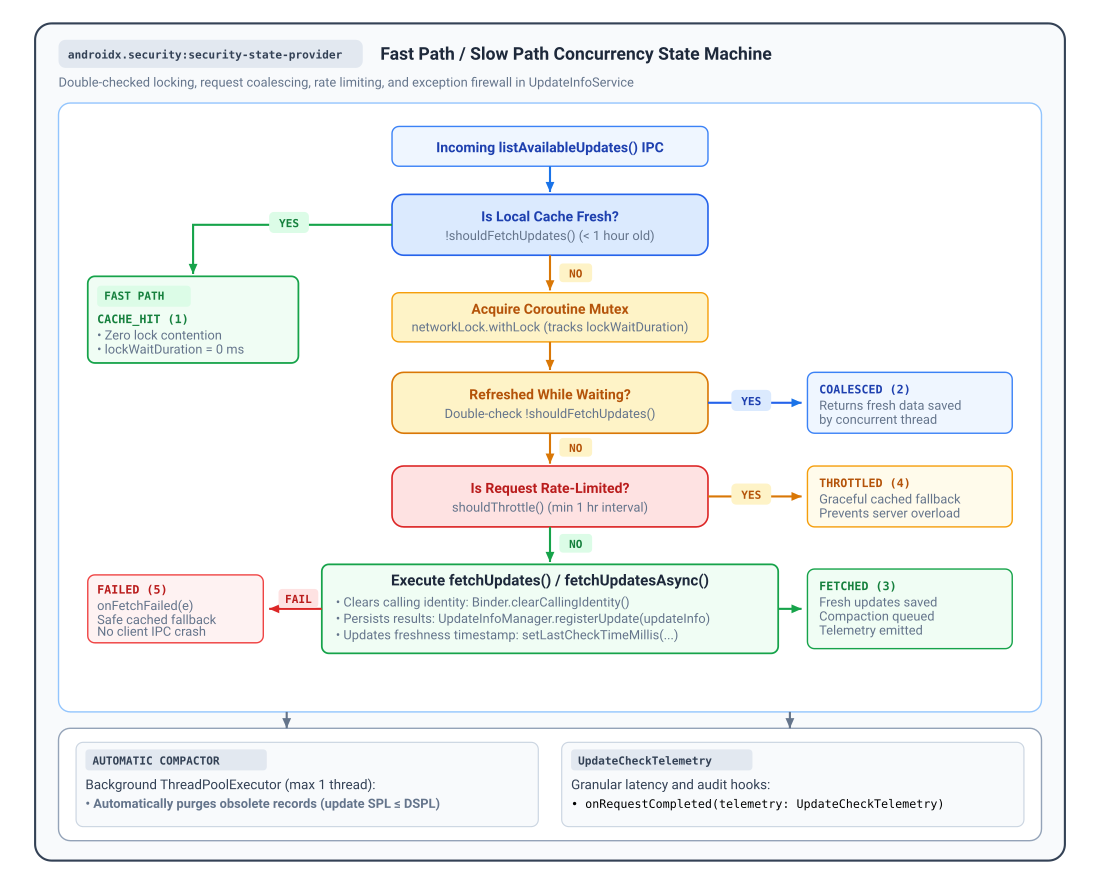
當用戶端查詢更新時,UpdateInfoService 會執行雙重檢查鎖定工作流程,以平衡資料新鮮度和後端伺服器負載:
- 快速路徑 (
shouldFetchUpdates()):根據預設,只有在全域lastCheckTimeMillis較舊 (超過 1 小時) (TimeUnit.HOURS.toMillis(1)) 時,shouldFetchUpdates()才會傳回true(表示快取過時)。如果shouldFetchUpdates()傳回false,服務會立即傳回快取記錄,結果為UpdateFetchOutcome.CACHE_HIT,不會取得鎖定或執行網路 I/O。您可以覆寫shouldFetchUpdates(),自訂這項快取政策。 - 慢速路徑和要求合併:當
shouldFetchUpdates()傳回true時,服務會取得內部協同程式互斥鎖,並重新評估shouldFetchUpdates()(如果並行要求在等待鎖定時已重新整理快取,則傳回UpdateFetchOutcome.COALESCED)。 - 持續性速率限制器 (
shouldThrottle()):為保護後端基礎架構免於查詢爆量或重複失敗,shouldThrottle()會在應用程式和裝置重新啟動時,強制執行至少 1 小時的間隔。UpdateInfoService會在叫用fetchUpdates()前記錄每次嘗試,因此如果fetchUpdates()擲回例外狀況 (在叫用onFetchFailed(e)後傳回UpdateFetchOutcome.FAILED),接下來 60 分鐘內的後續查詢會正常傳回快取的備援資料,並顯示UpdateFetchOutcome.THROTTLED結果。
可觀測性、遙測和診斷
UpdateInfoService 提供內建的可觀測性掛鉤,可追蹤用戶端採用情形、監控 IPC 延遲時間,以及記錄後端錯誤,不必使用低階 AIDL 存根進行插樁:
onRequestCompleted(telemetry):每次更新檢查完成時,都會叫用這個函式,並提供UpdateCheckTelemetry摘要。onClientConnected(packageName, callerUid):經過驗證的用戶端開啟工作階段時,系統會叫用這個方法。onClientDisconnected(packageName, callerUid):在用戶端取消繫結或程序終止時叫用。onFetchFailed(e): 如果在fetchUpdates()期間發生例外狀況,且服務傳回快取的回溯資料之前,系統會叫用這個方法。
在 UpdateInfoService (Kotlin) 或 ListenableFutureUpdateInfoService (Java) 中覆寫這些回呼:
Kotlin
import androidx.security.state.provider.UpdateCheckTelemetry
import androidx.security.state.provider.UpdateFetchOutcome
import androidx.security.state.provider.UpdateInfoService

abstract class MonitoredUpdateInfoService : UpdateInfoService() {
    override fun onRequestCompleted(telemetry: UpdateCheckTelemetry) {
        val outcomeName = when (telemetry.outcome) {
            UpdateFetchOutcome.CACHE_HIT -> "CACHE_HIT"
            UpdateFetchOutcome.COALESCED -> "COALESCED"
            UpdateFetchOutcome.FETCHED -> "FETCHED"
            UpdateFetchOutcome.THROTTLED -> "THROTTLED"
            UpdateFetchOutcome.FAILED -> "FAILED"
            else -> "UNKNOWN"
        }
        MyAnalytics.logEvent("SECURITY_UPDATE_CHECK")
            .addParam("outcome", outcomeName)
            .addParam("total_duration_ms", telemetry.totalDurationMillis)
            .addParam("lock_wait_ms", telemetry.lockWaitDurationMillis)
            .addParam("processing_ms", telemetry.processingDurationMillis)
            .addParam("fetch_duration_ms", telemetry.fetchDurationMillis)
            .addParam("caller_uid", telemetry.callerUid)
            .send()
    }

    override fun onClientConnected(packageName: String, callerUid: Int) {
        // Track authenticated client sessions and adoption
        MyMetrics.incrementCounter("client_connected", "package", packageName)
    }

    override fun onClientDisconnected(packageName: String, callerUid: Int) {
        // Track session termination and cleanup resources
        MyMetrics.incrementCounter("client_disconnected", "package", packageName)
    }

    override fun onFetchFailed(e: Exception) {
        // Report exceptions caught during the update check workflow
        MyCrashReporter.recordException(e)
    }
}
Java
import androidx.annotation.NonNull;
import androidx.security.state.provider.ListenableFutureUpdateInfoService;
import androidx.security.state.provider.UpdateCheckTelemetry;
import androidx.security.state.provider.UpdateFetchOutcome;

public abstract class MonitoredUpdateInfoService extends ListenableFutureUpdateInfoService {
    @Override
    protected void onRequestCompleted(@NonNull UpdateCheckTelemetry telemetry) {
        String outcomeName;
        switch (telemetry.getOutcome()) {
            case UpdateFetchOutcome.CACHE_HIT: outcomeName = "CACHE_HIT"; break;
            case UpdateFetchOutcome.COALESCED: outcomeName = "COALESCED"; break;
            case UpdateFetchOutcome.FETCHED: outcomeName = "FETCHED"; break;
            case UpdateFetchOutcome.THROTTLED: outcomeName = "THROTTLED"; break;
            case UpdateFetchOutcome.FAILED: outcomeName = "FAILED"; break;
            default: outcomeName = "UNKNOWN"; break;
        }
        MyAnalytics.logEvent("SECURITY_UPDATE_CHECK")
            .addParam("outcome", outcomeName)
            .addParam("total_duration_ms", telemetry.getTotalDurationMillis())
            .addParam("lock_wait_ms", telemetry.getLockWaitDurationMillis())
            .addParam("processing_ms", telemetry.getProcessingDurationMillis())
            .addParam("fetch_duration_ms", telemetry.getFetchDurationMillis())
            .addParam("caller_uid", telemetry.getCallerUid())
            .send();
    }

    @Override
    protected void onClientConnected(@NonNull String packageName, int callerUid) {
        MyMetrics.incrementCounter("client_connected", "package", packageName);
    }

    @Override
    protected void onClientDisconnected(@NonNull String packageName, int callerUid) {
        MyMetrics.incrementCounter("client_disconnected", "package", packageName);
    }

    @Override
    protected void onFetchFailed(@NonNull Exception e) {
        MyCrashReporter.recordException(e);
    }
}
遙測結果和延遲指標
UpdateCheckTelemetry 會測量單調遞增的經過時間 (SystemClock.elapsedRealtime()),並回報 UpdateFetchOutcome 中定義的五種結果之一:
| 結果常數 | @IntDef 程式碼 |
記錄的指標屬性 | 說明和系統狀態 |
|---|---|---|---|
UpdateFetchOutcome.CACHE_HIT |
1 |
totalDurationMillis、processingDurationMillis、callerUid |
透過快速路徑 (傳回 shouldFetchUpdates() false) 立即從本機磁碟/記憶體快取提供服務。lockWaitDurationMillis 和 fetchDurationMillis 為 0。 |
UpdateFetchOutcome.COALESCED |
2 |
totalDurationMillis、lockWaitDurationMillis、processingDurationMillis、callerUid |
查詢排在另一個有效重新整理作業之後;取得鎖定後,資料為最新狀態。避免重複的網路擷取 (fetchDurationMillis 為 0)。 |
UpdateFetchOutcome.FETCHED |
3 |
totalDurationMillis,lockWaitDurationMillis,processingDurationMillis,fetchDurationMillis,callerUid |
後端網路同步處理作業已順利執行 (fetchUpdates() 已完成)。新記錄已儲存至磁碟。 |
UpdateFetchOutcome.THROTTLED |
4 |
totalDurationMillis、lockWaitDurationMillis、processingDurationMillis、callerUid |
要求遭速率限制器封鎖 (傳回 shouldThrottle() true)。快取資料安全地傳回用戶端 (fetchDurationMillis 為 0)。 |
UpdateFetchOutcome.FAILED |
5 |
totalDurationMillis,lockWaitDurationMillis,processingDurationMillis,fetchDurationMillis,callerUid |
更新檢查或網路要求擲回例外狀況。Caught by exception firewall, fired onFetchFailed(e), returned cached fallback. |
進階服務代理程式掛鉤:getCallerUid()
用戶端連線時,UpdateInfoService 會自動評估
getCallerUid()初始繫結器執行緒 (在呼叫
Binder.clearCallingIdentity()之前,先執行 fetchUpdates()),驗證
套件擁有權,並將經過驗證的呼叫端 UID 直接傳遞至
onClientConnected()、onClientDisconnected() 和 telemetry.callerUid (位於
onRequestCompleted(telemetry) 中)。
如果是標準 Android <service> 元件,則不需要呼叫或覆寫 getCallerUid()。protected open getCallerUid() 方法 (預設會委派給 Binder.getCallingUid()) 會做為主機應用程式的覆寫掛鉤,這些應用程式會透過內部服務代理程式或 Proxy 架構,將 Binder 處理序間通訊 (IPC) 路由傳送至子類別,讓子類別傳回邏輯用戶端 UID,而非代理的 UID。
其他資源
如要進一步瞭解如何發布安全狀態,請參閱下列資源:
說明文件
API 參考資料
UpdateInfoServiceListenableFutureUpdateInfoServiceUpdateInfoManagerUpdateInfoUpdateInfo.BuilderUpdateCheckTelemetryUpdateFetchOutcomeSecurityPatchState