

應用程式的安全性取決於基礎作業系統。為降低風險,應用程式應透過即時評估裝置的安全狀態,控管安全敏感作業,判斷裝置 (尤其是核心系統元件) 是否已完全更新,並防範 Android 安全性公告中發布的安全性弱點。掌握裝置安全性狀態,有助於在應用程式執行高風險作業前建立安全防護措施。
AndroidX Security State 是 Jetpack 程式庫,可提供 Android 裝置安全狀態的統一存取權。這項服務結合了 AOSP API 和 Android 公開漏洞動態消息,可提供全面、精確且可執行的裝置安全性狀態,而不僅是安全性修補程式等級 (SPL)。
架構總覽
下圖說明 AndroidX Security State 程式庫如何將裝置端平台屬性、處理序間通訊 (IPC) 更新供應器和公開安全漏洞動態消息,整合為一組連貫的 API。
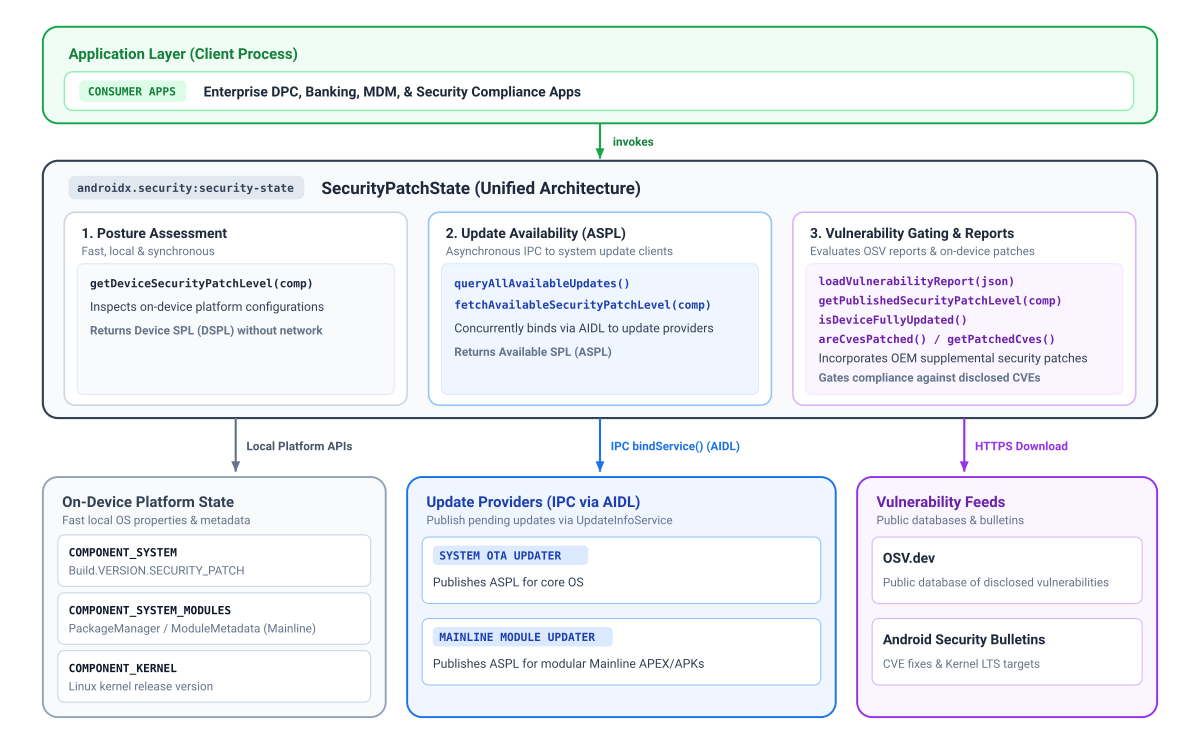
安全性修補程式狀態和元件
使用 Security State 程式庫的主要優點是,它能夠在精細的元件層級提供安全性修補程式等級 (SPL)。多年來,Android 已在 Google Play 系統更新 (Mainline 計畫) 中導入更多模組,這些模組會透過 Google Play 更新,與標準系統無線更新 (OTA) 無關,並以不同頻率提供重要安全性修正。
同樣地,雖然安全性修補程式等級通常會規定一般核心映像檔 (GKI) 的最低必要版本,但核心更新實際上可能會提前進行。系統的主要 SPL 字串可能無法完整擷取這些核心專屬修正。
為提升透明度,安全性狀態程式庫會針對以下三種元件,分別提供有效修補程式等級:
- 系統 (
COMPONENT_SYSTEM):代表標準 OS 和系統安全狀態,衍生自標準安全性修補程式等級欄位。 - 系統 Mainline 模組 (
COMPONENT_SYSTEM_MODULES): 代表模組化系統元件 (Google Play 系統更新) 的安全性狀態,衍生自特定模組發布版本。 - 核心 (
COMPONENT_KERNEL):代表裝置核心的安全狀態,直接從核心版本字串衍生而來。
視元件而定,程式庫最多可提供 3 個維度的修補程式層級資訊:
- 裝置 SPL (DSPL):裝置上執行的個別元件目前修補程式層級,會同步查詢,不需發出網路要求。系統和主線會回報日曆日期 (
DateBasedSecurityPatchLevel),而核心則會回報發布版本 (例如5.15.148)。VersionedSecurityPatchLevel - 已發布的 SPL (PSPL):在Android 安全性公告和開放原始碼安全漏洞 (OSV) 資料庫報告中正式發布的基準。應用程式可以比較裝置 SPL 提供的日期或版本字串,評估是否符合規範。
- 可用的 SPL (ASPL):指出裝置是否有待處理的更新,可從更新供應商取得,並使用 IPC 進行非同步查詢。Android Google Play 系統更新功能可提供 Mainline 模組,而 OEM OTA 用戶端則可提供系統更新。由於核心更新會與作業系統映像檔一併提供,因此系統會使用
COMPONENT_SYSTEM評估核心更新的可用性。
限制存取高度重視安全性的功能
您可以結合裝置 SPL (DSPL)、可用 SPL (ASPL) 和已發布 SPL (PSPL) 的資訊,針對安全防護功能進行情境判斷。舉例來說,您可以比較 DSPL 和 ASPL,判斷是否有使用者尚未安裝的新安全性修補程式,並提示他們先更新,再啟動付款或憑證註冊等敏感作業。您也可以使用 areCvesPatched(),在叫用易受攻擊的子系統之前,先驗證裝置是否已修復特定高風險安全漏洞,例如在授權近距離付款或資料共用之前,先檢查是否有重大 NFC 或藍牙安全漏洞。
平台版本注意事項
部分安全狀態功能取決於基礎平台架構,因此無法在較舊的 Android 版本上使用:
- Android 11 (API 級別 30) 以上版本:全面支援所有元件,包括公告發布的核心 LTS 版本和更新可用性 (ASPL) 查詢。
- Android 10 (API 級別 29):支援系統和系統模組修補程式等級,但由於 Android 安全性公告中的通用核心映像檔 (GKI) 追蹤和核心 LTS 目標是從 Android 11 開始,因此無法提供公告發布的核心版本,但仍可在本機讀取裝置上的核心版本。
- Android 9 (API 級別 28) 以下版本:除了 Android 10 的限制外,Android 10 之前沒有模組化系統元件 (Mainline 計畫)。如果系統模組 SPL 無法使用,安全呼叫
getDeviceSecurityPatchLevel(COMPONENT_SYSTEM_MODULES)會回溯至 Unix 基準紀元日期 (1970 年 1 月 1 日)。
瞭解更新適用情形和可用的安全修補程式層級 (ASPL)
如要判斷裝置的資安態勢,必須瞭解個別元件是否有待處理的安全性更新。Android 裝置會透過多種不同的傳送機制接收安全性更新,例如系統無線 (OTA) 更新和Google Play 系統更新 (適用於模組化元件)。
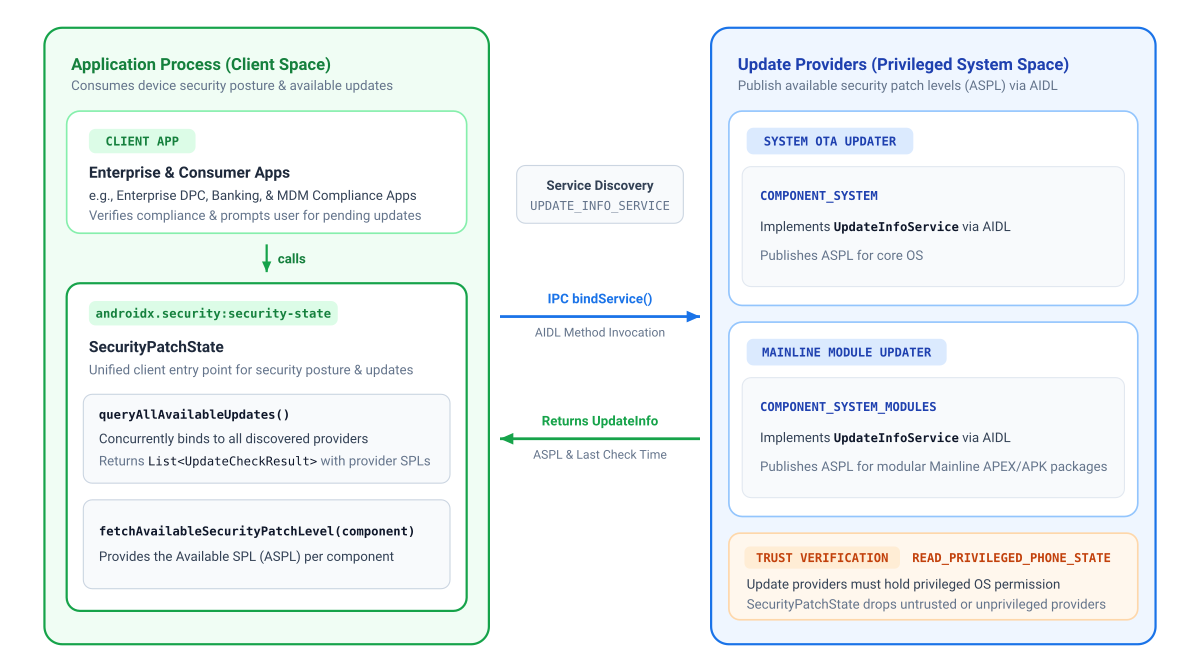
應用程式必須先擷取特定元件的 ASPL,對應的更新供應商才能發布該資訊。為了協調這些不同的更新來源,用戶端應用程式會使用 AndroidX Security State 程式庫查詢安全性狀態,而裝置上的更新用戶端則會使用隨附的 AndroidX Security State Provider 程式庫發布可用的安全性修補程式等級 (ASPL)。
Google 會為所有 GMS Android 裝置提供 Mainline 模組的更新資訊,並為使用 Google OTA 用戶端 (GOTA) 的裝置提供系統 OTA 資訊。
下圖說明用戶端應用程式如何使用 AndroidX Security State 程式庫,查詢 Google Play 系統更新和系統 OTA 更新的安全性狀態:
新增依附元件
如要新增 AndroidX Security State 的依附元件,必須在專案中加入 Google Maven 存放區。將依附元件新增至應用程式的 build.gradle.kts 或 build.gradle 檔案:
Kotlin
// Kotlin DSL (build.gradle.kts)
dependencies {
    implementation("androidx.security:security-state:1.1.0")
}
Groovy
// Groovy DSL (build.gradle)
dependencies {
    implementation "androidx.security:security-state:1.1.0"
}
已聲明的權限矩陣
| 目標 API | AndroidManifest.xml 中需要的權限 |
作業注意事項 |
|---|---|---|
getDeviceSecurityPatchLevel() |
無 | 同步讀取本機原生系統屬性和套件中繼資料。 |
fetchAvailableSecurityPatchLevel()queryAllAvailableUpdates() |
無 | 透過裝置端 IPC 通訊。這個程式庫只會查詢裝置上受信任的元件 (需要更新供應商持有具備權限的 READ_PRIVILEGED_PHONE_STATE 權限),因此應用程式可以確信收到的資訊真實可靠。 |
createVulnerabilityReportUrl()loadVulnerabilityReport()getPublishedSecurityPatchLevel()areCvesPatched()isDeviceFullyUpdated() |
android.permission.INTERNET |
擷取公開 OSV 報表時必須提供。使用 loadVulnerabilityReport() 載入記憶體後,查詢方法會在本地執行,不需網路存取權。 |
初始化程式庫
使用 Android Context 初始化 SecurityPatchState:
Kotlin
import androidx.security.state.SecurityPatchState

val securityPatchState = SecurityPatchState(context)
Java
import androidx.security.state.SecurityPatchState;

SecurityPatchState securityPatchState = new SecurityPatchState(context);
單獨使用 context 初始化,即可立即存取離線裝置修補程式層級,無須網路連線。(更新供應情形查詢
與裝置端供應商非同步通訊)。
如果應用程式評估 CVE 合規性,且已將 OSV 安全漏洞報告載入記憶體,Kotlin 呼叫端可以直接將 JSON 字串傳遞至 Kotlin 中的建構函式:
val securityPatchState = SecurityPatchState(context, vulnerabilityReportJsonString = jsonString)
在 Java 中,或是在啟動後非同步載入報表時,請使用內容初始化並呼叫 securityPatchState.loadVulnerabilityReport(jsonString)。
檢查裝置修補程式等級
同步查詢裝置端的修補程式等級:
Kotlin
val deviceSpl = securityPatchState.getDeviceSecurityPatchLevel(SecurityPatchState.COMPONENT_SYSTEM)
val mainlineSpl = securityPatchState.getDeviceSecurityPatchLevel(SecurityPatchState.COMPONENT_SYSTEM_MODULES)
val kernelVersion = securityPatchState.getDeviceSecurityPatchLevel(SecurityPatchState.COMPONENT_KERNEL)

// Gatekeeping check: compare against a required baseline patch date
val requiredSpl = SecurityPatchState.DateBasedSecurityPatchLevel.fromString("2026-01-01")
if (deviceSpl < requiredSpl) {
    // Restrict access to sensitive features or guide user to update
}
Java
SecurityPatchState.SecurityPatchLevel deviceSpl = securityPatchState.getDeviceSecurityPatchLevel(SecurityPatchState.COMPONENT_SYSTEM);
SecurityPatchState.SecurityPatchLevel mainlineSpl = securityPatchState.getDeviceSecurityPatchLevel(SecurityPatchState.COMPONENT_SYSTEM_MODULES);
SecurityPatchState.SecurityPatchLevel kernelVersion = securityPatchState.getDeviceSecurityPatchLevel(SecurityPatchState.COMPONENT_KERNEL);

// Gatekeeping check: compare against a required baseline patch date
SecurityPatchState.SecurityPatchLevel requiredSpl = SecurityPatchState.DateBasedSecurityPatchLevel.fromString("2026-01-01");
if (deviceSpl.compareTo(requiredSpl) < 0) {
    // Restrict access to sensitive features or guide user to update
}
檢查是否有待處理的系統更新
應用程式可以與裝置端受信任的更新供應商 (最常見的是 Google Play 系統更新和 OEM OTA 用戶端) 進行非同步通訊,評估是否有待處理的更新:
fetchAvailableSecurityPatchLevel():傳回指定元件的有效可用 SPL (如果沒有較新的更新,則會回復為目前的裝置 SPL),可用於與裝置 SPL 和已發布的 SPL 進行比較。queryAllAvailableUpdates():探索裝置上所有可信的更新供應商,並傳回詳細的UpdateCheckResult,以及資料來源和資料新鮮度的中繼資料。
範例 1:提示使用者安裝尚未安裝的更新
當有安全性更新可用時,請使用 fetchAvailableSecurityPatchLevel() 提示使用者 (例如啟動 Settings.ACTION_SYSTEM_UPDATE_SETTINGS):
Kotlin
import androidx.lifecycle.lifecycleScope
import androidx.security.state.SecurityPatchState
import kotlinx.coroutines.launch

// Pattern A: Prompt users for pending updates (with automatic offline fallback)
lifecycleScope.launch {
    val currentSpl = securityPatchState.getDeviceSecurityPatchLevel(SecurityPatchState.COMPONENT_SYSTEM)
    val availableSpl = securityPatchState.fetchAvailableSecurityPatchLevel(SecurityPatchState.COMPONENT_SYSTEM)
    if (availableSpl > currentSpl) {
        // Prompt the user to install pending updates in system settings
    }
}
Java
在 Java 中,非同步方法會傳回 ListenableFuture,並使用 ContextCompat.getMainExecutor() 路由回呼:
import androidx.core.content.ContextCompat;
import androidx.security.state.SecurityPatchState;
import androidx.security.state.SecurityPatchState.SecurityPatchLevel;
import com.google.common.util.concurrent.FutureCallback;
import com.google.common.util.concurrent.Futures;
import com.google.common.util.concurrent.ListenableFuture;

// Pattern A: Prompt users for pending updates (with automatic offline fallback)
SecurityPatchLevel currentSpl = securityPatchState.getDeviceSecurityPatchLevel(SecurityPatchState.COMPONENT_SYSTEM);
ListenableFuture<SecurityPatchLevel> availableSpl = securityPatchState.fetchAvailableSecurityPatchLevelAsync(
    SecurityPatchState.COMPONENT_SYSTEM,
    SecurityPatchState.UPDATE_INFO_SERVICE_BINDING_TIMEOUT_MS
);

Futures.addCallback(availableSpl, new FutureCallback<SecurityPatchLevel>() {
    @Override
    public void onSuccess(SecurityPatchLevel available) {
        if (available.compareTo(currentSpl) > 0) {
            // Prompt the user to install pending updates in system settings
        }
    }

    @Override
    public void onFailure(Throwable t) {
        // Handle timeout or IPC communication error
    }
}, ContextCompat.getMainExecutor(context));
範例 2:檢查供應商詳細狀態
使用 queryAllAvailableUpdates() 檢查個別供應商、時間戳記和 UpdateInfo 記錄:
Kotlin
import androidx.lifecycle.lifecycleScope
import androidx.security.state.SecurityPatchState
import kotlinx.coroutines.launch

// Pattern B: Inspect detailed provider status
lifecycleScope.launch {
    val updateResults = securityPatchState.queryAllAvailableUpdates()
    for (result in updateResults) {
        val provider = result.providerPackageName
        val lastCheck = result.lastCheckTimeMillis
        val updates = result.updates // List<UpdateInfo>
    }
}
Java
import androidx.core.content.ContextCompat;
import androidx.security.state.SecurityPatchState;
import androidx.security.state.UpdateCheckResult;
import androidx.security.state.UpdateInfo;
import com.google.common.util.concurrent.FutureCallback;
import com.google.common.util.concurrent.Futures;
import com.google.common.util.concurrent.ListenableFuture;
import java.util.List;

// Pattern B: Inspect detailed provider status
ListenableFuture<List<UpdateCheckResult>> updateResults = securityPatchState.queryAllAvailableUpdatesAsync(
    SecurityPatchState.UPDATE_INFO_SERVICE_BINDING_TIMEOUT_MS
);

Futures.addCallback(updateResults, new FutureCallback<List<UpdateCheckResult>>() {
    @Override
    public void onSuccess(List<UpdateCheckResult> results) {
        for (UpdateCheckResult result : results) {
            String provider = result.getProviderPackageName();
            long lastCheck = result.getLastCheckTimeMillis();
            List<UpdateInfo> updates = result.getUpdates();
        }
    }

    @Override
    public void onFailure(Throwable t) {
        // Handle error
    }
}, ContextCompat.getMainExecutor(context));
確認安全漏洞是否已解決,並檢查 CVE
如要評估 CVE 緩解措施、檢查整體更新合規性,或檢查已發布的安全性修補程式等級 (PSPL),您的應用程式必須先取得並載入 OSV 安全漏洞報告,詳情請參閱 SecurityPatchState 的 API 參考資料。
Kotlin
// Load vulnerability report
val reportUrl = SecurityPatchState.createVulnerabilityReportUrl()
// ... download JSON string from reportUrl ...
securityPatchState.loadVulnerabilityReport(jsonString)

// Check overall update compliance against published bulletin
val isFullyUpdated = securityPatchState.isDeviceFullyUpdated()

val cves = listOf("CVE-2019-9501", "CVE-2020-3699", "CVE-2024-0016")
val isPatched = securityPatchState.areCvesPatched(cves)

// Get a list of all patched CVEs for a specific component and SPL
val deviceSpl = securityPatchState.getDeviceSecurityPatchLevel(SecurityPatchState.COMPONENT_SYSTEM)
val patchedSystemCVEs = securityPatchState.getPatchedCves(SecurityPatchState.COMPONENT_SYSTEM, deviceSpl)

// Inspect published SPL and kernel LTS target versions from the bulletin
val publishedSystemSpl = securityPatchState.getPublishedSecurityPatchLevel(SecurityPatchState.COMPONENT_SYSTEM)
val kernelLtsTargets = securityPatchState.getPublishedSecurityPatchLevel(SecurityPatchState.COMPONENT_KERNEL)
Java
// Load vulnerability report
Uri reportUrl = SecurityPatchState.createVulnerabilityReportUrl();
// ... download JSON string from reportUrl ...
securityPatchState.loadVulnerabilityReport(jsonString);

// Check overall update compliance against published bulletin
boolean isFullyUpdated = securityPatchState.isDeviceFullyUpdated();

List<String> cves = Arrays.asList("CVE-2019-9501", "CVE-2020-3699", "CVE-2024-0016");
boolean isPatched = securityPatchState.areCvesPatched(cves);

// Get a list of all patched CVEs for a specific component and SPL
SecurityPatchState.SecurityPatchLevel deviceSpl = securityPatchState.getDeviceSecurityPatchLevel(SecurityPatchState.COMPONENT_SYSTEM);
Map<SecurityPatchState.Severity, Set<String>> patchedSystemCVEs =
    securityPatchState.getPatchedCves(SecurityPatchState.COMPONENT_SYSTEM, deviceSpl);

// Inspect published SPL and kernel LTS target versions from the bulletin
List<SecurityPatchState.SecurityPatchLevel> publishedSystemSpl =
    securityPatchState.getPublishedSecurityPatchLevel(SecurityPatchState.COMPONENT_SYSTEM);
List<SecurityPatchState.SecurityPatchLevel> kernelLtsTargets =
    securityPatchState.getPublishedSecurityPatchLevel(SecurityPatchState.COMPONENT_KERNEL);
載入安全漏洞報告
- 本機快取和 WorkManager 重新整理:由於 Android 安全性公告每月發布一次,請將下載的 JSON 快取到內部儲存空間 (
context.filesDir),並使用WorkManager安排定期背景工作 (最好每 24 到 48 小時一次),以重新整理報表,並在應用程式啟動時從本機快取同步讀取。 - 背景執行緒:在背景執行緒 (Kotlin 中的
Dispatchers.IO或 Java 中的Executor) 上叫用loadVulnerabilityReport(),避免在剖析 CVE 記錄時封鎖主要 UI 執行緒。 - 核心 LTS 評估:呼叫
getPatchedCves(COMPONENT_KERNEL, ...)會擲回IllegalArgumentException,而areCvesPatched()不會 評估核心 CVE。請改為比較裝置的 Kernel 版本與getPublishedSecurityPatchLevel(COMPONENT_KERNEL)傳回的 Android Common Kernel LTS 目標,評估 Kernel 安全性,並比對主要和次要分支版本 (例如比較5.15.140Kernel 與5.15.159目標)。
其他資源
如要進一步瞭解裝置安全狀態,請參閱下列資源:
說明文件
- 發布裝置安全狀態
- Android 安全性公告
- 模組化系統元件
- 通用核心映像檔 (GKI)
- 補充安全性修補程式
- Play Integrity API
- 開放原始碼安全漏洞 (OSV) 資料庫
- Security State 1.1.0 版版本資訊