
Your app is only as secure as its underlying OS. To mitigate risk, your app should gate security-sensitive operations with a real-time assessment of the device's security posture, determining whether the device, especially its core system components, is fully updated and protected against vulnerabilities published in the Android Security Bulletin. Visibility into the device security state helps you establish safeguards before your app executes high-risk operations.
AndroidX Security State is a Jetpack library that provides unified access to the security state of an Android-powered device. It combines AOSP APIs and Android public vulnerability feeds to provide a comprehensive, precise, and actionable device security status beyond just the Security Patch Level (SPL).
Architectural overview
The following diagram illustrates how the AndroidX Security State library unifies on-device platform properties, interprocess communication (IPC) update providers, and public vulnerability feeds into a single, cohesive set of APIs.
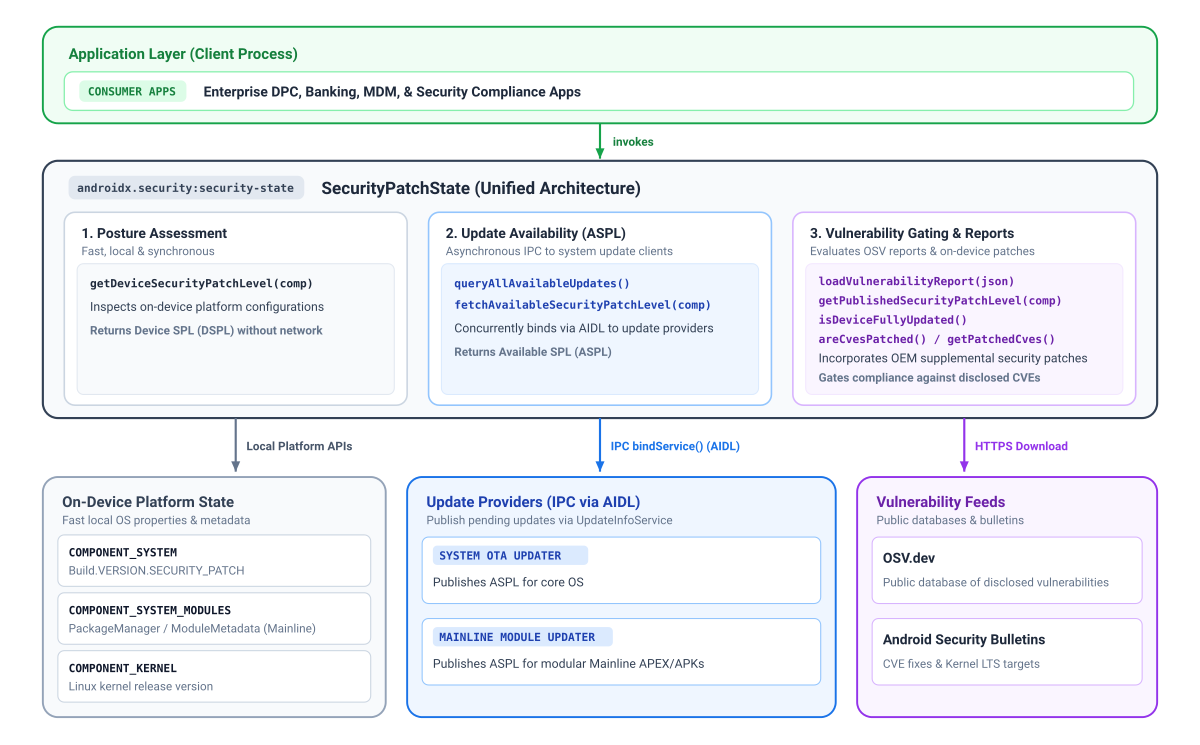
Security patch states and components
The primary advantage of using the Security State library is its ability to provide the Security Patch Level (SPL) at a granular, component level. Over the years, Android has introduced more modules to Google Play system updates (Project Mainline) which are updated using Google Play independently of the standard system over-the-air (OTA) updates, providing critical security fixes on a different cadence.
Similarly, while the security patch level usually mandates the minimum required Generic Kernel Image (GKI) version, kernel updates can actually move ahead of the system schedule. These kernel-specific fixes may not be fully captured by the system's primary SPL string.
To improve transparency, the security state library provides an effective patch level for all three components individually:
- System (
COMPONENT_SYSTEM): Represents the standard OS and system security status derived from the standard security patch level field. - System Mainline Modules (
COMPONENT_SYSTEM_MODULES): Represents the modular system components' (Google Play system updates) security status, derived from specific module release versions. - Kernel (
COMPONENT_KERNEL): Represents the security status of the device kernel, derived directly from the Kernel version string.
Depending on the component, the library provides up to 3 dimensions of patch level information:
- Device SPL (DSPL): The current patch level of individual components
running on the device, queried synchronously without network requests. System
and Mainline report calendar dates (
DateBasedSecurityPatchLevel), while the Kernel reports its release version (VersionedSecurityPatchLevel, for example,5.15.148). - Published SPL (PSPL): The baseline officially published in the Android Security Bulletin and Open Source Vulnerabilities (OSV) database reports. Your app can evaluate compliance by comparing dates or version strings provided by Device SPL.
- Available SPL (ASPL): Indicates whether a device has pending updates
available from update providers, queried asynchronously using IPC. The Android
Google Play system update feature provides availability for Mainline modules,
and OEM OTA clients provide availability for System updates. Because kernel
updates are bundled into the operating system image, kernel update
availability is evaluated using
COMPONENT_SYSTEM.
Gate security-sensitive features
You can combine information from Device SPL (DSPL), Available SPL (ASPL), and
Published SPL (PSPL) to make contextual determinations for gating
security-sensitive features. For example, you can compare DSPL alongside ASPL to
determine whether a newer security patch is available that the user has not yet
installed, prompting them to update before initiating sensitive operations such
as payments or credential enrollment. You can also use areCvesPatched() to
verify whether specific, high-risk vulnerabilities have been remediated on the
device before invoking vulnerable subsystems, such as checking for critical NFC
or Bluetooth vulnerabilities before authorizing proximity-based payments or data
sharing.
Platform version considerations
Certain security state capabilities depend on underlying platform architecture and are unavailable on lower versions of Android:
- Android 11 (API level 30) and higher: Full support for all components, including bulletin-published kernel LTS versions and update availability (ASPL) queries.
- Android 10 (API level 29): Supports system and system module patch levels; however, bulletin-published kernel versions are unavailable because Generic Kernel Image (GKI) tracking and kernel LTS targets in the Android Security Bulletin began in Android 11—on-device kernel version can still be read locally.
- Android 9 (API level 28) and older: In addition to Android 10 limitations,
modular system components (Project Mainline) did not exist before Android 10.
Calling
getDeviceSecurityPatchLevel(COMPONENT_SYSTEM_MODULES)safely falls back to the baseline Unix epoch date (1970-01-01) when system module SPLs are unavailable.
Understand update availability and Available SPL (ASPL)
Determining a device's security posture requires knowing whether pending security updates are available for individual components. Android devices receive security updates through multiple distinct delivery mechanisms such as system over-the-air (OTA) updates and Google Play system updates for modular components.
Before your app can retrieve the ASPL for a given component, the corresponding update provider must publish that information. To coordinate across these different update sources, client applications use the AndroidX Security State library to query security state, while on-device update clients use the companion AndroidX Security State Provider library to publish their Available Security Patch Level (ASPL).
Google provides update information for Mainline modules to all GMS Android devices, as well as system OTA information for devices using the Google OTA client (GOTA).
The following diagram illustrates how client applications use the AndroidX Security State library to query security posture across both Google Play system updates and system OTA updates:
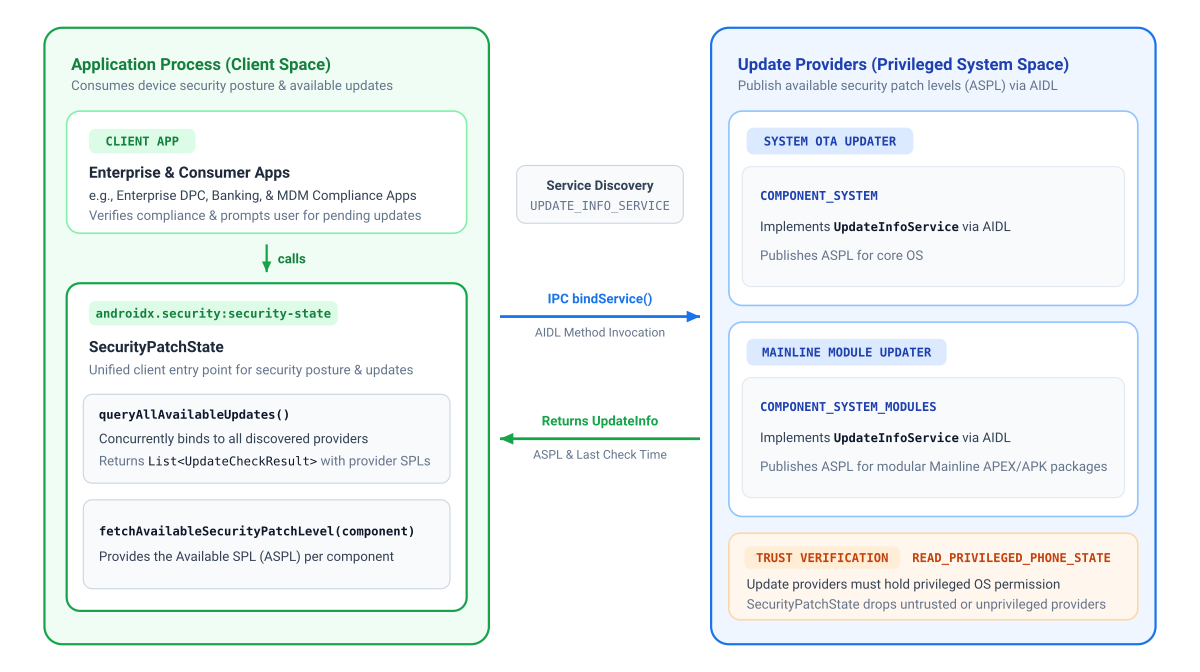
Add dependencies
To add a dependency on AndroidX Security State, you must include the Google
Maven repository in your project. Add the dependency to your
app's build.gradle.kts or build.gradle file:
Kotlin
// Kotlin DSL (build.gradle.kts)
dependencies {
    implementation("androidx.security:security-state:1.1.0")
}
Groovy
// Groovy DSL (build.gradle)
dependencies {
    implementation "androidx.security:security-state:1.1.0"
}
Declared permissions matrix
| Target APIs | Permissions Required in AndroidManifest.xml |
Operational Notes |
|---|---|---|
getDeviceSecurityPatchLevel() |
None | Reads local native system properties and package metadata synchronously. |
fetchAvailableSecurityPatchLevel()queryAllAvailableUpdates() |
None | Communicates using on-device IPC. The library only queries trusted components on the device (requiring update providers to hold the privileged READ_PRIVILEGED_PHONE_STATE permission), so your app can be confident in the authenticity of the information it receives. |
createVulnerabilityReportUrl()loadVulnerabilityReport()getPublishedSecurityPatchLevel()areCvesPatched()isDeviceFullyUpdated() |
android.permission.INTERNET |
Required to fetch public OSV reports. Once loaded into memory using loadVulnerabilityReport(), querying methods execute locally without network access. |
Initialize the library
Initialize SecurityPatchState with an Android Context:
Kotlin
import androidx.security.state.SecurityPatchState

val securityPatchState = SecurityPatchState(context)
Java
import androidx.security.state.SecurityPatchState;

SecurityPatchState securityPatchState = new SecurityPatchState(context);
Initializing with context alone provides immediate access to offline device
patch levels without network dependencies. (Update availability queries
communicate asynchronously with on-device providers).
If your app evaluates CVE compliance and already loaded an OSV vulnerability report into memory, Kotlin callers can pass the JSON string directly to the constructor in Kotlin:
val securityPatchState = SecurityPatchState(context, vulnerabilityReportJsonString = jsonString)
In Java, or when loading reports asynchronously after startup, initialize with
context and call securityPatchState.loadVulnerabilityReport(jsonString).
Check device patch levels
Query on-device patch levels synchronously:
Kotlin
val deviceSpl = securityPatchState.getDeviceSecurityPatchLevel(SecurityPatchState.COMPONENT_SYSTEM)
val mainlineSpl = securityPatchState.getDeviceSecurityPatchLevel(SecurityPatchState.COMPONENT_SYSTEM_MODULES)
val kernelVersion = securityPatchState.getDeviceSecurityPatchLevel(SecurityPatchState.COMPONENT_KERNEL)

// Gatekeeping check: compare against a required baseline patch date
val requiredSpl = SecurityPatchState.DateBasedSecurityPatchLevel.fromString("2026-01-01")
if (deviceSpl < requiredSpl) {
    // Restrict access to sensitive features or guide user to update
}
Java
SecurityPatchState.SecurityPatchLevel deviceSpl = securityPatchState.getDeviceSecurityPatchLevel(SecurityPatchState.COMPONENT_SYSTEM);
SecurityPatchState.SecurityPatchLevel mainlineSpl = securityPatchState.getDeviceSecurityPatchLevel(SecurityPatchState.COMPONENT_SYSTEM_MODULES);
SecurityPatchState.SecurityPatchLevel kernelVersion = securityPatchState.getDeviceSecurityPatchLevel(SecurityPatchState.COMPONENT_KERNEL);

// Gatekeeping check: compare against a required baseline patch date
SecurityPatchState.SecurityPatchLevel requiredSpl = SecurityPatchState.DateBasedSecurityPatchLevel.fromString("2026-01-01");
if (deviceSpl.compareTo(requiredSpl) < 0) {
    // Restrict access to sensitive features or guide user to update
}
Check for pending system updates
Apps can evaluate pending update availability by communicating asynchronously with trusted on-device update providers, most commonly Google Play system updates and OEM OTA clients:
fetchAvailableSecurityPatchLevel(): Returns effective Available SPL for a specified component (falling back to current Device SPL if no newer update is available) that can be used to compare against Device SPL and Published SPL.queryAllAvailableUpdates(): Discovers all trusted update providers on the device and returns granularUpdateCheckResultalong with metadata about the source and freshness of the data.
Example 1: Prompt users for pending updates
Use fetchAvailableSecurityPatchLevel() to prompt users when security updates
are available (for example, by launching
Settings.ACTION_SYSTEM_UPDATE_SETTINGS):
Kotlin
import androidx.lifecycle.lifecycleScope
import androidx.security.state.SecurityPatchState
import kotlinx.coroutines.launch

// Pattern A: Prompt users for pending updates (with automatic offline fallback)
lifecycleScope.launch {
    val currentSpl = securityPatchState.getDeviceSecurityPatchLevel(SecurityPatchState.COMPONENT_SYSTEM)
    val availableSpl = securityPatchState.fetchAvailableSecurityPatchLevel(SecurityPatchState.COMPONENT_SYSTEM)
    if (availableSpl > currentSpl) {
        // Prompt the user to install pending updates in system settings
    }
}
Java
In Java, asynchronous methods return a ListenableFuture and route
callbacks using ContextCompat.getMainExecutor():
import androidx.core.content.ContextCompat;
import androidx.security.state.SecurityPatchState;
import androidx.security.state.SecurityPatchState.SecurityPatchLevel;
import com.google.common.util.concurrent.FutureCallback;
import com.google.common.util.concurrent.Futures;
import com.google.common.util.concurrent.ListenableFuture;

// Pattern A: Prompt users for pending updates (with automatic offline fallback)
SecurityPatchLevel currentSpl = securityPatchState.getDeviceSecurityPatchLevel(SecurityPatchState.COMPONENT_SYSTEM);
ListenableFuture<SecurityPatchLevel> availableSpl = securityPatchState.fetchAvailableSecurityPatchLevelAsync(
    SecurityPatchState.COMPONENT_SYSTEM,
    SecurityPatchState.UPDATE_INFO_SERVICE_BINDING_TIMEOUT_MS
);

Futures.addCallback(availableSpl, new FutureCallback<SecurityPatchLevel>() {
    @Override
    public void onSuccess(SecurityPatchLevel available) {
        if (available.compareTo(currentSpl) > 0) {
            // Prompt the user to install pending updates in system settings
        }
    }

    @Override
    public void onFailure(Throwable t) {
        // Handle timeout or IPC communication error
    }
}, ContextCompat.getMainExecutor(context));
Example 2: Inspect detailed provider status
Use queryAllAvailableUpdates() to inspect individual providers, timestamps,
and UpdateInfo records:
Kotlin
import androidx.lifecycle.lifecycleScope
import androidx.security.state.SecurityPatchState
import kotlinx.coroutines.launch

// Pattern B: Inspect detailed provider status
lifecycleScope.launch {
    val updateResults = securityPatchState.queryAllAvailableUpdates()
    for (result in updateResults) {
        val provider = result.providerPackageName
        val lastCheck = result.lastCheckTimeMillis
        val updates = result.updates // List<UpdateInfo>
    }
}
Java
import androidx.core.content.ContextCompat;
import androidx.security.state.SecurityPatchState;
import androidx.security.state.UpdateCheckResult;
import androidx.security.state.UpdateInfo;
import com.google.common.util.concurrent.FutureCallback;
import com.google.common.util.concurrent.Futures;
import com.google.common.util.concurrent.ListenableFuture;
import java.util.List;

// Pattern B: Inspect detailed provider status
ListenableFuture<List<UpdateCheckResult>> updateResults = securityPatchState.queryAllAvailableUpdatesAsync(
    SecurityPatchState.UPDATE_INFO_SERVICE_BINDING_TIMEOUT_MS
);

Futures.addCallback(updateResults, new FutureCallback<List<UpdateCheckResult>>() {
    @Override
    public void onSuccess(List<UpdateCheckResult> results) {
        for (UpdateCheckResult result : results) {
            String provider = result.getProviderPackageName();
            long lastCheck = result.getLastCheckTimeMillis();
            List<UpdateInfo> updates = result.getUpdates();
        }
    }

    @Override
    public void onFailure(Throwable t) {
        // Handle error
    }
}, ContextCompat.getMainExecutor(context));
Verify vulnerability resolution and check CVEs
To evaluate CVE mitigations, check overall update compliance, or inspect Published Security Patch Levels (PSPL), your app must first obtain and load an OSV vulnerability report, as detailed in the API reference for SecurityPatchState.
Kotlin
// Load vulnerability report
val reportUrl = SecurityPatchState.createVulnerabilityReportUrl()
// ... download JSON string from reportUrl ...
securityPatchState.loadVulnerabilityReport(jsonString)

// Check overall update compliance against published bulletin
val isFullyUpdated = securityPatchState.isDeviceFullyUpdated()

val cves = listOf("CVE-2019-9501", "CVE-2020-3699", "CVE-2024-0016")
val isPatched = securityPatchState.areCvesPatched(cves)

// Get a list of all patched CVEs for a specific component and SPL
val deviceSpl = securityPatchState.getDeviceSecurityPatchLevel(SecurityPatchState.COMPONENT_SYSTEM)
val patchedSystemCVEs = securityPatchState.getPatchedCves(SecurityPatchState.COMPONENT_SYSTEM, deviceSpl)

// Inspect published SPL and kernel LTS target versions from the bulletin
val publishedSystemSpl = securityPatchState.getPublishedSecurityPatchLevel(SecurityPatchState.COMPONENT_SYSTEM)
val kernelLtsTargets = securityPatchState.getPublishedSecurityPatchLevel(SecurityPatchState.COMPONENT_KERNEL)
Java
// Load vulnerability report
Uri reportUrl = SecurityPatchState.createVulnerabilityReportUrl();
// ... download JSON string from reportUrl ...
securityPatchState.loadVulnerabilityReport(jsonString);

// Check overall update compliance against published bulletin
boolean isFullyUpdated = securityPatchState.isDeviceFullyUpdated();

List<String> cves = Arrays.asList("CVE-2019-9501", "CVE-2020-3699", "CVE-2024-0016");
boolean isPatched = securityPatchState.areCvesPatched(cves);

// Get a list of all patched CVEs for a specific component and SPL
SecurityPatchState.SecurityPatchLevel deviceSpl = securityPatchState.getDeviceSecurityPatchLevel(SecurityPatchState.COMPONENT_SYSTEM);
Map<SecurityPatchState.Severity, Set<String>> patchedSystemCVEs =
    securityPatchState.getPatchedCves(SecurityPatchState.COMPONENT_SYSTEM, deviceSpl);

// Inspect published SPL and kernel LTS target versions from the bulletin
List<SecurityPatchState.SecurityPatchLevel> publishedSystemSpl =
    securityPatchState.getPublishedSecurityPatchLevel(SecurityPatchState.COMPONENT_SYSTEM);
List<SecurityPatchState.SecurityPatchLevel> kernelLtsTargets =
    securityPatchState.getPublishedSecurityPatchLevel(SecurityPatchState.COMPONENT_KERNEL);
Load vulnerability reports
- Local Caching & WorkManager Refresh: Because Android Security Bulletins
are published monthly, cache the downloaded JSON in internal storage
(
context.filesDir) and schedule a periodic background task withWorkManager(preferably every 24–48 hours) to refresh the report, reading from the local cache synchronously on app launch. - Background Threading: Invoke
loadVulnerabilityReport()on a background thread (Dispatchers.IOin Kotlin or anExecutorin Java) to avoid blocking the main UI thread while parsing CVE records. - Kernel LTS Evaluation: Calling
getPatchedCves(COMPONENT_KERNEL, ...)throws anIllegalArgumentException, andareCvesPatched()does not evaluate kernel CVEs. Instead, evaluate kernel security by comparing the device's kernel version against the Android Common Kernel LTS targets returned bygetPublishedSecurityPatchLevel(COMPONENT_KERNEL)matching its major and minor branch (e.g. comparing a5.15.140kernel against the5.15.159target).
Additional resources
For more information about device security state, see the following resources:
Documentation
- Publish device security state
- Android Security Bulletins
- Modular system components
- Generic Kernel Image (GKI)
- Supplemental security patches
- Play Integrity API
- Open Source Vulnerabilities (OSV) database
- Security State 1.1.0 release notes