

CameraX มี Extensions API สำหรับเข้าถึง ส่วนขยาย ที่ผู้ผลิตอุปกรณ์ได้ติดตั้งใช้งานในอุปกรณ์ Android ต่างๆ ดูรายการโหมดส่วนขยายที่รองรับได้ที่ ส่วนขยายกล้อง
ดูรายการอุปกรณ์ที่รองรับส่วนขยายได้ที่อุปกรณ์ที่รองรับ
สถาปัตยกรรมส่วนขยาย
รูปภาพต่อไปนี้แสดงสถาปัตยกรรมส่วนขยายกล้อง
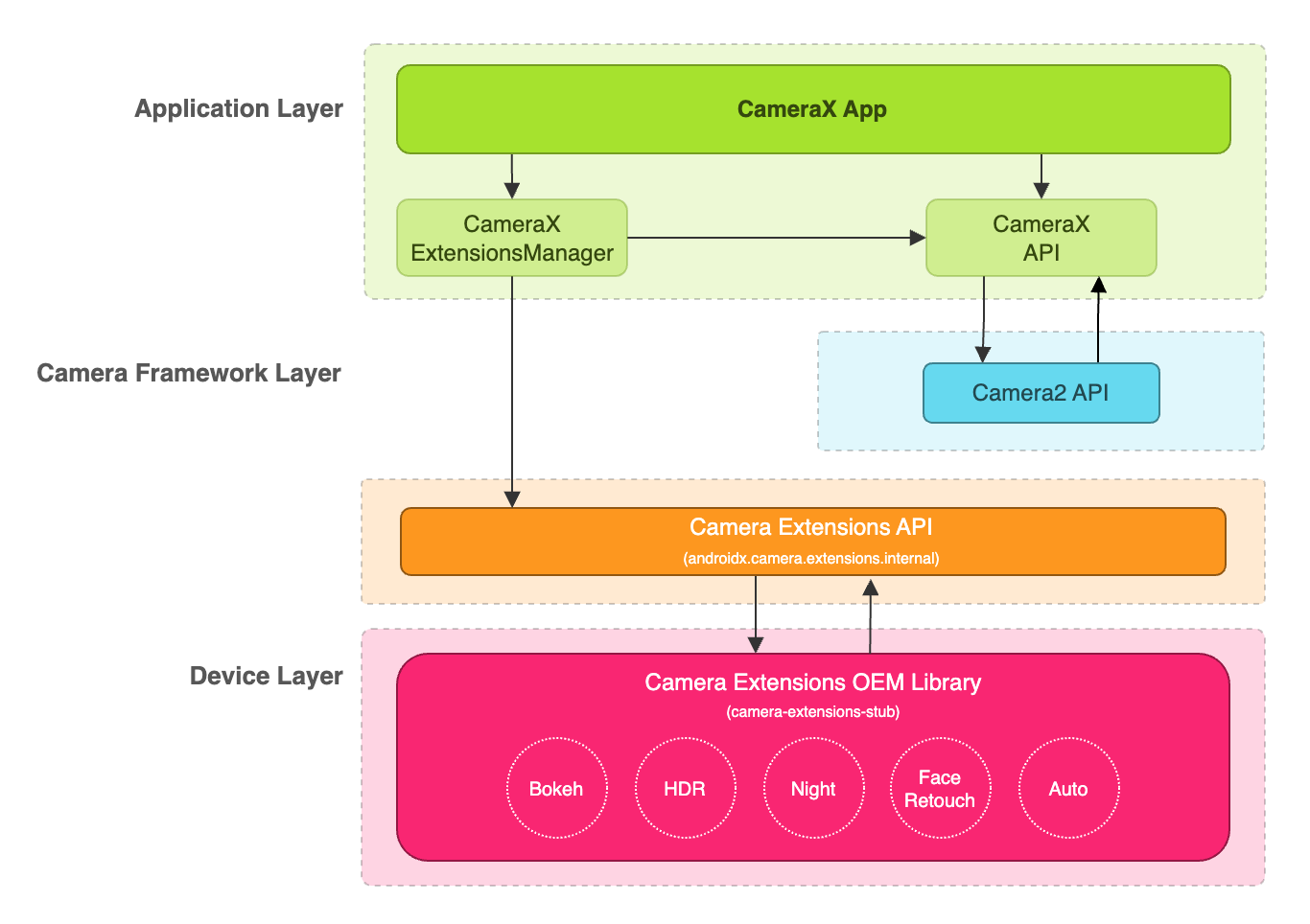
แอปพลิเคชัน CameraX สามารถใช้ส่วนขยายผ่าน CameraX Extensions API ได้ CameraX Extensions API จะจัดการการค้นหาส่วนขยายที่พร้อมใช้งาน การกำหนดค่าเซสชันกล้องส่วนขยาย และการสื่อสารกับไลบรารี Camera Extensions OEM ซึ่งจะช่วยให้แอปพลิเคชันของคุณใช้ความสามารถต่างๆ เช่น โหมดกลางคืน, HDR, อัตโนมัติ, Bokeh หรือการปรับแต่งใบหน้าได้
เปิดใช้ส่วนขยายสำหรับการจับภาพและแสดงตัวอย่าง
ก่อนใช้ Extensions API ให้ดึงข้อมูลอินสแตนซ์ ExtensionsManager โดยใช้เมธอด ExtensionsManager#getInstanceAsync(Context, CameraProvider) ซึ่งจะช่วยให้คุณค้นหาข้อมูลความพร้อมใช้งานของส่วนขยายได้ จากนั้นดึงข้อมูล CameraSelector ที่เปิดใช้ส่วนขยาย ระบบจะใช้โหมดส่วนขยายใน Use Case การจับภาพและการแสดงตัวอย่างเมื่อ
เรียกใช้เมธอด bindToLifecycle()
โดยเปิดใช้ส่วนขยาย CameraSelector
หากต้องการใช้ส่วนขยายสำหรับ Use Case การจับภาพและการแสดงตัวอย่าง โปรดดูตัวอย่างโค้ดต่อไปนี้
Kotlin
import androidx.camera.extensions.ExtensionMode
import androidx.camera.extensions.ExtensionsManager

override fun onCreate(savedInstanceState: Bundle?) {
    super.onCreate(savedInstanceState)

    val lifecycleOwner = this

    val cameraProviderFuture = ProcessCameraProvider.getInstance(applicationContext)
    cameraProviderFuture.addListener({
        // Obtain an instance of a process camera provider
        // The camera provider provides access to the set of cameras associated with the device.
        // The camera obtained from the provider will be bound to the activity lifecycle.
        val cameraProvider = cameraProviderFuture.get()

        val extensionsManagerFuture =
            ExtensionsManager.getInstanceAsync(applicationContext, cameraProvider)
        extensionsManagerFuture.addListener({
            // Obtain an instance of the extensions manager
            // The extensions manager enables a camera to use extension capabilities available on
            // the device.
            val extensionsManager = extensionsManagerFuture.get()

            // Select the camera
            val cameraSelector = CameraSelector.DEFAULT_BACK_CAMERA

            // Query if extension is available.
            // Not all devices will support extensions or might only support a subset of
            // extensions.
            if (extensionsManager.isExtensionAvailable(cameraSelector, ExtensionMode.NIGHT)) {
                // Unbind all use cases before enabling different extension modes.
                try {
                    cameraProvider.unbindAll()

                    // Retrieve a night extension enabled camera selector
                    val nightCameraSelector =
                        extensionsManager.getExtensionEnabledCameraSelector(
                            cameraSelector,
                            ExtensionMode.NIGHT
                        )

                    // Bind image capture and preview use cases with the extension enabled camera
                    // selector.
                    val imageCapture = ImageCapture.Builder().build()
                    val preview = Preview.Builder().build()
                    // Connect the preview to receive the surface the camera outputs the frames
                    // to. This will allow displaying the camera frames in either a TextureView
                    // or SurfaceView. The SurfaceProvider can be obtained from the PreviewView.
                    preview.setSurfaceProvider(surfaceProvider)

                    // Returns an instance of the camera bound to the lifecycle
                    // Use this camera object to control various operations with the camera
                    // Example: flash, zoom, focus metering etc.
                    val camera = cameraProvider.bindToLifecycle(
                        lifecycleOwner,
                        nightCameraSelector,
                        imageCapture,
                        preview
                    )
                } catch (e: Exception) {
                    Log.e(TAG, "Use case binding failed", e)
                }
            }
        }, ContextCompat.getMainExecutor(this))
    }, ContextCompat.getMainExecutor(this))
}
Java
import androidx.camera.extensions.ExtensionMode; import androidx.camera.extensions.ExtensionsManager; @Override protected void onCreate(Bundle savedInstanceState) { super.onCreate(savedInstanceState); final LifecycleOwner lifecycleOwner = this; final ListenableFuturecameraProviderFuture = ProcessCameraProvider.getInstance(getApplicationContext()); cameraProviderFuture.addListener(() -> { try { // Obtain an instance of a process camera provider // The camera provider provides access to the set of cameras associated with the // device. The camera obtained from the provider will be bound to the activity // lifecycle. final ProcessCameraProvider cameraProvider = cameraProviderFuture.get(); final ListenableFuture extensionsManagerFuture = ExtensionsManager.getInstanceAsync(getApplicationContext(), cameraProvider); extensionsManagerFuture.addListener(() -> { // Obtain an instance of the extensions manager // The extensions manager enables a camera to use extension capabilities available // on the device. try { final ExtensionsManager extensionsManager = extensionsManagerFuture.get(); // Select the camera final CameraSelector cameraSelector = CameraSelector.DEFAULT_BACK_CAMERA; // Query if extension is available. // Not all devices will support extensions or might only support a subset of // extensions. if (extensionsManager.isExtensionAvailable( cameraSelector, ExtensionMode.NIGHT )) { // Unbind all use cases before enabling different extension modes. cameraProvider.unbindAll(); // Retrieve extension enabled camera selector final CameraSelector nightCameraSelector = extensionsManager .getExtensionEnabledCameraSelector(cameraSelector, ExtensionMode.NIGHT); // Bind image capture and preview use cases with the extension enabled camera // selector. final ImageCapture imageCapture = new ImageCapture.Builder().build(); final Preview preview = new Preview.Builder().build(); // Connect the preview to receive the surface the camera outputs the frames // to. This will allow displaying the camera frames in either a TextureView // or SurfaceView. The SurfaceProvider can be obtained from the PreviewView. preview.setSurfaceProvider(surfaceProvider); cameraProvider.bindToLifecycle( lifecycleOwner, nightCameraSelector, imageCapture, preview ); } } catch (ExecutionException | InterruptedException e) { throw new RuntimeException(e); } }, ContextCompat.getMainExecutor(this)); } catch (ExecutionException | InterruptedException e) { throw new RuntimeException(e); } }, ContextCompat.getMainExecutor(this)); }
ปิดใช้ส่วนขยาย
หากต้องการปิดใช้ส่วนขยายของผู้ให้บริการ ให้ยกเลิกการผูก Use Case ทั้งหมด แล้วผูก Use Case การจับภาพและการแสดงตัวอย่างอีกครั้งด้วยตัวเลือกกล้องปกติ เช่น ผูกกับกล้องหลังอีกครั้งโดยใช้ CameraSelector.DEFAULT_BACK_CAMERA
ความสัมพันธ์
CameraX Extensions API ได้รับการติดตั้งใช้งานในไลบรารี camera-extensions
ส่วนขยายขึ้นอยู่กับโมดูลหลักของ CameraX (core, camera2, lifecycle)
camera-extensions:1.0.0-alpha28 คุณต้องรวม camera-lifecycle, camera-core และ camera-camera2 เวอร์ชัน 1.1.0-alpha28 ด้วย เนื่องจากโมดูลเหล่านี้เผยแพร่พร้อมกัน
ดึงดูด
dependencies {
  def camerax_version = "1.2.0-rc01"
  implementation "androidx.camera:camera-core:${camerax_version}"
  implementation "androidx.camera:camera-camera2:${camerax_version}"
  implementation "androidx.camera:camera-lifecycle:${camerax_version}"
  //the CameraX Extensions library
  implementation "androidx.camera:camera-extensions:${camerax_version}"
    ...
}
Kotlin
dependencies {
  val camerax_version = "1.2.0-rc01"
  implementation("androidx.camera:camera-core:${camerax_version}")
  implementation("androidx.camera:camera-camera2:${camerax_version}")
  implementation("androidx.camera:camera-lifecycle:${camerax_version}")
  // the CameraX Extensions library
  implementation("androidx.camera:camera-extensions:${camerax_version}")
    ...
}
การนำ API เดิมออก
เมื่อมีการเผยแพร่ Extensions API ใหม่ใน 1.0.0-alpha26 ตอนนี้ Extensions API เดิมที่เผยแพร่ในเดือนสิงหาคม 2019 จึงเลิกใช้งานแล้ว ตั้งแต่เวอร์ชัน 1.0.0-alpha28 เป็นต้นไป ระบบได้นำ Extensions API เดิมออกจากไลบรารีแล้ว ตอนนี้แอปพลิเคชันที่ใช้ Extensions API ใหม่ต้องรับ
ที่เปิดใช้ส่วนขยายแล้ว CameraSelector
และใช้เพื่อผูก Use Case
แอปพลิเคชันที่ใช้ Extensions API เดิมควรย้ายข้อมูลไปยัง Extensions API ใหม่เพื่อให้มั่นใจว่าแอปจะเข้ากันได้กับการเผยแพร่ CameraX ในอนาคต
แหล่งข้อมูลเพิ่มเติม
ดูข้อมูลเพิ่มเติมเกี่ยวกับ CameraX ได้ที่แหล่งข้อมูลเพิ่มเติมต่อไปนี้
Codelab
ตัวอย่างโค้ด
แอปตัวอย่าง CameraX Extensions
แหล่งอ้างอิงอื่น
ส่วนขยายของผู้ให้บริการ CameraX
เครื่องมือตรวจสอบส่วนขยายของผู้ให้บริการ CameraX