

আপনার ব্যবহারকারীরা যেখানে আছেন তাদের কাছে পৌঁছানোর মাধ্যমে অ্যাপের ব্যস্ততা বাড়ান। একাধিক অন-ডিভাইস সারফেস, যেমন কালেকশন , এন্টারটেইনমেন্ট স্পেস এবং প্লে স্টোর জুড়ে ব্যবহারকারীদের ব্যক্তিগতকৃত সুপারিশ এবং ধারাবাহিকতা বিষয়বস্তু সরাসরি সরবরাহ করতে Engage SDK-কে সংহত করুন। ইন্টিগ্রেশন গড় APK-এ 50 KB এর কম (সংকুচিত) যোগ করে এবং বেশিরভাগ অ্যাপ ডেভেলপারের প্রায় এক সপ্তাহ সময় নেয়। আমাদের ব্যবসা সাইটে আরো জানুন.
এই নির্দেশিকাটিতে বিকাশকারী অংশীদারদের ভ্রমণ এবং ইভেন্ট বিষয়বস্তু Engage বিষয়বস্তু পৃষ্ঠে সরবরাহ করার জন্য নির্দেশাবলী রয়েছে।
ইন্টিগ্রেশন বিস্তারিত
পরিভাষা
এই ইন্টিগ্রেশনে নিম্নলিখিত ক্লাস্টার প্রকারগুলি অন্তর্ভুক্ত রয়েছে: সুপারিশ , বৈশিষ্ট্যযুক্ত , সংরক্ষণ এবং অনুসন্ধান চালিয়ে যান ৷
প্রস্তাবনা ক্লাস্টারগুলি একজন ব্যক্তিগত বিকাশকারী অংশীদার থেকে ব্যক্তিগতকৃত ভ্রমণ এবং ইভেন্টের পরামর্শগুলি দেখায়৷ এই সুপারিশগুলি ব্যবহারকারীর জন্য ব্যক্তিগতকৃত বা সাধারণীকরণ করা যেতে পারে (উদাহরণস্বরূপ, ট্রেন্ডিং আইটেম)। নিবন্ধ, ইভেন্ট, বাসস্থান, বা আগ্রহের স্থানের সুপারিশগুলিকে পৃষ্ঠ করতে এগুলি ব্যবহার করুন।
- একটি সুপারিশ ক্লাস্টার
ArticleEntity,EventEntity,LodgingEntity,PointOfInterestEntity, বাStoreEntityতালিকা দিয়ে তৈরি করা যেতে পারে, কিন্তু বিভিন্ন ধরনের সত্তার মিশ্রণ নয়৷
আপনার সুপারিশগুলি নিম্নলিখিত কাঠামো গ্রহণ করে:
সুপারিশ ক্লাস্টার: একটি UI ভিউ যাতে একই বিকাশকারী অংশীদারের কাছ থেকে সুপারিশের একটি গোষ্ঠী রয়েছে৷
সত্তা: একটি বস্তু একটি ক্লাস্টারে একটি একক আইটেম প্রতিনিধিত্ব করে। এই ইন্টিগ্রেশন কিছু সত্তার প্রস্তাব দেয় যেগুলি সুপারিশ ক্লাস্টার ব্যবহার করে দেখা যাবে:
ArticleEntity : ArticleEntity ভ্রমণ এবং ইভেন্ট সম্পর্কিত পাঠ্য-ভিত্তিক সামগ্রীর জন্য একটি সুপারিশ উপস্থাপন করে। এটি নিবন্ধ, ব্লগপোস্ট, বিপণন সামগ্রী, সংবাদ স্নিপেট ইত্যাদির জন্য ব্যবহার করা যেতে পারে।
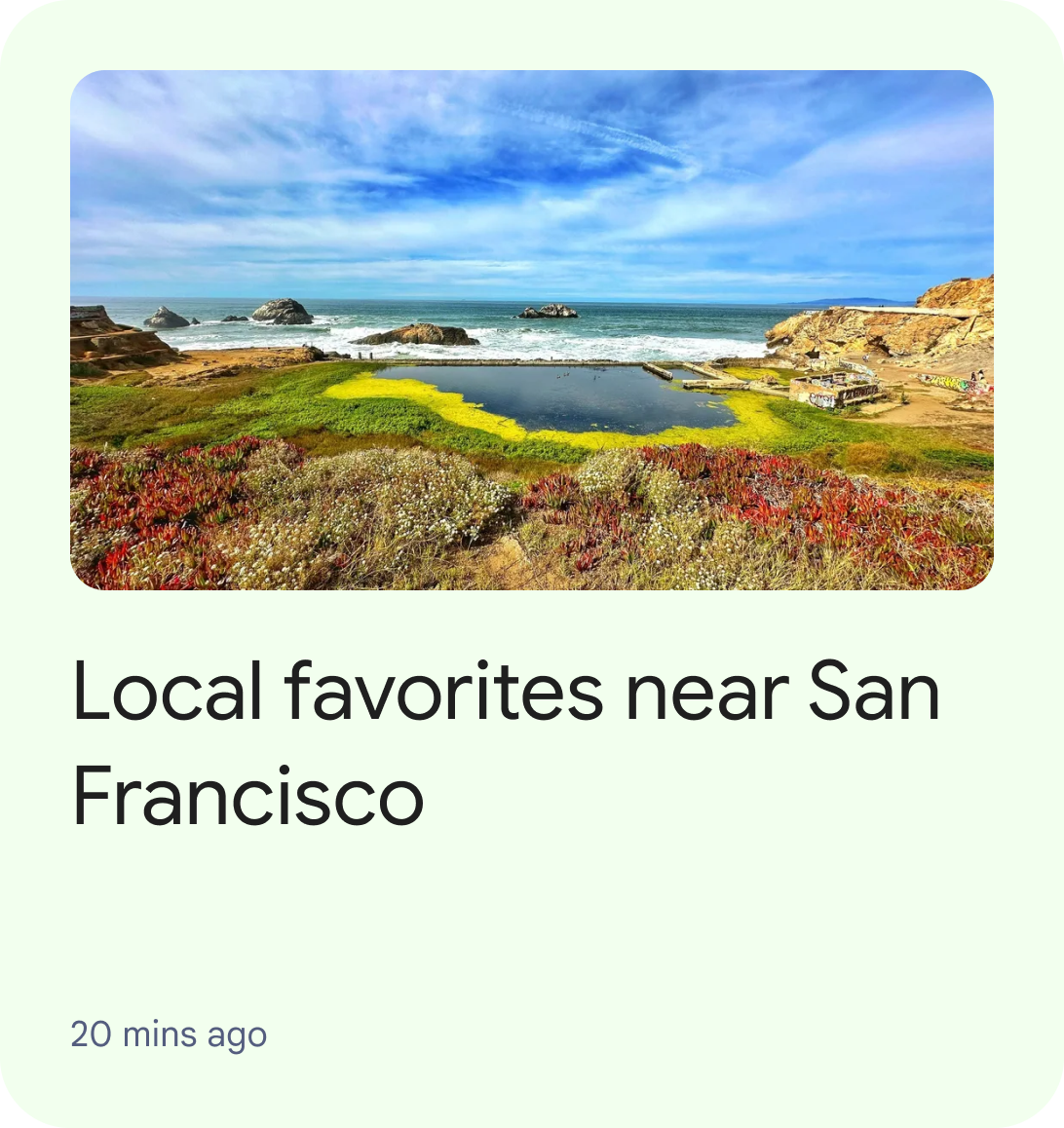
চিত্র 1: UI সুপারিশ ক্লাস্টারের মধ্যে একটি একক ArticleEntity দেখাচ্ছে। EventEntity : EventEntity ভবিষ্যতে ঘটতে থাকা একটি ইভেন্টের প্রতিনিধিত্ব করে। ইভেন্ট শুরুর সময় হল তথ্যের একটি গুরুত্বপূর্ণ অংশ যা ব্যবহারকারীদের কাছে জানানো দরকার।
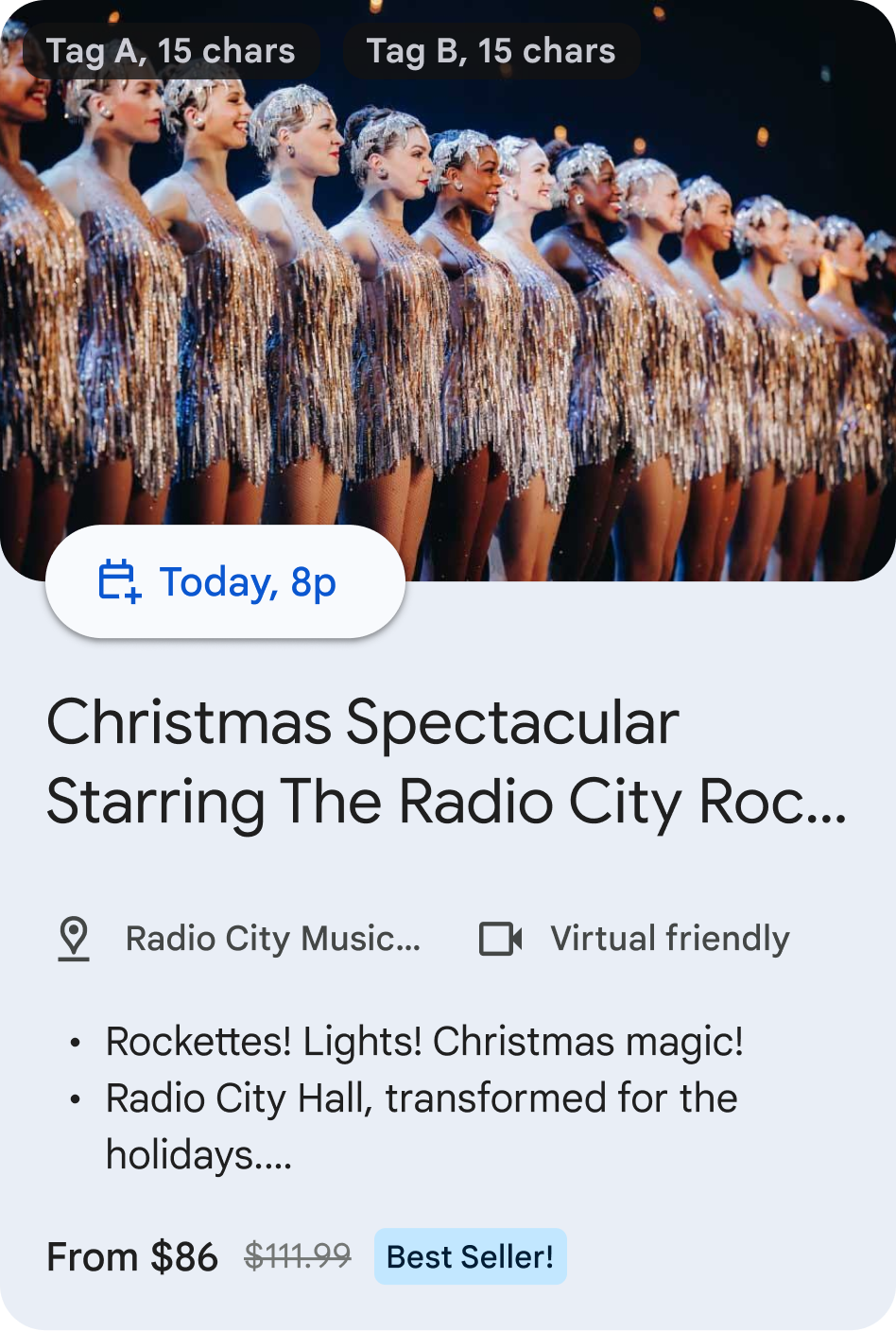
চিত্র 2: UI সুপারিশ ক্লাস্টারের মধ্যে একটি একক EventEntity দেখাচ্ছে৷ LodgingEntity : LodgingEntity একটি আবাসনের প্রতিনিধিত্ব করে, যেমন একটি হোটেল, অ্যাপার্টমেন্ট, স্বল্পমেয়াদী এবং দীর্ঘমেয়াদী ভাড়ার জন্য ছুটির বাড়ি।
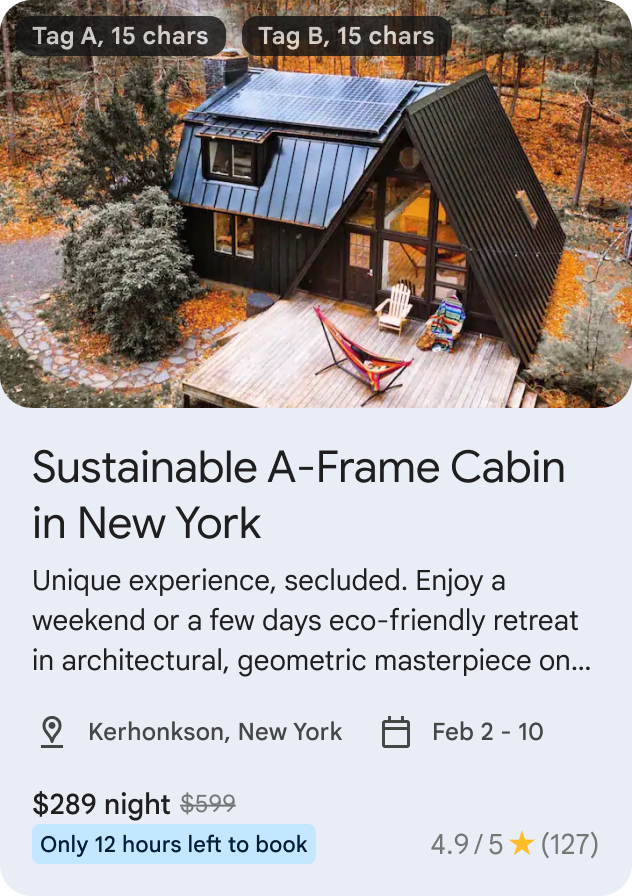
চিত্র 3: UI সুপারিশ ক্লাস্টারের মধ্যে একটি একক LodgingEntity দেখাচ্ছে৷ StoreEntity : StoreEntity একটি দোকান, রেস্তোরাঁ, ক্যাফে ইত্যাদির প্রতিনিধিত্ব করে। এটি এমন বিষয়বস্তুকে হাইলাইট করে যেখানে একটি ডাইনিং ভেন্যু বা স্টোর হল একটি গুরুত্বপূর্ণ তথ্য যা ব্যবহারকারীদের কাছে পৌঁছে দিতে হবে।
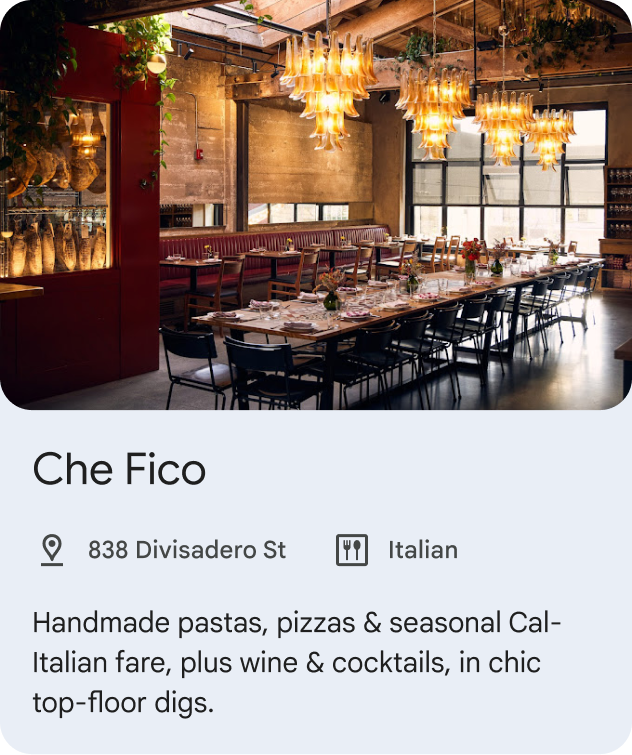
চিত্র 4: UI সুপারিশ ক্লাস্টারের মধ্যে একটি একক StoreEntity দেখাচ্ছে৷ PointOfInterestEntity : PointOfInterestEntity একটি আগ্রহের জায়গার প্রতিনিধিত্ব করে যেমন, একটি গ্যাস স্টেশন, ইভেন্ট ভেন্যু, থিম পার্ক, জাদুঘর, পর্যটক আকর্ষণ, হাইকিং ট্রেইল ইত্যাদি। এটি এমন বিষয়বস্তুকে হাইলাইট করে যেখানে অবস্থান একটি গুরুত্বপূর্ণ তথ্য যা ব্যবহারকারীদের কাছে জানানো প্রয়োজন। এটি বাসস্থান, একটি দোকান বা একটি খাবারের স্থানের জন্য ব্যবহার করা উচিত নয়৷
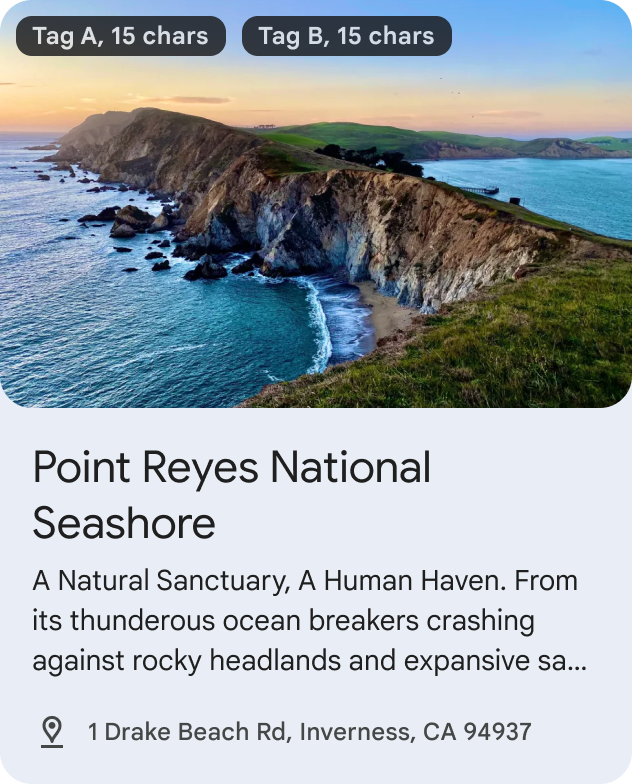
চিত্র 5: UI সুপারিশ ক্লাস্টারের মধ্যে একটি একক PointOfInterestEntity দেখাচ্ছে৷
- একটি সুপারিশ ক্লাস্টার
রিজার্ভেশন ক্লাস্টার সম্প্রতি একটি একক UI গ্রুপিংয়ে একাধিক বিকাশকারী অংশীদারদের দ্বারা নিযুক্ত সামগ্রী দেখায়৷ প্রতিটি বিকাশকারী অংশীদারকে রিজার্ভেশন ক্লাস্টারে সর্বাধিক 10টি সত্তা সম্প্রচার করার অনুমতি দেওয়া হবে।
আপনার রিজার্ভেশন সামগ্রী নিম্নলিখিত কাঠামো নিতে পারে:
RestaurantReservationEntity : RestaurantReservationEntity একটি রেস্তোরাঁ বা ক্যাফের জন্য একটি সংরক্ষণের প্রতিনিধিত্ব করে এবং ব্যবহারকারীদের আসন্ন বা চলমান রেস্তোরাঁর সংরক্ষণগুলি ট্র্যাক করতে সহায়তা করে৷
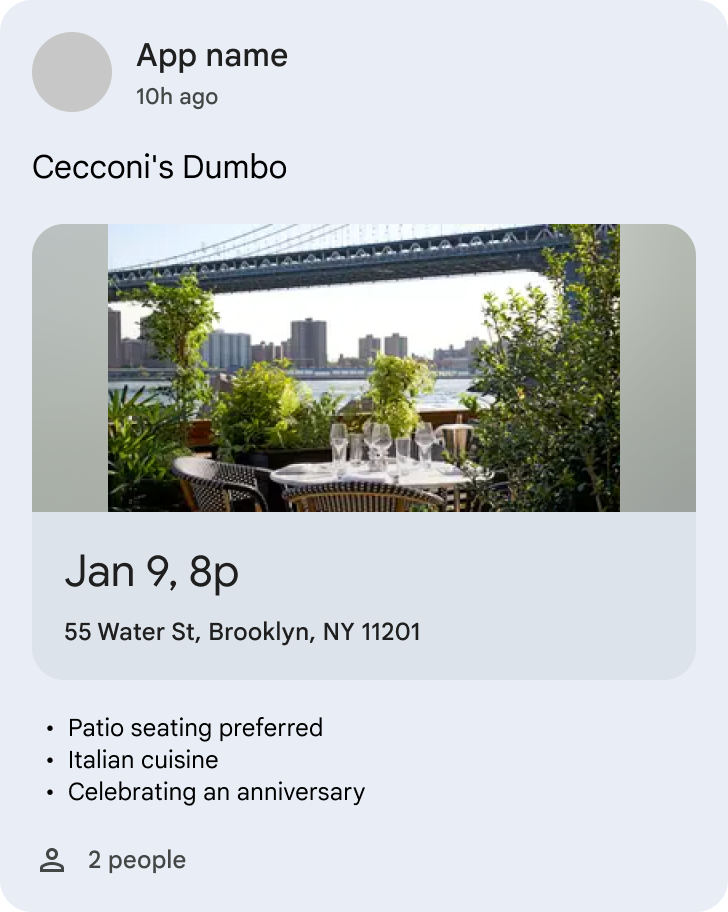
চিত্র 6. UI একটি রিজার্ভেশন ক্লাস্টারের মধ্যে একটি একক রেস্টুরেন্ট রিজার্ভেশন সত্তা দেখাচ্ছে। EventReservationEntity : EventReservationEntity একটি ইভেন্টের জন্য একটি সংরক্ষণের প্রতিনিধিত্ব করে এবং ব্যবহারকারীদের আসন্ন বা চলমান ইভেন্ট সংরক্ষণগুলি ট্র্যাক করতে সহায়তা করে৷ ইভেন্টগুলি অন্তর্ভুক্ত করতে পারে তবে নিম্নলিখিতগুলির মধ্যে সীমাবদ্ধ নয়:
- ফুটবল ম্যাচের জন্য সংরক্ষণের মতো ক্রীড়া ইভেন্ট
- ইস্পোর্টের জন্য রিজার্ভেশনের মতো গেমিং ইভেন্ট
- সিনেমা, কনসার্ট, থিয়েটার, বুক সাইনিং-এ সিনেমার জন্য রিজার্ভেশনের মতো বিনোদন ইভেন্ট
- গাইডেড ট্যুর, মিউজিয়ামের টিকিটের মতো ভ্রমণ বা আগ্রহের জায়গা সংরক্ষণ
- সামাজিক / সেমিনার / সম্মেলন সংরক্ষণ
- শিক্ষা / প্রশিক্ষণ সেশন সংরক্ষণ
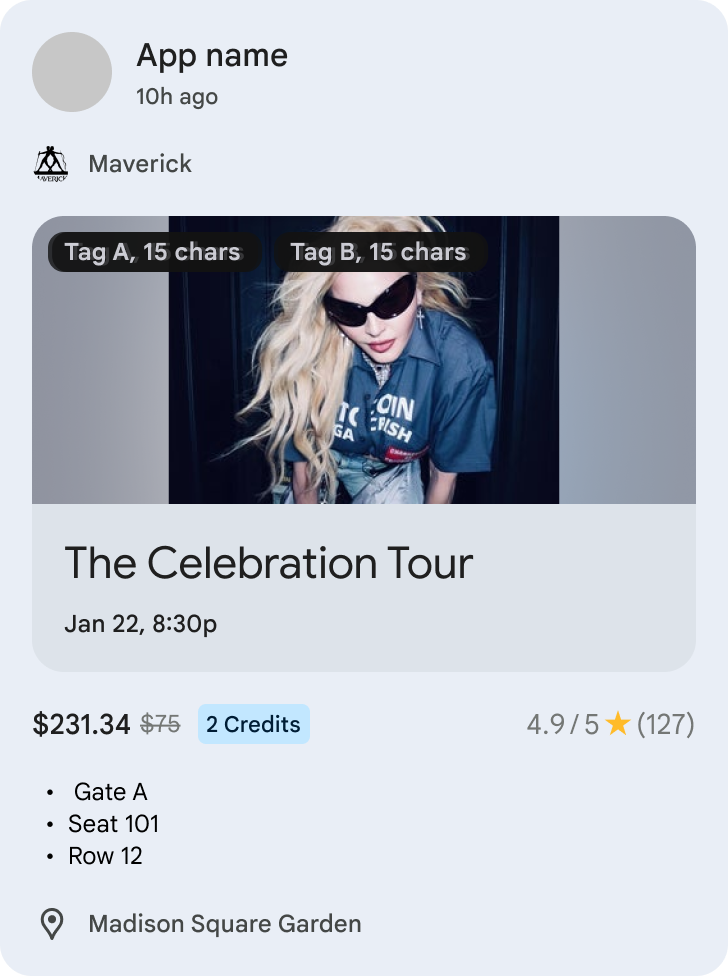
চিত্র 7. UI একটি রিজার্ভেশন ক্লাস্টারের মধ্যে একটি একক EventReservationEntity দেখাচ্ছে৷ LodgingReservationEntity : LodgingEntityReservation ভ্রমণ বাসস্থানের জন্য একটি রিজার্ভেশন প্রতিনিধিত্ব করে এবং ব্যবহারকারীদের আসন্ন বা চলমান হোটেল বা ছুটির ভাড়া রিজার্ভেশন ট্র্যাক করতে সাহায্য করে।
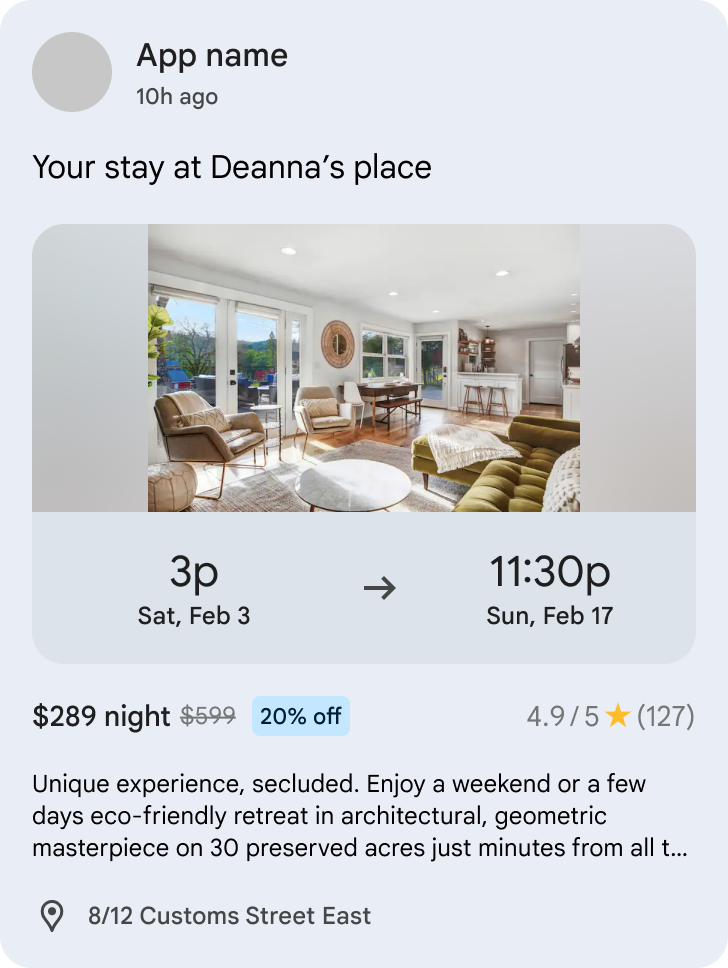
চিত্র 8. UI একটি রিজার্ভেশন ক্লাস্টারের মধ্যে একটি একক LodgingReservationEntity দেখাচ্ছে৷ TransportationReservationEntity : TransportationReservationEntity যেকোন মোডে পরিবহনের জন্য রিজার্ভেশনের প্রতিনিধিত্ব করে এবং ব্যবহারকারীদের আসন্ন বা চলমান ফ্লাইট, ফেরি, ট্রেন, বাস, রাইড-হেলিং বা ক্রুজের রিজার্ভেশন ট্র্যাক করতে সাহায্য করে।
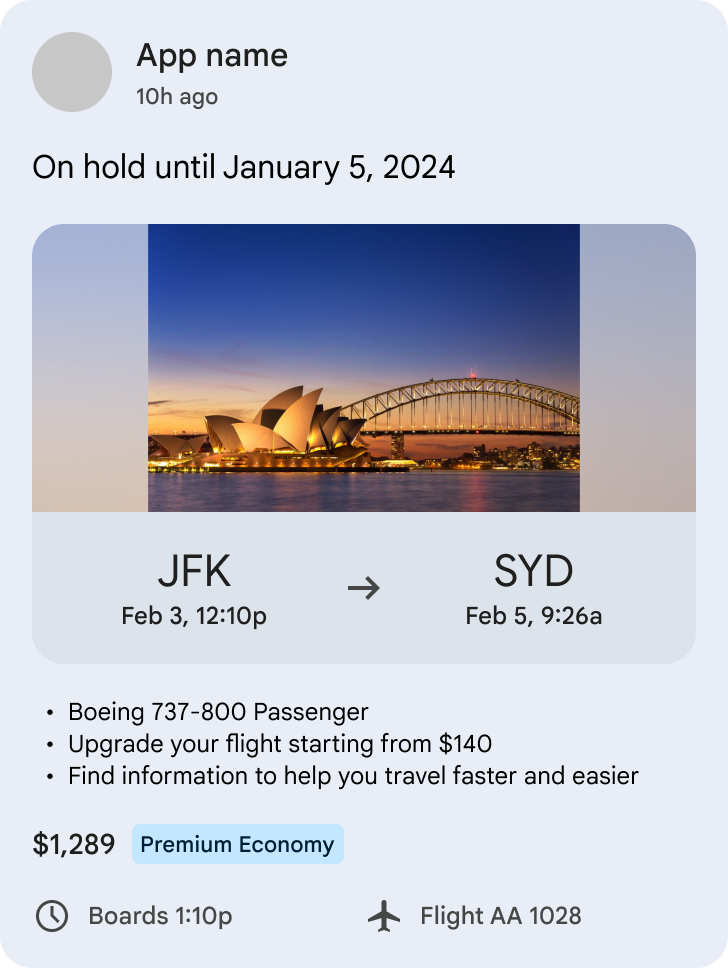
চিত্র 9. UI একটি রিজার্ভেশন ক্লাস্টারের মধ্যে একটি একক TransportationReservationEntity দেখাচ্ছে৷ VehicleRentalReservationEntity : VehicleRentalReservationEntity গাড়ি ভাড়া সংরক্ষণের প্রতিনিধিত্ব করে এবং ব্যবহারকারীদের আসন্ন বা চলমান যানবাহন ভাড়া সংরক্ষণ ট্র্যাক করতে সহায়তা করে।
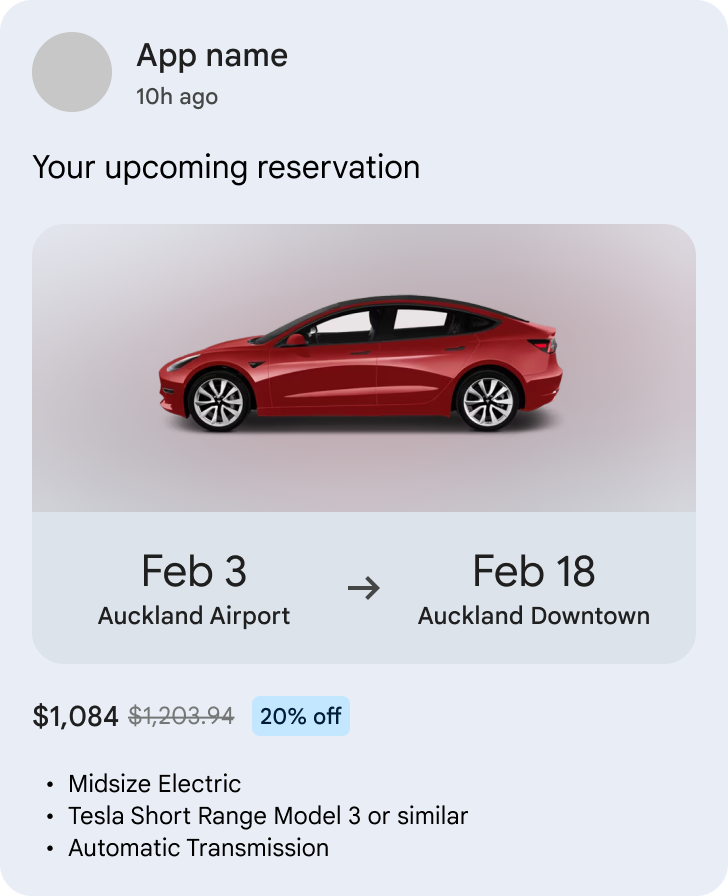
চিত্র 10. UI একটি রিজার্ভেশন ক্লাস্টারের মধ্যে একটি একক VehicleRentalReservationEntity দেখাচ্ছে৷
বৈশিষ্ট্যযুক্ত ক্লাস্টারটি একটি UI গ্রুপিংয়ে একাধিক বিকাশকারী অংশীদারদের থেকে সত্তার একটি নির্বাচন প্রদর্শন করে৷ একটি একক বৈশিষ্ট্যযুক্ত ক্লাস্টার থাকবে, যা সমস্ত সুপারিশ ক্লাস্টারের উপরে একটি অগ্রাধিকার প্লেসমেন্ট সহ UI এর শীর্ষের কাছে প্রদর্শিত হবে৷ প্রতিটি বিকাশকারী অংশীদারকে বৈশিষ্ট্যযুক্ত ক্লাস্টারে 10টি পর্যন্ত সম্প্রচার করার অনুমতি দেওয়া হবে।
GenericFeaturedEntity : GenericFeaturedEntity প্রস্তাবিত আইটেম থেকে আলাদা যে বৈশিষ্ট্যযুক্ত আইটেমটি ডেভেলপারদের থেকে একটি একক শীর্ষ সামগ্রীর জন্য ব্যবহার করা উচিত এবং ব্যবহারকারীদের জন্য আকর্ষণীয় এবং প্রাসঙ্গিক হবে এমন একক সবচেয়ে গুরুত্বপূর্ণ সামগ্রীর প্রতিনিধিত্ব করা উচিত৷
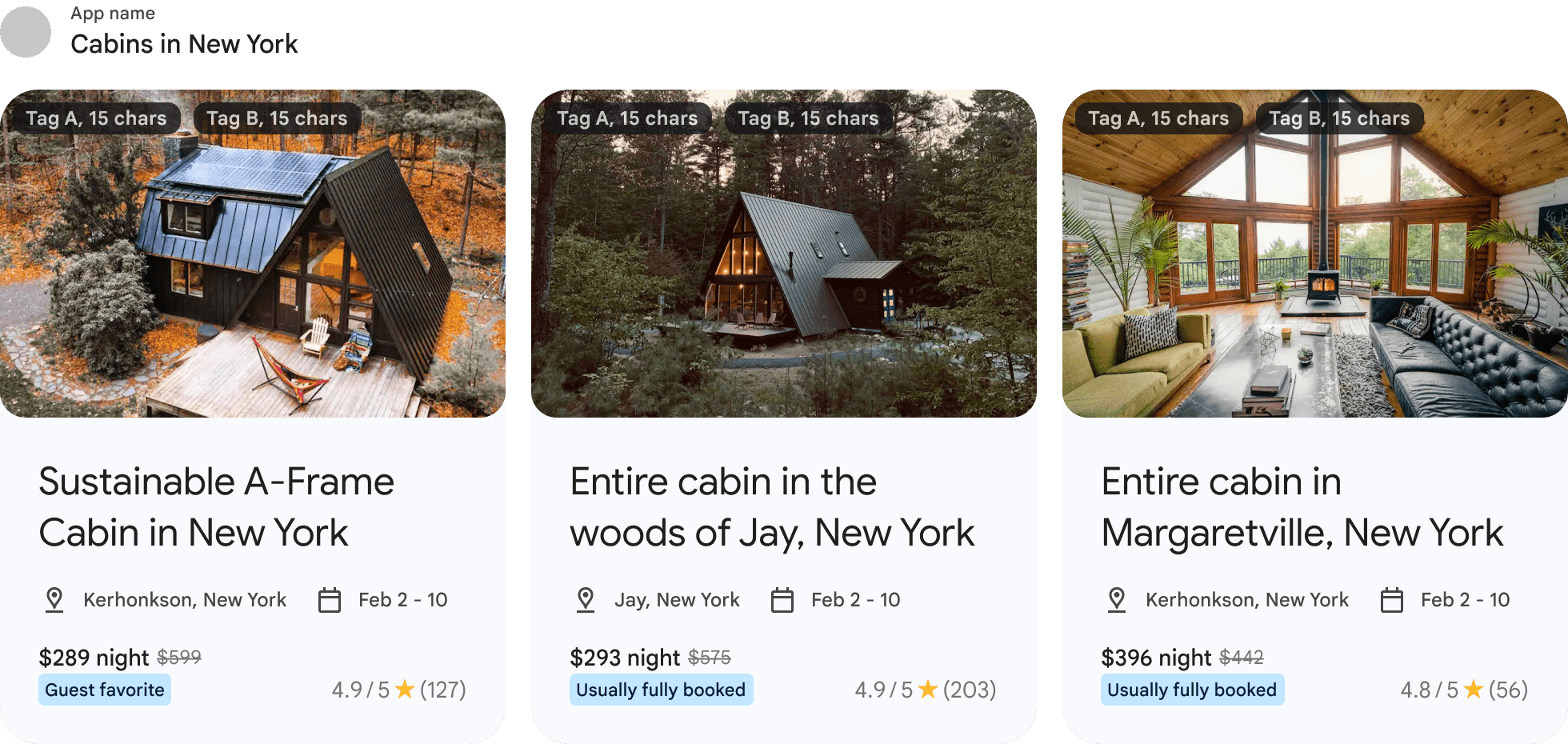
চিত্র 11: UI GenericFeaturedEntity-এর তালিকা সহ একটি বৈশিষ্ট্যযুক্ত ক্লাস্টার দেখাচ্ছে
Continue Search ক্লাস্টার ব্যবহারকারীদের সার্চ কোয়েরির একটি তালিকা প্রদর্শন করে তাদের পূর্ববর্তী ভ্রমণ অনুসন্ধান যাত্রা পুনরায় শুরু করতে সহায়তা করে যা ব্যবহারকারী সম্প্রতি তাদের সমস্ত ভ্রমণ অ্যাপ জুড়ে অনুসন্ধান করেছেন। ক্লাস্টারটিকে দ্বিতীয় অবস্থানে, সংরক্ষণের পরে এবং বৈশিষ্ট্যযুক্ত এবং সুপারিশ ক্লাস্টারের আগে পিন করা হবে। প্রতিটি বিকাশকারী অংশীদারকে অনুসন্ধান চালিয়ে যাওয়া ক্লাস্টারে 3টি পর্যন্ত সম্প্রচার করার অনুমতি দেওয়া হবে।
- PointOfInterestEntity: PointOfInterestEntity একটি আগ্রহের জায়গার প্রতিনিধিত্ব করে যেমন, একটি গ্যাস স্টেশন, ইভেন্ট ভেন্যু, থিম পার্ক, জাদুঘর, পর্যটক আকর্ষণ, হাইকিং ট্রেইল ইত্যাদি। এটি ব্যবহারকারীর পূর্বে অনুসন্ধান করা বিষয়বস্তু হাইলাইট করে।
প্রাক কাজ
ন্যূনতম API স্তর: 19
আপনার অ্যাপে com.google.android.engage:engage-core লাইব্রেরি যোগ করুন:
dependencies {
    // Make sure you also include that repository in your project's build.gradle file.
    implementation 'com.google.android.engage:engage-core:1.5.11'
}
সারাংশ
নকশা একটি আবদ্ধ সেবা বাস্তবায়ন উপর ভিত্তি করে.
একটি ক্লায়েন্ট যে ডেটা প্রকাশ করতে পারে তা বিভিন্ন ক্লাস্টার প্রকারের জন্য নিম্নলিখিত সীমার সাপেক্ষে:
| ক্লাস্টার টাইপ | ক্লাস্টার সীমা | একটি ক্লাস্টারে ন্যূনতম সত্তা সীমা | একটি ক্লাস্টারে সত্তার সর্বোচ্চ সীমা |
|---|---|---|---|
| সুপারিশ ক্লাস্টার(গুলি) | সর্বাধিক 7 | অন্ততঃ ১ | সর্বাধিক 50টি ( ArticleEntity , EventEntity , LodgingEntity , StoreEntity , or PointOfInterestEntity ) |
| রিজার্ভেশন ক্লাস্টার | সর্বোচ্চ 1 | অন্ততঃ ১ | সর্বাধিক 20টি ( RestaurantReservationEntity , EventReservationEntity , LodgingReservationEntity , TransportationReservationEntity , বা VehicleRentalReservationEntity রিজার্ভেশন এন্টিটি ) |
| বৈশিষ্ট্যযুক্ত ক্লাস্টার | সর্বোচ্চ 1 | অন্ততঃ ১ | সর্বাধিক 20 ( GenericFeaturedEntity ) |
| সার্চ ক্লাস্টার চালিয়ে যান | সর্বোচ্চ 1 | অন্ততঃ ১ | সর্বাধিক 3টি ( PointOfInterestEntity ) |
ধাপ 1: সত্তা তথ্য প্রদান
প্রতিটি আইটেমের প্রকারের প্রতিনিধিত্ব করার জন্য SDK বিভিন্ন সত্তাকে সংজ্ঞায়িত করেছে। আমরা ভ্রমণ এবং ইভেন্ট বিভাগের জন্য নিম্নলিখিত সংস্থাগুলিকে সমর্থন করি:
-
GenericFeaturedEntity -
ArticleEntity -
EventEntity -
LodgingEntity -
StoreEntity -
PointOfInterestEntity -
RestaurantReservationEntity -
EventReservationEntity -
LodgingReservationEntity -
TransportationReservationEntity -
VehicleRentalReservationEntity
নীচের চার্টগুলি প্রতিটি ধরণের জন্য উপলব্ধ বৈশিষ্ট্য এবং প্রয়োজনীয়তার রূপরেখা দেয়।
GenericFeaturedEntity
| বৈশিষ্ট্য | প্রয়োজনীয়তা | বর্ণনা | বিন্যাস |
|---|---|---|---|
| অ্যাকশন উরি | প্রয়োজন | প্রদানকারী অ্যাপে সত্তার সাথে গভীর লিঙ্ক। দ্রষ্টব্য: আপনি অ্যাট্রিবিউশনের জন্য গভীর লিঙ্ক ব্যবহার করতে পারেন। এই FAQ পড়ুন | উরি |
| পোস্টার ছবি | প্রয়োজন | একাধিক ছবি দেওয়া হলে আমরা শুধুমাত্র 1টি ছবি দেখাব। প্রস্তাবিত আকৃতির অনুপাত হল 16:9 দ্রষ্টব্য: যদি একটি ব্যাজ প্রদান করা হয়, তাহলে ছবির উপরে এবং নীচে উভয় স্থানে 24 ডিপিএস নিরাপদ স্থান নিশ্চিত করুন | নির্দেশিকা জন্য ইমেজ স্পেসিফিকেশন দেখুন. |
| শিরোনাম | ঐচ্ছিক | সত্তার শিরোনাম। | বিনামূল্যে পাঠ্য প্রস্তাবিত পাঠ্য আকার: 50 অক্ষর |
| বর্ণনা | ঐচ্ছিক | সত্তা বর্ণনা করার জন্য পাঠ্যের একটি একক অনুচ্ছেদ। দ্রষ্টব্য: হয় বর্ণনা বা সাবটাইটেল তালিকা ব্যবহারকারীর কাছে প্রদর্শিত হবে, উভয়ই নয়। | বিনামূল্যে পাঠ্য প্রস্তাবিত পাঠ্য আকার: 180 অক্ষর |
| সাবটাইটেল তালিকা | ঐচ্ছিক | 3টি পর্যন্ত সাবটাইটেল, প্রতিটি সাবটাইটেলের সাথে পাঠ্যের একটি লাইন। দ্রষ্টব্য: হয় বর্ণনা বা সাবটাইটেল তালিকা ব্যবহারকারীর কাছে প্রদর্শিত হবে, উভয়ই নয়। | বিনামূল্যে পাঠ্য প্রতিটি সাবটাইটেলের জন্য প্রস্তাবিত পাঠ্য আকার: সর্বাধিক 50 অক্ষর |
| ব্যাজ | ঐচ্ছিক | প্রতিটি ব্যাজ হয় বিনামূল্যের পাঠ্য (সর্বোচ্চ 15 অক্ষর) বা ছোট ছবি। ইমেজ/ভিডিওর উপরে বিশেষ UX ট্রিটমেন্ট, উদাহরণস্বরূপ, ছবির উপর ব্যাজ ওভারলে হিসাবে
| |
| ব্যাজ - পাঠ্য | ঐচ্ছিক | ব্যাজের শিরোনাম দ্রষ্টব্য: ব্যাজের জন্য হয় পাঠ্য বা চিত্র প্রয়োজন | বিনামূল্যে পাঠ্য প্রস্তাবিত পাঠ্য আকার: সর্বোচ্চ 15 অক্ষর |
| ব্যাজ - ছবি | ঐচ্ছিক | ছোট ইমেজ বিশেষ UX ট্রিটমেন্ট, যেমন ইমেজ/ভিডিও থাম্বনেইলে ব্যাজ ওভারলে। দ্রষ্টব্য: ব্যাজের জন্য হয় পাঠ্য বা চিত্র প্রয়োজন | নির্দেশিকা জন্য ইমেজ স্পেসিফিকেশন দেখুন. |
| বিষয়বস্তু বিভাগ | ঐচ্ছিক | সত্তার বিষয়বস্তুর শ্রেণীবিভাগ বর্ণনা করুন। | Enums তালিকা নির্দেশিকা জন্য বিষয়বস্তু বিভাগ বিভাগ দেখুন. |
| DisplayTimeWindow (ঐচ্ছিক) - একটি বিষয়বস্তুর পৃষ্ঠে দেখানোর জন্য একটি সময় উইন্ডো সেট করুন | |||
| টাইমস্ট্যাম্প শুরু করুন | ঐচ্ছিক | যুগের টাইমস্ট্যাম্প যার পরে বিষয়বস্তু পৃষ্ঠে দেখানো উচিত। যদি সেট না করা হয়, তাহলে বিষয়বস্তু পৃষ্ঠে দেখানোর যোগ্য। | মিলিসেকেন্ডে যুগের টাইমস্ট্যাম্প |
| শেষ টাইমস্ট্যাম্প | ঐচ্ছিক | যুগের টাইমস্ট্যাম্প যার পরে বিষয়বস্তু পৃষ্ঠে আর দেখানো হয় না। যদি সেট না করা হয়, তাহলে বিষয়বস্তু পৃষ্ঠে দেখানোর যোগ্য। | মিলিসেকেন্ডে যুগের টাইমস্ট্যাম্প |
ArticleEntity
| বৈশিষ্ট্য | প্রয়োজনীয়তা | বর্ণনা | বিন্যাস |
|---|---|---|---|
| অ্যাকশন উরি | প্রয়োজন | প্রদানকারী অ্যাপে সত্তার সাথে গভীর লিঙ্ক। দ্রষ্টব্য: আপনি অ্যাট্রিবিউশনের জন্য গভীর লিঙ্ক ব্যবহার করতে পারেন। এই FAQ পড়ুন | উরি |
| শিরোনাম | প্রয়োজন | সত্তার শিরোনাম। | বিনামূল্যে পাঠ্য প্রস্তাবিত পাঠ্য আকার: সর্বাধিক 50 অক্ষর |
| পোস্টার ছবি | ঐচ্ছিক | একাধিক ছবি দেওয়া হলে আমরা শুধুমাত্র 1টি ছবি দেখাব। প্রস্তাবিত আকৃতির অনুপাত হল 16:9 দ্রষ্টব্য: ছবি অত্যন্ত সুপারিশ করা হয়. যদি একটি ব্যাজ প্রদান করা হয়, তাহলে ছবির উপরে এবং নীচে উভয় দিকে 24 ডিপিএসের নিরাপদ স্থান নিশ্চিত করুন | নির্দেশিকা জন্য ইমেজ স্পেসিফিকেশন দেখুন. |
| সূত্র- শিরোনাম | ঐচ্ছিক | লেখক, সংস্থা বা রিপোর্টারের নাম | বিনামূল্যে পাঠ্য প্রস্তাবিত পাঠ্য আকার: 25 অক্ষরের নিচে |
| সূত্র- ছবি | ঐচ্ছিক | লেখক, সংস্থা, রিপোর্টার মত উৎসের একটি চিত্র | নির্দেশিকা জন্য ইমেজ স্পেসিফিকেশন দেখুন. |
| বর্ণনা | ঐচ্ছিক | সত্তা বর্ণনা করার জন্য পাঠ্যের একটি একক অনুচ্ছেদ। দ্রষ্টব্য: হয় বর্ণনা বা সাবটাইটেল তালিকা ব্যবহারকারীর কাছে প্রদর্শিত হবে, উভয়ই নয়। | বিনামূল্যে পাঠ্য প্রস্তাবিত পাঠ্য আকার: 180 অক্ষর |
| সাবটাইটেল তালিকা | ঐচ্ছিক | 3টি পর্যন্ত সাবটাইটেল, প্রতিটি সাবটাইটেলের সাথে পাঠ্যের একটি লাইন। দ্রষ্টব্য: হয় বর্ণনা বা সাবটাইটেল তালিকা ব্যবহারকারীর কাছে প্রদর্শিত হবে, উভয়ই নয়। | বিনামূল্যে পাঠ্য প্রতিটি সাবটাইটেলের জন্য প্রস্তাবিত পাঠ্য আকার: সর্বাধিক 50 অক্ষর |
| ব্যাজ | ঐচ্ছিক | প্রতিটি ব্যাজ হয় বিনামূল্যের পাঠ্য (সর্বোচ্চ 15 অক্ষর) বা ছোট ছবি। ইমেজ/ভিডিওর উপরে বিশেষ UX ট্রিটমেন্ট, উদাহরণস্বরূপ, ছবির উপর ব্যাজ ওভারলে হিসাবে
| |
| ব্যাজ - পাঠ্য | ঐচ্ছিক | ব্যাজের শিরোনাম দ্রষ্টব্য: ব্যাজের জন্য হয় পাঠ্য বা চিত্র প্রয়োজন | বিনামূল্যে পাঠ্য প্রস্তাবিত পাঠ্য আকার: সর্বোচ্চ 15 অক্ষর |
| ব্যাজ - ছবি | ঐচ্ছিক | ছোট ইমেজ বিশেষ UX ট্রিটমেন্ট, যেমন ইমেজ/ভিডিও থাম্বনেইলে ব্যাজ ওভারলে। দ্রষ্টব্য: ব্যাজের জন্য হয় পাঠ্য বা চিত্র প্রয়োজন | নির্দেশিকা জন্য ইমেজ স্পেসিফিকেশন দেখুন. |
| বিষয়বস্তু প্রকাশের সময় | ঐচ্ছিক | অ্যাপে কন্টেন্ট কখন প্রকাশিত/আপডেট করা হয়েছিল তার মিলিসেকেন্ডে এটি যুগের টাইমস্ট্যাম্প। | মিলিসেকেন্ডে যুগের টাইমস্ট্যাম্প |
| শেষ বাগদানের সময় | ঐচ্ছিক | মিলিসেকেন্ডে যুগের টাইমস্ট্যাম্প যখন ব্যবহারকারী শেষবার এই সত্তার সাথে ইন্টারঅ্যাক্ট করেছিল। | মিলিসেকেন্ডে যুগের টাইমস্ট্যাম্প |
| অগ্রগতি শতাংশ | ঐচ্ছিক | ব্যবহারকারীর দ্বারা আজ পর্যন্ত সম্পূর্ণ সামগ্রীর শতকরা পরিমাণ। | 0~100 এর মধ্যে একটি int মান। |
| বিষয়বস্তু বিভাগ | ঐচ্ছিক | সত্তার বিষয়বস্তুর শ্রেণীবিভাগ বর্ণনা করুন। | Enums তালিকা নির্দেশিকা জন্য বিষয়বস্তু বিভাগ বিভাগ দেখুন. |
| DisplayTimeWindow (ঐচ্ছিক) - একটি বিষয়বস্তুর পৃষ্ঠে দেখানোর জন্য একটি সময় উইন্ডো সেট করুন | |||
| টাইমস্ট্যাম্প শুরু করুন | ঐচ্ছিক | যুগের টাইমস্ট্যাম্প যার পরে বিষয়বস্তু পৃষ্ঠে দেখানো উচিত। যদি সেট না করা হয়, তাহলে বিষয়বস্তু পৃষ্ঠে দেখানোর যোগ্য। | মিলিসেকেন্ডে যুগের টাইমস্ট্যাম্প |
| শেষ টাইমস্ট্যাম্প | ঐচ্ছিক | যুগের টাইমস্ট্যাম্প যার পরে বিষয়বস্তু পৃষ্ঠে আর দেখানো হয় না। যদি সেট না করা হয়, তাহলে বিষয়বস্তু পৃষ্ঠে দেখানোর যোগ্য। | মিলিসেকেন্ডে যুগের টাইমস্ট্যাম্প |
EventEntity
| বৈশিষ্ট্য | প্রয়োজনীয়তা | বর্ণনা | বিন্যাস |
|---|---|---|---|
| অ্যাকশন উরি | প্রয়োজন | প্রদানকারী অ্যাপে সত্তার সাথে গভীর লিঙ্ক। দ্রষ্টব্য: আপনি অ্যাট্রিবিউশনের জন্য গভীর লিঙ্ক ব্যবহার করতে পারেন। এই FAQ পড়ুন | উরি |
| শিরোনাম | প্রয়োজন | সত্তার শিরোনাম। | স্ট্রিং প্রস্তাবিত পাঠ্য আকার: সর্বাধিক 50 অক্ষর |
| স্থানীয়কৃত শুরুর সময় - টাইমস্ট্যাম্প | প্রয়োজন | ইভেন্ট শুরু হওয়ার প্রত্যাশিত যুগের টাইমস্ট্যাম্প৷ | জোদা-টাইম ইনস্ট্যান্ট |
| স্থানীয়কৃত শুরুর সময় - টাইমজোন | প্রয়োজন | যে টাইমজোনে ইভেন্ট শুরু হবে বলে আশা করা হচ্ছে। | জোদা-টাইম ডেটটাইমজোন গাইডেন্সের জন্য টাইমজোন স্পেসিফিকেশন দেখুন। |
| ইভেন্ট মোড | প্রয়োজন | ইভেন্টটি ভার্চুয়াল, ব্যক্তিগত বা উভয়ই হবে কিনা তা নির্দেশ করার জন্য একটি ক্ষেত্র৷ | Enum: VIRTUAL, IN_PERSON, বা HYBRID |
| পোস্টার ছবি | প্রয়োজন | একাধিক ছবি দেওয়া হলে আমরা শুধুমাত্র 1টি ছবি দেখাব। প্রস্তাবিত আকৃতির অনুপাত হল 16:9 দ্রষ্টব্য: ছবি অত্যন্ত সুপারিশ করা হয়. যদি একটি ব্যাজ প্রদান করা হয়, তাহলে ছবির উপরে এবং নীচে উভয় দিকে 24 ডিপিএসের নিরাপদ স্থান নিশ্চিত করুন | নির্দেশিকা জন্য ইমেজ স্পেসিফিকেশন দেখুন. |
| অবস্থান - দেশ | শর্তসাপেক্ষে প্রয়োজন | যে দেশে ঘটনা ঘটছে। দ্রষ্টব্য: IN_PERSON বা HYBRID ইভেন্টগুলির জন্য এটি প্রয়োজনীয়৷ | বিনামূল্যে পাঠ্য প্রস্তাবিত পাঠ্যের আকার: সর্বাধিক ~20 অক্ষর |
| অবস্থান - শহর | শর্তসাপেক্ষে প্রয়োজন | যে শহরে ঘটনাটি ঘটছে। দ্রষ্টব্য: IN_PERSON বা HYBRID ইভেন্টগুলির জন্য এটি প্রয়োজনীয়৷ | বিনামূল্যে পাঠ্য প্রস্তাবিত পাঠ্যের আকার: সর্বাধিক ~20 অক্ষর |
| অবস্থান - প্রদর্শন ঠিকানা | শর্তসাপেক্ষে প্রয়োজন | ঠিকানা বা স্থানের নাম যেখানে ইভেন্টটি সংঘটিত হবে যা ব্যবহারকারীকে প্রদর্শন করা উচিত। দ্রষ্টব্য: IN_PERSON বা HYBRID ইভেন্টগুলির জন্য এটি প্রয়োজনীয়৷ | বিনামূল্যে পাঠ্য প্রস্তাবিত পাঠ্যের আকার: সর্বাধিক ~20 অক্ষর |
| অবস্থান - রাস্তার ঠিকানা | ঐচ্ছিক | যে স্থানে ইভেন্টটি হোস্ট করা হচ্ছে তার রাস্তার ঠিকানা (যদি প্রযোজ্য হয়)। | বিনামূল্যে পাঠ্য প্রস্তাবিত পাঠ্যের আকার: সর্বাধিক ~20 অক্ষর |
| অবস্থান - রাজ্য | ঐচ্ছিক | রাজ্য বা প্রদেশ (যদি প্রযোজ্য হয়) যেখানে ইভেন্টটি হোস্ট করা হচ্ছে। | বিনামূল্যে পাঠ্য প্রস্তাবিত পাঠ্যের আকার: সর্বাধিক ~20 অক্ষর |
| অবস্থান - জিপ কোড | ঐচ্ছিক | যে স্থানে ইভেন্টটি হোস্ট করা হচ্ছে তার জিপ কোড (প্রযোজ্য হলে)। | বিনামূল্যে পাঠ্য প্রস্তাবিত পাঠ্যের আকার: সর্বাধিক ~20 অক্ষর |
| অবস্থান - পাড়া | ঐচ্ছিক | আশেপাশের (যদি প্রযোজ্য হয়) যেখানে ইভেন্টটি হোস্ট করা হচ্ছে। | বিনামূল্যে পাঠ্য প্রস্তাবিত পাঠ্যের আকার: সর্বাধিক ~20 অক্ষর |
| শেষ সময় | ঐচ্ছিক | ইভেন্ট শেষ হওয়ার প্রত্যাশিত যুগের টাইমস্ট্যাম্প৷ দ্রষ্টব্য: এটি মিলিসেকেন্ডে উপস্থাপন করা হবে। | মিলিসেকেন্ডে যুগের টাইমস্ট্যাম্প |
| বর্ণনা | ঐচ্ছিক | সত্তা বর্ণনা করার জন্য পাঠ্যের একটি একক অনুচ্ছেদ। দ্রষ্টব্য: হয় বর্ণনা বা সাবটাইটেল তালিকা ব্যবহারকারীর কাছে প্রদর্শিত হবে, উভয়ই নয়। | বিনামূল্যে পাঠ্য প্রস্তাবিত পাঠ্য আকার: 180 অক্ষর |
| সাবটাইটেল তালিকা | ঐচ্ছিক | 3টি পর্যন্ত সাবটাইটেল, প্রতিটি সাবটাইটেলের সাথে পাঠ্যের একটি লাইন। দ্রষ্টব্য: হয় বর্ণনা বা সাবটাইটেল তালিকা ব্যবহারকারীর কাছে প্রদর্শিত হবে, উভয়ই নয়। | বিনামূল্যে পাঠ্য প্রতিটি সাবটাইটেলের জন্য প্রস্তাবিত পাঠ্য আকার: সর্বাধিক 50 অক্ষর |
| ব্যাজ | ঐচ্ছিক | প্রতিটি ব্যাজ হয় বিনামূল্যের পাঠ্য (সর্বোচ্চ 15 অক্ষর) বা ছোট ছবি। | |
| ব্যাজ - পাঠ্য | ঐচ্ছিক | ব্যাজের শিরোনাম দ্রষ্টব্য: ব্যাজের জন্য হয় পাঠ্য বা চিত্র প্রয়োজন | বিনামূল্যে পাঠ্য প্রস্তাবিত পাঠ্য আকার: সর্বোচ্চ 15 অক্ষর |
| ব্যাজ - ছবি | ঐচ্ছিক | ছোট ইমেজ বিশেষ UX ট্রিটমেন্ট, যেমন ইমেজ/ভিডিও থাম্বনেইলে ব্যাজ ওভারলে। দ্রষ্টব্য: ব্যাজের জন্য হয় পাঠ্য বা চিত্র প্রয়োজন | নির্দেশিকা জন্য ইমেজ স্পেসিফিকেশন দেখুন. |
| মূল্য - বর্তমান মূল্য | শর্তসাপেক্ষে প্রয়োজন | ইভেন্টের জন্য টিকিট/পাসের বর্তমান মূল্য। স্ট্রাইকথ্রু মূল্য প্রদান করা হলে অবশ্যই প্রদান করতে হবে। | বিনামূল্যে পাঠ্য |
| মূল্য - StrikethroughPrice | ঐচ্ছিক | ইভেন্টের জন্য টিকিট/পাসের আসল মূল্য। | বিনামূল্যে পাঠ্য |
| মূল্য কলআউট | ঐচ্ছিক | একটি প্রোমো, ইভেন্ট, সদস্য ডিসকাউন্ট, যদি উপলব্ধ থাকে তবে মূল্য কলআউট। | বিনামূল্যে পাঠ্য প্রস্তাবিত পাঠ্যের আকার: 45 অক্ষরের নিচে (অত্যধিক দীর্ঘ পাঠ্য উপবৃত্ত দেখাতে পারে) |
| বিষয়বস্তু বিভাগ | ঐচ্ছিক | সত্তার বিষয়বস্তুর শ্রেণীবিভাগ বর্ণনা করুন। | যোগ্য Enums তালিকা
নির্দেশিকা জন্য বিষয়বস্তু বিভাগ বিভাগ দেখুন. |
| DisplayTimeWindow (ঐচ্ছিক) - একটি বিষয়বস্তুর পৃষ্ঠে দেখানোর জন্য একটি সময় উইন্ডো সেট করুন | |||
| টাইমস্ট্যাম্প শুরু করুন | ঐচ্ছিক | যুগের টাইমস্ট্যাম্প যার পরে বিষয়বস্তু পৃষ্ঠে দেখানো উচিত। যদি সেট না করা হয়, তাহলে বিষয়বস্তু পৃষ্ঠে দেখানোর যোগ্য। | মিলিসেকেন্ডে যুগের টাইমস্ট্যাম্প |
| শেষ টাইমস্ট্যাম্প | ঐচ্ছিক | যুগের টাইমস্ট্যাম্প যার পরে বিষয়বস্তু পৃষ্ঠে আর দেখানো হয় না। যদি সেট না করা হয়, তাহলে বিষয়বস্তু পৃষ্ঠে দেখানোর যোগ্য। | মিলিসেকেন্ডে যুগের টাইমস্ট্যাম্প |
LodgingEntity
| বৈশিষ্ট্য | প্রয়োজনীয়তা | বর্ণনা | বিন্যাস |
|---|---|---|---|
| অ্যাকশন উরি | প্রয়োজন | প্রদানকারী অ্যাপে সত্তার সাথে গভীর লিঙ্ক। দ্রষ্টব্য: আপনি অ্যাট্রিবিউশনের জন্য গভীর লিঙ্ক ব্যবহার করতে পারেন। এই FAQ পড়ুন | উরি |
| শিরোনাম | প্রয়োজন | সত্তার শিরোনাম। | স্ট্রিং প্রস্তাবিত পাঠ্য আকার: সর্বাধিক 50 অক্ষর |
| পোস্টার ছবি | প্রয়োজন | একাধিক ছবি দেওয়া হলে আমরা শুধুমাত্র 1টি ছবি দেখাব। প্রস্তাবিত আকৃতির অনুপাত হল 16:9 দ্রষ্টব্য: যদি একটি ব্যাজ প্রদান করা হয়, তাহলে ছবির উপরে এবং নীচে উভয় স্থানে 24 ডিপিএস নিরাপদ স্থান নিশ্চিত করুন | নির্দেশিকা জন্য ইমেজ স্পেসিফিকেশন দেখুন. |
| অবস্থান - দেশ | প্রয়োজন | যে দেশে বাসস্থান হচ্ছে। | বিনামূল্যে পাঠ্য প্রস্তাবিত পাঠ্যের আকার: সর্বাধিক ~20 অক্ষর |
| অবস্থান - শহর | প্রয়োজন | যে শহরে বাসস্থান হচ্ছে। | বিনামূল্যে পাঠ্য প্রস্তাবিত পাঠ্যের আকার: সর্বাধিক ~20 অক্ষর |
| অবস্থান - প্রদর্শন ঠিকানা | প্রয়োজন | ঠিকানা যা ব্যবহারকারীর কাছে প্রদর্শিত হবে। আমরা বেশিরভাগ ব্যবহারের ক্ষেত্রে শহরের নাম এবং সম্ভবত রাজ্য বা দেশ অন্তর্ভুক্ত করার পরামর্শ দিই। শুধুমাত্র রাস্তার ঠিকানা বা আশেপাশের এলাকা অন্তর্ভুক্ত করুন যদি ব্যবহারকারী লোকেশনের কাছাকাছি থাকে, ব্যবহারকারী লোকেশনের সাথে পরিচিত হয়, অথবা শহরটি ক্লাস্টার শিরোনামে অন্তর্ভুক্ত থাকে। যদি আপনি রাস্তার ঠিকানা অন্তর্ভুক্ত করেন, যেখানে সম্ভব সেখানে সংক্ষিপ্ত রূপ ব্যবহার করে একটি সংক্ষিপ্ত ঠিকানা দিন (উদাহরণস্বরূপ, "রাস্তার জন্য "St", "Avenue" এর জন্য "Ave")। | বিনামূল্যে পাঠ্য প্রস্তাবিত পাঠ্যের আকার: সর্বাধিক ~20 অক্ষর |
| অবস্থান - রাস্তার ঠিকানা | ঐচ্ছিক | বাসস্থানের রাস্তার ঠিকানা (যদি প্রযোজ্য হয়)। | বিনামূল্যে পাঠ্য প্রস্তাবিত পাঠ্যের আকার: সর্বাধিক ~20 অক্ষর |
| অবস্থান - রাজ্য | ঐচ্ছিক | রাজ্য বা প্রদেশ (যদি প্রযোজ্য হয়) যেখানে বাসস্থান অবস্থিত। | বিনামূল্যে পাঠ্য প্রস্তাবিত পাঠ্যের আকার: সর্বাধিক ~20 অক্ষর |
| অবস্থান - জিপ কোড | ঐচ্ছিক | বাসস্থানের জিপ কোড (যদি প্রযোজ্য হয়)। | বিনামূল্যে পাঠ্য প্রস্তাবিত পাঠ্যের আকার: সর্বাধিক ~20 অক্ষর |
| অবস্থান - পাড়া | ঐচ্ছিক | বাসস্থানের আশেপাশের এলাকা (যদি প্রযোজ্য হয়)। | বিনামূল্যে পাঠ্য প্রস্তাবিত পাঠ্যের আকার: সর্বাধিক ~20 অক্ষর |
| ব্যাজ | ঐচ্ছিক | প্রতিটি ব্যাজ হয় বিনামূল্যের পাঠ্য (সর্বোচ্চ 15 অক্ষর) বা ছোট ছবি। | |
| ব্যাজ - পাঠ্য | ঐচ্ছিক | ব্যাজের শিরোনাম দ্রষ্টব্য: ব্যাজের জন্য হয় পাঠ্য বা চিত্র প্রয়োজন | বিনামূল্যে পাঠ্য প্রস্তাবিত পাঠ্য আকার: সর্বোচ্চ 15 অক্ষর |
| ব্যাজ - ছবি | ঐচ্ছিক | ছোট ইমেজ বিশেষ UX ট্রিটমেন্ট, যেমন ইমেজ/ভিডিও থাম্বনেইলে ব্যাজ ওভারলে। দ্রষ্টব্য: ব্যাজের জন্য হয় পাঠ্য বা চিত্র প্রয়োজন | নির্দেশিকা জন্য ইমেজ স্পেসিফিকেশন দেখুন. |
| বর্ণনা | ঐচ্ছিক | সত্তা বর্ণনা করার জন্য পাঠ্যের একটি একক অনুচ্ছেদ। দ্রষ্টব্য: হয় বর্ণনা বা সাবটাইটেল তালিকা ব্যবহারকারীর কাছে প্রদর্শিত হবে, উভয়ই নয়। | বিনামূল্যে পাঠ্য প্রস্তাবিত পাঠ্য আকার: 180 অক্ষর |
| সাবটাইটেল তালিকা | ঐচ্ছিক | 3টি পর্যন্ত সাবটাইটেল, প্রতিটি সাবটাইটেলের সাথে পাঠ্যের একটি লাইন। দ্রষ্টব্য: হয় বর্ণনা বা সাবটাইটেল তালিকা ব্যবহারকারীর কাছে প্রদর্শিত হবে, উভয়ই নয়। | বিনামূল্যে পাঠ্য প্রতিটি সাবটাইটেলের জন্য প্রস্তাবিত পাঠ্য আকার: সর্বাধিক 50 অক্ষর |
| AvailabilityTimeWindow - স্থানীয়কৃত শুরুর সময় - টাইমস্ট্যাম্প | ঐচ্ছিক | যুগের টাইমস্ট্যাম্প যখন বাসস্থান খোলা/উপলব্ধ হবে বলে আশা করা হয়। | জোদা-টাইম ইনস্ট্যান্ট |
| AvailabilityTimeWindow - স্থানীয়কৃত শুরুর সময় - টাইমজোন | ঐচ্ছিক | টাইমজোন যেখানে থাকার জায়গা খোলা/উপলব্ধ হবে বলে আশা করা হচ্ছে। | জোদা-টাইম ডেটটাইমজোন গাইডেন্সের জন্য টাইমজোন স্পেসিফিকেশন দেখুন। |
| AvailabilityTimeWindow - স্থানীয়কৃত শেষ সময় - টাইমস্ট্যাম্প | ঐচ্ছিক | যুগের টাইমস্ট্যাম্প যে পর্যন্ত থাকার জায়গা খোলা/উপলব্ধ হবে বলে আশা করা হচ্ছে। | জোদা-টাইম ইনস্ট্যান্ট |
| AvailabilityTimeWindow - স্থানীয়কৃত শেষ সময় - টাইমজোন | ঐচ্ছিক | টাইমজোন যেখানে থাকার জায়গা খোলা/উপলব্ধ হবে বলে আশা করা হচ্ছে। | জোদা-টাইম ডেটটাইমজোন গাইডেন্সের জন্য টাইমজোন স্পেসিফিকেশন দেখুন। |
| রেটিং - সর্বোচ্চ মান | ঐচ্ছিক | রেটিং স্কেলের সর্বোচ্চ মান। প্রদান করা আবশ্যক যদি রেটিং বর্তমান মান প্রদান করা হয়. | সংখ্যা >= 0.0 |
| রেটিং - বর্তমান মান | ঐচ্ছিক | রেটিং স্কেলের বর্তমান মান। প্রদান করা আবশ্যক যদি রেটিং সর্বোচ্চ মান প্রদান করা হয়. | সংখ্যা >= 0.0 |
| রেটিং - গণনা | ঐচ্ছিক | বাসস্থানের জন্য রেটিং গণনা. দ্রষ্টব্য: আপনার অ্যাপ ব্যবহারকারীদের কাছে এটি কীভাবে প্রদর্শিত হবে তা নিয়ন্ত্রণ করতে চাইলে এই ক্ষেত্রটি প্রদান করুন। ব্যবহারকারীর কাছে প্রদর্শিত হতে পারে এমন সংক্ষিপ্ত স্ট্রিং প্রদান করুন। উদাহরণস্বরূপ, যদি গণনা 1,000,000 হয়, তাহলে 1M-এর মতো সংক্ষিপ্ত রূপগুলি ব্যবহার করার কথা বিবেচনা করুন, যাতে ছোট ডিসপ্লে আকারে এটি কাটা না যায়৷ | স্ট্রিং |
| রেটিং - গণনা মান | ঐচ্ছিক | বাসস্থানের জন্য রেটিং গণনা. দ্রষ্টব্য: আপনি যদি প্রদর্শন সংক্ষিপ্তকরণ যুক্তি নিজে পরিচালনা করতে না চান তবে এই ক্ষেত্রটি প্রদান করুন৷ গণনা এবং গণনা মান উভয়ই উপস্থিত থাকলে, আমরা ব্যবহারকারীদের কাছে প্রদর্শন করতে গণনা ব্যবহার করব | লম্বা |
| মূল্য - বর্তমান মূল্য | শর্তসাপেক্ষে প্রয়োজন | বাসস্থানের বর্তমান মূল্য। স্ট্রাইকথ্রু মূল্য প্রদান করা হলে অবশ্যই প্রদান করতে হবে। | বিনামূল্যে পাঠ্য |
| মূল্য - StrikethroughPrice | ঐচ্ছিক | বাসস্থানের আসল মূল্য, যা UI-তে দেওয়া হয়। | বিনামূল্যে পাঠ্য |
| মূল্য কলআউট | ঐচ্ছিক | একটি প্রোমো, ইভেন্ট, সদস্য ডিসকাউন্ট, যদি উপলব্ধ থাকে তবে মূল্য কলআউট। | বিনামূল্যে পাঠ্য প্রস্তাবিত পাঠ্যের আকার: 45 অক্ষরের নিচে (অত্যধিক দীর্ঘ পাঠ্য উপবৃত্ত দেখাতে পারে) |
| DisplayTimeWindow (ঐচ্ছিক) - একটি বিষয়বস্তুর পৃষ্ঠে দেখানোর জন্য একটি সময় উইন্ডো সেট করুন | |||
| টাইমস্ট্যাম্প শুরু করুন | ঐচ্ছিক | যুগের টাইমস্ট্যাম্প যার পরে বিষয়বস্তু পৃষ্ঠে দেখানো উচিত। যদি সেট না করা হয়, তাহলে বিষয়বস্তু পৃষ্ঠে দেখানোর যোগ্য। | মিলিসেকেন্ডে যুগের টাইমস্ট্যাম্প |
| শেষ টাইমস্ট্যাম্প | ঐচ্ছিক | যুগের টাইমস্ট্যাম্প যার পরে বিষয়বস্তু পৃষ্ঠে আর দেখানো হয় না। যদি সেট না করা হয়, তাহলে বিষয়বস্তু পৃষ্ঠে দেখানোর যোগ্য। | মিলিসেকেন্ডে যুগের টাইমস্ট্যাম্প |
StoreEntity
StoreEntity অবজেক্ট একটি পৃথক স্টোরের প্রতিনিধিত্ব করে যা বিকাশকারী অংশীদাররা প্রকাশ করতে চায়, যেমন একটি জনপ্রিয় খাবারের স্থান বা খাবারের জায়গা যা একজনের ভ্রমণ অভিজ্ঞতার সাথে প্রাসঙ্গিক।
| বৈশিষ্ট্য | প্রয়োজনীয়তা | বর্ণনা | বিন্যাস |
|---|---|---|---|
| পোস্টার ছবি | প্রয়োজন | অন্তত একটি ছবি প্রদান করা আবশ্যক. | নির্দেশিকা জন্য ইমেজ স্পেসিফিকেশন দেখুন. |
| অ্যাকশন উরি | প্রয়োজন | প্রদানকারী অ্যাপে সত্তার সাথে গভীর লিঙ্ক। দ্রষ্টব্য: আপনি অ্যাট্রিবিউশনের জন্য গভীর লিঙ্ক ব্যবহার করতে পারেন। এই FAQ পড়ুন | উরি |
| শিরোনাম | ঐচ্ছিক | দোকানের নাম। | বিনামূল্যে পাঠ্য প্রস্তাবিত পাঠ্যের আকার: 45 অক্ষরের নিচে (অত্যধিক দীর্ঘ পাঠ্য উপবৃত্ত দেখাতে পারে) |
| অবস্থান | ঐচ্ছিক | দোকানের অবস্থান। | বিনামূল্যে পাঠ্য প্রস্তাবিত পাঠ্যের আকার: 45 অক্ষরের নিচে (অত্যধিক দীর্ঘ পাঠ্য উপবৃত্ত দেখাতে পারে) |
| কলআউট | ঐচ্ছিক | দোকানের জন্য প্রোমো, ইভেন্ট বা আপডেট দেখানোর জন্য কলআউট, যদি পাওয়া যায়। | বিনামূল্যে পাঠ্য প্রস্তাবিত পাঠ্যের আকার: 45 অক্ষরের নিচে (অত্যধিক দীর্ঘ পাঠ্য উপবৃত্ত দেখাতে পারে) |
| কলআউট সূক্ষ্ম মুদ্রণ | ঐচ্ছিক | কলআউটের জন্য সূক্ষ্ম মুদ্রণ পাঠ্য। | বিনামূল্যে পাঠ্য প্রস্তাবিত পাঠ্যের আকার: 45 অক্ষরের নিচে (অত্যধিক দীর্ঘ পাঠ্য উপবৃত্ত দেখাতে পারে) |
| বর্ণনা | ঐচ্ছিক | দোকানের বর্ণনা। | বিনামূল্যে পাঠ্য প্রস্তাবিত পাঠ্যের আকার: 90 অক্ষরের নিচে (অত্যধিক দীর্ঘ পাঠ্য উপবৃত্ত দেখাতে পারে) |
| শ্রেণী | ঐচ্ছিক | একটি দোকানের বিভাগ, ডাইনিং জায়গার প্রসঙ্গে, এটি "ফরাসি", "নতুন আমেরিকান", "রামেন", "ফাইন ডাইনিং" এর মতো রন্ধনপ্রণালী হতে পারে। | বিনামূল্যে পাঠ্য প্রস্তাবিত পাঠ্যের আকার: 45 অক্ষরের নিচে (অত্যধিক দীর্ঘ পাঠ্য উপবৃত্ত দেখাতে পারে) |
| রেটিং - সর্বোচ্চ মান | ঐচ্ছিক | রেটিং স্কেলের সর্বোচ্চ মান। প্রদান করা আবশ্যক যদি রেটিং বর্তমান মান প্রদান করা হয়. | সংখ্যা >= 0.0 |
| রেটিং - বর্তমান মান | ঐচ্ছিক | রেটিং স্কেলের বর্তমান মান। প্রদান করা আবশ্যক যদি রেটিং সর্বোচ্চ মান প্রদান করা হয়. | সংখ্যা >= 0.0 |
| রেটিং - গণনা | ঐচ্ছিক | বাসস্থানের জন্য রেটিং গণনা. দ্রষ্টব্য: আপনার অ্যাপ ব্যবহারকারীদের কাছে এটি কীভাবে প্রদর্শিত হবে তা নিয়ন্ত্রণ করতে চাইলে এই ক্ষেত্রটি প্রদান করুন। ব্যবহারকারীর কাছে প্রদর্শিত হতে পারে এমন সংক্ষিপ্ত স্ট্রিং প্রদান করুন। উদাহরণস্বরূপ, যদি গণনা 1,000,000 হয়, তাহলে 1M-এর মতো সংক্ষিপ্ত রূপগুলি ব্যবহার করার কথা বিবেচনা করুন, যাতে ছোট ডিসপ্লে আকারে এটি কাটা না যায়৷ | স্ট্রিং |
| রেটিং - গণনা মান | ঐচ্ছিক | বাসস্থানের জন্য রেটিং গণনা. দ্রষ্টব্য: আপনি যদি প্রদর্শন সংক্ষিপ্তকরণ যুক্তি নিজে পরিচালনা করতে না চান তবে এই ক্ষেত্রটি প্রদান করুন৷ গণনা এবং গণনা মান উভয়ই উপস্থিত থাকলে, আমরা ব্যবহারকারীদের কাছে প্রদর্শন করতে গণনা ব্যবহার করব | লম্বা |
| DisplayTimeWindow (ঐচ্ছিক) - একটি বিষয়বস্তুর পৃষ্ঠে দেখানোর জন্য একটি সময় উইন্ডো সেট করুন | |||
| টাইমস্ট্যাম্প শুরু করুন | ঐচ্ছিক | যুগের টাইমস্ট্যাম্প যার পরে বিষয়বস্তু পৃষ্ঠে দেখানো উচিত। যদি সেট না করা হয়, তাহলে বিষয়বস্তু পৃষ্ঠে দেখানোর যোগ্য। | মিলিসেকেন্ডে যুগের টাইমস্ট্যাম্প |
| শেষ টাইমস্ট্যাম্প | ঐচ্ছিক | যুগের টাইমস্ট্যাম্প যার পরে বিষয়বস্তু পৃষ্ঠে আর দেখানো হয় না। যদি সেট না করা হয়, তাহলে বিষয়বস্তু পৃষ্ঠে দেখানোর যোগ্য। | মিলিসেকেন্ডে যুগের টাইমস্ট্যাম্প |
PointOfInterestEntity
| বৈশিষ্ট্য | প্রয়োজনীয়তা | বর্ণনা | বিন্যাস |
|---|---|---|---|
| অ্যাকশন উরি | প্রয়োজন | প্রদানকারী অ্যাপে সত্তার সাথে গভীর লিঙ্ক। দ্রষ্টব্য: আপনি অ্যাট্রিবিউশনের জন্য গভীর লিঙ্ক ব্যবহার করতে পারেন। এই FAQ পড়ুন | উরি |
| শিরোনাম | প্রয়োজন | সত্তার শিরোনাম। | স্ট্রিং প্রস্তাবিত পাঠ্য আকার: সর্বাধিক 50 অক্ষর |
| পোস্টার ছবি | শর্তসাপেক্ষে প্রয়োজন | একাধিক ছবি দেওয়া হলে আমরা শুধুমাত্র 1টি ছবি দেখাব। প্রস্তাবিত আকৃতির অনুপাত হল 16:9 দ্রষ্টব্য: যদি সত্তা সুপারিশ ক্লাস্টারের অংশ হয় তবে চিত্র প্রয়োজন। যদি একটি ব্যাজ প্রদান করা হয়, তাহলে ছবির উপরে এবং নীচে উভয় দিকে 24 ডিপিএসের নিরাপদ স্থান নিশ্চিত করুন | নির্দেশিকা জন্য ইমেজ স্পেসিফিকেশন দেখুন. |
| শেষ বাগদানের সময় | শর্তসাপেক্ষে প্রয়োজন | যুগের টাইমস্ট্যাম্প যখন ব্যবহারকারী শেষবার এই সত্তার সাথে ইন্টারঅ্যাক্ট করেছিলেন। দ্রষ্টব্য: যদি সত্তাটি অবিরত অনুসন্ধান ক্লাস্টারের অংশ হয় তবে এই ক্ষেত্রটি প্রয়োজন৷ | জোদা-টাইম ইনস্ট্যান্ট |
| অবস্থান - দেশ | শর্তসাপেক্ষে প্রয়োজন | যে দেশের স্বার্থের বিন্দু ঘটছে। দ্রষ্টব্য: সত্তাটি সুপারিশ ক্লাস্টারের অংশ হলে এই ক্ষেত্রটি প্রয়োজন৷ | বিনামূল্যে পাঠ্য প্রস্তাবিত পাঠ্যের আকার: সর্বাধিক ~20 অক্ষর |
| অবস্থান - শহর | শর্তসাপেক্ষে প্রয়োজন | যে শহরে বিন্দুর আগ্রহের ঘটনা ঘটছে। দ্রষ্টব্য: সত্তাটি সুপারিশ ক্লাস্টারের অংশ হলে এই ক্ষেত্রটি প্রয়োজন৷ | বিনামূল্যে পাঠ্য প্রস্তাবিত পাঠ্যের আকার: সর্বাধিক ~20 অক্ষর |
| অবস্থান - প্রদর্শন ঠিকানা | শর্তসাপেক্ষে প্রয়োজন | ঠিকানা যা ব্যবহারকারীর কাছে প্রদর্শিত হবে। যেখানে সম্ভব সেখানে সংক্ষিপ্ত রূপ ব্যবহার করে একটি সংক্ষিপ্ত ঠিকানা প্রদান করুন (উদাহরণস্বরূপ, "রাস্তার জন্য "St", "Avenue" এর জন্য "Ave")। ব্যবহারকারীর ডিভাইস এবং সেটিংসের উপর নির্ভর করে এই স্ট্রিংটি কাটা হতে পারে। স্পষ্ট পরিচয়ের জন্য শহরের নাম অন্তর্ভুক্ত করুন। দ্রষ্টব্য: সত্তাটি সুপারিশ ক্লাস্টারের অংশ হলে এই ক্ষেত্রটি প্রয়োজন৷ | বিনামূল্যে পাঠ্য প্রস্তাবিত পাঠ্যের আকার: সর্বাধিক ~35 অক্ষর |
| অবস্থান - রাস্তার ঠিকানা | ঐচ্ছিক | আগ্রহের জায়গার রাস্তার ঠিকানা (যদি প্রযোজ্য হয়)। | বিনামূল্যে পাঠ্য প্রস্তাবিত পাঠ্যের আকার: সর্বাধিক ~20 অক্ষর |
| অবস্থান - রাজ্য | ঐচ্ছিক | রাজ্য বা প্রদেশ (যদি প্রযোজ্য হয়) যেখানে আগ্রহের জায়গাটি অবস্থিত। | বিনামূল্যে পাঠ্য প্রস্তাবিত পাঠ্যের আকার: সর্বাধিক ~20 অক্ষর |
| অবস্থান - জিপ কোড | ঐচ্ছিক | আগ্রহের পয়েন্টের জিপ কোড (যদি প্রযোজ্য হয়)। | বিনামূল্যে পাঠ্য প্রস্তাবিত পাঠ্যের আকার: সর্বাধিক ~20 অক্ষর |
| অবস্থান - পাড়া | ঐচ্ছিক | আগ্রহের বিন্দুর আশেপাশের (যদি প্রযোজ্য হয়)। | বিনামূল্যে পাঠ্য প্রস্তাবিত পাঠ্যের আকার: সর্বাধিক ~20 অক্ষর |
| AvailabilityTimeWindow - স্থানীয়কৃত শুরুর সময় - টাইমস্ট্যাম্প | ঐচ্ছিক | যুগের টাইমস্ট্যাম্প যখন আগ্রহের পয়েন্ট খোলা/উপলব্ধ হবে বলে আশা করা হয়। | জোদা-টাইম ইনস্ট্যান্ট |
| AvailabilityTimeWindow - স্থানীয়কৃত শুরুর সময় - টাইমজোন | ঐচ্ছিক | টাইমজোন যেখানে আগ্রহের পয়েন্ট খোলা/উপলব্ধ হবে বলে আশা করা হচ্ছে। | জোদা-টাইম ডেটটাইমজোন গাইডেন্সের জন্য টাইমজোন স্পেসিফিকেশন দেখুন। |
| AvailabilityTimeWindow - স্থানীয়কৃত শেষ সময় - টাইমস্ট্যাম্প | ঐচ্ছিক | যুগের টাইমস্ট্যাম্প যে পর্যন্ত আগ্রহের পয়েন্ট খোলা/উপলব্ধ হবে বলে আশা করা হচ্ছে। | জোদা-টাইম ইনস্ট্যান্ট |
| AvailabilityTimeWindow - স্থানীয়কৃত শেষ সময় - টাইমজোন | ঐচ্ছিক | টাইমজোন যেখানে আগ্রহের পয়েন্ট খোলা/উপলব্ধ হবে বলে আশা করা হচ্ছে। | জোদা-টাইম ডেটটাইমজোন গাইডেন্সের জন্য টাইমজোন স্পেসিফিকেশন দেখুন। |
| ব্যাজ | ঐচ্ছিক | প্রতিটি ব্যাজ হয় বিনামূল্যের পাঠ্য (সর্বোচ্চ 15 অক্ষর) বা ছোট ছবি। | |
| ব্যাজ - পাঠ্য | ঐচ্ছিক | ব্যাজের শিরোনাম দ্রষ্টব্য: ব্যাজের জন্য হয় পাঠ্য বা চিত্র প্রয়োজন | বিনামূল্যে পাঠ্য প্রস্তাবিত পাঠ্য আকার: সর্বোচ্চ 15 অক্ষর |
| ব্যাজ - ছবি | ঐচ্ছিক | ছোট ইমেজ বিশেষ UX ট্রিটমেন্ট, যেমন ইমেজ/ভিডিও থাম্বনেইলে ব্যাজ ওভারলে। দ্রষ্টব্য: ব্যাজের জন্য হয় পাঠ্য বা চিত্র প্রয়োজন | নির্দেশিকা জন্য ইমেজ স্পেসিফিকেশন দেখুন. |
| বর্ণনা | ঐচ্ছিক | সত্তা বর্ণনা করার জন্য পাঠ্যের একটি একক অনুচ্ছেদ। দ্রষ্টব্য: হয় বর্ণনা বা সাবটাইটেল তালিকা ব্যবহারকারীর কাছে প্রদর্শিত হবে, উভয়ই নয়। | বিনামূল্যে পাঠ্য প্রস্তাবিত পাঠ্য আকার: 180 অক্ষর |
| সাবটাইটেল তালিকা | ঐচ্ছিক | 3টি পর্যন্ত সাবটাইটেল, প্রতিটি সাবটাইটেলের সাথে পাঠ্যের একটি লাইন। দ্রষ্টব্য: হয় বর্ণনা বা সাবটাইটেল তালিকা ব্যবহারকারীর কাছে প্রদর্শিত হবে, উভয়ই নয়। | বিনামূল্যে পাঠ্য প্রতিটি সাবটাইটেলের জন্য প্রস্তাবিত পাঠ্য আকার: সর্বাধিক 50 অক্ষর |
| রেটিং - সর্বোচ্চ মান | ঐচ্ছিক | রেটিং স্কেলের সর্বোচ্চ মান। প্রদান করা আবশ্যক যদি রেটিং বর্তমান মান প্রদান করা হয়. | সংখ্যা >= 0.0 |
| রেটিং - বর্তমান মান | ঐচ্ছিক | রেটিং স্কেলের বর্তমান মান। প্রদান করা আবশ্যক যদি রেটিং সর্বোচ্চ মান প্রদান করা হয়. | সংখ্যা >= 0.0 |
| রেটিং - গণনা | ঐচ্ছিক | আগ্রহের পয়েন্টের জন্য রেটিং গণনা। দ্রষ্টব্য: আপনার অ্যাপ ব্যবহারকারীদের কাছে এটি কীভাবে প্রদর্শিত হবে তা নিয়ন্ত্রণ করতে চাইলে এই ক্ষেত্রটি প্রদান করুন। ব্যবহারকারীর কাছে প্রদর্শিত হতে পারে এমন সংক্ষিপ্ত স্ট্রিং প্রদান করুন। উদাহরণস্বরূপ, যদি গণনা 1,000,000 হয়, তাহলে 1M-এর মতো সংক্ষিপ্ত রূপগুলি ব্যবহার করার কথা বিবেচনা করুন, যাতে ছোট ডিসপ্লে আকারে এটি কাটা না যায়৷ | স্ট্রিং |
| রেটিং - গণনা মান | ঐচ্ছিক | আগ্রহের পয়েন্টের জন্য রেটিং গণনা। দ্রষ্টব্য: আপনি যদি প্রদর্শন সংক্ষিপ্তকরণ যুক্তি নিজে পরিচালনা করতে না চান তবে এই ক্ষেত্রটি প্রদান করুন৷ গণনা এবং গণনা মান উভয়ই উপস্থিত থাকলে, আমরা ব্যবহারকারীদের কাছে প্রদর্শন করতে গণনা ব্যবহার করব | লম্বা |
| মূল্য - বর্তমান মূল্য | শর্তসাপেক্ষে প্রয়োজন | আগ্রহের পয়েন্টের জন্য টিকিট/প্রবেশ পাসের বর্তমান মূল্য। স্ট্রাইকথ্রু মূল্য প্রদান করা হলে অবশ্যই প্রদান করতে হবে। | বিনামূল্যে পাঠ্য |
| মূল্য - StrikethroughPrice | ঐচ্ছিক | আগ্রহের জায়গার জন্য টিকিট/এন্ট্রি পাসের আসল মূল্য। | বিনামূল্যে পাঠ্য |
| মূল্য কলআউট | ঐচ্ছিক | একটি প্রোমো, ইভেন্ট, সদস্য ডিসকাউন্ট, যদি উপলব্ধ থাকে তবে মূল্য কলআউট। | বিনামূল্যে পাঠ্য প্রস্তাবিত পাঠ্যের আকার: 45 অক্ষরের নিচে (অত্যধিক দীর্ঘ পাঠ্য উপবৃত্ত দেখাতে পারে) |
| বিষয়বস্তু বিভাগ | ঐচ্ছিক | সত্তার বিষয়বস্তুর শ্রেণীবিভাগ বর্ণনা করুন। | যোগ্য Enums তালিকা
নির্দেশিকা জন্য বিষয়বস্তু বিভাগ বিভাগ দেখুন. |
| DisplayTimeWindow (ঐচ্ছিক) - একটি বিষয়বস্তুর পৃষ্ঠে দেখানোর জন্য একটি সময় উইন্ডো সেট করুন | |||
| টাইমস্ট্যাম্প শুরু করুন | ঐচ্ছিক | যুগের টাইমস্ট্যাম্প যার পরে বিষয়বস্তু পৃষ্ঠে দেখানো উচিত। যদি সেট না করা হয়, তাহলে বিষয়বস্তু পৃষ্ঠে দেখানোর যোগ্য। | মিলিসেকেন্ডে যুগের টাইমস্ট্যাম্প |
| শেষ টাইমস্ট্যাম্প | ঐচ্ছিক | যুগের টাইমস্ট্যাম্প যার পরে বিষয়বস্তু পৃষ্ঠে আর দেখানো হয় না। যদি সেট না করা হয়, তাহলে বিষয়বস্তু পৃষ্ঠে দেখানোর যোগ্য। | মিলিসেকেন্ডে যুগের টাইমস্ট্যাম্প |
RestaurantReservationEntity
| বৈশিষ্ট্য | প্রয়োজনীয়তা | বর্ণনা | বিন্যাস |
|---|---|---|---|
| অ্যাকশন উরি | প্রয়োজন | প্রদানকারী অ্যাপে সত্তার সাথে গভীর লিঙ্ক। দ্রষ্টব্য: আপনি অ্যাট্রিবিউশনের জন্য গভীর লিঙ্ক ব্যবহার করতে পারেন। এই FAQ পড়ুন | উরি |
| শিরোনাম | প্রয়োজন | সত্তার শিরোনাম। | স্ট্রিং প্রস্তাবিত পাঠ্য আকার: সর্বাধিক 50 অক্ষর |
| স্থানীয় রিজার্ভেশন শুরুর সময় - টাইমস্ট্যাম্প | প্রয়োজন | যুগের টাইমস্ট্যাম্প যখন রিজার্ভেশন শুরু হবে বলে আশা করা হচ্ছে। | জোদা-টাইম ইনস্ট্যান্ট |
| স্থানীয়কৃত রিজার্ভেশন শুরুর সময় - টাইমজোন | প্রয়োজন | যে টাইমজোনে রিজার্ভেশন শুরু হবে বলে আশা করা হচ্ছে। | জোদা-টাইম ডেটটাইমজোন গাইডেন্সের জন্য টাইমজোন স্পেসিফিকেশন দেখুন। |
| অবস্থান - দেশ | প্রয়োজন | যে দেশে রেস্টুরেন্ট হচ্ছে। | বিনামূল্যে পাঠ্য প্রস্তাবিত পাঠ্যের আকার: সর্বাধিক ~20 অক্ষর |
| অবস্থান - শহর | প্রয়োজন | যে শহরে রেস্টুরেন্ট হচ্ছে। | বিনামূল্যে পাঠ্য প্রস্তাবিত পাঠ্যের আকার: সর্বাধিক ~20 অক্ষর |
| অবস্থান - প্রদর্শন ঠিকানা | প্রয়োজন | prestaurant এর ঠিকানা যা ব্যবহারকারীর কাছে প্রদর্শিত হবে। | বিনামূল্যে পাঠ্য প্রস্তাবিত পাঠ্যের আকার: সর্বাধিক ~20 অক্ষর |
| অবস্থান - রাস্তার ঠিকানা | ঐচ্ছিক | রেস্টুরেন্টের রাস্তার ঠিকানা (যদি প্রযোজ্য হয়)। | বিনামূল্যে পাঠ্য প্রস্তাবিত পাঠ্যের আকার: সর্বাধিক ~20 অক্ষর |
| অবস্থান - রাজ্য | ঐচ্ছিক | রাজ্য বা প্রদেশ (যদি প্রযোজ্য হয়) যেখানে রেস্টুরেন্টটি অবস্থিত। | বিনামূল্যে পাঠ্য প্রস্তাবিত পাঠ্যের আকার: সর্বাধিক ~20 অক্ষর |
| অবস্থান - জিপ কোড | ঐচ্ছিক | রেস্টুরেন্টের জিপ কোড (যদি প্রযোজ্য হয়)। | বিনামূল্যে পাঠ্য প্রস্তাবিত পাঠ্যের আকার: সর্বাধিক ~20 অক্ষর |
| অবস্থান - পাড়া | ঐচ্ছিক | রেস্টুরেন্টের আশেপাশের এলাকা (যদি প্রযোজ্য হয়)। | বিনামূল্যে পাঠ্য প্রস্তাবিত পাঠ্যের আকার: সর্বাধিক ~20 অক্ষর |
| পোস্টার ছবি | ঐচ্ছিক | একাধিক ছবি দেওয়া হলে আমরা শুধুমাত্র 1টি ছবি দেখাব। প্রস্তাবিত আকৃতির অনুপাত হল 16:9 | নির্দেশিকা জন্য ইমেজ স্পেসিফিকেশন দেখুন. |
| বর্ণনা | ঐচ্ছিক | সত্তা বর্ণনা করার জন্য পাঠ্যের একটি একক অনুচ্ছেদ। দ্রষ্টব্য: হয় বর্ণনা বা সাবটাইটেল তালিকা ব্যবহারকারীর কাছে প্রদর্শিত হবে, উভয়ই নয়। | বিনামূল্যে পাঠ্য প্রস্তাবিত পাঠ্য আকার: 180 অক্ষর |
| সাবটাইটেল তালিকা | ঐচ্ছিক | 3টি পর্যন্ত সাবটাইটেল, প্রতিটি সাবটাইটেলের সাথে পাঠ্যের একটি লাইন। দ্রষ্টব্য: হয় বর্ণনা বা সাবটাইটেল তালিকা ব্যবহারকারীর কাছে প্রদর্শিত হবে, উভয়ই নয়। | বিনামূল্যে পাঠ্য প্রতিটি সাবটাইটেলের জন্য প্রস্তাবিত পাঠ্য আকার: সর্বাধিক 50 অক্ষর |
| টেবিলের আকার | ঐচ্ছিক | রিজার্ভেশন গ্রুপের লোকের সংখ্যা | পূর্ণসংখ্যা > 0 |
| DisplayTimeWindow (ঐচ্ছিক) - একটি বিষয়বস্তুর পৃষ্ঠে দেখানোর জন্য একটি সময় উইন্ডো সেট করুন | |||
| টাইমস্ট্যাম্প শুরু করুন | ঐচ্ছিক | যুগের টাইমস্ট্যাম্প যার পরে বিষয়বস্তু পৃষ্ঠে দেখানো উচিত। যদি সেট না করা হয়, তাহলে বিষয়বস্তু পৃষ্ঠে দেখানোর যোগ্য। | মিলিসেকেন্ডে যুগের টাইমস্ট্যাম্প |
| শেষ টাইমস্ট্যাম্প | ঐচ্ছিক | যুগের টাইমস্ট্যাম্প যার পরে বিষয়বস্তু পৃষ্ঠে আর দেখানো হয় না। যদি সেট না করা হয়, তাহলে বিষয়বস্তু পৃষ্ঠে দেখানোর যোগ্য। | মিলিসেকেন্ডে যুগের টাইমস্ট্যাম্প |
EventReservationEntity
| বৈশিষ্ট্য | প্রয়োজনীয়তা | বর্ণনা | বিন্যাস |
|---|---|---|---|
| অ্যাকশন উরি | প্রয়োজন | প্রদানকারী অ্যাপে সত্তার সাথে গভীর লিঙ্ক। দ্রষ্টব্য: আপনি অ্যাট্রিবিউশনের জন্য গভীর লিঙ্ক ব্যবহার করতে পারেন। এই FAQ পড়ুন | উরি |
| শিরোনাম | প্রয়োজন | সত্তার শিরোনাম। | স্ট্রিং প্রস্তাবিত পাঠ্য আকার: সর্বাধিক 50 অক্ষর |
| স্থানীয়কৃত শুরুর সময় - টাইমস্ট্যাম্প | প্রয়োজন | ইভেন্ট শুরু হওয়ার প্রত্যাশিত যুগের টাইমস্ট্যাম্প৷ | জোদা-টাইম ইনস্ট্যান্ট |
| স্থানীয়কৃত শুরুর সময় - টাইমজোন | প্রয়োজন | যে টাইমজোনে ইভেন্ট শুরু হবে বলে আশা করা হচ্ছে। | জোদা-টাইম ডেটটাইমজোন See Timezone Specifications for guidance. |
| Event mode | প্রয়োজন | A field to indicate whether the event will be virtual, in-person or both. | Enum: VIRTUAL, IN_PERSON, or HYBRID |
| Location - Country | Conditionally required | The country in which the event is happening. Note: This is required for events which are IN_PERSON or HYBRID | বিনামূল্যে পাঠ্য Recommended text size: max ~20 chars |
| Location - City | Conditionally required | The city in which the event is happening. Note: This is required for events which are IN_PERSON or HYBRID | বিনামূল্যে পাঠ্য Recommended text size: max ~20 chars |
| Location - Display Address | Conditionally required | The address or venue name where the event will take place that should be displayed to the user. Note: This is required for events which are IN_PERSON or HYBRID | বিনামূল্যে পাঠ্য Recommended text size: max ~20 chars |
| Location - Street Address | ঐচ্ছিক | The street address (if applicable) of the location at which event is being hosted. | বিনামূল্যে পাঠ্য Recommended text size: max ~20 chars |
| Location - State | ঐচ্ছিক | The state or province (if applicable) in which the event is being hosted. | বিনামূল্যে পাঠ্য Recommended text size: max ~20 chars |
| Location - Zip code | ঐচ্ছিক | The zip code (if applicable) of the location in which the event is being hosted. | বিনামূল্যে পাঠ্য Recommended text size: max ~20 chars |
| Location - Neighborhood | ঐচ্ছিক | The neighborhood (if applicable) in which the event is being hosted. | বিনামূল্যে পাঠ্য Recommended text size: max ~20 chars |
| Poster images | ঐচ্ছিক | We will show only 1 image when multiple images are provided. Recommended aspect ratio is 16:9 Note: Image is highly recommended. If a badge is provided, ensure safe space of 24 dps at both the top and bottom of the image | See Image Specifications for guidance. |
| Localized End time - Timestamp | ঐচ্ছিক | The epoch timestamp when the event is expected to end. | Joda-Time Instant |
| Localized End time - Timezone | ঐচ্ছিক | The timezone in which the event is expected to end. | Joda-Time DateTimeZone See Timezone Specifications for guidance. |
| Service Provider - Name | ঐচ্ছিক | The name of the service provider. Note: Either text or image is required for the service provider. | বিনামূল্যে পাঠ্য. For example, name of the event organizer/tour |
| Service Provider - Image | ঐচ্ছিক | The logo/image of the service provider. Note: Either text or image is required for the service provider. | See Image Specifications for guidance. |
| বর্ণনা | ঐচ্ছিক | A single paragraph of text to describe the entity. Note: Either description or subtitle list will be displayed to the user, not both. | বিনামূল্যে পাঠ্য Recommended text size: 180 chars |
| Subtitle list | ঐচ্ছিক | Up to 3 subtitles, with each subtitle a single line of text. Note: Either description or subtitle list will be displayed to the user, not both. | বিনামূল্যে পাঠ্য Recommended text size for each subtitle: max 50 chars |
| ব্যাজ | ঐচ্ছিক | Each badge is either free text (max 15 chars) or small image. | |
| Badge - Text | ঐচ্ছিক | Title for the badge Note: Either text or image is required for the badge | বিনামূল্যে পাঠ্য Recommended text size: max 15 chars |
| Badge - Image | ঐচ্ছিক | ছোট ইমেজ Special UX treatment, for example as badge overlay on the image/video thumbnail. Note: Either text or image is required for the badge | See Image Specifications for guidance. |
| রিজার্ভেশন আইডি | ঐচ্ছিক | The reservation ID for the event reservation. | বিনামূল্যে পাঠ্য |
| Price - CurrentPrice | Conditionally required | The current price of the ticket/pass for the event. Must be provided if strikethrough price is provided. | বিনামূল্যে পাঠ্য |
| Price - StrikethroughPrice | ঐচ্ছিক | The original price of the ticket/pass for the event. | বিনামূল্যে পাঠ্য |
| Price Callout | ঐচ্ছিক | Price callout to feature a promo, event, member discount, if available. | বিনামূল্যে পাঠ্য Recommended text size: under 45 chars (Text that is too long may show ellipses) |
| Rating - Max value | ঐচ্ছিক | The maximum value of the rating scale. Must be provided if current value of rating is also provided. | Number >= 0.0 |
| Rating - Current value | ঐচ্ছিক | The current value of the rating scale. Must be provided if maximum value of rating is also provided. | Number >= 0.0 |
| Rating - Count | ঐচ্ছিক | The count of the ratings for the event. Note: Provide this field if your app wants to control how this is displayed to the users. Provide the concise string that can be displayed to the user. For example, if the count is 1,000,000, consider using abbreviations like 1M, so that it won't be truncated on smaller display sizes. | স্ট্রিং |
| Rating - Count Value | ঐচ্ছিক | The count of the ratings for the event. Note: Provide this field if you don't want to handle the display abbreviation logic yourself. If both Count and Count Value are present, we will use the Count to display to users | লম্বা |
| বিষয়বস্তু বিভাগ | ঐচ্ছিক | Describe the category of the content in the entity. | List of Eligible Enums
See the Content Category section for guidance. |
| DisplayTimeWindow (Optional) - Set a time window for a content to be shown on the surface | |||
| টাইমস্ট্যাম্প শুরু করুন | ঐচ্ছিক | The epoch timestamp after which the content should be shown on the surface. If not set, content is eligible to be shown on the surface. | Epoch timestamp in milliseconds |
| End Timestamp | ঐচ্ছিক | The epoch timestamp after which the content is no longer shown on the surface. If not set, content is eligible to be shown on the surface. | Epoch timestamp in milliseconds |
LodgingReservationEntity
| বৈশিষ্ট্য | প্রয়োজনীয়তা | বর্ণনা | বিন্যাস |
|---|---|---|---|
| Action Uri | প্রয়োজন | Deep Link to the entity in the provider app. Note: You can use deep links for attribution. Refer to this FAQ | উরি |
| শিরোনাম | প্রয়োজন | Title of the entity. | বিনামূল্যে পাঠ্য. For example, "Your Stay from Dec 12th" Recommended text size: Max 50 chars |
| Localized Check-in Time - Timestamp | প্রয়োজন | The epoch timestamp that represents the check in time for the reservation. | Joda-Time Instant |
| Localized Check-in Time - Timezone | প্রয়োজন | The timezone in which the check in time exists for the reservation. | Joda-Time DateTimeZone See Timezone Specifications for guidance. |
| Localized Check-out Time - Timestamp | প্রয়োজন | The epoch timestamp that represents the check out time for the reservation. | Joda-Time Instant |
| Localized Check-out Time - Timezone | প্রয়োজন | The timezone in which the check out time exists for the reservation. | Joda-Time DateTimeZone See Timezone Specifications for guidance. |
| Location - Country | প্রয়োজন | The country in which the lodging is located. | বিনামূল্যে পাঠ্য Recommended text size: max ~20 chars |
| Location - City | প্রয়োজন | The city in which the lodging is located. | বিনামূল্যে পাঠ্য Recommended text size: max ~20 chars |
| Location - Display Address | প্রয়োজন | The address that will be displayed to the user. Provide a succinct address, using abbreviations where possible (for example, "St" for "Street", "Ave" for "Avenue"). This string may be truncated depending on the user's device and settings. Include the city name for clear identification. | বিনামূল্যে পাঠ্য Recommended text size: max ~35 chars |
| Location - Street Address | ঐচ্ছিক | The street address (if applicable) of the lodging. | বিনামূল্যে পাঠ্য Recommended text size: max ~20 chars |
| Location - State | ঐচ্ছিক | The state or province (if applicable) in which the lodging is located. | বিনামূল্যে পাঠ্য Recommended text size: max ~20 chars |
| Location - Zip code | ঐচ্ছিক | The zip code (if applicable) of the lodging. | বিনামূল্যে পাঠ্য Recommended text size: max ~20 chars |
| Location - Neighborhood | ঐচ্ছিক | The neighborhood (if applicable) of the lodging. | বিনামূল্যে পাঠ্য Recommended text size: max ~20 chars |
| Poster images | ঐচ্ছিক | We will show only 1 image when multiple images are provided. Recommended aspect ratio is 16:9 Note: If a badge is provided, ensure safe space of 24 dps at both the top and bottom of the image | See Image Specifications for guidance. |
| বর্ণনা | ঐচ্ছিক | A single paragraph of text to describe the entity. Note: Either description or subtitle list will be displayed to the user, not both. | বিনামূল্যে পাঠ্য Recommended text size: 180 chars |
| Subtitle list | ঐচ্ছিক | Up to 3 subtitles, with each subtitle a single line of text. Note: Either description or subtitle list will be displayed to the user, not both. | বিনামূল্যে পাঠ্য Recommended text size for each subtitle: max 50 chars |
| রিজার্ভেশন আইডি | ঐচ্ছিক | The reservation ID for the lodging reservation. | বিনামূল্যে পাঠ্য |
| Rating - Max value | ঐচ্ছিক | The maximum value of the rating scale. Must be provided if current value of rating is also provided. | Number >= 0.0 |
| Rating - Current value | ঐচ্ছিক | The current value of the rating scale. Must be provided if maximum value of rating is also provided. | Number >= 0.0 |
| Rating - Count | ঐচ্ছিক | The count of the ratings for the lodging. Note: Provide this field if your app wants to control how this is displayed to the users. Provide the concise string that can be displayed to the user. For example, if the count is 1,000,000, consider using abbreviations like 1M, so that it won't be truncated on smaller display sizes. | স্ট্রিং |
| Rating - Count Value | ঐচ্ছিক | The count of the ratings for the lodging. Note: Provide this field if you don't want to handle the display abbreviation logic yourself. If both Count and Count Value are present, we will use the Count to display to users | লম্বা |
| Price - CurrentPrice | Conditionally required | The current price of the lodging. Must be provided if strikethrough price is provided. | বিনামূল্যে পাঠ্য |
| Price - StrikethroughPrice | ঐচ্ছিক | The original price of the lodging, which is be struck-through in the UI. | বিনামূল্যে পাঠ্য |
| Price Callout | ঐচ্ছিক | Price callout to feature a promo, event, member discount, if available. | বিনামূল্যে পাঠ্য Recommended text size: under 45 chars (Text that is too long may show ellipses) |
| DisplayTimeWindow (Optional) - Set a time window for a content to be shown on the surface | |||
| টাইমস্ট্যাম্প শুরু করুন | ঐচ্ছিক | The epoch timestamp after which the content should be shown on the surface. If not set, content is eligible to be shown on the surface. | Epoch timestamp in milliseconds |
| End Timestamp | ঐচ্ছিক | The epoch timestamp after which the content is no longer shown on the surface. If not set, content is eligible to be shown on the surface. | Epoch timestamp in milliseconds |
TransportationReservationEntity
| বৈশিষ্ট্য | প্রয়োজনীয়তা | বর্ণনা | বিন্যাস |
|---|---|---|---|
| Action Uri | প্রয়োজন | Deep Link to the entity in the provider app. Note: You can use deep links for attribution. Refer to this FAQ | উরি |
| শিরোনাম | প্রয়োজন | Title of the entity. | বিনামূল্যে পাঠ্য. For example, "SFO to SAN" Recommended text size: Max 50 chars |
| পরিবহন প্রকার | প্রয়োজন | The mode/type of transportation for the reservation. | Enum: FLIGHT, TRAIN, BUS, or FERRY |
| Localized Departure Time - Timestamp | প্রয়োজন | The epoch timestamp that represents the departure time. | Joda-Time Instant |
| Localized Departure Time - Timezone | প্রয়োজন | The timezone of the departure time. | Joda-Time DateTimeZone See Timezone Specifications for guidance. |
| Localized Arrival Time - Timestamp | প্রয়োজন | The epoch timestamp that represents the arrival time. | Joda-Time Instant |
| Localized Arrival Time - Timezone | প্রয়োজন | The timezone of the arrival time. | Joda-Time DateTimeZone See Timezone Specifications for guidance. |
| Transportation Number | প্রয়োজন | The flight number, bus number, train number, or ferry/cruise number. | বিনামূল্যে পাঠ্য |
| Localized Boarding Time - Timestamp | প্রয়োজন | The epoch timestamp that represents the boarding time for the reservation (if applicable) | Joda-Time Instant |
| Localized Boarding Time - Timezone | প্রয়োজন | The timezone of the boarding time for the reservation (if applicable) | Joda-Time DateTimeZone See Timezone Specifications for guidance. |
| Departure Location - Country | ঐচ্ছিক | The country of departure. | বিনামূল্যে পাঠ্য Recommended text size: max ~20 chars |
| Departure Location - City | ঐচ্ছিক | The city of departure. | বিনামূল্যে পাঠ্য Recommended text size: max ~20 chars |
| Departure Location - Display Address | ঐচ্ছিক | The location of departure that will be displayed to the user. | বিনামূল্যে পাঠ্য Recommended text size: max ~20 chars |
| Departure Location - Street Address | ঐচ্ছিক | The street address (if applicable) of the departure location. | বিনামূল্যে পাঠ্য Recommended text size: max ~20 chars |
| Departure Location - State | ঐচ্ছিক | The state or province (if applicable) of the departure location. | বিনামূল্যে পাঠ্য Recommended text size: max ~20 chars |
| Departure Location - Zip code | ঐচ্ছিক | The zip code (if applicable) of the departure location. | বিনামূল্যে পাঠ্য Recommended text size: max ~20 chars |
| Departure Location - Neighborhood | ঐচ্ছিক | The neighborhood (if applicable) of the departure location. | বিনামূল্যে পাঠ্য Recommended text size: max ~20 chars |
| Arrival Location - Country | ঐচ্ছিক | The country of arrival. | বিনামূল্যে পাঠ্য Recommended text size: max ~20 chars |
| Arrival Location - City | ঐচ্ছিক | The city of arrival. | বিনামূল্যে পাঠ্য Recommended text size: max ~20 chars |
| Arrival Location - Display Address | ঐচ্ছিক | The location of arrival that will be displayed to the user. | বিনামূল্যে পাঠ্য Recommended text size: max ~20 chars |
| Arrival Location - Street Address | ঐচ্ছিক | The street address (if applicable) of the arrival location. | বিনামূল্যে পাঠ্য Recommended text size: max ~20 chars |
| Arrival Location - State | ঐচ্ছিক | The state or province (if applicable) of the arrival location. | বিনামূল্যে পাঠ্য Recommended text size: max ~20 chars |
| Arrival Location - Zip code | ঐচ্ছিক | The zip code (if applicable) of the arrival location. | বিনামূল্যে পাঠ্য Recommended text size: max ~20 chars |
| Arrival Location - Neighborhood | ঐচ্ছিক | The neighborhood (if applicable) of the arrival location. | বিনামূল্যে পাঠ্য Recommended text size: max ~20 chars |
| Service Provider - Name | ঐচ্ছিক | The name of the service provider. Note: Either text or image is required for the service provider. | বিনামূল্যে পাঠ্য. For example, Airline name |
| Service Provider - Image | ঐচ্ছিক | The logo/image of the service provider. Note: Either text or image is required for the service provider. | See Image Specifications for guidance. |
| Poster images | ঐচ্ছিক | We will show only 1 image when multiple images are provided. Recommended aspect ratio is 16:9 | See Image Specifications for guidance. |
| বর্ণনা | ঐচ্ছিক | A single paragraph of text to describe the entity. Note: Either description or subtitle list will be displayed to the user, not both. | বিনামূল্যে পাঠ্য Recommended text size: 180 chars |
| Subtitle list | ঐচ্ছিক | Up to 3 subtitles, with each subtitle a single line of text. Note: Either description or subtitle list will be displayed to the user, not both. | বিনামূল্যে পাঠ্য Recommended text size for each subtitle: max 50 chars |
| রিজার্ভেশন আইডি | ঐচ্ছিক | The reservation ID for the transportation reservation. | বিনামূল্যে পাঠ্য |
| Price - CurrentPrice | Conditionally required | The current price of the reservation. Must be provided if strikethrough price is provided. | বিনামূল্যে পাঠ্য |
| Price - StrikethroughPrice | ঐচ্ছিক | The original price of the reservation, which is be struck-through in the UI. | বিনামূল্যে পাঠ্য |
| Price Callout | ঐচ্ছিক | Price callout to feature a promo, event, member discount, if available. | বিনামূল্যে পাঠ্য Recommended text size: under 45 chars (Text that is too long may show ellipses) |
| DisplayTimeWindow (Optional) - Set a time window for a content to be shown on the surface | |||
| টাইমস্ট্যাম্প শুরু করুন | ঐচ্ছিক | The epoch timestamp after which the content should be shown on the surface. If not set, content is eligible to be shown on the surface. | Epoch timestamp in milliseconds |
| End Timestamp | ঐচ্ছিক | The epoch timestamp after which the content is no longer shown on the surface. If not set, content is eligible to be shown on the surface. | Epoch timestamp in milliseconds |
VehicleRentalReservationEntity
| বৈশিষ্ট্য | প্রয়োজনীয়তা | বর্ণনা | বিন্যাস |
|---|---|---|---|
| Action Uri | প্রয়োজন | Deep Link to the entity in the provider app. Note: You can use deep links for attribution. Refer to this FAQ | উরি |
| শিরোনাম | প্রয়োজন | Title of the entity. | বিনামূল্যে পাঠ্য. For example, "Avis Union Square SF" Recommended text size: Max 50 chars |
| Localized Pickup Time - Timestamp | প্রয়োজন | The epoch timestamp that represents the pick up time for the reservation. | Joda-Time Instant |
| Localized Pickup Time - Timezone | প্রয়োজন | The timezone of the pick up time for the reservation. | Joda-Time DateTimeZone See Timezone Specifications for guidance. |
| Localized Return Time - Timestamp | ঐচ্ছিক | The epoch timestamp that represents the check out time for the reservation. | Joda-Time Instant |
| Localized Return Time - Timezone | ঐচ্ছিক | The timezone of the check out time for the reservation. | Joda-Time DateTimeZone See Timezone Specifications for guidance. |
| Pickup Address - Country | ঐচ্ছিক | The country of the pickup location. | বিনামূল্যে পাঠ্য Recommended text size: max ~20 chars |
| Pickup Address - City | ঐচ্ছিক | The city of the pickup location. | বিনামূল্যে পাঠ্য Recommended text size: max ~20 chars |
| Pickup Address - Display Address | ঐচ্ছিক | The pickup location that will be displayed to the user. | বিনামূল্যে পাঠ্য Recommended text size: max ~20 chars |
| Pickup Address - Street Address | ঐচ্ছিক | The street address (if applicable) of the pickup location. | বিনামূল্যে পাঠ্য Recommended text size: max ~20 chars |
| Pickup Address - State | ঐচ্ছিক | The state or province (if applicable) of the pickup location. | বিনামূল্যে পাঠ্য Recommended text size: max ~20 chars |
| Pickup Address - Zip code | ঐচ্ছিক | The zip code (if applicable) of the pickup location. | বিনামূল্যে পাঠ্য Recommended text size: max ~20 chars |
| Pickup Address - Neighborhood | ঐচ্ছিক | The neighborhood (if applicable) of the pickup location. | বিনামূল্যে পাঠ্য Recommended text size: max ~20 chars |
| Return Address - Country | ঐচ্ছিক | The country of return location. | বিনামূল্যে পাঠ্য Recommended text size: max ~20 chars |
| Return Address - City | ঐচ্ছিক | The city of return location. | বিনামূল্যে পাঠ্য Recommended text size: max ~20 chars |
| Return Address - Display Address | ঐচ্ছিক | The return location that will be displayed to the user. | বিনামূল্যে পাঠ্য Recommended text size: max ~20 chars |
| Return Address - Street Address | ঐচ্ছিক | The street address (if applicable) of the return location. | বিনামূল্যে পাঠ্য Recommended text size: max ~20 chars |
| Return Address - State | ঐচ্ছিক | The state or province (if applicable) of the return location. | বিনামূল্যে পাঠ্য Recommended text size: max ~20 chars |
| Return Address - Zip code | ঐচ্ছিক | The zip code (if applicable) of the return location. | বিনামূল্যে পাঠ্য Recommended text size: max ~20 chars |
| Return Address - Neighborhood | ঐচ্ছিক | The neighborhood (if applicable) of the return location. | বিনামূল্যে পাঠ্য Recommended text size: max ~20 chars |
| Service Provider - Name | ঐচ্ছিক | The name of the service provider. Note: Either text or image is required for the service provider. | বিনামূল্যে পাঠ্য. For example, "Avis Car Rental" |
| Service Provider - Image | ঐচ্ছিক | The logo/image of the service provider. Note: Either text or image is required for the service provider. | See Image Specifications for guidance. |
| Poster images | ঐচ্ছিক | We will show only 1 image when multiple images are provided. Recommended aspect ratio is 16:9 | See Image Specifications for guidance. |
| বর্ণনা | ঐচ্ছিক | A single paragraph of text to describe the entity. Note: Either description or subtitle list will be displayed to the user, not both. | বিনামূল্যে পাঠ্য Recommended text size: 180 chars |
| Subtitle list | ঐচ্ছিক | Up to 3 subtitles, with each subtitle a single line of text. Note: Either description or subtitle list will be displayed to the user, not both. | বিনামূল্যে পাঠ্য Recommended text size for each subtitle: max 50 chars |
| নিশ্চিতকরণ আইডি | ঐচ্ছিক | The confirmation ID for the vehicle rental reservation. | বিনামূল্যে পাঠ্য |
| Price - CurrentPrice | Conditionally required | The current price of the reservation. Must be provided if strikethrough price is provided. | বিনামূল্যে পাঠ্য |
| Price - StrikethroughPrice | ঐচ্ছিক | The original price of the reservation, which is be struck-through in the UI. | বিনামূল্যে পাঠ্য |
| Price Callout | ঐচ্ছিক | Price callout to feature a promo, event, member discount, if available. | বিনামূল্যে পাঠ্য Recommended text size: under 45 chars (Text that is too long may show ellipses) |
| DisplayTimeWindow (Optional) - Set a time window for a content to be shown on the surface | |||
| টাইমস্ট্যাম্প শুরু করুন | ঐচ্ছিক | The epoch timestamp after which the content should be shown on the surface. If not set, content is eligible to be shown on the surface. | Epoch timestamp in milliseconds |
| End Timestamp | ঐচ্ছিক | The epoch timestamp after which the content is no longer shown on the surface. If not set, content is eligible to be shown on the surface. | Epoch timestamp in milliseconds |
ইমেজ স্পেসিফিকেশন
Required specifications for image assets are listed in this table:
| আকৃতির অনুপাত | Minimum pixels | Recommended pixels |
|---|---|---|
Square (1x1) পছন্দের | 300x300 | 1200x1200 |
| Landscape (1.91x1) | 600x314 | 1200x628 |
| Portrait (4x5) | 480x600 | 960x1200 |
The images are required to be hosted on public CDNs so that Google can access them.
ফাইল ফরম্যাট
PNG, JPG, static GIF, WebP
সর্বোচ্চ ফাইলের আকার
5120 KB
অতিরিক্ত সুপারিশ
- Image safe area: Put your important content in the center 80% of the image.
- Use a transparent background so that the image can be properly displayed in Dark and Light theme settings.
Timezone specifications
Prefer ID (for example, "America/Los_Angeles") over offset (for example, "-07:00").
Sample usage: DateTimeZone.forID("America/Los_Angeles")
বিষয়বস্তু বিভাগ
The content category allows apps to publish content belonging to multiple categories. This maps the content with some of the predefined categories namely:
-
TYPE_EDUCATION -
TYPE_SPORTS -
TYPE_MOVIES_AND_TV_SHOWS -
TYPE_BOOKS -
TYPE_AUDIOBOOKS -
TYPE_MUSIC -
TYPE_DIGITAL_GAMES -
TYPE_TRAVEL_AND_LOCAL -
TYPE_HOME_AND_AUTO -
TYPE_BUSINESS -
TYPE_NEWS -
TYPE_FOOD_AND_DRINK -
TYPE_SHOPPING -
TYPE_HEALTH_AND_FITENESS -
TYPE_MEDICAL -
TYPE_PARENTING -
TYPE_DATING
The images are required to be hosted on public CDNs so that Google can access them.
Guidelines to use the content categories
- Some entities like ArticleEntity and GenericFeaturedEntity are eligible to use any of the content categories. For other entities like EventEntity , EventReservationEntity , PointOfInterestEntity , only a subset of these categories are eligible. Check the list of categories eligible for an entity type before populating the list.
Use the specific entity type for some content categories over a combination of the Generic entities and the ContentCategory:
- TYPE_MOVIES_AND_TV_SHOWS - Check out the entities from Watch integration guide before using the generic entities.
- TYPE_BOOKS - Check out the EbookEntity before using the generic entities.
- TYPE_AUDIOBOOKS - Check out AudiobookEntity before using the generic entities.
- TYPE_SHOPPING - Check out ShoppingEntity before using the generic entities.
- TYPE_FOOD_AND_DRINK - Check out entities from Food Integration guide before using the generic entities.
The ContentCategory field is optional and should be left blank if the content doesn't belong to any of the categories mentioned earlier.
In case multiple content categories are provided, provide them in the order of relevance to the content with the most relevant content category placed first in the list.
Step 2: Provide Cluster data
It is recommended to have the content publish job executed in the background (for example, using WorkManager ) and scheduled on a regular basis or on an event basis (for example, every time the user opens the app or when the user just added something to their cart).
AppEngageTravelClient is responsible for publishing clusters.
There are following APIs to publish clusters in the client:
-
isServiceAvailable -
publishRecommendationClusters -
publishFeaturedCluster -
publishReservationCluster -
publishContinueSearchCluster -
publishUserAccountManagementRequest -
updatePublishStatus -
deleteRecommendationsClusters -
deleteFeaturedCluster -
deleteReservationCluster -
deleteContinueSearchCluster -
deleteUserManagementCluster -
deleteClusters
isServiceAvailable
This API is used to check if the service is available for integration and whether the content can be presented on the device.
কোটলিন
client.isServiceAvailable.addOnCompleteListener { task ->
    if (task.isSuccessful) {
        // Handle IPC call success
        if(task.result) {
          // Service is available on the device, proceed with content publish
          // calls.
        } else {
          // Service is not available, no further action is needed.
        }
    } else {
      // The IPC call itself fails, proceed with error handling logic here,
      // such as retry.
    }
}
জাভা
client.isServiceAvailable().addOnCompleteListener(task - > {
    if (task.isSuccessful()) {
        // Handle success
        if(task.getResult()) {
          // Service is available on the device, proceed with content publish
          // calls.
        } else {
          // Service is not available, no further action is needed.
        }
    } else {
      // The IPC call itself fails, proceed with error handling logic here,
      // such as retry.
    }
});
publishRecommendationClusters
This API is used to publish a list of RecommendationCluster objects.
কোটলিন
client.publishRecommendationClusters(
      PublishRecommendationClustersRequest.Builder()
        .addRecommendationCluster(
          RecommendationCluster.Builder()
            .addEntity(entity1)
            .addEntity(entity2)
            .setTitle("Top Picks For You")
            .build()
        )
        .build()
    )
জাভা
client.publishRecommendationClusters(
            new PublishRecommendationClustersRequest.Builder()
                .addRecommendationCluster(
                    new RecommendationCluster.Builder()
                        .addEntity(entity1)
                        .addEntity(entity2)
                        .setTitle("Top Picks For You")
                        .build())
                .build());
When the service receives the request, the following actions take place within one transaction:
- Existing
RecommendationClusterdata from the developer partner is removed. - Data from the request is parsed and stored in the updated Recommendation Cluster.
In case of an error, the entire request is rejected and the existing state is maintained.
publishFeaturedCluster
This API is used to publish a list of FeaturedCluster objects.
কোটলিন
client.publishFeaturedCluster(
    PublishFeaturedClusterRequest.Builder()
      .setFeaturedCluster(
        FeaturedCluster.Builder()
          .addEntity(entity1)
          .addEntity(entity2)
          .build())
      .build())
জাভা
client.publishFeaturedCluster(
            new PublishFeaturedClustersRequest.Builder()
                .addFeaturedCluster(
                    new FeaturedCluster.Builder()
                        .addEntity(entity1)
                        .addEntity(entity2)
                        .build())
                .build());
When the service receives the request, the following actions take place within one transaction:
- Existing
FeaturedClusterdata from the developer partner is removed. - Data from the request is parsed and stored in the updated Featured Cluster.
In case of an error, the entire request is rejected and the existing state is maintained.
publishReservationCluster
This API is used to publish a ReservationCluster object.
কোটলিন
client.publishReservationCluster(
    PublishReservationClusterRequest.Builder()
      .setReservationCluster(
        ReservationCluster.Builder()
          .addLodgingReservationEntity(lodgingReservationEntity)
          .addVehicleRentalReservationEntity(vehicleRentalReservationEntity)
          .addTransportationReservationEntity(transportationReservationEntity)
          .addEventReservationEntity(eventReservationEntity)
          .addRestaurantReservationEntity(restaurantReservationEntity)
          .build())
      .build())
জাভা
client.publishReservationCluster(
            new PublishReservationClusterRequest.Builder()
                .setReservationCluster(
                    new ReservationCluster.Builder()
                        .addLodgingReservationEntity(lodgingReservationEntity)
                        .addVehicleRentalReservationEntity(vehicleRentalReservationEntity)
                        .addTransportationReservationEntity(transportationReservationEntity)
                        .addEventReservationEntity(eventReservationEntity)
                        .addRestaurantReservationEntity(restaurantReservationEntity)
                        .build())
                .build());
When the service receives the request, the following actions take place within one transaction:
- Existing
ReservationClusterdata from the developer partner is removed. - Data from the request is parsed and stored in the updated Reservation Cluster.
In case of an error, the entire request is rejected and the existing state is maintained.
publishContinueSearchCluster
This API is used to publish a list of ContinueSearchCluster objects.
কোটলিন
client.publishContinueSearchCluster(
    PublishContinueSearchClusterRequest.Builder()
      .setContinueSearchCluster(
        ContinueSearchCluster.Builder()
          .addPointOfInterestEntity(entity1)
          .addPointOfInterestEntity(entity2)
          .build())
      .build())
জাভা
client.publishContinueSearchCluster(
            new PublishContinueSearchClusterRequest.Builder()
                .setContinueSearchCluster(
                    new ContinueSearchCluster.Builder()
                        .addPointOfInterestEntity(entity1)
                        .addPointOfInterestEntity(entity2)
                        .build())
                .build());
When the service receives the request, the following actions take place within one transaction:
- Existing
ContinueSearchClusterdata from the developer partner is removed. - Data from the request is parsed and stored in the updated Continue Search Cluster.
In case of an error, the entire request is rejected and the existing state is maintained.
publishUserAccountManagementRequest
This API is used to publish a Sign In card . The signin action directs users to the app's sign in page so that the app can publish content (or provide more personalized content)
The following metadata is part of the Sign In Card -
| বৈশিষ্ট্য | প্রয়োজনীয়তা | বর্ণনা |
|---|---|---|
| Action Uri | প্রয়োজন | Deeplink to Action (ie navigates to app sign in page) |
| ছবি | Optional - If not provided, Title must be provided | Image Shown on the Card 16x9 aspect ratio images with a resolution of 1264x712 |
| শিরোনাম | Optional - If not provided, Image must be provided | Title on the Card |
| Action Text | ঐচ্ছিক | Text Shown on the CTA (ie Sign in) |
| সাবটাইটেল | ঐচ্ছিক | Optional Subtitle on the Card |
কোটলিন
var SIGN_IN_CARD_ENTITY =
      SignInCardEntity.Builder()
          .addPosterImage(
              Image.Builder()
                  .setImageUri(Uri.parse("http://www.x.com/image.png"))
                  .setImageHeightInPixel(500)
                  .setImageWidthInPixel(500)
                  .build())
          .setActionText("Sign In")
          .setActionUri(Uri.parse("http://xx.com/signin"))
          .build()

client.publishUserAccountManagementRequest(
            PublishUserAccountManagementRequest.Builder()
                .setSignInCardEntity(SIGN_IN_CARD_ENTITY)
                .build());
জাভা
SignInCardEntity SIGN_IN_CARD_ENTITY =
      new SignInCardEntity.Builder()
          .addPosterImage(
              new Image.Builder()
                  .setImageUri(Uri.parse("http://www.x.com/image.png"))
                  .setImageHeightInPixel(500)
                  .setImageWidthInPixel(500)
                  .build())
          .setActionText("Sign In")
          .setActionUri(Uri.parse("http://xx.com/signin"))
          .build();

client.publishUserAccountManagementRequest(
            new PublishUserAccountManagementRequest.Builder()
                .setSignInCardEntity(SIGN_IN_CARD_ENTITY)
                .build());
When the service receives the request, the following actions take place within one transaction:
- Existing
UserAccountManagementClusterdata from the developer partner is removed. - Data from the request is parsed and stored in the updated UserAccountManagementCluster Cluster.
In case of an error, the entire request is rejected and the existing state is maintained.
updatePublishStatus
If for any internal business reason, none of the clusters is published, we strongly recommend updating the publish status using the updatePublishStatus API. This is important because :
- Providing the status in all scenarios, even when the content is published (STATUS == PUBLISHED), is critical to populate dashboards that use this explicit status to convey the health and other metrics of your integration.
- If no content is published but the integration status isn't broken (STATUS == NOT_PUBLISHED), Google can avoid triggering alerts in the app health dashboards. It confirms that content is not published due to an expected situation from the provider's standpoint.
- It helps developers provide insights into when the data is published versus not.
- Google may use the status codes to nudge the user to do certain actions in the app so they can see the app content or overcome it.
The list of eligible publish status codes are :
// Content is published
AppEngagePublishStatusCode.PUBLISHED,

// Content is not published as user is not signed in
AppEngagePublishStatusCode.NOT_PUBLISHED_REQUIRES_SIGN_IN,

// Content is not published as user is not subscribed
AppEngagePublishStatusCode.NOT_PUBLISHED_REQUIRES_SUBSCRIPTION,

// Content is not published as user location is ineligible
AppEngagePublishStatusCode.NOT_PUBLISHED_INELIGIBLE_LOCATION,

// Content is not published as there is no eligible content
AppEngagePublishStatusCode.NOT_PUBLISHED_NO_ELIGIBLE_CONTENT,

// Content is not published as the feature is disabled by the client
// Available in v1.3.1
AppEngagePublishStatusCode.NOT_PUBLISHED_FEATURE_DISABLED_BY_CLIENT,

// Content is not published as the feature due to a client error
// Available in v1.3.1
AppEngagePublishStatusCode.NOT_PUBLISHED_CLIENT_ERROR,

// Content is not published as the feature due to a service error
// Available in v1.3.1
AppEngagePublishStatusCode.NOT_PUBLISHED_SERVICE_ERROR,

// Content is not published due to some other reason
// Reach out to engage-developers@ before using this enum.
AppEngagePublishStatusCode.NOT_PUBLISHED_OTHER
If the content is not published due to a user not logged in, Google would recommend publishing the Sign In Card. If for any reason providers are not able to publish the Sign In Card then we recommend calling the updatePublishStatus API with the status code NOT_PUBLISHED_REQUIRES_SIGN_IN
কোটলিন
client.updatePublishStatus(
   PublishStatusRequest.Builder()
     .setStatusCode(AppEngagePublishStatusCode.NOT_PUBLISHED_REQUIRES_SIGN_IN)
     .build())
জাভা
client.updatePublishStatus(
    new PublishStatusRequest.Builder()
        .setStatusCode(AppEngagePublishStatusCode.NOT_PUBLISHED_REQUIRES_SIGN_IN)
        .build());
deleteRecommendationClusters
This API is used to delete the content of Recommendation Clusters.
কোটলিন
client.deleteRecommendationClusters()
জাভা
client.deleteRecommendationClusters();
When the service receives the request, it removes the existing data from the Recommendation Clusters. In case of an error, the entire request is rejected and the existing state is maintained.
deleteFeaturedCluster
This API is used to delete the content of Featured Cluster.
কোটলিন
client.deleteFeaturedCluster()
জাভা
client.deleteFeaturedCluster();
When the service receives the request, it removes the existing data from the Featured Cluster. In case of an error, the entire request is rejected and the existing state is maintained.
deleteReservationCluster
This API is used to delete the content of Reservation Cluster.
কোটলিন
client.deleteReservationCluster()
জাভা
client.deleteReservationCluster();
When the service receives the request, it removes the existing data from the Reservation Cluster. In case of an error, the entire request is rejected and the existing state is maintained.
deleteUserManagementCluster
This API is used to delete the content of UserAccountManagement Cluster.
কোটলিন
client.deleteUserManagementCluster()
জাভা
client.deleteUserManagementCluster();
When the service receives the request, it removes the existing data from the UserAccountManagement Cluster. In case of an error, the entire request is rejected and the existing state is maintained.
deleteContinueSearchCluster
This API is used to delete the content of Continue Search Cluster.
কোটলিন
client.deleteContinueSearchCluster()
জাভা
client.deleteContinueSearchCluster();
When the service receives the request, it removes the existing data from the Continue Search Cluster. In case of an error, the entire request is rejected, and the existing state is maintained.
deleteClusters
This API is used to delete the content of a given cluster type.
কোটলিন
client.deleteClusters(
    DeleteClustersRequest.Builder()
      .addClusterType(ClusterType.TYPE_RESERVATION)
      .addClusterType(ClusterType.TYPE_FEATURED)
      .addClusterType(ClusterType.TYPE_RECOMMENDATION)
      .addClusterType(ClusterType.TYPE_CONTINUE_SEARCH)
      .build())
জাভা
client.deleteClusters(
            new DeleteClustersRequest.Builder()
                .addClusterType(ClusterType.TYPE_RESERVATION)
                .addClusterType(ClusterType.TYPE_FEATURED)
                .addClusterType(ClusterType.TYPE_RECOMMENDATION)
                .addClusterType(ClusterType.TYPE_CONTINUE_SEARCH)
                .build());
When the service receives the request, it removes the existing data from all clusters matching the specified cluster types. Clients can choose to pass one or many cluster types. In case of an error, the entire request is rejected and the existing state is maintained.
ত্রুটি হ্যান্ডলিং
It is highly recommended to listen to the task result from the publish APIs such that a follow-up action can be taken to recover and resubmit an successful task.
কোটলিন
client.publishRecommendationClusters(
        PublishRecommendationClustersRequest.Builder()
          .addRecommendationCluster(..)
          .build())
      .addOnCompleteListener { task ->
        if (task.isSuccessful) {
          // do something
        } else {
          val exception = task.exception
          if (exception is AppEngageException) {
            @AppEngageErrorCode val errorCode = exception.errorCode
            if (errorCode == AppEngageErrorCode.SERVICE_NOT_FOUND) {
              // do something
            }
          }
        }
      }
জাভা
client.publishRecommendationClusters(
              new PublishRecommendationClustersRequest.Builder()
                  .addRecommendationCluster(...)
                  .build())
          .addOnCompleteListener(
              task -> {
                if (task.isSuccessful()) {
                  // do something
                } else {
                  Exception exception = task.getException();
                  if (exception instanceof AppEngageException) {
                    @AppEngageErrorCode
                    int errorCode = ((AppEngageException) exception).getErrorCode();
                    if (errorCode == AppEngageErrorCode.SERVICE_NOT_FOUND) {
                      // do something
                    }
                  }
                }
              });
The error is returned as an AppEngageException with the cause included as an error code.
| ত্রুটি কোড | ত্রুটির নাম | দ্রষ্টব্য |
|---|---|---|
1 | SERVICE_NOT_FOUND | The service is not available on the given device. |
2 | SERVICE_NOT_AVAILABLE | The service is available on the given device, but it is not available at the time of the call (for example, it is explicitly disabled). |
3 | SERVICE_CALL_EXECUTION_FAILURE | The task execution failed due to threading issues. In this case, it can be retried. |
4 | SERVICE_CALL_PERMISSION_DENIED | The caller is not allowed to make the service call. |
5 | SERVICE_CALL_INVALID_ARGUMENT | The request contains invalid data (for example, more than the allowed number of clusters). |
6 | SERVICE_CALL_INTERNAL | There is an error on the service side. |
7 | SERVICE_CALL_RESOURCE_EXHAUSTED | The service call is made too frequently. |
Step 3: Handle broadcast intents
In addition to making publish content API calls through a job, it is also required to set up a BroadcastReceiver to receive the request for a content publish.
The goal of broadcast intents is mainly for app reactivation and forcing data sync. Broadcast intents are not designed to be sent very frequently. It is only triggered when the Engage Service determines the content might be stale (for example, a week old). That way, there is more confidence that the user can have a fresh content experience, even if the application has not been executed for a long period of time.
The BroadcastReceiver must be set up in the following two ways:
Dynamically register an instance of the
BroadcastReceiverclass usingContext.registerReceiver(). This enables communication from applications that are still live in memory.
কোটলিন
class AppEngageBroadcastReceiver : BroadcastReceiver(){
  // Trigger recommendation cluster publish when PUBLISH_RECOMMENDATION broadcast
  // is received
  // Trigger featured cluster publish when PUBLISH_FEATURED broadcast is received
  // Trigger continue search cluster publish when PUBLISH_CONTINUE_SEARCH
  // broadcast is received
  // Trigger reservation cluster publish when PUBLISH_RESERVATION broadcast is
  // received
}

fun registerBroadcastReceivers(context: Context){
  var  context = context
  context = context.applicationContext

// Register Recommendation Cluster Publish Intent
  context.registerReceiver(AppEngageBroadcastReceiver(),
                           IntentFilter(com.google.android.engage.service.Intents.ACTION_PUBLISH_RECOMMENDATION),
                           com.google.android.engage.service.BroadcastReceiverPermissions.BROADCAST_REQUEST_DATA_PUBLISH_PERMISSION,
                           /*scheduler=*/null)

// Register Featured Cluster Publish Intent
  context.registerReceiver(AppEngageBroadcastReceiver(),
                           IntentFilter(com.google.android.engage.service.Intents.ACTION_PUBLISH_FEATURED),
                           com.google.android.engage.service.BroadcastReceiverPermissions.BROADCAST_REQUEST_DATA_PUBLISH_PERMISSION,
                           /*scheduler=*/null)

// Register Continue Search Cluster Publish Intent
  context.registerReceiver(AppEngageBroadcastReceiver(),
                           IntentFilter(com.google.android.engage.travel.service.Intents.ACTION_PUBLISH_CONTINUE_SEARCH),
                           com.google.android.engage.service.BroadcastReceiverPermissions.BROADCAST_REQUEST_DATA_PUBLISH_PERMISSION,
                           /*scheduler=*/null)

// Register Reservation Cluster Publish Intent
  context.registerReceiver(AppEngageBroadcastReceiver(),
                           IntentFilter(com.google.android.engage.travel.service.Intents.ACTION_PUBLISH_RESERVATION),
                           com.google.android.engage.service.BroadcastReceiverPermissions.BROADCAST_REQUEST_DATA_PUBLISH_PERMISSION,
                           /*scheduler=*/null)
}
জাভা
class AppEngageBroadcastReceiver extends BroadcastReceiver {
// Trigger recommendation cluster publish when PUBLISH_RECOMMENDATION broadcast
// is received

// Trigger featured cluster publish when PUBLISH_FEATURED broadcast is received

// Trigger continue search cluster publish when PUBLISH_CONTINUE_SEARCH
// broadcast is received

// Trigger reservation cluster publish when PUBLISH_RESERVATION broadcast is
// received
}

public static void registerBroadcastReceivers(Context context) {

context = context.getApplicationContext();

// Register Recommendation Cluster Publish Intent
context.registerReceiver(new AppEngageBroadcastReceiver(),
                         new IntentFilter(com.google.android.engage.service.Intents.ACTION_PUBLISH_RECOMMENDATION),
                         com.google.android.engage.service.BroadcastReceiverPermissions.BROADCAST_REQUEST_DATA_PUBLISH_PERMISSION,
                         /*scheduler=*/null);

// Register Featured Cluster Publish Intent
context.registerReceiver(new AppEngageBroadcastReceiver(),
                         new IntentFilter(com.google.android.engage.service.Intents.ACTION_PUBLISH_FEATURED),
                         com.google.android.engage.service.BroadcastReceiverPermissions.BROADCAST_REQUEST_DATA_PUBLISH_PERMISSION,
                         /*scheduler=*/null);

// Register Continue Search Cluster Publish Intent
context.registerReceiver(new AppEngageBroadcastReceiver(),
                         new IntentFilter(com.google.android.engage.travel.service.Intents.ACTION_PUBLISH_CONTINUE_SEARCH),
                         com.google.android.engage.service.BroadcastReceiverPermissions.BROADCAST_REQUEST_DATA_PUBLISH_PERMISSION,
                         /*scheduler=*/null);

// Register Reservation Cluster Publish Intent
context.registerReceiver(new AppEngageBroadcastReceiver(),
                         new IntentFilter(com.google.android.engage.travel.service.Intents.ACTION_PUBLISH_RESERVATION),
                         com.google.android.engage.service.BroadcastReceiverPermissions.BROADCAST_REQUEST_DATA_PUBLISH_PERMISSION,
                         /*scheduler=*/null);

}
Statically declare an implementation with the
<receiver>tag in yourAndroidManifest.xmlfile. This allows the application to receive broadcast intents when it is not running, and also allows the application to publish the content.
<application>
   <receiver
      android:name=".AppEngageBroadcastReceiver"
      android:permission="com.google.android.engage.REQUEST_ENGAGE_DATA"
      android:exported="true"
      android:enabled="true">
      <intent-filter>
         <action android:name="com.google.android.engage.action.PUBLISH_RECOMMENDATION" />
      </intent-filter>
      <intent-filter>
         <action android:name="com.google.android.engage.action.PUBLISH_FEATURED" />
      </intent-filter>
      <intent-filter>
         <action android:name="com.google.android.engage.action.travel.PUBLISH_CONTINUE_SEARCH" />
      </intent-filter>
      <intent-filter>
         <action android:name="com.google.android.engage.action.travel.PUBLISH_RESERVATION" />
      </intent-filter>
   </receiver>
</application>
The following intents is sent by the service:
-
com.google.android.engage.action.PUBLISH_RECOMMENDATIONIt is recommended to start apublishRecommendationClusterscall when receiving this intent. -
com.google.android.engage.action.PUBLISH_FEATUREDIt is recommended to start apublishFeaturedClustercall when receiving this intent. -
com.google.android.engage.action.travel.PUBLISH_CONTINUE_SEARCHIt is recommended to start apublishContinueSearchClustercall when receiving this intent. -
com.google.android.engage.action.travel.PUBLISH_RESERVATIONIt is recommended to start apublishReservationClustercall when receiving this intent.
Integration workflow
For a step-by-step guide on verifying your integration after it is complete, see Engage developer integration workflow .
FAQs
See Engage SDK Frequently Asked Questions for FAQs.
যোগাযোগ
Contact engage-developers@google.com if there are any questions during the integration process.
পরবর্তী পদক্ষেপ
After completing this integration, your next steps are as follows:
- Send an email to
engage-developers@google.comand attach your integrated APK that is ready for testing by Google. - Google performs a verification and reviews internally to make sure the integration works as expected. If changes are needed, Google contacts you with any necessary details.
- When testing is complete and no changes are needed, Google contacts you to notify you that you can start publishing the updated and integrated APK to the Play Store.
- After Google has confirmed that your updated APK has been published to the Play Store, your Recommendation , Featured , Reservation , and Continue Search clusters may be published and visible to users.