

如需在两台设备之间创建连接,您必须同时实现服务器端和客户端机制,因为其中一台设备必须打开服务器端套接字,而另一台设备必须使用服务器端设备的 MAC 地址发起连接。服务器设备和客户端设备各自以不同的方式获取所需的 BluetoothSocket。服务器在接受传入连接时会收到套接字信息。客户端在打开与服务器的 RFCOMM 通道时会提供套接字信息。
当服务器和客户端在同一 RFCOMM 通道上各自具有一个已连接的 BluetoothSocket 时,它们会被视为已相互连接。此时,每个设备都可以获得输入和输出流,并可以开始数据传输,传输蓝牙数据部分对此进行了详细介绍。本部分介绍了如何发起两个设备之间的连接。
在尝试查找蓝牙设备之前,请确保您拥有适当的蓝牙权限,并为您的应用设置蓝牙。
连接技术
一种实现方法是将每个设备自动准备为服务器,以便每个设备都打开一个服务器端套接字并监听连接。在这种情况下,任一设备都可以发起与另一台设备的连接并成为客户端。或者,一台设备可以明确托管连接并按需打开服务器端套接字,另一台设备则发起连接。
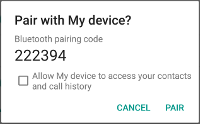
作为服务器连接
当您想要连接两台设备时,其中一台设备必须通过保持打开的 BluetoothServerSocket 充当服务器。服务器端套接字的用途是监听传入的连接请求,并在接受请求后提供已连接的 BluetoothSocket。从 BluetoothServerSocket 获取 BluetoothSocket 后,可以(并且应该)舍弃 BluetoothServerSocket,除非您希望设备接受更多连接。
如需设置服务器端套接字并接受连接,请完成以下一系列步骤:
通过调用
listenUsingRfcommWithServiceRecord(String, UUID)获取BluetoothServerSocket。该字符串是服务的可识别名称,系统会自动将其写入设备上的新服务发现协议 (SDP) 数据库条目。该名称是任意名称,可以只是您的应用名称。 SDP 条目中还包含通用唯一标识符 (UUID),并构成了与客户端设备达成连接协议的基础。也就是说,当客户端尝试连接到此设备时,它会携带一个 UUID,用于唯一标识它要连接的服务。这些 UUID 必须匹配,连接才能被接受。
UUID 是字符串 ID 的标准化 128 位格式,用于唯一标识信息。UUID 用于标识系统或网络中需要保持唯一性的信息,因为 UUID 重复的概率实际上为零。它是独立生成的,不使用集中式授权机构。在本例中,它用于唯一标识应用的蓝牙服务。如需获取要与应用搭配使用的 UUID,您可以使用网络上的众多随机
UUID生成器之一,然后使用fromString(String)初始化 UUID。通过调用
accept()开始监听连接请求。这是一个阻塞调用。当连接被接受或发生异常时,它会返回。仅当远程设备发送的连接请求中包含与此监听服务器端套接字注册的 UUID 相匹配的 UUID 时,系统才会接受连接。成功后,
accept()会返回已连接的BluetoothSocket。除非您想接受其他连接,否则请调用
close()。此方法调用会释放服务器端套接字及其所有资源,但不会关闭
accept()返回的已连接BluetoothSocket。与 TCP/IP 不同,RFCOMM 一次只允许每个通道有一个已连接的客户端,因此在大多数情况下,在接受已连接的套接字后,应立即在BluetoothServerSocket上调用close()。
由于 accept() 调用是阻塞调用,因此请勿在主 activity 界面线程中执行该调用。在另一个线程中执行该操作可确保您的应用仍能响应其他用户互动。通常,在由应用管理的新线程中执行涉及 BluetoothServerSocket 或 BluetoothSocket 的所有工作是合理的。如需中止被阻塞的调用(例如 accept()),请从另一个线程对 BluetoothServerSocket 或 BluetoothSocket 调用 close()。请注意,BluetoothServerSocket 或 BluetoothSocket 上的所有方法都是线程安全的。
示例
以下是接受传入连接的服务器组件的简化线程:
Kotlin
private inner class AcceptThread : Thread() {

   private val mmServerSocket: BluetoothServerSocket? by lazy(LazyThreadSafetyMode.NONE) {
       bluetoothAdapter?.listenUsingInsecureRfcommWithServiceRecord(NAME, MY_UUID)
   }

   override fun run() {
       // Keep listening until exception occurs or a socket is returned.
       var shouldLoop = true
       while (shouldLoop) {
           val socket: BluetoothSocket? = try {
               mmServerSocket?.accept()
           } catch (e: IOException) {
               Log.e(TAG, "Socket's accept() method failed", e)
               shouldLoop = false
               null
           }
           socket?.also {
               manageMyConnectedSocket(it)
               mmServerSocket?.close()
               shouldLoop = false
           }
       }
   }

   // Closes the connect socket and causes the thread to finish.
   fun cancel() {
       try {
           mmServerSocket?.close()
       } catch (e: IOException) {
           Log.e(TAG, "Could not close the connect socket", e)
       }
   }
}
Java
private class AcceptThread extends Thread {
   private final BluetoothServerSocket mmServerSocket;

   public AcceptThread() {
       // Use a temporary object that is later assigned to mmServerSocket
       // because mmServerSocket is final.
       BluetoothServerSocket tmp = null;
       try {
           // MY_UUID is the app's UUID string, also used by the client code.
           tmp = bluetoothAdapter.listenUsingRfcommWithServiceRecord(NAME, MY_UUID);
       } catch (IOException e) {
           Log.e(TAG, "Socket's listen() method failed", e);
       }
       mmServerSocket = tmp;
   }

   public void run() {
       BluetoothSocket socket = null;
       // Keep listening until exception occurs or a socket is returned.
       while (true) {
           try {
               socket = mmServerSocket.accept();
           } catch (IOException e) {
               Log.e(TAG, "Socket's accept() method failed", e);
               break;
           }

           if (socket != null) {
               // A connection was accepted. Perform work associated with
               // the connection in a separate thread.
               manageMyConnectedSocket(socket);
               mmServerSocket.close();
               break;
           }
       }
   }

   // Closes the connect socket and causes the thread to finish.
   public void cancel() {
       try {
           mmServerSocket.close();
       } catch (IOException e) {
           Log.e(TAG, "Could not close the connect socket", e);
       }
   }
}
在此示例中,只需要一个传入连接,因此一旦接受连接并获取 BluetoothSocket,应用就会将获取的 BluetoothSocket 传递给单独的线程,关闭 BluetoothServerSocket,并跳出循环。
请注意,当 accept() 返回 BluetoothSocket 时,套接字已连接。因此,您不应像在客户端那样调用 connect()。
特定于应用的 manageMyConnectedSocket() 方法旨在启动用于传输数据的线程,传输蓝牙数据主题中对此进行了讨论。
通常,您应该在完成传入连接监听后立即关闭 BluetoothServerSocket。在此示例中,获取 BluetoothSocket 后会立即调用 close()。您可能还需要在线程中提供一个公共方法,以便在您需要停止监听该服务器端套接字时关闭私有 BluetoothSocket。
以客户端身份连接
如需发起与远程设备(在开放的服务器端套接字上接受连接)的连接,您必须先获取一个表示该远程设备的 BluetoothDevice 对象。如需了解如何创建 BluetoothDevice,请参阅查找蓝牙设备。然后,您必须使用 BluetoothDevice 获取 BluetoothSocket 并发起连接。
基本流程如下:
使用
BluetoothDevice,通过调用createRfcommSocketToServiceRecord(UUID)获取BluetoothSocket。此方法会初始化一个
BluetoothSocket对象,该对象允许客户端连接到BluetoothDevice。此处传递的 UUID 必须与服务器设备在调用listenUsingRfcommWithServiceRecord(String, UUID)以打开其BluetoothServerSocket时使用的 UUID 匹配。如需使用匹配的 UUID,请将 UUID 字符串硬编码到应用中,然后从服务器和客户端代码中引用该字符串。通过调用
connect()启动连接。请注意,此方法是阻塞调用。在客户端调用此方法后,系统会执行 SDP 查找,以找到具有匹配 UUID 的远程设备。如果查找成功且远程设备接受连接,则其会共享连接期间要使用的 RFCOMM 频道,并且
connect()方法会返回。如果连接失败,或者connect()方法超时(大约 12 秒后),则该方法会抛出IOException。
由于 connect() 是阻塞调用,因此您应始终在与主 activity(界面)线程不同的线程中执行此连接过程。
示例
以下是发起蓝牙连接的客户端线程的基本示例:
Kotlin
private inner class ConnectThread(device: BluetoothDevice) : Thread() {

   private val mmSocket: BluetoothSocket? by lazy(LazyThreadSafetyMode.NONE) {
       device.createRfcommSocketToServiceRecord(MY_UUID)
   }

   public override fun run() {
       // Cancel discovery because it otherwise slows down the connection.
       bluetoothAdapter?.cancelDiscovery()

       mmSocket?.let { socket ->
           // Connect to the remote device through the socket. This call blocks
           // until it succeeds or throws an exception.
           socket.connect()

           // The connection attempt succeeded. Perform work associated with
           // the connection in a separate thread.
           manageMyConnectedSocket(socket)
       }
   }

   // Closes the client socket and causes the thread to finish.
   fun cancel() {
       try {
           mmSocket?.close()
       } catch (e: IOException) {
           Log.e(TAG, "Could not close the client socket", e)
       }
   }
}
Java
private class ConnectThread extends Thread {
   private final BluetoothSocket mmSocket;
   private final BluetoothDevice mmDevice;

   public ConnectThread(BluetoothDevice device) {
       // Use a temporary object that is later assigned to mmSocket
       // because mmSocket is final.
       BluetoothSocket tmp = null;
       mmDevice = device;

       try {
           // Get a BluetoothSocket to connect with the given BluetoothDevice.
           // MY_UUID is the app's UUID string, also used in the server code.
           tmp = device.createRfcommSocketToServiceRecord(MY_UUID);
       } catch (IOException e) {
           Log.e(TAG, "Socket's create() method failed", e);
       }
       mmSocket = tmp;
   }

   public void run() {
       // Cancel discovery because it otherwise slows down the connection.
       bluetoothAdapter.cancelDiscovery();

       try {
           // Connect to the remote device through the socket. This call blocks
           // until it succeeds or throws an exception.
           mmSocket.connect();
       } catch (IOException connectException) {
           // Unable to connect; close the socket and return.
           try {
               mmSocket.close();
           } catch (IOException closeException) {
               Log.e(TAG, "Could not close the client socket", closeException);
           }
           return;
       }

       // The connection attempt succeeded. Perform work associated with
       // the connection in a separate thread.
       manageMyConnectedSocket(mmSocket);
   }

   // Closes the client socket and causes the thread to finish.
   public void cancel() {
       try {
           mmSocket.close();
       } catch (IOException e) {
           Log.e(TAG, "Could not close the client socket", e);
       }
   }
}
请注意,在此代码段中,cancelDiscovery() 是在尝试连接之前调用的。您应始终在 connect() 之前调用 cancelDiscovery(),尤其是因为无论当前是否正在进行设备发现,cancelDiscovery() 都会成功。如果您的应用需要确定设备发现是否正在进行,您可以使用 isDiscovering() 进行检查。
应用专属的 manageMyConnectedSocket() 方法旨在启动用于传输数据的线程,传输蓝牙数据部分对此进行了讨论。
BluetoothSocket 使用完毕后,请务必调用 close()。这样做会立即关闭已连接的套接字,并释放所有相关的内部资源。